在前端项目的开发周期中,随着功能的迭代、人员的更替,项目中会逐渐积累大量的冗余文件和未被使用的依赖包。这些"累赘"不仅会占用存储空间,还会拖慢项目的构建速度、增加维护成本,甚至可能引发潜在的兼容性问题。因此,定期对前端项目进行冗余清理,是保障项目稳定高效运行的必要举措。
为什么会产生冗余?
(一)依赖包的"历史遗留"
在前端项目开发过程中,为了快速实现某些功能,开发者通常会引入各种各样的第三方依赖包,新建项目时可能是从老项目复制过来的,有很多冗余依赖,然而,随着项目的推进,部分功能可能被废弃、重构或者替换,但是对应的依赖包却没有及时被移除。
(二)文件的"迭代残留"
在项目的功能迭代过程中,开发者会不断创建新的文件来实现新的功能,同时也会对旧的文件进行修改、重构。然而,很多时候,旧的文件并没有被及时删除,而是被保留在项目中,成为"历史遗留文件"。这些文件可能是早期的草稿版本、被废弃的组件、测试用的临时文件等。
【例子】从index.vue文件复制了一份index Copy.vue,结果没用上;另外就是有些开发者喜欢复制index_old.vue去记录老版本代码,实际上过了一段时间的版本迭代之后,新代码已经稳定运行,老代码还原回来也会报错,变得毫无意义。
(三)配置文件的"过时无效"
前端项目中通常包含大量的配置文件,如package.json、webpack.config.js、.babelrc等。随着项目技术栈的升级、构建工具的更新,这些配置文件中的一些配置项可能会变得过时或者无效。例如,当Webpack从4.x版本升级到5.x版本时,一些旧的配置项如optimization.splitChunks的默认值发生了变化,旧的配置可能不再适用,但开发者可能没有及时更新配置文件,导致配置文件中存在冗余的配置项。此外,一些配置文件中可能还残留着针对已废弃功能的配置,这些配置不仅没有实际作用,还会增加配置文件的复杂度。
(四)团队协作中的"沟通盲区"
在多人协作的前端项目中,由于沟通不畅或者信息不对称,也容易导致冗余的产生。例如,当一个开发者负责开发某个功能模块时,可能会创建一些临时文件或者引入一些依赖包,但是在功能完成后,没有及时告知其他团队成员,也没有将这些文件或依赖从项目中移除。而其他团队成员在不知情的情况下,可能会继续基于这些冗余内容进行开发,导致冗余进一步积累。此外,不同开发者的开发习惯和规范不一致,也可能导致项目中出现重复的文件或依赖。
冗余清理的方法与工具
删除依赖:depcheck
执行之后,会列出这几个依赖列表,例如:
Unused dependencies:
- lodash
Unused devDependencies: - eslint-plugin-vue@6.2.2
Missing dependencies: - axios
删除多余的文件
借助AI工具(Trae),直接帮我们生成了一个Node.js脚本,输出未被引用的文件:
js
const fs = require('fs');
const path = require('path');

// Recursively get all files with specified extensions
function getAllFiles(dir, extensions) {
  let files = [];
  const items = fs.readdirSync(dir, { withFileTypes: true });

  for (const item of items) {
    const itemPath = path.join(dir, item.name);
    if (item.isDirectory()) {
      files = [...files, ...getAllFiles(itemPath, extensions)];
    } else if (extensions.includes(path.extname(item.name))) {
      files.push(itemPath);
    }
  }

  return files;
}

function analyzeUnusedFiles() {
  const srcDir = '/my-pro/src';
  const projectRoot = '/my-pro';

  // Get all TypeScript, Vue, and JavaScript files
  const extensions = ['.ts', '.vue', '.js', '.tsx', '.jsx'];
  const absoluteFiles = getAllFiles(srcDir, extensions);

  const importRegex = /from\s+['"]([^'"]+)['"]/g;
  const referencedFiles = new Set();

  // Add main.ts as referenced since it's imported in index.html
  const mainTsPath = path.join(srcDir, 'main.ts');
  referencedFiles.add(mainTsPath);

  // Check index.html for references to main.ts
  const indexHtmlPath = path.join(projectRoot, 'index.html');
  if (fs.existsSync(indexHtmlPath)) {
    const indexContent = fs.readFileSync(indexHtmlPath, 'utf8');
    if (indexContent.includes('/src/main.ts')) {
      referencedFiles.add(mainTsPath);
    }
  }

  // Track all referenced files
  for (const file of absoluteFiles) {
    if (fs.existsSync(file)) {
      const content = fs.readFileSync(file, 'utf8');
      let match;

      // Check for import statements
      while ((match = importRegex.exec(content)) !== null) {
        let importedPath = match[1];

        // Handle alias imports
        if (importedPath.startsWith('/@/')) {
          importedPath = importedPath.replace('/@/', '');
          importedPath = path.join(srcDir, importedPath);
        }
        // Handle relative imports
        else if (importedPath.startsWith('./') || importedPath.startsWith('../')) {
          importedPath = path.resolve(path.dirname(file), importedPath);
        }

        // Add common extensions if missing
        if (!path.extname(importedPath)) {
          const exts = ['.ts', '.vue', '.js', '.tsx', '.jsx'];
          for (const ext of exts) {
            const candidate = importedPath + ext;
            if (fs.existsSync(candidate)) {
              importedPath = candidate;
              break;
            }
          }
        }

        // Add to referenced files if it exists
        if (fs.existsSync(importedPath)) {
          referencedFiles.add(importedPath);
        }
      }

      // Check for dynamic imports
      const dynamicImportRegex = /import\(['"]([^'"]+)['"]\)/g;
      let dynamicMatch;
      while ((dynamicMatch = dynamicImportRegex.exec(content)) !== null) {
        let importedPath = dynamicMatch[1];

        // Handle alias imports
        if (importedPath.startsWith('/@/')) {
          importedPath = importedPath.replace('/@/', '');
          importedPath = path.join(srcDir, importedPath);
        }
        // Handle relative imports
        else if (importedPath.startsWith('./') || importedPath.startsWith('../')) {
          importedPath = path.resolve(path.dirname(file), importedPath);
        }

        // Add common extensions if missing
        if (!path.extname(importedPath)) {
          const exts = ['.ts', '.vue', '.js', '.tsx', '.jsx'];
          for (const ext of exts) {
            const candidate = importedPath + ext;
            if (fs.existsSync(candidate)) {
              importedPath = candidate;
              break;
            }
          }
        }

        // Add to referenced files if it exists
        if (fs.existsSync(importedPath)) {
          referencedFiles.add(importedPath);
        }
      }
    }
  }

  // Find unreferenced files
  const unreferencedFiles = absoluteFiles.filter(file => !referencedFiles.has(file));

  console.log('未被引用的文件:');
  unreferencedFiles.forEach(file => console.log(file.replace(srcDir, '')));
}

analyzeUnusedFiles();
输出结果:
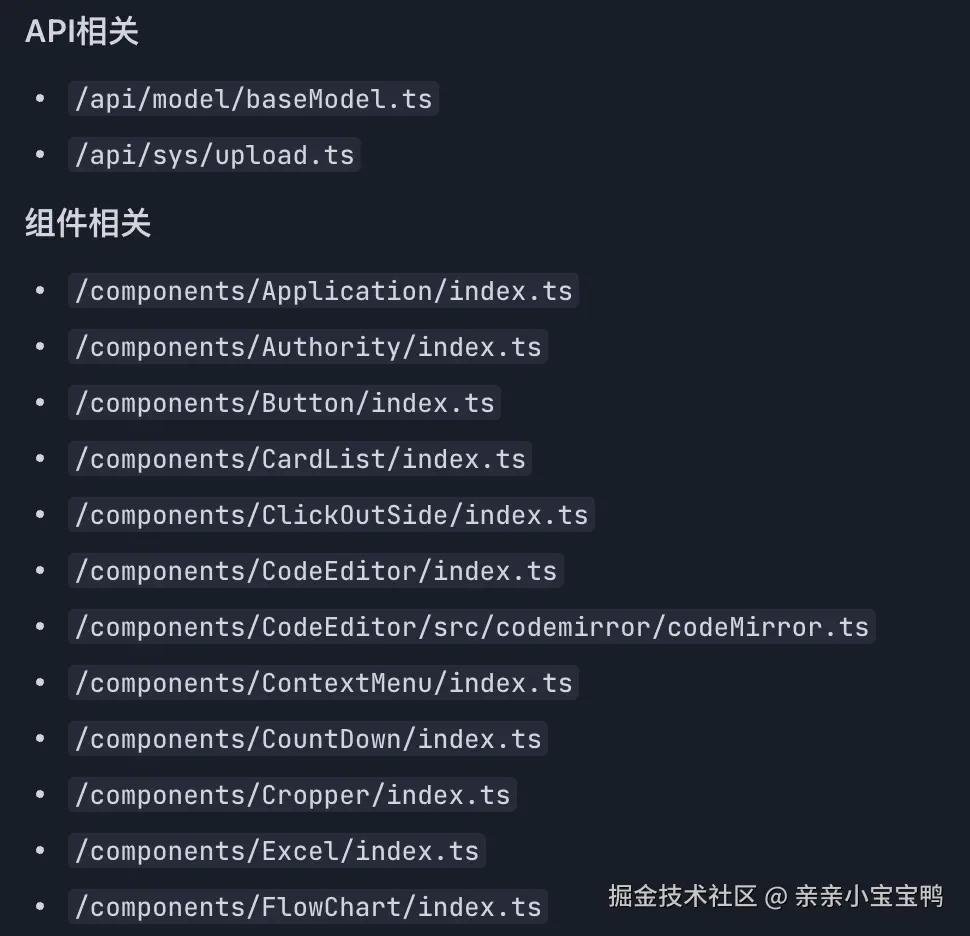
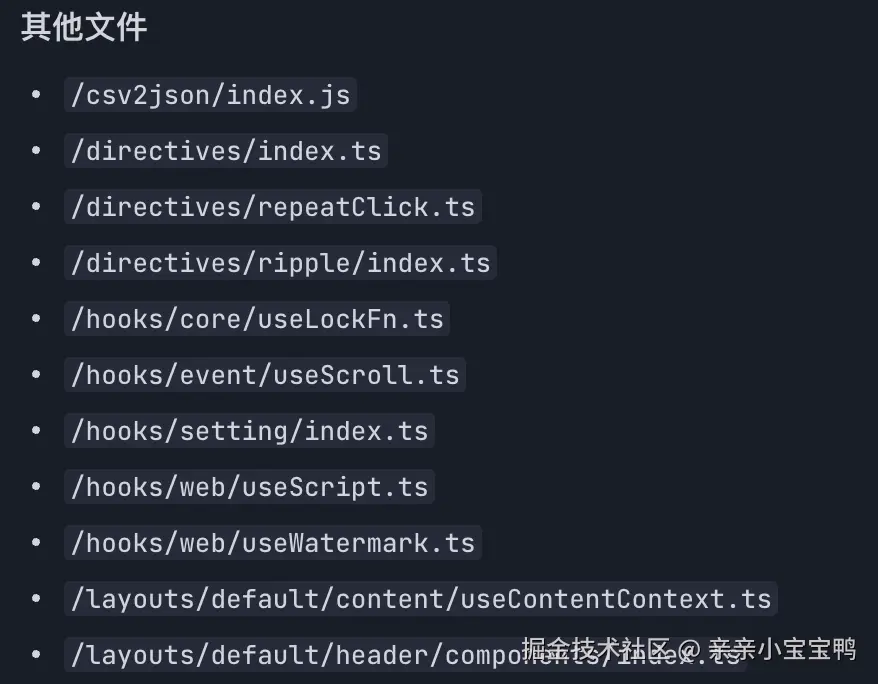
AI给我们的思路是:使用脚本递归扫描项目文件,检测import语句和动态import,识别被引用的文件。
删除空文件夹
分支切换的时候经常会出现,我们也可以通过执行脚本去删除对应文件夹。
js
const rimraf = require('rimraf');
const fs = require('fs');
const path = require('path');

// 递归遍历目录,找出所有空目录
function findEmptyDirs(dir) {
  const emptyDirs = [];
  const items = fs.readdirSync(dir);
  for (const item of items) {
    const itemPath = path.join(dir, item);
    const stats = fs.statSync(itemPath);
    if (stats.isDirectory()) {
      const subItems = fs.readdirSync(itemPath);
      if (subItems.length === 0) {
        emptyDirs.push(itemPath);
      } else {
        emptyDirs.push(...findEmptyDirs(itemPath));
      }
    }
  }
  return emptyDirs;
}

// 删除所有空目录
function deleteEmptyDirs(rootDir) {
  const emptyDirs = findEmptyDirs(rootDir);
  console.log(`找到 ${emptyDirs.length} 个空目录`);
  for (const dir of emptyDirs) {
    rimraf(dir, (err) => {
      if (err) {
        console.error(`删除失败: ${dir}`, err);
      } else {
        console.log(`已删除: ${dir}`);
      }
    });
  }
}

// 示例调用

deleteEmptyDirs('./src'); 如果空文件夹是有用的,可以在空文件夹里新建一个.gitkeep文件用于占位。
清理后的验证与总结
- 依靠AI,但不依赖
在上面用AI生成脚本检索代码的时候,我发现AI帮我把package.json完全替换了,显然这不是我们所期望的。我们通过AI找到了冗余文件,不能直接让AI帮忙删掉,而是自己去再做一次复核,然后再去删除,毕竟项目负责人是我们自己,不是AI。我们不能和用户说:由于AI误删除了文件导致了项目无法运行。
- 性能指标评估
清理完成后,我们应该对项目的性能指标进行评估,对比清理前后的差异,衡量清理的效果。主要关注的性能指标包括:项目的构建时间、打包后的文件大小、页面的加载时间等等。
- 清理文档记录
最后,要对本次冗余清理的过程和结果进行详细的文档记录。记录的内容包括:清理的时间、清理的范围、使用的工具、移除的依赖包列表、删除的文件列表、遇到的问题及解决方法、性能指标的对比结果等。
- 对冗余代码进行分析
清理了一些代码之后,我们需要去分析冗余产生的原因,从而去规范化我们的代码。例如,静态图片文件要统一放在指定的目录下;相似组件库,例如vue-draggable和sortable.js只取一个即可。
五、结语
前端项目的冗余清理是一项长期而细致的工作,它不仅仅是简单地删除几个文件或依赖包,更是对项目技术债务的一次梳理和优化。通过定期的冗余清理,我们可以为前端项目减轻负担,提高项目的构建速度和运行性能,降低维护成本,同时也能让项目的代码结构更加清晰、易于理解。在清理过程中,我们也要注意对现有业务不能有影响,需要自己验证,并且备份原始代码,在出问题的时候可以一键回退。