1.购物车数据
html
<!DOCTYPE html>
<html lang="en">

<head>
	<meta charset="UTF-8">
	<meta http-equiv="X-UA-Compatible" content="IE=edge">
	<meta name="viewport" content="width=device-width, initial-scale=1.0">
	<title>购物车</title>
	<script src="./js/vue.js"></script>
	<script src="./js/axios.js"></script>
	<link rel="stylesheet" href="./css/element-ui.css">
	<link rel="stylesheet" href="./css/index.css">
</head>

<body>
	<div class="container" id="app" >
		<h4>购物车</h4>
		<!-- 购物车列表 -->
		<div>
			<!-- 通过v-for依次渲染每个el-card内的数据 -->
			<el-card class="box-card" v-for="(item,index) in carlist">
				<!-- 商品图片 -->
				<img :src="item.img">
				<div>

					<span>
						<!-- 商品名称 -->
						<!-- 插值表达式{{ }} -->
						{{item.name}}
					</span>
					<div class="bottom clearfix">
						<!-- 当点击时调用方法 -->
						<el-button type="text" class="button" @click=add(index)>+</el-button>
						<el-button type="text" class="button">
							<!-- 商品数量 -->
							{{item.num}}
						</el-button>
						<el-button type="text" class="button"  @click=dec(index)>-</el-button>
					</div>
				</div>
			</el-card>
		</div>
	</div>
	</div>

	<!-- 引入组件库 -->
	<script src="./js/element-ui.js"></script>
	<script>
		new Vue({
			el: "#app",
			data: {
				carlist: [] //购物车列表
			},
			created() {
				// 在这里使用axios 发送请求
				//.then
				axios.get("./carList.json").then(res=>{
					//res是数据的包装
					//res.data才是真正的数据!!!
					console.log(res.data);
					this.carlist=res.data
				})
			},
			methods:{
				//添加方法
				//需要形参index来明确当前的对象
				add(index){
					this.carlist[index].num++
				},
				dec(index){
					//注意:减的前提是目前数量>0
					if(this.carlist[index].num>0){
						this.carlist[index].num--
					}
				}
			}
		})


	</script>
</body>

</html>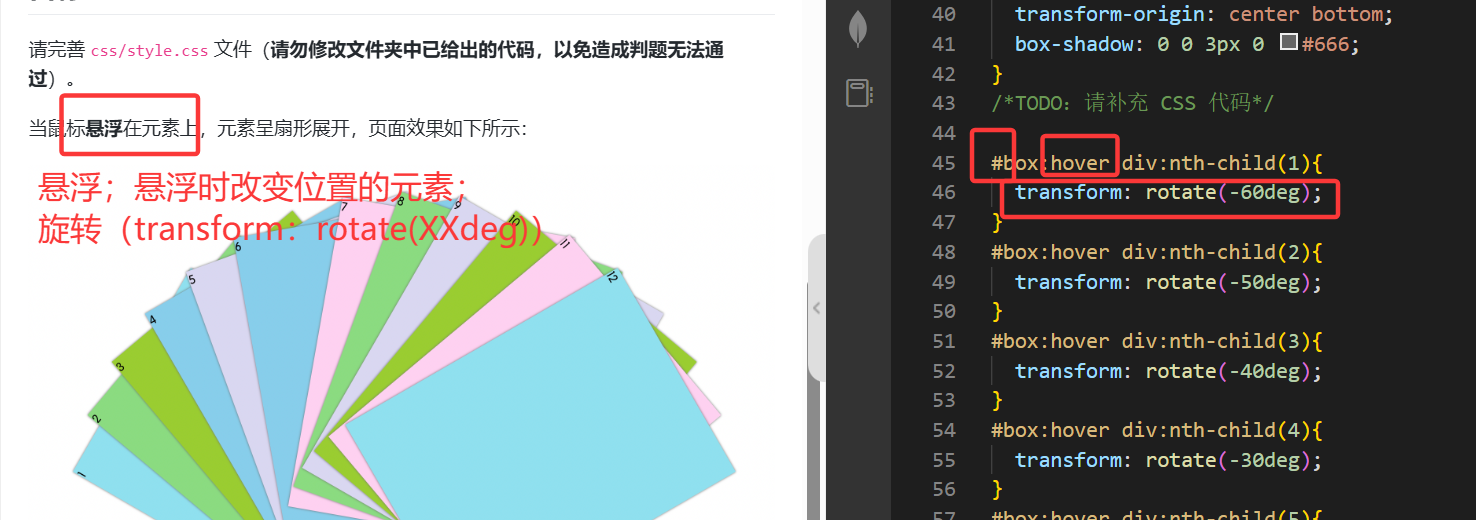
3
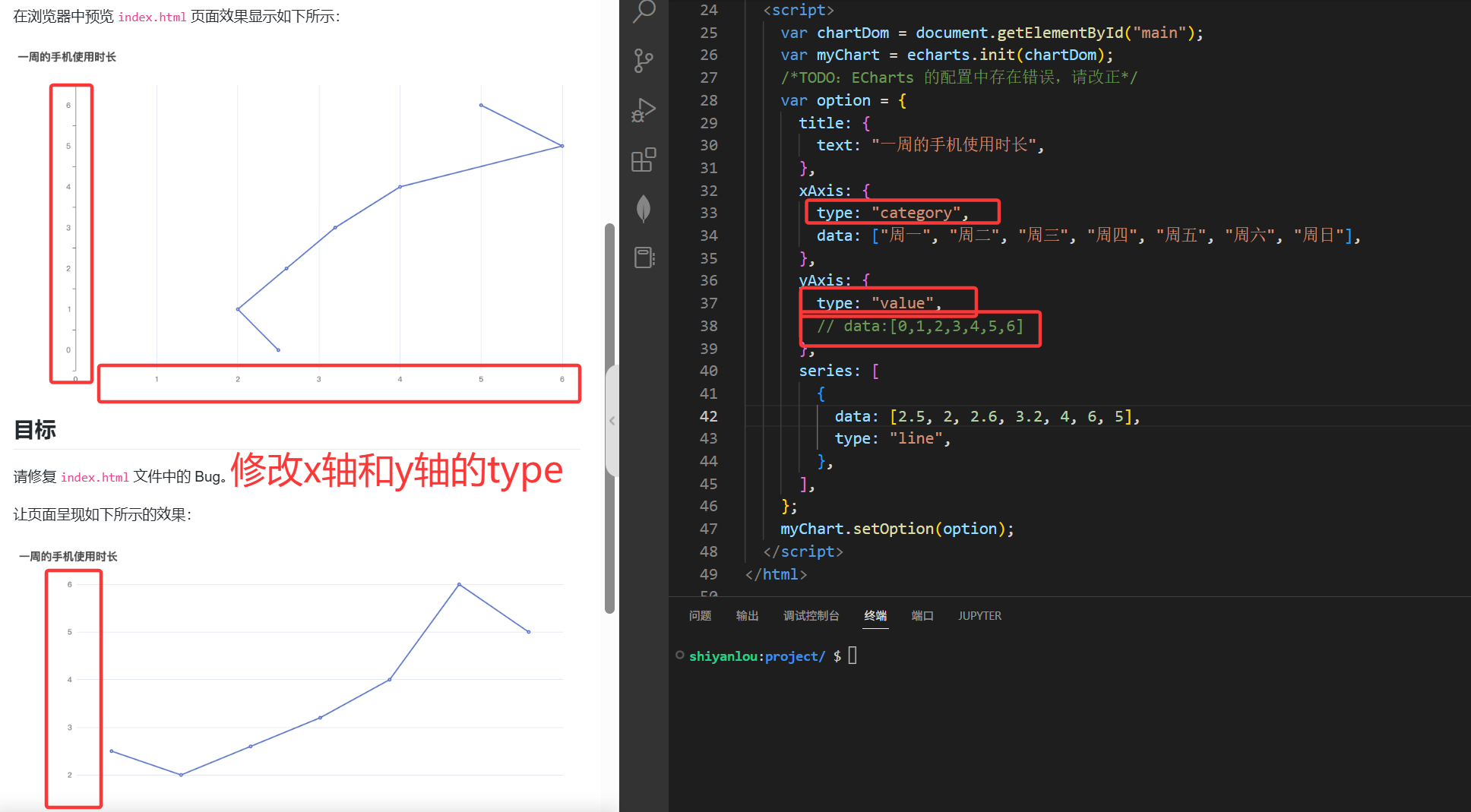
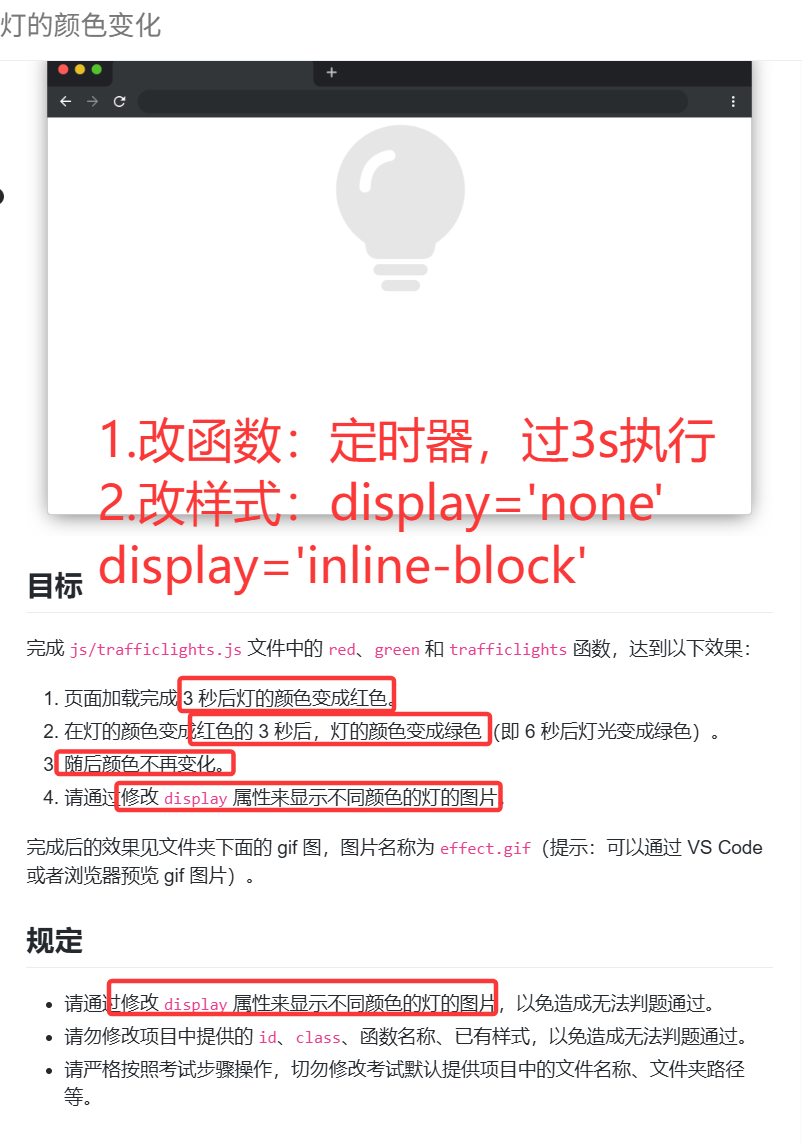
javascript
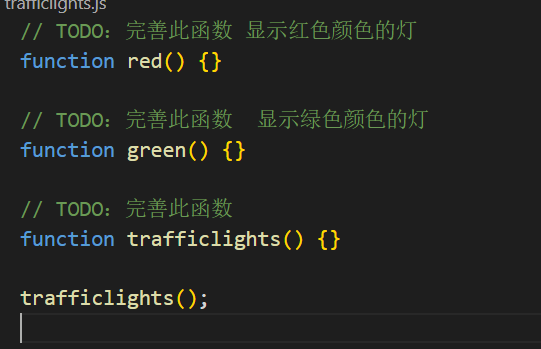
// TODO:完善此函数 显示红色颜色的灯
function red() {
    defaultlight.style.display='none'
    redlight.style.display='inline-block'
    greenlight.style.display='none'

}

// TODO:完善此函数  显示绿色颜色的灯
function green() {
    defaultlight.style.display='none'
    redlight.style.display='none'
    greenlight.style.display='inline-block'

}

// TODO:完善此函数
function trafficlights() {
    //当页面加载完成
    setInterval(()=>{
            red()
            setInterval(()=>{
                green()
        },3000)
    },3000)
}


trafficlights();
为什么可以直接用类名,不需要DOM获取
为什么是inline-block
为什么不需要加页面加载成功的判断
6.冬奥大抽奖
考点:
类名增删 XX.classList.add/remove('类名')
内容:textContent,innerHtml(读取DOM元素内部全部html内容)
遍历:for
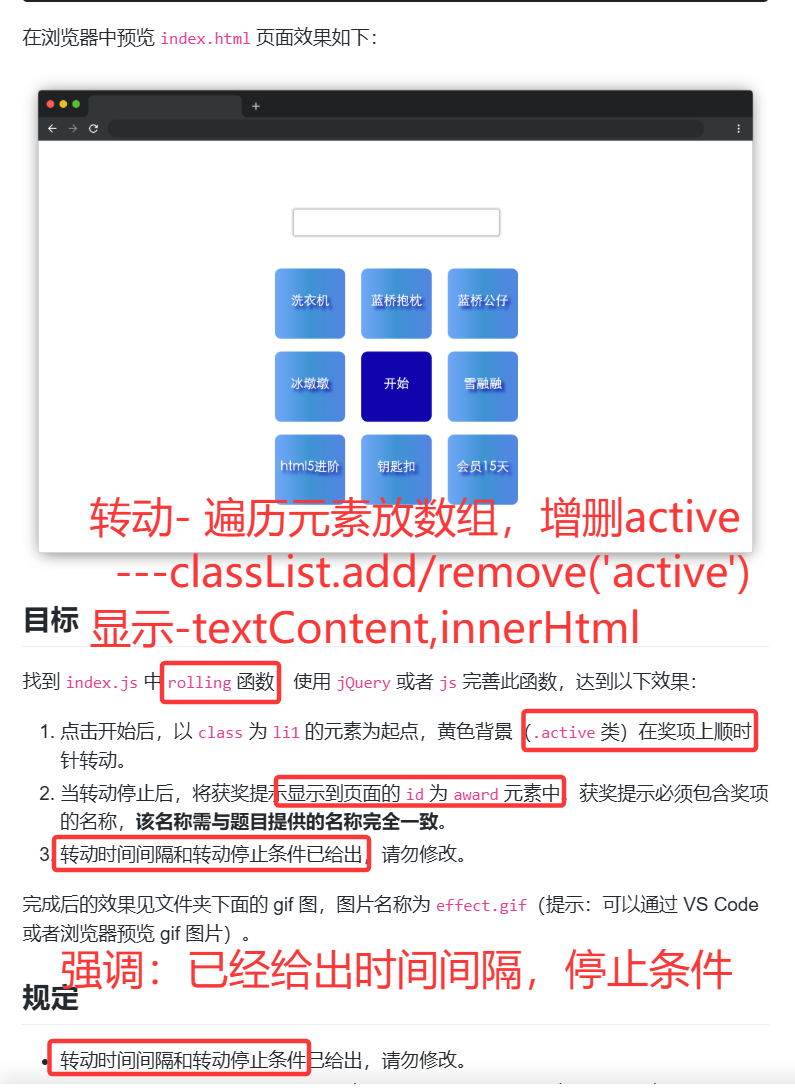
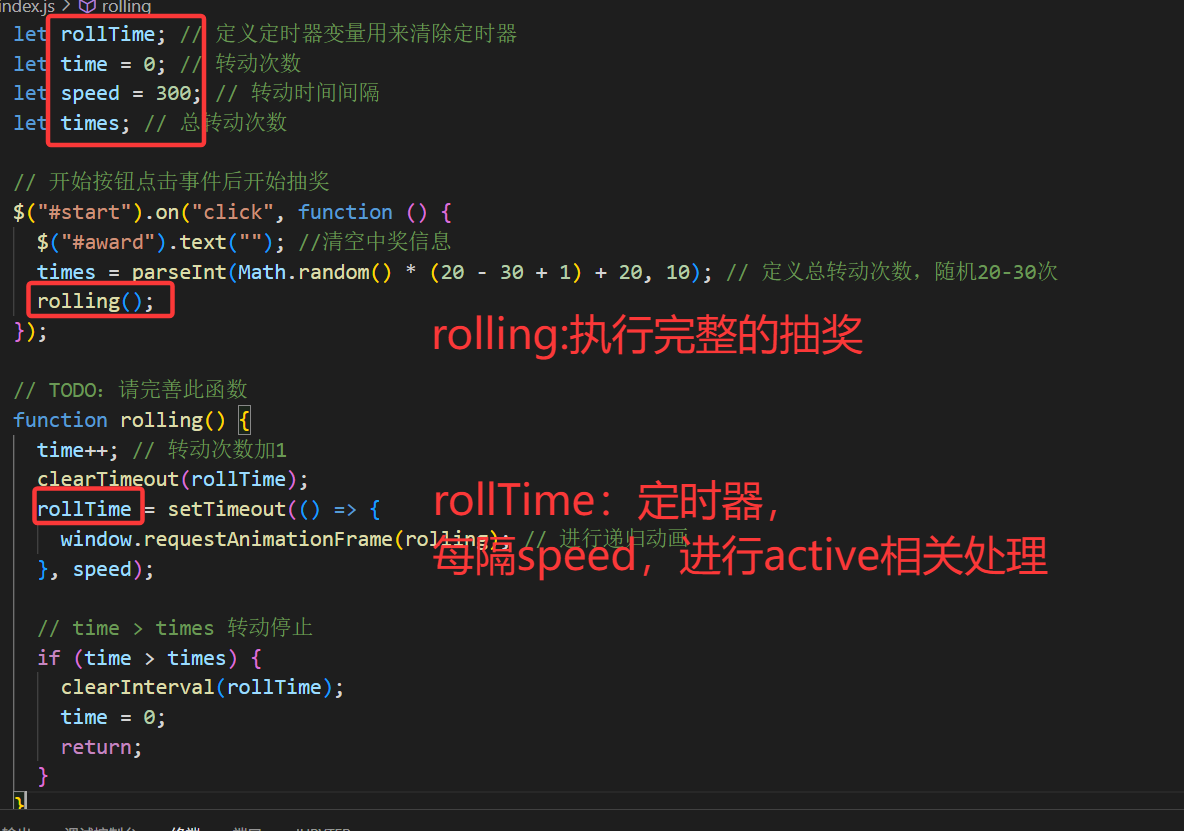
题解:
javascript
let rollTime; // 定义定时器变量用来清除定时器
let time = 0; // 转动次数
let speed = 300; // 转动时间间隔
let times; // 总转动次数

// 开始按钮点击事件后开始抽奖
$("#start").on("click", function () {
  $("#award").text(""); //清空中奖信息
  times = parseInt(Math.random() * (20 - 30 + 1) + 20, 10); // 定义总转动次数,随机20-30次
  rolling();
});

// TODO:请完善此函数
function rolling() {
  time++; // 转动次数加1
  clearTimeout(rollTime);

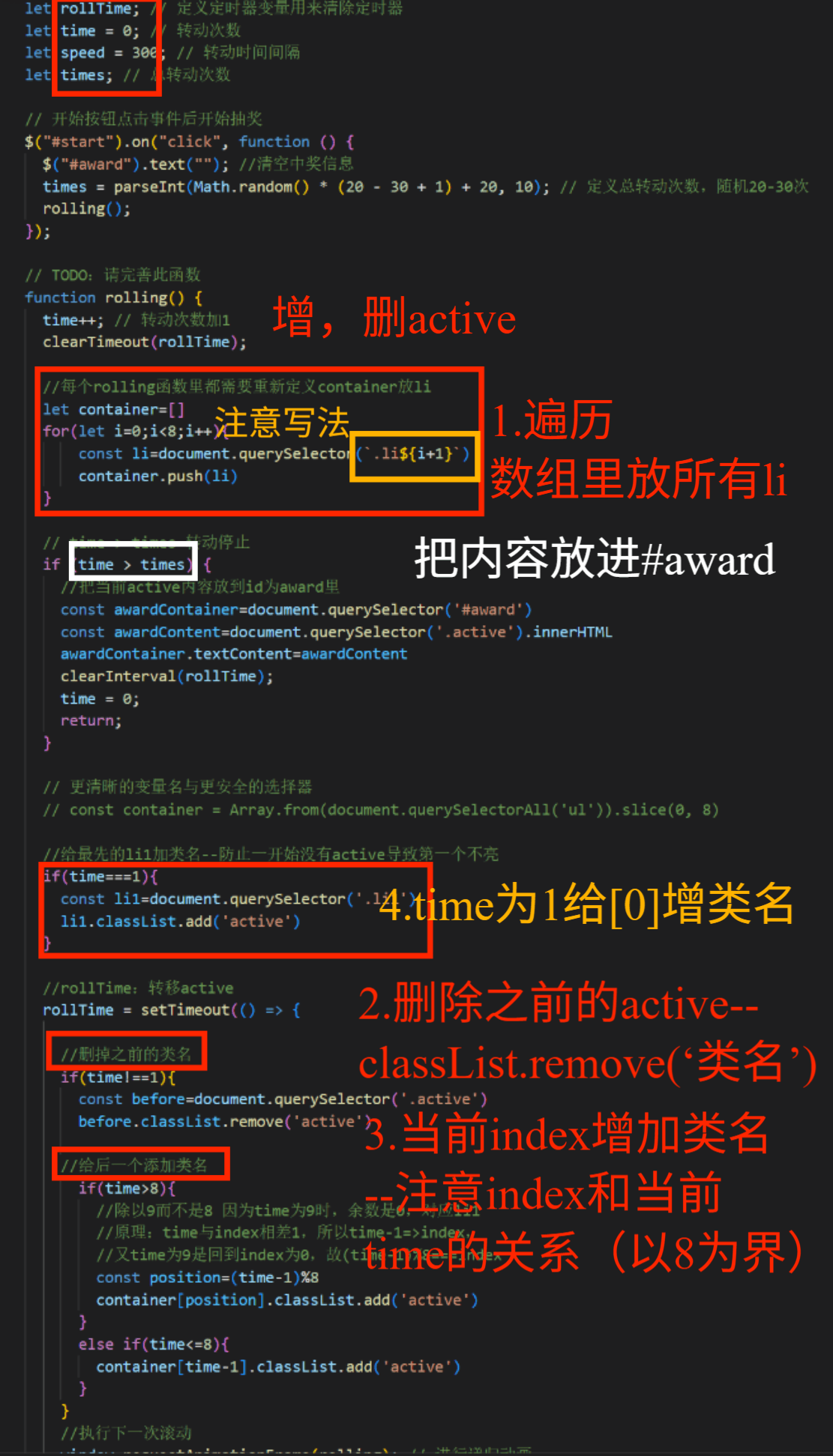
  //每个rolling函数里都需要重新定义container放li
  let container=[]
  for(let i=0;i<8;i++){
      const li=document.querySelector(`.li${i+1}`)
      container.push(li)
  }


  // time > times 转动停止
  if (time > times) {
    //把当前active内容放到id为award里
    const awardContainer=document.querySelector('#award')
    const awardContent=document.querySelector('.active').innerHTML
    awardContainer.textContent=awardContent
    clearInterval(rollTime);
    time = 0;
    return;
  }


  // 更清晰的变量名与更安全的选择器
  // const container = Array.from(document.querySelectorAll('ul')).slice(0, 8)

  //给最先的li1加类名--防止一开始没有active导致第一个不亮
  if(time===1){
    const li1=document.querySelector('.li1')
    li1.classList.add('active')
  }

  //rollTime:转移active
  rollTime = setTimeout(() => {

    //删掉之前的类名
    if(time!==1){
      const before=document.querySelector('.active')
      before.classList.remove('active')

    //给后一个添加类名
      if(time>8){
        //除以9而不是8 因为time为9时,余数是0,对应li1
        //原理:time与index相差1,所以time-1=>index,
        //又time为9是回到index为0,故(time-1)%8===index
        const position=(time-1)%8
        container[position].classList.add('active')
      }
      else if(time<=8){
        container[time-1].classList.add('active')
      }
    }
    //执行下一次滚动
    window.requestAnimationFrame(rolling); // 进行递归动画
  }, speed);


}
易错点:
1.父子关系:
误写成A:nth-child(X)---(作为父元素第x个子的A)
正确写法:
A+空格+:nth-child(X)--A下面的第x个子元素--漏空格意义不一样
ul+空格+li:nth-child(X)--ul下面作为第三个子元素的li
ul+空格+li:nth-child(X)--选ul里的第二个p
2.time与index关系
误写:time>8 对应containertime%9---time为17,index为8,而index范围0~7,越界,且time%9-1同样不行,time为9会出现负数
正确:(time-1)%8,time-1为index,%8的范围是0~7,不越界
7.蓝桥知识网
css
/*
 TODO:请补充代码

*/
body{
    margin: 0;
    padding: 0;
    text-decoration: none;

}
ul{
    /* ✅ 错误点:去掉圆点:给所有 ul 添加 list-style: none; 误以为用text-direction*/
    list-style: none;
}
/* 上面 */
.front{
    background-color: #a6b1e1;
    width:100%;
}
.front-content{
    width: 1024px;
    margin: 0 auto;
}
.navigator{
    color: white;
    padding-top: 13px;
    height: 46px;
    line-height: 46px;
    display: flex;
    flex-direction: row;
    text-align: center;
    /* background-color: grey; */
    /*  ✅ 布局对齐: */
    /*错误点:使用了 gap:365px;*/
    justify-content: space-between; /* 左右分开 */
    align-items: center;
}
.navigator div:nth-child(1){
    font-size: 18px;
}
.navigator div:nth-child(2){
    font-size: 16px;
    height: 46px;
    line-height: 46px;
    /* background-color: green; */
}
.nav-right ul{
    display: flex;
    text-decoration: none;
    /* background-color: pink; */
    margin-top: 0;
}
.nav-right li{
    margin-right: 16px;
    text-decoration: none;
}

.title{
    height: 427px;
    text-align: center;
}
.title div:nth-child(1){
    /* ✅ 布局对齐:修正 margin: 0 auto 拼写 */
    /* margin: 0 atuo; */
    margin: 0 auto;
    margin-top: 30px;
    color: black;
    font-size: 45px;
}
.title div:nth-child(2){
    margin: 0 atuo;
    margin-top: 62px;
    color: white;
    font-size: 21px;
    font-weight: 200;
}
.title div:nth-child(3){
    color: #efbfbf;
    font-size: 18px;
    width: 100px;
    padding: 10px;
    margin: 0 auto;
    margin-top: 36px;
    text-align: center;
    /* background-color: yellow; */
    border-radius: 2px;

    border: inset 0 0 0 2px #efbfbf;


    /* ✅ 错误点:给 "加入我们" 按钮添加 border: 2px solid #efbfbf; */
    /* 误以为:border-color: #efbfbf; */
    border: solid #efbfbf;
}

/* ------------------------------ */
/* 中间 */
.main{
    padding: 74px;
    background-color: white;
    margin: 0 auto;
}
.main-content{
    margin: 0 auto;
    /* background-color: grey; */
    width: 1024px;
    height: 302px;
    display: flex;

    /* flex-direction: wrap; */

    /* 删掉了固定高度 height:302px(内容会被截断)
    ✅ 错误点:flex-wrap:wrap写成了  /* flex-direction: wrap; */
    flex-wrap: wrap;
    gap: 20px;
}
.main-content>ul{
    height: 72px;
    width: 502px;
    gap: 20px;
    /* background-color: pink; */
    display: flex;
    flex-wrap: wrap;
}
.main-Item{
    height: 151px;
    width: 502px;
    /* gap: 20px; */
    /* background-color: pink; */
    display: flex;
    flex-wrap: wrap;
}
.main-Item ul li:nth-child(1){
    font-size: 30px;
    font-weight: 200;
    color: black;
    margin-bottom: 10px;
}
.main-Item ul li:nth-child(2){
    font-size: 18px;
    color: #aaa;
    line-height: 1.4em;

}

/* -------------------------------- */
/* 结尾 */
.end{
    width: 100%;
    background-color: white;
    height: 80px;
    padding-top: 30px;
    margin: 0 auto;
    text-align: center;
}
.end div{
    margin: 0 auto;
    font-size: 14px;
    color: #aaa;
}
.end div:nth-child(2){
    margin-top: 20px;
}
8.课程列表
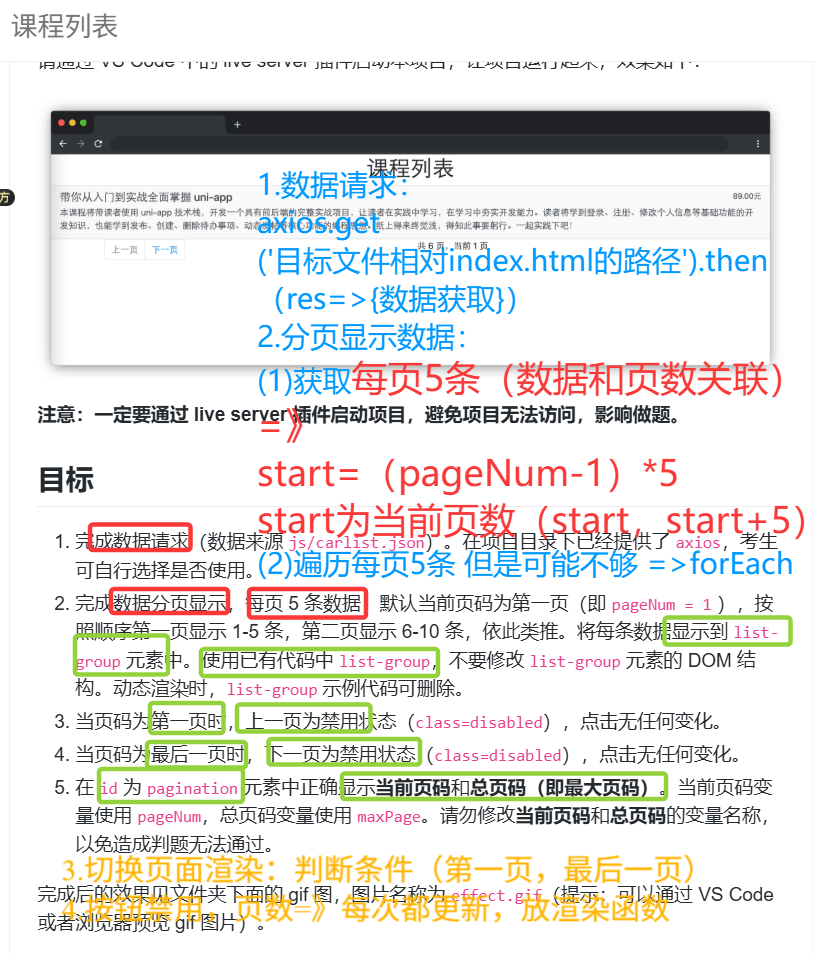
考点:
数据axios请求:axios.get('目标相对文件的路径')
异步处理:.then(res=>{})
渲染函数:创建元素,元素赋值,添加到某个元素里XX.appendChild(XX)直接写XX 不加引号
类名添加与删除:XX.toggle('类名",条件);添加多个类名classList.add('XX', "XX")逗号隔开
javascript
let pageNum = 1; // 当前页码,默认页码1
let maxPage; // 最大页数

// TODO:待补充代码
// 获取数据
let allData=[]

// get('目标文件相对根文件的位置')
axios.get('js/carlist.json').then(res=>{
  allData=res.data
  //算总页数
  maxPage = Math.ceil(allData.length / 5)
  //渲染第一页
  rendering()
})


//页面数据容器
const listContainer=document.querySelector('.list-group')

//渲染函数
function rendering(){
  //每次渲染都要清空原先的内容
  listContainer.innerHTML=''

  //数据和页数联系--现在是第几页,要显示哪 5 条!
  const start = (pageNum - 1) * 5;
  const current = allData.slice(start, start + 5);

  //单页数据
  //不用for() 因为不一定每次都是5条 所以用forEach保证每一个都处理不够 5 条就少循环几次
  //用for会导致部分current [3]、current [4] 是 undefined,页面崩掉
  current.forEach(item=>{
    //创造4个元素
    const aData=document.createElement('a')
    const nameData=document.createElement('h5')
    const descriptionData=document.createElement('p')
    const priceData=document.createElement('small')
    const divData=document.createElement('div')
    //放内容
    nameData.textContent=item.name
    descriptionData.textContent=item.description
    priceData.textContent=item.price
    //放元素
    divData.appendChild(nameData)
    divData.appendChild(priceData)

    aData.appendChild(divData)
    aData.appendChild(descriptionData)

    //添加类名
    aData.classList.add('list-group-item')
    aData.classList.add('list-group-item-action')
    divData.classList.add('d-flex','w-100' ,'justify-content-between')
    nameData.classList.add('mb-1')
    descriptionData.classList.add('mb-1');

    listContainer.appendChild(aData)

    })

    //每次渲染都要重写当前页数和总页数,并更新按钮状态,故放到渲染函数里
    //页码显示
    const paginationEl = document.getElementById('pagination');
    paginationEl.textContent = `${pageNum} / ${maxPage}`; // 直接显示 "当前页 / 总页数"

    //按钮禁用
    const prev = document.getElementById("prev");
    const next = document.getElementById("next");

    //元素.classList.toggle('类名', 条件);条件为true就增加类名,false就移除
    prev.classList.toggle('disabled', pageNum === 1); // 第一页禁用上一页
    next.classList.toggle('disabled', pageNum === maxPage); // 最后一页禁用下一页
}


// 点击上一页
let prev = document.getElementById("prev");
prev.onclick = function () {
  // TODO:待补充代码
    if (pageNum > 1) {    // 正确判断
      pageNum--          // 先改页
      rendering()        // 再渲染
    }

};
// 点击下一页
let next = document.getElementById("next");
next.onclick = function () {
  // TODO:待补充代码
  if(pageNum<maxPage){
    pageNum++
    rendering()
  }
};
易错易漏:
语法:
classList.add 传入带空格的字符串-----不能多个类写一起,必须分开。
const 常量重复赋值 ----const 不能改,要么用 let,要么直接一步赋值。
eg.const current = \[\] ; current = allData.slice(...)
appendChild 传入字符串--必须传元素节点,不能传字符串。(也就是不加引号)
splice和slice的区别:
- slice 不会改原数组 → 取一段,返回新数组
- splice 会改原数组 → 删 / 插元素,直接把原数组变了
逻辑:
数据永远只切前 5 条,不和页码关联 eg.slice(0,5)-----永远第一页,点烂下一页都没用
翻页顺序颠倒 eg.rendering() pageNum--先渲染再改页码 → 永远慢一页
for(let i=0;i<5;i++) 强行循环 5 次---最后一页不足 5 条时,直接 undefined 报错。
按钮禁用只加不移除 只写了 add('disabled'),没写 remove,按钮灰了就永远灰
maxPage 在点击事件里重复计算应该请求完数据算一次就行,不需要每次点都算。
current 数据放在 axios 里,翻页不更新翻页时不会重新切数据 ,必须把 slice 放进 rendering。

你做分页 ,只能用 slice ,不能用 splice:
- 用 slice:每次翻页都从完整数组里取 5 条原数据永远完整,上一页下一页都正常