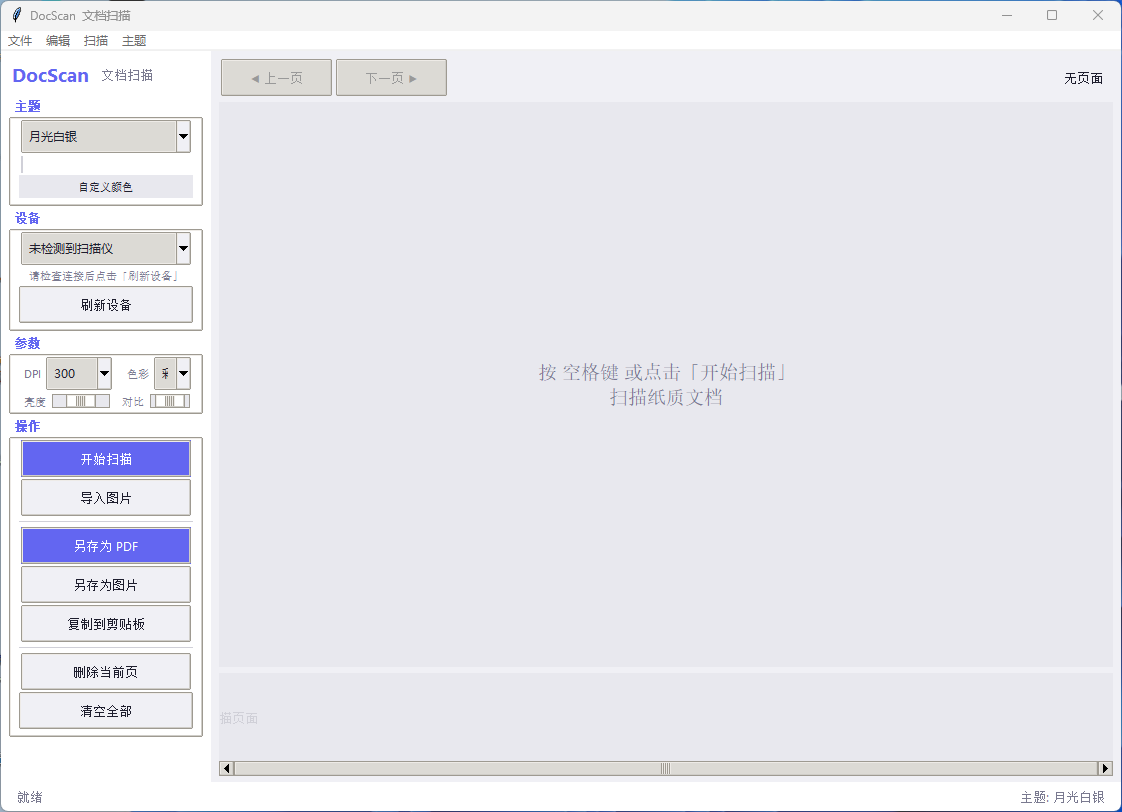
DocScan - 文档扫描软件
📖 简介
DocScan 是一款基于 Python Tkinter 开发的文档扫描软件,支持通过扫描仪硬件扫描纸质文档,并导出为 PDF 或图片格式。软件提供多主题切换、自定义配色、快捷键操作等功能,界面简洁紧凑,操作便捷。
✨ 功能特性
-
扫描支持:通过 WIA (Windows Image Acquisition) 接口驱动扫描仪
-
多页扫描:支持连续扫描多页文档
-
PDF 导出:将多页扫描结果合并为单个 PDF 文件
-
图片导出:支持 PNG/JPEG/BMP/TIFF 格式,可保存单页或全部页
-
剪贴板操作:复制当前页或全部页到系统剪贴板
-
主题切换:8 套内置主题 + 自定义配色
-
参数调节:DPI、色彩模式、亮度、对比度
-
快捷键支持:提升操作效率
🖥️ 系统要求
-
操作系统:Windows 7/8/10/11 (仅支持 Windows,依赖 WIA 接口)
-
Python 版本:Python 3.8 或更高版本
-
硬件:连接至电脑的扫描仪设备
📦 安装依赖
1. 安装 Python
请确保已安装 Python 3.8 或更高版本。
2. 安装依赖库
pip install pywin32 Pillow reportlab依赖说明:
-
pywin32:用于 Windows WIA 扫描接口(必需) -
Pillow:用于图片处理(必需) -
reportlab:用于生成 PDF(推荐,否则使用 Pillow 回退)
🚀 快速开始
1. 连接扫描仪
确保扫描仪已连接电脑并安装好驱动程序。
2. 运行程序
python docscan.py3. 开始扫描
-
在左侧「设备」下拉框中选择扫描仪(自动检测)
-
设置扫描参数(DPI、色彩模式等)
-
点击「开始扫描」按钮或按空格键
-
扫描完成后,文档会显示在预览区
4. 导出文档
-
导出为 PDF :点击「另存为 PDF」或按
Ctrl+S -
导出为图片 :点击「另存为图片」或按
Ctrl+Shift+S -
复制到剪贴板 :点击「复制到剪贴板」或按
Ctrl+C
🎮 快捷键
| 快捷键 | 功能 |
|---|---|
空格 |
开始扫描 |
← / → |
上一页 / 下一页 |
Ctrl+S |
另存为 PDF |
Ctrl+Shift+S |
另存为图片 |
Ctrl+O |
导入图片 |
Ctrl+C |
复制当前页到剪贴板 |
Ctrl+Shift+C |
复制全部页到剪贴板 |
Delete |
删除当前页 |
🎨 主题设置
内置主题
软件提供 8 套内置主题,可在菜单栏「主题」中选择:
-
深邃夜空 - 深蓝暗色
-
森林墨绿 - 深绿暗色
-
暖阳琥珀 - 深棕暖色
-
冰蓝极光 - 深蓝冷色
-
薰衣草紫 - 深紫暗色
-
熔岩赤焰 - 深红暗色
-
月光白银 - 浅色明亮(默认)
-
牛皮纸复古 - 暖黄浅色
自定义配色
点击「主题」→「自定义颜色...」可调整以下颜色:
-
背景色
-
面板色
-
卡片色
-
强调色
-
悬停色
-
文字色
-
次要文字
-
边框色
自定义主题会自动保存,下次启动时自动恢复。
📁 界面布局
┌──────────────────────────────────────────────┐
│  菜单栏: 文件 | 编辑 | 扫描 | 主题            │
├──────────┬───────────────────────────────────┤
│ DocScan  │  ◀ 上一页          下一页 ▶  1/3  │
│ 文档扫描  │ ┌─────────────────────────────┐   │
│          │ │                             │   │
│ ┌主题────┐│ │      [扫描预览画布]          │   │
│ │月光白银││ │                             │   │
│ └────────┘│ └─────────────────────────────┘   │
│ ┌设备────┐│ ┌──┐ ┌──┐ ┌──┐                  │
│ │HP Scan ││ │1 │ │2 │ │3 │  缩略图条         │
│ └────────┘│ └──┘ └──┘ └──┘                  │
│ ┌参数────┐│                                   │
│ │DPI: 300││                                   │
│ │色彩: 彩色││                                   │
│ │亮度 ────││                                   │
│ │对比 ────││                                   │
│ └────────┘│                                   │
│ ┌操作────┐│                                   │
│ │开始扫描││                                   │
│ │导入图片││                                   │
│ │另存PDF ││                                   │
│ │另存图片││                                   │
│ │复制剪贴││                                   │
│ │删除页  ││                                   │
│ │清空全部││                                   │
│ └────────┘│                                   │
├──────────┴───────────────────────────────────┤
│  就绪                          主题: 月光白银  │
└──────────────────────────────────────────────┘
📝 使用说明
扫描文档
-
选择扫描仪(自动检测或手动选择)
-
设置参数:
-
DPI:分辨率(75-2400)
-
色彩模式:彩色/灰度/黑白
-
亮度:-1000 到 1000
-
对比度:-1000 到 1000
-
-
点击「开始扫描」或按空格键
-
扫描完成后可继续扫描多页
导入图片
点击「导入图片」可选择现有图片文件,支持格式:PNG、JPG、JPEG、BMP、TIFF。
页面管理
-
点击底部缩略图切换页面
-
使用左右箭头键翻页
-
点击「删除当前页」移除当前页面
-
点击「清空全部」清空所有页面
导出文档
-
PDF 导出:合并所有页面为单个 PDF 文件
-
图片导出:
-
保存当前页为单张图片
-
保存全部页(自动编号)
-
-
复制到剪贴板:
-
复制当前页
-
复制全部页(拼合为长图)
-
🔧 配置文件
软件配置保存在用户目录下的 .docscan_config.json 文件中:
~/.docscan_config.json包含主题设置、自定义配色等信息。
🐛 常见问题
Q1: 提示 "WIA 不可用"
原因 :未安装 pywin32 或系统不支持 WIA 接口。
解决:
-
运行
pip install pywin32 -
确保使用 Windows 7 或更高版本
-
检查扫描仪驱动是否正确安装
Q2: 扫描仪未检测到
解决:
-
确保扫描仪已连接并开机
-
点击「刷新设备」按钮
-
检查扫描仪驱动是否安装正确
Q3: 复制到剪贴板失败
原因 :需要 pywin32 支持。
解决 :运行 pip install pywin32 安装依赖。
DocScan - 简单易用的文档扫描工具 默认主题:月光白银 |
代码:
#!/usr/bin/env python3
"""
DocScan v4 - 纸质文档扫描软件
紧凑侧边栏 / 8套主题 / 自定义配色 / 另存为图片 / 复制到剪贴板
默认主题: 月光白银
基于 Tkinter + WIA (Windows Image Acquisition)
"""
import tkinter as tk
from tkinter import ttk, filedialog, messagebox, colorchooser
from PIL import Image, ImageTk
import io
import os
import sys
import tempfile
import platform
import json
# ─────────────────────────────────────────────
# 主题定义
# ─────────────────────────────────────────────
THEMES = {
"深邃夜空": {
"bg": "#1a1a2e",
"surface": "#16213e",
"card": "#0f3460",
"accent": "#e94560",
"hover": "#c81e45",
"text": "#eaeaea",
"muted": "#8a8a9e",
"border": "#2a2a4e",
"success": "#4caf50",
"warn": "#ff9800",
"thumb_bg":"#111128",
"thumb_cur":"#e94560",
"cvs_bg": "#111128",
},
"森林墨绿": {
"bg": "#1b2d1b",
"surface": "#243524",
"card": "#2e4a2e",
"accent": "#76c893",
"hover": "#5bb07a",
"text": "#e8f0e8",
"muted": "#7a9a7a",
"border": "#3a5a3a",
"success": "#81c784",
"warn": "#ffb74d",
"thumb_bg":"#152015",
"thumb_cur":"#76c893",
"cvs_bg": "#152015",
},
"暖阳琥珀": {
"bg": "#2c1810",
"surface": "#3d2218",
"card": "#4e2d1f",
"accent": "#f4a460",
"hover": "#e09040",
"text": "#f5e6d3",
"muted": "#b89a80",
"border": "#5a3d2e",
"success": "#8bc34a",
"warn": "#ff7043",
"thumb_bg":"#241410",
"thumb_cur":"#f4a460",
"cvs_bg": "#241410",
},
"冰蓝极光": {
"bg": "#0d1b2a",
"surface": "#1b2838",
"card": "#1f3044",
"accent": "#00b4d8",
"hover": "#0096c7",
"text": "#e0f0ff",
"muted": "#6a8a9e",
"border": "#2a4058",
"success": "#2dd4bf",
"warn": "#fbbf24",
"thumb_bg":"#0a1420",
"thumb_cur":"#00b4d8",
"cvs_bg": "#0a1420",
},
"薰衣草紫": {
"bg": "#1e1030",
"surface": "#2a1840",
"card": "#36204f",
"accent": "#c084fc",
"hover": "#a855f7",
"text": "#f0e8ff",
"muted": "#9a88b0",
"border": "#4a3060",
"success": "#34d399",
"warn": "#fbbf24",
"thumb_bg":"#180e28",
"thumb_cur":"#c084fc",
"cvs_bg": "#180e28",
},
"熔岩赤焰": {
"bg": "#1a0a0a",
"surface": "#2a1212",
"card": "#3a1818",
"accent": "#ef4444",
"hover": "#dc2626",
"text": "#ffe8e8",
"muted": "#a07070",
"border": "#4a2525",
"success": "#22c55e",
"warn": "#eab308",
"thumb_bg":"#140808",
"thumb_cur":"#ef4444",
"cvs_bg": "#140808",
},
"月光白银": {
"bg": "#f0f0f5",
"surface": "#ffffff",
"card": "#e8e8ee",
"accent": "#6366f1",
"hover": "#4f46e5",
"text": "#1e1e2e",
"muted": "#7a7a90",
"border": "#d0d0d8",
"success": "#16a34a",
"warn": "#d97706",
"thumb_bg":"#e8e8ee",
"thumb_cur":"#6366f1",
"cvs_bg": "#e8e8ee",
},
"牛皮纸复古": {
"bg": "#f5e6c8",
"surface": "#faf0dc",
"card": "#efe0c0",
"accent": "#8b5e3c",
"hover": "#6d4530",
"text": "#3a2a1a",
"muted": "#9a8a70",
"border": "#d4c4a8",
"success": "#5a8a3a",
"warn": "#c07830",
"thumb_bg":"#e8d8b8",
"thumb_cur":"#8b5e3c",
"cvs_bg": "#e8d8b8",
},
}
# ─────────────────────────────────────────────
# 依赖检查
# ─────────────────────────────────────────────
WIA_AVAILABLE = False
try:
import win32com.client
WIA_AVAILABLE = True
except Exception:
pass
CLIPBOARD_AVAILABLE = False
try:
import win32clipboard
import win32con
CLIPBOARD_AVAILABLE = True
except Exception:
pass
REPORTLAB_AVAILABLE = False
try:
from reportlab.lib.pagesizes import A4
from reportlab.pdfgen import canvas as pdf_canvas
REPORTLAB_AVAILABLE = True
except ImportError:
pass
# ─────────────────────────────────────────────
# WIA 常量
# ─────────────────────────────────────────────
class WIA_PROP:
HORIZONTAL_RESOLUTION = 6147
VERTICAL_RESOLUTION = 6148
HORIZONTAL_EXTENT = 6151
VERTICAL_EXTENT = 6152
DATA_TYPE = 4103
BITS_PER_PIXEL = 4101
CURRENT_INTENT = 6146
BRIGHTNESS = 6154
CONTRAST = 6155
class WIA_INTENT:
COLOR = 1
GRAYSCALE = 2
TEXT = 4
class WIA_CMD:
SCAN = "{9B26B7B2-ACAD-11D2-A093-00C04F72DC3C}"
# ─────────────────────────────────────────────
# 扫描仪控制
# ─────────────────────────────────────────────
class Scanner:
COLOR_MODES = {
"彩色": WIA_INTENT.COLOR,
"灰度": WIA_INTENT.GRAYSCALE,
"黑白": WIA_INTENT.TEXT,
}
def __init__(self):
self._dm = None
if WIA_AVAILABLE:
try:
self._dm = win32com.client.Dispatch("WIA.DeviceManager")
except Exception:
pass
def list_devices(self):
if not self._dm:
return []
devices = []
try:
for i in range(1, self._dm.DeviceInfos.Count + 1):
try:
info = self._dm.DeviceInfos[i]
if info.Type == 1:
devices.append(info)
except Exception:
continue
except Exception:
pass
return devices
def scan(self, device_info, dpi=300, color_mode="彩色",
brightness=0, contrast=0):
device = device_info.Connect()
try:
item = device.Items[1]
except Exception:
item = device.Item(1)
def _set_prop(props, pid, value):
try:
for j in range(1, props.Count + 1):
try:
if props[j].PropertyID == pid:
props[j].Value = value
return True
except Exception:
continue
except Exception:
pass
return False
props = item.Properties
_set_prop(props, WIA_PROP.HORIZONTAL_RESOLUTION, dpi)
_set_prop(props, WIA_PROP.VERTICAL_RESOLUTION, dpi)
intent_val = self.COLOR_MODES.get(color_mode, WIA_INTENT.COLOR)
_set_prop(props, WIA_PROP.CURRENT_INTENT, intent_val)
if brightness != 0:
_set_prop(props, WIA_PROP.BRIGHTNESS, brightness)
if contrast != 0:
_set_prop(props, WIA_PROP.CONTRAST, contrast)
try:
dialog = win32com.client.Dispatch("WIA.CommonDialog")
img = dialog.ShowTransfer(
item, "{B96B3CAE-0728-11D3-9D7B-0000F81EF32E}")
except Exception:
try:
icmd = device.Commands(WIA_CMD.SCAN)
icmd.Execute()
img = device.Items[1].Transfer(
"{B96B3CAE-0728-11D3-9D7B-0000F81EF32E}")
except Exception as e2:
raise RuntimeError(f"扫描失败: {e2}")
data = img.FileData.BinaryData
return Image.open(io.BytesIO(data))
# ─────────────────────────────────────────────
# PDF 生成
# ─────────────────────────────────────────────
def generate_pdf(images, filepath):
if REPORTLAB_AVAILABLE:
c = pdf_canvas.Canvas(filepath, pagesize=A4)
pw, ph = A4
for img in images:
rgb = img.convert("RGB")
with tempfile.NamedTemporaryFile(suffix=".jpg", delete=False) as tf:
rgb.save(tf.name, "JPEG", quality=92)
tmp = tf.name
iw, ih = rgb.size
scale = min((pw - 40) / iw, (ph - 40) / ih)
w, h = iw * scale, ih * scale
c.drawImage(tmp, (pw - w) / 2, (ph - h) / 2, w, h)
c.showPage()
os.unlink(tmp)
c.save()
else:
imgs = [im.convert("RGB") for im in images]
imgs[0].save(filepath, "PDF", save_all=True,
append_images=imgs[1:])
# ─────────────────────────────────────────────
# 剪贴板操作
# ─────────────────────────────────────────────
def copy_image_to_clipboard(pil_image):
"""将 PIL Image 复制到系统剪贴板 (Windows)"""
if not CLIPBOARD_AVAILABLE:
# Pillow 回退:仅能复制少量格式
output = io.BytesIO()
pil_image.convert("RGB").save(output, "BMP")
data = output.getvalue()[14:] # 去掉 BMP 文件头
try:
from tkinter import TclError
root_clip = tk.Tk()
root_clip.withdraw()
root_clip.clipboard_clear()
# Tkinter 只能复制文本,图片需要 pywin32
root_clip.destroy()
except Exception:
pass
raise RuntimeError(
"复制图片到剪贴板需要 pywin32\n"
"请运行: pip install pywin32")
# 转换为 BMP 格式写入剪贴板
output = io.BytesIO()
pil_image.convert("RGB").save(output, "BMP")
data = output.getvalue()[14:] # 去掉 BMP 文件头 (14字节)
win32clipboard.OpenClipboard()
win32clipboard.EmptyClipboard()
win32clipboard.SetClipboardData(win32con.CF_DIB, data)
win32clipboard.CloseClipboard()
# ─────────────────────────────────────────────
# 配置管理
# ─────────────────────────────────────────────
CONFIG_PATH = os.path.join(os.path.expanduser("~"), ".docscan_config.json")
def load_config():
try:
with open(CONFIG_PATH, "r", encoding="utf-8") as f:
return json.load(f)
except Exception:
return {}
def save_config(cfg):
try:
with open(CONFIG_PATH, "w", encoding="utf-8") as f:
json.dump(cfg, f, ensure_ascii=False, indent=2)
except Exception:
pass
# ─────────────────────────────────────────────
# 主应用
# ─────────────────────────────────────────────
class DocScanApp:
def __init__(self, root):
self.root = root
self.root.title("DocScan 文档扫描")
self.root.geometry("1120x760")
self.root.minsize(860, 580)
self.scanner = Scanner()
self.images = []
self.thumbs = []
self.current_page = 0
self.selected_device = None
self._cfg = load_config()
theme_name = self._cfg.get("theme", "月光白银")
if theme_name not in THEMES:
theme_name = "月光白银"
self._theme_name = theme_name
self._apply_theme(THEMES[theme_name])
self._build_ui()
self._bind_keys()
self._init_devices()
# ── 主题应用 ──────────────────────────
def _apply_theme(self, t):
self.bg = t["bg"]
self.surface = t["surface"]
self.card = t["card"]
self.accent = t["accent"]
self.hover = t["hover"]
self.text = t["text"]
self.muted = t["muted"]
self.border = t["border"]
self.success = t["success"]
self.warn = t["warn"]
self.thumb_bg = t.get("thumb_bg", t["surface"])
self.thumb_cur = t.get("thumb_cur", t["accent"])
self.cvs_bg = t.get("cvs_bg", t["surface"])
self.root.configure(bg=self.bg)
style = ttk.Style()
style.theme_use("clam")
style.configure(".", background=self.bg, foreground=self.text,
font=("Segoe UI", 10))
style.configure("TFrame", background=self.bg)
style.configure("Side.TFrame", background=self.surface)
style.configure("Card.TFrame", background=self.card)
style.configure("TLabel", background=self.bg, foreground=self.text)
style.configure("Side.TLabel", background=self.surface,
foreground=self.text)
style.configure("Muted.TLabel", background=self.surface,
foreground=self.muted)
style.configure("Accent.TLabel", background=self.surface,
foreground=self.accent, font=("Segoe UI", 18, "bold"))
style.configure("TButton", padding=(14, 7))
style.configure("Accent.TButton", background=self.accent,
foreground="#ffffff")
style.map("Accent.TButton",
background=[("active", self.hover),
("disabled", self.border)])
style.configure("TCombobox", padding=6)
style.configure("TLabelframe", background=self.surface,
foreground=self.text)
style.configure("TLabelframe.Label", background=self.surface,
foreground=self.accent, font=("Segoe UI", 9, "bold"))
style.configure("Horizontal.TScale", background=self.surface)
style.configure("TScale", background=self.surface,
troughcolor=self.card)
def _switch_theme(self, name):
if name not in THEMES:
return
self._theme_name = name
self._apply_theme(THEMES[name])
self._cfg["theme"] = name
save_config(self._cfg)
for w in self.root.winfo_children():
w.destroy()
self._build_ui()
if self.images:
self._show_page(self.current_page)
# ── 构建 UI ───────────────────────────
def _build_ui(self):
self._build_menu()
main = ttk.Frame(self.root)
main.pack(fill="both", expand=True)
sidebar = ttk.Frame(main, style="Side.TFrame", width=210)
sidebar.pack(side="left", fill="y")
sidebar.pack_propagate(False)
preview = ttk.Frame(main)
preview.pack(side="left", fill="both", expand=True)
self._build_sidebar(sidebar)
self._build_preview(preview)
self._build_statusbar()
# ── 菜单 ──────────────────────────────
def _build_menu(self):
mb = tk.Menu(self.root, bg=self.surface, fg=self.text,
activebackground=self.accent,
activeforeground="#ffffff", relief="flat",
selectcolor=self.accent)
# 文件
fm = tk.Menu(mb, tearoff=0, bg=self.surface, fg=self.text,
activebackground=self.accent,
activeforeground="#ffffff")
fm.add_command(label="打开图片...", command=self._import_images,
accelerator="Ctrl+O")
fm.add_command(label="另存为图片...", command=self._save_image,
accelerator="Ctrl+Shift+S")
fm.add_command(label="另存为 PDF...", command=self._save_pdf,
accelerator="Ctrl+S")
fm.add_separator()
fm.add_command(label="退出", command=self.root.quit)
mb.add_cascade(label="文件", menu=fm)
# 编辑
em = tk.Menu(mb, tearoff=0, bg=self.surface, fg=self.text,
activebackground=self.accent,
activeforeground="#ffffff")
em.add_command(label="复制当前页到剪贴板",
command=self._copy_clipboard,
accelerator="Ctrl+C")
em.add_command(label="复制全部页到剪贴板",
command=self._copy_all_clipboard,
accelerator="Ctrl+Shift+C")
mb.add_cascade(label="编辑", menu=em)
# 扫描
sm = tk.Menu(mb, tearoff=0, bg=self.surface, fg=self.text,
activebackground=self.accent,
activeforeground="#ffffff")
sm.add_command(label="开始扫描", command=self._do_scan,
accelerator="Space")
sm.add_command(label="刷新设备", command=self._init_devices)
mb.add_cascade(label="扫描", menu=sm)
# 主题
tm = tk.Menu(mb, tearoff=0, bg=self.surface, fg=self.text,
activebackground=self.accent,
activeforeground="#ffffff")
for tname in THEMES:
tm.add_command(label=tname,
command=lambda n=tname: self._switch_theme(n))
tm.add_separator()
tm.add_command(label="自定义颜色...",
command=self._custom_theme)
mb.add_cascade(label="主题", menu=tm)
self.root.config(menu=mb)
# ── 侧边栏 ────────────────────────────
def _build_sidebar(self, parent):
spad = dict(padx=10, pady=1)
# 标题行
header = tk.Frame(parent, bg=self.surface)
header.pack(fill="x", padx=8, pady=(8, 6))
tk.Label(header, text="DocScan",
bg=self.surface, fg=self.accent,
font=("Segoe UI", 14, "bold")).pack(side="left")
tk.Label(header, text=" 文档扫描",
bg=self.surface, fg=self.muted,
font=("Segoe UI", 10)).pack(side="left", padx=(2, 0))
# ── 主题 ──
tf = ttk.LabelFrame(parent, text=" 主题 ")
tf.pack(fill="x", padx=8, pady=2)
self._theme_var = tk.StringVar(value=self._theme_name)
theme_cb = ttk.Combobox(tf, textvariable=self._theme_var,
values=list(THEMES.keys()),
state="readonly", height=6)
theme_cb.pack(fill="x", **spad)
theme_cb.bind("<<ComboboxSelected>>",
lambda e: self._switch_theme(self._theme_var.get()))
self._theme_preview = tk.Canvas(tf, height=18, highlightthickness=0,
bg=self.surface)
self._theme_preview.pack(fill="x", **spad)
self._draw_theme_strip()
tk.Button(tf, text="自定义颜色", bg=self.card,
fg=self.text, relief="flat", font=("Segoe UI", 8),
activebackground=self.accent, activeforeground="#fff",
command=self._custom_theme).pack(fill="x",
padx=8, pady=(1, 6))
# ── 设备 ──
df = ttk.LabelFrame(parent, text=" 设备 ")
df.pack(fill="x", padx=8, pady=2)
self._dev_var = tk.StringVar()
self._dev_cb = ttk.Combobox(df, textvariable=self._dev_var,
state="readonly", height=6)
self._dev_cb.pack(fill="x", **spad)
self._dev_cb.bind("<<ComboboxSelected>>", self._on_device)
self._dev_lbl = ttk.Label(df, text="检测中...",
style="Muted.TLabel",
font=("Segoe UI", 8))
self._dev_lbl.pack(**spad)
ttk.Button(df, text="刷新设备",
command=self._init_devices).pack(fill="x",
padx=8, pady=(1, 6))
# ── 参数 ──
pf = ttk.LabelFrame(parent, text=" 参数 ")
pf.pack(fill="x", padx=8, pady=2)
# DPI + 色彩 并排
row1 = tk.Frame(pf, bg=self.surface)
row1.pack(fill="x", **spad)
tk.Label(row1, text="DPI", bg=self.surface, fg=self.muted,
font=("Segoe UI", 8)).pack(side="left", padx=(0, 2))
self._dpi_var = tk.StringVar(value="300")
dpi_cb = ttk.Combobox(row1, textvariable=self._dpi_var,
values=["100", "150", "200", "300",
"600", "1200", "2400"],
state="readonly", width=5)
dpi_cb.pack(side="left", padx=(0, 12))
tk.Label(row1, text="色彩", bg=self.surface, fg=self.muted,
font=("Segoe UI", 8)).pack(side="left", padx=(0, 2))
self._clr_var = tk.StringVar(value="彩色")
clr_cb = ttk.Combobox(row1, textvariable=self._clr_var,
values=["彩色", "灰度", "黑白"],
state="readonly", width=5)
clr_cb.pack(side="left")
# 亮度 + 对比度 并排
row2 = tk.Frame(pf, bg=self.surface)
row2.pack(fill="x", **spad)
tk.Label(row2, text="亮度", bg=self.surface, fg=self.muted,
font=("Segoe UI", 8)).pack(side="left", padx=(0, 2))
self._brt = tk.IntVar(value=0)
ttk.Scale(row2, from_=-1000, to=1000, variable=self._brt,
orient="horizontal", length=60).pack(side="left",
padx=(0, 8))
tk.Label(row2, text="对比", bg=self.surface, fg=self.muted,
font=("Segoe UI", 8)).pack(side="left", padx=(0, 2))
self._cst = tk.IntVar(value=0)
ttk.Scale(row2, from_=-1000, to=1000, variable=self._cst,
orient="horizontal", length=60).pack(side="left")
# ── 操作按钮 ──
bf = ttk.LabelFrame(parent, text=" 操作 ")
bf.pack(fill="x", padx=8, pady=2)
ttk.Button(bf, text="开始扫描",
style="Accent.TButton",
command=self._do_scan).pack(fill="x", **spad)
ttk.Button(bf, text="导入图片",
command=self._import_images).pack(fill="x", **spad)
sep1 = tk.Frame(bf, bg=self.border, height=1)
sep1.pack(fill="x", padx=8, pady=4)
ttk.Button(bf, text="另存为 PDF",
style="Accent.TButton",
command=self._save_pdf).pack(fill="x", **spad)
ttk.Button(bf, text="另存为图片",
command=self._save_image).pack(fill="x", **spad)
ttk.Button(bf, text="复制到剪贴板",
command=self._copy_clipboard).pack(fill="x", **spad)
sep2 = tk.Frame(bf, bg=self.border, height=1)
sep2.pack(fill="x", padx=8, pady=4)
ttk.Button(bf, text="删除当前页",
command=self._del_page).pack(fill="x", **spad)
ttk.Button(bf, text="清空全部",
command=self._clear_all).pack(fill="x",
padx=8, pady=(1, 6))
# ── 预览区 ────────────────────────────
def _build_preview(self, parent):
bar = ttk.Frame(parent)
bar.pack(fill="x", padx=8, pady=(8, 0))
self._btn_prev = ttk.Button(bar, text="◀ 上一页",
command=self._prev, state="disabled")
self._btn_prev.pack(side="left", padx=2)
self._btn_next = ttk.Button(bar, text="下一页 ▶",
command=self._next, state="disabled")
self._btn_next.pack(side="left", padx=2)
self._pg_lbl = ttk.Label(bar, text="无页面")
self._pg_lbl.pack(side="right", padx=8)
cf = ttk.Frame(parent)
cf.pack(fill="both", expand=True, padx=8, pady=6)
self._cvs = tk.Canvas(cf, bg=self.cvs_bg, highlightthickness=0)
self._cvs.pack(fill="both", expand=True)
self._placeholder = self._cvs.create_text(
0, 0,
text="按 空格键 或点击「开始扫描」\n扫描纸质文档",
fill=self.muted, font=("Segoe UI", 14),
justify="center")
self._cvs.bind("<Configure>", self._on_resize)
# 缩略图条
self._thumb_frame = ttk.Frame(parent)
self._thumb_frame.pack(fill="x", padx=8, pady=(0, 6))
self._thumb_cvs = tk.Canvas(self._thumb_frame, bg=self.thumb_bg,
height=88, highlightthickness=0)
self._thumb_cvs.pack(fill="x")
sb = ttk.Scrollbar(self._thumb_frame, orient="horizontal",
command=self._thumb_cvs.xview)
sb.pack(fill="x")
self._thumb_cvs.configure(xscrollcommand=sb.set)
self._thumb_inner = tk.Frame(self._thumb_cvs, bg=self.thumb_bg)
self._thumb_cvs.create_window(0, 0, window=self._thumb_inner,
anchor="nw")
self._thumb_inner.bind(
"<Configure>",
lambda e: self._thumb_cvs.configure(
scrollregion=self._thumb_cvs.bbox("all")))
self._no_pg = self._thumb_cvs.create_text(
0, 44, text="尚无扫描页面",
fill=self.border, font=("Segoe UI", 10))
# ── 状态栏 ────────────────────────────
def _build_statusbar(self):
bar = ttk.Frame(self.root, style="Side.TFrame")
bar.pack(fill="x", side="bottom")
self._status = ttk.Label(bar, text="就绪", style="Muted.TLabel")
self._status.pack(side="left", padx=14, pady=4)
self._theme_status = ttk.Label(
bar, text=f"主题: {self._theme_name}",
style="Muted.TLabel")
self._theme_status.pack(side="right", padx=14, pady=4)
# ── 主题预览条 ────────────────────────
def _draw_theme_strip(self):
self._theme_preview.delete("all")
t = THEMES[self._theme_name]
keys = ["bg", "surface", "card", "accent", "text", "muted", "border"]
w = self._theme_preview.winfo_width() or 180
seg = w / len(keys)
self._theme_preview.configure(bg=t["surface"])
for i, k in enumerate(keys):
x0 = i * seg
x1 = x0 + seg - 2
self._theme_preview.create_rectangle(
x0, 1, x1, 17,
fill=t[k], outline=t["border"], width=1)
# ── 自定义主题 ────────────────────────
def _custom_theme(self):
win = tk.Toplevel(self.root)
win.title("自定义主题配色")
win.geometry("480x480")
win.configure(bg=self.surface)
win.resizable(False, False)
win.transient(self.root)
win.grab_set()
custom = dict(THEMES[self._theme_name])
color_labels = {
"bg": "背景色",
"surface": "面板色",
"card": "卡片色",
"accent": "强调色",
"hover": "悬停色",
"text": "文字色",
"muted": "次要文字",
"border": "边框色",
}
swatches = {}
def pick_color(key):
c = colorchooser.askcolor(
color=custom[key],
title=f"选择 {color_labels[key]}")[1]
if c:
custom[key] = c
swatches[key].configure(
bg=c, text=c,
fg="#000" if self._is_light(c) else "#fff")
custom["thumb_bg"] = custom["surface"]
custom["thumb_cur"] = custom["accent"]
custom["cvs_bg"] = custom["surface"]
self._apply_theme(custom)
self.root.update_idletasks()
if self.images:
self._show_page(self.current_page)
self._draw_theme_strip()
ttk.Label(win, text="自定义配色方案",
style="Side.TLabel",
font=("Segoe UI", 13, "bold")).pack(pady=(12, 2))
ttk.Label(win, text="点击色块选择颜色,实时预览",
style="Muted.TLabel").pack(pady=(0, 8))
grid = tk.Frame(win, bg=self.surface)
grid.pack(fill="both", expand=True, padx=16)
for row, (key, label) in enumerate(color_labels.items()):
tk.Label(grid, text=label, bg=self.surface,
fg=self.text, font=("Segoe UI", 9),
anchor="w", width=7).grid(row=row, column=0,
sticky="w", padx=6, pady=4)
sw = tk.Label(grid, text=custom[key], bg=custom[key],
fg="#000" if self._is_light(custom[key])
else "#fff",
font=("Consolas", 8), width=12,
relief="solid", bd=1, cursor="hand2")
sw.grid(row=row, column=1, padx=6, pady=4, sticky="ew")
sw.bind("<Button-1>", lambda e, k=key: pick_color(k))
swatches[key] = sw
btn = tk.Button(grid, text="选择", bg=self.card,
fg=self.text, relief="flat",
font=("Segoe UI", 8),
activebackground=self.accent,
activeforeground="#fff",
command=lambda k=key: pick_color(k))
btn.grid(row=row, column=2, padx=4, pady=4)
grid.columnconfigure(1, weight=1)
btn_frame = tk.Frame(win, bg=self.surface)
btn_frame.pack(fill="x", padx=16, pady=10)
def apply_custom():
custom["thumb_bg"] = custom["surface"]
custom["thumb_cur"] = custom["accent"]
custom["cvs_bg"] = custom["surface"]
self._apply_theme(custom)
self._theme_name = "自定义"
self._theme_var.set("自定义")
self._cfg["theme"] = "自定义"
self._cfg["custom_theme"] = dict(custom)
save_config(self._cfg)
for w in self.root.winfo_children():
w.destroy()
self._build_ui()
if self.images:
self._show_page(self.current_page)
win.destroy()
def reset_to_default():
name = "月光白银"
self._switch_theme(name)
self._theme_var.set(name)
win.destroy()
tk.Button(btn_frame, text="应用", bg=self.accent,
fg="#fff", relief="flat", font=("Segoe UI", 10, "bold"),
activebackground=self.hover,
activeforeground="#fff",
padx=16, pady=4,
command=apply_custom).pack(side="right", padx=4)
tk.Button(btn_frame, text="重置默认", bg=self.card,
fg=self.text, relief="flat", font=("Segoe UI", 9),
activebackground=self.border,
padx=10, pady=4,
command=reset_to_default).pack(side="right", padx=4)
@staticmethod
def _is_light(hex_color):
try:
c = hex_color.lstrip("#")
r, g, b = int(c[0:2], 16), int(c[2:4], 16), int(c[4:6], 16)
return (r * 0.299 + g * 0.587 + b * 0.114) > 150
except Exception:
return False
# ── 设备管理 ──────────────────────────
def _init_devices(self):
if not WIA_AVAILABLE:
self._dev_lbl.config(text="⚠ 未安装 pywin32 或无 WIA 支持")
self._dev_cb.set("无可用设备")
return
try:
devs = self.scanner.list_devices()
if devs:
names = [f"{d.Properties['Name'].Value}" for d in devs]
self._dev_cb["values"] = names
self._dev_cb.current(0)
self.selected_device = devs[0]
self._dev_lbl.config(
text=f"✓ 发现 {len(devs)} 台设备",
foreground=self.success)
self._apply_device()
else:
self._dev_cb.set("未检测到扫描仪")
self._dev_lbl.config(text="请检查连接后点击「刷新设备」")
except Exception as e:
self._dev_lbl.config(text=f"检测出错: {e}")
def _on_device(self, _=None):
try:
devs = self.scanner.list_devices()
idx = self._dev_cb.current()
if 0 <= idx < len(devs):
self.selected_device = devs[idx]
self._apply_device()
except Exception:
pass
def _apply_device(self):
if not self.selected_device:
return
try:
item = self.selected_device.Connect().Items[1]
for j in range(1, item.Properties.Count + 1):
p = item.Properties[j]
if p.PropertyID == WIA_PROP.HORIZONTAL_RESOLUTION:
try:
self._dpi_var.set(str(int(p.Value)))
except Exception:
pass
elif p.PropertyID == WIA_PROP.DATA_TYPE:
try:
v = int(p.Value)
if v == 2:
self._clr_var.set("灰度")
elif v == 3:
self._clr_var.set("黑白")
else:
self._clr_var.set("彩色")
except Exception:
pass
except Exception:
pass
# ── 扫描 ──────────────────────────────
def _do_scan(self):
if not WIA_AVAILABLE:
messagebox.showerror(
"环境错误",
"WIA 不可用!\n\n"
"请确认:\n"
"1. 系统为 Windows 7 或更高版本\n"
"2. 已安装: pip install pywin32\n"
"3. 扫描仪驱动已正确安装")
return
if not self.selected_device:
messagebox.showwarning("提示",
"未检测到扫描仪\n请先连接设备并点击「刷新设备」")
return
try:
self._status.config(text="正在扫描,请稍候...")
self.root.update()
dpi = int(self._dpi_var.get())
clr = self._clr_var.get()
brt = self._brt.get()
cst = self._cst.get()
img = self.scanner.scan(
self.selected_device,
dpi=dpi, color_mode=clr,
brightness=brt, contrast=cst)
self.images.append(img)
self.current_page = len(self.images) - 1
self._refresh_view()
self._status.config(
text=f"扫描完成 --- 第 {len(self.images)} 页 "
f"(DPI={dpi}, {clr})")
except Exception as e:
messagebox.showerror("扫描失败", str(e))
self._status.config(text="扫描失败")
# ── 页面查看 ──────────────────────────
def _show_page(self, idx):
if not self.images or not (0 <= idx < len(self.images)):
return
self.current_page = idx
self._cvs.delete("all")
img = self.images[idx]
self._cvs.update_idletasks()
cw = max(self._cvs.winfo_width() - 20, 200)
ch = max(self._cvs.winfo_height() - 20, 200)
scale = min(cw / img.width, ch / img.height, 1.0)
nw, nh = int(img.width * scale), int(img.height * scale)
resized = img.resize((nw, nh), Image.LANCZOS)
photo = ImageTk.PhotoImage(resized)
self._cvs.create_image(cw // 2 + 10, ch // 2 + 10,
image=photo, anchor="center")
self._cvs.image = photo
self._refresh_thumbs()
self._update_nav()
def _on_resize(self, _=None):
if self.images:
self._show_page(self.current_page)
else:
self._cvs.coords(self._placeholder,
self._cvs.winfo_width() // 2,
self._cvs.winfo_height() // 2)
def _refresh_thumbs(self):
for w in self._thumb_inner.winfo_children():
w.destroy()
self.thumbs.clear()
if not self.images:
self._thumb_cvs.itemconfig(self._no_pg, text="尚无扫描页面")
return
self._thumb_cvs.itemconfig(self._no_pg, text="")
for i, img in enumerate(self.images):
th = img.copy()
th.thumbnail((72, 72), Image.LANCZOS)
photo = ImageTk.PhotoImage(th)
self.thumbs.append(photo)
is_cur = (i == self.current_page)
border_c = self.thumb_cur if is_cur else self.border
bg_c = self.card if is_cur else self.thumb_bg
frm = tk.Frame(self._thumb_inner, bg=border_c, padx=2, pady=2)
frm.pack(side="left", padx=4, pady=6)
inner = tk.Frame(frm, bg=bg_c)
inner.pack()
lbl = tk.Label(inner, image=photo, bg=bg_c, cursor="hand2")
lbl.pack()
lbl.bind("<Button-1>", lambda e, x=i: self._show_page(x))
tk.Label(inner, text=f"{i + 1}", bg=bg_c,
fg=self.text if is_cur else self.muted,
font=("Segoe UI", 8)).pack()
def _update_nav(self):
n = len(self.images)
self._btn_prev.config(
state="normal" if self.current_page > 0 else "disabled")
self._btn_next.config(
state="normal" if self.current_page < n - 1 else "disabled")
if n:
self._pg_lbl.config(
text=f"第 {self.current_page + 1} / {n} 页")
else:
self._pg_lbl.config(text="无页面")
def _prev(self):
if self.current_page > 0:
self._show_page(self.current_page - 1)
def _next(self):
if self.current_page < len(self.images) - 1:
self._show_page(self.current_page + 1)
# ── 图片操作 ──────────────────────────
def _import_images(self):
paths = filedialog.askopenfilenames(
title="选择图片",
filetypes=[
("图片文件", "*.png *.jpg *.jpeg *.bmp *.tiff *.tif"),
("所有文件", "*.*")])
for p in paths:
try:
self.images.append(Image.open(p))
except Exception as e:
messagebox.showerror("导入失败", f"{p}\n{e}")
if paths:
self.current_page = len(self.images) - 1
self._refresh_view()
self._status.config(text=f"已导入 {len(paths)} 张图片")
def _del_page(self):
if not self.images:
return
if messagebox.askyesno("确认", "删除当前页面?"):
self.images.pop(self.current_page)
self.current_page = min(self.current_page,
max(len(self.images) - 1, 0))
self._refresh_view()
self._status.config(text="已删除")
def _clear_all(self):
if not self.images:
return
if messagebox.askyesno("确认",
f"清空全部 {len(self.images)} 页?"):
self.images.clear()
self.current_page = 0
self._refresh_view()
self._status.config(text="已清空")
# ── 保存图片 ──────────────────────────
def _save_image(self):
"""另存为图片 (PNG/JPG/BMP/TIFF),支持单页或全部页"""
if not self.images:
messagebox.showinfo("提示",
"没有可保存的页面\n请先扫描或导入图片")
return
# 选择保存模式
mode_win = tk.Toplevel(self.root)
mode_win.title("另存为图片")
mode_win.geometry("320x200")
mode_win.configure(bg=self.surface)
mode_win.resizable(False, False)
mode_win.transient(self.root)
mode_win.grab_set()
result = {"mode": None}
tk.Label(mode_win, text="保存范围",
bg=self.surface, fg=self.accent,
font=("Segoe UI", 12, "bold")).pack(pady=(16, 4))
n = len(self.images)
tk.Label(mode_win,
text=f"当前共 {n} 页,第 {self.current_page + 1} 页为当前页",
bg=self.surface, fg=self.muted,
font=("Segoe UI", 9)).pack(pady=(0, 10))
def choose(mode):
result["mode"] = mode
mode_win.destroy()
btnf = tk.Frame(mode_win, bg=self.surface)
btnf.pack(fill="x", padx=20, pady=4)
tk.Button(btnf, text="保存当前页",
bg=self.accent, fg="#fff", relief="flat",
font=("Segoe UI", 10, "bold"),
activebackground=self.hover,
padx=16, pady=6,
command=lambda: choose("single")).pack(fill="x", pady=3)
tk.Button(btnf, text="保存全部页",
bg=self.card, fg=self.text, relief="flat",
font=("Segoe UI", 10, "bold"),
activebackground=self.border,
padx=16, pady=6,
command=lambda: choose("all")).pack(fill="x", pady=3)
self.root.wait_window(mode_win)
if not result["mode"]:
return
if result["mode"] == "single":
self._save_single_image()
else:
self._save_all_images()
def _save_single_image(self):
"""保存当前页为单张图片"""
path = filedialog.asksaveasfilename(
title="保存为图片",
defaultextension=".png",
filetypes=[
("PNG 图片", "*.png"),
("JPEG 图片", "*.jpg"),
("BMP 图片", "*.bmp"),
("TIFF 图片", "*.tiff"),
("所有文件", "*.*")])
if not path:
return
try:
img = self.images[self.current_page]
ext = os.path.splitext(path)[1].lower()
if ext in (".jpg", ".jpeg"):
img.convert("RGB").save(path, "JPEG", quality=95)
elif ext == ".bmp":
img.convert("RGB").save(path, "BMP")
elif ext in (".tiff", ".tif"):
img.save(path, "TIFF")
else:
if not path.lower().endswith(".png"):
path += ".png"
img.save(path, "PNG")
self._status.config(
text=f"图片已保存: {os.path.basename(path)}")
messagebox.showinfo(
"保存成功",
f"文件已保存\n\n{path}")
except Exception as e:
messagebox.showerror("保存失败", str(e))
def _save_all_images(self):
"""保存全部页为多张图片(自动编号)"""
# 选择保存目录和格式
path = filedialog.asksaveasfilename(
title="选择保存位置和格式",
defaultextension=".png",
filetypes=[
("PNG 图片", "*.png"),
("JPEG 图片", "*.jpg"),
("BMP 图片", "*.bmp"),
("TIFF 图片", "*.tiff"),
("所有文件", "*.*")])
if not path:
return
try:
base, ext = os.path.splitext(path)
if not ext:
ext = ".png"
saved = 0
for i, img in enumerate(self.images):
if len(self.images) == 1:
out_path = path
else:
out_path = f"{base}_{i + 1:03d}{ext}"
if ext in (".jpg", ".jpeg"):
img.convert("RGB").save(out_path, "JPEG", quality=95)
elif ext == ".bmp":
img.convert("RGB").save(out_path, "BMP")
elif ext in (".tiff", ".tif"):
img.save(out_path, "TIFF")
else:
img.save(out_path, "PNG")
saved += 1
dir_path = os.path.dirname(path)
self._status.config(
text=f"已保存 {saved} 张图片到: {os.path.basename(dir_path)}")
messagebox.showinfo(
"保存成功",
f"已保存 {saved} 张图片\n\n目录: {dir_path}")
except Exception as e:
messagebox.showerror("保存失败", str(e))
# ── 复制到剪贴板 ──────────────────────
def _copy_clipboard(self):
"""复制当前页到系统剪贴板"""
if not self.images:
messagebox.showinfo("提示",
"没有可复制的页面\n请先扫描或导入图片")
return
try:
img = self.images[self.current_page]
copy_image_to_clipboard(img)
self._status.config(
text=f"已复制第 {self.current_page + 1} 页到剪贴板")
# 短暂闪绿
orig = self._status.cget("foreground")
self._status.config(foreground=self.success)
self.root.after(1500,
lambda: self._status.config(foreground=orig))
except RuntimeError as e:
messagebox.showerror("复制失败", str(e))
except Exception as e:
messagebox.showerror("复制失败", str(e))
def _copy_all_clipboard(self):
"""复制全部页到剪贴板(逐页复制,最终保留最后一页)"""
if not self.images:
messagebox.showinfo("提示",
"没有可复制的页面\n请先扫描或导入图片")
return
try:
# 生成一张拼合长图
total_h = sum(im.height for im in self.images)
max_w = max(im.width for im in self.images)
combined = Image.new("RGB", (max_w, total_h), (255, 255, 255))
y = 0
for im in self.images:
combined.paste(im.convert("RGB"), (0, y))
y += im.height
copy_image_to_clipboard(combined)
self._status.config(
text=f"已复制全部 {len(self.images)} 页到剪贴板 (拼合)")
orig = self._status.cget("foreground")
self._status.config(foreground=self.success)
self.root.after(1500,
lambda: self._status.config(foreground=orig))
except RuntimeError as e:
messagebox.showerror("复制失败", str(e))
except Exception as e:
messagebox.showerror("复制失败", str(e))
# ── 保存 PDF ──────────────────────────
def _save_pdf(self):
if not self.images:
messagebox.showinfo("提示",
"没有可保存的页面\n请先扫描或导入图片")
return
path = filedialog.asksaveasfilename(
title="保存为 PDF",
defaultextension=".pdf",
filetypes=[("PDF 文件", "*.pdf")])
if not path:
return
if not path.lower().endswith(".pdf"):
path += ".pdf"
try:
generate_pdf(self.images, path)
self._status.config(
text=f"PDF 已保存: {os.path.basename(path)}")
messagebox.showinfo(
"保存成功",
f"文件已保存\n\n{path}\n\n"
f"共 {len(self.images)} 页")
except Exception as e:
messagebox.showerror("保存失败", str(e))
def _refresh_view(self):
if self.images:
self._show_page(self.current_page)
else:
self._cvs.delete("all")
self._placeholder = self._cvs.create_text(
0, 0,
text="按 空格键 或点击「开始扫描」\n扫描纸质文档",
fill=self.muted, font=("Segoe UI", 14),
justify="center")
self._cvs.update_idletasks()
self._cvs.coords(self._placeholder,
self._cvs.winfo_width() // 2,
self._cvs.winfo_height() // 2)
self._refresh_thumbs()
self._update_nav()
# ── 快捷键 ────────────────────────────
def _bind_keys(self):
self.root.bind("<space>", lambda e: self._do_scan())
self.root.bind("<Left>", lambda e: self._prev())
self.root.bind("<Right>", lambda e: self._next())
self.root.bind("<Control-s>", lambda e: self._save_pdf())
self.root.bind("<Control-Shift-S>", lambda e: self._save_image())
self.root.bind("<Control-o>", lambda e: self._import_images())
self.root.bind("<Control-c>", lambda e: self._copy_clipboard())
self.root.bind("<Control-Shift-C>",
lambda e: self._copy_all_clipboard())
self.root.bind("<Delete>", lambda e: self._del_page())
# ─────────────────────────────────────────────
# 入口
# ─────────────────────────────────────────────
def main():
if platform.system() != "Windows":
print("=" * 50)
print(" DocScan 仅支持 Windows 系统")
print(" (依赖 WIA - Windows Image Acquisition)")
print("=" * 50)
root = tk.Tk()
try:
from ctypes import windll
windll.shcore.SetProcessDpiAwareness(1)
except Exception:
pass
app = DocScanApp(root)
root.mainloop()
if __name__ == "__main__":
main()