引言
在三维数字城市应用中,建筑可视化不仅是展示空间结构,更是传递信息、增强沉浸感的重要手段。通过 WebGL 着色器技术,我们可以为 3D 建筑模型赋予丰富的视觉效果,例如根据高度变化的渐变色彩、动态扫描光效等。本文分享一个基于 Vue 3 和 Cesium 的实践项目,实现了两个核心效果:
-
建筑高度渐变着色:根据建筑高度从底部的颜色渐变为顶部的另一种颜色,直观反映建筑高度分布。
-
动态光圈扫描:在渐变基础上叠加周期性移动的光圈,模拟扫描或能量波的效果。
同时项目集成了天地图影像和注记图层,提供了简洁的 UI 控制面板,允许用户实时调整渐变颜色并切换效果模式。本文将详细解析技术实现,包括 Cesium 的初始化、3D Tiles 加载、自定义着色器编写,以及 Vue 3 的响应式交互。
技术栈
-
前端框架:Vue 3(Composition API)
-
三维地球引擎:Cesium 1.x
-
底图服务:天地图(影像 + 注记)
-
着色器语言:GLSL(OpenGL Shading Language)
-
构建工具:Vite
效果预览
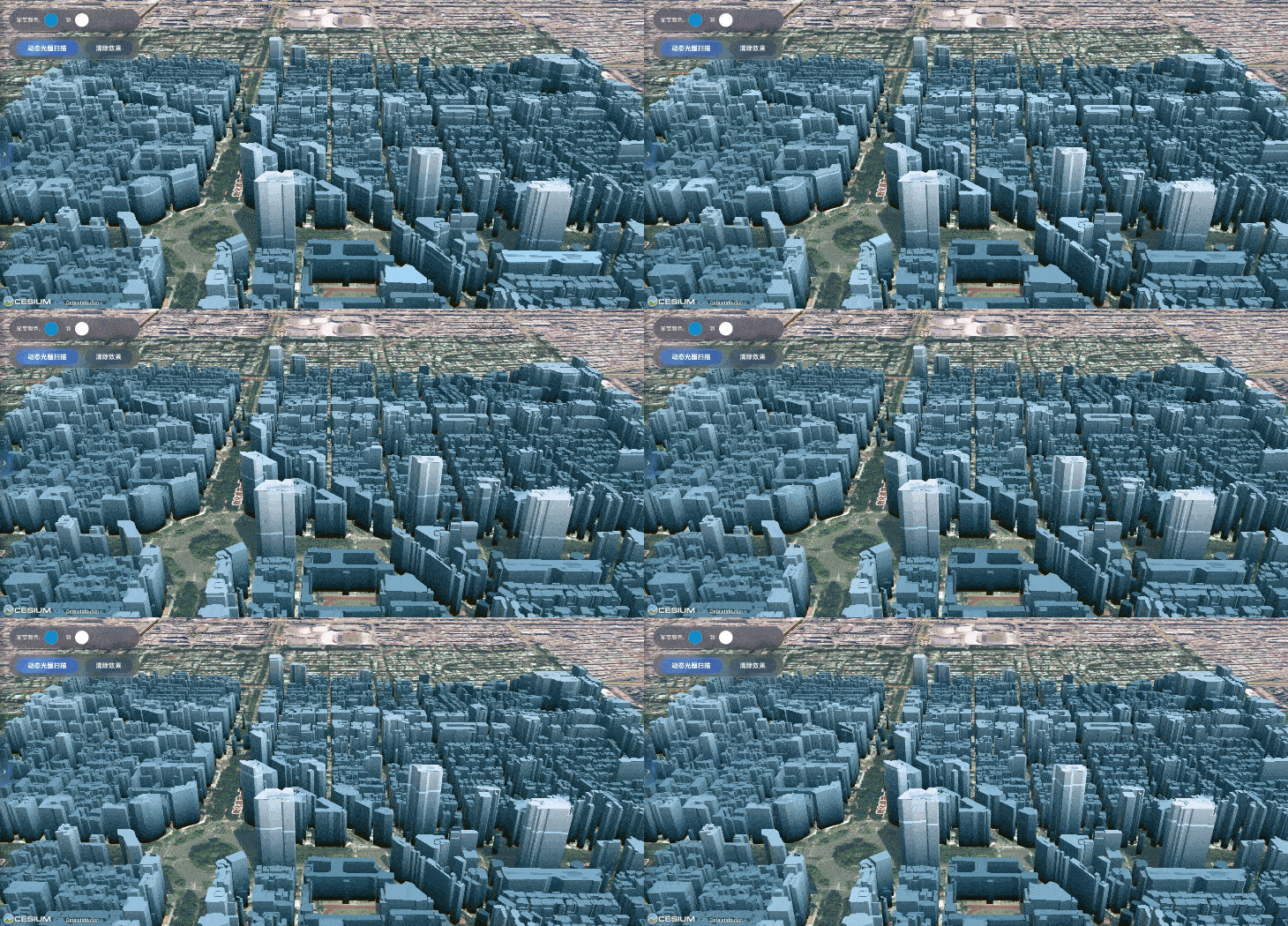
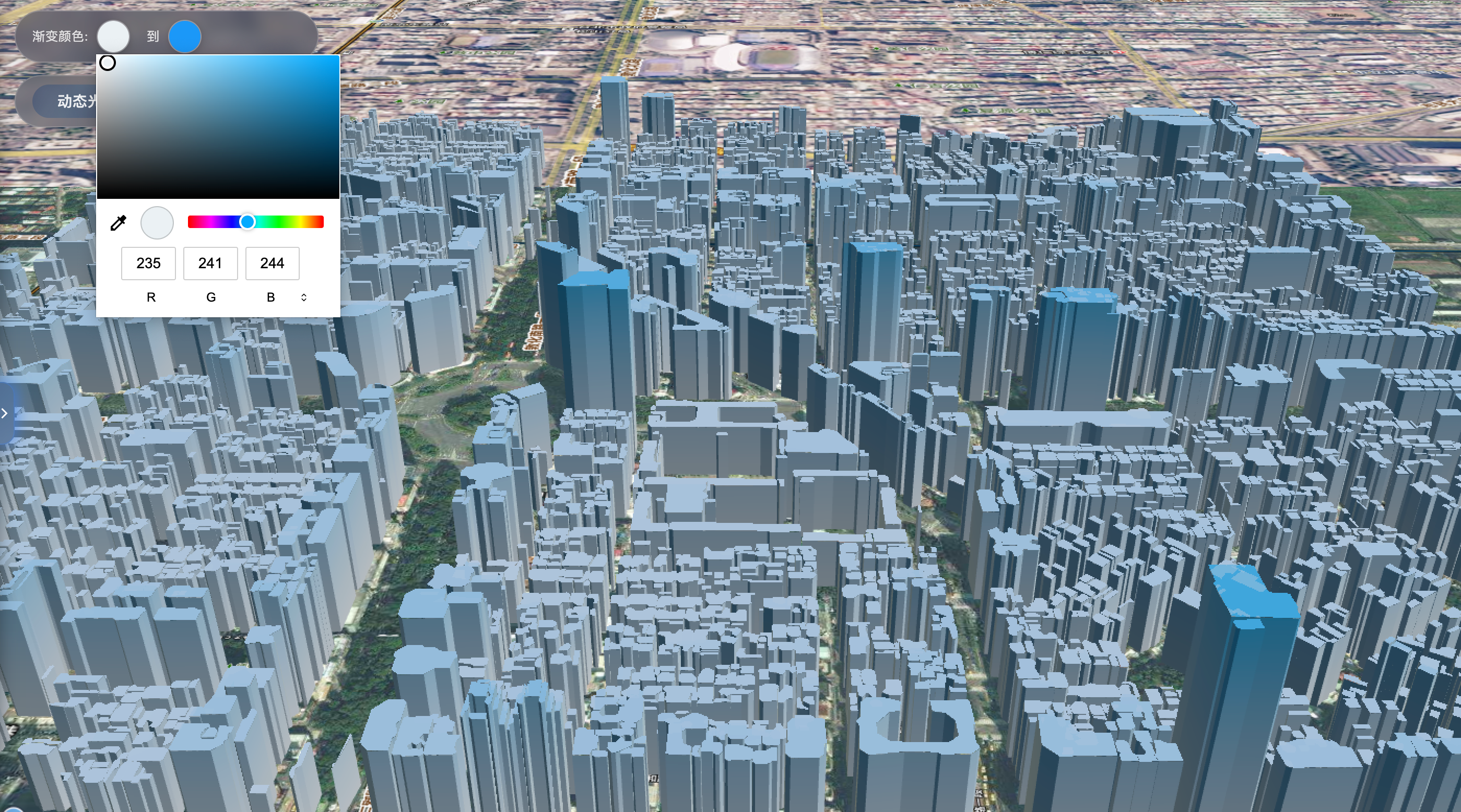
项目运行后,会加载一个城市级 3D 建筑模型(3D Tiles),默认显示普通影像底图。左上角控制面板包含两个颜色选择器(底部色、顶部色)和两个按钮:"动态光圈扫描"与"清除效果"。
-
渐变模式 :建筑颜色随高度线性插值,用户可以自定义起始色和终止色。
-
扫描模式 :在渐变的基础上,一个明亮的光环从底部向顶部周期性移动,产生扫描动效。
核心实现详解
1. Cesium 实例化与配置
项目在 onMounted 中调用 initCesium 函数创建 Viewer。为了保持整洁,禁用了大部分默认控件(时间轴、导航、图层选择器等),仅保留地球视图。同时设置了 imageryProvider: false,后续通过自定义方式添加天地图图层。
javascript
const newViewer = new Cesium.Viewer(cesiumContainer.value, {
  timeline: false,
  animation: false,
  homeButton: false,
  sceneModePicker: false,
  // ... 其他禁用
  imageryProvider: false,
  shouldAnimate: true,   // 启用动画,为动态扫描做准备
});
2. 天地图底图集成
为了提供清晰的地理底图,项目分别添加了天地图影像服务和注记服务。影像服务使用 UrlTemplateImageryProvider 拼接瓦片 URL,注记服务类似。由于需要支持未来的颜色自定义(如黑白化、单色滤镜),我们定义了一个 ColorizedImageryProvider 类继承自 UrlTemplateImageryProvider,虽然当前版本未实现具体颜色处理,但为扩展预留了接口。
javascript
class ColorizedImageryProvider extends Cesium.UrlTemplateImageryProvider {
  constructor(options) {
    super(options);
    this.colorMode = options.colorMode || 'normal';
    this.customColorRGB = options.customColorRGB || { r: 58, g: 134, b: 255 };
  }
  // 可在此添加自定义着色器逻辑,对影像进行实时颜色变换
}
影像图层和注记图层分别设置 zIndex,确保注记始终显示在影像之上。
3. 加载 3D Tiles 建筑模型
通过 Cesium.Cesium3DTileset.fromUrl 加载本地或网络的 tileset.json 文件。加载成功后,将 tileset 添加到场景,并调用 getTilesetMaxHeight 函数获取模型的最大高度。这一高度值对于后续着色器中的高度归一化至关重要。
getTilesetMaxHeight 通过解析 tileset 的根节点包围盒(box、region 或 sphere)估算模型最大高度,避免硬编码。若获取失败则回退到默认值 155 米。
javascript
javascript
const maxBuildingHeight = await getTilesetMaxHeight(tileset);4. 自定义着色器实现视觉效果
Cesium 提供了 CustomShader API,允许开发者直接在渲染管线中插入 GLSL 代码,修改模型的材质。我们的两个效果均通过替换 tileset.customShader 实现。
4.1 高度渐变着色器
在 onColorChange 中(颜色选择器变化时触发),我们动态生成一个新的 CustomShader。核心 GLSL 代码如下:
glsl
javascript
void fragmentMain(FragmentInput fsInput, inout czm_modelMaterial material) {
  vec3 positionMC = fsInput.attributes.positionMC;
  float height = positionMC.y;                      // 模型坐标系中的高度
  float maxHeight = ${maxBuildingHeight.toFixed(2)};
  float heightRatio = clamp(height / maxHeight, 0.0, 1.0);

  vec3 baseColor = vec3(${baseColor.r}, ${baseColor.g}, ${baseColor.b});
  vec3 gradientColor = vec3(${gradientColor.r}, ${gradientColor.g}, ${gradientColor.b});

  material.diffuse = mix(baseColor, gradientColor, heightRatio);
}-
positionMC是模型坐标系下的顶点坐标,Y 轴向上表示高度。 -
通过
height / maxHeight得到归一化的高度比例,然后使用mix函数线性插值两种颜色。 -
颜色值从 Vue 组件的响应式变量中读取,并在每次变化时重新生成着色器字符串。
4.2 动态光圈扫描着色器
按钮 customShader2 触发更复杂的着色器。它在渐变的基础上,加入了两个动态效果:
-
亮度随高度周期性波动 :使用
fract(czm_frameNumber / 360.0)产生一个随时间线性递增的相位,结合正弦函数使亮度在高度方向上有波纹效果。 -
移动光圈 :定义一个随时间移动的归一化高度阈值
vtxf_a13,当建筑某点的高度比例接近该阈值时,增加亮度,形成扫描光环。
核心代码片段:
glsl
javascript
// 亮度波纹
float vtxf_a11 = fract(czm_frameNumber / 360.0) * 3.14159265 * 2.0;
float vtxf_a12 = vtxf_height / _heightRange + sin(vtxf_a11) * 0.1;
material.diffuse *= vec3(vtxf_a12, vtxf_a12, vtxf_a12);

// 移动光圈
float vtxf_a13 = fract(czm_frameNumber / 360.0);
float vtxf_h = clamp(vtxf_height / _glowRange, 0.0, 1.0);
vtxf_a13 = abs(vtxf_a13 - 0.5) * 2.0;
float vtxf_diff = step(0.01, abs(vtxf_h - vtxf_a13));
material.diffuse += material.diffuse * (1.0 - vtxf_diff);-
czm_frameNumber是 Cesium 内置的帧计数器,用于驱动动画。 -
_heightRange控制波纹的波长,_glowRange定义光圈移动的总高度范围。 -
step函数用来判断当前高度是否在光圈附近,1.0 - vtxf_diff表示如果高度接近光圈阈值,则额外叠加亮度。
5. Vue 响应式交互
用户通过颜色选择器或按钮改变效果时,对应的响应式变量(如 modelColorHex、activeShader)更新,触发相应的函数重新生成着色器并赋给 tileset。这充分利用了 Vue 的响应式系统,使得着色器效果与 UI 实时同步。
javascript
javascript
const onColorChange = () => {
  activeShader.value = 1;
  // 生成渐变着色器并应用
};
"清除效果"按钮则将 tileset.customShader 设为 undefined,恢复模型的原始纹理。
6. 资源清理与内存管理
在组件卸载时,destroyCesium 函数负责移除 tileset、销毁 Viewer 实例,避免内存泄漏。
关键点与优化思考
-
高度估算的准确性 :
getTilesetMaxHeight依赖 boundingVolume 的解析,不同数据源可能结构不同,需要增加容错。实际项目中可考虑预计算并存储在元数据中。 -
着色器性能:所有效果均在 GPU 中完成,性能开销很小,适合大规模城市模型。
-
天地图 token :代码中引用了
TD_MAP_KEY,实际使用时需要替换为自己的密钥。 -
动态动画流畅性 :
shouldAnimate必须设置为true,否则czm_frameNumber不会递增,动画将停滞。
运行与体验
项目基于 Vue 3 和 Vite 构建。运行前请确保:
-
将 3D Tiles 数据放置在
/public/data/tileset.json路径下(可替换为任意符合规范的 tileset) -
申请天地图服务 token 并配置到
config.js中
启动开发服务器后,即可在浏览器中体验交互效果。左上角的颜色选择器可实时调整渐变色,点击"动态光圈扫描"按钮,建筑表面将出现缓慢移动的光环,视觉效果极具科技感。
总结
本文展示了一个结合 Vue 3 和 Cesium 的 3D 建筑可视化项目,重点介绍了如何通过自定义着色器实现动态视觉增强。这种技术可广泛应用于智慧城市、数字孪生、灾害模拟等场景,帮助用户更直观地理解空间数据。
未来可以扩展的方向包括:
-
支持更多着色器效果(如波纹扩散、热力图、夜间灯光等)
-
允许用户自定义扫描速度、光圈宽度等参数
-
将颜色与业务数据(如人口密度、楼龄)关联,实现数据驱动的可视化
-
优化天地图颜色处理,实现底图单色化或叠加分析图层
通过本次实践,我们深刻体会到 WebGL 着色器为三维可视化带来的无限可能。希望这篇文章能为您的 Cesium 开发提供一些灵感和实用参考。
完整代码
javascript
<template>
  <div class="app-container">
    <div class="top-left-controls">
      <div class="color-control-group">
        <div class="color-row">
          <label class="color-label">渐变颜色:</label>
          <input type="color" v-model="modelColorHex" class="color-input" @input="onColorChange" />
        </div>
        <div class="color-row">
          <label class="color-label">到</label>
          <input type="color" v-model="gradientColorHex" class="color-input" @input="onColorChange" />
        </div>
      </div>

      <div class="liquid-btn-group">
        <button @click="customShader2" :class="['liquid-btn', activeShader === 2 ? 'active' : '']">
          <span>动态光圈扫描</span>
        </button>
        <button @click="customShader3" :class="['liquid-btn', activeShader === 3 ? 'active' : '']">
          <span>清除效果</span>
        </button>
      </div>
    </div>

    <div ref="cesiumContainer" class="cesium-container"></div>
  </div>
</template>

<script setup>
import { ref, onMounted, onUnmounted } from 'vue';
import { TD_MAP_KEY } from '../config.js';

const cesiumContainer = ref(null);
const activeShader = ref(0);
const modelColorHex = ref('#00aaff');
const gradientColorHex = ref('#ffffff');
let tileset = null;
let customShader = null;
let maxBuildingHeight = 150.0;

let colorizedImageryProvider = null;
let satelliteLayer = null;
let labelLayer = null;
let currentViewer = null;

class ColorizedImageryProvider extends Cesium.UrlTemplateImageryProvider {
  constructor(options) {
    super(options);
    this._tilingScheme = new Cesium.WebMercatorTilingScheme();
    this.colorMode = options.colorMode || 'normal';
    this.customColorRGB = options.customColorRGB || { r: 58, g: 134, b: 255 };
  }

  get tilingScheme() {
    return this._tilingScheme;
  }

}

const createLabelLayer = (viewer) => {
  const layer = viewer.imageryLayers.addImageryProvider(new Cesium.UrlTemplateImageryProvider({
    url: `https://t{s}.tianditu.gov.cn/cia_w/wmts?SERVICE=WMTS&REQUEST=GetTile&VERSION=1.0.0&LAYER=cia&STYLE=default&TILEMATRIXSET=w&FORMAT=tiles&TILECOL={x}&TILEROW={y}&TILEMATRIX={z}&tk=${TD_MAP_KEY}`,
    subdomains: ['0', '1', '2', '3', '4', '5', '6', '7'],
    credit: '天地图',
    maximumLevel: 18,
    minimumLevel: 0,
    maximumScreenSpaceError: 0,
    disableDepthTestAgainstTerrain: true
  }));
  layer.zIndex = 1;
  return layer;
};

const refreshSatelliteLayer = () => {
  if (!currentViewer || !colorizedImageryProvider) return;
  const oldLayer = satelliteLayer;
  if (oldLayer) {
    currentViewer.imageryLayers.remove(oldLayer);
  }
  satelliteLayer = currentViewer.imageryLayers.addImageryProvider(colorizedImageryProvider);
  satelliteLayer.zIndex = 0;
  if (labelLayer) {
    currentViewer.imageryLayers.raiseToTop(labelLayer);
  }
};

const initMapLayers = (viewer) => {
  currentViewer = viewer;
  colorizedImageryProvider = new ColorizedImageryProvider({
    url: `https://t{s}.tianditu.gov.cn/img_w/wmts?SERVICE=WMTS&REQUEST=GetTile&VERSION=1.0.0&LAYER=img&STYLE=default&TILEMATRIXSET=w&FORMAT=tiles&TILECOL={x}&TILEROW={y}&TILEMATRIX={z}&tk=${TD_MAP_KEY}`,
    subdomains: ['0', '1', '2', '3', '4', '5', '6', '7'],
    colorMode: 'normal',
    customColorRGB: { r: 58, g: 134, b: 255 },
    credit: '天地图',
    maximumLevel: 18,
    minimumLevel: 0
  });
  satelliteLayer = viewer.imageryLayers.addImageryProvider(colorizedImageryProvider);
  satelliteLayer.zIndex = 0;

  labelLayer = createLabelLayer(viewer);
};

const hexToRgb = (hex) => {
  const result = /^#?([a-f\d]{2})([a-f\d]{2})([a-f\d]{2})$/i.exec(hex);
  return result ? {
    r: parseInt(result[1], 16) / 255,
    g: parseInt(result[2], 16) / 255,
    b: parseInt(result[3], 16) / 255
  } : { r: 0, g: 0.67, b: 1 };
};

const getTilesetMaxHeight = async (tileset) => {
  try {
    await tileset.readyPromise;
    let maxHeight = 75.0 + 80;
    const root = tileset.root;
    if (root && root.boundingVolume) {
      const boundingVolume = root.boundingVolume;
      if (boundingVolume.box) {
        const centerZ = boundingVolume.box[2];
        const halfZ = boundingVolume.box[11];
        maxHeight = centerZ + halfZ;
      } else if (boundingVolume.region) {
        maxHeight = boundingVolume.region[5];
      } else if (boundingVolume.sphere) {
        const centerZ = boundingVolume.sphere[2];
        const radius = boundingVolume.sphere[3];
        maxHeight = centerZ + radius;
      }
      if (isNaN(maxHeight) || maxHeight <= 75.0) {
        maxHeight = 155.0;
      }
    }
    maxHeight = Math.max(maxHeight + 5, 95.0);
    console.log(`模型最大高度: ${maxHeight.toFixed(2)} 米`);
    return maxHeight;
  } catch (error) {
    console.warn('获取模型最大高度失败,使用默认值:', error);
    return 155.0;
  }
};

const initCesium = () => {
  try {
    if (!cesiumContainer.value) {
      console.error('Cesium容器DOM元素不存在');
      return;
    }

    if (window.cesiumViewer) {
      window.cesiumViewer.destroy();
      window.cesiumViewer = null;
    }

    const newViewer = new Cesium.Viewer(cesiumContainer.value, {
      timeline: false,
      animation: false,
      homeButton: false,
      sceneModePicker: false,
      navigationHelpButton: false,
      baseLayerPicker: false,
      infoBox: false,
      selectionIndicator: false,
      navigationInstructionsInitiallyVisible: false,
      fullscreenButton: false,
      geocoder: false,
      imageryProvider: false,
      shouldAnimate: true,
    });

    window.cesiumViewer = newViewer;

    initMapLayers(newViewer);

    load3DTiles(newViewer);
  } catch (error) {
    console.error('Cesium 初始化失败:', error);
  }
};

const load3DTiles = async (viewer) => {
  try {
    tileset = await Cesium.Cesium3DTileset.fromUrl('/data/tileset.json');
    viewer.scene.primitives.add(tileset);
    maxBuildingHeight = await getTilesetMaxHeight(tileset);
    viewer.zoomTo(tileset);
  } catch (error) {
    console.error('加载3DTiles失败:', error);
  }
};

const onColorChange = () => {
  activeShader.value = 1;
  const baseColor = hexToRgb(modelColorHex.value);
  const gradientColor = hexToRgb(gradientColorHex.value);

  const shader = new Cesium.CustomShader({
    fragmentShaderText: `
      void fragmentMain(FragmentInput fsInput, inout czm_modelMaterial material) {
        vec3 positionMC = fsInput.attributes.positionMC;
        float height = positionMC.y;
        float maxHeight = ${maxBuildingHeight.toFixed(2)};
        float heightRatio = clamp(height / maxHeight, 0.0, 1.0);

        vec3 baseColor = vec3(${baseColor.r.toFixed(3)}, ${baseColor.g.toFixed(3)}, ${baseColor.b.toFixed(3)});
        vec3 gradientColor = vec3(${gradientColor.r.toFixed(3)}, ${gradientColor.g.toFixed(3)}, ${gradientColor.b.toFixed(3)});

        material.diffuse = mix(baseColor, gradientColor, heightRatio);
      }
    `
  });
  tileset.customShader = shader;
  customShader = shader;
};

const customShader2 = () => {
  activeShader.value = 2;
  const baseColor = hexToRgb(modelColorHex.value);
  const gradientColor = hexToRgb(gradientColorHex.value);
  const baseHeight = 0;
  const heightRange = 60.0;
  const glowRange = maxBuildingHeight - baseHeight;

  const shader = new Cesium.CustomShader({
    fragmentShaderText: `
      void fragmentMain(FragmentInput fsInput, inout czm_modelMaterial material) {
        vec3 positionMC = fsInput.attributes.positionMC;
        float height = positionMC.y;
        float maxHeight = ${maxBuildingHeight.toFixed(2)};
        float heightRatio = clamp(height / maxHeight, 0.0, 1.0);

        vec3 baseColor = vec3(${baseColor.r.toFixed(3)}, ${baseColor.g.toFixed(3)}, ${baseColor.b.toFixed(3)});
        vec3 gradientColor = vec3(${gradientColor.r.toFixed(3)}, ${gradientColor.g.toFixed(3)}, ${gradientColor.b.toFixed(3)});

        material.diffuse = mix(baseColor, gradientColor, heightRatio);

        if (height >= ${baseHeight}.0) {
          float _baseHeight = ${baseHeight}.0;
          float _heightRange = ${heightRange}.0;
          float _glowRange = ${glowRange.toFixed(2)};

          float vtxf_height = height - _baseHeight;
          float vtxf_a11 = fract(czm_frameNumber / 360.0) * 3.14159265 * 2.0;
          float vtxf_a12 = vtxf_height / _heightRange + sin(vtxf_a11) * 0.1;
          material.diffuse *= vec3(vtxf_a12, vtxf_a12, vtxf_a12);

          float vtxf_a13 = fract(czm_frameNumber / 360.0);
          float vtxf_h = clamp(vtxf_height / _glowRange, 0.0, 1.0);
          vtxf_a13 = abs(vtxf_a13 - 0.5) * 2.0;
          float vtxf_diff = step(0.01, abs(vtxf_h - vtxf_a13));
          material.diffuse += material.diffuse * (1.0 - vtxf_diff);
        }
      }
    `
  });
  tileset.customShader = shader;
  customShader = shader;
};

const customShader3 = () => {
  activeShader.value = 3;
  clearShader();
};

const clearShader = () => {
  if (tileset) {
    tileset.customShader = undefined;
  }
  customShader = null;
};

const destroyCesium = () => {
  clearShader();

  if (tileset && window.cesiumViewer) {
    window.cesiumViewer.scene.primitives.remove(tileset);
    tileset = null;
  }

  if (window.cesiumViewer) {
    window.cesiumViewer.destroy();
    window.cesiumViewer = null;
  }
};

onMounted(() => {
  if (cesiumContainer.value) {
    initCesium();
  }
});

onUnmounted(() => {
  destroyCesium();
});
</script>

<style scoped>
.app-container {
  position: relative;
  width: 100vw;
  height: 100vh;
  overflow: hidden;
  font-family: 'Segoe UI', 'Poppins', 'Roboto', sans-serif;
}

.cesium-container {
  width: 100vw;
  height: 100vh;
  overflow: hidden;
}

.top-left-controls {
  position: absolute;
  z-index: 1000;
  left: 20px;
  top: 20px;
  display: flex;
  flex-direction: column;
  gap: 12px;
}

.color-control-group {
  display: flex;
  gap: 16px;
  background: rgba(15, 25, 45, 0.4);
  backdrop-filter: blur(8px);
  padding: 8px 16px;
  border-radius: 60px;
  border: 1px solid rgba(255, 255, 255, 0.2);
  box-shadow: 0 8px 20px rgba(0, 0, 0, 0.15);
}

.color-row {
  display: flex;
  align-items: center;
  gap: 8px;
}

.color-label {
  font-size: 12px;
  color: rgba(255, 255, 255, 0.8);
  letter-spacing: 0.5px;
}

.color-input {
  width: 32px;
  height: 32px;
  border: 1px solid rgba(255, 255, 255, 0.3);
  border-radius: 50%;
  cursor: pointer;
  background: transparent;
  padding: 0;
  outline: none;
  box-shadow: 0 2px 8px rgba(0, 0, 0, 0.2);
  transition: transform 0.2s ease;
}

.color-input::-webkit-color-swatch-wrapper {
  padding: 0;
}

.color-input::-webkit-color-swatch {
  border: none;
  border-radius: 50%;
}

.color-input:hover {
  transform: scale(1.05);
}

.liquid-btn-group {
  display: flex;
  gap: 16px;
  background: rgba(15, 25, 45, 0.3);
  backdrop-filter: blur(8px);
  padding: 8px 16px;
  border-radius: 60px;
  border: 1px solid rgba(255, 255, 255, 0.15);
  box-shadow: 0 8px 20px rgba(0, 0, 0, 0.1);
}

.liquid-btn {
  position: relative;
  padding: 8px 24px;
  font-size: 14px;
  font-weight: 500;
  letter-spacing: 0.5px;
  color: rgba(255, 255, 255, 0.9);
  background: transparent;
  border: none;
  border-radius: 40px;
  cursor: pointer;
  overflow: hidden;
  transition: all 0.35s cubic-bezier(0.2, 0.9, 0.4, 1.1);
  backdrop-filter: blur(4px);
  font-family: inherit;
}

.liquid-btn span {
  position: relative;
  z-index: 2;
}

.liquid-btn::before {
  content: '';
  position: absolute;
  top: 0;
  left: 0;
  right: 0;
  bottom: 0;
  background: linear-gradient(120deg,
    rgba(64, 128, 255, 0.2) 0%,
    rgba(100, 180, 255, 0.3) 30%,
    rgba(64, 128, 255, 0.2) 60%,
    rgba(40, 100, 210, 0.2) 100%);
  border-radius: 40px;
  opacity: 0.6;
  transition: opacity 0.4s ease;
  z-index: 1;
}

.liquid-btn:hover::before {
  animation: liquidFlow 1.2s ease-in-out infinite;
  background: linear-gradient(120deg,
    rgba(80, 150, 255, 0.4) 0%,
    rgba(120, 200, 255, 0.5) 30%,
    rgba(80, 150, 255, 0.4) 60%,
    rgba(60, 120, 230, 0.3) 100%);
  background-size: 200% 100%;
}

@keyframes liquidFlow {
  0% {
    background-position: 0% 50%;
    opacity: 0.5;
  }
  50% {
    background-position: 100% 50%;
    opacity: 0.8;
  }
  100% {
    background-position: 0% 50%;
    opacity: 0.5;
  }
}

.liquid-btn.active {
  color: white;
  background: rgba(64, 128, 255, 0.3);
  box-shadow: 0 0 12px rgba(64, 128, 255, 0.4), inset 0 1px 1px rgba(255, 255, 255, 0.2);
  border: 1px solid rgba(64, 128, 255, 0.6);
}

.liquid-btn.active::before {
  background: linear-gradient(120deg,
    rgba(64, 128, 255, 0.5) 0%,
    rgba(100, 180, 255, 0.7) 30%,
    rgba(64, 128, 255, 0.5) 60%,
    rgba(40, 100, 210, 0.4) 100%);
  opacity: 0.9;
  animation: liquidFlow 1.8s ease-in-out infinite;
}

.liquid-btn:not(.active):hover {
  background: rgba(64, 128, 255, 0.2);
  box-shadow: 0 6px 16px rgba(0, 0, 0, 0.2);
}

.liquid-btn:focus-visible {
  outline: none;
  box-shadow: 0 0 0 2px rgba(64, 128, 255, 0.5), 0 0 0 4px rgba(0, 0, 0, 0.2);
}
</style>