文章名称
目录
- 文章名称
- 前言
- 一.创建飞书机器人
- 二.OpenClaw绑定机器人(配置绑定)
-
- 1.设置对话隔离
- [2. 配置飞书](#2. 配置飞书)
- [3. 绑定机器人到对话](#3. 绑定机器人到对话)
- 三.OpenClaw绑定机器人(对话绑定)
- [四. 其他问题](#四. 其他问题)
- 我的龙虾日记
前言
多个任务同时进行的时候会模糊上下文,可以通过多个会话方式来隔离任务。可以很好的的单独完成任务。
需要在已经安装插件并绑定了一个机器人的情况下进行。
官方文档地址
https://bytedance.larkoffice.com/docx/WNNXdhKxmo8KDJxMM9dc0GD5nFf
可以实现多群聊(单独拉机器人)+单独会话模式
一.创建飞书机器人
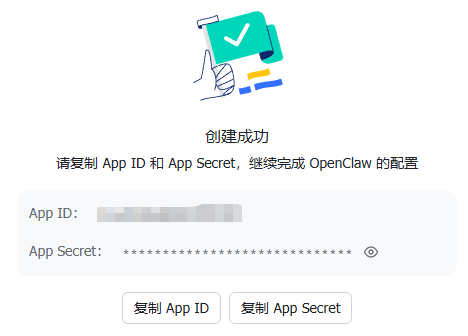
现在版本创建机器人非常方便,不需要手动创建。直接通过官方连接即可创建机器人。
保存好App ID和App Sercet
二.OpenClaw绑定机器人(配置绑定)
绑定也有两种方式配置绑定和对话绑定,官方采用对话绑定的方式
1.设置对话隔离
默认采用的是per-channel-peer
bash
  // 配置会话隔离
  "session": {
    "dmScope": "per-account-channel-peer"
  },
多账号会话隔离(dmScope)
| 参数 | 必填 | 说明 |
|---|---|---|
| main | 最粗粒度 | 所有私聊共用一个会话 |
| per-peer | 按用户粒度 | 同一用户跨不同 channel 共享会话 |
| per-channel-peer | 按 channel + 用户粒度 | 不同 channel 的同一用户各自独立,但同 channel 下多账号仍共享 |
| per-account-channel-peer | 按账号 + channel | 用户 粒度,多账号推荐,每个机器人与每个用户的会话完全独立 |
2. 配置飞书
bash
// 配置飞书多账户
  "channels": {
    "feishu": {
      "enabled": true,
      "threadSession": true,
      "replyMode": "auto",
      // 默认机器人配置,必须要有!!
      "appId": "cli_xxx",
      "appSecret": "xxx",
      //增加的机器人
      "accounts": {
        "default": {},

        // 工作机器人1
        "work": {
          "appId": "cli_work_yyy",
          "appSecret": "work_secret_yyy",
          "botName": "工作机器人",
          "dmPolicy": "allowlist",
          "allowFrom": ["ou_5b990e213988b9bcf396f955a50b2a22", "ou_1234567890abcdef"],
        },

        // 机器人2
        "support": {
          "appId": "cli_support_zzz",
          "appSecret": "support_secret_zzz",
          "botName": "客服机器人",
          "dmPolicy": "open",
          "allowFrom": ["*"]
        }
      },

      // 群组配置 oc是对话,ou是机器人
      "groups": {
        "*": { "requireMention": true },
        "oc_83e1c0d069b94efc09ad22e05bc06365": {
          "requireMention": false,
          "groupPolicy": "open"
        },
        "oc_dev_123456789": {
          "requireMention": false,
          "groupPolicy": "allowlist",
          "allowFrom": ["ou_dev_001", "ou_dev_002"],
        }
      },

      "groupPolicy": "allowlist",
      "groupAllowFrom": [
        "ou_user1",
        "ou_user2",
        "oc_chat1"
      ]
    }
  },
3. 绑定机器人到对话
bash
  // 路由绑定
  "bindings": [
    { "agentId": "main", "match": { "channel": "feishu", "accountId": "default" } },
    { "agentId": "work", "match": { "channel": "feishu", "accountId": "work" } },
    { "agentId": "support", "match": { "channel": "feishu", "accountId": "support" } },
    {
      "agentId": "work",
      "match": {
        "channel": "feishu",
        "peer": { "kind": "direct", "id": "ou_owner_user" }
      }
    },
    {
      "agentId": "support",
      "match": {
        "channel": "feishu",
        "peer": { "kind": "group", "id": "oc_support_group_123" }
      }
    }
  ]
}
三.OpenClaw绑定机器人(对话绑定)
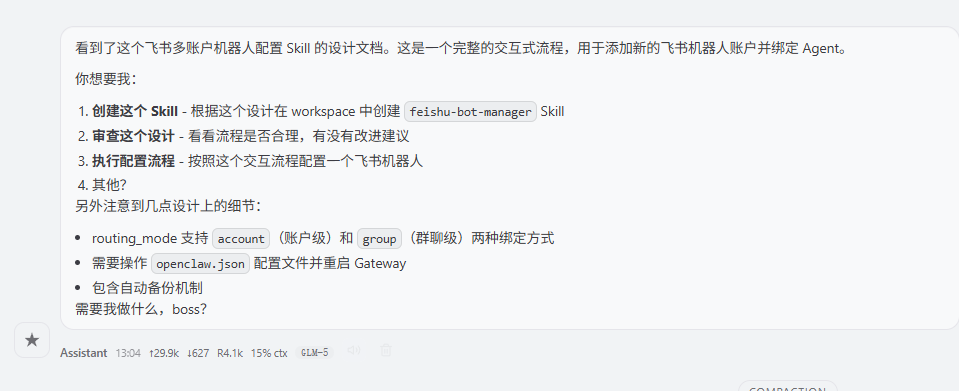
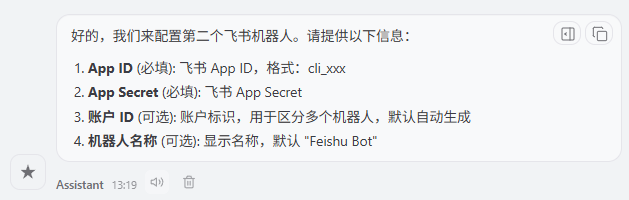
以上方法确实很麻烦所以可以通过对话的方式绑定,也可以直接用的我的skills安装
注意:目前版本26.3.23不需要群组绑定,直接账户绑定即可,后续直接可以拉机器人
对话中输入
把以下输入到对话框,接下来就很简单,按照对话内容配置就可以,记得添加Agent Id查询一下ID错了默认绑定main
bash
# OpenClaw Skill 核心定义
name: feishu-bot-manager
version: 1.0.0
update_at: 2026-03-23
description: 飞书多账户机器人配置管理 Skill。支持交互式添加新的飞书机器人账户并绑定 Agent,26.3.23+版本默认使用账户级绑定,无需单独配置群聊级绑定。
author: OpenClaw Admin
tags:
  - feishu
  - 机器人配置
  - 多账户管理
  - Agent绑定

# 触发规则(对话触发入口)
invocations:
  - words:
      - 添加飞书机器人
      - 配置飞书机器人
      - 新增飞书账户
      - 添加机器人账户
      - feishu bot
      - 飞书多账户
    description: 启动交互式飞书机器人账户添加与Agent绑定流程
    usage_scene:
      - 用户需要为不同的飞书机器人绑定不同的 Agent
      - 用户需要新增飞书机器人多账户配置

# 核心对话交互流程
interaction:
  # 流程启动入口
  entry:
    trigger: invocation_matched
    response: |
      好的,我们来配置一个新的飞书机器人。首先请提供以下必填信息,可选信息可直接回车跳过:
    next_step: collect_base_info

  # 步骤1:收集基础配置信息
  collect_base_info:
    type: form_collect
    form_fields:
      - key: app_id
        label: App ID
        required: true
        prompt: 请输入飞书 App ID,格式为 cli_xxx
        validate: regex:^cli_.+
        validate_error: 格式错误,App ID 必须以 cli_ 开头
      - key: app_secret
        label: App Secret
        required: true
        prompt: 请输入飞书 App Secret
        input_type: password
      - key: account_id
        label: 账户 ID
        required: false
        prompt: 请输入账户标识(用于区分多个机器人,不填将自动生成)
        default: auto_generate
      - key: bot_name
        label: 机器人名称
        required: false
        prompt: 请输入机器人显示名称,不填默认使用 "Feishu Bot"
        default: Feishu Bot
    on_finish:
      next_step: select_routing_mode

  # 步骤2:选择路由绑定方案(标注版本适配)
  select_routing_mode:
    type: single_select
    prompt: |
      请选择路由绑定方案:
      【当前版本提示:26.3.23+ 已无需单独绑定群聊,推荐使用账户级绑定】
    options:
      - label: 账户级绑定 - 该飞书账户的所有消息都由指定 Agent 处理
        value: account
      - label: 群聊级绑定 - 仅特定群聊的消息由指定 Agent 处理(不推荐,26.3.23+无需配置)
        value: group
    on_finish:
      next_step: bind_agent

  # 步骤3:绑定目标Agent
  bind_agent:
    type: input_collect
    key: agent_id
    label: 绑定 Agent ID
    required: true
    prompt: 请输入要绑定的 Agent ID
    on_finish:
      # 条件分支:仅群聊级绑定需要收集群聊ID
      if: "{{routing_mode == 'group'}}"
      then:
        next_step: collect_chat_id
      else:
        next_step: preview_confirm

  # 步骤4:群聊级绑定补充信息(仅条件触发)
  collect_chat_id:
    type: input_collect
    key: chat_id
    label: 群聊 ID
    required: true
    prompt: 请输入群聊 ID,格式为 oc_xxx
    validate: regex:^oc_.+
    validate_error: 格式错误,群聊 ID 必须以 oc_ 开头
    on_finish:
      next_step: preview_confirm

  # 步骤5:配置预览与二次确认
  preview_confirm:
    type: confirm
    prompt: |
      即将执行以下配置,请核对确认:
      - App ID: {{app_id}}
      - App Secret: ******
      - 账户 ID: {{account_id}}
      - 机器人名称: {{bot_name}}
      - 路由模式: {{routing_mode}}
      - 绑定 Agent: {{agent_id}}
      {% if routing_mode == 'group' %}
      - 绑定群聊 ID: {{chat_id}}
      {% endif %}
    confirm_text: 确认执行
    cancel_text: 取消配置
    on_confirm:
      next_step: execute_config
    on_cancel:
      response: 已取消飞书机器人配置流程,如有需要可随时重新触发。
      exit: true

  # 步骤6:执行配置脚本
  execute_config:
    type: action
    action: script
    script_path: ./scripts/run_feishu_bot_manager.py
    args:
      app_id: "{{app_id}}"
      app_secret: "{{app_secret}}"
      account_id: "{{account_id}}"
      bot_name: "{{bot_name}}"
      agent_id: "{{agent_id}}"
      routing_mode: "{{routing_mode}}"
      chat_id: "{% if routing_mode == 'group' %}{{chat_id}}{% else %}{% endif %}"
    on_success:
      response: |
        ✅ 飞书机器人配置执行成功!
        已完成:
        1. 自动备份原有 openclaw.json 配置文件
        2. 新增飞书机器人账户配置
        3. 完成 Agent 路由绑定
        4. 自动设置 dmScope 会话颗粒度
        5. 已触发 Gateway 重启
        ⚠️ 重启后约 10-30 秒服务恢复,可正常使用机器人。
      exit: true
    on_failure:
      response: |
        ❌ 配置执行失败,请检查参数有效性后重试。
        如需恢复,可使用自动备份的 openclaw.json 配置文件手动还原。
      exit: true

# CLI 命令行调用定义(非交互模式直接执行)
cli:
  command: openclaw skills run feishu-bot-manager
  description: 非交互式飞书机器人账户配置命令
  examples:
    - description: 账户级绑定(推荐,26.3.23+默认方案)
      command: |
        openclaw skills run feishu-bot-manager -- \
          --app-id cli_xxx \
          --app-secret yyy \
          --account-id bot-sales \
          --bot-name "销售助手" \
          --agent-id recruiter \
          --routing-mode account
    - description: 群聊级绑定(兼容旧版本)
      command: |
        openclaw skills run feishu-bot-manager -- \
          --app-id cli_xxx \
          --app-secret yyy \
          --account-id bot-sales \
          --agent-id recruiter \
          --chat-id oc_xxx \
          --routing-mode group
  parameters:
    - name: --app-id
      required: true
      description: 飞书 App ID,格式为 cli_xxx
    - name: --app-secret
      required: true
      description: 飞书 App Secret
    - name: --account-id
      required: false
      description: 账户唯一标识,不填将自动生成
    - name: --bot-name
      required: false
      description: 机器人显示名称,默认值 Feishu Bot
    - name: --agent-id
      required: true
      description: 要绑定的目标 Agent ID
    - name: --routing-mode
      required: false
      description: 路由绑定模式,可选 account/group,默认值 account
    - name: --chat-id
      required: false
      description: 群聊绑定模式必填,群聊 ID 格式为 oc_xxx
    - name: --dm-policy
      required: false
      description: DM 消息策略,可选 open/pairing/allowlist,默认值 open

# 配置结构示例(用于执行校验与参考)
config_spec:
  target_file: ~/.openclaw/openclaw.json
  example: |
    {
      "channels": {
        "feishu": {
          "enabled": true,
          "appId": "cli_现有",
          "appSecret": "现有Secret",
          "dmPolicy": "open",
          "accounts": {
            "bot-sales": {
              "appId": "cli_xxx",
              "appSecret": "yyy",
              "botName": "销售助手",
              "dmPolicy": "open",
              "requireMention": false,
              "allowFrom": ["*"],
              "groupAllowFrom": ["*"],
              "enabled": true
            }
          }
        }
      },
      "bindings": [
        {
          "agentId": "recruiter",
          "match": {
            "channel": "feishu",
            "accountId": "bot-sales"
          }
        }
      ],
      "session": {
        "dmScope": "per-account-channel-peer"
      }
    }

# 执行工作流(脚本执行逻辑定义)
workflow:
  - name: 备份原有配置
    step: 1
    action: 自动备份 openclaw.json 到 ~/.openclaw/backups/ 目录,保留历史版本
  - name: 写入新账户配置
    step: 2
    action: 新增机器人账户到 channels.feishu.accounts 节点,不修改原有根节点配置
  - name: 添加路由绑定规则
    step: 3
    action: 根据路由模式,新增对应 binding 规则到 bindings 数组
  - name: 设置会话颗粒度
    step: 4
    action: 自动设置 session.dmScope 为 per-account-channel-peer
  - name: 重启Gateway服务
    step: 5
    action: 触发 OpenClaw Gateway 服务重启,加载新配置

# 注意事项
notes:
  - 现有根节点的 appId/appSecret 配置完全保留,不会被修改
  - 每次配置修改前自动备份配置文件,可用于异常恢复
  - Gateway 重启后约 10-30 秒服务恢复,期间不可用
  - 26.3.23+ 版本已无需单独配置群聊级绑定,推荐使用账户级绑定方案
然后根据需要添加就可以了
四. 其他问题
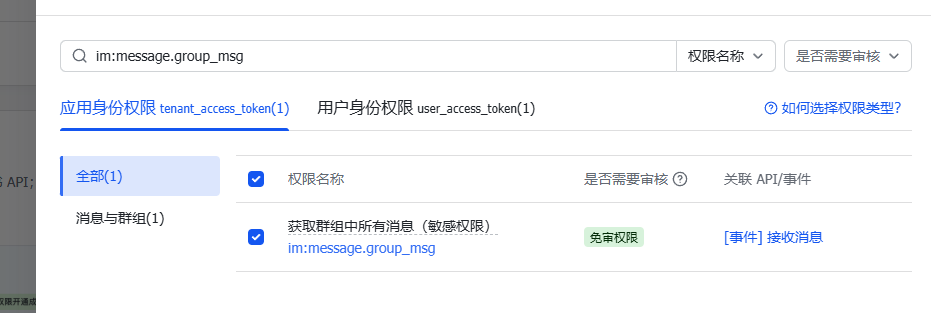
需要额外在开发者后台申请应用身份权限:获取群组中所有消息(敏感权限)im:message.group_msg。
群聊中对话过程中需要用@机器人,把这个参数设成false,
bash
"requireMention": false,官方配置方法
bash
# 设置不需要 @ 也回复
openclaw config set channels.feishu.requireMention false --json
# 重启生效
sh /workspace/projects/scripts/restart.sh
小记: