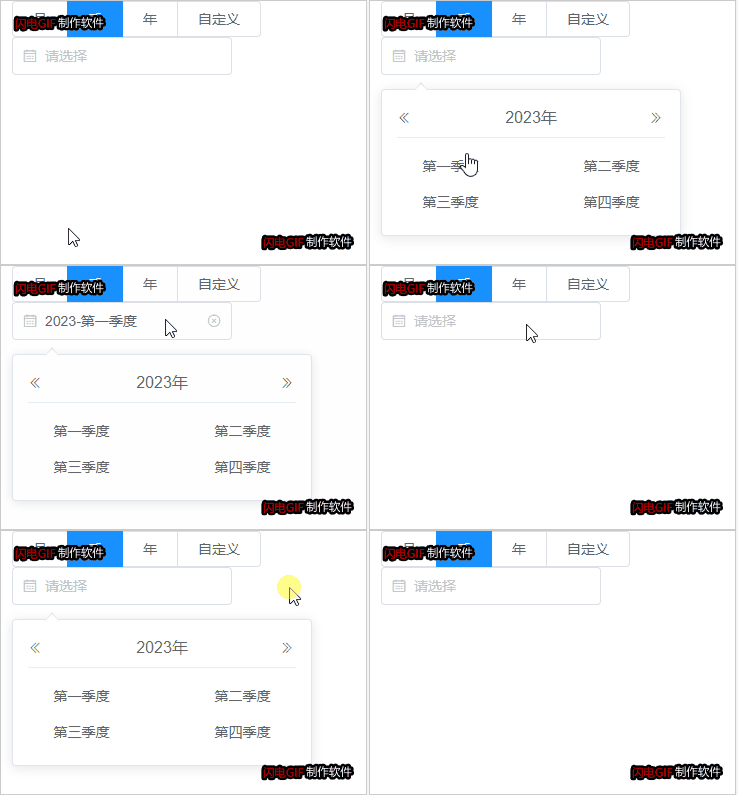
//组件
<template>
  <div class="quarter">
    <div class="input-wrap" id="closeId" @mouseover="handler" @click.stop="btn"
      :style="{ color: colorItem, borderColor: props.quarterItemVal.borderColorItem }">
      <div class="select-content">
        <Calendar />{{ seasonValue }}
      </div>
      <CircleClose :style="{ display: displayShow, cursor: 'pointer' }" @click.stop="close" />
    </div>
    <!-- <div class="text-placeholder" :style="{ color: '#f56c6c', display: props.quarterItemVal.displayTextShow }">请选择季度</div> -->
    <div v-show="showSeason" ref="shows" class="pop">
      <div class="card-header">
        <div class="el-icon-d-arrow-left" @click="prev" style="width: 16px;cursor: pointer;">
          <DArrowLeft />
        </div>
        <span class="text-year" style="text-align:center">{{ year }}年</span>
        <div class="el-icon-d-arrow-right" @click="next" style="width: 16px;cursor: pointer;">
          <DArrowRight />
        </div>
      </div>
      <div class="text-item" style="text-align:center;">
        <el-button type="text" size="medium" style="cursor: pointer;width:40%;color: #606266;float:left;"
          :style="{ color: selectedQuarter == 'Q1' ? '#409eff' : '#606266' }"
          @click="selectSeason('Q1')">第一季度</el-button>
        <el-button type="text" size="medium" style="cursor: pointer;float:right;width:40%;color: #606266;"
          :style="{ color: selectedQuarter == 'Q2' ? '#409eff' : '#606266' }"
          @click="selectSeason('Q2')">第二季度</el-button>
      </div>
      <div class="text-item" style="text-align:center;">
        <el-button type="text" size="medium" style="cursor: pointer;width:40%;color: #606266;float:left;"
          :style="{ color: selectedQuarter == 'Q3' ? '#409eff' : '#606266' }"
          @click="selectSeason('Q3')">第三季度</el-button>
        <el-button type="text" size="medium" style="cursor: pointer;float:right;width:40%;color: #606266;"
          :style="{ color: selectedQuarter == 'Q4' ? '#409eff' : '#606266' }"
          @click="selectSeason('Q4')">第四季度</el-button>
      </div>
    </div>
  </div>
</template>
<script setup lang="ts">
import { ref, reactive, watch, onMounted } from 'vue';
const props = defineProps({
  quarterItemVal: {
    type: Object,
    default: () => ({})
  },
  yearVal: {
    type: String,
    default: ''
  },
  quarterTextVal: {
    type: String,
    default: ''
  }
})
console.log('fda:', props)
// 定义 emits
const emit = defineEmits<{
  (e: 'getQuarter', value: any): void
  (e: 'getStyle', value: any): void
}>();

// 响应式数据
const showSeason = ref(false); // 是否显示选择季度面板
const year = props.yearVal ? ref(props.yearVal) : ref(new Date().getFullYear()); // 默认当前年
console.log('year:', props.yearVal && props.quarterTextVal)
const seasonValue = props.yearVal && props.quarterTextVal ? ref( props.yearVal+'-'+props.quarterTextVal) : ref("请选择"); // input中显示的内容
const selectedQuarter = props.quarterTextVal?ref(props.quarterTextVal):ref(""); // 当前选中的季度
const time = reactive({
  stTime: "",
  edTime: "",
});
const colorItem = seasonValue.value == "请选择" ? ref("#c0c4cc") : ref("#606266");
const displayShow = ref("none");
const shows = ref<HTMLElement | null>(null);

// 生命周期
onMounted(() => {
  // 点击页面的任何一个地方,都隐藏提示
  text();
});

// 监听
watch(seasonValue, (newVal, oldVal) => {
  console.log(`新值:${newVal}`);
  console.log(`旧值:${oldVal}`);
  if (newVal == "请选择") {
    colorItem.value = "#c0c4cc";
  } else {
    colorItem.value = "#606266";
  }
});

// 方法
const handler = () => {
  if (seasonValue.value == "请选择") {
    displayShow.value = "none";
  } else {
    displayShow.value = "block";
  }
};

const text = () => {
  document.addEventListener("click", (e) => {
    if (shows.value) {
      let self = shows.value.contains(e.target as Node);
      if (!self) {
        showSeason.value = false;
      }
    }
  });
};

const btn = () => {
  showSeason.value = !showSeason.value;
};
const valueTime = ref({})
const close = () => {
  seasonValue.value = "请选择";
  showSeason.value = false;
  valueTime.value = ''
  console.log('valueTime.value:', valueTime.value)
  selectedQuarter.value = ""
  emit("getQuarter", valueTime.value); // 传值给父组件
  emit("getStyle", {
    borderColorItem: "#f56c6c",
    displayTextShow: "block"
  });
};

const prev = () => {
  year.value = +year.value - 1;
  selectedQuarter.value = ""
};

const next = () => {
  year.value = +year.value + 1;
  selectedQuarter.value = ""
};
const selectSeason = (quarter: string) => {
  seasonValue.value = year.value.toString() + "-" + quarter.toString();
  showSeason.value = false;
  selectedQuarter.value = quarter
  switch (quarter) {
    case "Q1":
      time.stTime = year.value.toString() + "-01-01" + " " + "00:00:00";
      time.edTime = year.value.toString() + "-03-31" + " " + "23:59:59";
      break;
    case "Q2":
      time.stTime = year.value.toString() + "-04-01" + " " + "00:00:00";
      time.edTime = year.value.toString() + "-06-30" + " " + "23:59:59";
      break;
    case "Q3":
      time.stTime = year.value.toString() + "-07-01" + " " + "00:00:00";
      time.edTime = year.value.toString() + "-09-30" + " " + "23:59:59";
      break;
    case "Q4":
      time.stTime = year.value.toString() + "-10-01" + " " + "00:00:00";
      time.edTime = year.value.toString() + "-12-31" + " " + "23:59:59";
      break;
  }
  valueTime.value = {
    quarter: quarter,
    ...time
  }
  emit("getQuarter", valueTime.value); // 传值给父组件
};
</script>
<style lang="scss">
.quarter {
  position: relative;

  .input-wrap {
    width: 260px;
    height: 32px;
    border: 1px solid #dcdfe6;
    border-radius: 4px;
    color: #606266;
    position: relative;
    display: flex;
    align-items: center;
    justify-content: space-between;
    padding: 0px 11px;

    .el-icon-date {
      color: #c0c4cc;
      margin-left: 10px;
      margin-right: 8px;
    }

    .el-icon-circle-close {
      position: absolute;
      top: 50%;
      transform: translateY(-50%);
      right: 10px;
      color: #c0c4cc;
      display: none;
      cursor: pointer;
    }

    svg {
      width: 14px;
      height: 14px;
      color: #c0c4cc;
    }

  }

  .text-placeholder {
    position: absolute;
    top: 24px;
  }

  .select-content {
    display: flex;
    align-items: center;

    svg {
      margin-right: 8px;
    }
  }

  .input-wrap:hover {
    border-color: #c0c4cc;
  }

  .input-wrap:focus {
    border-color: #409eff;
  }

  .pop {
    width: 300px;
    position: absolute;
    background: #fff;
    box-shadow: 0 2px 12px 0 rgba(0, 0, 0, 0.1);
    border: 1px solid #dfe4ed;
    border-radius: 4px;
    color: #606266;
    padding: 8px 15px 15px 15px;
    top: 52px;
    z-index: 10;
    left: -20px;

    .card-header {
      height: 40px;
      border-bottom: 1px solid #e6ebf5;
      display: flex;
      justify-content: space-between;
      align-items: center;
      margin-bottom: 10px;

      .text-year {
        font-size: 16px;
      }
    }

    &::before {
      content: "";
      border-bottom: 10px solid #dfe4ed;
      border-left: 8px solid transparent;
      border-right: 8px solid transparent;
      position: absolute;
      left: 50%;
      -webkit-transform: translateX(-50%);
      transform: translateX(-50%);
      top: -8px;
      border-radius: 5px;
    }

    &::after {
      content: "";
      border-bottom: 8px solid #fff;
      border-left: 8px solid transparent;
      border-right: 8px solid transparent;
      position: absolute;
      left: 50%;
      -webkit-transform: translateX(-50%);
      transform: translateX(-50%);
      top: -6px;
      border-radius: 5px;
    }
  }
}
</style>
//使用
import quarter from "@/components/quarter.vue";
<el-form :model="formData" :rules="formRules" ref="formRef" label-width="160px">
            <div class="form-section">
                <el-form-item label="数据时间" prop="quarter" >
                    <!-- 季度 -->
                    <quarter @getQuarter="getQuarterVal" :quarterItemVal="quarterItemVal" @getStyle="getStyleVal" />
                </el-form-item>
            </div>
</el-form>
<el-button type="primary" @click="nextStep">下一步</el-button>

const yearVal = ref('2026')
const quarterTextVal = ref( 'Q3')
// 表单数据
const formData = reactive<any>({  quarter: ''})
const formRef = ref()
const isShowQuarter = ref(false)
onMounted(() => {
    // 延迟一点检查,确保 props 已经传递
    nextTick(() => {
        isShowQuarter.value = true
    })
})
// 表单验证规则
const formRules = computed(() => ({
    quarter: [
        { required: true, message: '请选择季度', trigger: 'change' }
    ]
}))
// 下一步
const nextStep = async () => {
// 表单验证
    try {

            console.log('请选择季度', quarterVal.value)
            if (!quarterVal.value) {
                quarterItemVal.value = {
                    borderColorItem: '#f56c6c',
                    displayTextShow: 'block',
                }
                formData.quarter = '';
        }
        await formRef.value.validate();
        // 构建传递给父组件的数据
        const data = {
            ...formData,
            fileList: formVal.fileList || []
        };
    } catch (error) {
        ElMessage.error('请检查表单填写是否正确');
        return;
    }
};
// 季度的选择值
const quarterVal = ref('')
const quarterItemVal = ref({
    borderColorItem: '#dcdfe6',
    displayTextShow: 'none',
})
const getQuarterVal = (data: any) => {
    console.log('选择:', data)
    quarterVal.value = data
    quarterItemVal.value = {
        borderColorItem: '#dcdfe6',
        displayTextShow: 'none',
    }
    formData.quarter = data.quarter
    if (formData.quarter) {
        formRef.value.clearValidate('quarter')
    } else {
        formRef.value.validateField('quarter', () => { })
    }
}
const getStyleVal = (data: any) => {
    console.log(data)
    quarterItemVal.value = data
    formData.quarter = ''

}