文章目录
-
- 概要
- 一、默认插槽(匿名插槽)
- 二、具名插槽(多区域分发)
-
-
-
-
- [方案 1:命名 props 传递(推荐)](#方案 1:命名 props 传递(推荐))
- 子组件(Layout.tsx)
- 父组件使用
- [方案 2:children 对象模式(贴近 Vue 语法)](#方案 2:children 对象模式(贴近 Vue 语法))
-
-
-
- 三、作用域插槽(子传数据给父)
-
-
-
-
- [核心:函数 props(Render Props)](#核心:函数 props(Render Props))
- 子组件(List.tsx)
-
-
-
- 四、三种方案对比
- [五、实战:Taro 小程序通用弹窗(含插槽)](#五、实战:Taro 小程序通用弹窗(含插槽))
概要
React 无原生 标签,但通过 props.children、命名 props、函数 props(Render Props) 三大方案,可实现默认、具名、作用域三类插槽,满足组件内容分发需求。
一、默认插槽(匿名插槽)
React 内置机制,接收组件标签内所有内容,对应 Vue 默认 。
子组件(Card.tsx)
javascript
import React from 'react'
import { View, Text } from '@tarojs/components'

interface CardProps {
  children: React.ReactNode
}

const Card: React.FC<CardProps> = ({ children }) => {
  return (
    <View className="card">
      <View className="card-header">默认标题</View>
      <View className="card-body">
        {/* 渲染父组件传入的所有内容 */}
        {children}
      </View>
    </View>
  )
}

export default Card
父组件使用
javascript
import Card from './Card'

const Parent = () => {
  return (
    <Card>
      <Text>这是默认插槽内容</Text>
      <View>可嵌套任意组件</View>
    </Card>
  )
}
二、具名插槽(多区域分发)
方案 1:命名 props 传递(推荐)
通过自定义 props 传递 JSX,实现多区域精准分发。
子组件(Layout.tsx)
javascript
import React from 'react'
import { View } from '@tarojs/components'

interface LayoutProps {
  header: React.ReactNode
  main: React.ReactNode
  footer: React.ReactNode
}

const Layout: React.FC<LayoutProps> = ({ header, main, footer }) => {
  return (
    <View className="layout">
      <View className="layout-header">{header}</View>
      <View className="layout-main">{main}</View>
      <View className="layout-footer">{footer}</View>
    </View>
  )
}

export default Layout
父组件使用
javascript
import Layout from './Layout'

const Parent = () => {
  return (
    <Layout
      header={<Text>页面头部</Text>}
      main={<Text>主体内容</Text>}
      footer={<Text>版权信息</Text>}
    />
  )
}
方案 2:children 对象模式(贴近 Vue 语法)
javascript
// 子组件 Modal.tsx
const Modal: React.FC<{ children: { title?: React.ReactNode; content?: React.ReactNode } }> = ({ children }) => {
  const { title, content } = children
  return (
    <View className="modal">
      <View className="modal-title">{title}</View>
      <View className="modal-content">{content}</View>
    </View>
  )
}

// 父组件使用
<Modal>
  {{
    title: <Text>弹窗标题</Text>,
    content: <Text>弹窗内容</Text>
  }}
</Modal>
三、作用域插槽(子传数据给父)
核心:函数 props(Render Props)
子组件提供数据,父组件基于数据自定义渲染,对应 Vue 作用域插槽。
子组件(List.tsx)
javascript
import React from 'react'
import { View } from '@tarojs/components'

interface ListProps<T> {
  data: T[]
  renderItem: (item: T) => React.ReactNode
}

const List = <T extends { id: number; name: string }>(props: ListProps<T>) => {
  const { data, renderItem } = props
  return (
    <View className="list">
      {data.map(item => (
        <View key={item.id} className="list-item">
          {/* 子组件将数据回传给父组件渲染 */}
          {renderItem(item)}
        </View>
      ))}
    </View>
  )
}

export default List
父组件使用
javascript
import List from './List'

const Parent = () => {
  const listData = [
    { id: 1, name: 'React' },
    { id: 2, name: 'Taro' }
  ]
  return (
    <List
      data={listData}
      renderItem={item => (
        <Text>{item.id} - {item.name}</Text>
      )}
    />
  )
}
四、三种方案对比
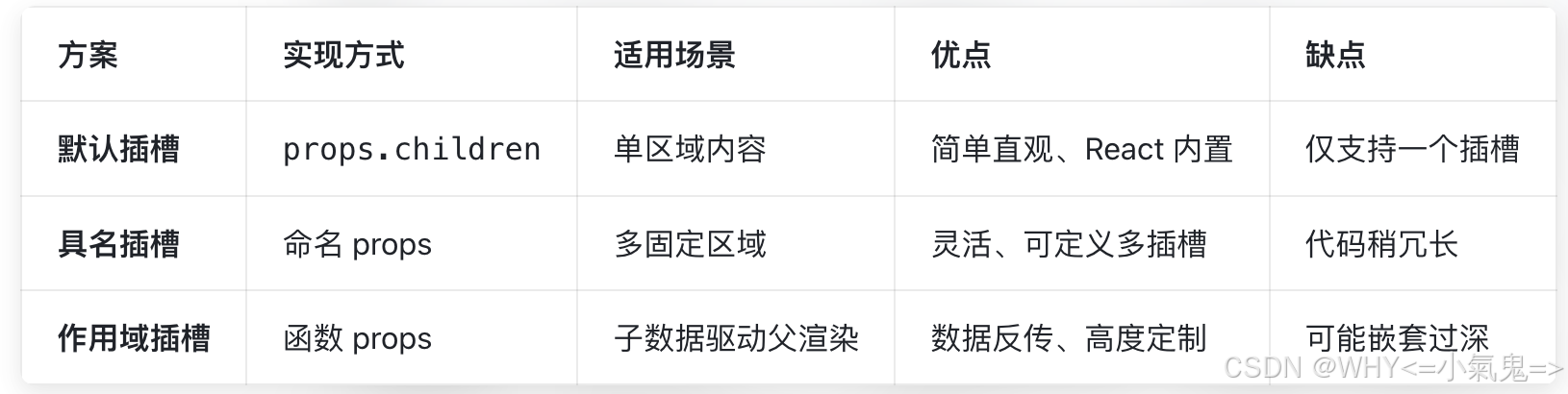
五、实战:Taro 小程序通用弹窗(含插槽)
javascript
// components/Modal/index.tsx
import React, { useState } from 'react'
import { View, Text, Button } from '@tarojs/components'
import './index.less'

interface ModalProps {
  visible: boolean
  onClose: () => void
  title: React.ReactNode
  children: React.ReactNode
  footer?: React.ReactNode
}

const Modal: React.FC<ModalProps> = ({ visible, onClose, title, children, footer }) => {
  if (!visible) return null

  return (
    <View className="modal-mask">
      <View className="modal-content">
        <View className="modal-header">
          <Text className="modal-title">{title}</Text>
          <Button className="modal-close" onClick={onClose}>×</Button>
        </View>
        <View className="modal-body">
          {/* 默认插槽 */}
          {children}
        </View>
        {footer && (
          <View className="modal-footer">
            {/* 具名插槽:底部按钮区 */}
            {footer}
          </View>
        )}
      </View>
    </View>
  )
}

export default Modal
使用示例
javascript
import Modal from '@/components/Modal'

const Page = () => {
  const [modalVisible, setModalVisible] = useState(false)

  return (
    <View>
      <Button onClick={() => setModalVisible(true)}>打开弹窗</Button>
      <Modal
        visible={modalVisible}
        onClose={() => setModalVisible(false)}
        title={<Text>登录提示</Text>}
        footer={
          <View>
            <Button onClick={() => setModalVisible(false)}>取消</Button>
            <Button onClick={() => console.log('确认')}>确认</Button>
          </View>
        }
      >
        {/* 默认插槽:弹窗内容 */}
        <Text>请先完成登录操作</Text>
      </Modal>
    </View>
  )
}