目标:
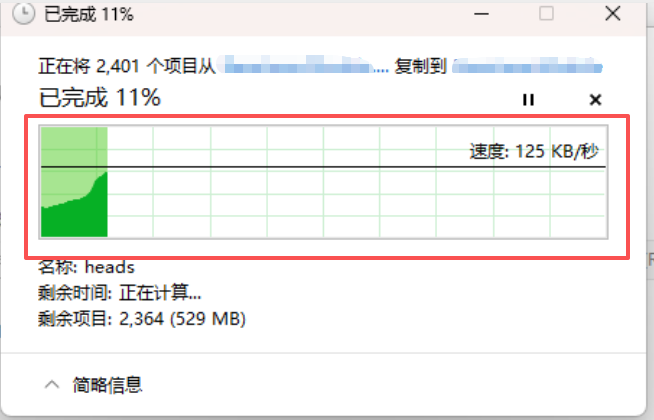
最终实现:
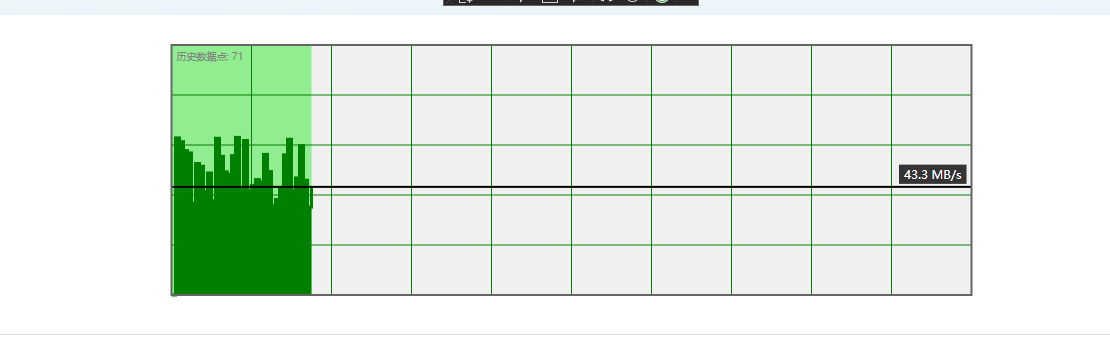
整体拆分,分步实现:
1.控件的基底,是一个实心的矩形
2.在基底上绘制绿色网格线,类似棋盘的效果
3.有进度条显示,进度条是长度可变的浅绿色的矩形块
4.有实时速度显示,速度大小转为黑色实线在基底中的高度显示
5.记录每个黑色实线与浅绿色的矩形块右边缘交点,这些交点连线与基底的下边缘组成的轮廓填充成深绿色
注意事项
一、笔者实现过程中,最开始设计自定义控件时,继承了ProgressBar,然后发现绘制的网格线这些显示不出来,继承了ProgressBar的控件的整体模板是跟随ProgressBar的,后来改为继承Control。
二、绘制顺序可以改变,顺序决定了谁覆盖谁的问题,比如把黑死速度实线放在靠前位置绘制:
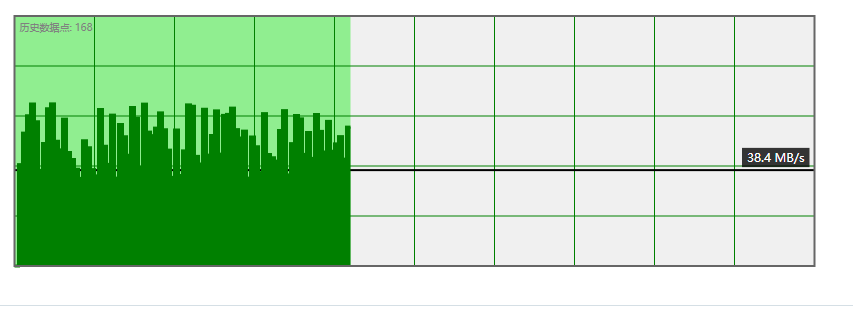
后面绘制的曲线会遮挡住黑色实线。
相关知识
WPF 中的
DrawingContext
Brush
Geometry
Drawing
学习博客会另外写,这个进度条控件用到的主要是DrawingContext类,自行了解,这里以思路和代码为主。
完整代码:
控件:
cs
using System;
using System.Windows;
using System.Windows.Controls;
using System.Windows.Media;
using System.Windows.Threading;
namespace WpfPasteAnimation
{
public class MyPasteControl : System.Windows.Controls.Control
{
// 进度值依赖属性
public static readonly DependencyProperty ValueProperty =
DependencyProperty.Register("Value", typeof(double), typeof(MyPasteControl),
new FrameworkPropertyMetadata(0.0,
FrameworkPropertyMetadataOptions.AffectsRender,
OnValueChanged));
// 最小值
public static readonly DependencyProperty MinimumProperty =
DependencyProperty.Register("Minimum", typeof(double), typeof(MyPasteControl),
new FrameworkPropertyMetadata(0.0,
FrameworkPropertyMetadataOptions.AffectsRender,
OnPropertyChanged));
// 最大值
public static readonly DependencyProperty MaximumProperty =
DependencyProperty.Register("Maximum", typeof(double), typeof(MyPasteControl),
new FrameworkPropertyMetadata(100.0,
FrameworkPropertyMetadataOptions.AffectsRender,
OnPropertyChanged));
// 速度值
public static readonly DependencyProperty SpeedProperty =
DependencyProperty.Register("Speed", typeof(double), typeof(MyPasteControl),
new FrameworkPropertyMetadata(0.0,
FrameworkPropertyMetadataOptions.AffectsRender,
OnPropertyChanged));
// 最大速度
public static readonly DependencyProperty MaxSpeedProperty =
DependencyProperty.Register("MaxSpeed", typeof(double), typeof(MyPasteControl),
new FrameworkPropertyMetadata(100.0,
FrameworkPropertyMetadataOptions.AffectsRender,
OnPropertyChanged));
// 浅色填充颜色(进度填充)
public static readonly DependencyProperty LightFillColorProperty =
DependencyProperty.Register("LightFillColor", typeof(Brush), typeof(MyPasteControl),
new FrameworkPropertyMetadata(new SolidColorBrush(Color.FromArgb(100, 76, 175, 80)),
FrameworkPropertyMetadataOptions.AffectsRender,
OnPropertyChanged));
// 深色曲线填充颜色
public static readonly DependencyProperty DarkCurveColorProperty =
DependencyProperty.Register("DarkCurveColor", typeof(Brush), typeof(MyPasteControl),
new FrameworkPropertyMetadata(new SolidColorBrush(Color.FromArgb(200, 33, 150, 243)),
FrameworkPropertyMetadataOptions.AffectsRender,
OnPropertyChanged));
// 曲线颜色
public static readonly DependencyProperty CurveLineColorProperty =
DependencyProperty.Register("CurveLineColor", typeof(Brush), typeof(MyPasteControl),
new FrameworkPropertyMetadata(Brushes.Orange,
FrameworkPropertyMetadataOptions.AffectsRender,
OnPropertyChanged));
// 曲线粗细
public static readonly DependencyProperty CurveLineThicknessProperty =
DependencyProperty.Register("CurveLineThickness", typeof(double), typeof(MyPasteControl),
new FrameworkPropertyMetadata(2.0,
FrameworkPropertyMetadataOptions.AffectsRender,
OnPropertyChanged));
// 速度线条颜色
public static readonly DependencyProperty SpeedLineColorProperty =
DependencyProperty.Register("SpeedLineColor", typeof(Brush), typeof(MyPasteControl),
new FrameworkPropertyMetadata(Brushes.Red,
FrameworkPropertyMetadataOptions.AffectsRender,
OnPropertyChanged));
// 速度线条粗细
public static readonly DependencyProperty SpeedLineThicknessProperty =
DependencyProperty.Register("SpeedLineThickness", typeof(double), typeof(MyPasteControl),
new FrameworkPropertyMetadata(2.0,
FrameworkPropertyMetadataOptions.AffectsRender,
OnPropertyChanged));
// 背景色
public static readonly DependencyProperty BackgroundColorProperty =
DependencyProperty.Register("BackgroundColor", typeof(Brush), typeof(MyPasteControl),
new FrameworkPropertyMetadata(Brushes.LightGray,
FrameworkPropertyMetadataOptions.AffectsRender,
OnPropertyChanged));
// 网格线颜色
public static readonly DependencyProperty GridLineColorProperty =
DependencyProperty.Register("GridLineColor", typeof(Brush), typeof(MyPasteControl),
new FrameworkPropertyMetadata(Brushes.DarkGray,
FrameworkPropertyMetadataOptions.AffectsRender,
OnPropertyChanged));
// 数据点颜色
public static readonly DependencyProperty DataPointColorProperty =
DependencyProperty.Register("DataPointColor", typeof(Brush), typeof(MyPasteControl),
new FrameworkPropertyMetadata(Brushes.Yellow,
FrameworkPropertyMetadataOptions.AffectsRender,
OnPropertyChanged));
// 数据点大小
public static readonly DependencyProperty DataPointSizeProperty =
DependencyProperty.Register("DataPointSize", typeof(double), typeof(MyPasteControl),
new FrameworkPropertyMetadata(4.0,
FrameworkPropertyMetadataOptions.AffectsRender,
OnPropertyChanged));
// 是否显示数据点
public static readonly DependencyProperty ShowDataPointsProperty =
DependencyProperty.Register("ShowDataPoints", typeof(bool), typeof(MyPasteControl),
new FrameworkPropertyMetadata(true,
FrameworkPropertyMetadataOptions.AffectsRender,
OnPropertyChanged));
// 是否显示速度线条
public static readonly DependencyProperty ShowSpeedLineProperty =
DependencyProperty.Register("ShowSpeedLine", typeof(bool), typeof(MyPasteControl),
new FrameworkPropertyMetadata(true,
FrameworkPropertyMetadataOptions.AffectsRender,
OnPropertyChanged));
// 是否显示网格线
public static readonly DependencyProperty ShowGridLinesProperty =
DependencyProperty.Register("ShowGridLines", typeof(bool), typeof(MyPasteControl),
new FrameworkPropertyMetadata(true,
FrameworkPropertyMetadataOptions.AffectsRender,
OnPropertyChanged));
// 是否自动记录数据点
public static readonly DependencyProperty AutoRecordDataProperty =
DependencyProperty.Register("AutoRecordData", typeof(bool), typeof(MyPasteControl),
new FrameworkPropertyMetadata(true,
FrameworkPropertyMetadataOptions.AffectsRender,
OnPropertyChanged));
// 公共属性
public double Value
{
get { return (double)GetValue(ValueProperty); }
set { SetValue(ValueProperty, value); }
}
public double Minimum
{
get { return (double)GetValue(MinimumProperty); }
set { SetValue(MinimumProperty, value); }
}
public double Maximum
{
get { return (double)GetValue(MaximumProperty); }
set { SetValue(MaximumProperty, value); }
}
public double Speed
{
get { return (double)GetValue(SpeedProperty); }
set { SetValue(SpeedProperty, value); }
}
public double MaxSpeed
{
get { return (double)GetValue(MaxSpeedProperty); }
set { SetValue(MaxSpeedProperty, value); }
}
public Brush LightFillColor
{
get { return (Brush)GetValue(LightFillColorProperty); }
set { SetValue(LightFillColorProperty, value); }
}
public Brush DarkCurveColor
{
get { return (Brush)GetValue(DarkCurveColorProperty); }
set { SetValue(DarkCurveColorProperty, value); }
}
public Brush CurveLineColor
{
get { return (Brush)GetValue(CurveLineColorProperty); }
set { SetValue(CurveLineColorProperty, value); }
}
public double CurveLineThickness
{
get { return (double)GetValue(CurveLineThicknessProperty); }
set { SetValue(CurveLineThicknessProperty, value); }
}
public Brush SpeedLineColor
{
get { return (Brush)GetValue(SpeedLineColorProperty); }
set { SetValue(SpeedLineColorProperty, value); }
}
public double SpeedLineThickness
{
get { return (double)GetValue(SpeedLineThicknessProperty); }
set { SetValue(SpeedLineThicknessProperty, value); }
}
public Brush BackgroundColor
{
get { return (Brush)GetValue(BackgroundColorProperty); }
set { SetValue(BackgroundColorProperty, value); }
}
public Brush GridLineColor
{
get { return (Brush)GetValue(GridLineColorProperty); }
set { SetValue(GridLineColorProperty, value); }
}
public Brush DataPointColor
{
get { return (Brush)GetValue(DataPointColorProperty); }
set { SetValue(DataPointColorProperty, value); }
}
public double DataPointSize
{
get { return (double)GetValue(DataPointSizeProperty); }
set { SetValue(DataPointSizeProperty, value); }
}
public bool ShowDataPoints
{
get { return (bool)GetValue(ShowDataPointsProperty); }
set { SetValue(ShowDataPointsProperty, value); }
}
public bool ShowSpeedLine
{
get { return (bool)GetValue(ShowSpeedLineProperty); }
set { SetValue(ShowSpeedLineProperty, value); }
}
public bool ShowGridLines
{
get { return (bool)GetValue(ShowGridLinesProperty); }
set { SetValue(ShowGridLinesProperty, value); }
}
public bool AutoRecordData
{
get { return (bool)GetValue(AutoRecordDataProperty); }
set { SetValue(AutoRecordDataProperty, value); }
}
// 存储所有历史数据点(永久保存,不会消失)
private List<DataPoint> permanentHistoryPoints = new List<DataPoint>();
private DispatcherTimer dataCollectionTimer;
private double lastRecordedProgress = -1;
private static void OnPropertyChanged(DependencyObject d, DependencyPropertyChangedEventArgs e)
{
var control = d as MyPasteControl;
control?.InvalidateVisual();
}
private static void OnValueChanged(DependencyObject d, DependencyPropertyChangedEventArgs e)
{
var control = d as MyPasteControl;
double newValue = (double)e.NewValue;
double min = control.Minimum;
double max = control.Maximum;
if (newValue < min) control.Value = min;
if (newValue > max) control.Value = max;
control?.AddDataPoint();
control?.InvalidateVisual();
}
public MyPasteControl()
{
this.Background = Brushes.Transparent;
// 启动数据收集
StartDataCollection();
}
private void StartDataCollection()
{
dataCollectionTimer = new DispatcherTimer();
dataCollectionTimer.Interval = TimeSpan.FromMilliseconds(50);
dataCollectionTimer.Tick += (s, e) =>
{
if (AutoRecordData)
{
AddDataPoint();
}
};
dataCollectionTimer.Start();
}
private void AddDataPoint()
{
// 检查是否有变化,避免重复记录相同的点
if (Math.Abs(lastRecordedProgress - Value) < 0.01 &&
permanentHistoryPoints.Count > 0 &&
Math.Abs(permanentHistoryPoints[permanentHistoryPoints.Count - 1].Speed - Speed) < 0.01)
{
return;
}
// 添加当前数据点(永久保存)
permanentHistoryPoints.Add(new DataPoint
{
Progress = Value,
Speed = Speed,
Timestamp = DateTime.Now
});
lastRecordedProgress = Value;
// 不限制数量,永久保存所有点
InvalidateVisual();
}
// 清空历史数据
public void ClearHistory()
{
permanentHistoryPoints.Clear();
lastRecordedProgress = -1;
InvalidateVisual();
}
// 获取历史数据点数量
public int GetHistoryPointCount()
{
return permanentHistoryPoints.Count;
}
protected override void OnRender(DrawingContext drawingContext)
{
if (ActualWidth <= 0 || ActualHeight <= 0)
return;
// 绘制背景
DrawBackground(drawingContext);
// 绘制浅色进度填充
DrawLightFill(drawingContext);
// 绘制网格线
if (ShowGridLines)
{
DrawGridLines(drawingContext);
}
// 绘制曲线线条
DrawCurveLine(drawingContext);
// 绘制曲线填充区域(深色)
DrawCurveFill(drawingContext);
// 绘制数据点
if (ShowDataPoints)
{
DrawDataPoints(drawingContext);
}
// 绘制速度水平线
if (ShowSpeedLine)
{
DrawSpeedLine(drawingContext);
}
// 绘制边框
DrawBorder(drawingContext);
// 绘制信息文本
DrawInfoText(drawingContext);
}
private void DrawBackground(DrawingContext drawingContext)
{
Rect backgroundRect = new Rect(0, 0, ActualWidth, ActualHeight);
drawingContext.DrawRectangle(BackgroundColor, null, backgroundRect);
}
private void DrawLightFill(DrawingContext drawingContext)
{
// 计算进度填充宽度
double percentage = (Value - Minimum) / (Maximum - Minimum);
percentage = Math.Max(0, Math.Min(1, percentage));
double fillWidth = ActualWidth * percentage;
if (fillWidth <= 0)
return;
// 绘制浅色填充区域
Rect fillRect = new Rect(0, 0, fillWidth, ActualHeight);
drawingContext.DrawRectangle(LightFillColor, null, fillRect);
}
private void DrawCurveFill(DrawingContext drawingContext)
{
if (permanentHistoryPoints.Count < 2)
return;
// 创建曲线填充路径几何图形
StreamGeometry curveFillGeometry = new StreamGeometry();
using (StreamGeometryContext ctx = curveFillGeometry.Open())
{
PointCollection points = new PointCollection();
// 收集所有有效的曲线点
for (int i = 0; i < permanentHistoryPoints.Count; i++)
{
var point = GetCurvePoint(permanentHistoryPoints[i]);
if (point.HasValue)
{
points.Add(point.Value);
}
}
if (points.Count < 2)
return;
// 开始绘制路径
ctx.BeginFigure(points[0], true, true);
// 添加曲线上的点
for (int i = 1; i < points.Count; i++)
{
ctx.LineTo(points[i], true, false);
}
// 添加到底部边界点
Point bottomRight = new Point(points[points.Count - 1].X, ActualHeight);
Point bottomLeft = new Point(points[0].X, ActualHeight);
ctx.LineTo(bottomRight, true, false);
ctx.LineTo(bottomLeft, true, false);
}
curveFillGeometry.Freeze();
// 绘制深色填充
drawingContext.DrawGeometry(DarkCurveColor, null, curveFillGeometry);
}
private void DrawCurveLine(DrawingContext drawingContext)
{
if (permanentHistoryPoints.Count < 2)
return;
// 创建曲线路径几何图形
StreamGeometry curveLineGeometry = new StreamGeometry();
using (StreamGeometryContext ctx = curveLineGeometry.Open())
{
bool isFirst = true;
for (int i = 0; i < permanentHistoryPoints.Count; i++)
{
var point = GetCurvePoint(permanentHistoryPoints[i]);
if (point.HasValue)
{
if (isFirst)
{
ctx.BeginFigure(point.Value, false, false);
isFirst = false;
}
else
{
ctx.LineTo(point.Value, true, false);
}
}
}
}
curveLineGeometry.Freeze();
// 绘制曲线线条
Pen curvePen = new Pen(CurveLineColor, CurveLineThickness);
curvePen.Freeze();
drawingContext.DrawGeometry(null, curvePen, curveLineGeometry);
}
private void DrawDataPoints(DrawingContext drawingContext)
{
if (permanentHistoryPoints.Count == 0)
return;
foreach (var dataPoint in permanentHistoryPoints)
{
var point = GetCurvePoint(dataPoint);
if (point.HasValue)
{
// 绘制数据点(圆形)
double radius = DataPointSize / 2;
Rect pointRect = new Rect(point.Value.X - radius, point.Value.Y - radius, DataPointSize, DataPointSize);
// 创建圆形几何图形
EllipseGeometry ellipseGeometry = new EllipseGeometry(pointRect);
drawingContext.DrawGeometry(DataPointColor, null, ellipseGeometry);
}
}
}
private Point? GetCurvePoint(DataPoint dataPoint)
{
// 计算进度对应的X坐标
double progressPercentage = (dataPoint.Progress - Minimum) / (Maximum - Minimum);
progressPercentage = Math.Max(0, Math.Min(1, progressPercentage));
double x = ActualWidth * progressPercentage;
// 计算速度对应的Y坐标(速度越快,Y值越小)
double speedPercentage = dataPoint.Speed / MaxSpeed;
speedPercentage = Math.Max(0, Math.Min(1, speedPercentage));
double y = ActualHeight * (1 - speedPercentage);
// 确保点在有效范围内
if (x >= 0 && x <= ActualWidth && y >= 0 && y <= ActualHeight)
{
return new Point(x, y);
}
return null;
}
private void DrawSpeedLine(DrawingContext drawingContext)
{
if (MaxSpeed <= 0)
return;
// 计算速度线条的Y坐标
double speedPercentage = Math.Min(1.0, Speed / MaxSpeed);
double lineY = ActualHeight * (1 - speedPercentage);
// 绘制水平线条(横跨整个进度条宽度)
Pen speedPen = new Pen(SpeedLineColor, SpeedLineThickness);
speedPen.Freeze();
Point startPoint = new Point(0, lineY);
Point endPoint = new Point(ActualWidth, lineY);
drawingContext.DrawLine(speedPen, startPoint, endPoint);
// 显示速度文本
DrawSpeedText(drawingContext, lineY);
}
private void DrawSpeedText(DrawingContext drawingContext, double lineY)
{
string speedText = Speed.ToString("F1") + " MB/s";
var formattedText = new FormattedText(
speedText,
System.Globalization.CultureInfo.CurrentCulture,
FlowDirection.LeftToRight,
new Typeface(this.FontFamily, this.FontStyle, this.FontWeight, this.FontStretch),
12,
Brushes.White,
VisualTreeHelper.GetDpi(this).PixelsPerDip);
// 文本位置(右侧)
double textX = ActualWidth - formattedText.Width - 10;
double textY = lineY - formattedText.Height - 5;
if (textY < 0)
{
textY = lineY + SpeedLineThickness + 5;
}
// 文本背景
Rect textBackground = new Rect(textX - 5, textY - 2, formattedText.Width + 10, formattedText.Height + 4);
drawingContext.DrawRectangle(new SolidColorBrush(Color.FromArgb(200, 0, 0, 0)), null, textBackground);
drawingContext.DrawText(formattedText, new Point(textX, textY));
}
private void DrawGridLines(DrawingContext drawingContext)
{
Pen gridPen = new Pen(GridLineColor, 1);
gridPen.Freeze();
// 绘制垂直网格线(10条)
for (int i = 1; i <= 10; i++)
{
double x = ActualWidth * i / 10;
drawingContext.DrawLine(gridPen, new Point(x, 0), new Point(x, ActualHeight));
}
// 绘制水平网格线(5条)
for (int i = 1; i <= 5; i++)
{
double y = ActualHeight * i / 5;
drawingContext.DrawLine(gridPen, new Point(0, y), new Point(ActualWidth, y));
}
}
private void DrawBorder(DrawingContext drawingContext)
{
if (BorderBrush != null && BorderThickness != null)
{
Pen borderPen = new Pen(BorderBrush, BorderThickness.Left);
borderPen.Freeze();
Rect borderRect = new Rect(0, 0, ActualWidth, ActualHeight);
drawingContext.DrawRectangle(null, borderPen, borderRect);
}
}
private void DrawInfoText(DrawingContext drawingContext)
{
// 显示历史数据点数量
string infoText = $"历史数据点: {permanentHistoryPoints.Count}";
var formattedText = new FormattedText(
infoText,
System.Globalization.CultureInfo.CurrentCulture,
FlowDirection.LeftToRight,
new Typeface(this.FontFamily, this.FontStyle, this.FontWeight, this.FontStretch),
10,
Brushes.Gray,
VisualTreeHelper.GetDpi(this).PixelsPerDip);
double textX = 5;
double textY = 5;
drawingContext.DrawText(formattedText, new Point(textX, textY));
}
// 数据点结构
private class DataPoint
{
public double Progress { get; set; }
public double Speed { get; set; }
public DateTime Timestamp { get; set; }
}
}
}测试主窗体:
XML
<Window
    x:Class="WpfPasteAnimation.MainWindow"
    xmlns="http://schemas.microsoft.com/winfx/2006/xaml/presentation"
    xmlns:x="http://schemas.microsoft.com/winfx/2006/xaml"
    xmlns:d="http://schemas.microsoft.com/expression/blend/2008"
    xmlns:local="clr-namespace:WpfPasteAnimation"
    xmlns:mc="http://schemas.openxmlformats.org/markup-compatibility/2006"
    Title="MainWindow"
    Width="800"
    Height="450"
    mc:Ignorable="d">
    <Grid Margin="20">
        <Grid.RowDefinitions>
            <RowDefinition Height="Auto" />
            <RowDefinition Height="Auto" />
            <RowDefinition Height="Auto" />
            <RowDefinition Height="Auto" />
            <RowDefinition Height="Auto" />
            <RowDefinition Height="Auto" />
        </Grid.RowDefinitions>

        <!--  永久曲线进度条  -->
        <local:MyPasteControl
            x:Name="CurveProgressBar"
            Grid.Row="0"
            Width="800"
            Height="250"
            Margin="0,10"
            AutoRecordData="True"
            BackgroundColor="#F0F0F0"
            BorderBrush="#666666"
            BorderThickness="2"
            CurveLineColor="Green"
            CurveLineThickness="3"
            DarkCurveColor="Green"
            DataPointColor="Green"
            DataPointSize="5"
            GridLineColor="Green"
            LightFillColor="LightGreen"
            MaxSpeed="100"
            Maximum="100"
            Minimum="0"
            ShowDataPoints="False"
            ShowGridLines="True"
            ShowSpeedLine="True"
            Speed="0"
            SpeedLineColor="Black"
            SpeedLineThickness="2"
            Value="0" />

        <!--  控制面板  -->
        <GroupBox
            Grid.Row="1"
            Margin="0,20"
            Header="控制面板">
            <StackPanel Margin="10">
                <TextBlock
                    Margin="0,5"
                    FontWeight="Bold"
                    Text="进度控制" />
                <Slider
                    x:Name="ProgressSlider"
                    Maximum="100"
                    Minimum="0"
                    Value="0" />
                <TextBlock
                    Margin="5"
                    HorizontalAlignment="Center"
                    Text="{Binding ElementName=ProgressSlider, Path=Value, StringFormat='进度:{0:F0}%'}" />

                <TextBlock
                    Margin="0,15,0,5"
                    FontWeight="Bold"
                    Text="速度控制 (MB/s)" />
                <Slider
                    x:Name="SpeedSlider"
                    Maximum="100"
                    Minimum="0"
                    Value="0" />
                <TextBlock
                    Margin="5"
                    HorizontalAlignment="Center"
                    Text="{Binding ElementName=SpeedSlider, Path=Value, StringFormat='速度:{0:F1} MB/s'}" />

                <TextBlock
                    Margin="0,15,0,5"
                    FontWeight="Bold"
                    Text="最大速度 (MB/s)" />
                <Slider
                    x:Name="MaxSpeedSlider"
                    Maximum="200"
                    Minimum="10"
                    Value="100" />
                <TextBlock
                    Margin="5"
                    HorizontalAlignment="Center"
                    Text="{Binding ElementName=MaxSpeedSlider, Path=Value, StringFormat='最大速度:{0:F0} MB/s'}" />
            </StackPanel>
        </GroupBox>

        <!--  模拟按钮  -->
        <StackPanel
            Grid.Row="2"
            Margin="0,10"
            HorizontalAlignment="Center"
            Orientation="Horizontal">
            <Button
                Margin="5"
                Padding="15,8"
                Background="#4CAF50"
                Click="SimulateFullDownload_Click"
                Content="模拟完整下载"
                Foreground="White" />
            <Button
                Margin="5"
                Padding="15,8"
                Background="#FF9800"
                Click="SimulateRandom_Click"
                Content="模拟随机波动"
                Foreground="White" />
            <Button
                Margin="5"
                Padding="15,8"
                Background="#2196F3"
                Click="AddTestPoint_Click"
                Content="添加测试点"
                Foreground="White" />
            <Button
                Margin="5"
                Padding="15,8"
                Background="#F44336"
                Click="ClearHistory_Click"
                Content="清空历史"
                Foreground="White" />
            <Button
                Margin="5"
                Padding="15,8"
                Click="ExportData_Click"
                Content="导出数据" />
        </StackPanel>

        <!--  曲线参数  -->
        <GroupBox
            Grid.Row="3"
            Margin="0,10"
            Header="曲线参数">
            <StackPanel Margin="10">
                <StackPanel Margin="0,5" Orientation="Horizontal">
                    <TextBlock
                        Width="80"
                        VerticalAlignment="Center"
                        Text="曲线粗细:" />
                    <Slider
                        x:Name="CurveThicknessSlider"
                        Width="150"
                        Maximum="5"
                        Minimum="1"
                        Value="3" />
                    <TextBlock
                        Margin="10,0"
                        VerticalAlignment="Center"
                        Text="{Binding ElementName=CurveThicknessSlider, Path=Value, StringFormat='{}{0:F0}'}" />
                </StackPanel>

                <StackPanel Margin="0,5" Orientation="Horizontal">
                    <TextBlock
                        Width="80"
                        VerticalAlignment="Center"
                        Text="数据点大小:" />
                    <Slider
                        x:Name="DataPointSizeSlider"
                        Width="150"
                        Maximum="10"
                        Minimum="2"
                        Value="5" />
                    <TextBlock
                        Margin="10,0"
                        VerticalAlignment="Center"
                        Text="{Binding ElementName=DataPointSizeSlider, Path=Value, StringFormat='{}{0:F0}'}" />
                </StackPanel>

                <CheckBox
                    x:Name="ShowDataPointsCheck"
                    Margin="0,5"
                    Checked="DataPointCheck_Changed"
                    Content="显示数据点"
                    IsChecked="True"
                    Unchecked="DataPointCheck_Changed" />
                <CheckBox
                    x:Name="ShowSpeedLineCheck"
                    Margin="0,5"
                    Checked="SpeedLineCheck_Changed"
                    Content="显示速度水平线"
                    IsChecked="True"
                    Unchecked="SpeedLineCheck_Changed" />
                <CheckBox
                    x:Name="ShowGridLinesCheck"
                    Margin="0,5"
                    Checked="GridLineCheck_Changed"
                    Content="显示网格线"
                    IsChecked="True"
                    Unchecked="GridLineCheck_Changed" />
                <CheckBox
                    x:Name="AutoRecordCheck"
                    Margin="0,5"
                    Checked="AutoRecordCheck_Changed"
                    Content="自动记录数据点"
                    IsChecked="True"
                    Unchecked="AutoRecordCheck_Changed" />
            </StackPanel>
        </GroupBox>

        <!--  状态显示  -->
        <TextBlock
            x:Name="StatusText"
            Grid.Row="4"
            Margin="0,15"
            HorizontalAlignment="Center"
            FontSize="12"
            Foreground="Gray"
            Text="就绪" />

        <!--  统计信息  -->
        <Border
            Grid.Row="5"
            Margin="0,10"
            Padding="10"
            Background="#F5F5F5"
            CornerRadius="5">
            <StackPanel HorizontalAlignment="Center" Orientation="Horizontal">
                <TextBlock
                    x:Name="StatsText"
                    FontSize="11"
                    Foreground="Gray"
                    Text="数据点数量: 0" />
            </StackPanel>
        </Border>
    </Grid>
</Window>
主窗体代码:
cs
using System.Text;
using System.Windows;
using System.Windows.Controls;
using System.Windows.Data;
using System.Windows.Documents;
using System.Windows.Input;
using System.Windows.Media;
using System.Windows.Media.Imaging;
using System.Windows.Navigation;
using System.Windows.Shapes;
using System.Windows.Threading;

namespace WpfPasteAnimation
{
    public partial class MainWindow : Window
    {
        private DispatcherTimer simulationTimer;
        private Random random = new Random();
        private bool isSimulating = false;

        public MainWindow()
        {
            InitializeComponent();

            // 绑定控制
            ProgressSlider.ValueChanged += (s, e) =>
            {
                if (!isSimulating)
                {
                    CurveProgressBar.Value = e.NewValue;
                }
                UpdateStatus();
            };

            SpeedSlider.ValueChanged += (s, e) =>
            {
                if (!isSimulating)
                {
                    CurveProgressBar.Speed = e.NewValue;
                }
                UpdateStatus();
            };

            MaxSpeedSlider.ValueChanged += (s, e) =>
            {
                CurveProgressBar.MaxSpeed = e.NewValue;
                UpdateStatus();
            };

            CurveThicknessSlider.ValueChanged += (s, e) =>
            {
                CurveProgressBar.CurveLineThickness = e.NewValue;
            };

            DataPointSizeSlider.ValueChanged += (s, e) =>
            {
                CurveProgressBar.DataPointSize = e.NewValue;
            };

            // 定时更新统计信息
            DispatcherTimer statsTimer = new DispatcherTimer();
            statsTimer.Interval = TimeSpan.FromMilliseconds(500);
            statsTimer.Tick += (s, e) => UpdateStats();
            statsTimer.Start();
        }

        private void DataPointCheck_Changed(object sender, RoutedEventArgs e)
        {
            CurveProgressBar.ShowDataPoints = ShowDataPointsCheck.IsChecked ?? true;
        }

        private void SpeedLineCheck_Changed(object sender, RoutedEventArgs e)
        {
            CurveProgressBar.ShowSpeedLine = ShowSpeedLineCheck.IsChecked ?? true;
        }

        private void GridLineCheck_Changed(object sender, RoutedEventArgs e)
        {
            CurveProgressBar.ShowGridLines = ShowGridLinesCheck.IsChecked ?? true;
        }

        private void AutoRecordCheck_Changed(object sender, RoutedEventArgs e)
        {
            CurveProgressBar.AutoRecordData = AutoRecordCheck.IsChecked ?? true;
        }

        private void SimulateFullDownload_Click(object sender, RoutedEventArgs e)
        {
            StopSimulation();
            isSimulating = true;

            double progress = 0;
            double baseSpeed = 50;

            simulationTimer = new DispatcherTimer();
            simulationTimer.Interval = TimeSpan.FromMilliseconds(100);
            simulationTimer.Tick += (s, args) =>
            {
                if (progress < 100)
                {
                    // 进度增加
                    progress += 0.5;
                    CurveProgressBar.Value = progress;
                    ProgressSlider.Value = progress;

                    // 速度变化(模拟下载速度波动)
                    double speedVariation = random.NextDouble() * 30 - 15;
                    double newSpeed = Math.Max(5, Math.Min(CurveProgressBar.MaxSpeed, baseSpeed + speedVariation));
                    CurveProgressBar.Speed = newSpeed;
                    SpeedSlider.Value = newSpeed;

                    UpdateStatus($"下载中... {progress:F1}% | 速度: {newSpeed:F1} MB/s | 数据点: {CurveProgressBar.GetHistoryPointCount()}");
                }
                else
                {
                    StopSimulation();
                    UpdateStatus("下载完成!");
                    isSimulating = false;
                }
            };
            simulationTimer.Start();
        }

        private void SimulateRandom_Click(object sender, RoutedEventArgs e)
        {
            StopSimulation();
            isSimulating = true;

            simulationTimer = new DispatcherTimer();
            simulationTimer.Interval = TimeSpan.FromMilliseconds(200);
            simulationTimer.Tick += (s, args) =>
            {
                // 随机进度和速度
                double newProgress = random.NextDouble() * 100;
                double newSpeed = random.NextDouble() * CurveProgressBar.MaxSpeed;

                CurveProgressBar.Value = newProgress;
                CurveProgressBar.Speed = newSpeed;

                ProgressSlider.Value = newProgress;
                SpeedSlider.Value = newSpeed;

                UpdateStatus($"随机模拟 - 进度: {newProgress:F1}% | 速度: {newSpeed:F1} MB/s | 数据点: {CurveProgressBar.GetHistoryPointCount()}");
            };
            simulationTimer.Start();
        }

        private void AddTestPoint_Click(object sender, RoutedEventArgs e)
        {
            // 添加测试点
            double randomProgress = random.NextDouble() * 100;
            double randomSpeed = random.NextDouble() * CurveProgressBar.MaxSpeed;

            CurveProgressBar.Value = randomProgress;
            CurveProgressBar.Speed = randomSpeed;

            ProgressSlider.Value = randomProgress;
            SpeedSlider.Value = randomSpeed;

            UpdateStatus($"添加测试点 - 进度: {randomProgress:F1}%, 速度: {randomSpeed:F1} MB/s");
        }

        private void ClearHistory_Click(object sender, RoutedEventArgs e)
        {
            CurveProgressBar.ClearHistory();
            UpdateStatus("历史数据已清空");
            UpdateStats();
        }

        private void ExportData_Click(object sender, RoutedEventArgs e)
        {
            // 简单导出到控制台
            int pointCount = CurveProgressBar.GetHistoryPointCount();
            System.Diagnostics.Debug.WriteLine($"导出数据点: {pointCount} 个");
            UpdateStatus($"已导出 {pointCount} 个数据点");
        }

        private void StopSimulation()
        {
            if (simulationTimer != null)
            {
                simulationTimer.Stop();
                simulationTimer = null;
            }
        }

        private void UpdateStatus(string message = null)
        {
            if (message != null)
            {
                StatusText.Text = message;
            }
            else
            {
                int pointCount = CurveProgressBar.GetHistoryPointCount();
                StatusText.Text = $"进度: {CurveProgressBar.Value:F1}%, 速度: {CurveProgressBar.Speed:F1} MB/s, 最大速度: {CurveProgressBar.MaxSpeed:F0} MB/s, 数据点: {pointCount}";
            }
        }

        private void UpdateStats()
        {
            int pointCount = CurveProgressBar.GetHistoryPointCount();
            StatsText.Text = $"数据点数量: {pointCount} (永久保存,不会消失)";
        }
    }
}