Lua
-- 配置区域
local FEISHU_WEBHOOK = "https://open.feishu.cn/open-apis/bot/v2/hook/你的TOKEN"
local CPU_THRESHOLD = 90    -- CPU 报警阈值 80%
local MEM_THRESHOLD = 90    -- 内存报警阈值 85%
local DISK_PATH = "/"       -- 监控的磁盘分区
-- 获取 CPU 使用率 (读取 /proc/stat)
local function get_cpu_usage()
    local f = io.open("/proc/stat", "r")
    local line = f:read("*l")
    f:close()
    -- 解析:user nice system idle ...
    local user, nice, system, idle = line:match("cpu%s+(%d+)%s+(%d+)%s+(%d+)%s+(%d+)")
    local total = user + nice + system + idle
    return total, idle
end
local last_total, last_idle = 0, 0
-- 获取内存和硬盘使用率
local function get_sys_info()
    -- 内存 (单位 MB)
    local f_mem = io.popen("free -m | grep Mem")
    local mem_str = f_mem:read("*a")
    f_mem:close()
    local total_m, used_m = mem_str:match("Mem:%s+(%d+)%s+(%d+)")
    local mem_per = (used_m / total_m) * 100
    -- 硬盘 (单位 %)
    local f_disk = io.popen("df -h " .. DISK_PATH .. " | tail -1")
    local disk_str = f_disk:read("*a")
    f_disk:close()
    local disk_per = disk_str:match("(%d+)%%")
    return math.floor(mem_per), tonumber(disk_per)
end
-- 发送飞书消息
local function send_to_feishu(msg)
    local cfg_setting = cfg_query.data_setting
    local server_name = cfg_setting.config.server_name
    local body = {
        msg_type = "text",
        content = {
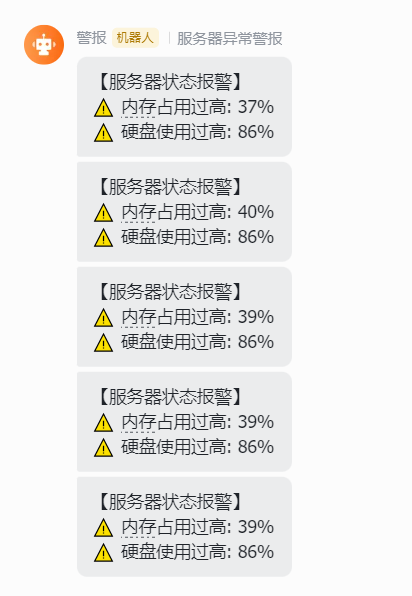
            text = "【服务器状态报警】\n" .. string.format("⚠️ %s \n", server_name) .. msg
        }
    }
    -- Skynet httpc 调用
	body = json.encode(body)
	local host, path = util.get_url_host(FEISHU_WEBHOOK)
	local ok, status, res = pcall(httpc.post_json, host, path, body)
    if not ok then
        skynet.error("飞书发送失败:", status)
    end
end

local function monitor()
    skynet.error("系统监控服务已启动...")
    skynet.fork(function()
        while true do
            -- 1. 计算 CPU 使用率 (需要两次采样计算差值)
            local t1, i1 = get_cpu_usage()
            skynet.sleep(100) -- 间隔 1 秒
            local t2, i2 = get_cpu_usage()
            local cpu_per = math.floor(100 * (1 - (i2 - i1) / (t2 - t1)))
            -- 2. 获取内存和硬盘
            local mem_per, disk_per = get_sys_info()
            -- 3. 判断是否报警
            local alert_msg = ""
            if cpu_per > CPU_THRESHOLD then
                alert_msg = alert_msg .. string.format("⚠️ CPU 占用过高: %d%%\n", cpu_per)
            end
            if mem_per > MEM_THRESHOLD then
                alert_msg = alert_msg .. string.format("⚠️ 内存占用过高: %d%%\n", mem_per)
            end
            if disk_per > MEM_THRESHOLD then
                alert_msg = alert_msg .. string.format("⚠️ 硬盘使用过高: %d%%\n", disk_per)
            end
            if alert_msg ~= "" then
                send_to_feishu(alert_msg)
                skynet.sleep(6000*5) -- 报警后冷却 5 分钟,避免刷屏
            end
            skynet.sleep(500) -- 每 5 秒检测一次
        end
    end)
end
飞书机器人准备
在飞书群聊中:设置 -> 群机器人 -> 添加机器人 -> 自定义机器人。
复制产生的 Webhook URL。
安全设置建议勾选"自定义关键词",例如设置关键词为 报警。