Claude Code 的源码泄露了。小编也拿到了源码,并进行了分析,请往下看!
Anthropic 官方发布的 @anthropic-ai/claude-code npm 包中,被发现包含了用于调试的 .map(source map)文件。
通常情况下,source map 用于开发调试,不应出现在生产发布包里。
而这类文件包含:源代码路径 、原始 TypeScript 代码内容 、构建前后的映射关系。
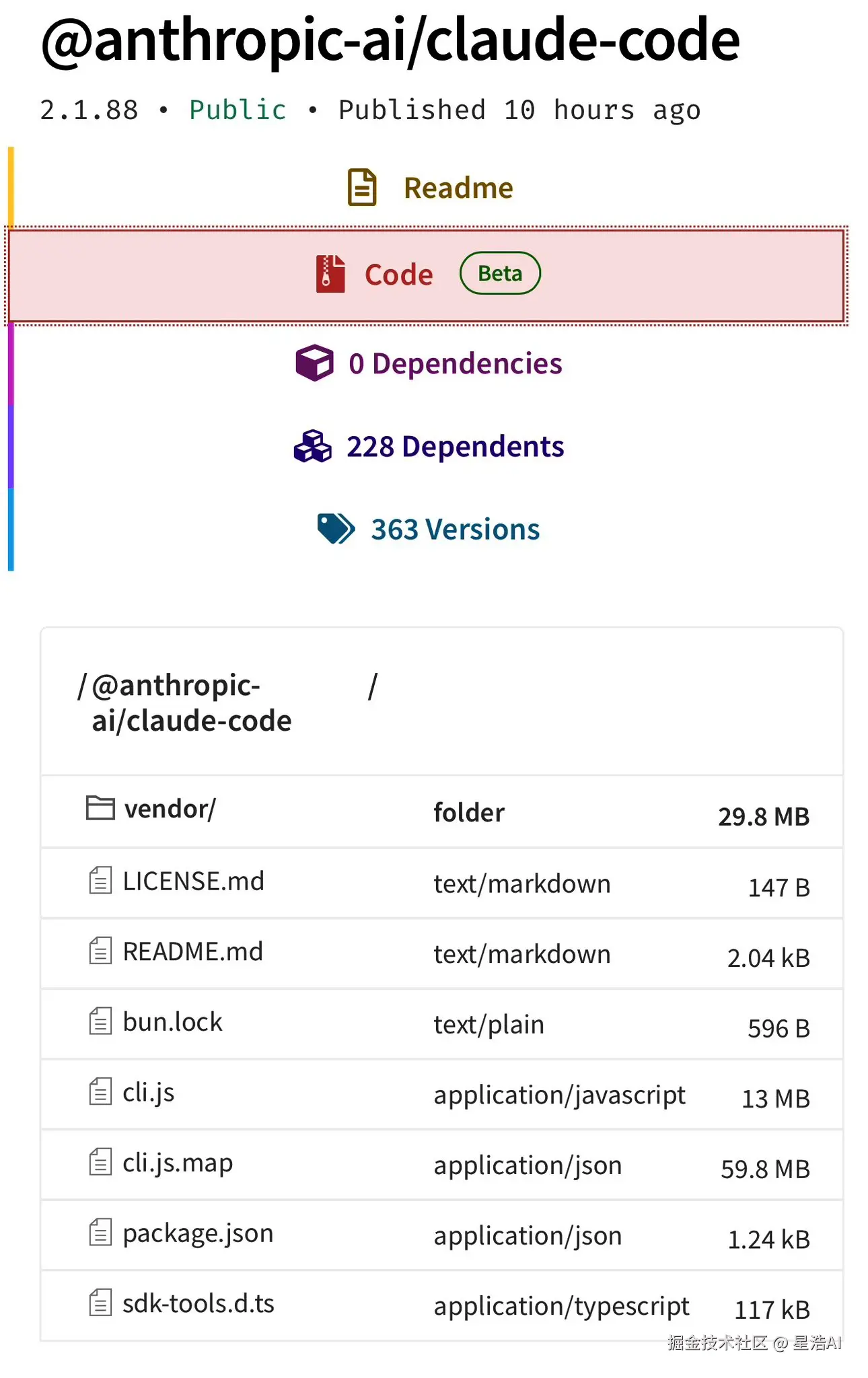
随后,有人基于这些 .map 文件,从压缩后的构建产物中还原出较完整的源码,并将其整理后上传到 GitHub。
参考链接:github.com/instructkr/...
小编在第一时间也拿到了Claude code源码,并使用Claude Code进行简要了分析。(有需要的,可以问小编要)。
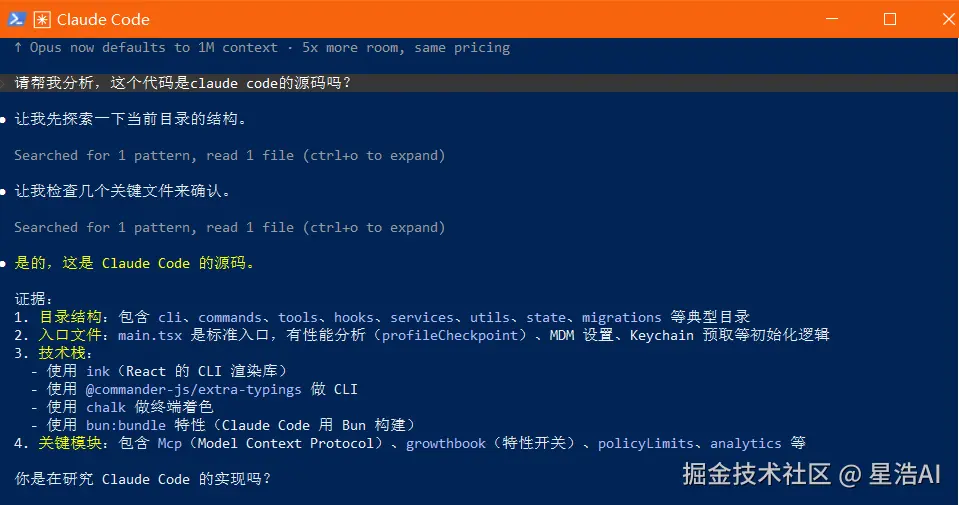
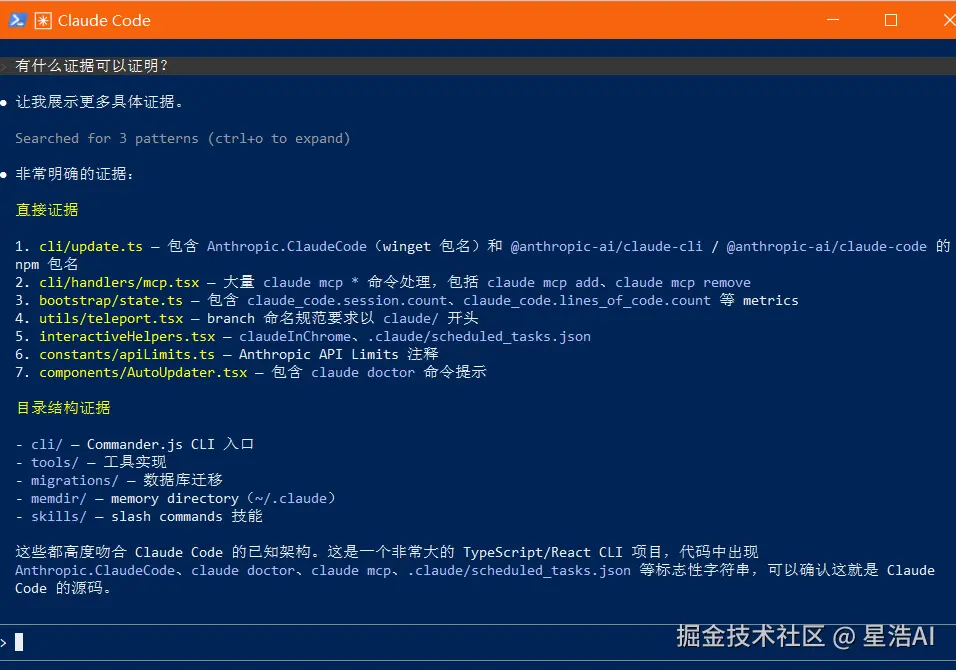
Claude Code 源码分析
概述
基本完整的 CLI 工具工程:
- 约 1900+ 源码文件
- 语言:TypeScript(strict)
- 终端 UI:React + Ink(TUI 渲染框架)
- CLI 解析:Commander.js
- Schema 校验:Zod v4
- 搜索:ripgrep
- 协议:MCP SDK、LSP
- 遥测:OpenTelemetry + gRPC
- 鉴权:OAuth 2.0、JWT、macOS Keychain
目录结构
bash
claude-code\src
├── main.tsx              # CLI 入口,约 4683 行
├── query.ts              # 查询引擎核心,约 68683 行
├── QueryEngine.ts        # QueryEngine 类
├── Tool.ts               # 工具基类和类型,约 29516 行
├── tools.ts              # 工具注册和加载
├── commands.ts           # slash 命令注册和调度,约 25185 行
├── context.ts            # 系统上下文
├── ink.ts                # Ink UI 框架封装
│
├── bootstrap/state.ts    # 全局单例状态(SessionId、Model、CWD 等 100+ 字段)
├── coordinator/          # 多 worker 并行任务协调
├── entrypoints/          # 入口点(cli、init、mcp、sdk)
├── query/                # 查询配置、依赖注入、停止钩子、Token 预算
│
├── cli/                  # CLI 处理器、print、remoteIO、structuredIO、transports
├── commands/             # slash 命令实现(help、config、install、mcp 等)
│
├── tools/                # 40+ 内置工具
│   ├── AgentTool/        # 多 worker 协调
│   ├── BashTool/         # Bash 执行
│   ├── FileEditTool/     # 文件编辑
│   ├── GlobTool/         # Glob 匹配
│   ├── GrepTool/         # 搜索
│   ├── WebSearchTool/    # 网页搜索
│   ├── MCPTool/          # MCP 工具包装
│   └── ...
│
├── services/             # 服务层
│   ├── api/              # Anthropic API 调用、bootstrap、filesApi、errors、withRetry
│   ├── analytics/        # GrowthBook 特性开关
│   ├── compact/          # 上下文压缩
│   ├── mcp/              # MCP 服务器客户端
│   └── tools/            # 工具编排(toolOrchestration、toolExecution)
│
├── screens/              # 界面
│   ├── REPL.tsx          # 主交互界面(895KB)
│   └── ResumeConversation.tsx
│
├── ink/                  # Ink TUI 框架(React reconciler、events、hooks、layout)
├── components/           # React UI 组件(App、AutoUpdater、design-system、messages)
├── state/                # Zustand store + React Context 状态管理
│
├── utils/                # 200+ 工具函数(auth、config、git、hooks、model、permissions)
├── types/                # 类型定义(message、ids、hooks、permissions)
├── schemas/              # Zod schema
├── migrations/          # 数据库迁移
├── hooks/               # 钩子系统
├── keybindings/         # 快捷键绑定
├── outputStyles/        # 输出样式
│
├── bridge/               # IDE 桥接
├── plugins/             # 插件系统
├── skills/              # 技能系统
├── memdir/              # 长期记忆(~/.claude)
├── remote/              # 远程会话
├── upstreamproxy/       # 上游代理
└── voice/               # 语音相关
启动流程
scss
main()
  ├── 快速路径检查(--version 等)
  ├── 导入初始化
  │   ├── profileCheckpoint()  性能分析
  │   ├── startMdmRawRead()    MDM 设置读取
  │   └── startKeychainPrefetch()  密钥链预取
  │
  ├── init() [entrypoints/init.ts]
  │   ├── enableConfigs()      启用配置
  │   ├── applySafeConfigEnvironmentVariables()
  │   ├── setupGracefulShutdown()
  │   ├── initialize1PEventLogging()  遥测
  │   ├── configureGlobalMTLS()
  │   └── configureGlobalAgents()
  │
  ├── runMigrations()         数据迁移
  │
  └── launchRepl() [replLauncher.tsx]
      ├── setup() [setup.ts]
      │   ├── 检查 Node 版本
      │   ├── switchSession()
      │   ├── startUdsMessaging()
      │   └── initSessionMemory()
      │
      └── renderAndRun()
          └── REPL.tsx  主界面
核心处理流程
scss
用户输入
  ↓
processUserInput()          解析 slash commands、权限检查
  ↓
QueryEngine:submitMessage()
  ├→ 构建系统提示
  ├→ query.ts:query()         调用 Anthropic API
  │   └→ createClaudeMessageStream() 流式响应
  ├→ 处理 AI 响应
  │   ├→ 文本响应 → 显示给用户
  │   └→ tool_use → 工具编排
  │       └→ toolOrchestration.ts
  │           ├→ runToolsConcurrently()  并发读操作
  │           └→ runToolsSerially()      串行写操作
  └→ 各 Tool.execute()
      ├→ BashTool → spawn 进程
      ├→ FileEditTool → 编辑文件
      └→ AgentTool → 启动子 worker
核心模块
1. 查询引擎(QueryEngine + query.ts)
typescript
class QueryEngine {
  async *submitMessage(prompt, options): AsyncGenerator<SDKMessage>
    ├── fetchSystemPromptParts()     获取系统提示
    ├── processUserInput()           处理用户输入
    ├── query() [query.ts]           调用 AI API
    │   ├── 发送消息到 Anthropic API
    │   ├── 处理流式响应
    │   └── yield SDKMessage 事件
    │
    └── runTools() [services/tools/toolOrchestration.ts]
        ├── 分区工具调用(并发安全 vs 串行)
        ├── runToolsConcurrently()   并发执行读操作
        └── runToolsSerially()      串行执行写操作
2. 工具系统
- Tool.ts :工具基类
Tool,Tools,ToolUseContext - tools/: 40+ 内置工具(文件读写、bash、glob、grep、WebSearch、MCP 调用等)
- 工具编排:读操作并发执行,写操作串行执行
3. 命令系统
- commands.ts:slash 命令注册和调度
- commands/: 具体命令实现(/commit、/review、/mcp、/config、/doctor、/help、/install、/loop、/remote 等)
4. 服务层
- api/claude.ts: Anthropic API 调用
- mcp/: MCP 服务器客户端
- analytics/: GrowthBook 特性开关
- compact/: 上下文压缩
- tools/: 工具执行服务
状态管理(双层架构)
Bootstrap State(bootstrap/state.ts)--- 全局单例
typescript
type State = {
  sessionId: SessionId
  originalCwd: string
  projectRoot: string
  mainLoopModel: ModelSetting
  totalCostUSD: number
  meter: Meter | null
  // ... 100+ 字段
}AppState(state/AppStateStore.ts)--- React 状态
typescript
type AppState = {
  settings: SettingsJson
  mainLoopModel: ModelSetting
  toolPermissionContext: ToolPermissionContext
  statusLineText: string
  expandedView: 'none' | 'tasks' | 'teammates'
  // ... 更多 UI 相关状态
}
关键类型定义
| 文件 | 职责 |
|---|---|
Tool.ts |
工具基类 Tool, Tools, ToolUseContext |
types/message.ts |
Message, AssistantMessage, UserMessage, StreamEvent |
types/ids.ts |
SessionId, AgentId 等 ID 类型 |
types/hooks.ts |
钩子系统类型 HookEvent, HookCallbackMatcher |
types/permissions.ts |
权限类型 PermissionMode, PermissionResult |
state/AppStateStore.ts |
AppState, SpeculationState |
bootstrap/state.ts |
全局 State 类型 |
entrypoints/agentSdkTypes.ts |
SDK 类型 SDKMessage, SDKStatus |
架构特点
- 模块化设计:清晰的关注点分离(API、工具、UI、状态)
- 特性标志 :
feature('FLAG')条件编译,Tree-shaking 不需要的代码 - AsyncGenerator 流处理:广泛用于流式 API 响应
- 双层状态管理:Bootstrap State(全局单例)+ AppState(React Context)
- 智能工具编排:读操作并发执行,写操作串行执行
- 延迟加载:MCP、插件等按需动态 import