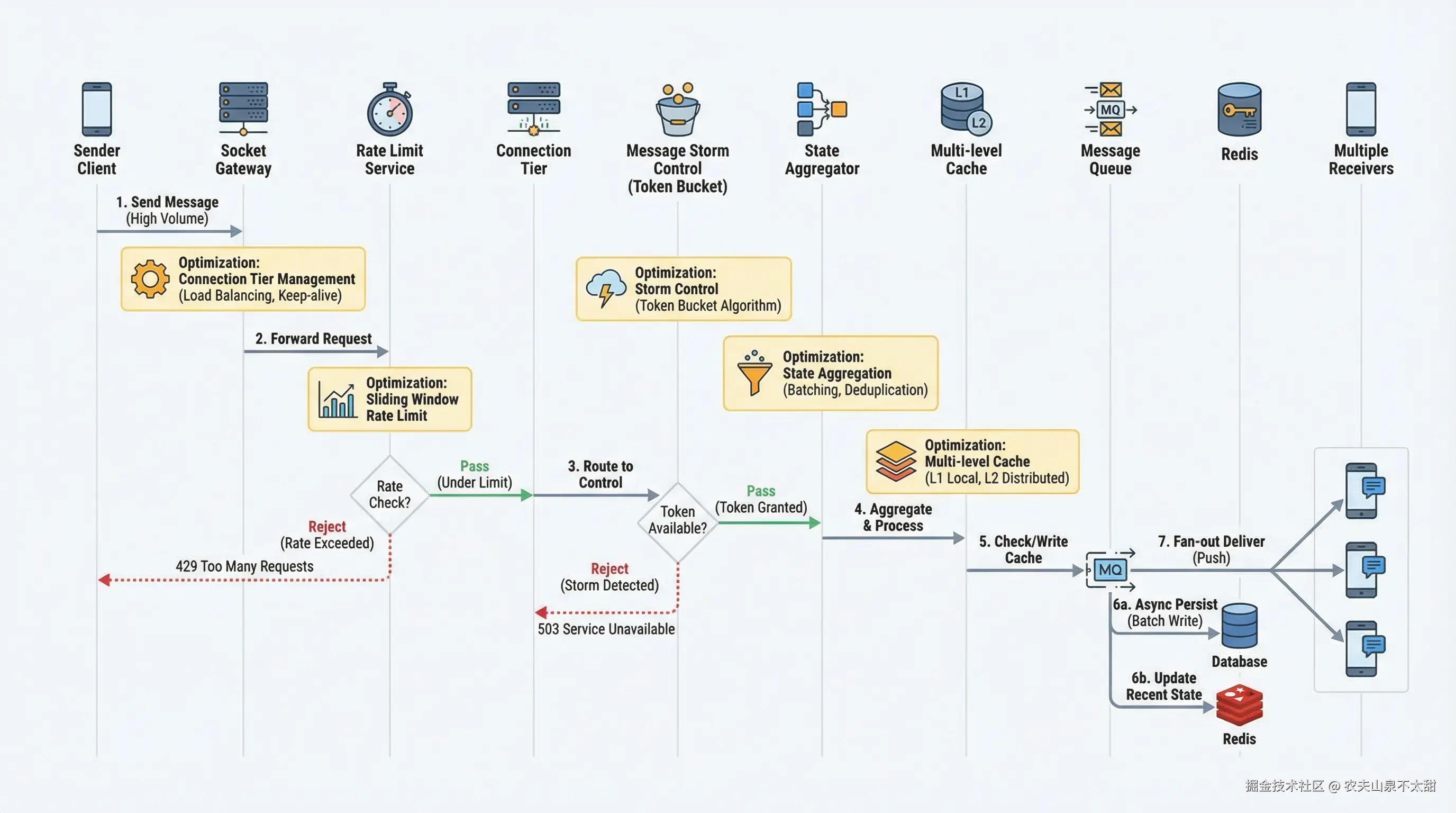
 NestJS 作为企业级 Node.js 框架,凭借其模块化架构、依赖注入和装饰器特性,为 Socket.io 服务提供了更加结构化和可维护的实现方式。本文将前文中的原生 Socket.io 代码转换为 NestJS 最佳实践,构建一个高性能的 IM 通信服务。
项目结构与依赖配置
1.1 项目初始化与依赖安装
NestJS 项目需要安装核心依赖以及 Socket.io 相关包。在开始实现之前,需要初始化项目并安装必要的依赖包:
bash
# 创建 NestJS 项目
nest new im-socket-service
cd im-socket-service

# 安装 Socket.io 相关依赖
npm install @nestjs/platform-socket.io @nestjs/websockets socket.io

# 安装 Redis 适配器
npm install @socket.io/redis-adapter ioredis

# 安装性能监控依赖
npm install @willsoto/nestjs-prometheus prom-client

# 安装类验证和转换
npm install class-validator class-transformer
项目采用模块化结构,将不同的功能域分离到独立模块中。主目录结构包含核心业务模块(用户、消息、会话)、基础设施模块(缓存、数据库)以及网关模块(Socket 连接)。每个模块拥有自己的控制器、服务和数据访问层,这种分层架构确保了代码的可测试性和可维护性。配置目录集中管理环境变量和全局配置,便于不同环境下的部署切换。
1.2 环境配置与常量定义
typescript
// config/constants.ts
export const SOCKET_CONFIG = {
  // 心跳配置
  PING_TIMEOUT: 10000,
  PING_INTERVAL: 15000,

  // 消息配置
  MAX_MESSAGE_SIZE: 100 * 1024, // 100KB
  MESSAGE_COMPRESSION: true,

  // 连接配置
  MAX_CONNECTIONS_PER_IP: 5,
  CONNECTION_TIMEOUT: 30000,

  // Redis 配置
  REDIS_PREFIX: 'im:socket:',
  REDIS_TTL: 3600,

  // 限流配置
  RATE_LIMIT: {
    WINDOW_MS: 60000,
    MAX_MESSAGES: 120,
  },
} as const;

export const CONNECTION_TIERS = {
  CRITICAL: {
    name: 'critical',
    weight: 100,
    maxConnections: 10000,
    heartbeatInterval: 30000,
    messageBufferSize: 1000,
  },
  STANDARD: {
    name: 'standard',
    weight: 50,
    maxConnections: 100000,
    heartbeatInterval: 30000,
    messageBufferSize: 500,
  },
  DEGRADED: {
    name: 'degraded',
    weight: 10,
    maxConnections: 50000,
    heartbeatInterval: 60000,
    messageBufferSize: 100,
  },
} as const;
NestJS WebSocket 网关实现
2.1 网关基础架构
NestJS 的 WebSocket 网关是处理 Socket 连接的核心组件。通过 @WebSocketGateway 装饰器定义网关,使用 @WebSocketServer 注入 Server 实例,并通过 @SubscribeMessage 装饰器处理各种消息事件。NestJS 的网关还支持依赖注入,可以直接使用 Service 层的能力。
typescript
// gateways/im.gateway.ts
import {
  WebSocketGateway,
  WebSocketServer,
  SubscribeMessage,
  OnGatewayConnection,
  OnGatewayDisconnect,
  OnGatewayInit,
  ConnectedSocket,
  MessageBody,
} from '@nestjs/websockets';
import { Server, Socket } from 'socket.io';
import { Logger, UseGuards, UsePipes, ValidationPipe } from '@nestjs/common';
import { AuthGuard } from '../guards/ws-auth.guard';
import { RateLimitGuard } from '../guards/rate-limit.guard';
import { ConnectionTierGuard } from '../guards/connection-tier.guard';
import { ImService } from '../services/im.service';
import { MessageDto, TypingDto, ReadReceiptDto } from '../dto';

@WebSocketGateway({
  namespace: '/im',
  cors: {
    origin: '*',
    credentials: true,
  },
  transports: ['websocket'],
  pingTimeout: 10000,
  pingInterval: 15000,
})
export class ImGateway
  implements OnGatewayInit, OnGatewayConnection, OnGatewayDisconnect
{
  @WebSocketServer()
  server: Server;

  private readonly logger = new Logger(ImGateway.name);

  constructor(private readonly imService: ImService) {}

  afterInit(server: Server): void {
    this.logger.log('WebSocket Gateway 初始化完成');
    this.imService.setServer(server);
  }

  async handleConnection(client: Socket): Promise<void> {
    try {
      // 解析认证信息
      const token = client.handshake.auth.token;
      const user = await this.imService.verifyToken(token);

      if (!user) {
        client.emit('auth_error', { message: '认证失败' });
        client.disconnect(true);
        return;
      }

      // 检查连接限制
      const tierResult = await this.imService.acceptConnection(client, user);

      if (!tierResult.accepted) {
        client.emit('connection_rejected', { reason: tierResult.reason });
        client.disconnect(true);
        return;
      }

      // 附加用户信息到 socket
      client.data.userId = user.userId;
      client.data.userTier = tierResult.tier;
      client.data.tierConfig = tierResult.config;
      client.data.connectedAt = Date.now();

      // 加入用户房间
      client.join(`user:${user.userId}`);
      client.join(`tier:${tierResult.tier}`);

      // 设置在线状态
      await this.imService.setPresence(user.userId, 'online', {
        deviceId: user.deviceId,
        tier: tierResult.tier,
      });

      // 发送连接成功消息
      client.emit('connected', {
        socketId: client.id,
        tier: tierResult.tier,
        serverTime: Date.now(),
      });

      this.logger.log(`用户 ${user.userId} 连接成功 (Tier: ${tierResult.tier})`);
    } catch (error) {
      this.logger.error(`连接处理失败: ${error.message}`);
      client.disconnect(true);
    }
  }

  async handleDisconnect(client: Socket): Promise<void> {
    const userId = client.data.userId;

    if (userId) {
      await this.imService.removeConnection(client.id, userId);
      await this.imService.setPresence(userId, 'offline');

      this.logger.log(`用户 ${userId} 断开连接`);
    }
  }

  @UseGuards(AuthGuard, RateLimitGuard)
  @SubscribeMessage('message')
  async handleMessage(
    @ConnectedSocket() client: Socket,
    @MessageBody() data: MessageDto,
  ): Promise<void> {
    const userId = client.data.userId;

    try {
      const result = await this.imService.handleMessage(userId, data);
      client.emit('message_sent', result);
    } catch (error) {
      client.emit('message_error', {
        clientMessageId: data.clientMessageId,
        error: error.message,
      });
    }
  }

  @SubscribeMessage('typing')
  async handleTyping(
    @ConnectedSocket() client: Socket,
    @MessageBody() data: TypingDto,
  ): Promise<void> {
    const userId = client.data.userId;
    await this.imService.handleTyping(userId, data);
  }

  @SubscribeMessage('read_receipt')
  async handleReadReceipt(
    @ConnectedSocket() client: Socket,
    @MessageBody() data: ReadReceiptDto,
  ): Promise<void> {
    const userId = client.data.userId;
    await this.imService.handleReadReceipt(userId, data);
  }

  @SubscribeMessage('join_conversation')
  async handleJoinConversation(
    @ConnectedSocket() client: Socket,
    @MessageBody() data: { conversationId: string },
  ): Promise<void> {
    const userId = client.data.userId;
    await this.imService.joinConversation(client, userId, data.conversationId);
  }

  @SubscribeMessage('leave_conversation')
  async handleLeaveConversation(
    @ConnectedSocket() client: Socket,
    @MessageBody() data: { conversationId: string },
  ): Promise<void> {
    const userId = client.data.userId;
    await this.imService.leaveConversation(client, userId, data.conversationId);
  }
}
2.2 数据传输对象定义
NestJS 推荐使用 DTO(Data Transfer Object)进行请求数据验证。通过 class-validator 和 class-transformer,可以实现自动的数据转换和验证,确保进入网关的数据符合预期格式。
typescript
// dto/index.ts
import { IsString, IsNotEmpty, IsOptional, IsNumber, MaxLength, IsEnum } from 'class-validator';

export class MessageDto {
  @IsString()
  @IsNotEmpty()
  clientMessageId: string;

  @IsString()
  @IsNotEmpty()
  conversationId: string;

  @IsString()
  @IsNotEmpty()
  @MaxLength(10000)
  content: string;

  @IsOptional()
  @IsNumber()
  messageType?: number;

  @IsOptional()
  metadata?: Record<string, any>;
}

export class TypingDto {
  @IsString()
  @IsNotEmpty()
  conversationId: string;

  @IsBoolean()
  isTyping: boolean;
}

export class ReadReceiptDto {
  @IsString()
  @IsNotEmpty()
  conversationId: string;

  @IsString()
  @IsNotEmpty()
  messageId: string;
}

export class JoinConversationDto {
  @IsString()
  @IsNotEmpty()
  conversationId: string;
}
2.3 Socket 认证守卫
守卫是 NestJS 管道/守卫/拦截器体系中的重要组成部分。Socket 认证守卫在消息处理之前验证用户身份,支持从握手信息或 Socket 数据中提取认证凭证。
typescript
// guards/ws-auth.guard.ts
import { CanActivate, ExecutionContext, Injectable, Logger } from '@nestjs/common';
import { WsException } from '@nestjs/websockets';
import { Socket } from 'socket.io';
import { JwtService } from '../services/jwt.service';

@Injectable()
export class AuthGuard implements CanActivate {
  private readonly logger = new Logger(AuthGuard.name);

  constructor(private readonly jwtService: JwtService) {}

  async canActivate(context: ExecutionContext): Promise<boolean> {
    const client: Socket = context.switchToWs().getClient();

    // 优先从 socket.data 获取已验证的用户信息
    if (client.data.userId) {
      return true;
    }

    // 否则从握手信息中验证
    const token = this.extractToken(client);

    if (!token) {
      throw new WsException('未提供认证令牌');
    }

    try {
      const user = await this.jwtService.verifySocketToken(token);
      client.data.userId = user.userId;
      client.data.userTier = user.tier;
      return true;
    } catch (error) {
      throw new WsException('认证失败');
    }
  }

  private extractToken(client: Socket): string | null {
    // 尝试从多个位置提取 token
    return (
      client.handshake.auth.token ||
      client.handshake.headers.authorization?.replace('Bearer ', '') ||
      this.extractTokenFromQuery(client)
    );
  }

  private extractTokenFromQuery(client: Socket): string | null {
    const token = client.handshake.query.token;
    if (Array.isArray(token)) {
      return token[0];
    }
    return token || null;
  }
}
2.4 限流守卫实现
typescript
// guards/rate-limit.guard.ts
import { CanActivate, ExecutionContext, Injectable } from '@nestjs/common';
import { WsException } from '@nestjs/websockets';
import { Socket } from 'socket.io';
import { RateLimiterService } from '../services/rate-limiter.service';

@Injectable()
export class RateLimitGuard implements CanActivate {
  constructor(private readonly rateLimiterService: RateLimiterService) {}

  async canActivate(context: ExecutionContext): Promise<boolean> {
    const client: Socket = context.switchToWs().getClient();
    const userId = client.data.userId;

    if (!userId) {
      return true; // 认证守卫会处理未认证的情况
    }

    const result = await this.rateLimiterService.check(userId);

    if (!result.allowed) {
      client.emit('rate_limited', {
        retryAfter: result.retryAfter,
        message: `发送频率超限,请在 ${result.retryAfter} 秒后重试`,
      });
      throw new WsException('发送频率超限');
    }

    return true;
  }
}
2.5 连接分级守卫
typescript
// guards/connection-tier.guard.ts
import { CanActivate, ExecutionContext, Injectable } from '@nestjs/common';
import { WsException } from '@nestjs/websockets';
import { Socket } from 'socket.io';
import { ConnectionTierService } from '../services/connection-tier.service';

@Injectable()
export class ConnectionTierGuard implements CanActivate {
  constructor(private readonly tierService: ConnectionTierService) {}

  async canActivate(context: ExecutionContext): Promise<boolean> {
    const client: Socket = context.switchToWs().getClient();
    const tier = client.data.userTier;

    // 根据连接级别应用不同的限制
    const tierConfig = this.tierService.getTierConfig(tier);

    if (!tierConfig) {
      throw new WsException('无效的连接级别');
    }

    // 将级别配置附加到 socket
    client.data.tierConfig = tierConfig;

    return true;
  }
}
核心服务层实现
3.1 IM 主服务
主服务是整个 Socket 业务的核心,负责协调各个子服务的功能,处理业务逻辑并与网关通信。
typescript
// services/im.service.ts
import { Injectable, Logger, OnModuleInit } from '@nestjs/common';
import { Server, Socket } from 'socket.io';
import { MessageDto, TypingDto, ReadReceiptDto } from '../dto';
import { ConnectionTierService } from './connection-tier.service';
import { PresenceService } from './presence.service';
import { MessageService } from './message.service';
import { StateAggregatorService } from './state-aggregator.service';
import { MessageStormControllerService } from './message-storm-controller.service';
import { JwtService } from './jwt.service';
import { RedisService } from './redis.service';

export interface AuthUser {
  userId: string;
  tier: string;
  deviceId: string;
  isPremium: boolean;
  isAdmin: boolean;
}

export interface ConnectionResult {
  accepted: boolean;
  tier?: string;
  config?: any;
  reason?: string;
}

@Injectable()
export class ImService implements OnModuleInit {
  private readonly logger = new Logger(ImService.name);
  private server: Server;

  constructor(
    private readonly tierService: ConnectionTierService,
    private readonly presenceService: PresenceService,
    private readonly messageService: MessageService,
    private readonly stateAggregator: StateAggregatorService,
    private readonly stormController: MessageStormControllerService,
    private readonly jwtService: JwtService,
    private readonly redisService: RedisService,
  ) {}

  onModuleInit(): void {
    this.stateAggregator.setServer(this.server);
    this.stormController.setServer(this.server);
  }

  setServer(server: Server): void {
    this.server = server;
    this.stateAggregator.setServer(server);
    this.stormController.setServer(server);
  }

  async verifyToken(token: string): Promise<AuthUser | null> {
    return this.jwtService.verifySocketToken(token);
  }

  async acceptConnection(
    client: Socket,
    user: AuthUser,
  ): Promise<ConnectionResult> {
    return this.tierService.acceptConnection(client, user);
  }

  async removeConnection(socketId: string, userId: string): Promise<void> {
    this.tierService.removeConnection(socketId, userId);
  }

  async setPresence(
    userId: string,
    status: string,
    metadata?: Record<string, any>,
  ): Promise<void> {
    await this.presenceService.setPresence(userId, status, metadata);

    // 广播状态变更
    this.stateAggregator.recordUpdate(`presence:${userId}`, {
      type: 'presence',
      userId,
      status,
      timestamp: Date.now(),
      room: 'presence',
    });
  }

  async handleMessage(userId: string, data: MessageDto): Promise<any> {
    const message = await this.messageService.createMessage({
      ...data,
      senderId: userId,
    });

    // 获取会话成员并广播消息
    const members = await this.messageService.getConversationMembers(
      data.conversationId,
    );

    for (const memberId of members) {
      if (memberId !== userId) {
        this.stormController.enqueue({
          targetRoom: `user:${memberId}`,
          event: 'new_message',
          data: message,
          senderId: userId,
        });
      }
    }

    return {
      clientMessageId: data.clientMessageId,
      serverMessageId: message.id,
      timestamp: message.createdAt,
    };
  }

  async handleTyping(userId: string, data: TypingDto): Promise<void> {
    this.stateAggregator.recordUpdate(`typing:${data.conversationId}`, {
      type: 'typing',
      userId,
      conversationId: data.conversationId,
      isTyping: data.isTyping,
      timestamp: Date.now(),
      room: `conversation:${data.conversationId}`,
    });
  }

  async handleReadReceipt(
    userId: string,
    data: ReadReceiptDto,
  ): Promise<void> {
    await this.messageService.markAsRead(
      userId,
      data.conversationId,
      data.messageId,
    );

    // 广播已读回执
    this.server
      .to(`user:${userId}`)
      .emit('read_receipt', {
        conversationId: data.conversationId,
        messageId: data.messageId,
        readBy: userId,
        readAt: Date.now(),
      });
  }

  async joinConversation(
    client: Socket,
    userId: string,
    conversationId: string,
  ): Promise<void> {
    client.join(`conversation:${conversationId}`);
    await this.presenceService.subscribeToConversation(
      userId,
      conversationId,
    );

    // 获取当前会话在线成员
    const onlineMembers = await this.presenceService.getConversationPresence(
      conversationId,
    );

    client.emit('conversation_members', {
      conversationId,
      onlineMembers,
    });
  }

  async leaveConversation(
    client: Socket,
    userId: string,
    conversationId: string,
  ): Promise<void> {
    client.leave(`conversation:${conversationId}`);
    await this.presenceService.unsubscribeFromConversation(
      userId,
      conversationId,
    );
  }

  async getOnlineUsers(userIds: string[]): Promise<Map<string, string>> {
    return this.presenceService.getMultiplePresence(userIds);
  }
}
3.2 连接分级服务
连接分级服务实现了用户连接的分级管理和资源分配策略,确保高优先级用户获得更好的服务质量。
typescript
// services/connection-tier.service.ts
import { Injectable, Logger } from '@nestjs/common';
import { Socket } from 'socket.io';
import { CONNECTION_TIERS, SOCKET_CONFIG } from '../../config/constants';

export interface ConnectionTierConfig {
  name: string;
  weight: number;
  maxConnections: number;
  heartbeatInterval: number;
  messageBufferSize: number;
}

export interface UserConnection {
  socket: Socket;
  tier: string;
  userId: string;
  connectedAt: number;
  config: ConnectionTierConfig;
}

@Injectable()
export class ConnectionTierService {
  private readonly logger = new Logger(ConnectionTierService.name);

  private connections: Map<string, UserConnection> = new Map();
  private tierConnections: Map<string, Set<string>> = new Map([
    ['critical', new Set()],
    ['standard', new Set()],
    ['degraded', new Set()],
  ]);

  private totalConnections = 0;
  private readonly maxTotalConnections = 200000;

  constructor() {
    // 初始化各等级配置
    Object.entries(CONNECTION_TIERS).forEach(([, config]) => {
      this.tierConnections.set(config.name, new Set());
    });
  }

  private determineTier(authData: any): string {
    if (authData.isPremium || authData.isAdmin) {
      return 'critical';
    }
    if (authData.isActive || authData.lastLoginWithin(7, 'days')) {
      return 'standard';
    }
    return 'degraded';
  }

  private getTierConfig(tierName: string): ConnectionTierConfig | null {
    const tier = Object.values(CONNECTION_TIERS).find(
      (t) => t.name === tierName,
    );
    return tier || null;
  }

  async acceptConnection(
    client: Socket,
    authData: any,
  ): Promise<{ accepted: boolean; tier?: string; config?: any; reason?: string }> {
    const tierName = this.determineTier(authData);
    const tierConfig = this.getTierConfig(tierName);

    if (!tierConfig) {
      return { accepted: false, reason: '无效的连接级别' };
    }

    // 检查全局连接数限制
    if (this.totalConnections >= this.maxTotalConnections) {
      const evicted = await this.evictLowestPriority();
      if (!evicted) {
        return { accepted: false, reason: '系统繁忙,请稍后重试' };
      }
    }

    const currentTierCount = this.tierConnections.get(tierName).size;

    // 检查当前级别连接数限制
    if (currentTierCount >= tierConfig.maxConnections) {
      // 尝试降级到下一级
      const lowerTier = tierName === 'critical' ? 'standard' :
                        tierName === 'standard' ? 'degraded' : null;

      if (lowerTier) {
        const lowerConfig = this.getTierConfig(lowerTier);
        if (lowerConfig && this.tierConnections.get(lowerTier).size < lowerConfig.maxConnections) {
          return this.createConnection(client, authData, lowerTier, lowerConfig);
        }
      }

      return { accepted: false, reason: `${tierName} 连接已满` };
    }

    return this.createConnection(client, authData, tierName, tierConfig);
  }

  private createConnection(
    client: Socket,
    authData: any,
    tierName: string,
    config: ConnectionTierConfig,
  ): { accepted: boolean; tier: string; config: any } {
    const connection: UserConnection = {
      socket: client,
      tier: tierName,
      userId: authData.userId,
      connectedAt: Date.now(),
      config,
    };

    this.connections.set(client.id, connection);
    this.tierConnections.get(tierName).add(client.id);
    this.totalConnections++;

    this.logger.debug(
      `连接建立: ${authData.userId} -> ${tierName} (总计: ${this.totalConnections})`,
    );

    return { accepted: true, tier: tierName, config };
  }

  private async evictLowestPriority(): Promise<boolean> {
    const degradedConnections = this.tierConnections.get('degraded');

    if (degradedConnections.size > 0) {
      let oldestSocketId: string | null = null;
      let oldestTime = Infinity;

      for (const socketId of degradedConnections) {
        const conn = this.connections.get(socketId);
        if (conn && conn.connectedAt < oldestTime) {
          oldestTime = conn.connectedAt;
          oldestSocketId = socketId;
        }
      }

      if (oldestSocketId) {
        const conn = this.connections.get(oldestSocketId);
        if (conn) {
          conn.socket.emit('forced_disconnect', {
            reason: '系统资源紧张',
          });
          conn.socket.disconnect(true);
          return true;
        }
      }
    }

    return false;
  }

  async removeConnection(socketId: string, userId: string): Promise<void> {
    const connection = this.connections.get(socketId);

    if (connection) {
      this.tierConnections.get(connection.tier).delete(socketId);
      this.connections.delete(socketId);
      this.totalConnections--;

      this.logger.debug(
        `连接移除: ${userId} -> ${connection.tier} (总计: ${this.totalConnections})`,
      );
    }
  }

  getTierConfig(tierName: string): ConnectionTierConfig | null {
    return this.getTierConfig(tierName);
  }

  getStats(): any {
    const stats = {
      total: this.totalConnections,
      byTier: {} as Record<string, number>,
      limits: {} as Record<string, number>,
    };

    for (const [tier, sockets] of this.tierConnections.entries()) {
      stats.byTier[tier] = sockets.size;
      const config = this.getTierConfig(tier);
      stats.limits[tier] = config?.maxConnections || 0;
    }

    return stats;
  }
}
3.3 消息风暴控制器
消息风暴控制器是保护系统在高峰期稳定运行的关键组件,通过令牌桶算法控制消息发送速率。
typescript
// services/message-storm-controller.service.ts
import { Injectable, Logger, OnModuleInit } from '@nestjs/common';
import { Server } from 'socket.io';

export interface QueuedMessage {
  targetRoom: string;
  event: string;
  data: any;
  senderId: string;
}

@Injectable()
export class MessageStormControllerService implements OnModuleInit {
  private readonly logger = new Logger(MessageStormControllerService.name);
  private server: Server;

  private tokenBucket: TokenBucket;
  private messageQueue: QueuedMessage[] = [];
  private processingInterval: NodeJS.Timeout;

  private readonly maxMessagesPerSecond = 50000;
  private readonly maxBurstSize = 1000;
  private readonly batchSize = 100;

  onModuleInit(): void {
    this.tokenBucket = new TokenBucket({
      capacity: this.maxBurstSize,
      refillRate: this.maxMessagesPerSecond / 1000,
    });

    this.startProcessing();
  }

  setServer(server: Server): void {
    this.server = server;
  }

  enqueue(message: QueuedMessage): void {
    const result = this.tokenBucket.tryConsume(1);

    if (result.consumed) {
      this.processMessage(message);
    } else {
      // 消息入队等待
      this.messageQueue.push(message);

      // 限制队列长度
      if (this.messageQueue.length > 10000) {
        this.messageQueue.shift(); // 丢弃最旧的消息
        this.logger.warn('消息队列已满,丢弃最旧消息');
      }
    }
  }

  private processMessage(message: QueuedMessage): void {
    const { targetRoom, event, data, senderId } = message;

    if (!this.server) {
      this.logger.error('Server 未初始化');
      return;
    }

    this.server.to(targetRoom).volatile.emit(event, {
      ...data,
      senderId,
      sentAt: Date.now(),
    });
  }

  private startProcessing(): void {
    this.processingInterval = setInterval(async () => {
      // 每秒补充的令牌数
      await this.processQueue();
    }, 100);
  }

  private async processQueue(): Promise<void> {
    if (this.messageQueue.length === 0) return;

    // 每 100ms 处理最多 batchSize 条消息
    const batch = this.messageQueue.splice(0, this.batchSize);

    for (const message of batch) {
      const result = this.tokenBucket.tryConsume(1);

      if (result.consumed) {
        this.processMessage(message);
      } else {
        // 放回队列头部
        this.messageQueue.unshift(message);
        break;
      }
    }
  }

  getQueueSize(): number {
    return this.messageQueue.length;
  }

  getTokenBucketStatus(): { tokens: number; capacity: number } {
    return {
      tokens: this.tokenBucket.getTokens(),
      capacity: this.tokenBucket.getCapacity(),
    };
  }
}

// 令牌桶算法实现
class TokenBucket {
  private tokens: number;
  private lastRefill: number;
  private readonly capacity: number;
  private readonly refillRate: number;

  constructor(options: { capacity: number; refillRate: number }) {
    this.capacity = options.capacity;
    this.refillRate = options.refillRate;
    this.tokens = options.capacity;
    this.lastRefill = Date.now();
  }

  private refill(): void {
    const now = Date.now();
    const elapsed = now - this.lastRefill;
    const tokensToAdd = elapsed * this.refillRate;

    this.tokens = Math.min(this.capacity, this.tokens + tokensToAdd);
    this.lastRefill = now;
  }

  tryConsume(tokens: number): { consumed: boolean; remaining: number } {
    this.refill();

    if (this.tokens >= tokens) {
      this.tokens -= tokens;
      return { consumed: true, remaining: this.tokens };
    }

    return { consumed: false, remaining: this.tokens };
  }

  getTokens(): number {
    this.refill();
    return this.tokens;
  }

  getCapacity(): number {
    return this.capacity;
  }
}
3.4 状态聚合服务
状态聚合服务通过批量处理和合并状态更新,减少网络传输量并提高系统响应速度。
typescript
// services/state-aggregator.service.ts
import { Injectable, Logger, OnModuleInit } from '@nestjs/common';
import { Server } from 'socket.io';

export interface StateUpdate {
  type: string;
  userId?: string;
  conversationId?: string;
  timestamp: number;
  room: string;
  [key: string]: any;
}

export interface AggregatedUpdate {
  type: string;
  updates: StateUpdate[];
  timestamp: number;
}

@Injectable()
export class StateAggregatorService implements OnModuleInit {
  private readonly logger = new Logger(StateAggregatorService.name);
  private server: Server;

  private pendingUpdates: Map<string, {
    updates: StateUpdate[];
    flushAt: number;
    scheduled: boolean;
  }> = new Map();

  private readonly flushInterval = 100; // 100ms 聚合窗口

  onModuleInit(): void {
    // 定期清理过期的待处理更新
    setInterval(() => {
      this.cleanupExpired();
    }, 60000);
  }

  setServer(server: Server): void {
    this.server = server;
  }

  recordUpdate(key: string, update: StateUpdate): void {
    if (!this.pendingUpdates.has(key)) {
      this.pendingUpdates.set(key, {
        updates: [],
        flushAt: Date.now() + this.flushInterval,
        scheduled: false,
      });
    }

    const pending = this.pendingUpdates.get(key);

    // 对于 typing 状态,合并同一用户的状态
    if (update.type === 'typing') {
      const existingIndex = pending.updates.findIndex(
        (u) => u.type === 'typing' && u.userId === update.userId,
      );

      if (existingIndex >= 0) {
        pending.updates[existingIndex] = {
          ...update,
          timestamp: Date.now(),
        };
        return;
      }
    }

    pending.updates.push(update);

    // 调度刷新
    if (!pending.scheduled) {
      this.scheduleFlush(key);
    }
  }

  private scheduleFlush(key: string): void {
    const pending = this.pendingUpdates.get(key);
    if (!pending) return;

    pending.scheduled = true;

    setTimeout(() => {
      this.flushUpdates(key);
    }, pending.flushAt - Date.now());
  }

  private flushUpdates(key: string): void {
    const pending = this.pendingUpdates.get(key);

    if (!pending || pending.updates.length === 0) {
      this.pendingUpdates.delete(key);
      return;
    }

    // 按房间分组
    const groupedUpdates = this.groupByRoom(pending.updates);

    // 广播更新
    for (const [room, updates] of Object.entries(groupedUpdates)) {
      if (this.server) {
        this.server.to(room).emit('state_batch', {
          updates,
          timestamp: Date.now(),
        } as AggregatedUpdate);
      }
    }

    this.pendingUpdates.delete(key);
  }

  private groupByRoom(updates: StateUpdate[]): Map<string, StateUpdate[]> {
    const grouped = new Map<string, StateUpdate[]>();

    for (const update of updates) {
      const room = update.room || 'global';

      if (!grouped.has(room)) {
        grouped.set(room, []);
      }

      grouped.get(room).push(update);
    }

    return grouped;
  }

  private cleanupExpired(): void {
    const now = Date.now();

    for (const [key, pending] of this.pendingUpdates.entries()) {
      if (pending.flushAt < now - 60000) {
        this.pendingUpdates.delete(key);
      }
    }
  }

  flushAll(): void {
    for (const key of this.pendingUpdates.keys()) {
      this.flushUpdates(key);
    }
  }

  getPendingCount(): number {
    return this.pendingUpdates.size;
  }
}
3.5 限流服务
限流服务采用滑动窗口算法,对用户的消息发送频率进行控制,防止恶意刷屏和资源滥用。
typescript
// services/rate-limiter.service.ts
import { Injectable, Logger } from '@nestjs/common';
import { SOCKET_CONFIG } from '../../config/constants';

export interface RateLimitResult {
  allowed: boolean;
  remaining: number;
  currentCount: number;
  retryAfter?: number;
}

@Injectable()
export class RateLimiterService {
  private readonly logger = new Logger(RateLimiterService.name);

  private windowData: Map<string, number[]> = new Map();
  private readonly windowMs = SOCKET_CONFIG.RATE_LIMIT.WINDOW_MS;
  private readonly maxMessages = SOCKET_CONFIG.RATE_LIMIT.MAX_MESSAGES;

  constructor() {
    // 定期清理过期数据
    setInterval(() => {
      this.cleanup();
    }, this.windowMs);
  }

  async check(userId: string): Promise<RateLimitResult> {
    const now = Date.now();
    const windowStart = now - this.windowMs;

    if (!this.windowData.has(userId)) {
      this.windowData.set(userId, []);
    }

    const timestamps = this.windowData.get(userId);

    // 清理过期时间戳
    while (timestamps.length > 0 && timestamps[0] < windowStart) {
      timestamps.shift();
    }

    if (timestamps.length >= this.maxMessages) {
      const oldestTimestamp = timestamps[0];
      const retryAfter = Math.ceil(
        (oldestTimestamp + this.windowMs - now) / 1000,
      );

      return {
        allowed: false,
        retryAfter,
        remaining: 0,
        currentCount: timestamps.length,
      };
    }

    timestamps.push(now);

    return {
      allowed: true,
      remaining: this.maxMessages - timestamps.length,
      currentCount: timestamps.length,
    };
  }

  private cleanup(): void {
    const now = Date.now();
    const windowStart = now - this.windowMs;

    for (const [userId, timestamps] of this.windowData.entries()) {
      // 移除过期的数据
      while (timestamps.length > 0 && timestamps[0] < windowStart) {
        timestamps.shift();
      }

      // 清理空数据
      if (timestamps.length === 0) {
        this.windowData.delete(userId);
      }
    }
  }

  getStats(): { totalTracked: number; averageLoad: number } {
    const allTimestamps = Array.from(this.windowData.values());
    const totalCount = allTimestamps.reduce((sum, arr) => sum + arr.length, 0);

    return {
      totalTracked: this.windowData.size,
      averageLoad: allTimestamps.length > 0
        ? totalCount / allTimestamps.length
        : 0,
    };
  }
}
3.6 在线状态服务
在线状态服务管理用户的在线状态,支持按用户、按会话查询当前在线成员列表。
typescript
// services/presence.service.ts
import { Injectable, Logger } from '@nestjs/common';

export interface PresenceState {
  userId: string;
  status: 'online' | 'away' | 'busy' | 'offline';
  lastSeen: number;
  metadata?: Record<string, any>;
}

@Injectable()
export class PresenceService {
  private readonly logger = new Logger(PresenceService.name);

  private presenceCache: Map<string, PresenceState> = new Map();
  private conversationSubscribers: Map<string, Set<string>> = new Map();

  private readonly ttl = 300; // 5 分钟离线判定

  constructor() {
    // 定期检查超时用户
    setInterval(() => {
      this.checkTimeouts();
    }, this.ttl * 1000 / 2);
  }

  async setPresence(
    userId: string,
    status: string,
    metadata?: Record<string, any>,
  ): Promise<void> {
    const state: PresenceState = {
      userId,
      status: status as PresenceState['status'],
      lastSeen: Date.now(),
      metadata,
    };

    this.presenceCache.set(userId, state);
  }

  getPresence(userId: string): PresenceState {
    const state = this.presenceCache.get(userId);

    if (!state) {
      return { userId, status: 'offline', lastSeen: 0 };
    }

    // 检查是否超时
    if (Date.now() - state.lastSeen > this.ttl * 1000) {
      return { userId, status: 'offline', lastSeen: state.lastSeen };
    }

    return state;
  }

  async subscribeToConversation(
    userId: string,
    conversationId: string,
  ): Promise<void> {
    if (!this.conversationSubscribers.has(conversationId)) {
      this.conversationSubscribers.set(conversationId, new Set());
    }

    this.conversationSubscribers.get(conversationId).add(userId);
  }

  async unsubscribeFromConversation(
    userId: string,
    conversationId: string,
  ): Promise<void> {
    const subscribers = this.conversationSubscribers.get(conversationId);

    if (subscribers) {
      subscribers.delete(userId);

      if (subscribers.size === 0) {
        this.conversationSubscribers.delete(conversationId);
      }
    }
  }

  async getConversationPresence(
    conversationId: string,
  ): Promise<PresenceState[]> {
    const subscribers = this.conversationSubscribers.get(conversationId);

    if (!subscribers) {
      return [];
    }

    const presence: PresenceState[] = [];

    for (const userId of subscribers) {
      presence.push(this.getPresence(userId));
    }

    return presence;
  }

  async getMultiplePresence(
    userIds: string[],
  ): Promise<Map<string, string>> {
    const result = new Map<string, string>();

    for (const userId of userIds) {
      const state = this.getPresence(userId);
      result.set(userId, state.status);
    }

    return result;
  }

  private checkTimeouts(): void {
    const now = Date.now();

    for (const [userId, state] of this.presenceCache.entries()) {
      if (
        state.status !== 'offline' &&
        now - state.lastSeen > this.ttl * 1000
      ) {
        state.status = 'offline';
        this.logger.debug(`用户 ${userId} 状态变更为离线`);
      }
    }
  }

  getStats(): { totalOnline: number; conversations: number } {
    let onlineCount = 0;

    for (const state of this.presenceCache.values()) {
      if (state.status !== 'offline') {
        onlineCount++;
      }
    }

    return {
      totalOnline: onlineCount,
      conversations: this.conversationSubscribers.size,
    };
  }
}
NestJS 模块编排
4.1 消息模块
消息模块负责消息的创建、存储和查询,是 IM 服务的数据核心。
typescript
// modules/message/message.module.ts
import { Module, forwardRef } from '@nestjs/common';
import { MessageService } from './message.service';
import { MessageController } from './message.controller';
import { DatabaseModule } from '../database/database.module';
import { CacheModule } from '../cache/cache.module';

@Module({
  imports: [
    DatabaseModule,
    forwardRef(() => CacheModule),
  ],
  controllers: [MessageController],
  providers: [MessageService],
  exports: [MessageService],
})
export class MessageModule {}
typescript
// modules/message/message.service.ts
import { Injectable, Logger } from '@nestjs/common';
import { InjectRepository } from '@nestjs/typeorm';
import { Repository } from 'typeorm';
import { Message } from './entities/message.entity';
import { CacheService } from '../cache/cache.service';

export interface CreateMessageDto {
  clientMessageId: string;
  conversationId: string;
  senderId: string;
  content: string;
  messageType?: number;
  metadata?: Record<string, any>;
}

@Injectable()
export class MessageService {
  private readonly logger = new Logger(MessageService.name);

  constructor(
    @InjectRepository(Message)
    private readonly messageRepository: Repository<Message>,
    private readonly cacheService: CacheService,
  ) {}

  async createMessage(dto: CreateMessageDto): Promise<Message> {
    const message = this.messageRepository.create({
      clientMessageId: dto.clientMessageId,
      conversationId: dto.conversationId,
      senderId: dto.senderId,
      content: dto.content,
      messageType: dto.messageType || 1,
      metadata: dto.metadata,
      status: 'sent',
    });

    const saved = await this.messageRepository.save(message);

    // 更新缓存中的未读计数
    await this.incrementUnreadCount(dto.conversationId, dto.senderId);

    return saved;
  }

  async getConversationMembers(conversationId: string): Promise<string[]> {
    // 从缓存或数据库获取会话成员
    const cacheKey = `conversation:members:${conversationId}`;
    const cached = await this.cacheService.get<string[]>(cacheKey);

    if (cached) {
      return cached;
    }

    // 从数据库查询
    // 实际实现中应该查询会话成员关系表
    const members = await this.getMembersFromDatabase(conversationId);

    await this.cacheService.set(cacheKey, members, { ttl: 300 });

    return members;
  }

  async markAsRead(
    userId: string,
    conversationId: string,
    messageId: string,
  ): Promise<void> {
    // 更新消息的已读状态
    await this.messageRepository.update(
      { id: messageId },
      { readBy: userId, readAt: new Date() },
    );

    // 更新缓存中的未读计数
    await this.decrementUnreadCount(conversationId, userId);
  }

  private async getMembersFromDatabase(
    conversationId: string,
  ): Promise<string[]> {
    // 实际实现中查询会话成员关系表
    return [];
  }

  private async incrementUnreadCount(
    conversationId: string,
    userId: string,
  ): Promise<void> {
    const key = `unread:${conversationId}:${userId}`;
    await this.cacheService.incr(key);
  }

  private async decrementUnreadCount(
    conversationId: string,
    userId: string,
  ): Promise<void> {
    const key = `unread:${conversationId}:${userId}`;
    await this.cacheService.decr(key);
  }

  async getUnreadCount(
    conversationId: string,
    userId: string,
  ): Promise<number> {
    const key = `unread:${conversationId}:${userId}`;
    return this.cacheService.get<number>(key) || 0;
  }
}
typescript
// modules/message/entities/message.entity.ts
import {
  Entity,
  PrimaryGeneratedColumn,
  Column,
  CreateDateColumn,
  Index,
} from 'typeorm';

@Entity('messages')
@Index(['conversationId', 'createdAt'])
export class Message {
  @PrimaryGeneratedColumn('uuid')
  id: string;

  @Column({ name: 'client_message_id' })
  clientMessageId: string;

  @Column({ name: 'conversation_id' })
  @Index()
  conversationId: string;

  @Column({ name: 'sender_id' })
  @Index()
  senderId: string;

  @Column('text')
  content: string;

  @Column({ name: 'message_type', default: 1 })
  messageType: number;

  @Column('jsonb', { nullable: true })
  metadata: Record<string, any>;

  @Column({ default: 'sent' })
  status: string;

  @Column({ name: 'read_by', nullable: true })
  readBy: string;

  @Column({ name: 'read_at', type: 'timestamp', nullable: true })
  readAt: Date;

  @CreateDateColumn({ name: 'created_at' })
  createdAt: Date;
}
4.2 Redis 适配器模块
Redis 模块封装了 Socket.io 的 Redis 适配器,支持集群部署。
typescript
// modules/adapters/redis-adapter.module.ts
import { Module, Global } from '@nestjs/common';
import { RedisService } from './redis.service';
import { RedisAdapterProvider } from './redis-adapter.provider';

@Global()
@Module({
  providers: [RedisService, RedisAdapterProvider],
  exports: [RedisService, RedisAdapterProvider],
})
export class RedisModule {}
typescript
// modules/adapters/redis-adapter.provider.ts
import { Provider } from '@nestjs/common';
import { createAdapter } from '@socket.io/redis-adapter';
import { Redis } from 'ioredis';
import { ServerOptions } from 'socket.io';

export const REDIS_ADAPTER = 'REDIS_ADAPTER';

export class RedisAdapterProvider {
  private pubClient: Redis;
  private subClient: Redis;
  private adapterCreator: any;

  async createAdapter(): Promise<any> {
    this.pubClient = new Redis({
      host: process.env.REDIS_HOST || 'localhost',
      port: parseInt(process.env.REDIS_PORT || '6379'),
      password: process.env.REDIS_PASSWORD,
      maxRetriesPerRequest: 3,
      lazyConnect: true,
    });

    this.subClient = new Redis({
      host: process.env.REDIS_HOST || 'localhost',
      port: parseInt(process.env.REDIS_PORT || '6379'),
      password: process.env.REDIS_PASSWORD,
      maxRetriesPerRequest: 3,
      lazyConnect: true,
    });

    await Promise.all([
      this.pubClient.connect(),
      this.subClient.connect(),
    ]);

    this.adapterCreator = createAdapter(this.pubClient, this.subClient, {
      requestsTimeout: 5000,
      heartbeatInterval: 5000,
      maxRetries: 3,
    });

    return this.adapterCreator;
  }

  getPubClient(): Redis {
    return this.pubClient;
  }

  getSubClient(): Redis {
    return this.subClient;
  }
}
4.3 Redis 服务
typescript
// modules/adapters/redis.service.ts
import { Injectable, Logger, OnModuleDestroy } from '@nestjs/common';
import { Redis } from 'ioredis';
import { SOCKET_CONFIG } from '../../config/constants';

@Injectable()
export class RedisService implements OnModuleDestroy {
  private readonly logger = new Logger(RedisService.name);
  private client: Redis;

  constructor() {
    this.client = new Redis({
      host: process.env.REDIS_HOST || 'localhost',
      port: parseInt(process.env.REDIS_PORT || '6379'),
      password: process.env.REDIS_PASSWORD,
      db: 0,
      maxRetriesPerRequest: 3,
      retryStrategy: (times) => {
        const delay = Math.min(times * 50, 2000);
        return delay;
      },
    });

    this.client.on('connect', () => {
      this.logger.log('Redis 连接成功');
    });

    this.client.on('error', (err) => {
      this.logger.error(`Redis 连接错误: ${err.message}`);
    });
  }

  async onModuleDestroy(): Promise<void> {
    await this.client.quit();
  }

  async get<T>(key: string): Promise<T | null> {
    const value = await this.client.get(`${SOCKET_CONFIG.REDIS_PREFIX}${key}`);
    if (value) {
      try {
        return JSON.parse(value) as T;
      } catch {
        return value as unknown as T;
      }
    }
    return null;
  }

  async set(
    key: string,
    value: any,
    options?: { ttl?: number },
  ): Promise<void> {
    const prefixedKey = `${SOCKET_CONFIG.REDIS_PREFIX}${key}`;
    const serialized =
      typeof value === 'string' ? value : JSON.stringify(value);

    if (options?.ttl) {
      await this.client.setex(prefixedKey, options.ttl, serialized);
    } else {
      await this.client.set(prefixedKey, serialized);
    }
  }

  async del(key: string): Promise<void> {
    await this.client.del(`${SOCKET_CONFIG.REDIS_PREFIX}${key}`);
  }

  async incr(key: string): Promise<number> {
    return this.client.incr(`${SOCKET_CONFIG.REDIS_PREFIX}${key}`);
  }

  async decr(key: string): Promise<number> {
    return this.client.decr(`${SOCKET_CONFIG.REDIS_PREFIX}${key}`);
  }

  async mget<T>(keys: string[]): Promise<(T | null)[]> {
    const prefixedKeys = keys.map(
      (k) => `${SOCKET_CONFIG.REDIS_PREFIX}${k}`,
    );
    const values = await this.client.mget(...prefixedKeys);

    return values.map((v) => {
      if (v) {
        try {
          return JSON.parse(v) as T;
        } catch {
          return v as unknown as T;
        }
      }
      return null;
    });
  }

  async expire(key: string, seconds: number): Promise<void> {
    await this.client.expire(`${SOCKET_CONFIG.REDIS_PREFIX}${key}`, seconds);
  }

  async hset(key: string, field: string, value: any): Promise<void> {
    const prefixedKey = `${SOCKET_CONFIG.REDIS_PREFIX}${key}`;
    const serialized =
      typeof value === 'string' ? value : JSON.stringify(value);
    await this.client.hset(prefixedKey, field, serialized);
  }

  async hget<T>(key: string, field: string): Promise<T | null> {
    const prefixedKey = `${SOCKET_CONFIG.REDIS_PREFIX}${key}`;
    const value = await this.client.hget(prefixedKey, field);

    if (value) {
      try {
        return JSON.parse(value) as T;
      } catch {
        return value as unknown as T;
      }
    }
    return null;
  }

  async hgetall<T>(key: string): Promise<Record<string, T>> {
    const prefixedKey = `${SOCKET_CONFIG.REDIS_PREFIX}${key}`;
    const hash = await this.client.hgetall(prefixedKey);
    const result: Record<string, T> = {};

    for (const [field, value] of Object.entries(hash)) {
      try {
        result[field] = JSON.parse(value) as T;
      } catch {
        result[field] = value as unknown as T;
      }
    }

    return result;
  }

  async sadd(key: string, ...members: string[]): Promise<number> {
    return this.client.sadd(
      `${SOCKET_CONFIG.REDIS_PREFIX}${key}`,
      ...members,
    );
  }

  async srem(key: string, ...members: string[]): Promise<number> {
    return this.client.srem(
      `${SOCKET_CONFIG.REDIS_PREFIX}${key}`,
      ...members,
    );
  }

  async smembers<T>(key: string): Promise<T[]> {
    const members = await this.client.smembers(
      `${SOCKET_CONFIG.REDIS_PREFIX}${key}`,
    );
    return members as T[];
  }
}
4.4 缓存模块
缓存模块提供多级缓存能力,支持进程内缓存和 Redis 分布式缓存。
typescript
// modules/cache/cache.module.ts
import { Module, Global } from '@nestjs/common';
import { CacheService } from './cache.service';
import { RedisModule } from '../adapters/redis-adapter.module';

@Global()
@Module({
  imports: [RedisModule],
  providers: [CacheService],
  exports: [CacheService],
})
export class CacheModule {}
typescript
// modules/cache/cache.service.ts
import { Injectable, Logger } from '@nestjs/common';
import { RedisService } from '../adapters/redis.service';

// 简单的 LRU 缓存实现
class LRUCache<K, V> {
  private cache = new Map<K, V>();
  private readonly maxSize: number;

  constructor(maxSize: number) {
    this.maxSize = maxSize;
  }

  get(key: K): V | undefined {
    const value = this.cache.get(key);
    if (value !== undefined) {
      // 移动到末尾表示最近使用
      this.cache.delete(key);
      this.cache.set(key, value);
    }
    return value;
  }

  set(key: K, value: V): void {
    if (this.cache.has(key)) {
      this.cache.delete(key);
    } else if (this.cache.size >= this.maxSize) {
      // 删除最旧的条目
      const firstKey = this.cache.keys().next().value;
      this.cache.delete(firstKey);
    }
    this.cache.set(key, value);
  }

  delete(key: K): boolean {
    return this.cache.delete(key);
  }

  clear(): void {
    this.cache.clear();
  }

  size(): number {
    return this.cache.size;
  }
}

@Injectable()
export class CacheService {
  private readonly logger = new Logger(CacheService.name);

  // L1: 进程内 LRU 缓存
  private l1Cache = new LRUCache<string, any>(10000);

  // L1 缓存的最大生命周期
  private l1Ttl = 60000; // 1 分钟

  constructor(private readonly redisService: RedisService) {}

  async get<T>(key: string): Promise<T | null> {
    // L1 查找
    const l1Value = this.l1Cache.get(key);
    if (l1Value !== undefined) {
      return l1Value as T;
    }

    // L2 查找
    const l2Value = await this.redisService.get<T>(key);
    if (l2Value !== null) {
      // 回填 L1
      this.l1Cache.set(key, l2Value);
    }

    return l2Value;
  }

  async set<T>(
    key: string,
    value: T,
    options?: { ttl?: number; l1Only?: boolean },
  ): Promise<void> {
    // L1 缓存
    this.l1Cache.set(key, value);

    // L2 缓存
    if (!options?.l1Only) {
      await this.redisService.set(key, value, {
        ttl: options?.ttl || 300,
      });
    }
  }

  async invalidate(key: string): Promise<void> {
    this.l1Cache.delete(key);
    await this.redisService.del(key);
  }

  async mget<T>(keys: string[]): Promise<(T | null)[]> {
    const results: (T | null)[] = [];
    const missingKeys: string[] = [];

    // L1 批量查找
    for (const key of keys) {
      const value = this.l1Cache.get(key);
      if (value !== undefined) {
        results.push(value as T);
      } else {
        results.push(null);
        missingKeys.push(key);
      }
    }

    // L2 批量查找
    if (missingKeys.length > 0) {
      const l2Results = await this.redisService.mget<T>(missingKeys);

      let resultIndex = 0;
      for (let i = 0; i < keys.length; i++) {
        if (results[i] === null) {
          const l2Value = l2Results[resultIndex++];
          results[i] = l2Value;

          // 回填 L1
          if (l2Value !== null) {
            this.l1Cache.set(keys[i], l2Value);
          }
        }
      }
    }

    return results;
  }

  async mset(
    entries: Array<{ key: string; value: any; ttl?: number }>,
  ): Promise<void> {
    for (const entry of entries) {
      await this.set(entry.key, entry.value, { ttl: entry.ttl });
    }
  }

  async incr(key: string): Promise<number> {
    const value = await this.redisService.incr(key);
    return value;
  }

  async decr(key: string): Promise<number> {
    const value = await this.redisService.decr(key);
    return value;
  }

  getL1Stats(): { size: number; maxSize: number } {
    return {
      size: this.l1Cache.size(),
      maxSize: 10000,
    };
  }
}
4.5 应用模块组装
typescript
// app.module.ts
import { Module } from '@nestjs/common';
import { TypeOrmModule } from '@nestjs/typeorm';
import { ImModule } from './modules/im/im.module';
import { MessageModule } from './modules/message/message.module';
import { CacheModule } from './modules/cache/cache.module';
import { RedisModule } from './modules/adapters/redis-adapter.module';

@Module({
  imports: [
    TypeOrmModule.forRoot({
      type: 'postgres',
      host: process.env.DB_HOST || 'localhost',
      port: parseInt(process.env.DB_PORT || '5432'),
      username: process.env.DB_USER || 'postgres',
      password: process.env.DB_PASSWORD,
      database: process.env.DB_NAME || 'im_db',
      entities: [__dirname + '/**/*.entity{.ts,.js}'],
      synchronize: process.env.NODE_ENV === 'development',
      logging: process.env.NODE_ENV === 'development',
    }),
    RedisModule,
    CacheModule,
    MessageModule,
    ImModule,
  ],
})
export class AppModule {}
4.6 IM 核心模块
typescript
// modules/im/im.module.ts
import { Module } from '@nestjs/common';
import { ImGateway } from '../../gateways/im.gateway';
import { ImService } from './services/im.service';
import { ConnectionTierService } from './services/connection-tier.service';
import { PresenceService } from './services/presence.service';
import { MessageService } from '../message/message.service';
import { StateAggregatorService } from './services/state-aggregator.service';
import { MessageStormControllerService } from './services/message-storm-controller.service';
import { RateLimiterService } from './services/rate-limiter.service';
import { JwtService } from './services/jwt.service';
import { CacheModule } from '../cache/cache.module';
import { MessageModule } from '../message/message.module';

@Module({
  imports: [CacheModule, MessageModule],
  providers: [
    ImGateway,
    ImService,
    ConnectionTierService,
    PresenceService,
    StateAggregatorService,
    MessageStormControllerService,
    RateLimiterService,
    JwtService,
  ],
  exports: [ImService],
})
export class ImModule {}
JWT 认证服务
typescript
// modules/im/services/jwt.service.ts
import { Injectable, Logger } from '@nestjs/common';
import { JwtService as NestJwtService } from '@nestjs/jwt';

export interface JwtPayload {
  userId: string;
  tier: string;
  deviceId: string;
  isPremium: boolean;
  isAdmin: boolean;
  iat?: number;
  exp?: number;
}

@Injectable()
export class JwtService {
  private readonly logger = new Logger(JwtService.name);

  constructor(private readonly nestJwtService: NestJwtService) {}

  async verifySocketToken(token: string): Promise<JwtPayload | null> {
    try {
      const payload = await this.nestJwtService.verifyAsync<JwtPayload>(token);

      return {
        userId: payload.userId,
        tier: payload.tier || 'standard',
        deviceId: payload.deviceId,
        isPremium: payload.isPremium || false,
        isAdmin: payload.isAdmin || false,
      };
    } catch (error) {
      this.logger.warn(`Token 验证失败: ${error.message}`);
      return null;
    }
  }

  generateToken(payload: Omit<JwtPayload, 'iat' | 'exp'>): string {
    return this.nestJwtService.sign(payload);
  }

  decodeToken(token: string): JwtPayload | null {
    try {
      return this.nestJwtService.decode(token) as JwtPayload;
    } catch {
      return null;
    }
  }
}
健康检查与监控
5.1 健康检查模块
typescript
// modules/health/health.module.ts
import { Module } from '@nestjs/common';
import { TerminusModule } from '@nestjs/terminus';
import { HealthController } from './health.controller';

@Module({
  imports: [TerminusModule],
  controllers: [HealthController],
})
export class HealthModule {}
typescript
// modules/health/health.controller.ts
import { Controller, Get } from '@nestjs/common';
import {
  HealthCheck,
  HealthCheckService,
  TypeOrmHealthIndicator,
  DiskHealthIndicator,
  MemoryHealthIndicator,
} from '@nestjs/terminus';
import { ConnectionTierService } from '../im/services/connection-tier.service';
import { PresenceService } from '../im/services/presence.service';
import { RateLimiterService } from '../im/services/rate-limiter.service';

@Controller('health')
export class HealthController {
  constructor(
    private readonly health: HealthCheckService,
    private readonly db: TypeOrmHealthIndicator,
    private readonly disk: DiskHealthIndicator,
    private readonly memory: MemoryHealthIndicator,
    private readonly tierService: ConnectionTierService,
    private readonly presenceService: PresenceService,
    private readonly rateLimiterService: RateLimiterService,
  ) {}

  @Get()
  @HealthCheck()
  check() {
    return this.health.check([
      // 数据库健康检查
      () => this.db.pingCheck('database'),

      // 内存健康检查
      () =>
        this.memory.checkHeap('memory_heap', 1500 * 1024 * 1024), // 1.5GB

      // 磁盘健康检查
      () => this.disk.checkStorage('disk', { thresholdPercent: 0.9 }),

      // 自定义 Socket 服务健康检查
      async () => {
        const tierStats = this.tierService.getStats();
        const presenceStats = this.presenceService.getStats();
        const rateLimitStats = this.rateLimiterService.getStats();

        return {
          socket: {
            status: 'up',
            totalConnections: tierStats.total,
            byTier: tierStats.byTier,
            onlineUsers: presenceStats.totalOnline,
            rateLimitTracked: rateLimitStats.totalTracked,
          },
        };
      },
    ]);
  }

  @Get('ready')
  @HealthCheck()
  readiness() {
    return this.health.check([
      () => this.db.pingCheck('database'),
    ]);
  }

  @Get('live')
  @HealthCheck()
  liveness() {
    return this.health.check([
      async () => ({
        api: { status: 'up' },
      }),
    ]);
  }
}
性能指标导出
typescript
// modules/metrics/metrics.module.ts
import { Module } from '@nestjs/common';
import { PrometheusModule } from '@willsoto/nestjs-prometheus';
import { MetricsService } from './metrics.service';

@Module({
  imports: [
    PrometheusModule.register({
      path: '/metrics',
      defaultMetrics: {
        enabled: true,
      },
    }),
  ],
  providers: [MetricsService],
  exports: [MetricsService],
})
export class MetricsModule {}
typescript
// modules/metrics/metrics.service.ts
import { Injectable, OnModuleInit } from '@nestjs/common';
import { Counter, Gauge, Histogram, Registry } from 'prom-client';
import { InjectMetric } from '@willsoto/nestjs-prometheus';
import { ConnectionTierService } from '../im/services/connection-tier.service';
import { PresenceService } from '../im/services/presence.service';
import { RateLimiterService } from '../im/services/rate-limiter.service';

@Injectable()
export class MetricsService implements OnModuleInit {
  private readonly registry: Registry;

  // 自定义指标
  private readonly activeConnections: Gauge;
  private readonly messagesSent: Counter;
  private readonly messagesReceived: Counter;
  private readonly connectionLatency: Histogram;
  private readonly rateLimitHits: Counter;

  constructor(
    @InjectMetric('im_active_connections') activeConnections: Gauge,
    @InjectMetric('im_messages_sent') messagesSent: Counter,
    @InjectMetric('im_messages_received') messagesReceived: Counter,
    private readonly tierService: ConnectionTierService,
    private readonly presenceService: PresenceService,
    private readonly rateLimiterService: RateLimiterService,
  ) {
    this.activeConnections = activeConnections;
    this.messagesSent = messagesSent;
    this.messagesReceived = messagesReceived;
    this.registry = new Registry();
  }

  onModuleInit(): void {
    // 定期更新指标
    setInterval(() => {
      this.updateMetrics();
    }, 5000);
  }

  private updateMetrics(): void {
    const tierStats = this.tierService.getStats();
    const presenceStats = this.presenceService.getStats();

    // 更新连接数指标
    this.activeConnections.set({
      tier: 'total',
    }, tierStats.total);

    for (const [tier, count] of Object.entries(tierStats.byTier)) {
      this.activeConnections.set({ tier }, count as number);
    }
  }

  recordMessageSent(conversationId: string): void {
    this.messagesSent.inc({ conversation: conversationId });
  }

  recordMessageReceived(conversationId: string): void {
    this.messagesReceived.inc({ conversation: conversationId });
  }

  recordConnectionLatency(duration: number): void {
    this.connectionLatency.observe(duration);
  }

  recordRateLimitHit(): void {
    this.rateLimitHits.inc();
  }

  getRegistry(): Registry {
    return this.registry;
  }
}
主入口配置
typescript
// main.ts
import { NestFactory } from '@nestjs/core';
import { ValidationPipe, Logger } from '@nestjs/common';
import { IoAdapter } from '@nestjs/platform-socket.io';
import { AppModule } from './app.module';
import { RedisAdapterProvider } from './modules/adapters/redis-adapter.provider';

async function bootstrap() {
  const logger = new Logger('Bootstrap');
  const app = await NestFactory.create(AppModule);

  // 全局管道
  app.useGlobalPipes(
    new ValidationPipe({
      transform: true,
      whitelist: true,
      forbidNonWhitelisted: true,
    }),
  );

  // CORS 配置
  app.enableCors({
    origin: '*',
    credentials: true,
  });

  // 初始化 Redis 适配器
  const redisAdapterProvider = app.get(RedisAdapterProvider);
  const redisAdapter = await redisAdapterProvider.createAdapter();

  // 自定义 Socket.io 适配器
  app.useWebSocketAdapter(new RedisIoAdapter(app, redisAdapter));

  const port = process.env.PORT || 3000;
  await app.listen(port);

  logger.log(`IM Socket 服务运行在端口 ${port}`);
}

class RedisIoAdapter extends IoAdapter {
  private adapterConstructor: any;

  constructor(app: any, adapter: any) {
    super(app);
    this.adapterConstructor = adapter;
  }

  createIOServer(port: number, options?: any): any {
    const server = super.createIOServer(port, {
      ...options,
      cors: {
        origin: '*',
        credentials: true,
      },
      transports: ['websocket'],
      pingTimeout: 10000,
      pingInterval: 15000,
    });

    return this.adapterConstructor(server);
  }
}

bootstrap();
总结
NestJS 框架为 Socket.io 服务提供了更加结构化和企业级的实现方式。通过模块化架构,业务逻辑被清晰地分离到不同的模块中,每个模块专注于特定的功能域。依赖注入机制使得服务之间的协作变得简单可控,而守卫、管道、拦截器等装饰器提供的 AOP 能力,则让我们能够优雅地处理横切关注点如认证、限流和验证。
在 IM 通信文档协同场景下,通过连接分级管理实现资源的差异化分配,通过消息风暴控制器防止系统在高峰期过载,通过状态聚合服务减少无效的网络传输,通过多级缓存保护数据库,这些优化策略在 NestJS 框架下得以用更加声明式和可维护的方式实现。整体架构既保持了高性能,又提供了良好的可扩展性和可测试性,适合作为企业级 IM 服务的基础框架。