背景
大家在日常开发中应该都用过 Lambda 表达式。以下面的 java 代码为例,我们在运行 HelloWorld 中的 main 方法时,可以看到 r 的类型信息,但是在编译时、运行时都没有看到 r 对应的类的 class 文件,有没有办法将 r 对应的类保存到 class 文件里呢?本文会对此进行探讨。
java
public class HelloWorld {
    public static void main(String[] args) {
        Runnable r = () -> System.out.println("Hello World");
        r.run();
        System.out.println("class name of r: " + r.getClass().getName());
    }
}
要点
运行 java 命令时,使用以下两个选项中的任何一个,都可以把 Lambda 表达式对应的类自动保存到 class 文件中
-Djdk.invoke.LambdaMetafactory.dumpProxyClassFiles-Djdk.invoke.LambdaMetafactory.dumpProxyClassFiles=true
正文
javac 版本和 java 版本
查看 javac 版本
使用如下命令可以查看 javac 命令的版本
bash
javac -version该命令在我电脑上的运行结果如下
text
javac 21查看 java 版本
使用如下命令可以查看 java 命令的版本
bash
java -version该命令在我电脑上的运行结果如下
text
openjdk version "21" 2023-09-19
OpenJDK Runtime Environment (build 21+35-2513)
OpenJDK 64-Bit Server VM (build 21+35-2513, mixed mode, sharing)
代码
请将如下代码保存为 HelloWorld.java ⬇️
java
public class HelloWorld {
    public static void main(String[] args) {
        Runnable r = () -> System.out.println("Hello World");
        r.run();
        System.out.println("class name of r: " + r.getClass().getName());
    }
}
编译
使用如下的命令可以编译 HelloWorld.java
bash
javac HelloWorld.java编译之后,执行 tree . 命令,会看到这样的结果 ⬇️ (当前目录多了 HelloWorld.class 文件)
text
.
├── HelloWorld.class
└── HelloWorld.java

1 directory, 2 files
运行
使用如下的命令可以编译 HelloWorld 中的 main 方法 ⬇️
bash
java HelloWorld在我电脑上,该命令的运行结果如下 ⬇️ (在您的电脑上,最后一行输出的类名可能是其他内容)
text
Hello World
class name of r: HelloWorld$$Lambda/0x0000007001000a00
看来 r 的精确类型(为了便于描述,我们把它简称为 L 吧)是一个很特殊的类(至少命名很特殊😂)。在运行完 HelloWorld 中的 main 方法之后,当前目录并没有新的文件生成。如果我们想看看 L 的内容,一个思路是让 java 虚拟机把 L 对应的 class 文件生成出来。
在 InnerClassLambdaMetafactory.java 里可以找到如下的选项 ⬇️
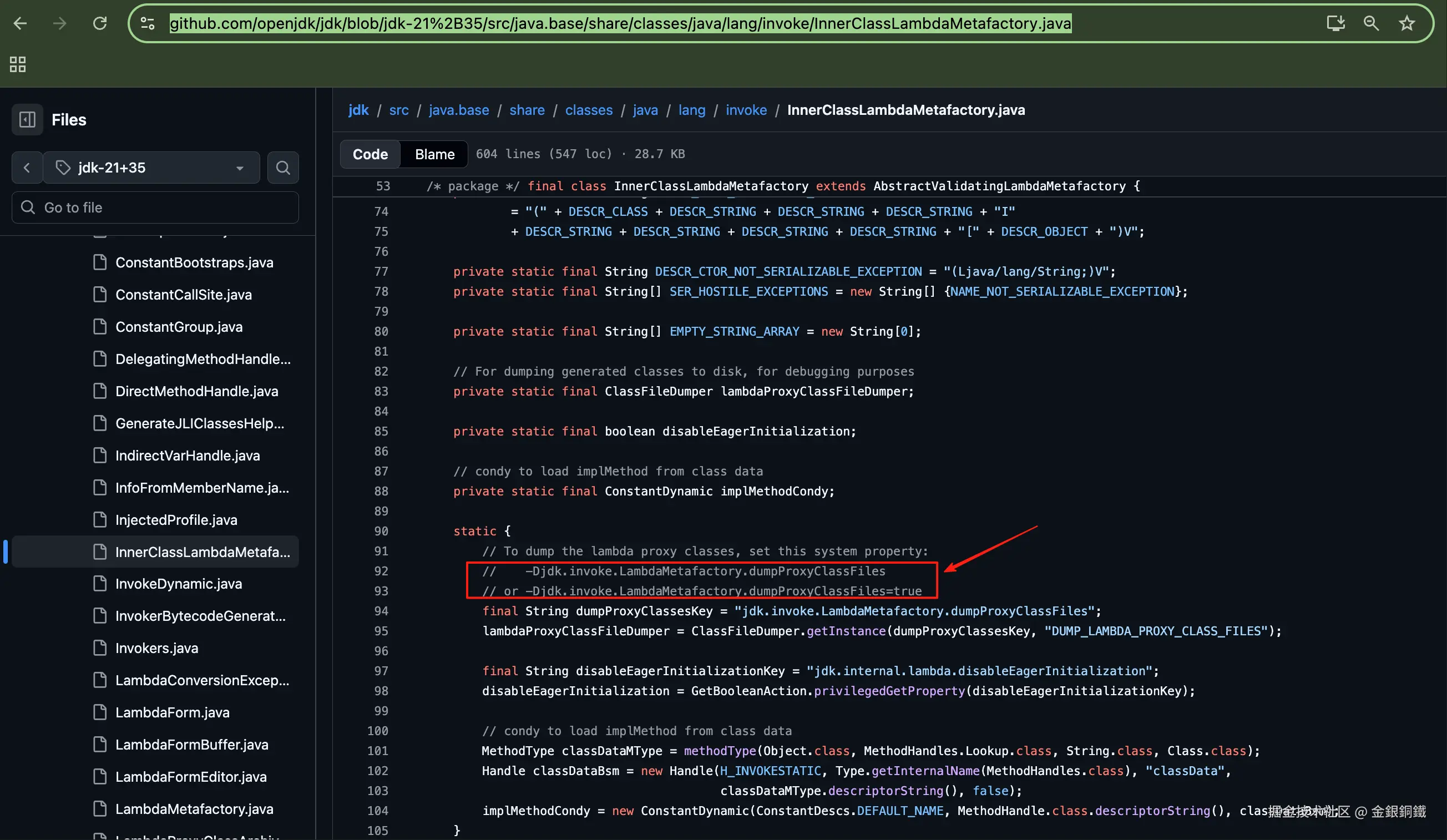
看起来只要加上以下两个选项的任何一个,就可以将 r 对应的类保存到 class 文件里
-Djdk.invoke.LambdaMetafactory.dumpProxyClassFiles-Djdk.invoke.LambdaMetafactory.dumpProxyClassFiles=true
我们就用第一种方法吧,完整的命令如下 ⬇️
bash
java -Djdk.invoke.LambdaMetafactory.dumpProxyClassFiles HelloWorld运行完这个命令后,再运行 tree . 命令,会得到以下结果 ⬇️ (在您的电脑上,所看到的 class 文件的名称可能会有差异)
text
.
├── DUMP_LAMBDA_PROXY_CLASS_FILES
│   └── HelloWorld$$Lambda.0x0000007001000a00.class
├── HelloWorld.class
└── HelloWorld.java

2 directories, 3 files
当前目录多了一个名为 DUMP_LAMBDA_PROXY_CLASS_FILES 的目录,这个目录下有一个 class 文件。我们用如下的命令可以查看这个 class 文件的内容
bash
javap -v -p DUMP_LAMBDA_PROXY_CLASS_FILES/*class我电脑上的运行结果如下 ⬇️ (这里略去了结果中的前三行)
text
final class HelloWorld$$Lambda implements java.lang.Runnable
  minor version: 0
  major version: 65
  flags: (0x1030) ACC_FINAL, ACC_SUPER, ACC_SYNTHETIC
  this_class: #2                          // HelloWorld$$Lambda
  super_class: #4                         // java/lang/Object
  interfaces: 1, fields: 0, methods: 2, attributes: 0
Constant pool:
   #1 = Utf8               HelloWorld$$Lambda
   #2 = Class              #1             // HelloWorld$$Lambda
   #3 = Utf8               java/lang/Object
   #4 = Class              #3             // java/lang/Object
   #5 = Utf8               java/lang/Runnable
   #6 = Class              #5             // java/lang/Runnable
   #7 = Utf8               <init>
   #8 = Utf8               ()V
   #9 = NameAndType        #7:#8          // "<init>":()V
  #10 = Methodref          #4.#9          // java/lang/Object."<init>":()V
  #11 = Utf8               run
  #12 = Utf8               HelloWorld
  #13 = Class              #12            // HelloWorld
  #14 = Utf8               lambda$main$0
  #15 = NameAndType        #14:#8         // lambda$main$0:()V
  #16 = Methodref          #13.#15        // HelloWorld.lambda$main$0:()V
  #17 = Utf8               Code
{
  private HelloWorld$$Lambda();
    descriptor: ()V
    flags: (0x0002) ACC_PRIVATE
    Code:
      stack=1, locals=1, args_size=1
         0: aload_0
         1: invokespecial #10                 // Method java/lang/Object."<init>":()V
         4: return

  public void run();
    descriptor: ()V
    flags: (0x0001) ACC_PUBLIC
    Code:
      stack=0, locals=1, args_size=1
         0: invokestatic  #16                 // Method HelloWorld.lambda$main$0:()V
         3: return
}
由于它的内容并不多,我们可以尝试手动反编译它,反编译的结果如下 ⬇️
java
final class HelloWorld$$Lambda implements java.lang.Runnable {
  private HelloWorld$$Lambda() {
    super();
  }

  public void run() {
      HelloWorld.lambda$main$0();
  }
}
简要的类图如下 ⬇️
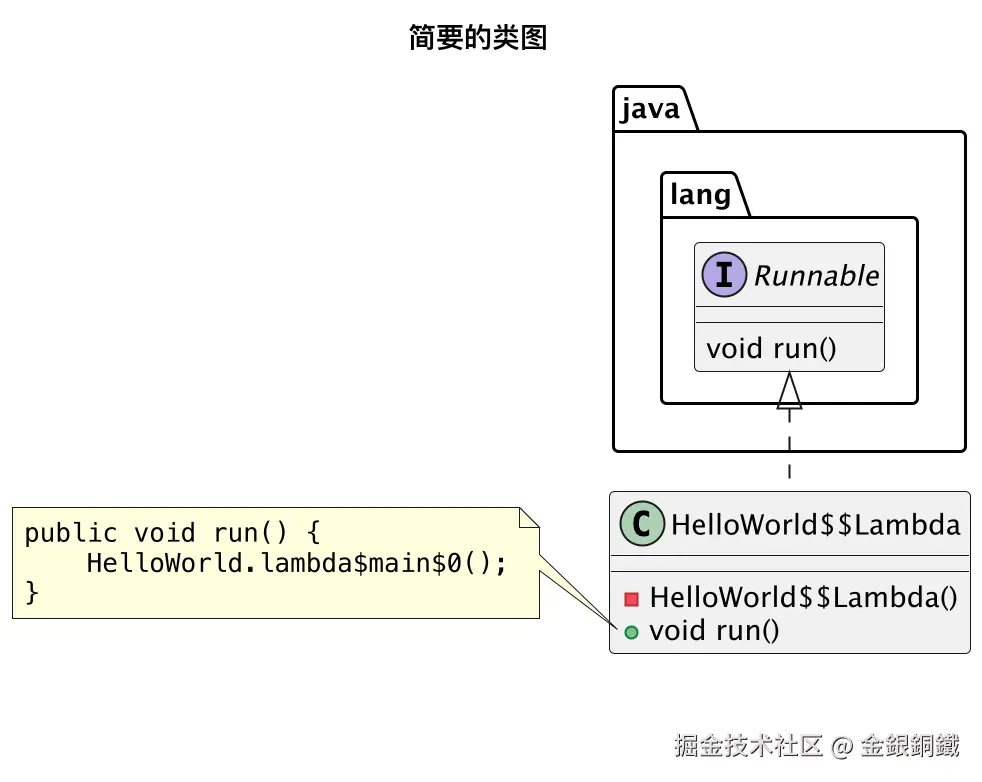
其他
绘制"简要的类图"所用到的代码
我用了 IntelliJ IDEA 中的 PlantUML 插件来画那张图,完整的代码如下 ⬇️
text
@startuml
'https://plantuml.com/component-diagram

title 简要的类图
caption \n\n
' caption 的内容是为了防止掘金平台生成的水印遮盖图中的文字

interface java.lang.Runnable
class HelloWorld$$Lambda
java.lang.Runnable <|.. HelloWorld$$Lambda

interface java.lang.Runnable {
    void run()
}

class HelloWorld$$Lambda {
  - HelloWorld$$Lambda()
  + void run()
}

note left of HelloWorld$$Lambda::run
<code>
public void run() {
    HelloWorld.lambda$main$0();
}
</code>
end note

@enduml