1. 问题
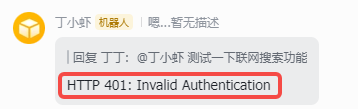
近期在使用OpenClaw时发现chat功能好好的,但是让它搜索网页就会返回类似:抱歉,我目前无法使用网络搜索功能(需要配置 API 密钥)、HTTP 401: Invalid Authentication类的错误😶
然后想让OpenClaw自己修复,迟迟修复不了,不得不自己在网上寻找解决方案了。记录一下,免得遗忘。
2. 解决方案
2.1 首先打开openclaw.json文件
bash
#一般在安装openclaw路径下
"C:\Users\<用户>\.openclaw\openclaw.json"
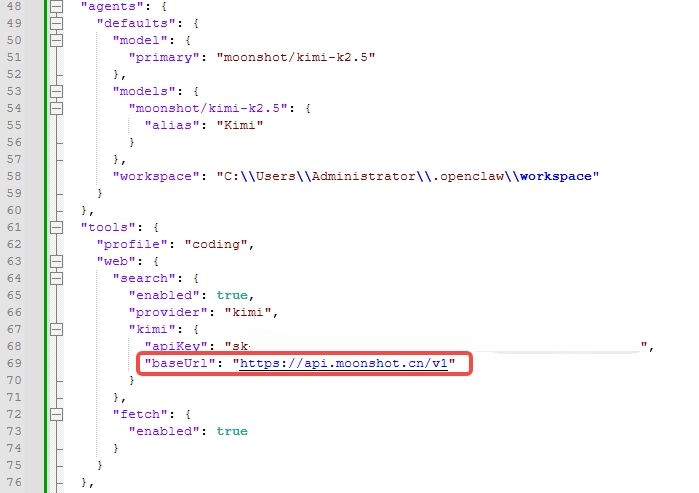
2.2 找到tools下的web配置
问题原因:
OpenClaw 默认使用的 baseUrl 错误(可能是 https://api.kimi.com/...),需要手动设置为 https://api.moonshot.cn/v1
json
"tools": {
    "profile": "coding",
    "web": {
      "search": {
        "enabled": true,
        "provider": "kimi",
        "kimi": {
          "apiKey": "sk-xxxxxxxxx",            # 配置自己的API key
		  "baseUrl": "https://api.moonshot.cn/v1" # 重点在这
        }
      },
      "fetch": {
        "enabled": true
      }
    }
  }
2.3 重启OpenClaw
bash
openclaw gateway restart测试,通过🎉🎉🎉,顺便说一句,我使用的版本:OpenClaw 2026.3.13 (61d171a)