setting.vue
html
<template>
  <view class="container">
    <view class="box">
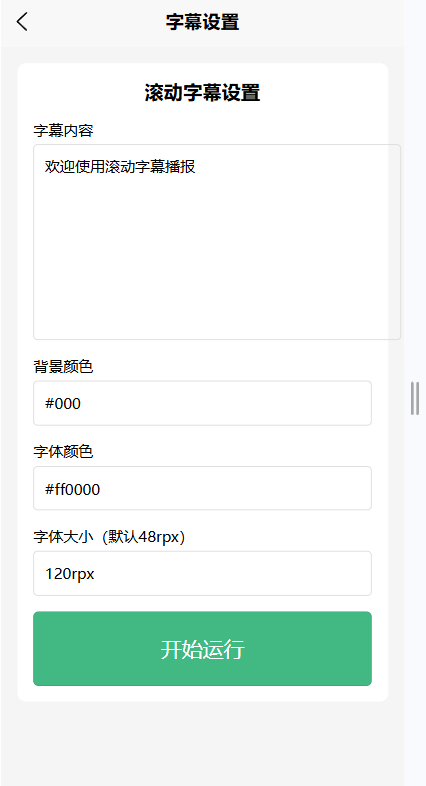
      <text class="title">滚动字幕设置</text>

      <view class="item">
        <text>字幕内容</text>
        <textarea v-model="text" placeholder="请输入滚动文字"></textarea>
      </view>

      <view class="item">
        <text>背景颜色</text>
        <input v-model="bgColor" type="text" placeholder="默认黑色" />
      </view>

      <view class="item">
        <text>字体颜色</text>
        <input v-model="color" type="text" placeholder="默认红色" />
      </view>

      <!-- 加了字体大小设置 -->
      <view class="item">
        <text>字体大小(默认48rpx)</text>
        <input v-model="fontSize" type="text" placeholder="例如:48rpx、60rpx" />
      </view>

      <button class="btn" @click="start">开始运行</button>
    </view>
  </view>
</template>

<script>
export default {
  data() {
    return {
      text: '欢迎使用滚动字幕播报',
      bgColor: '#000',
      color: '#ff0000',
	  fontSize: '60rpx' // 默认大小
    }
  },
  methods: {
    start() {
      if (!this.text) return uni.showToast({ title: '请输入内容' })
      uni.navigateTo({
        url: `/pages/scroll/player?text=${this.text}&bg=${this.bgColor}&color=${this.color}&fontSize=${this.fontSize}`
      })
    }
  }
}
</script>

<style scoped>
.container {
  padding: 30rpx;
  background: #f5f5f5;
  min-height: 100vh;
}
.box {
  background: #fff;
  padding: 30rpx;
  border-radius: 16rpx;
}
.title {
  font-size: 36rpx;
  font-weight: bold;
  margin-bottom: 30rpx;
  display: block;
  text-align: center;
}
.item {
  margin-bottom: 30rpx;
}
.item text {
  font-size: 28rpx;
  margin-bottom: 10rpx;
  display: block;
}
input, textarea {
  border: 1px solid #ddd;
  border-radius: 8rpx;
  padding: 20rpx;
  font-size: 28rpx;
}
.btn {
  background: #42b983;
  color: #fff;
  border-radius: 10rpx;
  padding: 20rpx;
}
</style>
player.vue
html
<template>
  <view
    class="player"
    :style="{ background: bgColor }"
    @dblclick="togglePause"
  >
    <!-- 滚动文字 -->
    <view
      v-if="showText"
      class="text-wrap"
      :style="{ top: `${top}px`, color: color,fontSize: fontSize  }"
    >
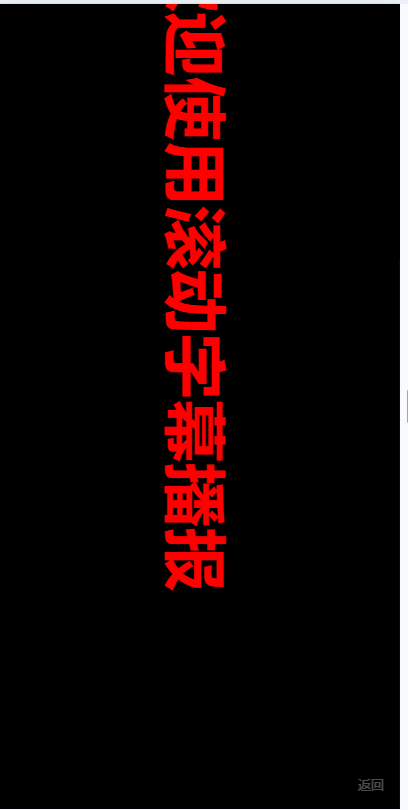
      {{ text }}
    </view>

    <!-- 无边框透明返回按钮 -->
    <view class="back-btn" @click="goBack">返回</view>
  </view>
</template>

<script>
export default {
  onLoad(options) {
    this.text = options.text || '欢迎'
    this.bgColor = options.bg || '#000'
    this.color = options.color || '#ff0000'
	this.fontSize = options.fontSize || '60rpx' // 接收字体大小
    this.startScroll()
  },
  onUnload() {
    clearInterval(this.timer)
  },
  data() {
    return {
      text: '',
      bgColor: '',
      color: '',
      top: 0,
      showText: true,
      paused: false,
      timer: null,
      speed: 1.5
    }
  },
  methods: {
    startScroll() {
      const screenHeight = uni.getSystemInfoSync().windowHeight
      this.top = screenHeight

      this.timer = setInterval(() => {
        if (this.paused) return

        this.top -= this.speed
        const end = -200

        if (this.top <= end) {
          this.showText = false
          clearInterval(this.timer)

          setTimeout(() => {
            this.showText = true
            this.startScroll()
          }, 2000)
        }
      }, 10)
    },
    togglePause() {
      this.paused = !this.paused
    },
    goBack() {
      uni.navigateBack()
    }
  }
}
</script>

<style scoped>
.player {
  width: 100vw;
  height: 100vh;
  position: relative;
  overflow: hidden;
}
.text-wrap {
  position: absolute;
  left: 50%;
  transform: translateX(-50%) rotate(90deg);
  white-space: nowrap;
  font-size: 48rpx;
  font-weight: bold;
}
.back-btn {
  position: fixed;
  right: 20rpx;
  bottom: 20rpx;
  font-size: 24rpx;
  color: rgba(255,255,255,0.3);
  padding: 10rpx;
}
</style>