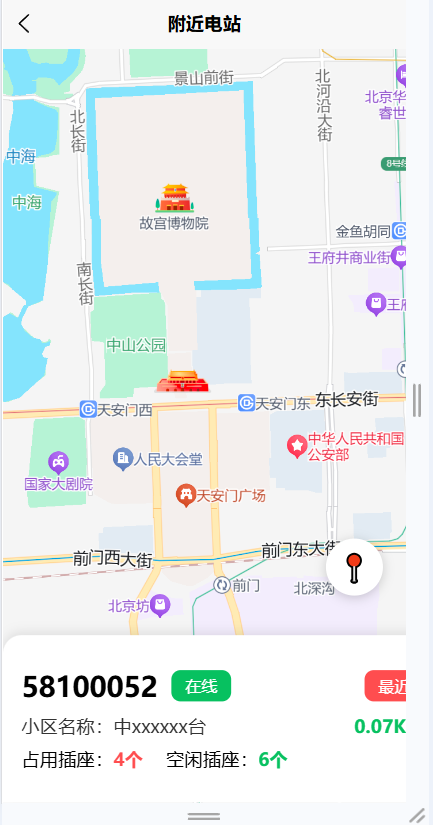
H5端
微信小程序端:
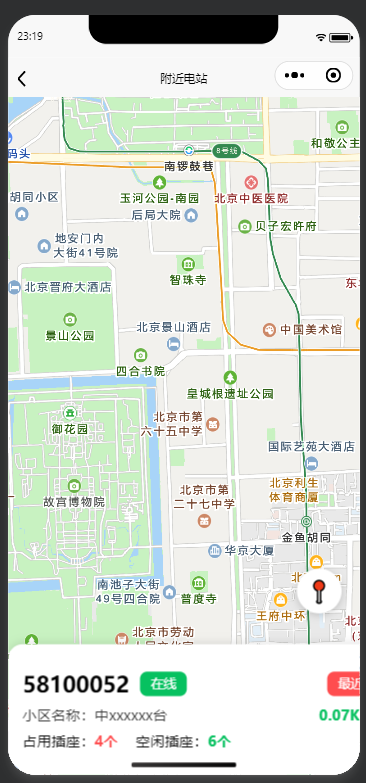
manifest.json配置
json
"mp-weixin" : {
        "appid" : "你的微信小程序appid",
        "setting" : {
            "urlCheck" : false
        },
        "usingComponents" : true,
		"permission": {
		        "scope.userLocation": {
		            "desc": "你的位置信息将用于定位显示"
		        }
		    },
		"requiredBackgroundModes": ["location"],
		"mapKey": {
		    "baidu": "你的百度地图AK"
		  }
    },
html
<template>
  <view class="container">
    <!-- 地图区域:全屏 -->
    <view class="map-wrap">
      <!-- #ifdef H5 -->
      <view id="container" class="map"></view>
      <!-- #endif -->

      <!-- #ifdef MP-WEIXIN || APP-PLUS -->
      <map
        class="map"
        provider="baidu"
        :longitude="longitude"
        :latitude="latitude"
        :scale="16"
        :markers="markers"
        show-location
      ></map>
      <!-- #endif -->

      <!-- 定位按钮 -->
      <view class="locate-btn" @click="handleLocate">
        <text class="icon">📍</text>
      </view>
    </view>

    <!-- 电站列表 -->
    <view class="station-list">
      <view class="station-item">
        <view class="station-header">
          <text class="station-id">58100052</text>
          <text class="status online">在线</text>
          <text class="tag recent">最近</text>
        </view>
        <view class="station-info">
          <text>小区名称:中xxxxxx台</text>
          <text class="distance">0.07Km</text>
        </view>
        <view class="station-port">
          <text>占用插座:<text class="red">4个</text></text>
          <text>空闲插座:<text class="green">6个</text></text>
        </view>
      </view>
    </view>
  </view>
</template>

<script>
export default {
  data() {
    return {
      map: null,
      longitude: 116.404,
      latitude: 39.915,
      markers: []
    };
  },

  onReady() {
    // #ifdef H5
    this.initMapH5();
    // #endif
  },

  methods: {
    // H5 百度地图初始化
    initMapH5() {
      // #ifdef H5
      this.map = new BMapGL.Map("container");
      const point = new BMapGL.Point(this.longitude, this.latitude);
      this.map.centerAndZoom(point, 15);
      this.map.enableScrollWheelZoom(true);
      // #endif
    },

    // 定位方法(全端兼容)
    handleLocate() {
      uni.showLoading({ title: "定位中..." });

      uni.getLocation({
        type: "gcj02",
        success: (res) => {
          this.longitude = res.longitude;
          this.latitude = res.latitude;

          // #ifdef H5
          const p = new BMapGL.Point(this.longitude, this.latitude);
          this.map.centerAndZoom(p, 16);
          this.map.clearOverlays();
          this.map.addOverlay(new BMapGL.Marker(p));
          // #endif

          // #ifdef MP-WEIXIN || APP-PLUS
          this.markers = [{
            id: 0,
            longitude: this.longitude,
            latitude: this.latitude,
            width: 30,
            height: 30
          }];
          // #endif

          uni.showToast({ title: "定位成功" });
        },
        fail: () => {
          uni.showToast({ title: "定位失败", icon: "none" });
        },
        complete: () => {
          uni.hideLoading();
        }
      });
    }
  }
};
</script>

<style scoped>
.container {
  width: 100%;
  height: 100vh;
  position: relative;
  overflow: hidden;
}
.map-wrap {
  width: 100%;
  height: 100%;
  position: absolute;
  top: 0;
  left: 0;
  z-index: 1;
}
.map {
  width: 100%;
  height: 100%;
}
.locate-btn {
  position: absolute;
  right: 20px;
  bottom: 180px;
  width: 50px;
  height: 50px;
  background: #fff;
  border-radius: 50%;
  display: flex;
  align-items: center;
  justify-content: center;
  box-shadow: 0 2px 10px rgba(0,0,0,0.2);
  z-index: 10;
}
.icon {
  font-size: 24px;
}
.station-list {
  position: absolute;
  bottom: 0;
  left: 0;
  width: 100%;
  background: #fff;
  border-radius: 16px 16px 0 0;
  padding: 16px;
  box-shadow: 0 -2px 10px rgba(0,0,0,0.1);
  z-index: 20;
}
.station-item {
  padding: 12px 0;
}
.station-header {
  display: flex;
  align-items: center;
  gap: 12px;
  margin-bottom: 8px;
}
.station-id {
  font-size: 24px;
  font-weight: bold;
}
.status.online {
  background: #07c160;
  color: #fff;
  padding: 4px 12px;
  border-radius: 8px;
  font-size: 14px;
}
.tag.recent {
  background: #ff4d4f;
  color: #fff;
  padding: 4px 12px;
  border-radius: 8px;
  font-size: 14px;
  margin-left: auto;
}
.station-info {
  display: flex;
  justify-content: space-between;
  margin-bottom: 8px;
  font-size: 16px;
  color: #333;
}
.distance {
  color: #07c160;
  font-weight: bold;
}
.station-port {
  display: flex;
  gap: 20px;
  font-size: 16px;
}
.red {
  color: #ff4d4f;
  font-weight: bold;
}
.green {
  color: #07c160;
  font-weight: bold;
}
</style>