在Fastadmin中使用think-queue队列笔记
目录
[安装 supervisor](#安装 supervisor)
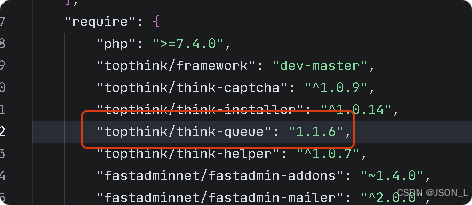
安装依赖包
命令如下:
bash
composer require topthink/think-queue若存在则不需要安装
队列配置
队列配置默认使用redis,配置文件位于application/extra/queue.php。
代码如下:
php
<?php
return [
    'connector'  => 'Redis',          // Redis 驱动
    'expire'     => 0,             // 任务的过期时间,默认为60秒; 若要禁用,则设置为 null
    'default'    => 'default',    // 默认的队列名称
    'host'       => '127.0.0.1',       // redis 主机ip
    'port'       => 6379,        // redis 端口
    'password'   => '',             // redis 密码
    'select'     => 0,          // 使用哪一个 db,默认为 db0
    'timeout'    => 0,          // redis连接的超时时间
    'persistent' => false,
];
生产端
在业务处理逻辑中对一些耗时的操作,添加到队列中进行异步处理。
代码如下:
php
// 添加到队列,只传递必要参数
\think\Queue::push('app\common\job\VideoProcessJob', [
       trends_id'     => $this->model->id,
       'text'         => $this->user['nickname']
], 'video');
消费端
在application/common下创建job文件夹,创建消费队列文件VideoProcessJob.php,
在生产端添加队列后,在消费端进行处理(需要注意不要重复消费)。
代码如下:
php
<?php

namespace app\common\job;

use think\queue\Job;
use app\common\library\VideoHandler;
use app\common\model\Trends;

class VideoProcessJob
{
    /**
     * 视频处理任务
     */
    public function fire(Job $job, $data)
    {
        try {
            // 查询帖子信息
            $TrendsModel = new Trends();
            $trends = $TrendsModel->where('id', $data['trends_id'])->find();
            if (!$trends) {
                throw new \think\Exception('帖子不存在');
            }

            echo "帖子ID: " . $trends['id'] . "\n";
            echo "帖子标题: " . $trends['title'] . "\n";

            // 获取视频列表
            $videos = explode(',', $trends['video_list']);
            if (empty($videos)) {
                throw new \think\Exception('视频列表为空');
            }

            // 是否队列处理
            if ($trends['is_queue']) {
                // 队列处理,直接删除任务
                $job->delete();
            }

            $videoHandler = new VideoHandler();

            // 处理每个视频
            $waterImages = [];
            $insert = [];
            foreach ($videos as $video) {
                $videoPath = ROOT_PATH . 'public' . $video;
                $waterFilename = str_replace('.mp4', '_w.mp4', $video);

                // 同时处理压缩和文字水印
                $compressOptions = [
                    'resolution' => '1280x720',
                    'bitrate' => '800k',
                    'fps' => 24
                ];
                $watermarkText = $data['text'] . ' @ ' . date('Y');
                $watermarkOptions = ['position' => 'bottom-right'];

                $videoHandler->compressWithWatermark(
                    $videoPath,
                    ROOT_PATH . 'public' . $waterFilename,
                    $compressOptions,
                    $watermarkText,
                    $watermarkOptions
                );
                $waterImages[] = $waterFilename;
                $insert[] = ['path' => $video, 'created_at' => time()];
            }

            // 修改帖子视频字段
            $TrendsModel->where('id', $trends['id'])->update([
                'video_list' => implode(',', $waterImages),
                'is_queue'   => 1
            ]);


            // 任务执行成功,删除任务
            $job->delete();

        } catch (\think\Exception $e) {
            // 记录错误日志
            \think\Log::error('视频处理任务失败: ' . $e->getMessage());
            echo "错误信息: " . $e->getMessage() . "\n";

            // 重试3次
            if ($job->attempts() < 3) {
                $job->release(60); // 60秒后重试
            } else {
                $job->delete(); // 超过重试次数,删除任务
            }
        }
    }
}
运行队列
在命令行开启队列监听,并分配进行处理。
命令如下:
bash
# 基础命令(常驻进程,持续监听队列)
php think queue:work

# 指定队列名称(如处理名为 "order" 的队列)
php think queue:work --queue order

# 限制进程数/处理次数(新手可选)
php think queue:work --daemon --tries 3

# --daemon 常驻模式(6.x 可省略,默认常驻),--tries 失败重试次数
执行如下:

守护进程
在生产环境中可以使用supervisor对队列进行托管。
防止因进程意外退出导致队列停摆。
安装 supervisor
bash
#以 CentOS 为例:
yum install supervisor
systemctl enable supervisor
systemctl start supervisor
配置文件
bash
[program:think_queue]
command=php /你的项目根目录/think queue:work --queue order --tries 3
autostart=true
autorestart=true
user=www  # 运行用户,建议和 web 服务一致
redirect_stderr=true
stdout_logfile=/var/log/think_queue.log  # 日志文件
重启supervisor生效
bash
supervisorctl reload
supervisorctl status  # 查看进程状态
总结
在Fastadmin中使用think-queue队列笔记