git学习
检查git是否安装
- 在命令行
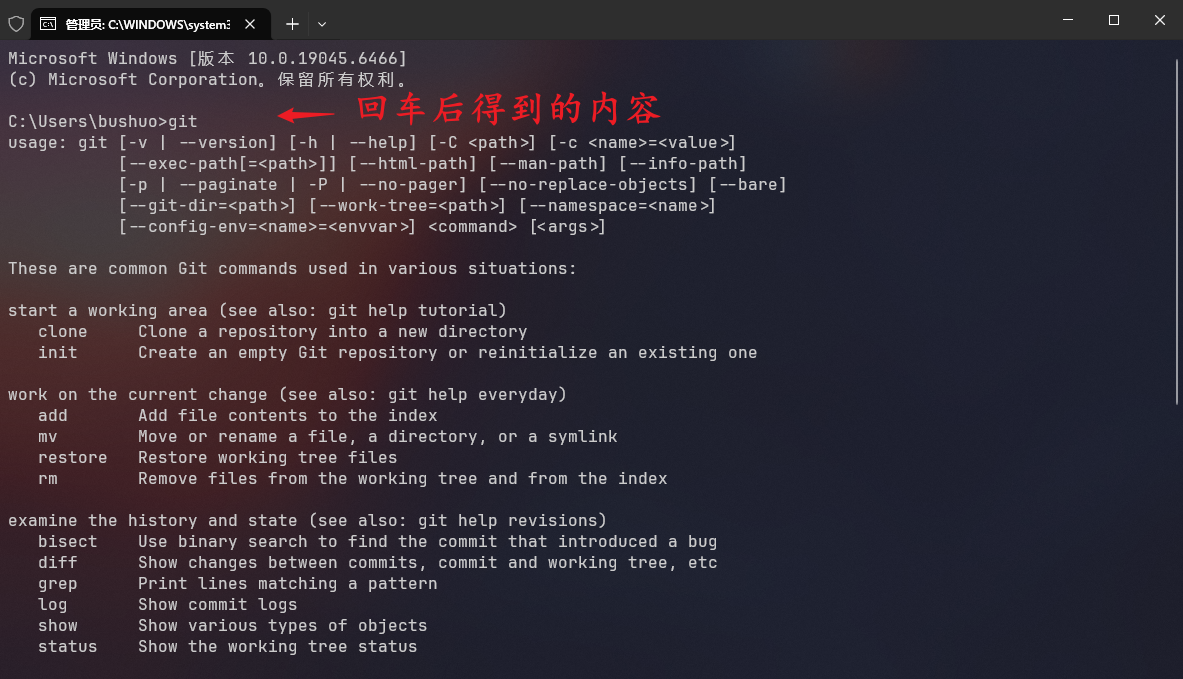
CMD中输入git并回车;- Win + R 快捷键打开命令行.
- 如果出现以下内容, 证明已经安装成功
git git -v, 查询git版本
bash
C:\Users\bushuo>git -v
git version 2.42.0.windows.2
下载与安装教程
Git - Windows 版安装 - Git 版本控制系统
官方相关教程
git命令实际测试
bash
Leetcode git status
fatal: not a git repository (or any of the parent directories): .git
Leetcode git init
Initialized empty Git repository in F:/Leetcode/.git/
Leetcode git status
On branch master
No commits yet
Untracked files:
(use "git add <file>..." to include in what will be committed)
"1.\344\270\244\346\225\260\344\271\213\345\222\214.cpp"
"128.\346\234\200\351\225\277\350\277\236\347\273\255\345\272\217\345\210\227.cpp"
"283.\347\247\273\345\212\250\351\233\266.cpp"
"49.Gemini\350\247\243\346\263\225.cpp"
"49.\345\255\227\346\257\215\345\274\202\344\275\215\350\257\215\345\210\206\347\273\204.cpp"
start VScode.bat
nothing added to commit but untracked files present (use "git add" to track)添加一个文件
返回结果
bash
F:\Leetcode>git add 1.两数之和.cpp

F:\Leetcode>git status
On branch master

No commits yet

Changes to be committed:
  (use "git rm --cached <file>..." to unstage)
        new file:   1.两数之和.cpp

Untracked files:
  (use "git add <file>..." to include in what will be committed)
        128.最长连续序列.cpp
        283.移动零.cpp
        49.Gemini解法.cpp
        49.字母异位词分组.cpp
        start VScode.bat


F:\Leetcode>
返回结果解释
Changes to be committed:, 即将被提交的更改(已经加入暂存区);(use "git rm --cached <file>..." to unstage), 如果想取消暂存, 可以用 git rm --cached <文件>;new file: 1.两数之和.cpp, 新文件:1.两数之和.cpp(已经被 Git 跟踪,并准备提交);
bash
工作区(你的文件)
    ↓ git add
暂存区(staging area)
    ↓ git commit
版本库(repository)
提交所有
git add .
git add ., 所有文件都进入Git, 全部提交;git commit -m "第一次提交所有题目"
bash
F:\Leetcode>git add .

F:\Leetcode>git rm --cached "start VScode.bat"
rm 'start VScode.bat'

F:\Leetcode>git status
On branch master

No commits yet

Changes to be committed:
  (use "git rm --cached <file>..." to unstage)
        new file:   1.两数之和.cpp
        new file:   128.最长连续序列.cpp
        new file:   283.移动零.cpp
        new file:   49.Gemini解法.cpp
        new file:   49.字母异位词分组.cpp

Untracked files:
  (use "git add <file>..." to include in what will be committed)
        start VScode.bat


F:\Leetcode>
git commit
bash
F:\Leetcode>git commit -m "第一次提交"
[master (root-commit) 7ce2207] 第一次提交
 5 files changed, 221 insertions(+)
 create mode 100644 1.两数之和.cpp
 create mode 100644 128.最长连续序列.cpp
 create mode 100644 283.移动零.cpp
 create mode 100644 49.Gemini解法.cpp
 create mode 100644 49.字母异位词分组.cpp

F:\Leetcode>git status
On branch master
Untracked files:
  (use "git add <file>..." to include in what will be committed)
        start VScode.bat

nothing added to commit but untracked files present (use "git add" to track)

F:\Leetcode>git log
commit 7ce22074976a1e9ee95471ebadedb84a358c0a86 (HEAD -> master)
Author: bushuo <3513566868@qq.com>
Date:   Fri Mar 27 22:32:10 2026 +0800

    第一次提交

F:\Leetcode>
git log命令可以查看所有产生的commit记录.
切换分支
bash
F:\Leetcode>git branch
* master

F:\Leetcode>git branch cpp

F:\Leetcode>git checkout cpp
Switched to branch 'cpp'

F:\Leetcode>git status
On branch cpp
Untracked files:
  (use "git add <file>..." to include in what will be committed)
        start VScode.bat

nothing added to commit but untracked files present (use "git add" to track)
git branch cpp, 创建分支;
git checkout cpp, 切换分支;
git checkout -b cpp, 新建并切换分支;
git merge cpp, 合并cpp到主分支;
git branch -d cpp, 删除分支;
git branch -D cpp, 强制删除;
git tag tag_name, 新建标签;
git tag, 查看历史tag记录;
向GitHub提交代码
SSH
SSH是一种网络协议, 用于计算机之间的加密登录
bash
F:\Leetcode>ssh
usage: ssh [-46AaCfGgKkMNnqsTtVvXxYy] [-B bind_interface] [-b bind_address]
           [-c cipher_spec] [-D [bind_address:]port] [-E log_file]
           [-e escape_char] [-F configfile] [-I pkcs11] [-i identity_file]
           [-J destination] [-L address] [-l login_name] [-m mac_spec]
           [-O ctl_cmd] [-o option] [-P tag] [-p port] [-Q query_option]
           [-R address] [-S ctl_path] [-W host:port] [-w local_tun[:remote_tun]]
           destination [command [argument ...]]

F:\Leetcode>
ssh -T git@github.com, 使用ssh协议, -T禁止分配终端(no tty), git@github.com, 测试本机SSH Key是否成功绑定到GitHub
bash
F:\Leetcode>ssh -T git@github.com
git@github.com: Permission denied (publickey).
github没有添加公钥.
git添加后修改文件
bash
F:\Leetcode>git status
On branch master
Changes to be committed:
  (use "git restore --staged <file>..." to unstage)
        new file:   Leetcode/1.两数之和.cpp
        new file:   Leetcode/128.最长连续序列.cpp
        new file:   Leetcode/135.分发糖果.cpp
        new file:   Leetcode/15.三数之和-官方.cpp
        new file:   Leetcode/15.三数之和-没解出来.cpp
        new file:   Leetcode/206.反转链表.cpp
        new file:   Leetcode/283.移动零-官方解题.cpp
        new file:   Leetcode/283.移动零.cpp
        new file:   Leetcode/455.分发饼干.cpp
        new file:   Leetcode/49.Gemini解法.cpp
        new file:   Leetcode/49.字母异位词分组.cpp
        new file:   nowcoder/BM1-反转链表.cpp
        new file:   nowcoder/BM2-链表内指定区间反转.cpp
        new file:   nowcoder/BM2-链表内指定区间反转_AI.cpp

Changes not staged for commit:
  (use "git add/rm <file>..." to update what will be committed)
  (use "git restore <file>..." to discard changes in working directory)
        deleted:    1.两数之和.cpp
        deleted:    128.最长连续序列.cpp
        deleted:    283.移动零.cpp
        deleted:    49.Gemini解法.cpp
        deleted:    49.字母异位词分组.cpp

Untracked files:
  (use "git add <file>..." to include in what will be committed)
        start VScode.bat
解释
上述内容表示Git仓库处于:
-
已经暂存了一堆新文件(准备提交)
-
同时又删除了几个文件(还没告诉Git)
-
On branch master: 表示现在在master分支上; -
Changes to be committed, 已经放进暂存区, 下次提交就会上传; -
Changes not staged for commit: 修改了, 但没有告诉Git的变化, 但是我把这几个文件从文件夹中删除掉了, 但还没有用git rm告诉Git -
使用
git rm删除上述相关文献, 然后再次查看git状态
bash
F:\Leetcode>git status
On branch master
Changes to be committed:
  (use "git restore --staged <file>..." to unstage)
        deleted:    283.移动零.cpp
        renamed:    1.两数之和.cpp -> Leetcode/1.两数之和.cpp
        renamed:    128.最长连续序列.cpp -> Leetcode/128.最长连续序列.cpp
        new file:   Leetcode/135.分发糖果.cpp
        new file:   Leetcode/15.三数之和-官方.cpp
        new file:   Leetcode/15.三数之和-没解出来.cpp
        new file:   Leetcode/206.反转链表.cpp
        new file:   Leetcode/283.移动零-官方解题.cpp
        new file:   Leetcode/283.移动零.cpp
        new file:   Leetcode/455.分发饼干.cpp
        renamed:    49.Gemini解法.cpp -> Leetcode/49.Gemini解法.cpp
        renamed:    49.字母异位词分组.cpp -> Leetcode/49.字母异位词分组.cpp
        new file:   nowcoder/BM1-反转链表.cpp
        new file:   nowcoder/BM2-链表内指定区间反转.cpp
        new file:   nowcoder/BM2-链表内指定区间反转_AI.cpp

Untracked files:
  (use "git add <file>..." to include in what will be committed)
        start VScode.bat
git配置信息的三个等级
- global 系统界别
- system 全局级别
- local 本地级别
Github创建仓库
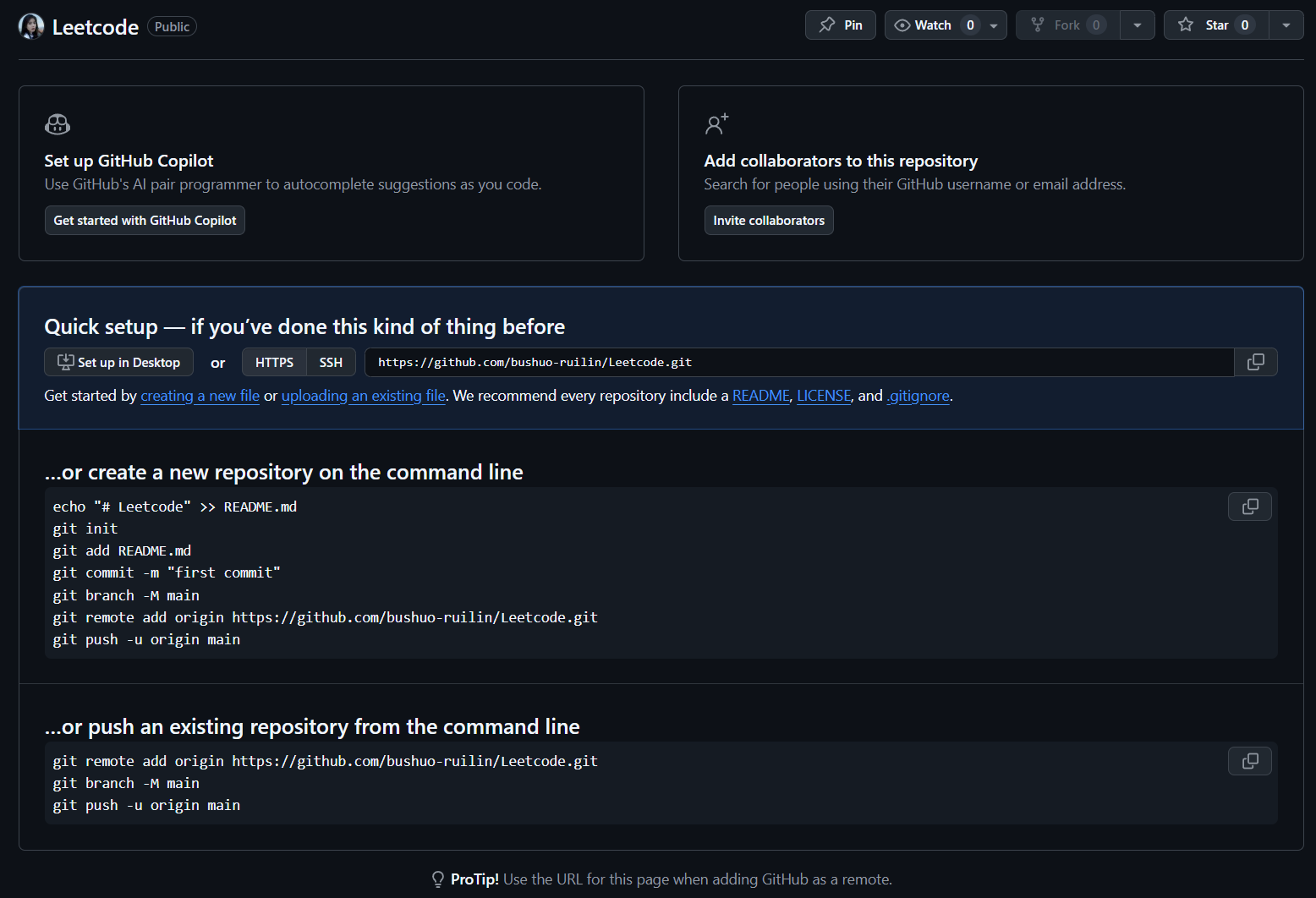
git branch -M main命令解释
- 该命令的作用是: 将当前分支重命名为main;
-M是--move --force的缩写, 即强制重命名;- Git本地初始化后默认分支名是
master, 但Github现在默认分支是main
bash
F:\Leetcode>git branch -M main

F:\Leetcode>git branch
  cpp
* main

F:\Leetcode>
关联远程仓库
给本地仓库添加一个远程仓库链接
git remote add origin
remote, 远程仓库操作;add, 添加一个新的远程仓库;origin, 给这个仓库起的别名;远程仓库地址.
查看当前所有远程仓库
bash
F:\Leetcode>git remote add origin https://github.com/bushuo-ruilin/Leetcode.git

F:\Leetcode>git remote -v
origin  https://github.com/bushuo-ruilin/Leetcode.git (fetch)
origin https://github.com/bushuo-ruilin/Leetcode.git (push)(fetch), 这个地址用于拉取代码git pull / git fetch;
(push), 这个地址用于推送代码git push
推送到远程仓库
git push -u origin main
-u 表示设置默认上游.
弹出登录界面
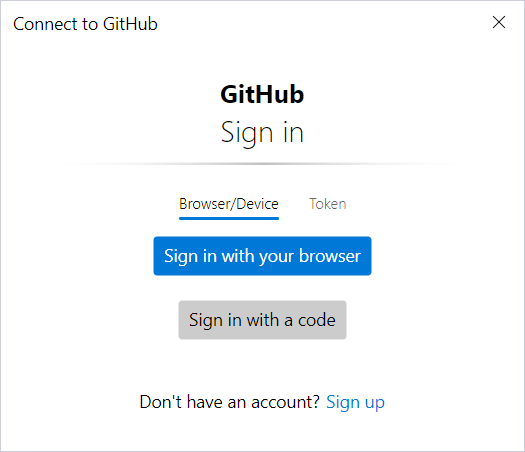
- 直接选择第一个就好了
Sign in with your browser.
bash
F:\Leetcode>git push -u origin main
warning: ----------------- SECURITY WARNING ----------------
warning: | TLS certificate verification has been disabled! |
warning: ---------------------------------------------------
warning: HTTPS connections may not be secure. See https://aka.ms/gcm/tlsverify for more information.
info: please complete authentication in your browser...
warning: ----------------- SECURITY WARNING ----------------
warning: | TLS certificate verification has been disabled! |
warning: ---------------------------------------------------
warning: HTTPS connections may not be secure. See https://aka.ms/gcm/tlsverify for more information.
Enumerating objects: 7, done.
Counting objects: 100% (7/7), done.
Delta compression using up to 16 threads
Compressing objects: 100% (7/7), done.
Writing objects: 100% (7/7), 2.95 KiB | 2.95 MiB/s, done.
Total 7 (delta 0), reused 0 (delta 0), pack-reused 0
To https://github.com/bushuo-ruilin/Leetcode.git
 * [new branch]      main -> main
branch 'main' set up to track 'origin/main'.
bash
warning: TLS certificate verification has been disabled!
HTTPS connections may not be secure.
Git关闭了SSL证书验证, 数据传输可能不安全, 能推送成功, 修复:
bash
# 重新开启SSL验证
git config --global http.sslVerify true
bash
Enumerating objects: 7, done.
Counting objects: 100% (7/7), done.
Delta compression using up to 16 threads
Compressing objects: 100% (7/7), done.
Writing objects: 100% (7/7), 2.95 KiB | 2.95 MiB/s, done.
Total 7 (delta 0), reused 0 (delta 0), pack-reused 0
To https://github.com/bushuo-ruilin/Leetcode.git
 * [new branch]      main -> main
branch 'main' set up to track 'origin/main'.

Enumerating objects: 7, done.    # 清点了7个文件对象
Counting objects: 100% (7/7)     # 统计完成
Compressing objects: 100% (7/7)  # 压缩完成
Writing objects: 100% (7/7)      # 写入/上传完成,共2.95KB


* [new branch] main -> main
# 在GitHub上新建了main分支, 并把本地main推送上去了.
查看提交历史, 确认要删除的commit
bash
F:\Leetcode>git log --oneline
7ce2207 (HEAD -> main, origin/main, cpp) 第一次提交
bash
F:\Leetcode>git log --oneline
7ce2207 (HEAD -> main, origin/main, cpp) 第一次提交

F:\Leetcode>git reset --hard HEAD~1
fatal: ambiguous argument 'HEAD~1': unknown revision or path not in the working tree.
Use '--' to separate paths from revisions, like this:
'git <command> [<revision>...] -- [<file>...]'

F:\Leetcode>git reset --hard HEAD~1
fatal: ambiguous argument 'HEAD~1': unknown revision or path not in the working tree.
Use '--' to separate paths from revisions, like this:
'git <command> [<revision>...] -- [<file>...]'

F:\Leetcode>git update-ref -d HEAD

F:\Leetcode>git status
On branch main

No commits yet

Changes to be committed:
  (use "git rm --cached <file>..." to unstage)
        new file:   Leetcode/1.两数之和.cpp
        new file:   Leetcode/128.最长连续序列.cpp
        new file:   Leetcode/135.分发糖果.cpp
        new file:   Leetcode/15.三数之和-官方.cpp
        new file:   Leetcode/15.三数之和-没解出来.cpp
        new file:   Leetcode/206.反转链表.cpp
        new file:   Leetcode/283.移动零-官方解题.cpp
        new file:   Leetcode/283.移动零.cpp
        new file:   Leetcode/455.分发饼干.cpp
        new file:   Leetcode/49.Gemini解法.cpp
        new file:   Leetcode/49.字母异位词分组.cpp
        new file:   nowcoder/BM1-反转链表.cpp
        new file:   nowcoder/BM2-链表内指定区间反转.cpp
        new file:   nowcoder/BM2-链表内指定区间反转_AI.cpp

Untracked files:
  (use "git add <file>..." to include in what will be committed)
        README.md
        start VScode.bat


F:\Leetcode>git rm -rf
fatal: No pathspec was given. Which files should I remove?

F:\Leetcode>git rm -rf .
rm 'Leetcode/1.两数之和.cpp'
rm 'Leetcode/128.最长连续序列.cpp'
rm 'Leetcode/135.分发糖果.cpp'
rm 'Leetcode/15.三数之和-官方.cpp'
rm 'Leetcode/15.三数之和-没解出来.cpp'
rm 'Leetcode/206.反转链表.cpp'
rm 'Leetcode/283.移动零-官方解题.cpp'
rm 'Leetcode/283.移动零.cpp'
rm 'Leetcode/455.分发饼干.cpp'
rm 'Leetcode/49.Gemini解法.cpp'
rm 'Leetcode/49.字母异位词分组.cpp'
rm 'nowcoder/BM1-反转链表.cpp'
rm 'nowcoder/BM2-链表内指定区间反转.cpp'
rm 'nowcoder/BM2-链表内指定区间反转_AI.cpp'

F:\Leetcode>git push origin main --force
error: src refspec main does not match any
error: failed to push some refs to 'https://github.com/bushuo-ruilin/Leetcode.git'

F:\Leetcode>git push origin --delete main
To https://github.com/bushuo-ruilin/Leetcode.git
 ! [remote rejected] main (refusing to delete the current branch: refs/heads/main)
error: failed to push some refs to 'https://github.com/bushuo-ruilin/Leetcode.git'

F:\Leetcode>git status
On branch main

No commits yet

Untracked files:
  (use "git add <file>..." to include in what will be committed)
        README.md
        start VScode.bat

nothing added to commit but untracked files present (use "git add" to track)

F:\Leetcode>git restore .
error: pathspec '.' did not match any file(s) known to git

F:\Leetcode>git checkout -- .
error: pathspec '.' did not match any file(s) known to git

F:\Leetcode>git fsck --lost-found
Checking object directories: 100% (256/256), done.
notice: HEAD points to an unborn branch (main)
dangling blob 802df8fd001cee5726c689f1b132d0a35ecaf83f
dangling blob 89a4c957e3a38b18673acd0d5f3f63378f699d2b
dangling blob c932a694303e1289cc78a32120cab6441b4381d7
dangling blob 11d7ce92bba06358fa9d5a49bd7c8dd8b91e803a
dangling blob 5993e81981f31d7e16600210badec2c96c50e0a0
dangling blob 9fbfdaded4748845264e269efa1a0064b710cdf2
dangling blob a32a0e082a40130b1bde8ce744c2371f5fcf5542
dangling blob 64638d0186fcc6e782e8dee6eb3bd51183586e6c
dangling blob ba974a15985a4b427b0e7494728f6277b38be05c
dangling blob 3c323c3ad0caaadb3d75a9e789bb377de02c07cc
dangling blob fda5aa9bfecbfc38cb68914ba78e19b4f73f7f32

F:\Leetcode>ls .git/lost-found/other/
'ls' 不是内部或外部命令,也不是可运行的程序
或批处理文件。

F:\Leetcode>git cat-file -p 802df8fd001cee5726c689f1b132d0a35ecaf83f
#include <iostream>
#include <vector>
#include <algorithm>


using namespace std;


int main()
{
    return 0;
}


class Solution {
public:
    int findContentChildren(vector<int>& g, vector<int>& s) {
        /* 首先进行排序 */
        sort(g.begin(), g.end());

        sort(s.begin(), s.end());

        int g_length = g.size();
        int s_length = s.size();
        int g_i = 0, s_i = 0;

        /* 饼干或者孩子都没有分完 */
        while(g_i < g_length && s_i < s_length)
        {
            /* 这里挺巧妙的 */
            if (g[g_i] <= s[s_i])
            {
                g_i++;
            }
            s_i++;
        }

        return g_i;


    }
};
F:\Leetcode>mkdir recovered

F:\Leetcode>for hash in 802df8fd 89a4c957 c932a694 11d7ce92 5993e819 9fbfdade a32a0e08 64638d01 ba974a15 3c323c3a fda5aa9b; do
此时不应有 hash。

F:\Leetcode>    git cat-file -p $hash > recovered/$hash.cpp
fatal: Not a valid object name $hash
提交
git commit -m "第一次提交"
git push
bash
F:\Leetcode>git log --oneline
fatal: your current branch 'main' does not have any commits yet

F:\Leetcode>git commit -m "第一次提交"
[main (root-commit) c652cc0] 第一次提交
 10 files changed, 629 insertions(+)
 create mode 100644 Leetcode/135.分发糖果.cpp
 create mode 100644 Leetcode/15.三数之和-官方.cpp
 create mode 100644 Leetcode/15.三数之和-没解出来.cpp
 create mode 100644 Leetcode/206.反转链表.cpp
 create mode 100644 Leetcode/283.移动零-官方解题.cpp
 create mode 100644 Leetcode/283.移动零.cpp
 create mode 100644 Leetcode/455.分发饼干.cpp
 create mode 100644 nowcoder/BM1-反转链表.cpp
 create mode 100644 nowcoder/BM2-链表内指定区间反转.cpp
 create mode 100644 nowcoder/BM2-链表内指定区间反转_AI.cpp

F:\Leetcode>git status
On branch main
Your branch and 'origin/main' have diverged,
and have 1 and 1 different commits each, respectively.
  (use "git pull" if you want to integrate the remote branch with yours)

Untracked files:
  (use "git add <file>..." to include in what will be committed)
        README.md
        start VScode.bat

nothing added to commit but untracked files present (use "git add" to track)

F:\Leetcode>git push
Enumerating objects: 14, done.
Counting objects: 100% (14/14), done.
Delta compression using up to 16 threads
Compressing objects: 100% (14/14), done.
Writing objects: 100% (14/14), 5.44 KiB | 2.72 MiB/s, done.
Total 14 (delta 3), reused 0 (delta 0), pack-reused 0
remote: Resolving deltas: 100% (3/3), done.
To https://github.com/bushuo-ruilin/Leetcode.git
 * [new branch]      main -> main

F:\Leetcode>
txt
git commit  -m        "第一次提交"
    │         │              │
    │         │              └─ 提交说明的具体内容(自己随便写)
    │         └─ message,指定提交说明
    └─ 提交命令