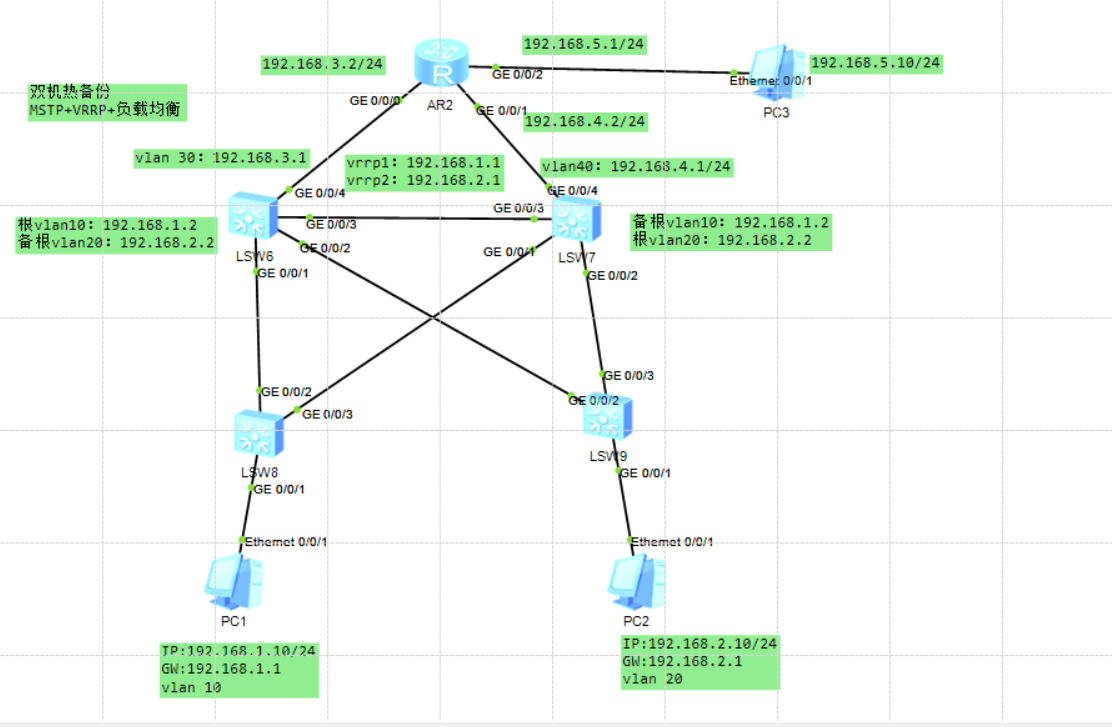
1. LSW6(左边那台,负责 VLAN10 主 + VLAN20 备)
system-view
sysname LSW6
vlan batch 10 20 30
接口配置
interface GigabitEthernet 0/0/4
port link-type access
port default vlan 30
quit
port-group group-member GigabitEthernet 0/0/1 to GigabitEthernet 0/0/3
port link-type trunk
port trunk allow-pass vlan 10 20 30
quit
三层接口 + VRRP(VLAN10 主,VLAN20 备)
interface Vlanif 30
ip address 192.168.3.1 24
quit
interface Vlanif 10
ip address 192.168.1.2 24
vrrp vrid 1 virtual-ip 192.168.1.1
vrrp vrid 1 priority 200
quit
interface Vlanif 20
ip address 192.168.2.2 24
vrrp vrid 2 virtual-ip 192.168.2.1
vrrp vrid 2 priority 195
quit
MSTP 配置(关键!)
stp enable
stp mode mstp
stp region-configuration
region-name 123
instance 1 vlan 10
instance 2 vlan 20
active region-configuration
quit
根桥设置(VLAN10 的根桥在 LSW6)
stp instance 1 root primary
stp instance 2 root secondary
PC1 接入端口设为边缘端口
interface GigabitEthernet 0/0/1 # 接 LSW8 的端口,根据拓扑调整
stp edged-port enable
quit
quit
save
2. LSW7(右边那台,负责 VLAN20 主 + VLAN10 备)
system-view
sysname LSW7
vlan batch 10 20 40
接口配置
interface GigabitEthernet 0/0/4
port link-type access
port default vlan 40
quit
port-group group-member GigabitEthernet 0/0/1 to GigabitEthernet 0/0/3
port link-type trunk
port trunk allow-pass vlan 10 20 40
quit
三层接口 + VRRP(VLAN10 备,VLAN20 主)
interface Vlanif 10
ip address 192.168.1.2 24
vrrp vrid 1 virtual-ip 192.168.1.1
vrrp vrid 1 priority 195
quit
interface Vlanif 20
ip address 192.168.2.2 24
vrrp vrid 2 virtual-ip 192.168.2.1
vrrp vrid 2 priority 200
quit
MSTP 配置
stp enable
stp mode mstp
stp region-configuration
region-name 123
instance 1 vlan 10
instance 2 vlan 20
active region-configuration
quit
根桥设置(VLAN20 的根桥在 LSW7)
stp instance 1 root secondary
stp instance 2 root primary
接入端口设为边缘端口
interface GigabitEthernet 0/0/1 # 接 LSW9 的端口
stp edged-port enable
quit
quit
save
3. LSW8(接 PC1,只通 VLAN10)
system-view
sysname LSW8
vlan 10
interface GigabitEthernet 0/0/1
port link-type access
port default vlan 10
stp edged-port enable
quit
port-group group-member GigabitEthernet 0/0/2 to GigabitEthernet 0/0/3
port link-type trunk
port trunk allow-pass vlan 10
quit
stp enable
stp mode mstp
stp region-configuration
region-name 123
instance 1 vlan 10
instance 2 vlan 20
active region-configuration
quit
quit
save
4. LSW9(接 PC2,只通 VLAN20)
system-view
sysname LSW9
vlan 20
interface GigabitEthernet 0/0/1
port link-type access
port default vlan 20
stp edged-port enable
quit
port-group group-member GigabitEthernet 0/0/2 to GigabitEthernet 0/0/3
port link-type trunk
port trunk allow-pass vlan 20
quit
stp enable
stp mode mstp
stp region-configuration
region-name 123
instance 1 vlan 10
instance 2 vlan 20
active region-configuration
quit
quit
save
5. R2(路由器,上联核心)
system-view
sysname R2
interface GigabitEthernet 0/0/0
ip address 192.168.3.2 24
quit
interface GigabitEthernet 0/0/1
ip address 192.168.4.2 24
quit
interface GigabitEthernet 0/0/2
ip address 192.168.5.1 24
quit
静态路由(指向 LSW7 的 SVI,通常走 GE0/0/1)
ip route-static 192.168.1.0 24 192.168.4.1
ip route-static 192.168.2.0 24 192.168.4.1
【或者每个网段都用rip宣告自己的网段】
R2rip 1
R2-rip-1v 2
R2-rip-1net
R2-rip-1network 192.168.3.0
R2-rip-1network 192.168.4.0
R2-rip-1network 192.168.5.0
quit
save