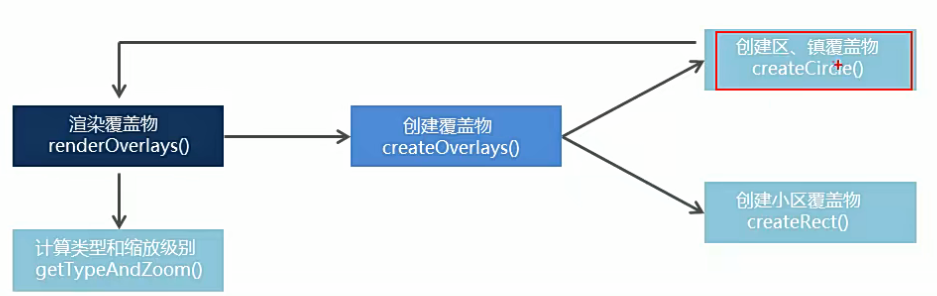
封装流程

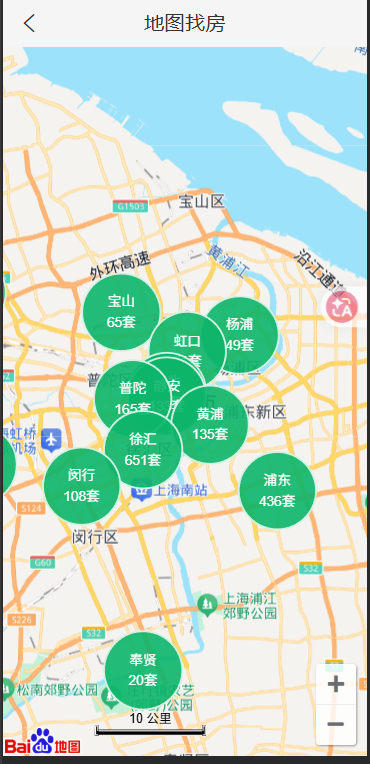
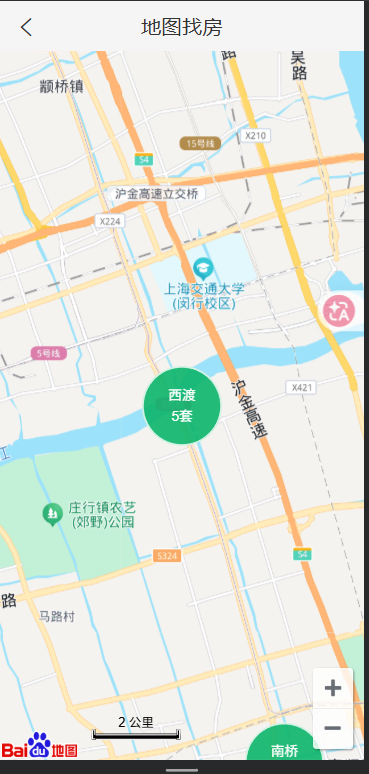
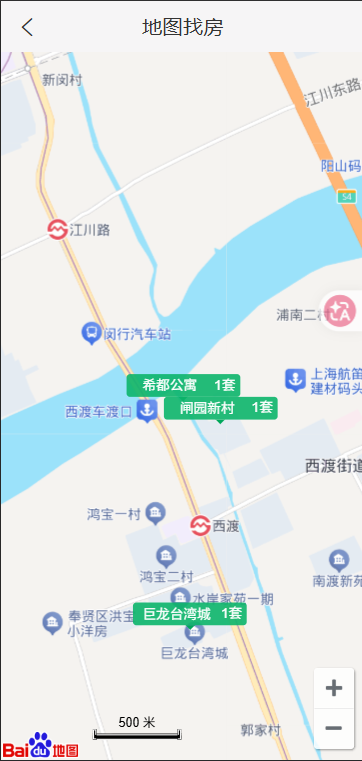
界面
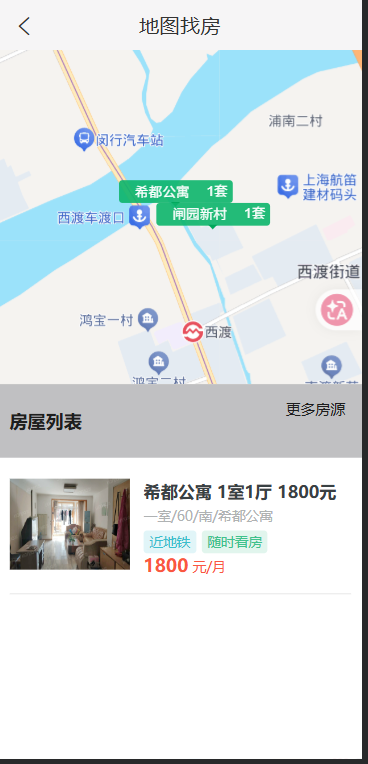
render() {
    return (
      <div className={styles.map}>
        {/* 地图容器 */}
        <NavHeader>地图找房</NavHeader>
        <div id="container" className={styles.container} />

        {/* 房源列表 */}
        {/* 添加 styles.show 展示房屋列表 */}
        <div
          className={[
            styles.houseList,
            this.state.isShowList ? styles.show : "",
          ].join(" ")}
        >
          <div className={styles.titleWrap}>
            <h1 className={styles.listTitle}>房屋列表</h1>
            <Link className={styles.titleMore} to="/home/list">
              更多房源
            </Link>
          </div>

          <div className={styles.houseItems}>
            {/* 房屋结构 */}
            {this.renderHousesList()}
          </div>
        </div>
      </div>
    );
  }
初始化地图
initMap() {
    const { label, value } = JSON.parse(localStorage.getItem("hkzf_city"));
    // 创建地图实例
    const map = new BMap.Map("container");
    this.map = map;
    // 创建地址解析器实例
    var myGeo = new BMap.Geocoder();
    // 将地址解析结果显示在地图上,并调整地图视野
    myGeo.getPoint(
      label,
      async (point) => {
        if (point) {
          // 初始化地图,同时设置展示级别
          map.centerAndZoom(point, 11);
          // 添加标注
          // map.addOverlay(new BMap.Marker(point));

          // 添加常见控件
          map.addControl(new BMap.NavigationControl());
          map.addControl(new BMap.ScaleControl());

          // 渲染覆盖物
          this.renderOverlays(value);
        }
      },
      label,
    );

    // 给地图绑定移动事件
    map.addEventListener("movestart", () => {
      // console.log('地图正在移动')
      if (this.state.isShowList) {
        // 隐藏列表
        this.setState({
          isShowList: false,
        });
      }
    });
  }
渲染覆盖物入口
/**
   * 渲染覆盖物入口
   * @param {*} id
   */
  async renderOverlays(id) {
    try {
      Toast.loading("加载中...", 0, null, false);

      const res = await API.get(`/area/map?id=${id}`);
      Toast.hide();
      const data = res.data.body;

      // 调用 getTypeAndZoom 方法获取级别和类型
      const { type, nextZoom } = this.getTypeAndZoom();

      data.forEach((item) => {
        this.createOverlays(item, nextZoom, type);
      });
    } catch (error) {
      Toast.hide();
    }
  }
计算要绘制的覆盖物类型和下一个缩放级别
// 计算要绘制的覆盖物类型和下一个缩放级别
  // 区   -> 11 ,范围:>=10 <12
  // 镇   -> 13 ,范围:>=12 <14
  // 小区 -> 15 ,范围:>=14 <16
  getTypeAndZoom() {
    // 调用地图的 getZoom() 方法,来获取当前缩放级别
    const zoom = this.map.getZoom();
    let nextZoom, type;

    // console.log('当前地图缩放级别:', zoom)
    if (zoom >= 10 && zoom < 12) {
      // 区
      // 下一个缩放级别
      nextZoom = 13;
      // circle 表示绘制圆形覆盖物(区、镇)
      type = "circle";
    } else if (zoom >= 12 && zoom < 14) {
      // 镇
      nextZoom = 15;
      type = "circle";
    } else if (zoom >= 14 && zoom < 16) {
      // 小区
      type = "rect";
    }

    return {
      nextZoom,
      type,
    };
  }
创建覆盖物
/**
   * 创建覆盖物
   * @param {*} item
   */
  createOverlays(data, zoom, type) {
    // 为每一条数据创建覆盖物
    const {
      coord: { longitude, latitude },
      label: areaName,
      count,
      value,
    } = data;
    // 创建覆盖物
    const areaPoint = new BMap.Point(longitude, latitude);
    if (type === "circle") {
      this.createCircle(areaPoint, areaName, count, value, zoom);
    } else {
      this.createRect(areaPoint, areaName, count, value);
    }
  }
创建小区覆盖物
// 创建小区覆盖物
  createRect(point, name, count, id) {
    const label = new BMap.Label("", {
      position: point,
      offset: new BMap.Size(-50, -28),
    });

    // 为label对象添加一个唯一标识
    label.id = id;

    // 创建标签对象
    label.setContent(`
            <div class="${styles.rect}">
              <p class="${styles.housename}">${name}</p>
              <p class="${styles.housenum}">${count}套</p>
              <span class="${styles.arrow}"></span>
            </div>
            `);
    label.setStyle(labelStyle);
    label.addEventListener("click", (e) => {
      console.log("小区被点击了");
      this.getHouseList(id);
      // 获取当前被点击项
      const target = e.changedTouches[0];
      // panBy() 方法,移动地图到中间位置
      this.map.panBy(
        window.innerWidth / 2 - target.clientX,
        (window.innerHeight - 330) / 2 - target.clientY,
      );
    });
    // 添加覆盖物到地图
    this.map.addOverlay(label);
  }
创建区域覆盖物
// 创建区域覆盖物
  createCircle(point, name, count, id, zoom) {
    const label = new BMap.Label("", {
      position: point,
      offset: new BMap.Size(-35, -35),
    });

    // 为label对象添加一个唯一标识
    label.id = id;

    // 设置房源覆盖物内容
    label.setContent(`
            <div class="${styles.bubble}">
              <p class="${styles.name}">${name}</p>
              <p>${count}套</p>
            </div>
            `);
    // 设置样式
    label.setStyle(labelStyle);

    // 添加单击事件
    label.addEventListener("click", () => {
      this.renderOverlays(id);
      console.log("点击了覆盖物", label.id);
      this.map.centerAndZoom(point, zoom);

      // 清除当前覆盖物信息
      this.map.clearOverlays();
    });

    // 解决清除覆盖物时,百度地图API的JS文件自身报错的问题
    setTimeout(() => {
      // 添加覆盖物到地图
      this.map.addOverlay(label);
    }, 0);
  }
获取小区下的房源列表
// 获取小区下的房源列表
  async getHouseList(id) {
    try {
      // 开启loading
      Toast.loading("加载中...", 0, null, false);

      const res = await API.get(`/houses?cityId=${id}`);
      // 关闭 loading
      Toast.hide();

      this.setState({
        housesList: res.data.body.list,
        // 展示房源列表
        isShowList: true,
      });
    } catch (e) {
      // 关闭 loading
      Toast.hide();
    }
  }
封装渲染房屋列表的方法
// 封装渲染房屋列表的方法
  renderHousesList() {
    return this.state.housesList.map((item) => (
      <HouseItem
        onClick={() => this.props.history.push(`/detail/${item.houseCode}`)}
        key={item.houseCode}
        src={BASE_URL + item.houseImg}
        title={item.title}
        desc={item.desc}
        tags={item.tags}
        price={item.price}
      />
    ));
  }