图像:
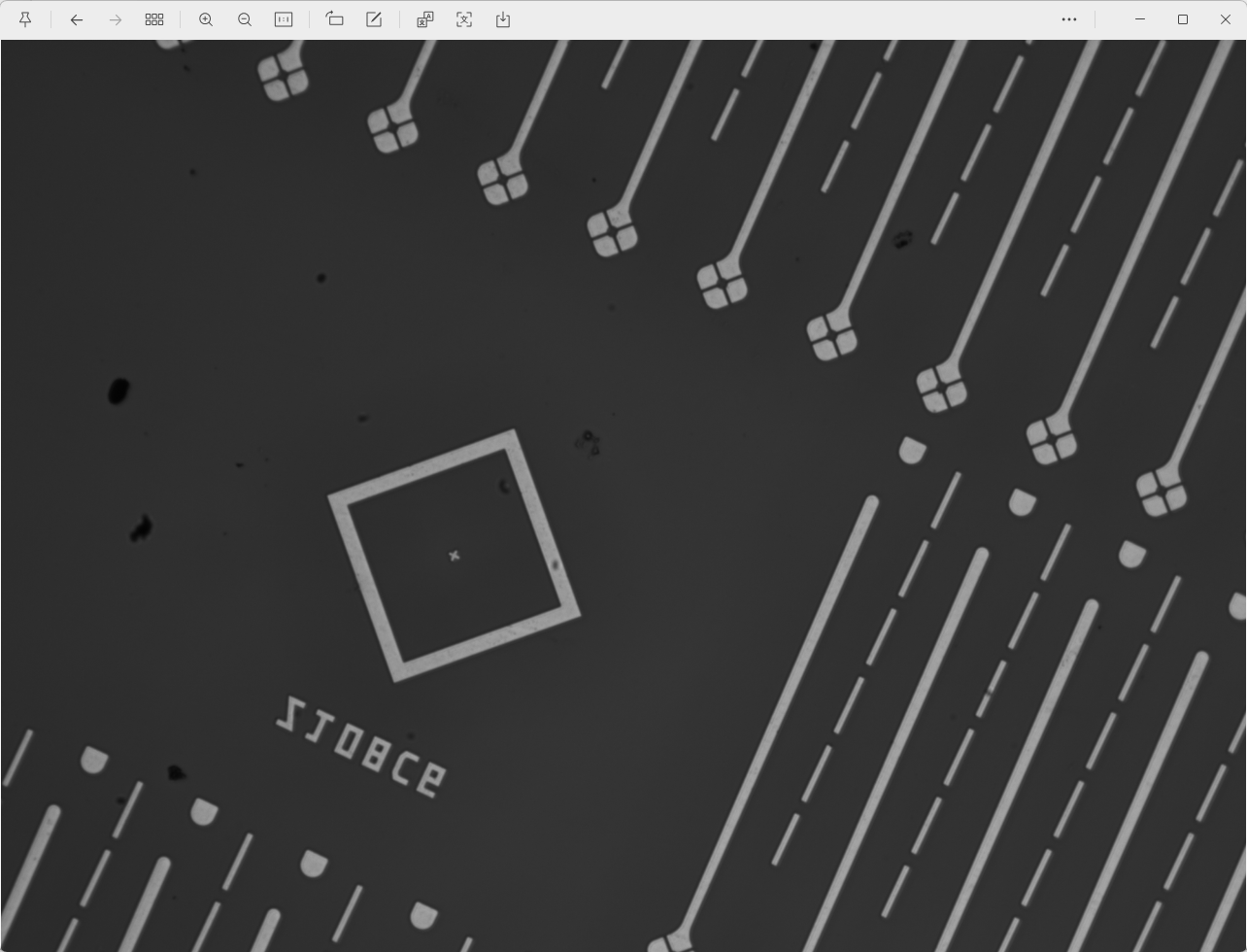
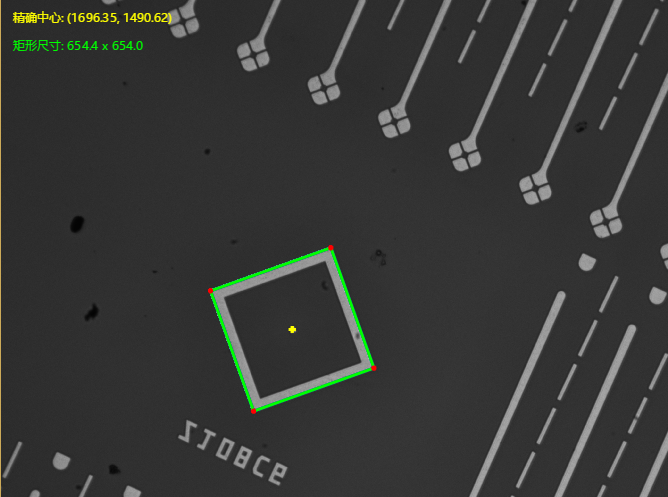
效果:
思路:
先使用edges_sub_pix找出所有轮廓

平滑轮廓,连接轮廓,去除Mark边上的干扰点,比如下面这里:
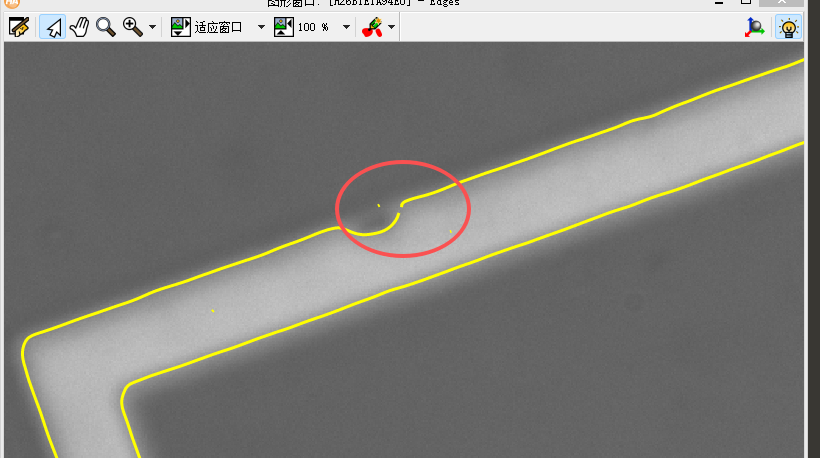
要连到一起形成封闭的轮廓方便后续处理。
然后找出封闭的、面积最大的一个轮廓
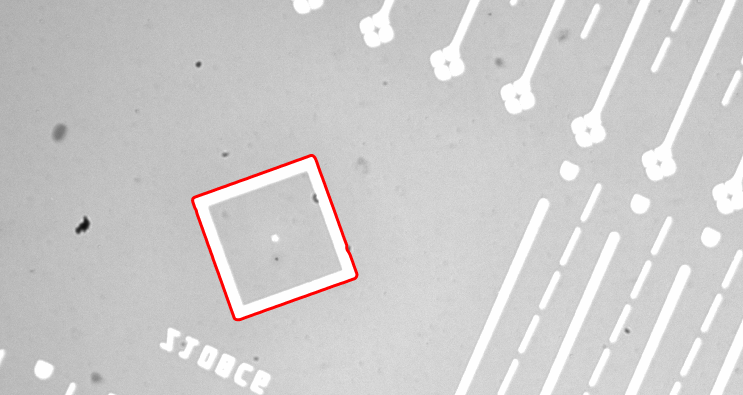
以这个轮廓位置为基准,进行二维两侧找矩形精确找边
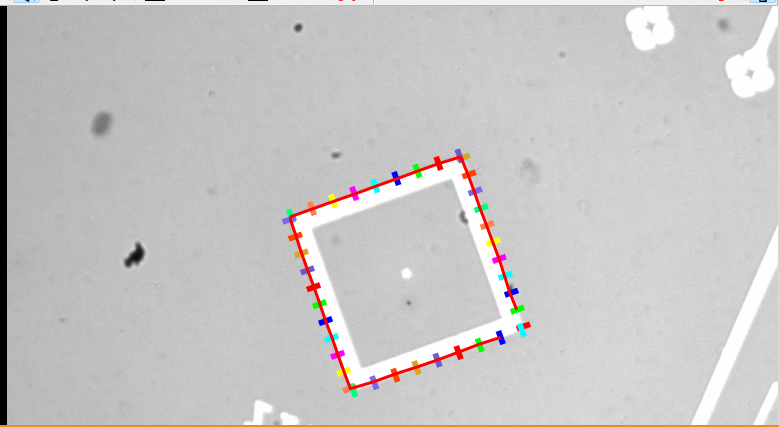
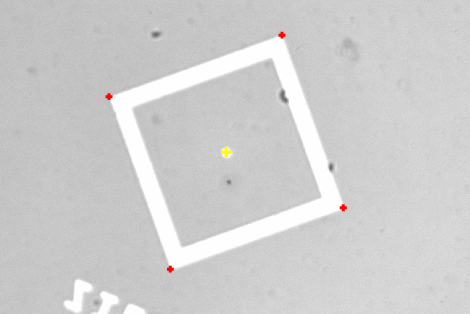
然后计算顶点确定中心。
代码:
Matlab
* Image Acquisition 01: Code generated by Image Acquisition 01
list_files ('G:/图像/打光测试用方框', ['files','follow_links'], ImageFiles)
tuple_regexp_select (ImageFiles, ['\\.(tif|tiff|gif|bmp|jpg|jpeg|jp2|png|pcx|pgm|ppm|pbm|xwd|ima|hobj)$','ignore_case'], ImageFiles)
for Index := 0 to |ImageFiles| - 1 by 1

 dev_close_window ()
 read_image (Image, ImageFiles[Index])
get_image_size (Image, Width, Height)

dev_set_colored (12)
dev_set_draw ('margin')
dev_open_window_fit_image (Image, 0, 0, -1, -1, WindowHandle)
dev_display (Image)

edges_sub_pix (Image, Edges, 'canny', 5, 3, 5)
smooth_contours_xld (Edges, SmoothedEdges, 3)
* segment_contours_xld (Edges, ContoursSplit, 'lines', 5, 4, 2)
* 2. 连接相切的轮廓(坑和路平滑过渡)
* MaxDist: 端点间的最大距离(像素)
* MaxAngle: 最大角度差(弧度)- 允许一定角度偏差
* MaxTang: 最大切线方向差(弧度)- 保证平滑连接
union_cotangential_contours_xld (Edges, UnionEdges, 20, rad(30), rad(30), 10, 10, 3, 'attr_keep')
* 步骤1:从原始轮廓中筛选出封闭的轮廓
select_contours_xld (UnionEdges, ClosedContours, 'closed', 0, 1.0, 0, 0)

* 步骤2:计算所有封闭轮廓的面积
area_center_xld (ClosedContours, Area, Row, Column, PointOrder)

* 步骤3:获取面积排序索引(升序:面积小的在前,大的在后)
tuple_sort_index (Area, Indices)

* 步骤4:获取轮廓数量
count_obj (ClosedContours, NumClosed)

* 步骤5:选出面积最大的两个轮廓
if (NumClosed >= 2)
    * 最大面积的索引(最后一个)
    Index1 := Indices[NumClosed - 1] + 1
    * 第二大面积的索引(倒数第二个)
    Index2 := Indices[NumClosed - 2] + 1

    * 选择两个轮廓
    select_obj (ClosedContours, LargestContour, Index1)
    select_obj (ClosedContours, SecondLargestContour, Index2)

    * 合并成一个对象数组(可选)
    concat_obj (LargestContour, SecondLargestContour, TopTwoContours)
elseif (NumClosed == 1)
    * 只有一个封闭轮廓的情况
    select_obj (ClosedContours, TopTwoContours, 1)

else
    * 没有封闭轮廓
    gen_empty_obj (TopTwoContours)

endif

* 显示结果
dev_display (TopTwoContours)

* ========== 为第一个轮廓生成最小外接矩形 ==========
smallest_rectangle2_xld (LargestContour, Row1, Column1, Phi1, Length1_1, Length2_1)
gen_rectangle2 (Rectangle1, Row1, Column1, Phi1, Length1_1, Length2_1)

* ========== 为第二个轮廓生成最小外接矩形 ==========
smallest_rectangle2_xld (SecondLargestContour, Row2, Column2, Phi2, Length1_2, Length2_2)
gen_rectangle2 (Rectangle2, Row2, Column2, Phi2, Length1_2, Length2_2)


    dev_display (Image)


* ========== 使用 Metrology Model 精确测量 ==========
* 获取图像尺寸
get_image_size (Image, Width, Height)

* 创建测量模型
create_metrology_model (MetrologyHandle)

* 设置图像尺寸
set_metrology_model_image_size (MetrologyHandle, Width, Height)

* 添加矩形测量对象
* 参数:[中心行, 中心列, 角度, 半长, 半宽]
* 测量区域长度: 30, 测量区域宽度: 10
* 平滑参数: 0.4, 边缘阈值: 20
add_metrology_object_generic (MetrologyHandle, 'rectangle2', [Row1, Column1, Phi1, Length1_1, Length2_1],20, 5, 1, 10, [], [], Index3)


* 设置测量参数
set_metrology_object_param (MetrologyHandle, 'all', 'measure_transition', 'all')
set_metrology_object_param (MetrologyHandle, 'all', 'measure_select', 'first')
set_metrology_object_param (MetrologyHandle, 'all', 'num_measures', 40)

* 执行测量
apply_metrology_model (Image, MetrologyHandle)

* 获取测量到的边缘点轮廓
get_metrology_object_measures (MeasuresContour, MetrologyHandle, 'all', 'all', RowPoints, ColPoints)

* 将测量点转换为轮廓
gen_contour_polygon_xld (MeasuresContour, RowPoints, ColPoints)

* 使用拟合矩形(可选,如果直接获取结果不够精确)
fit_rectangle2_contour_xld (MeasuresContour, 'regression', -1, 0, 0, 3, 2, PreciseRow, PreciseCol, PrecisePhi, PreciseLen1, PreciseLen2, PointOrder)

* 生成精确矩形轮廓
gen_rectangle2_contour_xld (PreciseRectangle, PreciseRow, PreciseCol, PrecisePhi, PreciseLen1, PreciseLen2)

* 或者直接获取测量结果(更简洁的方式)
* get_metrology_object_result (MetrologyHandle, Index, 'all', 'result_type', 'all_param', RectParams)
* PreciseRow := RectParams[0]
* PreciseCol := RectParams[1]
* PrecisePhi := RectParams[2]
* PreciseLen1 := RectParams[3]
* PreciseLen2 := RectParams[4]

* 清理测量模型
clear_metrology_model (MetrologyHandle)

* ========== 计算四个顶点 ==========
* 从矩形参数计算四个角点
CosPhi := cos(PrecisePhi)
SinPhi := sin(PrecisePhi)

* 顶点1(右上)
V1Row := PreciseRow + PreciseLen1 * CosPhi - PreciseLen2 * SinPhi
V1Col := PreciseCol + PreciseLen1 * SinPhi + PreciseLen2 * CosPhi

* 顶点2(右下)
V2Row := PreciseRow + PreciseLen1 * CosPhi + PreciseLen2 * SinPhi
V2Col := PreciseCol + PreciseLen1 * SinPhi - PreciseLen2 * CosPhi

* 顶点3(左下)
V3Row := PreciseRow - PreciseLen1 * CosPhi + PreciseLen2 * SinPhi
V3Col := PreciseCol - PreciseLen1 * SinPhi - PreciseLen2 * CosPhi

* 顶点4(左上)
V4Row := PreciseRow - PreciseLen1 * CosPhi - PreciseLen2 * SinPhi
V4Col := PreciseCol - PreciseLen1 * SinPhi + PreciseLen2 * CosPhi

* 计算中心点(四个顶点的平均值)
CenterRow := (V1Row + V2Row + V3Row + V4Row) / 4
CenterCol := (V1Col + V2Col + V3Col + V4Col) / 4

* ========== 显示结果 ==========
dev_clear_window ()
dev_display (Image)

* 显示初始外接矩形(灰色)
dev_set_color ('gray')
dev_display (Rectangle1)

* 显示测量边缘点(蓝色)
dev_set_color ('blue')
dev_display (MeasuresContour)

* 显示精确矩形(绿色)
dev_set_color ('green')
dev_set_line_width (3)
dev_display (PreciseRectangle)

* 显示四个顶点(红色十字)
dev_set_color ('red')
gen_cross_contour_xld (Cross1, V1Row, V1Col, 25, 0)
gen_cross_contour_xld (Cross2, V2Row, V2Col, 25, 0)
gen_cross_contour_xld (Cross3, V3Row, V3Col, 25, 0)
gen_cross_contour_xld (Cross4, V4Row, V4Col, 25, 0)
dev_display (Cross1)
dev_display (Cross2)
dev_display (Cross3)
dev_display (Cross4)

* 显示精确中心(黄色十字)
dev_set_color ('yellow')
gen_cross_contour_xld (CenterCross, CenterRow, CenterCol, 35, 0)
dev_display (CenterCross)

* 显示坐标信息
disp_message (WindowHandle, '精确中心: (' + CenterRow$'.2f' + ', ' + CenterCol$'.2f' + ')', 'window', 12, 12, 'yellow', 'false')
disp_message (WindowHandle, '矩形尺寸: ' + (2*PreciseLen1)$'.1f' + ' x ' + (2*PreciseLen2)$'.1f', 'window', 40, 12, 'green', 'false')
stop ()
endfor