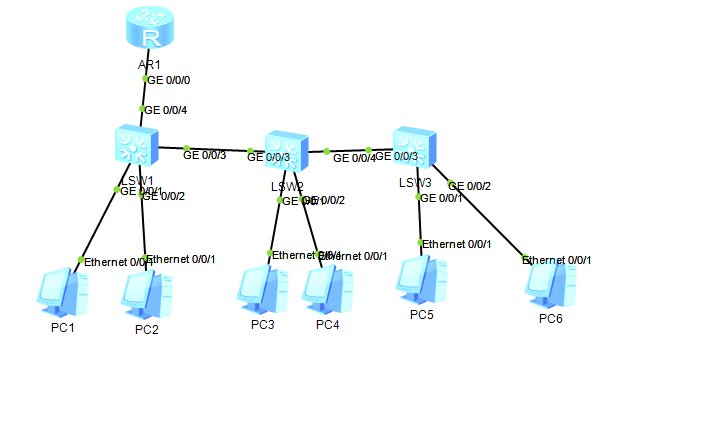
 一、拓扑与IP规划
| 设备 | VLAN | 网关 | IP地址 |
|---|---|---|---|
| PC1/PC3 | 2 | 192.168.2.254 | 192.168.2.1/2 |
| PC2 | 3 | 192.168.3.254 | 192.168.3.1 |
| PC4 | 4 | 192.168.4.254 | 192.168.4.1 |
| PC5 | 5 | 192.168.5.254 | 192.168.5.1 |
| PC6 | 6 | 192.168.6.254 | 192.168.6.1 |
二、交换机配置
LSW1
system-view
vlan batch 2 3 4 5 6
interface GigabitEthernet 0/0/1
port link-type access
port default vlan 2
quit
interface GigabitEthernet 0/0/2
port link-type access
port default vlan 3
quit
interface GigabitEthernet 0/0/3
port link-type trunk
port trunk allow-pass vlan 2 to 6
quit
interface GigabitEthernet 0/0/4
port link-type trunk
port trunk allow-pass vlan 2 to 6
quit
save
LSW2
system-view
vlan batch 2 3 4 5 6
interface GigabitEthernet 0/0/1
port link-type access
port default vlan 2
quit
interface GigabitEthernet 0/0/2
port link-type access
port default vlan 4
quit
interface GigabitEthernet 0/0/3
port link-type trunk
port trunk allow-pass vlan 2 to 6
quit
interface GigabitEthernet 0/0/4
port link-type trunk
port trunk allow-pass vlan 2 to 6
quit
save
LSW3
system-view
vlan batch 2 3 4 5 6
interface GigabitEthernet 0/0/1
port link-type access
port default vlan 5
quit
interface GigabitEthernet 0/0/2
port link-type access
port default vlan 6
quit
interface GigabitEthernet 0/0/3
port link-type trunk
port trunk allow-pass vlan 2 to 6
quit
save
三、路由器配置
system-view
dhcp enable
interface GigabitEthernet 0/0/0
ip address 192.168.3.254 255.255.255.0
dhcp select interface
quit
interface GigabitEthernet 0/0/0.2
dot1q termination vid 2
ip address 192.168.2.254 255.255.255.0
arp broadcast enable
dhcp select interface
quit
interface GigabitEthernet 0/0/0.4
dot1q termination vid 4
ip address 192.168.4.254 255.255.255.0
arp broadcast enable
dhcp select interface
quit
interface GigabitEthernet 0/0/0.5
dot1q termination vid 5
ip address 192.168.5.254 255.255.255.0
arp broadcast enable
dhcp select interface
quit
interface GigabitEthernet 0/0/0.6
dot1q termination vid 6
ip address 192.168.6.254 255.255.255.0
arp broadcast enable
dhcp select interface
quit
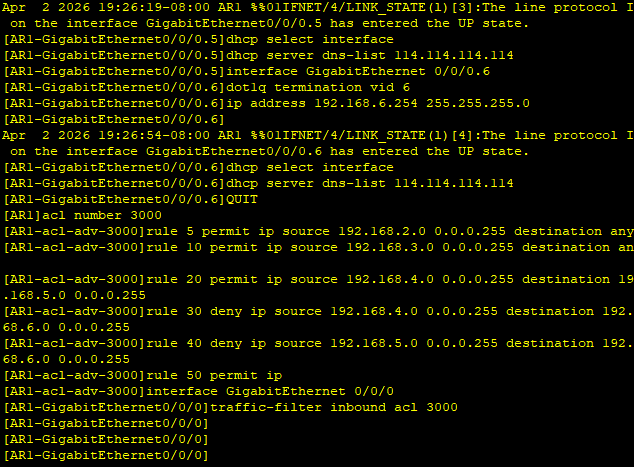
四、ACL配置
acl number 3000
rule 5 permit ip source 192.168.2.0 0.0.0.255
rule 10 permit ip source 192.168.3.0 0.0.0.255
rule 20 permit ip source 192.168.4.0 0.0.0.255 destination 192.168.5.0 0.0.0.255
rule 30 deny ip source 192.168.4.0 0.0.0.255 destination 192.168.6.0 0.0.0.255
rule 40 deny ip source 192.168.5.0 0.0.0.255 destination 192.168.6.0 0.0.0.255
rule 100 permit ip
quit
interface GigabitEthernet 0/0/0
traffic-filter inbound acl 3000
quit
save
五、PC配置
-
PC1: 192.168.2.1/24, GW 192.168.2.254
-
PC2: 192.168.3.1/24, GW 192.168.3.254
-
PC3: 192.168.2.2/24, GW 192.168.2.254
-
PC4: 192.168.4.1/24, GW 192.168.4.254
-
PC5: 192.168.5.1/24, GW 192.168.5.254
-
PC6: 192.168.6.1/24, GW 192.168.6.254
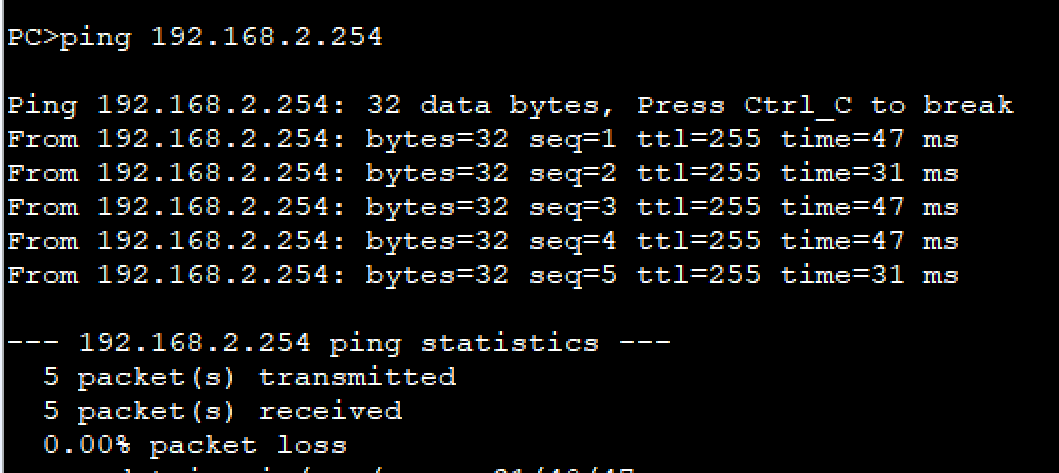
六、验证测试
# PC4测试PC5
ping 192.168.5.1  # 应该通
# PC4测试PC6
ping 192.168.6.1  # 应该不通
# PC5测试PC6
ping 192.168.6.1  # 应该不通
七、查看命令
display vlan
display ip interface brief
display dhcp server ip-in-use
display acl 3000