需求:整体划分24个单元格,最小单位为半格,,有五个不同的状态
(1)同一状态下可以选择多个时间段,点击选择半格,拖拽选择区间
(2)不同状态不可以选择同一区间,选择区以不同颜色区分,被其他状态选过的区间禁止选择
相邻的区间选中自动合并,点击取消选择当前区间
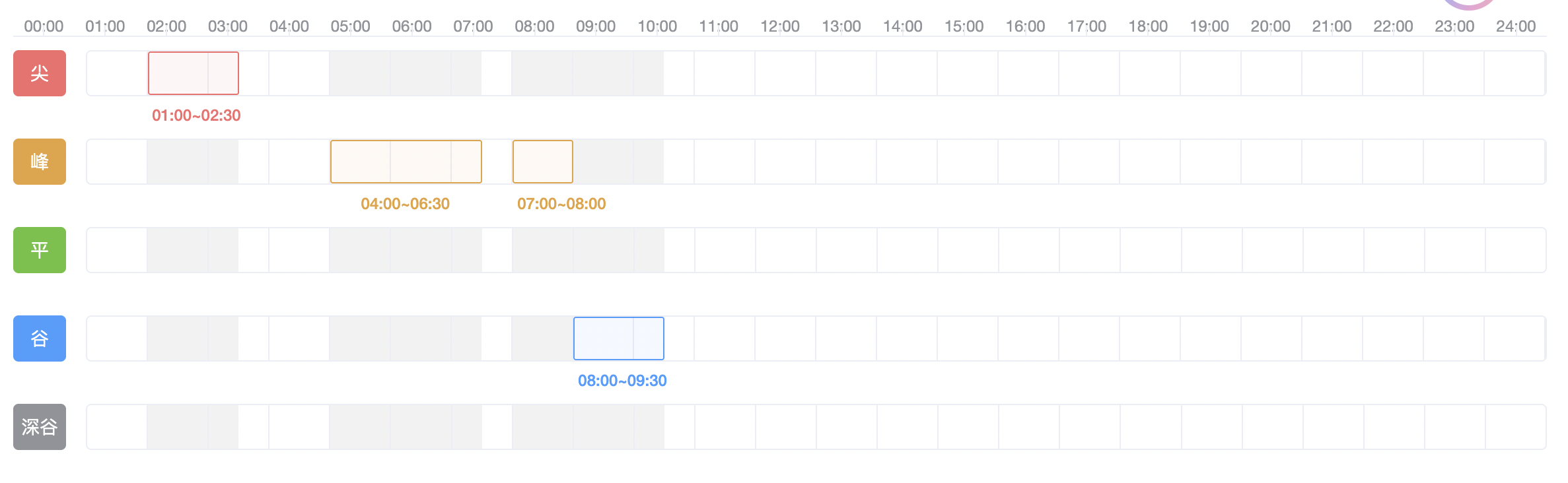
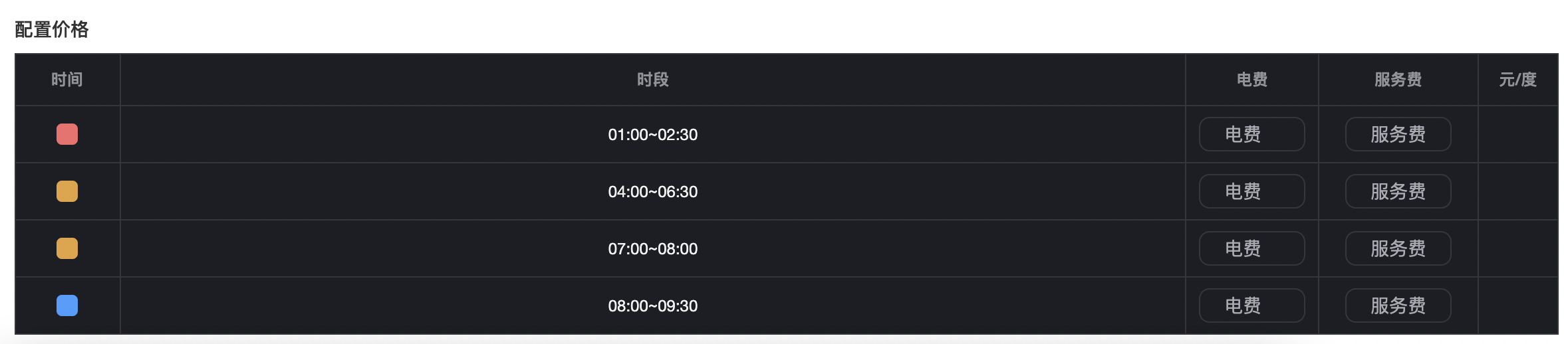
表格与选择区数据同步,实时变动,可对不同的状态设置其数值
部分代码
时段选择区标签样式
html<div class="time-grid-section"> <!-- 时间轴:00:00 ~ 24:00 --> <div class="time-ticks"> <div class="tick" v-for="hour in 25" :key="hour"> {{ `${(hour - 1).toString().padStart(2, '0')}:00` }} </div> </div> <!-- 5行时段选择:每行包含格子区+时段文字区 --> <div class="period-rows"> <div class="period-row" v-for="(row, rowIndex) in periodRows" :key="row.type"> <!-- 左侧颜色标签 --> <div class="period-label" :style="{ backgroundColor: row.color }"> {{ row.label }} </div> <!-- 核心:格子容器 + 时段文字容器 组合 --> <div class="grid-and-text-wrap"> <!-- 24个小时格子容器 --> <div class="hour-grid-container" @mousedown="handleMouseDown($event, rowIndex)" @mousemove="handleMouseMove($event, rowIndex)" @mouseup="handleMouseUp" @mouseleave="handleMouseUp"> <!-- 24个小时格子,每个包含2个30分钟半格 --> <div class="hour-grid" v-for="hour in 24" :key="hour"> <div class="half-grid" v-for="half in 2" :key="half" :data-index="(hour - 1) * 2 + half" :class="{ 'temp-select': isTempSelect(rowIndex, (hour - 1) * 2 + half), 'conflict': isConflict(rowIndex, (hour - 1) * 2 + half) }"></div> </div> <!-- 选中区域整体外边框:使用合并后的数据渲染 --> <!-- 【仅新增】给选中边框绑定点击取消事件,stop阻止冒泡,不影响原有逻辑 --> <div class="selected-wrap" v-for="(period, pIndex) in mergedPeriods[rowIndex]" :key="period.id" :style="{ left: `${((period.start - 1) / 48) * 100}%`, width: `${((period.end - period.start + 1) / 48) * 100}%`, borderColor: row.color, backgroundColor: `${row.color}10` }" @click.stop="handleCancelSelected(period, rowIndex)"></div> </div> <!-- 时段文字显示容器:使用合并后的数据渲染,与边框同步 --> <div class="period-text-container"> <div class="period-text" v-for="period in mergedPeriods[rowIndex]" :key="period.id" :style="{ color: row.color, left: `${((period.start - 1) / 48) * 100}%`, width: `${((period.end - period.start + 1) / 48) * 100}%` }"> {{ formatPeriod(period.start, period.end) }} </div> </div> </div> </div> </div> </div>时段格式化核心逻辑
核心规则:
单半格(start=end):结束时间取 start+1 → 如1→1+1 → 00:00~00:30
多格(start<end):结束时间直接取 end+1 → 如1~2→2+1 → 00:00~01:00
索引映射:1=00:00,2=00:30,3=01:00,4=01:30...48=23:30,49=24:00
javascriptconst formatPeriod = (start, end) => { // 通用时间计算:索引 → 对应时间(如1→00:00,2→00:30,49→24:00) const getTimeByIndex = (index) => { const totalMinutes = (index - 1) * 30 const hour = Math.floor(totalMinutes / 60).toString().padStart(2, '0') const minute = (totalMinutes % 60).toString().padStart(2, '0') return `${hour}:${minute}` } // 单格:start=end → 结束时间=start+1 if (start === end) { return `${getTimeByIndex(start)}~${getTimeByIndex(start + 1)}` } // 多格:start<end → 结束时间=end+1(核心) return `${getTimeByIndex(start)}~${getTimeByIndex(end + 1)}` }
mergedPeriods 计算属性 - 相邻/连续时段自动合并
javascriptconst mergedPeriods = computed(() => { // 强制转为纯数组,避免响应式包装器导致的类型问题 const rows = [...periodRows] // 遍历每行,返回每行的合并后时段数组,最终得到 二维数组 return rows.map(row => { // 空时段直接返回空数组,避免后续遍历报错 if (!row.periods || row.periods.length === 0) return [] // 1. 深拷贝并按start升序排序,避免修改原数据+保证合并顺序 const sortedPeriods = JSON.parse(JSON.stringify(row.periods)).sort((a, b) => a.start - b.start) // 2. 初始化合并数组,放入第一个时段 const merged = [sortedPeriods[0]] // 3. 遍历剩余时段,判断是否相邻/连续(核心合并逻辑) for (let i = 1; i < sortedPeriods.length; i++) { const lastMerged = merged[merged.length - 1] const current = sortedPeriods[i] // 相邻判断:当前时段start ≤ 上一时段end + 1(如1和2,完美匹配相邻半格) if (current.start <= lastMerged.end + 1) { // 合并时段:保留原属性,更新end为最大值,拼接唯一ID merged[merged.length - 1] = { ...lastMerged, end: Math.max(lastMerged.end, current.end), id: `${lastMerged.id}-${current.id}` // 保证v-for key唯一 } } else { // 非相邻时段,直接添加 merged.push(current) } } return merged }) })