摘要
动画为游戏注入了生命力,是游戏体验不可或缺的组成部分。本章将介绍 Pygame 中动画的基本实现方式,包括帧动画、精灵表、补间动画和状态机管理。我们将学习如何创建流畅、高效的角色动画系统,掌握动画的播放控制和过渡技巧。通过本章的学习,读者将能够为游戏角色和物体创建生动有趣的动画效果。
9.1 动画基础
动画本质上是通过快速连续显示一系列静态图像,制造运动错觉。
9.1.1 动画原理
动画的核心概念包括:
- 帧率:每秒显示的帧数,常见为 12 到 30 FPS
- 帧时间:每帧持续的时间,帧率越高,帧时间越短
- 关键帧:动画中的重要姿态,中间帧可以由程序插值生成
9.1.2 动画类型
| 类型 | 特点 | 适用场景 |
|---|---|---|
| 帧动画 | 由多张图片组成 | 角色动作、特效 |
| 补间动画 | 由程序计算中间状态 | UI 动画、移动效果 |
| 骨骼动画 | 基于骨骼驱动 | 复杂角色动画 |
| 粒子动画 | 由大量粒子组成 | 火焰、烟雾、爆炸 |
9.2 帧动画实现
帧动画是最常见、最容易理解的动画方式。它的基本思路是:
准备多张连续帧图片,然后按固定时间间隔切换显示。
9.2.1 基础帧动画
下面示例使用不同颜色的圆形来模拟动画帧:
python
import pygame
import sys

pygame.init()
screen = pygame.display.set_mode((800, 600))
clock = pygame.time.Clock()

class AnimatedSprite(pygame.sprite.Sprite):
    def __init__(self, x, y):
        super().__init__()
        self.frames = []
        colors = [
            (255, 0, 0),
            (255, 128, 0),
            (255, 255, 0),
            (0, 255, 0),
            (0, 255, 255),
            (0, 0, 255),
            (255, 0, 255)
        ]

        for color in colors:
            frame = pygame.Surface((64, 64), pygame.SRCALPHA)
            pygame.draw.circle(frame, color, (32, 32), 30)
            self.frames.append(frame)

        self.current_frame = 0
        self.animation_speed = 100
        self.last_update = pygame.time.get_ticks()

        self.image = self.frames[0]
        self.rect = self.image.get_rect(center=(x, y))

    def update(self):
        now = pygame.time.get_ticks()
        if now - self.last_update >= self.animation_speed:
            self.last_update = now
            self.current_frame = (self.current_frame + 1) % len(self.frames)
            self.image = self.frames[self.current_frame]

all_sprites = pygame.sprite.Group()
sprite = AnimatedSprite(400, 300)
all_sprites.add(sprite)

running = True
while running:
    for event in pygame.event.get():
        if event.type == pygame.QUIT:
            running = False

    all_sprites.update()

    screen.fill((50, 50, 50))
    all_sprites.draw(screen)

    pygame.display.flip()
    clock.tick(60)

pygame.quit()
sys.exit()
说明
frames保存所有帧current_frame表示当前帧索引animation_speed控制切换速度,单位是毫秒pygame.time.get_ticks()返回程序启动后的毫秒数
9.2.2 帧动画的核心逻辑
帧动画的关键点就是"定时切换"。
python
now = pygame.time.get_ticks()
if now - last_update >= animation_speed:
    last_update = now
    current_frame = (current_frame + 1) % len(frames)
解释
- 当当前时间减去上次更新时间达到设定间隔时
- 切换到下一帧
- 使用取模
%可以实现循环播放
9.3 从文件加载帧动画
在实际项目中,动画帧通常来自图片文件,而不是程序绘制。
9.3.1 文件帧加载思路
通常会把一组图片按固定命名规则保存,比如:
frame_00.pngframe_01.pngframe_02.png
然后按顺序读取。
python
import pygame
import os

def load_frames(folder, count):
    frames = []
    for i in range(count):
        filepath = f"{folder}/frame_{i:02d}.png"
        if os.path.exists(filepath):
            frame = pygame.image.load(filepath).convert_alpha()
            frames.append(frame)
    return frames
9.3.2 动画播放控制
python
class AnimationPlayer:
    def __init__(self, animations):
        self.animations = animations
        self.current_animation = "idle"
        self.current_frame = 0
        self.animation_speed = 100
        self.last_update = pygame.time.get_ticks()
        self.loop = True
        self.playing = True

    def play(self, name, loop=True):
        if name in self.animations:
            self.current_animation = name
            self.current_frame = 0
            self.loop = loop
            self.playing = True
            self.last_update = pygame.time.get_ticks()

    def update(self):
        if not self.playing:
            return

        now = pygame.time.get_ticks()
        if now - self.last_update >= self.animation_speed:
            self.last_update = now
            frames = self.animations[self.current_animation]
            self.current_frame += 1

            if self.current_frame >= len(frames):
                if self.loop:
                    self.current_frame = 0
                else:
                    self.current_frame = len(frames) - 1
                    self.playing = False
说明
play用于切换动画loop决定是否循环- 非循环动画播放完后停在最后一帧
9.4 精灵表处理
精灵表是把多帧动画合并到一张大图中,这样可以减少文件数量和加载开销。
9.4.1 精灵表裁剪
python
import pygame

class SpriteSheet:
    def __init__(self, filepath):
        self.sheet = pygame.image.load(filepath).convert_alpha()

    def get_image(self, x, y, width, height):
        image = pygame.Surface((width, height), pygame.SRCALPHA)
        image.blit(self.sheet, (0, 0), (x, y, width, height))
        return image
9.4.2 连续帧提取
python
def get_frames(self, start_x, start_y, width, height, count, direction="horizontal"):
    frames = []
    for i in range(count):
        if direction == "horizontal":
            x = start_x + i * width
            y = start_y
        else:
            x = start_x
            y = start_y + i * height
        frames.append(self.get_image(x, y, width, height))
    return frames
说明
- 横向排列:帧按水平方向排列
- 纵向排列:帧按竖直方向排列
- 适合多数 2D 角色动画资源
9.5 补间动画
补间动画是通过计算起点和终点之间的中间值实现平滑过渡。
9.5.1 线性插值
python
def lerp(start, end, t):
    return start + (end - start) * t
说明
start:起始值end:目标值t:进度,范围 0 到 1
9.5.2 缓动函数
python
def ease_in_out(t):
    return t * t * (3 - 2 * t)

def ease_out_bounce(t):
    if t < 1 / 2.75:
        return 7.5625 * t * t
    elif t < 2 / 2.75:
        t -= 1.5 / 2.75
        return 7.5625 * t * t + 0.75
    elif t < 2.5 / 2.75:
        t -= 2.25 / 2.75
        return 7.5625 * t * t + 0.9375
    else:
        t -= 2.625 / 2.75
        return 7.5625 * t * t + 0.984375
9.5.3 Tween 类
python
class Tween:
    def __init__(self, start_value, end_value, duration, ease_func=None):
        self.start_value = start_value
        self.end_value = end_value
        self.duration = duration
        self.ease_func = ease_func or (lambda t: t)
        self.start_time = pygame.time.get_ticks()
        self.finished = False

    def update(self):
        elapsed = pygame.time.get_ticks() - self.start_time
        t = min(elapsed / self.duration, 1.0)

        if t >= 1.0:
            self.finished = True

        return lerp(self.start_value, self.end_value, self.ease_func(t))
说明
- Tween 常用于 UI 位移、缩放、透明度变化
- 适合做按钮动画、弹出动画、提示框动画
9.6 动画状态机
动画状态机用于管理角色在不同状态下的动画切换,例如待机、行走、攻击。
9.6.1 状态机思路
python
class AnimationStateMachine:
    def __init__(self):
        self.states = {}
        self.transitions = {}
        self.current_state = None

    def add_state(self, name, animation):
        self.states[name] = animation

    def add_transition(self, from_state, to_state, condition):
        if from_state not in self.transitions:
            self.transitions[from_state] = []
        self.transitions[from_state].append((to_state, condition))

    def set_state(self, name):
        if name in self.states:
            self.current_state = name
            self.states[name].reset()
9.6.2 更新逻辑
python
def update(self, context):
    if self.current_state in self.transitions:
        for to_state, condition in self.transitions[self.current_state]:
            if condition(context):
                self.set_state(to_state)
                break

    if self.current_state:
        self.states[self.current_state].update()
说明
context是外部状态信息,例如是否移动、是否攻击- 条件满足时自动切换状态
9.7 中文字体安全加载方案
在某些环境中,pygame.font.SysFont 可能触发系统字体扫描错误,因此本书建议统一使用字体文件路径加载。
9.7.1 推荐写法
python
import pygame
import os

def get_font(size):
    font_paths = [
        r"C:\Windows\Fonts\simhei.ttf",
        r"C:\Windows\Fonts\msyh.ttc",
        r"C:\Windows\Fonts\simsun.ttc",
    ]

    for path in font_paths:
        if os.path.exists(path):
            try:
                return pygame.font.Font(path, size)
            except:
                pass

    return pygame.font.Font(None, size)
说明
- 这种写法避免了
SysFont引发的系统字体枚举问题 - 适合本书所有涉及中文显示的示例
9.8 综合示例:角色动画系统
下面给出本章完整的综合示例,包含:
- 帧动画
- 状态机
- 行走和待机切换
- 中文字体安全加载
python
import pygame
import sys
import os

pygame.init()
screen = pygame.display.set_mode((800, 600))
pygame.display.set_caption("角色动画系统演示")
clock = pygame.time.Clock()

def get_font(size):
    font_paths = [
        r"C:\Windows\Fonts\simhei.ttf",
        r"C:\Windows\Fonts\msyh.ttc",
        r"C:\Windows\Fonts\simsun.ttc",
    ]

    for path in font_paths:
        if os.path.exists(path):
            try:
                return pygame.font.Font(path, size)
            except:
                pass

    return pygame.font.Font(None, size)

font = get_font(24)

class FrameAnimation:
    def __init__(self, frames, speed=100, loop=True):
        self.frames = frames
        self.speed = speed
        self.loop = loop
        self.current_frame = 0
        self.last_update = pygame.time.get_ticks()
        self.finished = False

    def reset(self):
        self.current_frame = 0
        self.finished = False
        self.last_update = pygame.time.get_ticks()

    def update(self):
        if self.finished or len(self.frames) == 0:
            return

        now = pygame.time.get_ticks()
        if now - self.last_update >= self.speed:
            self.last_update = now
            self.current_frame += 1

            if self.current_frame >= len(self.frames):
                if self.loop:
                    self.current_frame = 0
                else:
                    self.current_frame = len(self.frames) - 1
                    self.finished = True

    def get_image(self):
        if len(self.frames) == 0:
            return None
        return self.frames[self.current_frame]

class AnimationStateMachine:
    def __init__(self):
        self.states = {}
        self.transitions = {}
        self.current_state = None

    def add_state(self, name, animation):
        self.states[name] = animation

    def add_transition(self, from_state, to_state, condition):
        if from_state not in self.transitions:
            self.transitions[from_state] = []
        self.transitions[from_state].append((to_state, condition))

    def set_state(self, name):
        if name in self.states and name != self.current_state:
            self.current_state = name
            self.states[name].reset()

    def update(self, context):
        if self.current_state in self.transitions:
            for to_state, condition in self.transitions[self.current_state]:
                if condition(context):
                    self.set_state(to_state)
                    break

        if self.current_state:
            self.states[self.current_state].update()

    def get_image(self):
        if self.current_state:
            return self.states[self.current_state].get_image()
        return None

# 生成示例帧
idle_frames = []
walk_frames = []

for i in range(4):
    frame = pygame.Surface((64, 64), pygame.SRCALPHA)
    pygame.draw.rect(frame, (100 + i * 20, 150, 220), (18, 16, 28, 40))
    pygame.draw.circle(frame, (255, 220, 180), (32, 16), 10)
    idle_frames.append(frame)

for i in range(6):
    frame = pygame.Surface((64, 64), pygame.SRCALPHA)
    offset = 8 if i % 2 == 0 else -8
    pygame.draw.rect(frame, (80, 220, 120), (18 + offset, 16, 28, 40))
    pygame.draw.circle(frame, (255, 220, 180), (32 + offset, 16), 10)
    walk_frames.append(frame)

asm = AnimationStateMachine()
asm.add_state("idle", FrameAnimation(idle_frames, 200))
asm.add_state("walk", FrameAnimation(walk_frames, 100))

asm.add_transition("idle", "walk", lambda ctx: ctx["moving"])
asm.add_transition("walk", "idle", lambda ctx: not ctx["moving"])

asm.set_state("idle")

player_rect = pygame.Rect(368, 268, 64, 64)
player_speed = 5

running = True
while running:
    moving = False

    for event in pygame.event.get():
        if event.type == pygame.QUIT:
            running = False

    keys = pygame.key.get_pressed()
    if keys[pygame.K_LEFT]:
        player_rect.x -= player_speed
        moving = True
    if keys[pygame.K_RIGHT]:
        player_rect.x += player_speed
        moving = True
    if keys[pygame.K_UP]:
        player_rect.y -= player_speed
        moving = True
    if keys[pygame.K_DOWN]:
        player_rect.y += player_speed
        moving = True

    asm.update({"moving": moving})

    screen.fill((40, 40, 40))

    image = asm.get_image()
    if image:
        screen.blit(image, player_rect)

    info1 = font.render("方向键移动角色", True, (255, 255, 255))
    info2 = font.render(f"当前状态: {asm.current_state}", True, (255, 220, 80))
    screen.blit(info1, (10, 10))
    screen.blit(info2, (10, 40))

    pygame.display.flip()
    clock.tick(60)

pygame.quit()
sys.exit()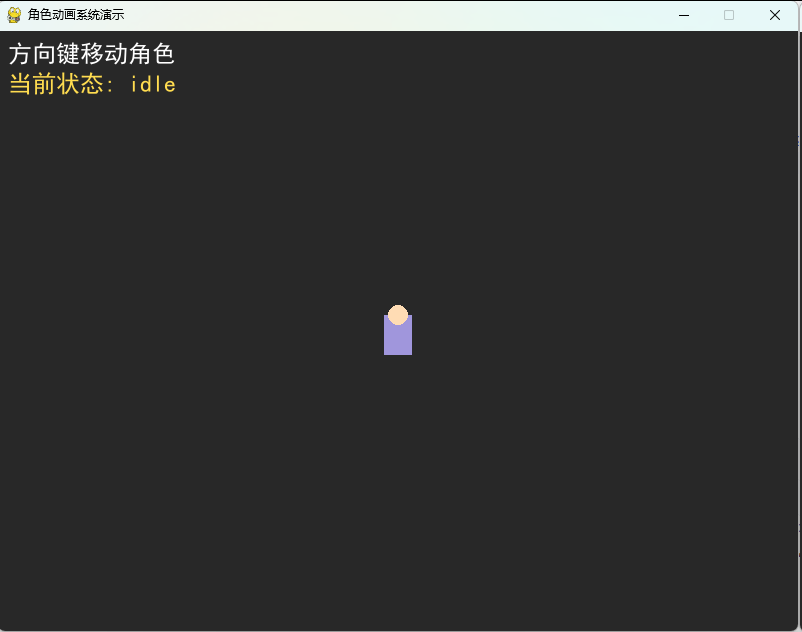
9.9 本章总结
本章介绍了 Pygame 中动画系统的基本实现方式。我们学习了帧动画、精灵表、补间动画和动画状态机的构建方法。动画系统是提升游戏表现力的重要组成部分,合理地组织动画逻辑可以让角色行为更加自然流畅。
本章知识点回顾
| 知识点 | 主要内容 |
|---|---|
| 帧动画 | 图像序列、定时切换 |
| 精灵表 | 合并帧、裁剪技术 |
| 补间动画 | 插值算法、缓动函数 |
| 状态机 | 动画状态管理、转换条件 |
| 中文字体 | 字体文件路径加载方案 |
课后练习
- 实现一个精灵表解析器,支持多行多列裁剪。
- 创建一个粒子动画系统。
- 实现动画暂停、继续和反向播放功能。
- 扩展状态机,加入攻击和受击动画。
- 实现一个角色跳跃动画系统。
下章预告
在下一章中,我们将学习游戏状态管理和场景切换,这是组织复杂游戏逻辑的重要基础。