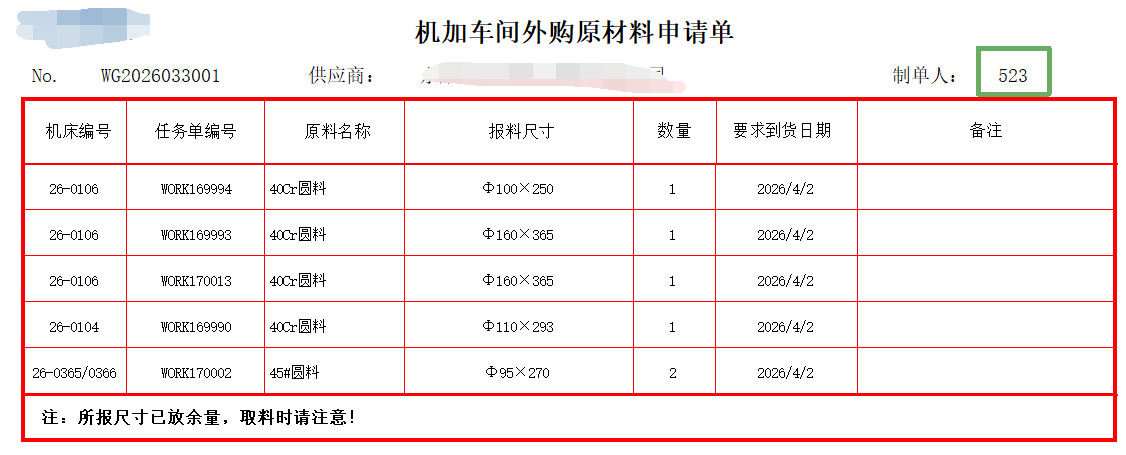
24年二开了机加原材料外购表,经过了一年多的使用,发现日常报的都是圆料和方料,且要求实际的重量和理论重量进行对比,以防供应商乱取,主要是增加了重量的自动计算,并且理论重量只保留1位小数且进1,另外测试了制单人只取工号,空值转0
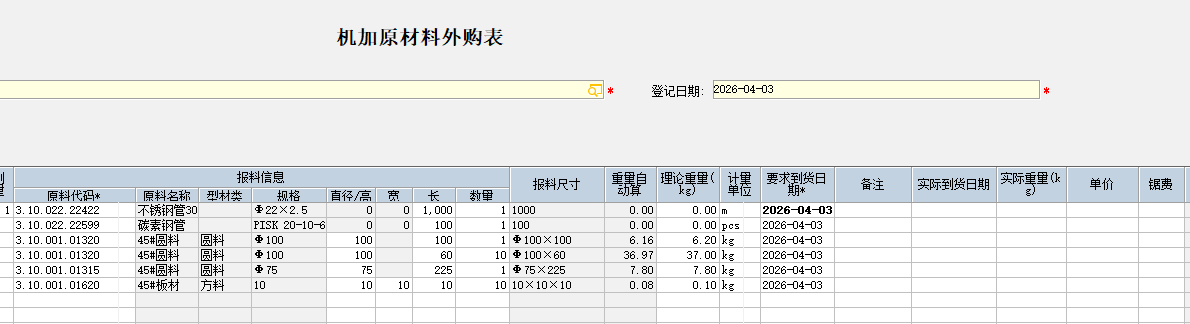
代码如下:
vbnet
'机加原材料采购申请表用
'定义 BillEvent 接口. 必须具有的声明, 以此来获得事件
Private WithEvents m_BillInterface  As BillEvent


Public Sub Show(ByVal oBillInterface As Object)

    'BillEvent 接口实现
    '注意: 此方法必须存在, 请勿修改
    Set m_BillInterface = oBillInterface

End Sub

Private Sub Class_Terminate()

    '释放接口对象
    '注意: 此方法必须存在, 请勿修改
    Set m_BillInterface = Nothing

End Sub


''''获取制单人的工号
Private Sub m_BillInterface_AfterNewBill()
Dim sKey As String, svalue As String
Dim rs As ADODB.Recordset

 sKey = m_BillInterface.TableInfo("Map")("FBiller") '获取制单人的KEY值
 svalue = m_BillInterface.Data("page1")(sKey)("FFLD") '获取制单人的数值
' MsgBox svalue
If svalue <> "" Then

Set rs = m_BillInterface.K3Lib.GetData("select t2.FNumber as GH from t_user t1 inner join t_emp t2 on t1.FEmpID=t2.FItemID where t1.FUserID='" & svalue & "'")

    If Not rs Is Nothing Then
    m_BillInterface.SetFieldValue "FBillerno", rs("GH") ''给单据头上的"制单人工号"赋值

    End If
End If

Set rs = Nothing

End Sub
'''按原料规格进行长宽高的拆分
Private Sub m_BillInterface_Change(ByVal dct As KFO.IDictionary, ByVal dctFld As KFO.IDictionary, ByVal col As Long, ByVal row As Long, Cancel As Boolean)
Dim svalue As String
Dim Model As String
Dim newsize1 As String, newsize2 As String
Dim i As Integer, j As Integer, k As Integer
Dim xPosition As Integer
Dim numb1 As Integer, numb2 As Integer
Dim chr As String
Dim Fnumber As String
Dim XC As String '型材
Dim T As Variant, W As Variant, L As Variant, SL As Variant
Dim OldWeight As Variant, SouceWeight As Variant, LLWeight As Variant


If row > 0 Then
    With m_BillInterface
    Fnumber = .Data("page2")(row)(m_BillInterface.TableInfo("map")("FBase2"))("ffld") '获取原料代码
    Model = .Data("page2")(row)(m_BillInterface.TableInfo("map")("FBaseProperty3"))("ffld") '获取规格
    XC = .Data("page2")(row)(m_BillInterface.TableInfo("map")("FBaseProperty4"))("ffld") '获取材料类型
    OldWeight = CDbl(.Data("page2")(row)(m_BillInterface.TableInfo("map")("FDecimal6"))("ffld")) '获取旧的自动算的重量
    End With


    If Model <> "" Then

    ''如果换了一个规格不为空的零件,先将长宽解锁
    Call LockOneCell(m_BillInterface, "FInteger4", row, False) '直接/高
    If XC <> "圆料" Then '如果型材不是圆料就将宽解锁
    Call LockOneCell(m_BillInterface, "FInteger2", row, False) '宽
    End If


    '先判断×的个数,如果像角钢槽钢类似40×40×4之类的,就直接用规格不进行拆分了
    ''如果像Q235这样10×20的,将数字小的设成厚度,大的设成高度

        i = 0
        j = 0
        k = 0
        For i = 1 To Len(Model)
           Char = Mid(Model, i, 1)

           If Char = "×" Then
           k = k + 1
           End If

        Next i


        If k = 0 Then

        ' 使用Asc函数获取当前字符的ASCII码,并使用Chr函数将ASCII码转换回字符进行比较
        ' 检查当前字符是否是数字(ASCII码范围48到57对应于'0'到'9')
        ' 如果是数字,则将其添加到输出字符串
            i = 0
            For i = 1 To Len(Model)
             If Asc(Mid(Model, i, 1)) >= 48 And Asc(Mid(Model, i, 1)) <= 57 Then
                        svalue = svalue & Mid(Model, i, 1)
             End If
            Next i
            newsize1 = svalue
            If CLng(newsize1) > 999 Then GoTo Err '有些是型号中有数字的
            m_BillInterface.SetFieldValue "FInteger4", newsize1, row '直径/高

        ElseIf k = 1 Then '板材或管料
            xPosition = InStr(1, Model, "×") '判断×的位置
            newsize1 = Mid(Model, 1, xPosition - 1)
            newsize2 = Mid(Model, xPosition + 1, Len(Model))
            On Error GoTo Err ' 管材的规格是 直径×壁厚的,还有一些字母的,会报错
            If CInt(newsize1) < CInt(newsize2) Then
            m_BillInterface.SetFieldValue "FInteger4", newsize1, row '直径/高
            m_BillInterface.SetFieldValue "FInteger2", newsize2, row '宽
            Else
            m_BillInterface.SetFieldValue "FInteger4", newsize2, row '直径/高
            m_BillInterface.SetFieldValue "FInteger2", newsize1, row '宽
            End If
        Else '按规格,宽和高都设为0,只管长度
Err:
            m_BillInterface.SetFieldValue "FInteger4", 0, row '直径/高
            m_BillInterface.SetFieldValue "FInteger2", 0, row '宽
            GoTo locker: '如果高和宽为0的话,就直接锁定

        End If

    Else

    ''如果规格为空的,就锁定高和宽
locker:
    Call LockOneCell(m_BillInterface, "FInteger4", row, True)
    Call LockOneCell(m_BillInterface, "FInteger2", row, True)

    End If

   With m_BillInterface
    ''''''''赋值"报料尺寸"
    If Len(Fnumber) > 0 Then '''判断原料代码是否为空,不为空则赋值尺寸
        T = .Data("page2")(row)(m_BillInterface.TableInfo("map")("FInteger4"))("ffld") '获取直径/高度
        W = .Data("page2")(row)(m_BillInterface.TableInfo("map")("FInteger2"))("ffld") '获取宽度
        L = .Data("page2")(row)(m_BillInterface.TableInfo("map")("FInteger1"))("ffld") '获取长度
        SL = .Data("page2")(row)(m_BillInterface.TableInfo("map")("FInteger3"))("ffld") '获取数量

        '''''''''''''''''''''
        ''T   W   L
        ''√  ×  √
        ''×  ×  √
        ''√  √  √
        ''总体上分为两种情况,一种是有宽度,一种是没宽度的
        ''有宽度的报料尺寸就T×W×L,没宽度的就MODEL×L
        If W = 0 Or W = "" Then
          If T = 0 Or T = "" Then
          .SetFieldValue "FText1", L, row
          Else
          .SetFieldValue "FText1", Model & "×" & L, row
          End If
        .SetFieldValue "FDecimal6", (EmptyTo0(T) / 2) ^ 2 * EmptyTo0(L) * 3.14 * 7.85 * EmptyTo0(SL) / 1000000, row

        Else
        .SetFieldValue "FText1", T & "×" & W & "×" & L, row
        .SetFieldValue "FDecimal6", EmptyTo0(T) * EmptyTo0(W) * EmptyTo0(L) * 7.85 * EmptyTo0(SL) / 1000000, row
        End If
    End If

    ''理论重量当为0时获取自动算的图纸
    SouceWeight = 0
    LLWeight = 0
    SouceWeight = CDbl(.Data("page2")(row)(m_BillInterface.TableInfo("map")("FDecimal6"))("ffld")) '获取自动算的重量
    LLWeight = CDbl(.Data("page2")(row)(m_BillInterface.TableInfo("map")("FDecimal"))("ffld")) '获取理论重量

    If OldWeight <> SouceWeight Then '与旧自动算重理对比,有变动则执行以下操作
        ''保留小数点1位并进1
        If SouceWeight <> Round(SouceWeight, 1) Then '保留1位后相等就取原值
            If SouceWeight <> 0 Then
            SouceWeight = Int((SouceWeight + 0.1) * 10) / 10
            End If
        End If

        ''给理论重量赋值

         .SetFieldValue "FDecimal", SouceWeight, row

    End If
  End With
End If

End Sub
''''''用于锁定单元格的代码
Public Sub LockOneCell(ByRef m_BillInterface As Object, ByVal sKey As String, ByVal nRow As Long, Optional ByVal bValue As Boolean = True)

    Dim dctCtl As KFO.Dictionary

    Set dctCtl = m_BillInterface.GetFieldInfoByKey(sKey, "", 0)

    m_BillInterface.LockCell dctCtl, nRow, bValue

    Set dctCtl = Nothing

End Sub

'''为空转换成0
Function EmptyTo0(ByVal Value As Variant) As Double
    If Value = "" Then
        EmptyTo0 = 0
    Else
        EmptyTo0 = CDbl(Value)
    End If
End Function