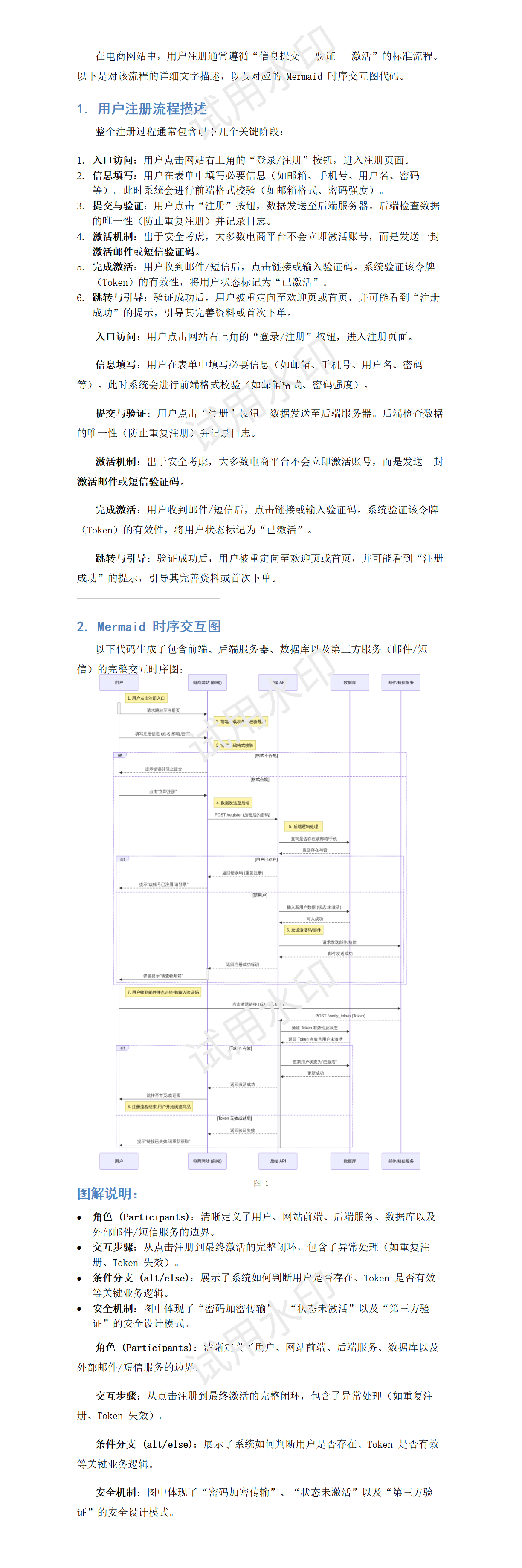
在日常工作当中,经常都需要用到Dify的智能体来进行方案设计,大模型给出的方案设计通常是Markdown格式,其中还会有很多Mermaid格式的流程图或时序图等,我们需要把生成的方案保存为Word文档格式,但是现有的Dify的Markdown转文档的插件,对于Mermaid代码块并不做渲染,虽然也可以在外网的一些网站上把Markdown文件进行转换,考虑到方案的信息敏感,我还是想在内网环境上来实现一个Dify插件来满足需求。
实现Mermaid渲染功能
为什么采用Mermaid
Mermaid是一种基于文本的图表绘制工具,使用类似 Markdown 的简单语法定义流程图、时序图、甘特图、类图等。
-
核心优势:纯文本、易版本控制、无需鼠标拖拽。
-
典型用法:在 Markdown 文档中嵌入 ````mermaid` 代码块,由渲染引擎自动生成矢量图。
大模型擅长使用Mermaid生成交互图 / 流程图,主要是以下几个原因:
-
文本 ↔ 图表无缝转换
大模型擅长生成结构化文本(如 JSON、YAML、代码)。Mermaid 语法本身就是文本,模型可直接输出符合规范的图表定义,无需图像生成能力。
-
低成本、高效率
相比生成图片(需要扩散模型,计算昂贵),输出 Mermaid 代码只需少量 token,速度快、成本低,且结果是可编辑、可版本化的矢量图。
-
精准表达逻辑与流程
流程图、时序图本质是逻辑关系(节点 + 边)。大模型在理解自然语言描述后,能准确映射为
A --> B、if/else分支等 Mermaid 语句,天然适合"需求 → 图表"的生成任务。 -
易于集成与迭代
生成的 Mermaid 代码可直接嵌入文档、Wiki、代码注释或聊天界面,用户可手动微调,模型也能根据反馈快速修正------这正是大模型的对话式优势。
Mermaid渲染的方案
通过Python进行Mermaid渲染,通常有以下两种方式:
1. 浏览器依赖方式(本地渲染,需安装浏览器)
-
代表库 :
mermaid-cli(Python 封装)、md2pdf-mermaid等。 -
原理 :内部依赖 Playwright 驱动无头浏览器(通常是 Chromium)进行渲染,将 Mermaid 文本转换为图片或 PDF。
-
注意事项 :安装完库后,必须手动运行
playwright install chromium下载浏览器内核,否则会报错。 -
优点:不依赖网络,可离线使用,输出质量可控。
-
缺点:需要额外安装浏览器,占用磁盘空间较大,首次配置稍繁琐。
2. 在线服务方式(依赖网络)
-
代表库 :
mermaid-py。 -
原理 :默认调用
mermaid.ink在线服务(一个公开的 Mermaid 渲染 API),将图表文本发送至服务端,返回渲染后的图片。 -
优点:无需安装任何浏览器或本地依赖,轻量快速,适合网络通畅的环境。
-
缺点 :必须联网,且可能受限于服务端速率、隐私(图表内容上传至第三方)或服务可用性。
考虑到这是一个内网应用,因此我采取第一种方式来实现
实现Mermaid渲染
由于Dify插件的沙盒环境限制,无法安装和持久化Chromium浏览器,因此我打算将Playwright和Mermaid-CLI作为独立服务,在服务器上部署,然后Dify插件作为轻量级的API客户端来调用。可以在服务器上通过以下命令来进行安装
pip install mermaid-cli
playwright install chromium
但是我发现这种方式安装之后, playwright还是会报缺少一些依赖包的错误,即使运行以下命令也不能完全解决问题,主要是Playwright 需要大量图形库才能运行无头浏览器。
playwright install-deps另一个方法就是直接采用官方的镜像,例如我选择了mcr.microsoft.com/playwright/python:v1.56.0-jammy这个镜像。
运行这个镜像,然后在里面新建一个main.py文件,通过fastapi来对外提供mermaid渲染服务,代码如下:
python
# main.py
import os
import tempfile
from fastapi import FastAPI, HTTPException
from fastapi.responses import Response
from pydantic import BaseModel
from mermaid_cli import render_mermaid

app = FastAPI(title="Mermaid Render Service")

class RenderRequest(BaseModel):
    code: str                    # Mermaid 代码
    format: str = "png"          # 输出格式,目前仅支持 png 或 svg
    theme: str = "default"       # 主题
    width: int = 2400             # 图片宽度(像素)
    height: int = 1800            # 图片高度(像素)

@app.post("/render")
async def render_mermaid_diagram(request: RenderRequest):
    """
    接收 Mermaid 代码,返回渲染后的图片
    """
    try:
        # 将 Mermaid 代码写入临时文件,因为 mermaid-cli 目前需要文件输入
        with tempfile.NamedTemporaryFile(mode='w', suffix='.mmd', delete=False) as f:
            f.write(request.code)
            input_path = f.name

        # 调用 mermaid-cli 渲染,输出为 bytes
        # 参数说明:
        # - input: 输入文件路径
        # - output_format: 图片格式 ('png' 或 'svg')
        # - theme: 主题
        # - width/height: 图片尺寸
        # - output: 如果为 None,则返回 bytes
        #view_config = {"deviceScaleFactor": 3}
        view_config = {"width": request.width, "height": request.height}
        title, desc, image_bytes = await render_mermaid(
            definition=request.code,
            output_format=request.format,
            background_color='white',
            mermaid_config={"theme": request.theme} if request.theme else None,
            viewport=view_config
        )

        # 确定返回的 Content-Type
        content_type = "image/png" if request.format == "png" else "image/svg+xml"

        return Response(content=image_bytes, media_type=content_type)

    except Exception as e:
        import traceback
        print(traceback.format_exc())
        raise HTTPException(status_code=500, detail=f"渲染失败: {str(e)}")
    finally:
        # 清理临时文件
        if os.path.exists(input_path):
            os.unlink(input_path)

# 可选的健康检查端点
@app.get("/health")
async def health():
    return {"status": "ok"}
然后运行以下命令来提供服务:
python
uvicorn main:app --host 0.0.0.0 --port 19980 --reload如果在调用服务时发现Playwright返回timeout错误,通常是因为官方镜像缺少中文字体,当Mermaid图表包含中文时会阻塞渲染。可以安装以下的中文字体
python
apt-get update && \
    apt-get install -y --no-install-recommends \
    fonts-wqy-microhei \
    fonts-noto-cjk \
    && fc-cache -fv \
    && rm -rf /var/lib/apt/lists/*
Dify插件开发
现在可以进行插件的开发了,按照官网的介绍,在Github仓库Releases · langgenius/dify-plugin-daemon中下载对应本地操作系统的插件工具,我的是dify-plugin-amd64,然后用这个工具来初始化插件的目录结构和文件。
我们要开发的是一个Tool插件,其能够被 Chatflow / Workflow / Agent 类型应用所调用的第三方服务,提供完整的 API 实现能力,用于增强 Dify 应用的能力。例如为应用添加在线搜索、图片生成等额外功能。运行以下命令初始化
python
./dify-plugin-linux-amd64 plugin init在配置向导中,template选择tool,以及选择相应的权限,这里只赋予Tools权限。最后会生成相应的项目代码。
工具逻辑的实现
在tools目录下,可以看到系统自动生成的py文件,修改其代码,实现将Markdown转换为Docx,并且调用我们之前建立的Mermaid渲染服务的功能。如以下代码
python
from collections.abc import Generator
from typing import Any
from dify_plugin import Tool
from dify_plugin.entities.tool import ToolInvokeMessage
import base64
import io
import os
import re
import struct
import tempfile
from typing import Optional, List, Dict, Tuple, Any
from urllib.parse import urlparse
import requests
from docx import Document
from docx.shared import Inches, Pt, RGBColor, Cm
from docx.enum.text import WD_ALIGN_PARAGRAPH, WD_LINE_SPACING, WD_UNDERLINE
from docx.enum.table import WD_TABLE_ALIGNMENT
from docx.oxml.ns import qn, nsdecls
from docx.oxml import parse_xml
from markdown_it import MarkdownIt
from markdown_it.token import Token
import logging
logger = logging.getLogger(__name__)
class MermaidRenderer:
"""Mermaid 图表渲染器 - 支持多种渲染方式"""
RENDERERS = ["mmdc", "playwright", "kroki", "mermaid_ink", "external_api"]
def __init__(self, external_api_url: Optional[str] = None):
"""
初始化渲染器
Args:
external_api_url: 外部渲染 API 地址
preferred_method: 首选渲染方法 (mmdc/playwright/kroki/mermaid_ink)
"""
self.external_api_url = external_api_url
self._temp_dir_ctx = tempfile.TemporaryDirectory()
self.temp_dir = self._temp_dir_ctx.name
def _try_external_api(self, code: str) -> Optional[bytes]:
"""使用外部 API 渲染"""
if not self.external_api_url:
return None
try:
resp = requests.post(
self.external_api_url,
json={"code": code},
timeout=300
)
resp.raise_for_status()
return resp.content
except Exception as e:
#print(f" 外部 API 错误: {e}")
logger.exception("外部API错误")
return None
def render(self, code: str) -> bytes:
"""
渲染 Mermaid 图表
Args:
code: Mermaid 代码
Returns:
PNG 图片二进制数据
"""
# 预处理:将常见中文/全角符号替换为英文/半角符号,避免 Mermaid 解析错误
symbol_map = {
'"': '「', '"': '」',
''': '『', ''': '』',
',': ',',
';': ';',
':': ':',
'(': '(',
')': ')',
'【': '[',
'】': ']',
'?': '?',
'!': '!',
' ': ' ', # 全角空格 -> 半角空格
}
for chn, eng in symbol_map.items():
code = code.replace(chn, eng)
result = self._try_external_api(code)
if result:
return result
raise RuntimeError("所有 Mermaid 渲染方法都失败,请检查网络连接或安装本地渲染工具")
def cleanup(self):
"""清理临时文件"""
try:
self._temp_dir_ctx.cleanup()
except:
pass
class ImageDownloader:
"""图片下载器"""
def __init__(self, temp_dir: str):
self.temp_dir = temp_dir
self._cache: Dict[str, str] = {}
def download(self, url: str) -> Optional[str]:
"""
下载图片并返回本地路径
Args:
url: 图片 URL
Returns:
本地文件路径或 None
"""
if url in self._cache:
return self._cache[url]
try:
# 检查是否是本地文件
if os.path.exists(url):
return url
# 检查 URL 是否有效
parsed = urlparse(url)
if not parsed.scheme or not parsed.netloc:
return None
# 下载图片
resp = requests.get(url, timeout=30, stream=True)
resp.raise_for_status()
# 确定文件扩展名
content_type = resp.headers.get('content-type', '')
ext = '.png'
if 'jpeg' in content_type or 'jpg' in content_type:
ext = '.jpg'
elif 'gif' in content_type:
ext = '.gif'
elif 'svg' in content_type:
ext = '.svg'
elif 'webp' in content_type:
ext = '.webp'
# 保存文件
filename = f"img_{hash(url) % 100000}{ext}"
filepath = os.path.join(self.temp_dir, filename)
with open(filepath, 'wb') as f:
for chunk in resp.iter_content(chunk_size=8192):
f.write(chunk)
self._cache[url] = filepath
return filepath
except Exception as e:
#print(f" 下载图片失败 {url}: {e}")
logger.exception("下载图片失败")
return None
class MarkdownToDocConverter:
"""Markdown 转 Word 转换器"""
def __init__(self,
external_api_url: Optional[str] = None,
base_path: Optional[str] = None):
"""
初始化转换器
Args:
external_api_url: 外部 Mermaid 渲染 API
preferred_render_method: 首选渲染方法
base_path: 解析相对路径时的基准路径
"""
self.mermaid_renderer = MermaidRenderer(external_api_url)
self.temp_dir = tempfile.mkdtemp()
self.image_downloader = ImageDownloader(self.temp_dir)
self.base_path = base_path or os.getcwd()
self.diagram_count = 0
# 初始化 Markdown 解析器
self.md = MarkdownIt("commonmark", {"breaks": True, "html": True})
self.md.enable(["table", "strikethrough"])
def _set_chinese_font(self, run, font_type: str = "body"):
"""设置中文字体"""
font_map = {
"heading": ("黑体", "SimHei"),
"body": ("宋体", "SimSun"),
"code": ("Consolas", "Consolas"),
}
chinese_font, western_font = font_map.get(font_type, font_map["body"])
run.font.name = western_font
run._element.rPr.rFonts.set(qn("w:eastAsia"), chinese_font)
def _get_png_size(self, img_data: bytes) -> Tuple[Optional[int], Optional[int]]:
"""从 PNG 二进制数据中获取原始宽高(像素)"""
if img_data[:8] == b'\x89PNG\r\n\x1a\n':
idx = 8
while idx < len(img_data):
if idx + 8 > len(img_data):
break
length = struct.unpack('>I', img_data[idx:idx+4])[0]
chunk_type = img_data[idx+4:idx+8]
if chunk_type == b'IHDR':
width = struct.unpack('>I', img_data[idx+8:idx+12])[0]
height = struct.unpack('>I', img_data[idx+12:idx+16])[0]
return width, height
idx += 12 + length
return None, None
def _add_mermaid_picture(self, doc: Document, img_data: bytes):
"""插入自适应页面宽度和高度的 Mermaid 图片,避免被推到下一页产生大量留白"""
section = doc.sections[0]
# 计算页面可用宽度(EMU -> inches,1 inch = 914400 EMU)
available_width_emu = section.page_width - section.left_margin - section.right_margin
max_width = Inches(max(available_width_emu / 914400 - 0.1, 1.0))
# 计算页面可用高度(减去页边距和页眉页脚的保守估计空间)
available_height_emu = section.page_height - section.top_margin - section.bottom_margin
max_height = Inches(max(available_height_emu / 914400 - 0.8, 2.0))
width_px, height_px = self._get_png_size(img_data)
if width_px and height_px:
original_width = Inches(width_px / 96)
original_height = Inches(height_px / 96)
# 先按宽度缩放
if original_width.inches > max_width.inches:
ratio = max_width.inches / original_width.inches
final_width = max_width
final_height = Inches(original_height.inches * ratio)
else:
final_width = original_width
final_height = original_height
# 再按高度缩放,确保不会超出单页可用高度而被推到下一页
if final_height.inches > max_height.inches:
ratio = max_height.inches / final_height.inches
final_height = max_height
final_width = Inches(final_width.inches * ratio)
else:
final_width = max_width
final_height = max_height
img_stream = io.BytesIO(img_data)
p = doc.add_paragraph()
p.alignment = WD_ALIGN_PARAGRAPH.CENTER
p.paragraph_format.space_before = Pt(0)
p.paragraph_format.space_after = Pt(3)
p.paragraph_format.line_spacing_rule = WD_LINE_SPACING.SINGLE
p.paragraph_format.keep_together = False
p.paragraph_format.keep_with_next = False
p.paragraph_format.page_break_before = False
p.paragraph_format.widow_control = False
run = p.add_run()
run.add_picture(img_stream, width=final_width, height=final_height)
# 图注
caption = doc.add_paragraph()
caption.alignment = WD_ALIGN_PARAGRAPH.CENTER
caption.paragraph_format.space_before = Pt(0)
caption.paragraph_format.space_after = Pt(3)
caption.paragraph_format.line_spacing_rule = WD_LINE_SPACING.SINGLE
caption.paragraph_format.keep_together = False
caption.paragraph_format.keep_with_next = False
caption.paragraph_format.page_break_before = False
cap_run = caption.add_run(f"图 {self.diagram_count}")
cap_run.font.size = Pt(9)
cap_run.font.color.rgb = RGBColor(128, 128, 128)
self._set_chinese_font(cap_run, "body")
def _set_paragraph_shading(self, paragraph, color: str = "F5F5F5"):
"""设置段落背景色"""
pPr = paragraph._p.get_or_add_pPr()
shd = parse_xml(r'<w:shd {} w:fill="{}" w:val="clear"/>'.format(nsdecls('w'), color))
pPr.append(shd)
def _add_hyperlink(self, paragraph, text: str, url: str, bold: bool = False, italic: bool = False, strike: bool = False, underline: bool = False):
"""添加超链接"""
part = paragraph.part
r_id = part.relate_to(url, docx.opc.constants.RELATIONSHIP_TYPE.HYPERLINK, is_external=True)
hyperlink = docx.oxml.shared.OxmlElement('w:hyperlink')
hyperlink.set(docx.oxml.shared.qn('r:id'), r_id)
new_run = docx.oxml.shared.OxmlElement('w:r')
rPr = docx.oxml.shared.OxmlElement('w:rPr')
# 设置超链接样式(蓝色下划线)
color = docx.oxml.shared.OxmlElement('w:color')
color.set(docx.oxml.shared.qn('w:val'), "0563C1")
rPr.append(color)
u = docx.oxml.shared.OxmlElement('w:u')
u.set(docx.oxml.shared.qn('w:val'), 'single')
rPr.append(u)
if bold:
rPr.append(docx.oxml.shared.OxmlElement('w:b'))
if italic:
rPr.append(docx.oxml.shared.OxmlElement('w:i'))
if strike:
rPr.append(docx.oxml.shared.OxmlElement('w:strike'))
new_run.append(rPr)
new_run.text = text
hyperlink.append(new_run)
paragraph._p.append(hyperlink)
return hyperlink
def _process_inline_tokens(self, paragraph, tokens, bold: bool = False, italic: bool = False, strike: bool = False, underline: bool = False, hyperlink_url: Optional[str] = None):
"""处理内联 token(markdown-it)"""
import docx
i = 0
while i < len(tokens):
token = tokens[i]
if token.type == "text":
if hyperlink_url:
self._add_hyperlink(paragraph, token.content, hyperlink_url, bold, italic, strike, underline)
else:
run = paragraph.add_run(token.content)
run.bold = bold
run.italic = italic
run.font.strike = strike
run.font.underline = WD_UNDERLINE.SINGLE if underline else WD_UNDERLINE.NONE
self._set_chinese_font(run, "body")
elif token.type == "strong_open":
# 找到 strong_close,处理中间的内容
j = i + 1
nested = []
depth = 1
while j < len(tokens) and depth > 0:
if tokens[j].type == "strong_open":
depth += 1
elif tokens[j].type == "strong_close":
depth -= 1
if depth == 0:
break
if depth > 0:
nested.append(tokens[j])
j += 1
self._process_inline_tokens(paragraph, nested, bold=True, italic=italic, strike=strike, underline=underline, hyperlink_url=hyperlink_url)
i = j
elif token.type == "em_open":
# 找到 em_close,处理中间的内容
j = i + 1
nested = []
depth = 1
while j < len(tokens) and depth > 0:
if tokens[j].type == "em_open":
depth += 1
elif tokens[j].type == "em_close":
depth -= 1
if depth == 0:
break
if depth > 0:
nested.append(tokens[j])
j += 1
self._process_inline_tokens(paragraph, nested, bold=bold, italic=True, strike=strike, underline=underline, hyperlink_url=hyperlink_url)
i = j
elif token.type == "s_open":
# 找到 s_close,处理中间的内容
j = i + 1
nested = []
depth = 1
while j < len(tokens) and depth > 0:
if tokens[j].type == "s_open":
depth += 1
elif tokens[j].type == "s_close":
depth -= 1
if depth == 0:
break
if depth > 0:
nested.append(tokens[j])
j += 1
self._process_inline_tokens(paragraph, nested, bold=bold, italic=italic, strike=True, underline=underline, hyperlink_url=hyperlink_url)
i = j
elif token.type in ("strong_close", "em_close", "s_close"):
# 这些应该被上面的 open 处理掉,如果单独遇到就跳过
pass
elif token.type == "code_inline":
run = paragraph.add_run(token.content)
run.font.name = "Consolas"
run._element.rPr.rFonts.set(qn("w:eastAsia"), "Consolas")
run.font.size = Pt(10)
run.bold = bold
run.italic = italic
run.font.strike = strike
run.font.underline = WD_UNDERLINE.SINGLE if underline else WD_UNDERLINE.NONE
# 灰色背景
shading_elm = parse_xml(r'<w:shd {} w:fill="F0F0F0" w:val="clear"/>'.format(nsdecls('w')))
run._r.get_or_add_rPr().append(shading_elm)
elif token.type == "link_open":
# 获取链接 href
href = token.attrs.get("href", "") if token.attrs else ""
# 找到 link_close
j = i + 1
nested = []
while j < len(tokens):
if tokens[j].type == "link_close":
break
nested.append(tokens[j])
j += 1
if href:
self._process_inline_tokens(paragraph, nested, bold=bold, italic=italic, strike=strike, underline=underline, hyperlink_url=href)
else:
self._process_inline_tokens(paragraph, nested, bold=bold, italic=italic, strike=strike, underline=underline)
i = j
elif token.type == "link_close":
pass
elif token.type == "image":
src = token.attrs.get("src", "") if token.attrs else ""
alt = token.content or ""
if src:
img_path = self.image_downloader.download(src)
if img_path:
try:
# 计算页面可用宽度
section = paragraph.part.document.sections[0]
available_width_emu = section.page_width - section.left_margin - section.right_margin
max_width = Inches(max(available_width_emu / 914400 - 0.1, 1.0))
run = paragraph.add_run()
pic = run.add_picture(img_path)
# 按比例缩放
if pic.width > max_width:
ratio = max_width.inches / pic.width.inches
pic.width = max_width
pic.height = Inches(pic.height.inches * ratio)
paragraph.alignment = WD_ALIGN_PARAGRAPH.CENTER
except Exception as e:
run = paragraph.add_run(f"[图片: {alt or src}]")
self._set_chinese_font(run, "body")
elif token.type == "html_inline":
content = token.content.strip().lower()
if content in ("<br>", "<br/>", "<br />"):
paragraph.add_run().add_break()
elif content in ("<u>", "<ins>"):
close_tag = "</u>" if content == "<u>" else "</ins>"
nested = []
j = i + 1
while j < len(tokens):
if tokens[j].type == "html_inline" and tokens[j].content.strip().lower() == close_tag:
break
nested.append(tokens[j])
j += 1
self._process_inline_tokens(paragraph, nested, bold, italic, strike, True, hyperlink_url)
i = j
elif content in ("</u>", "</ins>"):
pass # 由开始标签处理
elif token.type in ("softbreak", "hardbreak"):
paragraph.add_run().add_break()
elif token.children:
self._process_inline_tokens(paragraph, token.children, bold, italic, strike, underline, hyperlink_url)
i += 1
def _process_table_from_tokens(self, doc: Document, tokens: List, start_idx: int, end_idx: int) -> bool:
"""从扁平 token 列表中处理表格"""
try:
# 收集所有单元格内容
# 结构: thead_open -> tr_open -> th_open -> inline -> th_close -> ... -> tbody_open -> ...
rows = []
current_row = []
is_header = False
i = start_idx
while i < end_idx:
token = tokens[i]
if token.type == "thead_open":
is_header = True
elif token.type == "tbody_open":
is_header = False
elif token.type == "tr_open":
current_row = []
elif token.type == "tr_close":
if current_row:
rows.append((is_header, current_row))
elif token.type in ("th_open", "td_open"):
# 查找对应的 inline token
inline_tokens = []
j = i + 1
while j < end_idx and tokens[j].type not in ("th_close", "td_close"):
if tokens[j].type == "inline":
# inline token 的 children 包含格式信息
inline_tokens.extend(tokens[j].children or [])
j += 1
current_row.append(inline_tokens)
i = j # 跳过到 close tag
i += 1
if not rows:
return False
# 创建表格
num_cols = max(len(row[1]) for row in rows)
table = doc.add_table(rows=len(rows), cols=num_cols)
table.style = "Table Grid"
table.alignment = WD_TABLE_ALIGNMENT.CENTER
for i, (is_header, row_data) in enumerate(rows):
row = table.rows[i]
for j, cell_tokens in enumerate(row_data):
if j < len(row.cells):
cell = row.cells[j]
# 清空默认段落
cell.text = ""
p = cell.paragraphs[0]
# 处理单元格内的格式
if cell_tokens:
self._process_inline_tokens(p, cell_tokens)
# 表头加粗
if is_header:
for run in p.runs:
run.bold = True
self._set_chinese_font(run, "body")
return True
except Exception as e:
'''
print(f" 表格处理失败: {e}")
import traceback
traceback.print_exc()
'''
logger.exception("表格处理失败")
return False
def _find_matching_close(self, tokens: List, start_idx: int, open_type: str, close_type: str) -> int:
"""找到匹配的闭合 token 索引"""
depth = 1
i = start_idx + 1
while i < len(tokens):
if tokens[i].type == open_type:
depth += 1
elif tokens[i].type == close_type:
depth -= 1
if depth == 0:
return i
i += 1
return -1
def _process_tokens_markdown_it(self, doc: Document, tokens: List):
"""使用 markdown-it 处理 token"""
i = 0
while i < len(tokens):
token = tokens[i]
# 标题
if token.type == "heading_open":
level = int(token.tag[1]) if token.tag and len(token.tag) > 1 else 1
close_idx = self._find_matching_close(tokens, i, "heading_open", "heading_close")
if close_idx == -1:
i += 1
continue
content_tokens = []
j = i + 1
while j < close_idx:
if tokens[j].type == "inline":
content_tokens.extend(tokens[j].children or [])
j += 1
p = doc.add_heading(level=min(level, 6))
self._process_inline_tokens(p, content_tokens)
# 设置样式
font_size = {1: 22, 2: 18, 3: 16, 4: 14, 5: 12, 6: 11}.get(level, 12)
for run in p.runs:
run.font.size = Pt(font_size)
run.bold = True
self._set_chinese_font(run, "heading")
p.paragraph_format.space_before = Pt(12)
p.paragraph_format.space_after = Pt(6)
# 段落
elif token.type == "paragraph_open":
close_idx = self._find_matching_close(tokens, i, "paragraph_open", "paragraph_close")
if close_idx == -1:
i += 1
continue
content_tokens = []
j = i + 1
while j < close_idx:
if tokens[j].type == "inline":
content_tokens.extend(tokens[j].children or [])
j += 1
if content_tokens:
p = doc.add_paragraph()
self._process_inline_tokens(p, content_tokens)
p.paragraph_format.line_spacing_rule = WD_LINE_SPACING.ONE_POINT_FIVE
p.paragraph_format.first_line_indent = Inches(0.3)
i = close_idx
continue
# 代码块
elif token.type == "fence":
info = token.info.strip() if token.info else ""
code = token.content
if info.startswith("mermaid"):
# Mermaid 图表
self.diagram_count += 1
try:
#print(f" 正在渲染 Mermaid 图表 {self.diagram_count}...")
logger.info(f"正在渲染 Mermaid 图表 {self.diagram_count}...")
img_data = self.mermaid_renderer.render(code)
self._add_mermaid_picture(doc, img_data)
except Exception as e:
#print(f" 图表渲染失败: {e}")
logger.exception("图表渲染失败")
p = doc.add_paragraph()
p.paragraph_format.space_before = Pt(3)
p.paragraph_format.space_after = Pt(3)
run = p.add_run(f"[Mermaid 图表渲染失败]")
run.font.color.rgb = RGBColor(255, 0, 0)
# 显示代码
code_p = doc.add_paragraph()
code_p.paragraph_format.left_indent = Inches(0.3)
self._set_paragraph_shading(code_p)
code_run = code_p.add_run(code)
code_run.font.name = "Consolas"
code_run._element.rPr.rFonts.set(qn("w:eastAsia"), "Consolas")
code_run.font.size = Pt(10)
else:
# 普通代码块
p = doc.add_paragraph()
p.paragraph_format.left_indent = Inches(0.3)
p.paragraph_format.space_before = Pt(6)
p.paragraph_format.space_after = Pt(6)
self._set_paragraph_shading(p, "F5F5F5")
run = p.add_run(code)
run.font.name = "Consolas"
run._element.rPr.rFonts.set(qn("w:eastAsia"), "Consolas")
run.font.size = Pt(10)
# 代码块(缩进式)
elif token.type == "code_block":
p = doc.add_paragraph()
p.paragraph_format.left_indent = Inches(0.3)
p.paragraph_format.space_before = Pt(6)
p.paragraph_format.space_after = Pt(6)
self._set_paragraph_shading(p, "F5F5F5")
run = p.add_run(token.content)
run.font.name = "Consolas"
run._element.rPr.rFonts.set(qn("w:eastAsia"), "Consolas")
run.font.size = Pt(10)
# 无序列表
elif token.type == "bullet_list_open":
close_idx = self._find_matching_close(tokens, i, "bullet_list_open", "bullet_list_close")
if close_idx == -1:
i += 1
continue
list_items = []
j = i + 1
while j < close_idx:
if tokens[j].type == "list_item_open":
item_close_idx = self._find_matching_close(tokens, j, "list_item_open", "list_item_close")
if item_close_idx == -1:
j += 1
continue
item_content = []
k = j + 1
while k < item_close_idx:
if tokens[k].type == "inline":
item_content.extend(tokens[k].children or [])
elif tokens[k].type == "paragraph_open":
pass
elif tokens[k].type == "paragraph_close":
pass
k += 1
list_items.append(item_content)
j = item_close_idx
j += 1
for item_content in list_items:
p = doc.add_paragraph(style="List Bullet")
if item_content:
self._process_inline_tokens(p, item_content)
# 有序列表
elif token.type == "ordered_list_open":
start = 1
if token.attrs and "start" in token.attrs:
try:
start = int(token.attrs["start"])
except:
pass
close_idx = self._find_matching_close(tokens, i, "ordered_list_open", "ordered_list_close")
if close_idx == -1:
i += 1
continue
list_items = []
j = i + 1
while j < close_idx:
if tokens[j].type == "list_item_open":
item_close_idx = self._find_matching_close(tokens, j, "list_item_open", "list_item_close")
if item_close_idx == -1:
j += 1
continue
item_content = []
k = j + 1
while k < item_close_idx:
if tokens[k].type == "inline":
item_content.extend(tokens[k].children or [])
elif tokens[k].type == "paragraph_open":
pass
elif tokens[k].type == "paragraph_close":
pass
k += 1
list_items.append(item_content)
j = item_close_idx
j += 1
for idx, item_content in enumerate(list_items, start):
p = doc.add_paragraph(style="List Number")
if item_content:
self._process_inline_tokens(p, item_content)
# 引用块
elif token.type == "blockquote_open":
close_idx = self._find_matching_close(tokens, i, "blockquote_open", "blockquote_close")
if close_idx == -1:
i += 1
continue
# 处理引用块中的段落,每个段落独立
j = i + 1
while j < close_idx:
if tokens[j].type == "paragraph_open":
para_close_idx = self._find_matching_close(tokens, j, "paragraph_open", "paragraph_close")
if para_close_idx == -1:
j += 1
continue
inline_tokens = []
k = j + 1
while k < para_close_idx:
if tokens[k].type == "inline":
inline_tokens.extend(tokens[k].children or [])
k += 1
if inline_tokens:
p = doc.add_paragraph()
p.paragraph_format.left_indent = Inches(0.5)
p.paragraph_format.right_indent = Inches(0.5)
self._process_inline_tokens(p, inline_tokens, italic=True)
j = para_close_idx
j += 1
# 表格
elif token.type == "table_open":
close_idx = self._find_matching_close(tokens, i, "table_open", "table_close")
if close_idx == -1:
i += 1
continue
# 处理表格
self._process_table_from_tokens(doc, tokens, i, close_idx)
i = close_idx
# 水平线
elif token.type == "hr":
p = doc.add_paragraph()
p.paragraph_format.space_before = Pt(6)
p.paragraph_format.space_after = Pt(6)
run = p.add_run("─" * 50)
run.font.color.rgb = RGBColor(200, 200, 200)
# HTML 块
elif token.type == "html_block":
# 尝试提取文本内容
html_content = token.content
# 简单的 HTML 标签去除
text = re.sub(r'<[^>]+>', '', html_content)
if text.strip():
p = doc.add_paragraph()
run = p.add_run(text)
self._set_chinese_font(run, "body")
i += 1
def _convert_with_markdown_it(self, markdown_text: str, doc: Document):
"""使用 markdown-it 转换"""
tokens = self.md.parse(markdown_text)
self._process_tokens_markdown_it(doc, tokens)
def convert(self, markdown_text: str) -> io.BytesIO:
"""
转换 Markdown 为 Word 文档
Args:
markdown_text: Markdown 文本
Returns:
Word 文档二进制流
"""
try:
doc = Document()
# 设置默认样式
style = doc.styles["Normal"]
style.font.name = "SimSun"
style._element.rPr.rFonts.set(qn("w:eastAsia"), "SimSun")
style.font.size = Pt(12)
# 选择转换方法
self._convert_with_markdown_it(markdown_text, doc)
file_stream = io.BytesIO()
doc.save(file_stream)
file_stream.seek(0)
return file_stream
finally:
self.mermaid_renderer.cleanup()
# 清理临时文件
import shutil
try:
if os.path.exists(self.temp_dir):
shutil.rmtree(self.temp_dir)
except:
pass
class MarkdownMermaidToDocxTool(Tool):
def __init__(self, runtime, session):
# 1. 始终先调用父类的 __init__
super().__init__(runtime, session)
self.render_api_url = "http://host.docker.internal:19980/render"
self.converter = MarkdownToDocConverter(
external_api_url=self.render_api_url
)
def _invoke(self, tool_parameters: dict[str, Any]) -> Generator[ToolInvokeMessage]:
'''
yield self.create_json_message({
"result": "Hello, world!"
})
'''
markdown_text = tool_parameters.get('markdowntext')
if not markdown_text:
return {"error": "未提供 Markdown 文本"}
try:
file_stream = self.converter.convert(markdown_text)
file_bytes = file_stream.read()
#file_base64 = base64.b64encode(file_bytes).decode("utf-8")
yield self.create_blob_message(
blob=file_bytes,
meta={"mime_type": "application/vnd.openxmlformats-officedocument.wordprocessingml.document", "filename": "output.docx"}
)
'''
return {
"doc_file": {
"data": file_base64,
"mime_type": (
"application/vnd.openxmlformats-officedocument"
".wordprocessingml.document"
),
"filename": "output.docx",
}
}
'''
except Exception as e:
import traceback
error_msg = f"转换失败: {str(e)}\n{traceback.format_exc()}"
#return {"error": str(e), "traceback": traceback.format_exc()}
yield self.create_text_message(error_msg)修改requirements.txt
在项目根目录下,修改requirements.txt文件,增加需要用到的python依赖
python
dify_plugin>=0.4.0,<0.7.0
python-docx==1.2.0
requests~=2.32.3
markdown-it-py==4.0.0
插件打包
最后就是把插件打包为difypkg格式,运行以下命令
python
./dify-plugin-linux-amd64 package ./项目名称最后在dify的插件中安装本地插件,选择刚才打包好的插件文件即可。
功能演示
在Dify中新建一个Chatflow工作流,然后编排如下
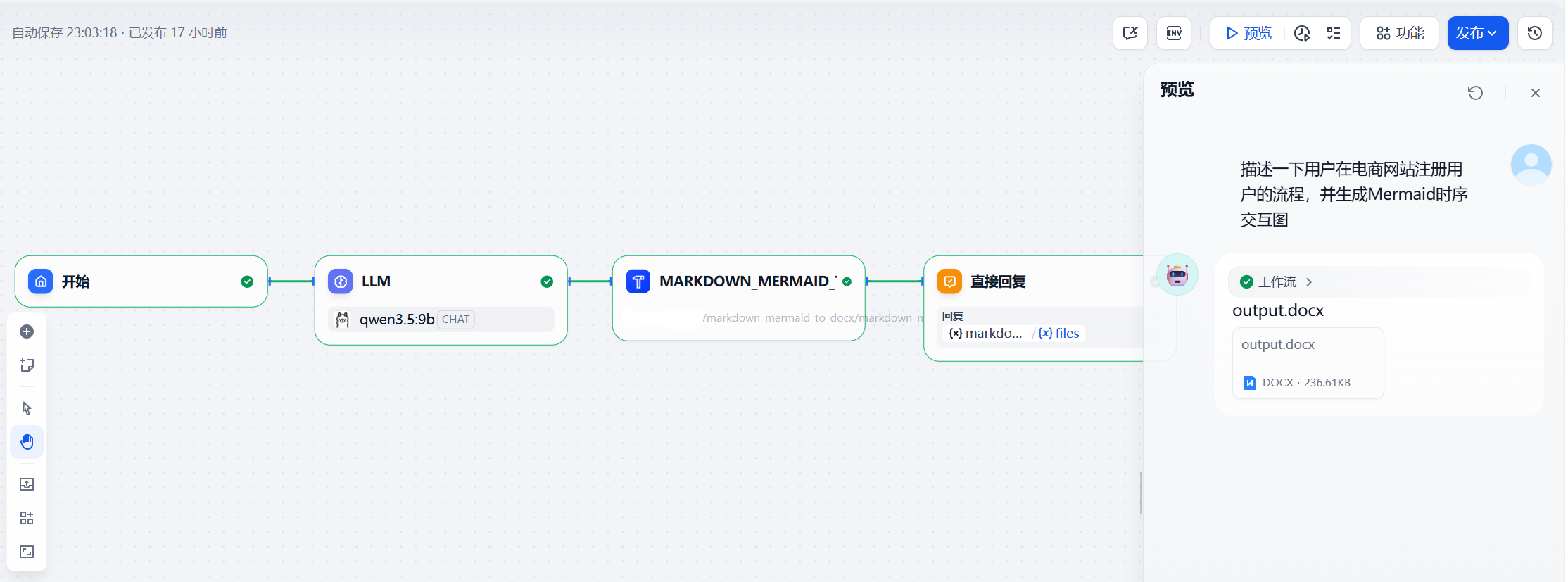
运行之后下载文档,其转换后的效果如下: