运行步骤
-
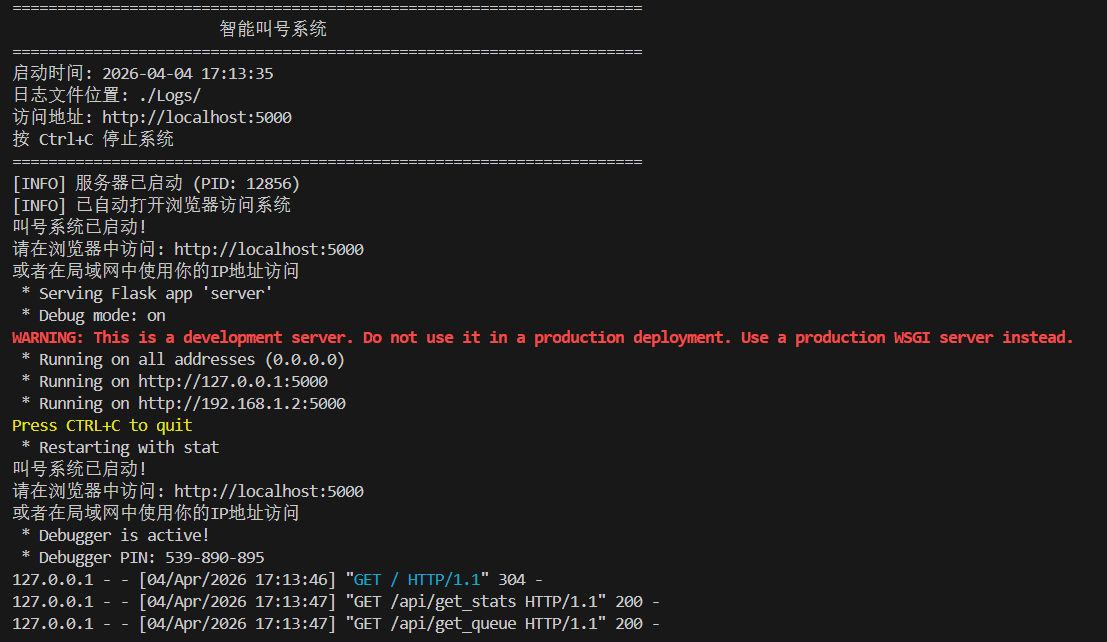
python run_server.py
-
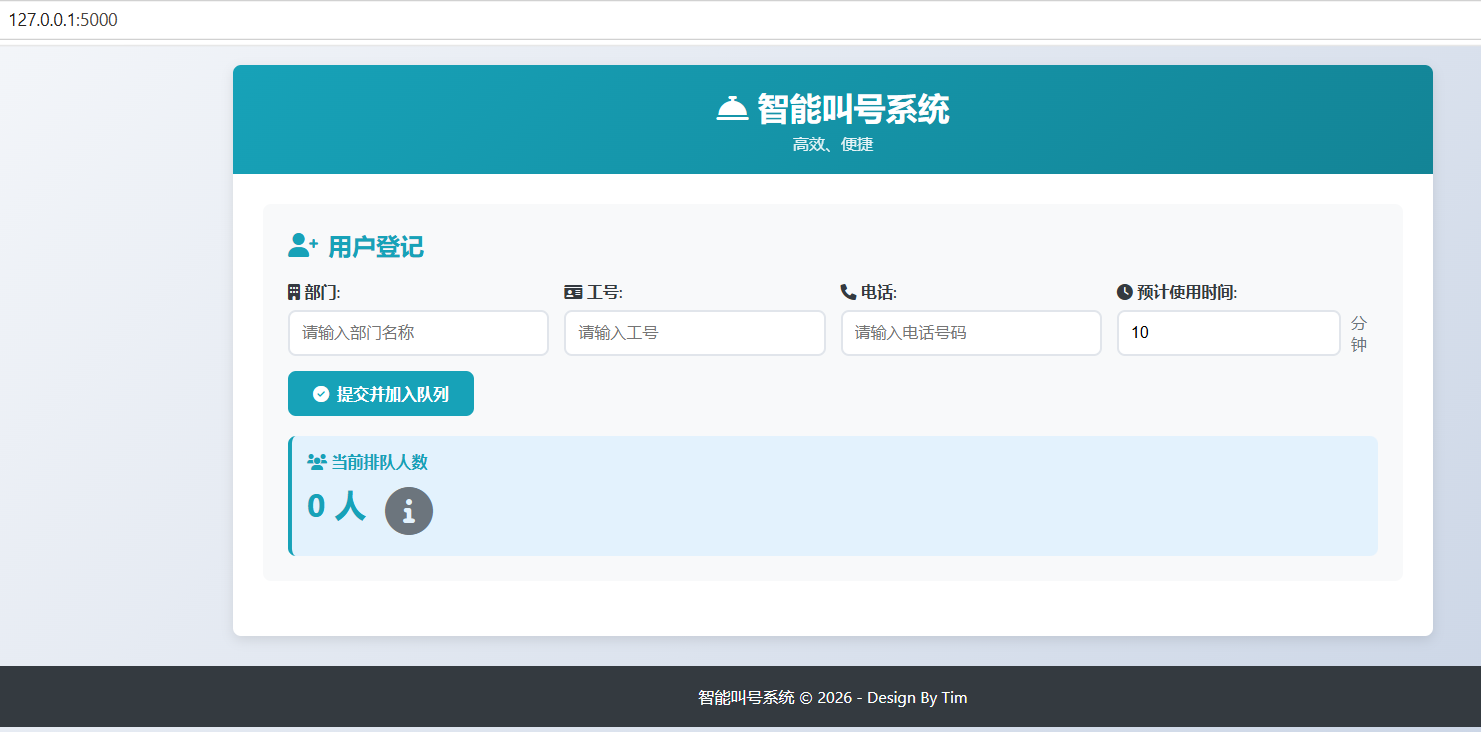
打开浏览器,访问http://localhost:5000
-
在局域网中,其他设备可通过服务器IP地址访问(例如 http://192.168.1.100:5000)
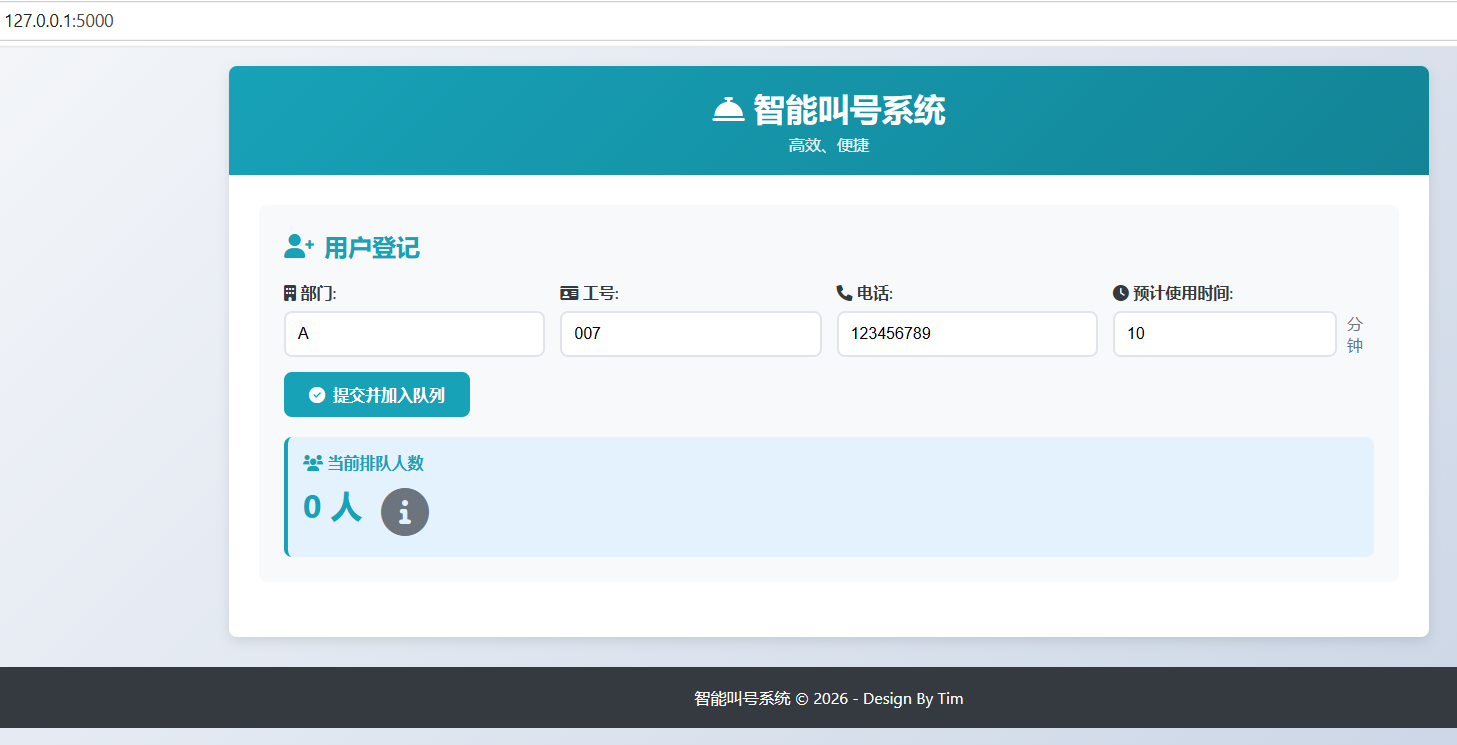
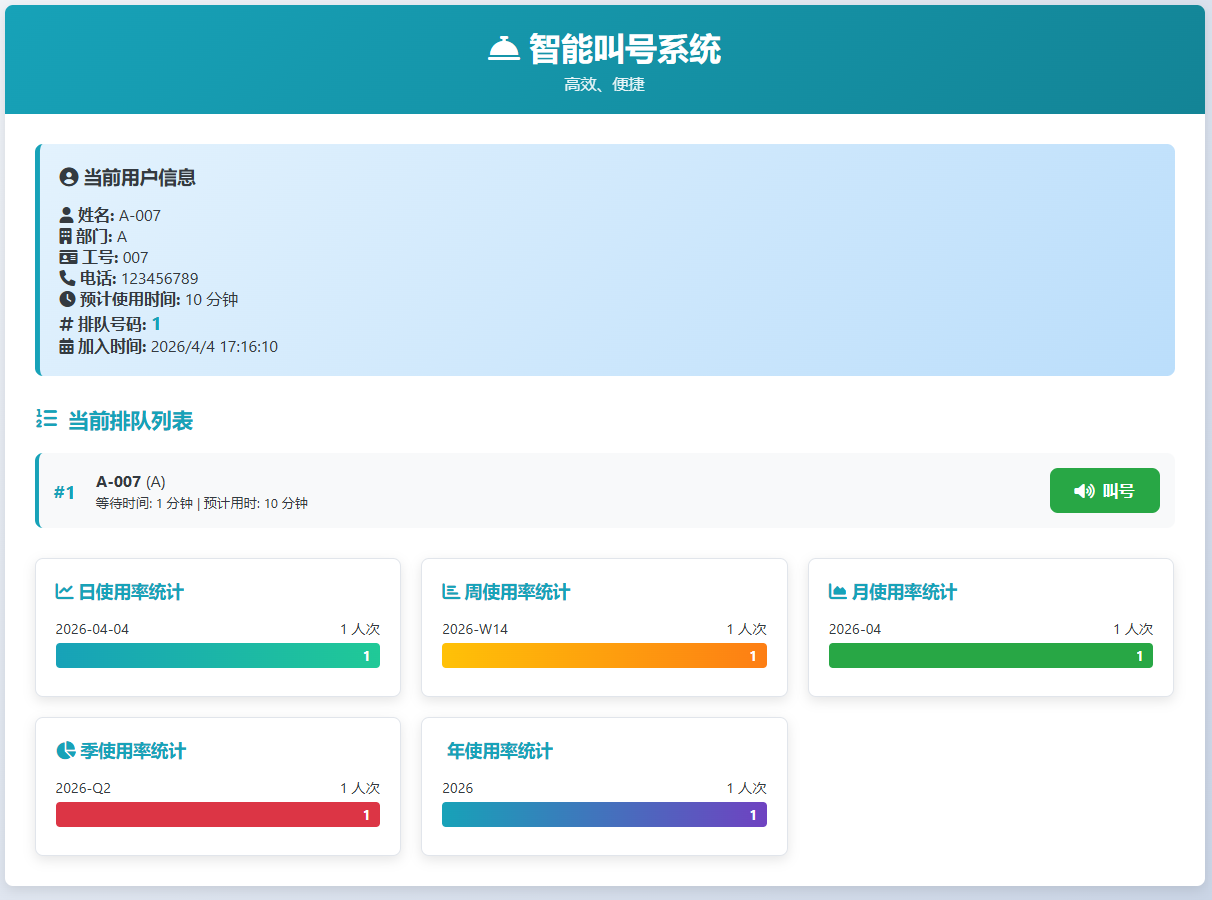
上图~
Tree:
calling_system/
├── server.py # 主服务器文件(已集成日志)
├── log_manager.py # 日志管理模块
├── run_server.py # 传统启动脚本
├── start.bat # Windows启动批处理文件
├── requirements.txt # 依赖包列表
├── Logs/ # 日志目录(自动创建)
│ └── queue_data.json # 队列数据文件
│ └── usage_stats.json # 使用统计数据文件
│ └── calling_system.log # 系统日志文件
└── static/
└── index.html # 工业风格UI界面
Code:
python
#!/usr/bin/env python3
# -*- coding: utf-8 -*-

from flask import Flask, render_template, request, jsonify
import json
import os
from datetime import datetime, timedelta
from log_manager import log_manager
import threading
import time

app = Flask(__name__)

# 确保Logs目录存在
logs_dir = 'Logs'
if not os.path.exists(logs_dir):
    os.makedirs(logs_dir)

# 数据存储文件路径
DATA_FILE = os.path.join(logs_dir, 'queue_data.json')
STATS_FILE = os.path.join(logs_dir, 'usage_stats.json')
LOG_FILE = os.path.join(logs_dir, 'Log.txt')

# 服务完成队列(用于跟踪已服务完成的用户)
completed_users = []

def load_data():
    """加载队列数据"""
    if os.path.exists(DATA_FILE):
        with open(DATA_FILE, 'r', encoding='utf-8') as f:
            return json.load(f)
    return []

def save_data(data):
    """保存队列数据"""
    with open(DATA_FILE, 'w', encoding='utf-8') as f:
        json.dump(data, f, ensure_ascii=False, indent=2)
    log_manager.info(f"队列数据已保存,当前队列长度: {len(data)}")

def load_stats():
    """加载使用统计"""
    if os.path.exists(STATS_FILE):
        with open(STATS_FILE, 'r', encoding='utf-8') as f:
            return json.load(f)
    return {'daily': {}, 'weekly': {}, 'monthly': {}, 'quarterly': {}, 'yearly': {}}

def save_stats(stats):
    """保存使用统计"""
    with open(STATS_FILE, 'w', encoding='utf-8') as f:
        json.dump(stats, f, ensure_ascii=False, indent=2)
    log_manager.info("使用统计数据已保存")

def remove_completed_users():
    """移除已完成服务的用户(超过预计使用时间的用户)"""
    global completed_users
    while True:
        try:
            # 每分钟检查一次
            time.sleep(60)

            queue = load_data()
            if not queue:
                continue

            current_time = datetime.now()
            updated_queue = []
            removed_count = 0

            for user in queue:
                join_time = datetime.fromisoformat(user['joinTime'].replace('Z', '+00:00'))
                # 计算用户已等待的时间(分钟)
                wait_duration = (current_time - join_time).total_seconds() / 60

                # 如果等待时间超过了预计使用时间,认为该用户已完成服务
                if wait_duration > user['estimatedTime']:
                    # 将用户添加到完成列表
                    completed_users.append(user)
                    removed_count += 1
                    log_manager.info(f"用户 {user['name']} 已完成服务,从队列中移除")
                else:
                    updated_queue.append(user)

            # 如果有用户被移除,更新队列数据
            if removed_count > 0:
                save_data(updated_queue)
                log_manager.info(f"移除了 {removed_count} 个已完成服务的用户,剩余队列长度: {len(updated_queue)}")

        except Exception as e:
            log_manager.error(f"移除已完成服务用户时发生错误: {str(e)}")


def clear_queue_at_night():
    """每天晚上20:00:00清除队列数据"""
    while True:
        now = datetime.now()
        # 计算今天20:00:00的时间
        target_time = now.replace(hour=20, minute=0, second=0, microsecond=0)

        # 如果已经过了今天的20:00,则等到明天
        if now > target_time:
            target_time += timedelta(days=1)

        # 计算距离下次执行的时间
        sleep_time = (target_time - now).total_seconds()

        # 睡眠直到下一个20:00
        time.sleep(sleep_time)

        # 清除队列数据
        queue = load_data()
        if queue:
            # 记录清除的信息到Log.txt
            with open(LOG_FILE, 'a', encoding='utf-8') as f:
                f.write(f"[{datetime.now().strftime('%Y-%m-%d %H:%M:%S')}] 清除队列数据: {len(queue)} 个排队记录\n")

            # 清空队列数据
            save_data([])
            log_manager.info(f"已清除 {len(queue)} 个排队记录,保留使用统计数据")

        # 再次睡眠24小时,避免重复执行
        time.sleep(24 * 3600)

@app.route('/')
def index():
    log_manager.info("用户访问主页")
    return app.send_static_file('index.html')

@app.route('/static/<path:filename>')
def static_files(filename):
    return app.send_static_file(filename)

@app.route('/api/join_queue', methods=['POST'])
def join_queue():
    """加入队列API"""
    data = request.json

    # 验证输入
    required_fields = ['department', 'employeeId', 'phone', 'estimatedTime']
    for field in required_fields:
        if field not in data or not data[field]:
            log_manager.warning(f"缺少必要字段: {field}")
            return jsonify({'success': False, 'message': f'缺少必要字段: {field}'}), 400

    # 创建新用户记录
    new_user = {
        'id': int(datetime.now().timestamp() * 1000),  # 使用毫秒时间戳作为ID
        'department': data['department'],
        'employeeId': data['employeeId'],
        'phone': data['phone'],
        'estimatedTime': int(data['estimatedTime']),
        'joinTime': datetime.now().isoformat(),
        'name': f"{data['department']}-{data['employeeId']}"
    }

    # 加载现有队列数据
    queue = load_data()

    # 添加新用户到队列
    queue.append(new_user)

    # 保存更新后的队列
    save_data(queue)

    # 更新使用统计
    update_usage_stats()

    log_manager.info(f"用户 {new_user['name']} 已加入队列,当前队列长度: {len(queue)}")

    return jsonify({
        'success': True,
        'message': '成功加入队列',
        'user': new_user,
        'queuePosition': len(queue)
    })

@app.route('/api/get_queue')
def get_queue():
    """获取当前队列"""
    queue = load_data()
    log_manager.info(f"获取队列数据,当前队列长度: {len(queue)}")
    return jsonify({
        'success': True,
        'queue': queue,
        'total': len(queue)
    })

@app.route('/api/get_stats')
def get_stats():
    """获取使用统计"""
    stats = load_stats()
    log_manager.info("获取使用统计数据")
    return jsonify({
        'success': True,
        'stats': stats
    })

@app.route('/api/get_queue_details')
def get_queue_details():
    """获取队列详情,用于More链接"""
    queue = load_data()
    return jsonify({
        'success': True,
        'queue': queue,
        'total': len(queue)
    })

def update_usage_stats():
    """更新使用统计"""
    stats = load_stats()

    # 确保所有统计字段都存在
    if 'daily' not in stats:
        stats['daily'] = {}
    if 'weekly' not in stats:
        stats['weekly'] = {}
    if 'monthly' not in stats:
        stats['monthly'] = {}
    if 'quarterly' not in stats:
        stats['quarterly'] = {}
    if 'yearly' not in stats:
        stats['yearly'] = {}

    # 使用当前时间进行精确统计
    now = datetime.now()
    today = now.strftime('%Y-%m-%d')
    week_key = get_week_key(now)
    month_key = get_month_key(now)
    quarter_key = get_quarter_key(now)
    year_key = get_year_key(now)

    # 更新日统计
    if today not in stats['daily']:
        stats['daily'][today] = 0
    stats['daily'][today] += 1

    # 更新周统计
    if week_key not in stats['weekly']:
        stats['weekly'][week_key] = 0
    stats['weekly'][week_key] += 1

    # 更新月统计
    if month_key not in stats['monthly']:
        stats['monthly'][month_key] = 0
    stats['monthly'][month_key] += 1

    # 更新季度统计
    if quarter_key not in stats['quarterly']:
        stats['quarterly'][quarter_key] = 0
    stats['quarterly'][quarter_key] += 1

    # 更新年度统计
    if year_key not in stats['yearly']:
        stats['yearly'][year_key] = 0
    stats['yearly'][year_key] += 1

    # 保留最近30天的日志数据
    cutoff_date = datetime.now() - timedelta(days=30)
    stats['daily'] = {k: v for k, v in stats['daily'].items()
                      if datetime.strptime(k, '%Y-%m-%d') >= cutoff_date}

    # 保留最近12周的周统计数据
    current_week = get_week_key(datetime.now())
    weeks = list(stats['weekly'].keys())
    weeks.sort(reverse=True)
    recent_weeks = weeks[:12]
    stats['weekly'] = {k: stats['weekly'][k] for k in recent_weeks}

    # 保留最近12个月的月统计数据
    current_month = get_month_key(datetime.now())
    months = list(stats['monthly'].keys())
    months.sort(reverse=True)
    recent_months = months[:12]
    stats['monthly'] = {k: stats['monthly'][k] for k in recent_months}

    # 保留最近12个季度的季度统计数据
    current_quarter = get_quarter_key(datetime.now())
    quarters = list(stats['quarterly'].keys())
    quarters.sort(reverse=True)
    recent_quarters = quarters[:12]
    stats['quarterly'] = {k: stats['quarterly'][k] for k in recent_quarters}

    # 保留最近5年的年度统计数据
    current_year = get_year_key(datetime.now())
    years = list(stats['yearly'].keys())
    years.sort(reverse=True)
    recent_years = years[:5]
    stats['yearly'] = {k: stats['yearly'][k] for k in recent_years}

    save_stats(stats)

def get_week_key(date):
    """获取周键值(年-周数)"""
    year = date.year
    week_num = date.isocalendar()[1]  # ISO周数
    return f"{year}-W{week_num:02d}"

def get_month_key(date):
    """获取月键值(年-月)"""
    year = date.year
    month = date.month
    return f"{year}-{month:02d}"

def get_quarter_key(date):
    """获取季度键值(年-季度)"""
    year = date.year
    quarter = (date.month - 1) // 3 + 1
    return f"{year}-Q{quarter}"

def get_year_key(date):
    """获取年键值(年)"""
    year = date.year
    return str(year)

if __name__ == '__main__':
    # 确保数据文件存在
    if not os.path.exists(DATA_FILE):
        save_data([])
        log_manager.info("初始化队列数据文件")

    if not os.path.exists(STATS_FILE):
        save_stats({'daily': {}, 'weekly': {}, 'monthly': {}, 'quarterly': {}, 'yearly': {}})
        log_manager.info("初始化统计文件")

    # 启动定时清除队列的线程
    clear_thread = threading.Thread(target=clear_queue_at_night, daemon=True)
    clear_thread.start()

    # 启动定时移除已完成服务用户的线程
    remove_completed_thread = threading.Thread(target=remove_completed_users, daemon=True)
    remove_completed_thread.start()

    log_manager.info("叫号系统已启动!")
    print("叫号系统已启动!")
    print("请在浏览器中访问: http://localhost:5000")
    print("或者在局域网中使用你的IP地址访问")

    # 在局域网中可用
    app.run(host='0.0.0.0', port=5000, debug=True)
log_manager.py
python
import os
import logging
from datetime import datetime
from logging.handlers import TimedRotatingFileHandler

# 获取当前文件所在目录
current_dir = os.path.dirname(os.path.abspath(__file__))

class LogManager:
    def __init__(self, log_dir=None):
        # 确保日志目录始终在calling_system目录下
        self.log_dir = os.path.join(current_dir, 'Logs') if log_dir is None else log_dir
        self.setup_logging()

    def setup_logging(self):
        # 创建日志目录
        if not os.path.exists(self.log_dir):
            os.makedirs(self.log_dir)

        # 创建logger
        self.logger = logging.getLogger('calling_system')
        self.logger.setLevel(logging.INFO)

        # 创建handler,每天生成一个新的日志文件
        log_file = os.path.join(self.log_dir, 'calling_system.log')
        handler = TimedRotatingFileHandler(
            log_file,
            when='midnight',
            interval=1,
            backupCount=30,  # 保留30天的日志
            encoding='utf-8'
        )

        # 设置日志格式
        formatter = logging.Formatter(
            '%(asctime)s - %(levelname)s - %(message)s',
            datefmt='%Y-%m-%d %H:%M:%S'
        )
        handler.setFormatter(formatter)

        # 添加handler到logger
        self.logger.addHandler(handler)

        # 避免重复输出
        self.logger.propagate = False

    def info(self, message):
        self.logger.info(message)

    def error(self, message):
        self.logger.error(message)

    def warning(self, message):
        self.logger.warning(message)

    def debug(self, message):
        self.logger.debug(message)

# 创建全局日志实例
log_manager = LogManager()
run_server.py
python
#!/usr/bin/env python3
"""
工业级叫号系统启动脚本
包含完整的日志管理和系统监控功能
"""

import os
import sys
import subprocess
import threading
import time
import signal
import json
import webbrowser
from datetime import datetime
from log_manager import log_manager

class SystemMonitor:
    def __init__(self):
        self.server_process = None
        self.running = False

    def start_server(self):
        """启动Flask服务器"""
        try:
            # 获取当前脚本所在目录
            script_dir = os.path.dirname(os.path.abspath(__file__))
            server_path = os.path.join(script_dir, "server.py")

            # 启动服务器进程
            self.server_process = subprocess.Popen([
                sys.executable, server_path
            ])

            log_manager.info(f"服务器进程已启动,PID: {self.server_process.pid}")
            print(f"[INFO] 服务器已启动 (PID: {self.server_process.pid})")

            # 在新线程中等待一段时间后打开浏览器
            def open_browser_after_delay():
                time.sleep(1.666)  # 等待1.666秒
                try:
                    webbrowser.open('http://127.0.0.1:5000')  #http://127.0.0.1:5000  http://localhost:5000
                    log_manager.info("自动打开浏览器访问系统")
                    print("[INFO] 已自动打开浏览器访问系统")
                except Exception as e:
                    log_manager.error(f"打开浏览器失败: {str(e)}")

            browser_thread = threading.Thread(target=open_browser_after_delay)
            browser_thread.daemon = True
            browser_thread.start()

            # 等待服务器进程结束
            self.server_process.wait()

        except Exception as e:
            error_msg = f"启动服务器时出错: {str(e)}"
            print(f"[ERROR] {error_msg}")
            log_manager.error(error_msg)

    def stop_server(self):
        """停止服务器"""
        if self.server_process:
            try:
                print("[INFO] 正在停止服务器...")
                log_manager.info("正在停止服务器")

                # 发送终止信号
                self.server_process.terminate()

                # 等待进程结束,最多等待5秒
                try:
                    self.server_process.wait(timeout=5)
                except subprocess.TimeoutExpired:
                    # 如果进程没有响应终止信号,则强制杀死
                    print("[WARN] 进程未正常终止,正在强制结束...")
                    self.server_process.kill()

                log_manager.info("服务器已停止")
                print("[INFO] 服务器已停止")

            except Exception as e:
                error_msg = f"停止服务器时出错: {str(e)}"
                print(f"[ERROR] {error_msg}")
                log_manager.error(error_msg)

    def monitor_system(self):
        """监控系统状态"""
        while self.running:
            try:
                time.sleep(10)  # 每10秒检查一次

                # 记录系统状态
                if self.server_process and self.server_process.poll() is None:
                    log_manager.info(f"服务器运行正常 (PID: {self.server_process.pid})")
                else:
                    log_manager.warning("服务器进程异常退出")
                    break

            except Exception as e:
                log_manager.error(f"监控系统时出错: {str(e)}")

    def run(self):
        """运行系统"""
        self.running = True

        print("=" * 70)
        print("                       智能叫号系统")
        print("=" * 70)
        print(f"启动时间: {datetime.now().strftime('%Y-%m-%d %H:%M:%S')}")
        print("日志文件位置: ./Logs/")
        print("访问地址: http://localhost:5000")
        print("按 Ctrl+C 停止系统")
        print("=" * 70)

        # 记录系统启动日志
        log_manager.info("智能叫号系统启动")

        try:
            # 启动服务器线程
            server_thread = threading.Thread(target=self.start_server)
            server_thread.daemon = True
            server_thread.start()

            # 启动监控线程
            monitor_thread = threading.Thread(target=self.monitor_system)
            monitor_thread.daemon = True
            monitor_thread.start()

            # 等待主线程
            while self.running:
                time.sleep(1)

        except KeyboardInterrupt:
            print("\n[INFO] 收到停止信号...")
        finally:
            self.stop_server()
            self.running = False
            log_manager.info("叫号系统已停止")

def main():
    # 确保日志目录存在
    if not os.path.exists('Logs'):
        os.makedirs('Logs')

    # 创建系统监控器
    monitor = SystemMonitor()

    # 运行系统
    monitor.run()

if __name__ == "__main__":
    main()
index.html
html
<!DOCTYPE html>
<html lang="zh-CN">
<head>
<meta charset="UTF-8">
<meta name="viewport" content="width=device-width, initial-scale=1.0">
<title>智能叫号系统</title>
<link rel="stylesheet" href="https://cdnjs.cloudflare.com/ajax/libs/font-awesome/6.0.0/css/all.min.css">
<style>
:root {
--primary-color: #17a2b8;
--secondary-color: #6c757d;
--success-color: #28a745;
--warning-color: #ffc107;
--danger-color: #dc3545;
--light-color: #f8f9fa;
--dark-color: #343a40;
--border-radius: 8px;
--box-shadow: 0 4px 12px rgba(0,0,0,0.1);
}
* {
margin: 0;
padding: 0;
box-sizing: border-box;
}
body {
font-family: 'Segoe UI', Tahoma, Geneva, Verdana, sans-serif;
background: linear-gradient(135deg, #f5f7fa 0%, #c3cfe2 100%);
min-height: 100vh;
padding: 20px;
color: var(--dark-color);
cursor: url("data:image/svg+xml,%3Csvg xmlns='http://www.w3.org/2000/svg' width='32' height='32' viewBox='0 0 32 32'%3E%3Crect x='8' y='14' width='16' height='4' fill='%2317a2b8'/%3E%3Crect x='6' y='12' width='2' height='8' fill='%2317a2b8'/%3E%3Crect x='24' y='12' width='2' height='8' fill='%2317a2b8'/%3E%3Crect x='14' y='6' width='4' height='20' fill='%2317a2b8'/%3E%3Crect x='12' y='4' width='8' height='2' fill='%2317a2b8'/%3E%3Crect x='12' y='26' width='8' height='2' fill='%2317a2b8'/%3E%3C/svg%3E"), auto;
}
.container {
max-width: 1200px;
margin: 0 auto;
background-color: white;
border-radius: var(--border-radius);
box-shadow: var(--box-shadow);
overflow: hidden;
}
.header {
background: linear-gradient(135deg, var(--primary-color) 0%, #138496 100%);
color: white;
padding: 20px;
text-align: center;
}
.header h1 {
font-size: 2rem;
margin-bottom: 5px;
}
.header p {
opacity: 0.9;
}
.content {
padding: 30px;
}
.login-form, .main-app {
display: none;
}
.active {
display: block;
}
.form-section {
background-color: var(--light-color);
padding: 25px;
border-radius: var(--border-radius);
margin-bottom: 25px;
}
.form-title {
color: var(--primary-color);
margin-bottom: 20px;
font-size: 1.5rem;
display: flex;
align-items: center;
}
.form-title i {
margin-right: 10px;
}
.form-grid {
display: grid;
grid-template-columns: repeat(auto-fit, minmax(250px, 1fr));
gap: 15px;
}
.form-group {
margin-bottom: 15px;
}
label {
display: block;
margin-bottom: 8px;
font-weight: 600;
color: var(--dark-color);
}
input, select {
width: 100%;
padding: 12px;
border: 2px solid #e1e5eb;
border-radius: var(--border-radius);
font-size: 16px;
transition: border-color 0.3s ease;
}
input:focus, select:focus {
outline: none;
border-color: var(--primary-color);
box-shadow: 0 0 0 3px rgba(23, 162, 184, 0.25);
}
.btn {
background-color: var(--primary-color);
color: white;
padding: 12px 25px;
border: none;
border-radius: var(--border-radius);
cursor: pointer;
font-size: 16px;
font-weight: 600;
transition: all 0.3s ease;
display: inline-flex;
align-items: center;
}
.btn i {
margin-right: 8px;
}
.btn:hover {
background-color: #138496;
transform: translateY(-2px);
box-shadow: 0 4px 8px rgba(0,0,0,0.2);
}
.btn-success {
background-color: var(--success-color);
}
.btn-success:hover {
background-color: #218838;
}
.btn-warning {
background-color: var(--warning-color);
color: var(--dark-color);
}
.btn-warning:hover {
background-color: #e0a800;
}
.queue-section {
margin-top: 30px;
}
.section-title {
color: var(--primary-color);
margin-bottom: 20px;
font-size: 1.3rem;
display: flex;
align-items: center;
}
.section-title i {
margin-right: 10px;
}
.user-info-card {
background: linear-gradient(135deg, #e3f2fd 0%, #bbdefb 100%);
border-left: 5px solid var(--primary-color);
padding: 20px;
border-radius: var(--border-radius);
margin-bottom: 20px;
}
.queue-list {
margin-top: 20px;
}
.queue-item {
background-color: var(--light-color);
padding: 15px;
margin-bottom: 10px;
border-radius: var(--border-radius);
border-left: 4px solid var(--primary-color);
display: flex;
justify-content: space-between;
align-items: center;
transition: transform 0.2s ease;
}
.queue-item:hover {
transform: translateX(5px);
background-color: #e9ecef;
}
.queue-number {
font-size: 1.2rem;
font-weight: bold;
color: var(--primary-color);
}
.queue-details {
flex-grow: 1;
margin: 0 20px;
}
.queue-actions {
display: flex;
gap: 10px;
}
.stats-container {
display: grid;
grid-template-columns: repeat(auto-fit, minmax(300px, 1fr));
gap: 20px;
margin-top: 30px;
}
.stat-card {
background-color: white;
border: 1px solid #e1e5eb;
border-radius: var(--border-radius);
padding: 20px;
box-shadow: var(--box-shadow);
}
.stat-title {
color: var(--primary-color);
margin-bottom: 15px;
font-size: 1.1rem;
}
.stat-bar-container {
margin: 8px 0;
}
.stat-label {
display: flex;
justify-content: space-between;
margin-bottom: 5px;
font-size: 0.9rem;
}
.stat-bar {
height: 25px;
background-color: #e9ecef;
border-radius: 4px;
overflow: hidden;
}
.stat-fill {
height: 100%;
background: linear-gradient(90deg, var(--primary-color), #20c997);
display: flex;
align-items: center;
justify-content: flex-end;
padding-right: 10px;
color: white;
font-size: 0.8rem;
font-weight: bold;
}
.notification {
position: fixed;
top: 20px;
right: 20px;
padding: 15px 25px;
border-radius: var(--border-radius);
color: white;
font-weight: 600;
z-index: 1000;
display: none;
box-shadow: var(--box-shadow);
animation: slideInRight 0.3s ease;
}
@keyframes slideInRight {
from {
transform: translateX(100%);
opacity: 0;
}
to {
transform: translateX(0);
opacity: 1;
}
}
.notification.success {
background-color: var(--success-color);
}
.notification.error {
background-color: var(--danger-color);
}
.reminder-modal {
position: fixed;
top: 0;
left: 0;
width: 100%;
height: 100%;
background-color: rgba(0,0,0,0.7);
z-index: 2000;
display: none;
justify-content: center;
align-items: center;
animation: fadeIn 0.3s ease;
}
@keyframes fadeIn {
from { opacity: 0; }
to { opacity: 1; }
}
.modal-content {
background-color: white;
padding: 30px;
border-radius: var(--border-radius);
text-align: center;
max-width: 500px;
width: 90%;
box-shadow: var(--box-shadow);
animation: scaleIn 0.3s ease;
}
@keyframes scaleIn {
from {
transform: scale(0.7);
opacity: 0;
}
to {
transform: scale(1);
opacity: 1;
}
}
.modal-icon {
font-size: 3rem;
color: var(--warning-color);
margin-bottom: 15px;
}
.modal-title {
color: var(--primary-color);
margin-bottom: 15px;
font-size: 1.5rem;
}
.modal-text {
margin-bottom: 20px;
font-size: 1.1rem;
line-height: 1.5;
}
.footer {
text-align: center;
padding: 20px;
background-color: var(--dark-color);
color: white;
margin-top: 30px;
}
/* 悬浮提示样式 - 优化的3行9列网格 */
.tooltip {
position: relative;
display: inline-block;
margin-left: 10px;
}
.tooltip .tooltip-content {
visibility: hidden;
position: absolute;
top: 0;
left: 0;
transform: translate(0, -100%);
background-color: white;
border: 1px solid #ddd;
border-radius: var(--border-radius);
padding: 15px;
box-shadow: 0 4px 12px rgba(0,0,0,0.2);
z-index: 1000;
width: 700px;
font-size: 13px;
opacity: 0;
transition: opacity 0.3s ease;
max-height: 250px;
overflow-y: auto;
}
.tooltip:hover .tooltip-content {
visibility: visible;
opacity: 1;
}
.tooltip .tooltip-icon {
cursor: help;
font-size: 1.5em;
color: #6c757d;
vertical-align: middle;
}
.queue-grid {
display: grid;
grid-template-columns: repeat(9, 1fr);
gap: 6px;
margin-top: 10px;
}
.queue-grid-item {
padding: 8px 4px;
background-color: #f8f9fa;
border: 1px solid #dee2e6;
border-radius: 4px;
text-align: center;
font-size: 0.75em;
min-height: 50px;
display: flex;
flex-direction: column;
justify-content: center;
}
.queue-grid-item .name {
font-weight: bold;
color: var(--primary-color);
font-size: 0.85em;
word-break: break-all;
margin-bottom: 2px;
}
.queue-grid-item .info {
font-size: 0.7em;
color: #6c757d;
word-break: break-all;
}
.more-link {
display: block;
text-align: center;
margin-top: 10px;
color: var(--primary-color);
text-decoration: underline;
cursor: pointer;
font-weight: bold;
}
.queue-summary {
margin-top: 20px;
padding: 15px;
background-color: #e3f2fd;
border-radius: var(--border-radius);
border-left: 4px solid var(--primary-color);
}
.queue-summary h4 {
color: var(--primary-color);
margin: 0 0 5px 0;
}
.queue-summary .queue-count {
font-size: 2em;
font-weight: bold;
color: var(--primary-color);
}
@media (max-width: 768px) {
.form-grid {
grid-template-columns: 1fr;
}
.queue-item {
flex-direction: column;
align-items: flex-start;
gap: 10px;
}
.queue-actions {
align-self: flex-end;
}
.queue-grid {
grid-template-columns: repeat(3, 1fr);
}
.tooltip .tooltip-content {
width: 350px;
}
}
</style>
</head>
<body>
<div class="container">
<div class="header">
<h1><i class="fas fa-bell-concierge"></i> 智能叫号系统</h1>
<p>高效、便捷</p>
</div>
<div class="content">
<!-- 登录表单 -->
<div id="loginForm" class="login-form active">
<div class="form-section">
<h2 class="form-title"><i class="fas fa-user-plus"></i> 用户登记</h2>
<form id="loginFormElement">
<div class="form-grid">
<div class="form-group">
<label for="department"><i class="fas fa-building"></i> 部门:</label>
<input type="text" id="department" placeholder="请输入部门名称" required>
</div>
<div class="form-group">
<label for="employeeId"><i class="fas fa-id-card"></i> 工号:</label>
<input type="text" id="employeeId" placeholder="请输入工号" required>
</div>
<div class="form-group">
<label for="phone"><i class="fas fa-phone"></i> 电话:</label>
<input type="tel" id="phone" placeholder="请输入电话号码" required>
</div>
<div class="form-group">
<label for="estimatedTime"><i class="fas fa-clock"></i> 预计使用时间:</label>
<div style="display: flex; align-items: center;">
<input type="number" id="estimatedTime" min="1" max="6000" value="10" style="width: 100%; padding: 12px; border: 2px solid #e1e5eb; border-radius: var(--border-radius); font-size: 16px;" required>
<span style="margin-left: 10px; color: #6c757d;">分钟</span>
</div>
</div>
</div>
<button type="submit" class="btn">
<i class="fas fa-check-circle"></i> 提交并加入队列
</button>
<!-- 当前排队人数显示 -->
<div class="queue-summary">
<div style="display: flex; justify-content: space-between; align-items: center;">
<div>
<h4><i class="fas fa-users"></i> 当前排队人数</h4>
<div class="queue-count">
<span id="currentQueueCount">0</span> 人
<!-- 悬浮提示信息 -->
<div class="tooltip">
<span class="tooltip-icon">
<i class="fas fa-info-circle"></i>
</span>
<div class="tooltip-content">
<h4><i class="fas fa-list"></i> 排队详情</h4>
<div id="queueGrid" class="queue-grid">
<!-- 动态填充内容 -->
</div>
<div id="moreLinkContainer" style="display: none;">
<div class="more-link" onclick="openMoreDetails()">
更多...
</div>
</div>
</div>
</div>
</div>
</div>
</div>
</div>
</form>
</div>
</div>
<!-- 主应用界面 -->
<div id="mainApp" class="main-app">
<div class="user-info-card">
<h3><i class="fas fa-user-circle"></i> 当前用户信息</h3>
<div id="userInfo"></div>
</div>
<div class="queue-section">
<h3 class="section-title"><i class="fas fa-list-ol"></i> 当前排队列表</h3>
<div class="queue-list">
<div id="queueList"></div>
</div>
</div>
<div class="stats-container">
<div class="stat-card">
<h4 class="stat-title"><i class="fas fa-chart-line"></i> 日使用率统计</h4>
<div id="dailyChart"></div>
</div>
<div class="stat-card">
<h4 class="stat-title"><i class="fas fa-chart-bar"></i> 周使用率统计</h4>
<div id="weeklyChart"></div>
</div>
<div class="stat-card">
<h4 class="stat-title"><i class="fas fa-chart-area"></i> 月使用率统计</h4>
<div id="monthlyChart"></div>
</div>
<div class="stat-card">
<h4 class="stat-title"><i class="fas fa-chart-pie"></i> 季使用率统计</h4>
<div id="quarterlyChart"></div>
</div>
<div class="stat-card">
<h4 class="stat-title"><i class="fas fa-chart-globe"></i> 年使用率统计</h4>
<div id="yearlyChart"></div>
</div>
</div>
</div>
</div>
</div>
<!-- 通知提示 -->
<div id="notification" class="notification"></div>
<!-- 提醒模态框 -->
<div id="reminderModal" class="reminder-modal">
<div class="modal-content">
<div class="modal-icon">
<i class="fas fa-bell"></i>
</div>
<h3 class="modal-title">提醒</h3>
<p class="modal-text" id="reminderText">到你啦!请不要走开!</p>
<button id="closeModal" class="btn btn-warning">
<i class="fas fa-times"></i> 关闭
</button>
</div>
</div>
<div class="footer">
<p>智能叫号系统 © 2026 - Design By Tim</p>
</div>
<script>
// 全局变量
let currentUser = null;
let queue = [];
let usageStats = { daily: {}, weekly: {}, monthly: {}, quarterly: {}, yearly: {} };
// 页面元素
const loginForm = document.getElementById('loginForm');
const mainApp = document.getElementById('mainApp');
const loginFormElement = document.getElementById('loginFormElement');
const userInfo = document.getElementById('userInfo');
const queueList = document.getElementById('queueList');
const notification = document.getElementById('notification');
const reminderModal = document.getElementById('reminderModal');
const reminderText = document.getElementById('reminderText');
const closeModal = document.getElementById('closeModal');
const dailyChart = document.getElementById('dailyChart');
const weeklyChart = document.getElementById('weeklyChart');
const monthlyChart = document.getElementById('monthlyChart');
const quarterlyChart = document.getElementById('quarterlyChart');
const yearlyChart = document.getElementById('yearlyChart');
// 更新排队人数和详情显示
function updateQueueSummary() {
const currentQueueCount = document.getElementById('currentQueueCount');
const queueGrid = document.getElementById('queueGrid');
const moreLinkContainer = document.getElementById('moreLinkContainer');
if (currentQueueCount) {
currentQueueCount.textContent = queue.length;
}
if (queueGrid) {
// 清空现有内容
queueGrid.innerHTML = '';
// 总是显示3行9列的网格,不管是否有排队人员
const totalCells = 27; // 3行 × 9列
for (let i = 0; i < totalCells; i++) {
const gridItem = document.createElement('div');
gridItem.className = 'queue-grid-item';
if (i < queue.length) {
// 如果有排队人员,显示排队信息
const person = queue[i];
const waitTime = Math.ceil((Date.now() - new Date(person.joinTime).getTime()) / (1000 * 60));
gridItem.innerHTML = `
<div class="name">#${i + 1} ${person.name}</div>
<div class="info">${person.phone}</div>
<div class="info">等${waitTime}分</div>
`;
} else if (queue.length === 0 && i === 4) { // 中央位置显示祝贺信息
// 当队列为空时,在中央位置显示祝贺信息
gridItem.colSpan = 9;
gridItem.style.fontSize = '1.2em';
gridItem.style.color = '#28a745';
gridItem.style.fontWeight = 'bold';
gridItem.style.display = 'flex';
gridItem.style.alignItems = 'center';
gridItem.style.justifyContent = 'center';
gridItem.textContent = '恭喜你,前面无人排队!';
} else {
// 显示空白单元格
gridItem.innerHTML = ' ';
}
queueGrid.appendChild(gridItem);
}
// 如果超过27个人,显示更多链接
if (queue.length > 27) {
moreLinkContainer.style.display = 'block';
} else {
moreLinkContainer.style.display = 'none';
}
}
}
// 显示通知
function showNotification(message, type = 'success') {
notification.textContent = message;
notification.className = `notification ${type}`;
notification.style.display = 'block';
setTimeout(() => {
notification.style.display = 'none';
}, 5000);
}
// 显示提醒模态框
function showReminder(employeeName) {
reminderText.textContent = `${employeeName}, `;
reminderModal.style.display = 'flex';
// 33秒后自动关闭
setTimeout(() => {
reminderModal.style.display = 'none';
}, 15000); // 33秒
}
// 关闭模态框
closeModal.addEventListener('click', () => {
reminderModal.style.display = 'none';
});
// 提交表单到服务器
loginFormElement.addEventListener('submit', async function(e) {
e.preventDefault();
const department = document.getElementById('department').value;
const employeeId = document.getElementById('employeeId').value;
const phone = document.getElementById('phone').value;
const estimatedTime = parseInt(document.getElementById('estimatedTime').value);
if (!department || !employeeId || !phone || !estimatedTime) {
showNotification('请填写所有必填项!', 'error');
return;
}
try {
showNotification('正在提交信息...', 'success');
const response = await fetch('/api/join_queue', {
method: 'POST',
headers: {
'Content-Type': 'application/json',
},
body: JSON.stringify({
department,
employeeId,
phone,
estimatedTime
})
});
const result = await response.json();
if (result.success) {
// 保存当前用户信息
currentUser = result.user;
// 显示主应用界面
loginForm.classList.remove('active');
mainApp.classList.add('active');
// 显示用户信息
userInfo.innerHTML = `
<div style="margin-top: 15px;">
<p><strong><i class="fas fa-user"></i> 姓名:</strong> ${currentUser.name}</p>
<p><strong><i class="fas fa-building"></i> 部门:</strong> ${currentUser.department}</p>
<p><strong><i class="fas fa-id-card"></i> 工号:</strong> ${currentUser.employeeId}</p>
<p><strong><i class="fas fa-phone"></i> 电话:</strong> ${currentUser.phone}</p>
<p><strong><i class="fas fa-clock"></i> 预计使用时间:</strong> ${currentUser.estimatedTime} 分钟</p>
<p><strong><i class="fas fa-hashtag"></i> 排队号码:</strong> <span style="font-size: 1.2em; color: var(--primary-color); font-weight: bold;">${result.queuePosition}</span></p>
<p><strong><i class="fas fa-calendar-alt"></i> 加入时间:</strong> ${new Date(currentUser.joinTime).toLocaleString()}</p>
</div>
`;
// 立即更新队列和统计,确保在主界面显示时数据是最新的
await updateQueue();
await getUsageStats(); // 立即获取最新统计
// 定期更新队列
updateQueuePeriodically();
// 设置提醒(1分钟后)
setTimeout(() => {
if (currentUser) {
showReminder(currentUser.name);
// 播放语音提醒
speak(`请注意,${currentUser.name},就快到你了,请做好准备!`);
}
}, 1 * 60 * 1000); // 1分钟后
showNotification('成功加入队列!您的号码是 #' + result.queuePosition);
} else {
showNotification(result.message || '提交失败', 'error');
}
} catch (error) {
console.error('提交错误:', error);
showNotification('网络错误,请稍后重试', 'error');
}
});
// 定期更新队列
function updateQueuePeriodically() {
updateQueue();
setInterval(updateQueue, 10000); // 每10秒更新一次
}
// 更新队列显示
async function updateQueue() {
try {
const response = await fetch('/api/get_queue');
const result = await response.json();
if (result.success) {
queue = result.queue;
updateQueueDisplay();
updateQueueSummary(); // 更新排队人数和详情
}
} catch (error) {
console.error('获取队列失败:', error);
}
}
// 更新队列显示
function updateQueueDisplay() {
queueList.innerHTML = '';
if (queue.length === 0) {
queueList.innerHTML = '<p style="text-align: center; color: var(--secondary-color); padding: 20px;">当前没有排队人员</p>';
return;
}
queue.slice(0, 15).forEach((person, index) => { // 只显示前15个
const item = document.createElement('div');
item.className = 'queue-item';
const waitTime = Math.ceil((Date.now() - new Date(person.joinTime).getTime()) / (1000 * 60));
item.innerHTML = `
<div class="queue-number">#${index + 1}</div>
<div class="queue-details">
<p><strong>${person.name}</strong> (${person.department})</p>
<small>等待时间: ${waitTime} 分钟 | 预计用时: ${person.estimatedTime} 分钟</small>
</div>
<div class="queue-actions">
<button class="btn btn-success" onclick="speak('请 ${person.name} 准备,就快到你了,别走开!')">
<i class="fas fa-volume-up"></i> 叫号
</button>
</div>
`;
queueList.appendChild(item);
});
if (queue.length > 10) {
const moreItem = document.createElement('div');
moreItem.className = 'queue-item';
moreItem.innerHTML = `<p style="text-align: center; width: 100%;">... 还有 ${queue.length - 10} 人排队</p>`;
queueList.appendChild(moreItem);
}
}
// 获取使用统计
async function getUsageStats() {
try {
const response = await fetch('/api/get_stats');
const result = await response.json();
if (result.success) {
usageStats = result.stats;
drawDailyChart();
drawWeeklyChart();
drawMonthlyChart();
drawQuarterlyChart();
drawYearlyChart();
}
} catch (error) {
console.error('获取统计失败:', error);
}
}
// 绘制日使用率图表
function drawDailyChart() {
if (!dailyChart) return;
dailyChart.innerHTML = '';
// 获取最近7天的数据
const sortedDays = Object.keys(usageStats.daily || {})
.sort((a, b) => new Date(b) - new Date(a))
.slice(0, 7)
.reverse(); // 最早的在前
if (sortedDays.length === 0) {
dailyChart.innerHTML = '<p style="text-align: center; color: var(--secondary-color); padding: 10px;">暂无数据</p>';
return;
}
const maxValue = Math.max(...Object.values(usageStats.daily), 1) || 1;
sortedDays.forEach(day => {
const count = usageStats.daily[day] || 0;
const percentage = (count / maxValue) * 100;
const dayDiv = document.createElement('div');
dayDiv.className = 'stat-bar-container';
dayDiv.innerHTML = `
<div class="stat-label">
<span>${day}</span>
<span>${count} 人次</span>
</div>
<div class="stat-bar">
<div class="stat-fill" style="width: ${percentage}%;">${count}</div>
</div>
`;
dailyChart.appendChild(dayDiv);
});
}
// 绘制周使用率图表
function drawWeeklyChart() {
if (!weeklyChart) return;
weeklyChart.innerHTML = '';
// 获取最近4周的数据
const sortedWeeks = Object.keys(usageStats.weekly || {})
.sort()
.slice(-4); // 最近4周
if (sortedWeeks.length === 0) {
weeklyChart.innerHTML = '<p style="text-align: center; color: var(--secondary-color); padding: 10px;">暂无数据</p>';
return;
}
const maxValue = Math.max(...Object.values(usageStats.weekly), 1) || 1;
sortedWeeks.forEach(week => {
const count = usageStats.weekly[week] || 0;
const percentage = (count / maxValue) * 100;
const weekDiv = document.createElement('div');
weekDiv.className = 'stat-bar-container';
weekDiv.innerHTML = `
<div class="stat-label">
<span>${week}</span>
<span>${count} 人次</span>
</div>
<div class="stat-bar">
<div class="stat-fill" style="width: ${percentage}%; background: linear-gradient(90deg, var(--warning-color), #fd7e14);">
${count}
</div>
</div>
`;
weeklyChart.appendChild(weekDiv);
});
}
// 绘制月使用率图表
function drawMonthlyChart() {
if (!monthlyChart) return;
monthlyChart.innerHTML = '';
// 获取最近6个月的数据
const sortedMonths = Object.keys(usageStats.monthly || {})
.sort()
.slice(-6); // 最近6个月
if (sortedMonths.length === 0) {
monthlyChart.innerHTML = '<p style="text-align: center; color: var(--secondary-color); padding: 10px;">暂无数据</p>';
return;
}
const maxValue = Math.max(...Object.values(usageStats.monthly), 1) || 1;
sortedMonths.forEach(month => {
const count = usageStats.monthly[month] || 0;
const percentage = (count / maxValue) * 100;
const monthDiv = document.createElement('div');
monthDiv.className = 'stat-bar-container';
monthDiv.innerHTML = `
<div class="stat-label">
<span>${month}</span>
<span>${count} 人次</span>
</div>
<div class="stat-bar">
<div class="stat-fill" style="width: ${percentage}%; background: linear-gradient(90deg, var(--success-color), #28a745);">
${count}
</div>
</div>
`;
monthlyChart.appendChild(monthDiv);
});
}
// 绘制季度使用率图表
function drawQuarterlyChart() {
if (!quarterlyChart) return;
quarterlyChart.innerHTML = '';
// 获取最近4个季度的数据
const sortedQuarters = Object.keys(usageStats.quarterly || {})
.sort()
.slice(-4); // 最近4个季度
if (sortedQuarters.length === 0) {
quarterlyChart.innerHTML = '<p style="text-align: center; color: var(--secondary-color); padding: 10px;">暂无数据</p>';
return;
}
const maxValue = Math.max(...Object.values(usageStats.quarterly), 1) || 1;
sortedQuarters.forEach(quarter => {
const count = usageStats.quarterly[quarter] || 0;
const percentage = (count / maxValue) * 100;
const quarterDiv = document.createElement('div');
quarterDiv.className = 'stat-bar-container';
quarterDiv.innerHTML = `
<div class="stat-label">
<span>${quarter}</span>
<span>${count} 人次</span>
</div>
<div class="stat-bar">
<div class="stat-fill" style="width: ${percentage}%; background: linear-gradient(90deg, var(--danger-color), #dc3545);">
${count}
</div>
</div>
`;
quarterlyChart.appendChild(quarterDiv);
});
}
// 绘制年度使用率图表
function drawYearlyChart() {
if (!yearlyChart) return;
yearlyChart.innerHTML = '';
// 获取最近5年的数据
const sortedYears = Object.keys(usageStats.yearly || {})
.sort()
.slice(-5); // 最近5年
if (sortedYears.length === 0) {
yearlyChart.innerHTML = '<p style="text-align: center; color: var(--secondary-color); padding: 10px;">暂无数据</p>';
return;
}
const maxValue = Math.max(...Object.values(usageStats.yearly), 1) || 1;
sortedYears.forEach(year => {
const count = usageStats.yearly[year] || 0;
const percentage = (count / maxValue) * 100;
const yearDiv = document.createElement('div');
yearDiv.className = 'stat-bar-container';
yearDiv.innerHTML = `
<div class="stat-label">
<span>${year}</span>
<span>${count} 人次</span>
</div>
<div class="stat-bar">
<div class="stat-fill" style="width: ${percentage}%; background: linear-gradient(90deg, var(--primary-color), #6f42c1);">
${count}
</div>
</div>
`;
yearlyChart.appendChild(yearDiv);
});
}
// 文本转语音函数
function speak(text) {
if ('speechSynthesis' in window) {
const utterance = new SpeechSynthesisUtterance(text);
utterance.lang = 'zh-CN';
utterance.rate = 0.9;
utterance.pitch = 1;
speechSynthesis.speak(utterance);
} else {
console.log('浏览器不支持语音合成功能');
}
}
// 打开更多详情页面
function openMoreDetails() {
// 获取当前队列数据
const currentQueue = [...queue]; // 复制当前队列数据
// 创建一个新的窗口显示详细信息
const detailWindow = window.open('', '_blank');
// 构建表格行
let tableRows = '';
currentQueue.forEach((person, index) => {
const waitTime = Math.ceil((Date.now() - new Date(person.joinTime).getTime()) / (1000 * 60));
tableRows += `<tr>
<td>#${index + 1}</td>
<td>${person.name}</td>
<td>${person.department}</td>
<td>${person.employeeId}</td>
<td>${person.phone}</td>
<td>${person.estimatedTime}</td>
<td>${waitTime}</td>
<td>${new Date(person.joinTime).toLocaleString()}</td>
</tr>`;
});
const detailPageHTML = `<!DOCTYPE html>
<html lang="zh-CN">
<head>
<meta charset="UTF-8">
<meta name="viewport" content="width=device-width, initial-scale=1.0">
<title>排队详情</title>
<style>
body {
font-family: Arial, sans-serif;
padding: 20px;
background-color: #f5f7fa;
}
table {
width: 100%;
border-collapse: collapse;
margin-top: 20px;
background-color: white;
box-shadow: 0 2px 8px rgba(0,0,0,0.1);
border-radius: 8px;
overflow: hidden;
}
th, td {
padding: 12px;
text-align: left;
border-bottom: 1px solid #ddd;
}
th {
background-color: #17a2b8;
color: white;
}
tr:nth-child(even) {
background-color: #f8f9fa;
}
.header {
text-align: center;
margin-bottom: 20px;
}
.header h1 {
color: #17a2b8;
}
</style>
</head>
<body>
<div class="header">
<h1>排队详情</h1>
<p>共 ${currentQueue.length} 人排队</p>
</div>
<table>
<thead>
<tr>
<th>序号</th>
<th>姓名</th>
<th>部门</th>
<th>工号</th>
<th>电话</th>
<th>预估时间(分钟)</th>
<th>等待时间(分钟)</th>
<th>加入时间</th>
</tr>
</thead>
<tbody>
${tableRows}
</tbody>
</table>
</body>
</html>`;
detailWindow.document.write(detailPageHTML);
}
// 初始化应用
document.addEventListener('DOMContentLoaded', function() {
// 立即获取使用统计
getUsageStats();
// 每分钟更新一次统计
setInterval(getUsageStats, 60000);
// 立即更新队列状态,然后每30秒更新一次
updateQueue();
setInterval(updateQueue, 30000);
});
// 全局函数供onclick使用
window.speak = speak;
window.openMoreDetails = openMoreDetails;
</script>
</body>
</html>