新手学习,需要关闭两台虚拟机防火墙和内核防火墙
yum  install  chrony  -y

[root@mysql-node3 yao]#  systemctl start chronyd.service 开启命令chronyd
# 关闭了chronyd服务程序 NTP service立刻变为inactive状态
[root@mysql-node3 yao]# systemctl stop chronyd.service


[root@mysql-node3 yao]#  timedatectl
               Local time: 日 2025-04-06 15:59:51 CST  当地时间
           Universal time: 日 2025-04-06 07:59:51 UTC   美国时间
                 RTC time: 日 2025-04-06 07:59:51       物理硬件时间
                Time zone: Asia/Shanghai (CST, +0800)   哪个时区
System clock synchronized: yes                  系统时间是否同步(跟远程的服务器是否同步)
              NTP service: active                  NTP 服务的状态
          RTC in local TZ: no                       表示 RTC 时钟是否使用本地时区

#关闭同步服务
[root@mysql-node3 yao]# timedatectl set-ntp 0   0代表关闭,1代表开

#有时候开启时间同步之后也不能联网,可能也有时间同步影响,也同样网络硬件同步时间,但是后面会报错,需要关掉
[root@mysql-node3 yao]# timedatectl set-local-rtc 0代表关闭,1代表开

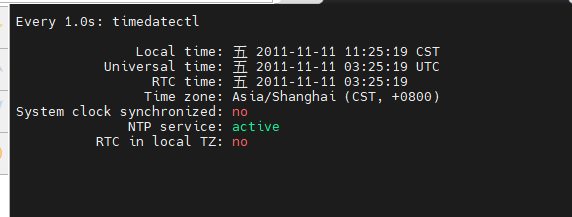
# 设置时间(必须关闭时间同步服务才能设置时间)
timedatectl set-time "2011-11-11 11:11:11"

[root@mysql-node3 yao]#  timedatectl set-ntp 1

[root@mysql-node3 yao]# vim /etc/chrony.conf
 # pool 2.rhel.pool.ntp.org iburst
 26 allow 0.0.0.0/0
 29 local stratum 10

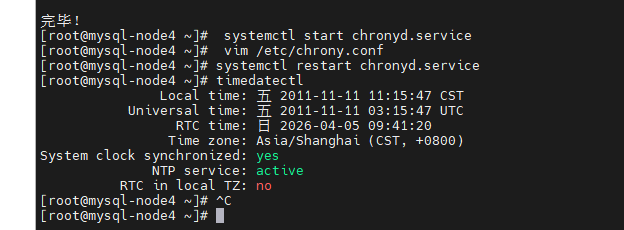
[root@mysql-node4 ~]#  systemctl restart chronyd.service
 # 修改chrony配置文件 将远程服务器的地址改为timeserver的地址
[root@mysql-node4 ~]#   vim /etc/chrony.conf
3 pool 192.168.xxx.100 iburst
[root@mysql-node4 ~]#  systemctl restart chronyd.service


#其他命令
查看时间服务器的状态
[root@server ~]# chronyc  sourcestats  -v
查看时间服务器是否在线
[root@server ~]# chronyc  activity  -v
同步系统时钟
[root@server ~]# chronyc  -a  makestep
总结
yum  install  chrony  -y

[root@mysql-node3 yao]#  timedatectl
               Local time: 日 2025-04-06 15:59:51 CST  当地时间
           Universal time: 日 2025-04-06 07:59:51 UTC   美国时间
                 RTC time: 日 2025-04-06 07:59:51       物理硬件时间
                Time zone: Asia/Shanghai (CST, +0800)   哪个时区
System clock synchronized: yes                  系统时间是否同步(跟远程的服务器是否同步)
              NTP service: active                  NTP 服务的状态
          RTC in local TZ: no                       表示 RTC 时钟是否使用本地时区

#关闭同步服务
[root@mysql-node3 yao]# timedatectl set-ntp 0   0代表关闭,1代表开
[root@mysql-node3 yao]# timedatectl set-local-rtc 0

# 设置时间(必须关闭时间同步服务才能设置时间)
timedatectl set-time "2011-11-11 11:11:11"

[root@mysql-node3 yao]# vim /etc/chrony.conf
 # pool 2.rhel.pool.ntp.org iburst
 26 allow 0.0.0.0/0
 29 local stratum 10
[root@mysql-node3 yao]# systemctl restart chronyd.service

 # 修改chrony配置文件 将远程服务器的地址改为timeserver的地址
[root@mysql-node4 ~]#   vim /etc/chrony.conf
3 pool 1672.25.254.30 iburst
[root@mysql-node4 ~]#  systemctl restart chronyd.service


#其他命令
查看时间服务器的状态
[root@server ~]# chronyc  sourcestats  -v
查看时间服务器是否在线
[root@server ~]# chronyc  activity  -v
同步系统时钟
[root@server ~]# chronyc  -a  makestep