一、前言
两台设备组建的 IRF 堆叠系统运行稳定,业务承载正常。结合本次网络架构整体优化规划,为适配后续网络拓扑调整、灵活分配设备资源,同时实现设备独立运维调度,满足多样化组网场景使用需求,现需拆解现有 IRF 堆叠架构,将两台设备退出堆叠模式并恢复为独立运行模式,完成配置重置与系统初始化后作为备用设备,提升网络部署的灵活性与设备利用率。
二、IRF模式切换独立运行
组网拓扑
某企业当前 IRF 堆叠系统由成员设备SwitchA与SwitchB组成,该堆叠已实现稳定运行,业务正常流转。因网络架构规划调整,需对现有设备部署模式进行变更,操作目标为将 SwitchA、SwitchB 退出 IRF 堆叠模式,分别恢复为独立运行模式,完成配置重置与状态初始化后,作为备用独立设备留存待用。
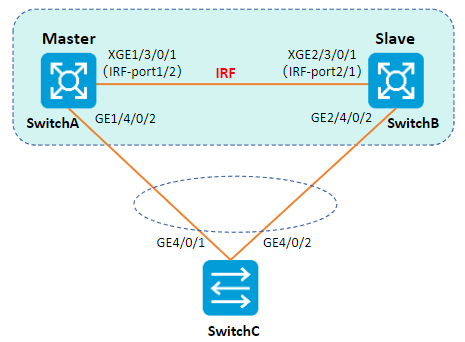
配置思路
-
断开 IRF 物理链路,可直接拔除 IRF 互联线缆,或通过命令行关闭主设备的全部 IRF 物理端口。
-
IRF 分裂后,分别将两台成员设备由 IRF 堆叠模式切换为独立运行模式
配置步骤
步骤 1 确定Master主设备。
<IRF> display irf
MemberID Slot Role Priority CPU-Mac Description
*+1 0 Master 1 00e0-fc0f-8C01 DeviceA
 1 1 Standby 1 00e0-fc0f-8c02 DeviceA
 2 0 Standby 1 00e0-fc0f-15e1 DeviceB
 2 1 Standby 1 00e0-fc0f-15e2 DeviceB
--------------------------------------------------
* indicates the device is the master.
+ indicates the device through which the user logs in.
The Bridge MAC of the IRF is: 0000-fc00-313e
Auto upgrade : no
Mac persistent : always
Domain ID : 0
Auto merge : yes
IRF mode : normal
步骤 2断开IRF连接,手工关闭Master设备( SwitchA)的IRF物理端口或者拔掉 IRF 互联线缆。
[IRF] interface ten-gigabitethernet 1/3/0/1
[IRF-Ten-Gigabitethernet1/3/0/1] shutdown
步骤 3切换主设备的运行模式为独立运行模式。
[IRF] undo chassis convert mode
The device will switch to stand-alone mode and reboot. Continue? [Y/N]:y
You are recommended to save the current running configuration and specify the configuration
file for the next startup. Continue? [Y/N]:y
Please input the file name(*.cfg)[flash:/startup.cfg]
(To leave the existing filename unchanged, press the enter key):
flash:/startup.cfg exists, overwrite? [Y/N]:y
Validating file. Please wait...
Saved the current configuration to mainboard device successfully.
Do you want to convert the content of the next startup configuration file flash:
/startup.cfg to make it available in stand-alone mode? [Y/N]:y
Now rebooting, please wait...
SwitchA 自动重启来完成模式的切换。
步骤 4切换从设备的运行模式为独立运行模式。
[IRF] undo chassis convert mode
The device will switch to stand-alone mode and reboot. Continue? [Y/N]:y
You are recommended to save the current running configuration and specify the configuration
file for the next startup. Continue? [Y/N]:y
Please input the file name(*.cfg)[flash:/startup.cfg]
(To leave the existing filename unchanged, press the enter key):
flash:/startup.cfg exists, overwrite? [Y/N]:y
Validating file. Please wait...
Saved the current configuration to mainboard device successfully.
Do you want to convert the content of the next startup configuration file flash:
/startup.cfg to make it available in stand-alone mode? [Y/N]:y
Now rebooting, please wait...
SwitchB 自动重启来完成模式的切换。
****说明:****若 IRF 堆叠内已创建 VLAN 接口并配置 IP 地址,且 SwitchA、SwitchB 均配置该 VLAN 成员端口,设备解除堆叠恢复独立运行后,将出现IP 地址冲突。需登录其中一台设备,修改对应 VLAN 接口的 IP 地址。