欢迎加入开源鸿蒙跨平台社区:
https://openharmonycrossplatform.csdn.net
绪论:UI = f(State) 的宇宙学模型与灾难
现代声明式前端框架(如 Flutter、React)的世界观建立在一个极其优雅而纯粹的数学函数之上:
U I = f ( S t a t e ) UI = f(State) UI=f(State)
屏幕上每一颗像素的色彩、每一处文本的轮廓(即 U I UI UI),仅仅是当前内存状态( S t a t e State State)通过组件树构建函数( f f f,在 Flutter 中即为 build() 方法)的必然映射。然而,当应用规模从单页的"计数器玩具"膨胀为包含数百个交互节点、数千种状态流转的"重症监护室统一终端"时,如何将正确的状态(State)在正确的时间点、精准地输送给需要的组件(Widget),便成为了决定工程生死的头等大事。
如果开发者一味依赖 setState(),系统必将陷入**"状态属性钻取(Prop Drilling)"**的病理泥潭:为了将顶层组件的数据传给底层的叶子节点,不得不在无数个无关的中间层组件中传递参数,导致代码极度耦合、难以测试。
为了斩断这乱麻般的依赖,全局状态管理方案 应运而生。在 Flutter 繁荣的生态圈中,Provider 与 BLoC 犹如两座并峙的高峰,各自拥趸无数。本篇文章将抛开枯燥的教条,通过在 main.dart 中纯手写构建这两套底座引擎,在一个统一的"病区工作站"实战场景中,深度拆解它们在低频配置共享与高频复杂状态流转中的各自优势。
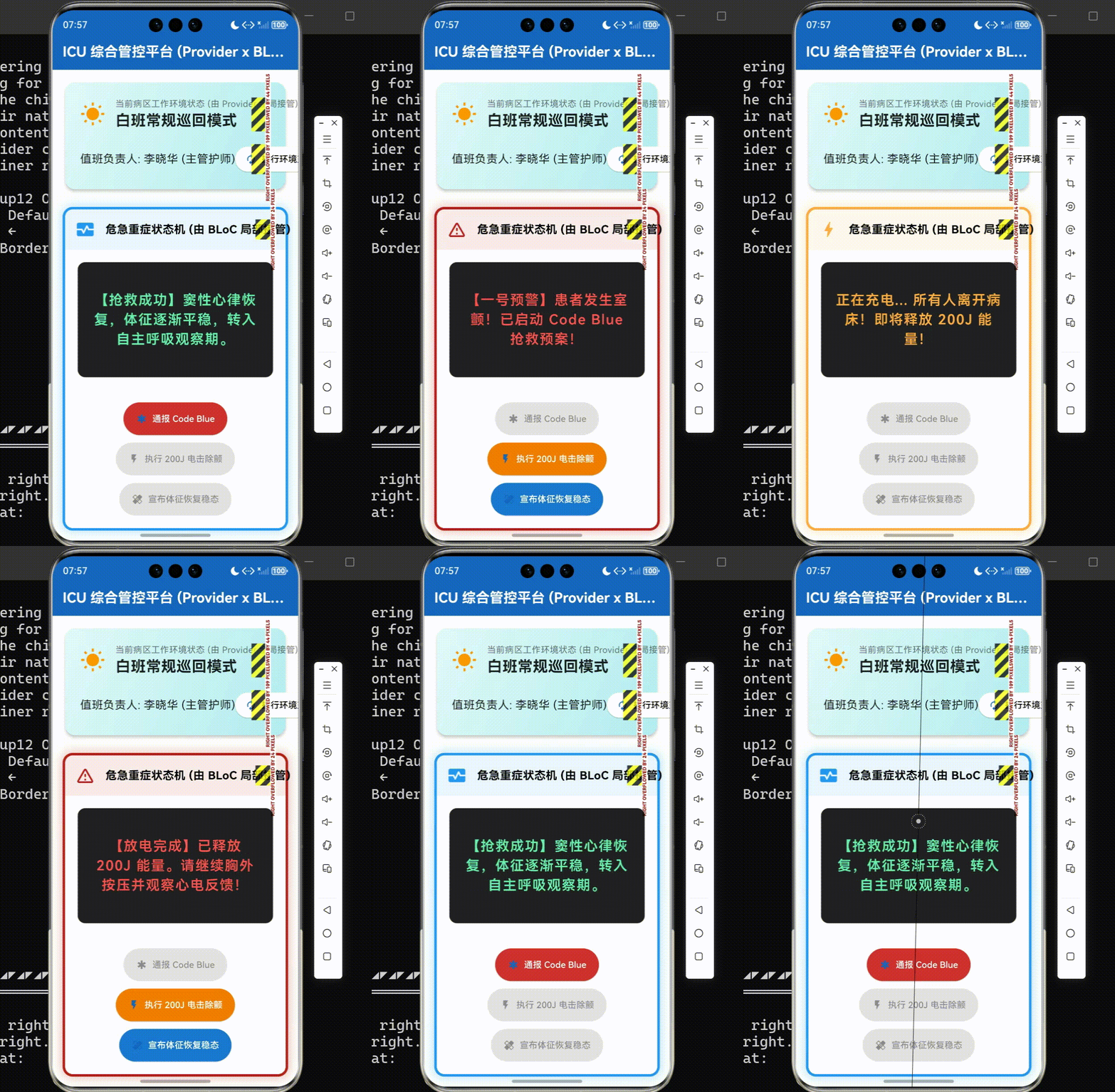
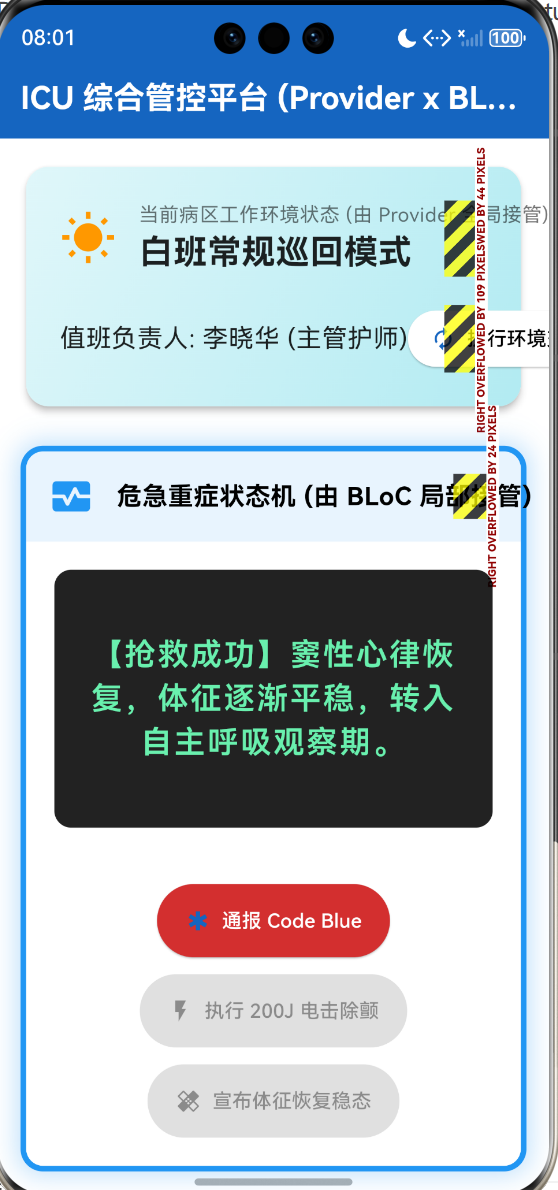
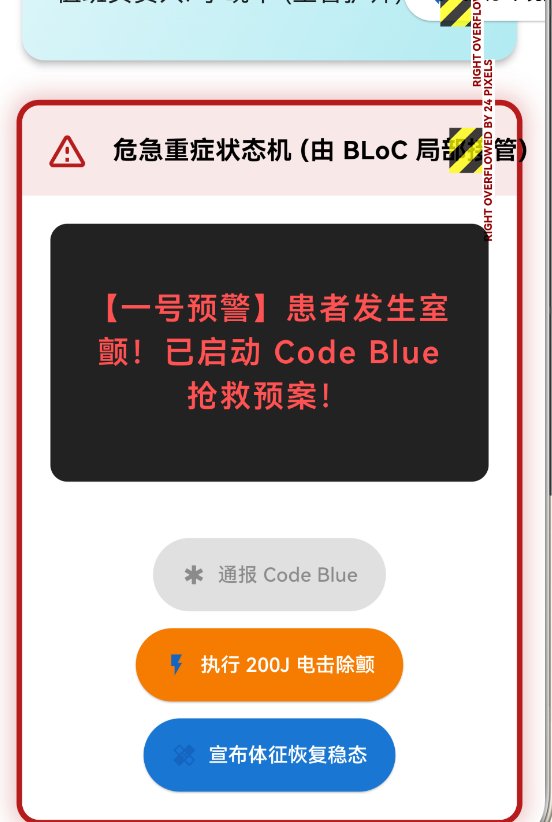
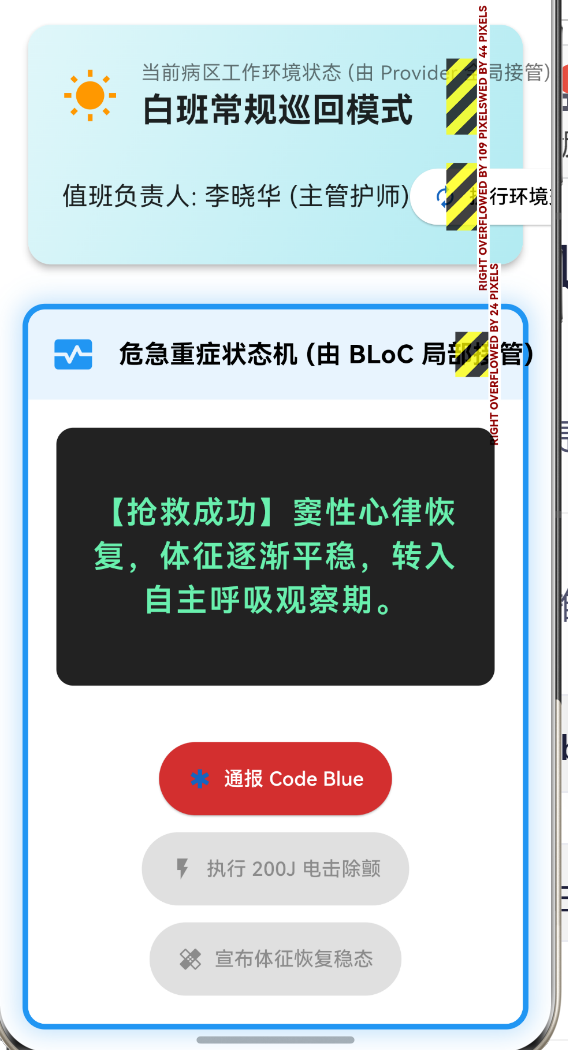
效果演示
一、 Provider:响应式的全局黑板 (The Blackboard Pattern)
Provider 的本质,是对 Flutter 底层 InheritedWidget 机制的一层优美的面向对象封装。它极其擅长处理那些**"频率较低、但波及面极广"**的环境属性,犹如挂在医院走廊黑板上的通告:只需书写一次,所有路过的人抬头便能获取。
1.1 核心原理解剖:O(1) 复杂度的向上寻址
在长达数百层的 Widget 树中寻找状态,最暴力的做法是从根节点往下遍历,时间复杂度为 O ( N ) O(N) O(N)。而 InheritedWidget 依靠 Element 树内部维护的散列表(Hash Map),实现了在任意子节点以 O ( 1 ) O(1) O(1) 常数级时间复杂度逆向获取顶层数据的神迹。
在我们的源码实践中,我们没有引入庞大的 provider 第三方库,而是亲自手敲了一个精简的基建:
dart
// 选自 main.dart:纯手写精简版 Provider 基建

class MiniProvider<T extends ChangeNotifier> extends InheritedNotifier<T> {
  const MiniProvider({
    super.key,
    required T super.notifier,
    required super.child,
  });

  /// O(1) 复杂度的组件树向上寻址函数
  static T of<T extends ChangeNotifier>(BuildContext context) {
    final provider = context.dependOnInheritedWidgetOfExactType<MiniProvider<T>>();
    if (provider == null) throw Exception('未找到对应 Provider');
    return provider.notifier!;
  }
}
1.2 医疗场景实战:昼夜交接班的主题流转
在病区工作站中,我们需要管理一个典型的全局环境状态:交接班系统(白天/黑夜模式)与当前责任护士信息 。
这个状态变化极度低频(一天可能只有两三次),但却会波及整个 App 的颜色主题、文字显示,甚至网络请求的 Token。这正是 Provider 大展拳脚的完美阵地。
dart
// 基于 ChangeNotifier 的黑板数据模型

class WardEnvironmentNotifier extends ChangeNotifier {
  bool _isNightShift = false;
  String _onDutyNurse = '李晓华 (主管护师)';

  bool get isNightShift => _isNightShift;
  String get onDutyNurse => _onDutyNurse;

  /// 触发交接班操作
  void toggleShift() {
    _isNightShift = !_isNightShift;
    _onDutyNurse = _isNightShift ? '王建国 (夜班值班护师)' : '李晓华 (主管护师)';

    // 【点睛之笔】:摇响铃铛,通知所有依赖此黑板的 UI 组件重新执行 build()
    notifyListeners();
  }
}
在界面的任意深处,我们只需一句 MiniProvider.of<WardEnvironmentNotifier>(context) 即可获取环境信息并订阅其变动,代码优雅且极具可读性。
二、 BLoC:高压下的全自动流水线 (The Assembly Line)
如果说 Provider 是一块静态的黑板,那么 BLoC (Business Logic Component) 则是一条隆隆作响的现代化工业流水线。它脱胎于复杂的响应式编程(Reactive Programming),极其擅长应对**"高频触发、状态机复杂、存在异步时序(如网络请求延迟)"**的棘手业务。
2.1 状态转移的有限自动机公式
在 BLoC 的哲学中,外部事件永远不能直接篡改状态。系统的流转被严格约束为以下数学推演:
S t + 1 = δ ( S t , E t ) S_{t+1} = \delta(S_t, E_t) St+1=δ(St,Et)
其中:
- S t S_t St:当前时刻的快照状态(State)。
- E t E_t Et:当前投入流水线的事件(Event)。
- δ \delta δ:在 BLoC 内部由开发者编写的映射引擎(
mapEventToState)。
2.2 BLoC 数据流向序列图
通过 Mermaid 序列图,我们能直观感受到这种"单向数据流"带来的秩序感:
状态广播流 (State Stream) BLoC 映射引擎 事件投递口 (Event Sink) 界面层 (Widget) 状态广播流 (State Stream) BLoC 映射引擎 事件投递口 (Event Sink) 界面层 (Widget) 执行逻辑运算与状态推演\n判断是否有足够权限\n向服务器发起急救建档请求 1. 用户点击 触发 Code Blue 按钮,投递 TriggerCodeBlueEvent 2. 事件排队进入内部核心引擎 3. 产出全新的 ResuscitationState(红灯报警) 4. StreamBuilder 监听到新状态,执行局部重绘
2.3 医疗场景实战:心肺复苏的异步阻断控制
在抢救室中,一旦患者室颤,会触发一系列严格规范的医疗操作链:触发报警 -> 准备除颤器 -> 放电停顿 -> 观察心率恢复 。
这种伴随着时间挂起(异步操作)的多节点业务,用 BLoC 处理简直是降维打击。
dart
// 选自 main.dart:抢救业务核心引擎

class ResuscitationBloc {
  // 定义双流管道:一个用于外发,一个用于内收
  final _stateController = StreamController<ResuscitationState>.broadcast();
  final _eventController = StreamController<ResuscitationEvent>();

  // ... 初始化略

  void _mapEventToState(ResuscitationEvent event) async {
    if (event is TriggerCodeBlueEvent) {
      _currentState = ResuscitationState(status: ResuscitationStatus.codeBlue, /*...*/);

    } else if (event is AdministerShockEvent) {
      // 1. 先变更为【除颤器充电中】状态,提示周围人员退后
      _currentState = ResuscitationState(status: ResuscitationStatus.defibrillating, /*...*/);
      _stateController.add(_currentState);

      // 2. 利用 await 挂起进程,模拟物理放电的时长 (极其安全的异步处理)
      await Future.delayed(const Duration(seconds: 2));

      // 3. 放电结束,自动回落至抢救观察态
      _currentState = ResuscitationState(status: ResuscitationStatus.codeBlue, /*...*/);
    }

    // 统一将本轮加工完毕的最终态推送出流水线
    _stateController.add(_currentState);
  }
}
这段逻辑被完全封印在纯 Dart 类中。即便是脱离了 Flutter 的 UI 框架,放到后端的单元测试环境中,也能以 100% 的覆盖率进行白盒测试。这也是医疗认证机构最为看重的代码可测试性(Testability)。
三、 架构选型法则与决策矩阵
在真实工程中,盲目排斥某种框架是狭隘的。优秀的系统往往是 Provider 兜底全局、BLoC 攻坚局部的双剑合璧。为了给未来的生命科学项目确立清晰的技术边界,我们总结了如下的选型决策矩阵:
| 评估维度 | Provider 方案 | BLoC 方案 |
|---|---|---|
| 底层实现机制 | 基于 InheritedWidget 的树状寻址 |
基于 Stream 流与发布订阅模式 |
| 适用业务特征 | 读多写少、结构简单(如全局主题、用户信息) | 交互极度频繁、状态节点多且含有复杂异步时序 |
| 样板代码量 (Boilerplate) | 极低,即用即建,心智负担极小 | 极高,需要拆分 Event、State 多个类 |
| 事件追溯性 | 差,状态被直接覆写,难以追踪修改源头 | 极优,每一个 Event 都可被打印进医疗系统日志 |
| 代码单元测试 | 较难,往往需附带 Widget 环境进行测试 | 极易,输入 Event 预期输出 State,纯逻辑论证 |
四、 阶段总结与前瞻:走向数据不朽之路
在本篇中,我们在同一个应用内,让 Provider 掌管了外层的病房昼夜交替更迭,而让 BLoC 沉入内部,主导了惊心动魄的抢救状态机运转。它们互不干涉,又完美融合。
至此,我们的生命科学 Flutter 架构之旅已经完整拼齐了界面渲染、并发内存、流式解析、异常管控与全局状态这五块最为核心的基石组件。
接下来将告别纯粹的内存逻辑运转,正式向操作系统的物理存储层挺进。我们将依托 SQLite 数据库,将这些转瞬即逝的抢救日志、除颤记录与血氧时序波形,转化为能抵抗断电与重启的永恒档案。数字医疗的终极使命,便是用数据的严谨对抗生死的无常。
完整代码
bash
import 'dart:async';
import 'package:flutter/material.dart';

void main() {
  runApp(
    // 根节点注入:利用 Provider 思想包裹全应用,提供全局主题与病区环境状态
    MiniProvider<WardEnvironmentNotifier>(
      notifier: WardEnvironmentNotifier(),
      child: const ClinicalManagementApp(),
    ),
  );
}

/// ---------------------------------------------------------------------------
/// 架构基建:纯手写精简版 Provider (基于 InheritedNotifier)
/// 不依赖第三方 package,展示对底层 O(1) 状态共享机制的深刻理解。
/// ---------------------------------------------------------------------------
class MiniProvider<T extends ChangeNotifier> extends InheritedNotifier<T> {
  const MiniProvider({
    super.key,
    required T super.notifier,
    required super.child,
  });

  /// O(1) 复杂度的组件树向上寻址函数
  static T of<T extends ChangeNotifier>(BuildContext context) {
    final provider = context.dependOnInheritedWidgetOfExactType<MiniProvider<T>>();
    if (provider == null) throw Exception('在组件树中未找到对应类型的 MiniProvider');
    return provider.notifier!;
  }
}

/// ---------------------------------------------------------------------------
/// 状态方案 A:Provider 模式 (基于 ChangeNotifier)
/// 适用场景:低频更新、结构简单的全局共享状态。例如:病区白班/夜班环境配置、当前护士信息。
/// ---------------------------------------------------------------------------
class WardEnvironmentNotifier extends ChangeNotifier {
  bool _isNightShift = false;
  String _onDutyNurse = '李晓华 (主管护师)';

  bool get isNightShift => _isNightShift;
  String get onDutyNurse => _onDutyNurse;

  /// 切换昼夜交接班状态
  void toggleShift() {
    _isNightShift = !_isNightShift;
    _onDutyNurse = _isNightShift ? '王建国 (夜班值班护师)' : '李晓华 (主管护师)';
    notifyListeners(); // 广播通知,触发所有依赖此环境的 UI 节点进行重绘
  }
}

/// ---------------------------------------------------------------------------
/// 状态方案 B:BLoC 模式 (基于 Stream 流水线)
/// 适用场景:高频更新、状态机流转复杂、需要严格时序追溯的业务。例如:心脏骤停抢救(Code Blue)流程。
/// ---------------------------------------------------------------------------

// 1. 抢救业务状态枚举
enum ResuscitationStatus { idle, codeBlue, defibrillating, recovering }

// 2. 抢救状态快照 (Immutable)
class ResuscitationState {
  final ResuscitationStatus status;
  final String clinicalLog;
  final int joules; // 除颤焦耳数

  ResuscitationState({required this.status, required this.clinicalLog, required this.joules});

  factory ResuscitationState.initial() => ResuscitationState(
      status: ResuscitationStatus.idle, clinicalLog: '病患体征平稳,未触发急救预案。', joules: 0);
}

// 3. 抢救事件抽象 (Event)
abstract class ResuscitationEvent {}
class TriggerCodeBlueEvent extends ResuscitationEvent {}
class AdministerShockEvent extends ResuscitationEvent {
  final int energy;
  AdministerShockEvent(this.energy);
}
class StabilizePatientEvent extends ResuscitationEvent {}

// 4. BLoC 核心引擎
class ResuscitationBloc {
  final _stateController = StreamController<ResuscitationState>.broadcast();
  final _eventController = StreamController<ResuscitationEvent>();

  Stream<ResuscitationState> get stateStream => _stateController.stream;
  Sink<ResuscitationEvent> get eventSink => _eventController.sink;

  ResuscitationState _currentState = ResuscitationState.initial();

  ResuscitationBloc() {
    _stateController.add(_currentState);
    // 监听事件输入,执行状态机推演
    _eventController.stream.listen(_mapEventToState);
  }

  void _mapEventToState(ResuscitationEvent event) async {
    if (event is TriggerCodeBlueEvent) {
      _currentState = ResuscitationState(
          status: ResuscitationStatus.codeBlue, clinicalLog: '【一号预警】患者发生室颤!已启动 Code Blue 抢救预案!', joules: 0);
    } else if (event is AdministerShockEvent) {
      // 模拟电击除颤的异步停顿时间
      _currentState = ResuscitationState(
          status: ResuscitationStatus.defibrillating, clinicalLog: '正在充电... 所有人离开病床!即将释放 ${event.energy}J 能量!', joules: event.energy);
      _stateController.add(_currentState); // 先抛出充电状态

      await Future.delayed(const Duration(seconds: 2)); // 模拟放电耗时

      _currentState = ResuscitationState(
          status: ResuscitationStatus.codeBlue, clinicalLog: '【放电完成】已释放 ${event.energy}J 能量。请继续胸外按压并观察心电反馈!', joules: 0);
    } else if (event is StabilizePatientEvent) {
      _currentState = ResuscitationState(
          status: ResuscitationStatus.recovering, clinicalLog: '【抢救成功】窦性心律恢复,体征逐渐平稳,转入自主呼吸观察期。', joules: 0);
    }

    // 推送最终决断状态
    if (!_stateController.isClosed) _stateController.add(_currentState);
  }

  void dispose() {
    _stateController.close();
    _eventController.close();
  }
}

/// ---------------------------------------------------------------------------
/// 主应用程序 (受 Provider 保护,能够动态切换主题)
/// ---------------------------------------------------------------------------
class ClinicalManagementApp extends StatelessWidget {
  const ClinicalManagementApp({super.key});

  @override
  Widget build(BuildContext context) {
    // 这里就是 O(1) 向上获取全局环境变量的体现
    final env = MiniProvider.of<WardEnvironmentNotifier>(context);

    return MaterialApp(
      title: '状态管理演练中心',
      debugShowCheckedModeBanner: false,
      theme: ThemeData(
        useMaterial3: true,
        // 根据 Provider 提供的全局状态,动态推演全局主题
        colorScheme: env.isNightShift
            ? const ColorScheme.dark(primary: Color(0xFF90CAF9), background: Color(0xFF121212), surface: Color(0xFF1E1E1E))
            : const ColorScheme.light(primary: Color(0xFF1565C0), background: Color(0xFFF5F7FA), surface: Colors.white),
      ),
      home: const WardDashboardScreen(),
    );
  }
}

/// ---------------------------------------------------------------------------
/// UI 控制台视图:左侧 Provider,右侧 BLoC 协同作战
/// ---------------------------------------------------------------------------
class WardDashboardScreen extends StatefulWidget {
  const WardDashboardScreen({super.key});

  @override
  State<WardDashboardScreen> createState() => _WardDashboardScreenState();
}

class _WardDashboardScreenState extends State<WardDashboardScreen> {
  late ResuscitationBloc _bloc;

  @override
  void initState() {
    super.initState();
    // 实例化 BLoC
    _bloc = ResuscitationBloc();
  }

  @override
  void dispose() {
    _bloc.dispose();
    super.dispose();
  }

  @override
  Widget build(BuildContext context) {
    // 继续监听 Provider 环境变更,如果变化,整个 Scaffold 会重绘
    final env = MiniProvider.of<WardEnvironmentNotifier>(context);

    return Scaffold(
      appBar: AppBar(
        title: const Text('ICU 综合管控平台 (Provider x BLoC)', style: TextStyle(fontWeight: FontWeight.bold)),
        backgroundColor: Theme.of(context).colorScheme.primary,
        foregroundColor: Colors.white,
        centerTitle: true,
      ),
      body: Padding(
        padding: const EdgeInsets.all(16.0),
        child: Column(
          crossAxisAlignment: CrossAxisAlignment.stretch,
          children: [
            // 顶部:全局环境状态看板 (Provider)
            _buildProviderEnvironmentPanel(env),
            const SizedBox(height: 24),

            // 底部:局部高频生命体征与抢救面板 (BLoC)
            Expanded(
              child: _buildBlocResuscitationPanel(),
            ),
          ],
        ),
      ),
    );
  }

  /// 构建 Provider 管理的全局环境区域
  Widget _buildProviderEnvironmentPanel(WardEnvironmentNotifier env) {
    return Card(
      elevation: 4,
      shape: RoundedRectangleBorder(borderRadius: BorderRadius.circular(16)),
      child: Container(
        decoration: BoxDecoration(
          borderRadius: BorderRadius.circular(16),
          gradient: LinearGradient(
            colors: env.isNightShift
              ? [const Color(0xFF2C3E50), const Color(0xFF000000)]
              : [const Color(0xFFE0F7FA), const Color(0xFFB2EBF2)],
            begin: Alignment.topLeft,
            end: Alignment.bottomRight,
          ),
        ),
        padding: const EdgeInsets.all(24.0),
        child: Column(
          children: [
            Row(
              children: [
                Icon(env.isNightShift ? Icons.nights_stay : Icons.wb_sunny,
                     size: 40, color: env.isNightShift ? Colors.amber : Colors.orange),
                const SizedBox(width: 16),
                Column(
                  crossAxisAlignment: CrossAxisAlignment.start,
                  children: [
                    Text('当前病区工作环境状态 (由 Provider 全局接管)',
                         style: TextStyle(color: env.isNightShift ? Colors.white70 : Colors.black54)),
                    Text(env.isNightShift ? '夜班静默值守模式' : '白班常规巡回模式',
                         style: TextStyle(fontSize: 24, fontWeight: FontWeight.bold,
                                          color: env.isNightShift ? Colors.white : Colors.black87)),
                  ],
                ),
              ],
            ),
            const SizedBox(height: 20),
            Row(
              mainAxisAlignment: MainAxisAlignment.spaceBetween,
              children: [
                Text('值班负责人: ${env.onDutyNurse}',
                     style: TextStyle(fontSize: 18, color: env.isNightShift ? Colors.white : Colors.black87)),
                ElevatedButton.icon(
                  onPressed: () => env.toggleShift(), // 触发全局换班
                  icon: const Icon(Icons.autorenew),
                  label: const Text('执行环境交接班'),
                  style: ElevatedButton.styleFrom(
                    backgroundColor: env.isNightShift ? Colors.grey.shade800 : Colors.white,
                    foregroundColor: env.isNightShift ? Colors.white : Colors.black,
                  ),
                )
              ],
            )
          ],
        ),
      ),
    );
  }

  /// 构建 BLoC 管理的局部高频抢救区域
  Widget _buildBlocResuscitationPanel() {
    return StreamBuilder<ResuscitationState>(
      stream: _bloc.stateStream,
      initialData: ResuscitationState.initial(),
      builder: (context, snapshot) {
        final state = snapshot.data!;

        Color borderColor;
        IconData statusIcon;

        switch (state.status) {
          case ResuscitationStatus.idle:
            borderColor = Colors.green;
            statusIcon = Icons.health_and_safety;
            break;
          case ResuscitationStatus.codeBlue:
            borderColor = Colors.red.shade900;
            statusIcon = Icons.warning_amber_rounded;
            break;
          case ResuscitationStatus.defibrillating:
            borderColor = Colors.orangeAccent;
            statusIcon = Icons.bolt;
            break;
          case ResuscitationStatus.recovering:
            borderColor = Colors.blue;
            statusIcon = Icons.monitor_heart;
            break;
        }

        return AnimatedContainer(
          duration: const Duration(milliseconds: 300),
          decoration: BoxDecoration(
            color: Theme.of(context).colorScheme.surface,
            borderRadius: BorderRadius.circular(16),
            border: Border.all(color: borderColor, width: 4),
            boxShadow: [
              BoxShadow(
                color: borderColor.withOpacity(0.3),
                blurRadius: 15,
                spreadRadius: 2,
              )
            ]
          ),
          child: Column(
            crossAxisAlignment: CrossAxisAlignment.stretch,
            children: [
              // 状态标头
              Container(
                padding: const EdgeInsets.all(16),
                decoration: BoxDecoration(
                  color: borderColor.withOpacity(0.1),
                  borderRadius: const BorderRadius.vertical(top: Radius.circular(12)),
                ),
                child: Row(
                  children: [
                    Icon(statusIcon, color: borderColor, size: 32),
                    const SizedBox(width: 16),
                    const Text('危急重症状态机 (由 BLoC 局部接管)',
                         style: TextStyle(fontSize: 18, fontWeight: FontWeight.bold)),
                  ],
                ),
              ),

              // 临床日志黑板
              Expanded(
                child: Container(
                  margin: const EdgeInsets.all(20),
                  padding: const EdgeInsets.all(20),
                  decoration: BoxDecoration(
                    color: Colors.black87,
                    borderRadius: BorderRadius.circular(12),
                  ),
                  child: Center(
                    child: Text(
                      state.clinicalLog,
                      textAlign: TextAlign.center,
                      style: TextStyle(
                        color: state.status == ResuscitationStatus.codeBlue ? Colors.redAccent :
                               state.status == ResuscitationStatus.defibrillating ? Colors.orangeAccent :
                               Colors.greenAccent,
                        fontSize: 22,
                        fontWeight: FontWeight.w600,
                        letterSpacing: 1.5,
                      ),
                    ),
                  ),
                ),
              ),

              // 抢救操作面板 (仅在相应状态下允许触发相应事件)
              Padding(
                padding: const EdgeInsets.all(20.0),
                child: Wrap(
                  spacing: 12,
                  runSpacing: 12,
                  alignment: WrapAlignment.center,
                  children: [
                    ElevatedButton.icon(
                      onPressed: state.status == ResuscitationStatus.idle || state.status == ResuscitationStatus.recovering
                          ? () => _bloc.eventSink.add(TriggerCodeBlueEvent())
                          : null,
                      icon: const Icon(Icons.emergency),
                      label: const Text('通报 Code Blue'),
                      style: ElevatedButton.styleFrom(
                        backgroundColor: Colors.red.shade700,
                        foregroundColor: Colors.white,
                        padding: const EdgeInsets.symmetric(horizontal: 20, vertical: 16),
                      ),
                    ),
                    ElevatedButton.icon(
                      onPressed: state.status == ResuscitationStatus.codeBlue
                          ? () => _bloc.eventSink.add(AdministerShockEvent(200)) // 注入 200焦耳电击事件
                          : null,
                      icon: const Icon(Icons.flash_on),
                      label: const Text('执行 200J 电击除颤'),
                      style: ElevatedButton.styleFrom(
                        backgroundColor: Colors.orange.shade700,
                        foregroundColor: Colors.white,
                        padding: const EdgeInsets.symmetric(horizontal: 20, vertical: 16),
                      ),
                    ),
                    ElevatedButton.icon(
                      onPressed: state.status == ResuscitationStatus.codeBlue
                          ? () => _bloc.eventSink.add(StabilizePatientEvent())
                          : null,
                      icon: const Icon(Icons.healing),
                      label: const Text('宣布体征恢复稳态'),
                      style: ElevatedButton.styleFrom(
                        backgroundColor: Colors.blue.shade700,
                        foregroundColor: Colors.white,
                        padding: const EdgeInsets.symmetric(horizontal: 20, vertical: 16),
                      ),
                    ),
                  ],
                ),
              )
            ],
          ),
        );
      },
    );
  }
}