1.实验拓扑
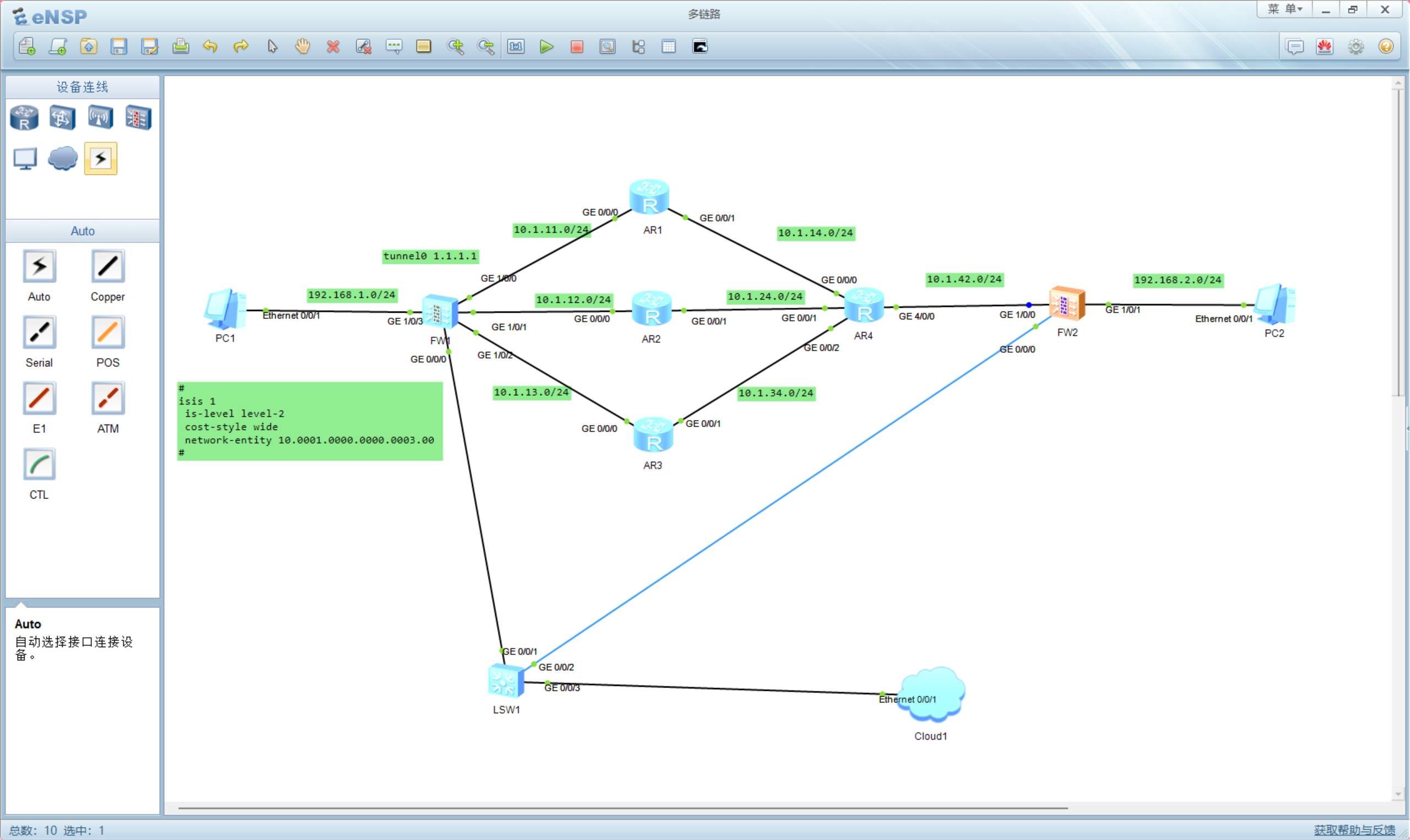
2.基础配置
a.基础配置(IP地址,路由配置等)
AR1:
isis 1
is-level level-2
cost-style wide
network-entity 10.0001.0000.0000.0001.00
interface GigabitEthernet0/0/0
ip address 10.1.11.2 255.255.255.0
isis en 1
interface GigabitEthernet0/0/1
ip address 10.1.14.1 255.255.255.0
isis en 1
AR2:
isis 1
is-level level-2
cost-style wide
network-entity 10.0001.0000.0000.0002.00
interface GigabitEthernet0/0/0
ip address 10.1.12.2 255.255.255.0
isis en 1
interface GigabitEthernet0/0/1
ip address 10.1.24.2 255.255.255.0
isis en 1
AR3:
isis 1
is-level level-2
cost-style wide
network-entity 10.0001.0000.0000.0003.00
interface GigabitEthernet0/0/0
ip address 10.1.13.3 255.255.255.0
isis en 1
interface GigabitEthernet0/0/1
ip address 10.1.34.3 255.255.255.0
isis en 1
AR4:
isis 1
is-level level-2
cost-style wide
network-entity 10.0001.0000.0000.0004.00
interface GigabitEthernet0/0/0
ip address 10.1.14.4 255.255.255.0
isis en 1
interface GigabitEthernet0/0/1
ip address 10.1.24.4 255.255.255.0
isis en 1
interface GigabitEthernet0/0/2
ip address 10.1.34.4 255.255.255.0
isis en 1
interface GigabitEthernet40/0
ip address 10.1.42.4 255.255.255.0
isis en 1
FW1:
interface GigabitEthernet1/0/0
undo shutdown
ip address 10.1.11.1 255.255.255.0
interface GigabitEthernet1/0/1
undo shutdown
ip address 10.1.12.1 255.255.255.0
interface GigabitEthernet1/0/2
undo shutdown
ip address 10.1.13.1 255.255.255.0
interface GigabitEthernet1/0/3
undo shutdown
ip address 192.168.1.254 255.255.255.0
service-manage ping permit
firewall zone local
set priority 100
firewall zone trust
set priority 85
add interface GigabitEthernet0/0/0
add interface GigabitEthernet1/0/3
firewall zone untrust
set priority 5
add interface GigabitEthernet1/0/0
add interface GigabitEthernet1/0/1
add interface GigabitEthernet1/0/2
firewall zone dmz
set priority 50
ip route-static 0.0.0.0 0.0.0.0 10.1.11.2
ip route-static 0.0.0.0 0.0.0.0 10.1.12.2
ip route-static 0.0.0.0 0.0.0.0 10.1.13.2
FW2:
interface GigabitEthernet1/0/0
undo shutdown
ip address 10.1.42.2 255.255.255.0
interface GigabitEthernet1/0/1
undo shutdown
ip address 192.168.2.254 255.255.255.0
firewall zone local
set priority 100
firewall zone trust
set priority 85
add interface GigabitEthernet0/0/0
add interface GigabitEthernet1/0/1
firewall zone untrust
set priority 5
add interface GigabitEthernet1/0/0
firewall zone dmz
set priority 50
ip route-static 0.0.0.0 0.0.0.0 10.1.42.4
b.配置FW1tunnel口以及隧道引流
FW1:
interface Tunnel0
ip address 1.1.1.1 255.255.255.0
tunnel-protocol ipsec
alias 1
service-manage ping permit
ip route-static 192.168.2.0 24 Tunnel 0
c.配置安全策略
FW1:
ip service-set ike type object 16
service 0 protocol udp source-port 0 to 65535 destination-port 500
security-policy
rule name ike
source-zone local
source-zone untrust
destination-zone local
destination-zone untrust
service esp
service ike
action permit
rule name ping
source-zone trust
source-zone untrust
destination-zone trust
destination-zone untrust
source-address 192.168.1.0 mask 255.255.255.0
source-address 192.168.2.0 mask 255.255.255.0
destination-address 192.168.1.0 mask 255.255.255.0
destination-address 192.168.2.0 mask 255.255.255.0
service icmp
action permit
FW2:
ip service-set ike type object 16
service 0 protocol udp source-port 0 to 65535 destination-port 500
security-policy
rule name ike
source-zone local
source-zone untrust
destination-zone local
destination-zone untrust
service esp
service ike
action permit
rule name ping
source-zone trust
source-zone untrust
destination-zone trust
destination-zone untrust
source-address 192.168.1.0 mask 255.255.255.0
source-address 192.168.2.0 mask 255.255.255.0
destination-address 192.168.1.0 mask 255.255.255.0
destination-address 192.168.2.0 mask 255.255.255.0
service icmp
action permit
d.建立IPsec隧道
FW1:
acl number 3000
rule 5 permit ip source 192.168.1.0 0.0.0.255 destination 192.168.2.0 0.0.0.255
ipsec proposal prop6472322180
encapsulation-mode auto
esp authentication-algorithm sha2-256
esp encryption-algorithm aes-256
ike proposal default
encryption-algorithm aes-256 aes-192 aes-128
dh group14
authentication-algorithm sha2-512 sha2-384 sha2-256
authentication-method pre-share
integrity-algorithm hmac-sha2-256
prf hmac-sha2-256
ike proposal 1
encryption-algorithm aes-256
dh group14
authentication-algorithm sha2-256
authentication-method pre-share
integrity-algorithm hmac-sha2-256
prf hmac-sha2-256
ike peer ike6472322180
exchange-mode auto
pre-shared-key %^%#pTVZ2E$H6/{GFB,*xyTOukZMPx`=Q56OD!F'|#/H%^%#
ike-proposal 1
remote-id-type none
dpd type periodic
remote-address 10.1.42.2
ipsec policy ipsec6472321925 1 isakmp
security acl 3000
ike-peer ike6472322180
proposal prop6472322180
tunnel local applied-interface
alias 12
sa trigger-mode auto
sa duration traffic-based 10485760
sa duration time-based 3600
interface Tunnel0
ip address 1.1.1.1 255.255.255.0
tunnel-protocol ipsec
alias 1
service-manage ping permit
ipsec policy ipsec6472321925
FW2:
acl number 3000
rule 5 permit ip source 192.168.2.0 0.0.0.255 destination 192.168.1.0 0.0.0.255
ipsec proposal prop6472317853
encapsulation-mode auto
esp authentication-algorithm sha2-256
esp encryption-algorithm aes-256
ike proposal default
encryption-algorithm aes-256 aes-192 aes-128
dh group14
authentication-algorithm sha2-512 sha2-384 sha2-256
authentication-method pre-share
integrity-algorithm hmac-sha2-256
prf hmac-sha2-256
ike proposal 1
encryption-algorithm aes-256
dh group14
authentication-algorithm sha2-256
authentication-method pre-share
integrity-algorithm hmac-sha2-256
prf hmac-sha2-256
ike peer ike6472317853
exchange-mode auto
pre-shared-key %^%#yk4GAL->G0[4E'8>\c5-lO`j;^#}pVNhq5YRY'`R%^%#
ike-proposal 1
remote-id-type none
dpd type periodic
remote-address 1.1.1.1
ipsec policy ipsec6472317572 1 isakmp
security acl 3000
ike-peer ike6472317853
proposal prop6472317853
tunnel local applied-interface
alias 12
sa trigger-mode auto
sa duration traffic-based 10485760
sa duration time-based 3600
3.结果验证
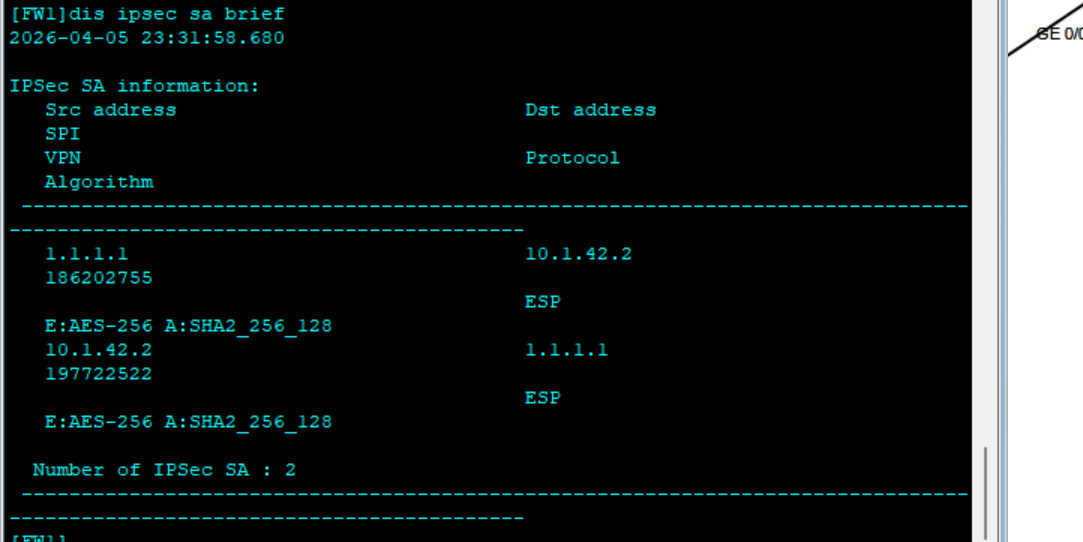
a.IPsec隧道是否建立
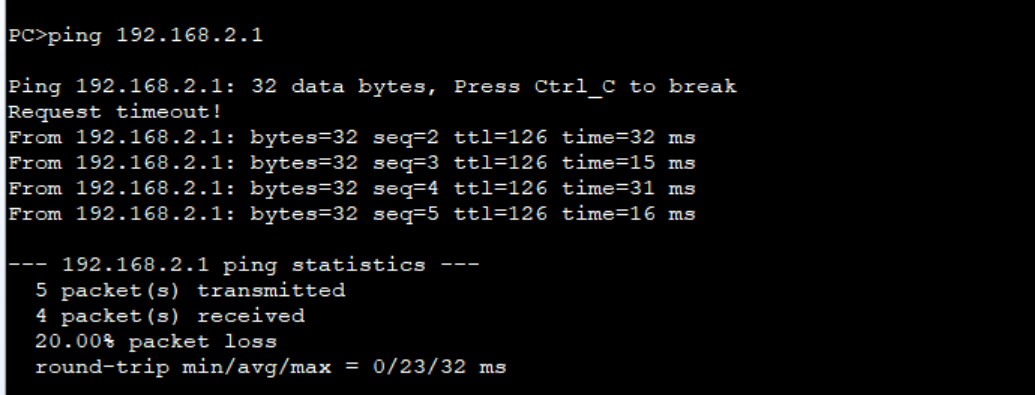
b.是否可以ping通
4.总结
此方案就是网关使用tunnel口利用链路进行多链路备份,可用性较高,只要不是双方防火墙出现问题,三条备用链路
而且FW2也可以使用tunnel口,FW2侧多些路由器,也可以实现FW1侧多链路,这样可靠行会更高