前情提要:本篇博客将详细介绍nginx实现http的反向代理,包括配置参数、反向代理实现动静分离、缓存功能的详解和配置流程。
一、反向代理配置参数介绍及配置示例
cpp
#官方文档:https://nginx.org/en/docs/http/ngx_http_proxy_module.html#proxy_pass

proxy_pass;     #用来设置将客户端请求转发给的后端服务器的主机
				#可以是主机名(将转发至后端服务做为主机头首部)、IP地址:端口的方式
				#也可以代理到预先设置的主机群组,需要模块ngx_http_upstream_module支持

proxy_hide_header field;    #用于nginx作为反向代理的时候
							#在返回给客户端http响应时
							#隐藏后端服务器相应头部的信息
							#可以设置在http,server或location块

proxy_pass_header field;    #透传
							#默认nginx在响应报文中不传递后端服务器的首部字段Date, Server, X-Pad, X-Accel等参数
							#如果要传递的话则要使用  proxy_pass_header field声明将后端服务器返回的值传递给客户端
							#field 首部字段大小不敏感

proxy_pass_request_body on | off;
#是否向后端服务器发送HTTP实体部分,可以设置在http,server或location块,默认即为开启

proxy_set_header;
#可更改或添加客户端的请求头部信息内容并转发至后端服务器,比如在后端服务器想要获取客户端的真实IP 的时候,就要更改每一个报文的头部

proxy_connect_timeout time;
#配置nginx服务器与后端服务器尝试建立连接的超时时间,默认为60秒

proxy_read_timeout time;
#配置nginx服务器向后端服务器或服务器组发起read请求后,等待的超时时间,默认60s

proxy_send_timeout time;
#配置nginx项后端服务器或服务器组发起write请求后,等待的超时 时间,默认60s

proxy_http_version 1.0;
#用于设置nginx提供代理服务的HTTP协议的版本,默认http 1.0

proxy_ignore_client_abort off;
#当客户端网络中断请求时,nginx服务器中断其对后端服务器的请求。即如果此项设置为on开启,则服务器会忽略客户端中断并一直等着代理服务执行返回,如果设置为off,则客户端中断后Nginx也会中断客户 端请求并立即记录499日志,默认为off。
1.1 proxy_pass 示例
- 准备环境
cpp
# 准备RS3和RS4两台服务主机
RS3 172.25.254.11
RS4 172.25.254.12

[root@RS3 ~]# echo 172.25.254.11-RS3 > /var/www/html/index.html
[root@RS4 ~]# echo 172.25.254.12-RS4 > /var/www/html/index.html

# nginx主机访问测试
[root@Nginx ~]# curl 172.25.254.11
172.25.254.11-RS3
[root@Nginx ~]# curl 172.25.254.12
172.25.254.12-RS4- 配置示例
cpp
# 编辑子配置文件
[root@Nginx ~]# vim /usr/local/nginx/conf/conf.d/vhost.conf
server {
        listen 80;
        server_name www.doubledragon.org;
        root /webdata/nginx/doubledragon.org;

        location / {			# 替换为172.25.254.11
                proxy_pass http://172.25.254.11:80;
        }

        location /web {			# 替换为172.25.254.12/web/
                proxy_pass http://172.25.254.12:80;
        }
}

# 配置RS4
[root@RS4 ~]# mkdir /var/www/html/web
[root@RS4 ~]# echo 172.25.254.12-RS4-web > /var/www/html/web/index.html- 访问测试
cpp
[root@Nginx ~]# curl www.doubledragon.org
172.25.254.11-RS3
[root@Nginx ~]# curl www.doubledragon.org/web/
172.25.254.12-RS4-web
1.2 proxy_hide_header filed示例
bash
[root@Nginx ~]# curl www.doubledragon.org/web/ -v
*   Trying 172.25.254.10:80...
* Connected to www.doubledragon.org (172.25.254.10) port 80 (#0)
> GET /web/ HTTP/1.1
> Host: www.doubledragon.org
> User-Agent: curl/7.76.1
> Accept: */*
>
* Mark bundle as not supporting multiuse
< HTTP/1.1 200 OK
< Server: nginx/1.28.2
< Date: Thu, 26 Mar 2026 06:48:07 GMT
< Content-Type: text/html; charset=UTF-8
< Content-Length: 22
< Connection: keep-alive
< Last-Modified: Thu, 26 Mar 2026 06:31:31 GMT
< ETag: "16-64de788fdf02b"		# 可以看见ETag信息
< Accept-Ranges: bytes
<
172.25.254.12-RS4-web
* Connection #0 to host www.doubledragon.org left intact- 配置示例
cpp
[root@Nginx ~]# vim /usr/local/nginx/conf/conf.d/vhost.conf

server {
        listen 80;
        server_name www.doubledragon.org;
        root /webdata/nginx/doubledragon.org;

        location / {
                proxy_pass http://172.25.254.11:80;
        }

        location /web {
                proxy_pass http://172.25.254.12:80;
                proxy_hide_header ETag;
        }
}- 访问测试
bash
[root@Nginx ~]# curl www.doubledragon.org/web/ -v
*   Trying 172.25.254.10:80...
* Connected to www.doubledragon.org (172.25.254.10) port 80 (#0)
> GET /web/ HTTP/1.1
> Host: www.doubledragon.org
> User-Agent: curl/7.76.1
> Accept: */*
>
* Mark bundle as not supporting multiuse
< HTTP/1.1 200 OK
< Server: nginx/1.28.2
< Date: Thu, 26 Mar 2026 06:49:00 GMT
< Content-Type: text/html; charset=UTF-8
< Content-Length: 22
< Connection: keep-alive
< Last-Modified: Thu, 26 Mar 2026 06:31:31 GMT
< Accept-Ranges: bytes
<
172.25.254.12-RS4-web
* Connection #0 to host www.doubledragon.org left intact
# ETag被隐藏了
1.3 proxy_pass_header示例
bash
[root@Nginx ~]#
[root@Nginx ~]# curl -v www.doubledragon.org
*   Trying 172.25.254.10:80...
* Connected to www.doubledragon.org (172.25.254.10) port 80 (#0)
> GET / HTTP/1.1
> Host: www.doubledragon.org
> User-Agent: curl/7.76.1
> Accept: */*
>
* Mark bundle as not supporting multiuse
< HTTP/1.1 200 OK
< Server: nginx/1.28.2			# 默认不传递透传信息
< Date: Thu, 26 Mar 2026 06:51:27 GMT
< Content-Type: text/html; charset=UTF-8
< Content-Length: 18
< Connection: keep-alive
< Last-Modified: Thu, 26 Mar 2026 06:12:09 GMT
< ETag: "12-64de743b90bdd"
< Accept-Ranges: bytes
<
172.25.254.11-RS3
* Connection #0 to host www.doubledragon.org left intact- 配置示例
cpp
[root@Nginx ~]# vim /usr/local/nginx/conf/conf.d/vhost.conf

server {
        listen 80;
        server_name www.doubledragon.org;
        root /webdata/nginx/doubledragon.org;

        location / {
                proxy_pass http://172.25.254.11:80;
                proxy_pass_header server;
        }

        location /web {
                proxy_pass http://172.25.254.12:80;
                proxy_hide_header ETag;
        }
}- 访问测试
bash
[root@Nginx ~]# curl -v www.doubledragon.org
*   Trying 172.25.254.10:80...
* Connected to www.doubledragon.org (172.25.254.10) port 80 (#0)
> GET / HTTP/1.1
> Host: www.doubledragon.org
> User-Agent: curl/7.76.1
> Accept: */*
>
* Mark bundle as not supporting multiuse
< HTTP/1.1 200 OK
< Date: Thu, 26 Mar 2026 06:52:37 GMT
< Content-Type: text/html; charset=UTF-8
< Content-Length: 18
< Connection: keep-alive
< Server: Apache/2.4.57 (Red Hat Enterprise Linux)		# 透传结果
< Last-Modified: Thu, 26 Mar 2026 06:12:09 GMT
< ETag: "12-64de743b90bdd"
< Accept-Ranges: bytes
<
172.25.254.11-RS3
* Connection #0 to host www.doubledragon.org left intact
1.4 proxy_set_header示例
- 配置示例
cpp
# 编辑RS3的apache配置文件
[root@RS3 ~]# vim /etc/httpd/conf/httpd.conf
    LogFormat "%h %l %u %t \"%r\" %>s %b \"%{Referer}i\" \"%{User-Agent}i\" \"%{X-Forwarded-For}i\"" combined

[root@RS3 ~]# systemctl restart  httpd

# 编辑nginx的配置文件
[root@Nginx ~]# vim /usr/local/nginx/conf/conf.d/vhost.conf

server {
        listen 80;
        server_name www.doubledragon.org;
        root /webdata/nginx/doubledragon.org;

        location / {
                proxy_pass http://172.25.254.11:80;
                proxy_pass_header server;
                proxy_set_header X-Forwarded-For $remote_addr;
        }

        location /web {
                proxy_pass http://172.25.254.12:80;
                proxy_hide_header ETag;
        }
}- 访问测试
cpp
[root@Nginx ~]# curl -v www.doubledragon.org

# 查看RS3的访问日志
[root@RS3 ~]# tail /var/log/httpd/access_log
172.25.254.10 - - [26/Mar/2026:14:56:46 +0800] "GET / HTTP/1.0" 200 18 "-" "curl/7.76.1" "172.25.254.10"
二、实战案例:反向代理实现动静分离
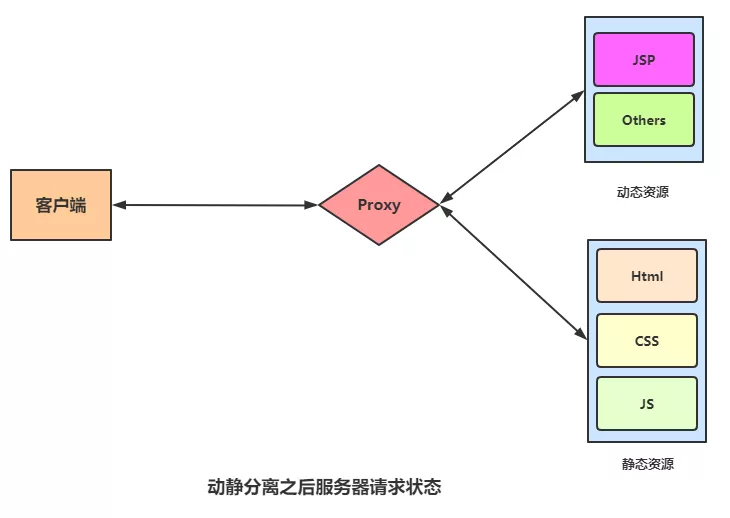
- 准备环境
cpp
# RS3编辑网页文件
[root@RS3 ~]# dnf install php -y
[root@RS3 ~]# systemctl restart httpd

[root@RS3 ~]# vim /var/www/html/index.php
<?php
    echo "<h2>172.25.254.11</h2>";
    phpinfo();
?>- 配置示例
cpp
# 编辑nginx配置文件
[root@Nginx ~]# vim /usr/local/nginx/conf/conf.d/vhost.conf

server {
        listen 80;
        server_name www.doubledragon.org;
        root /webdata/nginx/doubledragon.org;

        location / {
                proxy_pass http://172.25.254.12:80;
        }

        location ~* \.(php|js)$ {
                proxy_pass http://172.25.254.11:80;
        }
}
[root@Nginx ~]# nginx -s reload- 浏览器访问测试(需要配置本地dns解析)
访问<www.doubledragon.org/index.php>
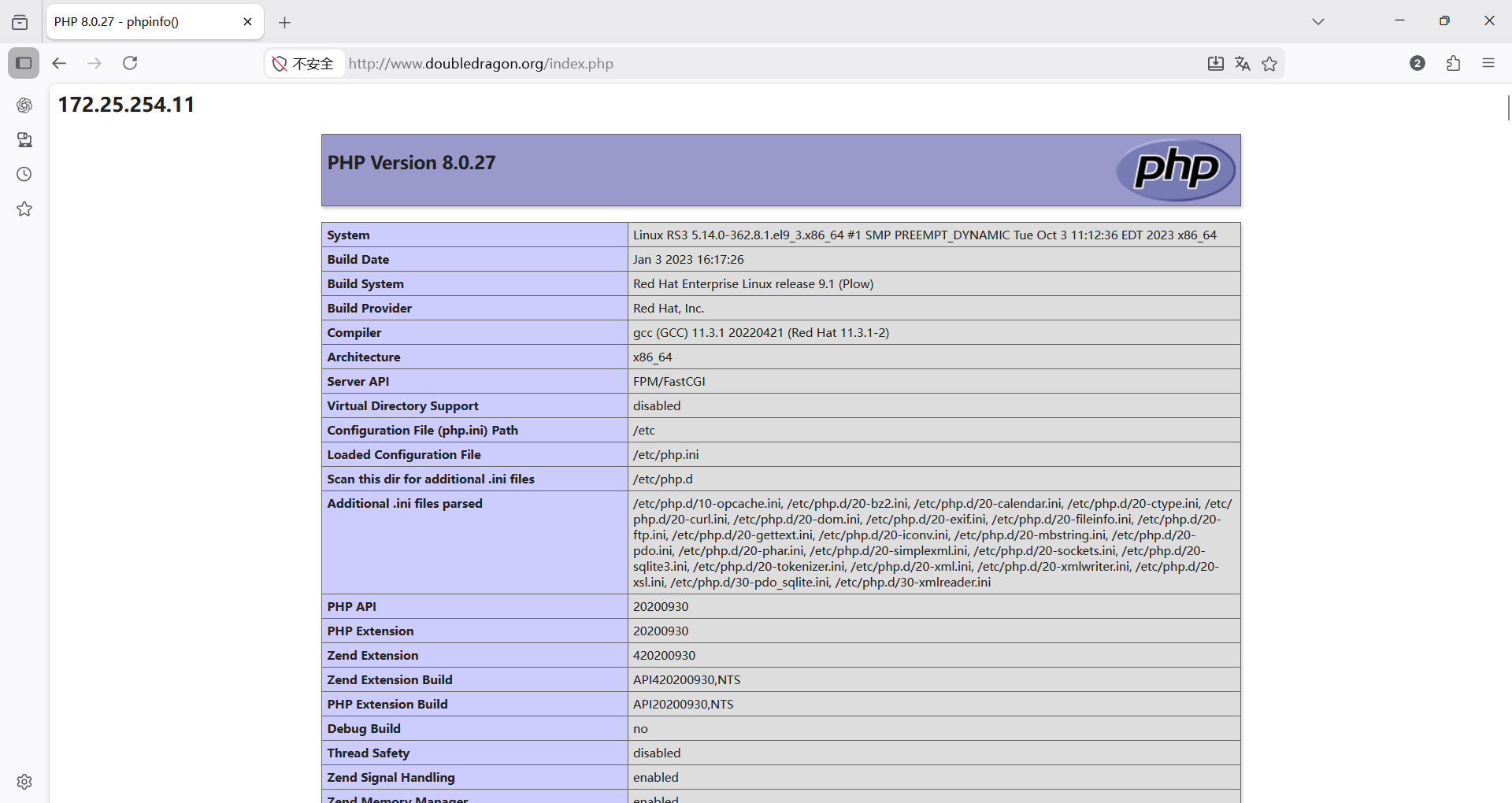
三、反向代理配置示例:缓存功能
缓存功能默认关闭状态,需要先动配置才能启用
3.1 配置参数介绍
cpp
proxy_cache zone_name | off; 默认off
#指明调用的缓存,或关闭缓存机制;Context:http, server, location
#zone_name 表示缓存的名称.需要由proxy_cache_path事先定义
cpp
proxy_cache_key string;
#缓存中用于"键"的内容,默认值:proxy_cache_key $scheme$proxy_host$request_uri;
cpp
proxy_cache_valid [code ...] time;
#定义对特定响应码的响应内容的缓存时长,定义在http{...}中
	示例:
	proxy_cache_valid 200 302 10m;
	proxy_cache_valid 404 1m;
cpp
proxy_cache_path;
#定义可用于proxy功能的缓存;Context:http
proxy_cache_path path [levels=levels] [use_temp_path=on|off]
keys_zone=zone_name:size [inactive=time] [max_size=size] [manager_files=number]
[manager_sleep=time] [manager_threshold=time] [loader_files=number]
[loader_sleep=time] [loader_threshold=time] [purger=on|off]
[purger_files=number] [purger_sleep=time] [purger_threshold=time];

#示例:在http配置定义缓存信息
proxy_cache_path /var/cache/nginx/proxy_cache 	#定义缓存保存路径,proxy_cache会自动创建
	levels=1:2:2			#定义缓存目录结构层次
							#1:2:2可以生成2^4x2^8x2^8=2^20=1048576个目录
	keys_zone=proxycache:20m      #指内存中缓存的大小,主要用于存放key和metadata (如:使用次数)
									#一般1M可存放8000个左右的key
	inactive=120s		#缓存有效时间
	max_size=10g;		#最大磁盘占用空间,磁盘存入文件内容的缓存空间最大值
cpp
#调用缓存功能,需要定义在相应的配置段,如server{...};或者location等
proxy_cache proxycache;
proxy_cache_key $request_uri;       #对指定的数据进行MD5的运算做为缓存的key
proxy_cache_valid 200 302 301 10m;  #指定的状态码返回的数据缓存多长时间
proxy_cache_valid any 1m;           #除指定的状态码返回的数据以外的缓存多长时间,必须设 置,否则不会缓存

proxy_cache_use_stale error | timeout | invalid_header | updating | http_500 | http_502 | http_503 | http_504 | http_403 | http_404 | off ;     #默认是off
#在被代理的后端服务器出现哪种情况下,可直接使用过期的缓存响应客户端
#示例

proxy_cache_use_stale error http_502 http_503;

proxy_cache_methods GET | HEAD | POST ...;
#对哪些客户端请求方法对应的响应进行缓存,GET和HEAD方法总是被缓存
3.2 非缓存场景压测
cpp
[root@Nginx ~]# ab -n 10000 -c 50 www.doubledragon.org/index.php
This is ApacheBench, Version 2.3 <$Revision: 1903618 $>
Copyright 1996 Adam Twiss, Zeus Technology Ltd, http://www.zeustech.net/
Licensed to The Apache Software Foundation, http://www.apache.org/

Benchmarking www.doubledragon.org (be patient)
Completed 1000 requests
Completed 2000 requests
Completed 3000 requests
Completed 4000 requests
Completed 5000 requests
Completed 6000 requests
Completed 7000 requests
Completed 8000 requests
Completed 9000 requests
Completed 10000 requests
Finished 10000 requests


Server Software:        nginx/1.28.2
Server Hostname:        www.doubledragon.org
Server Port:            80

Document Path:          /index.php
Document Length:        72825 bytes

Concurrency Level:      50
Time taken for tests:   8.818 seconds
Complete requests:      10000
Failed requests:        9970		# 可见10000个访问量,50个并发,几乎全部都访问失败,性能非常差
   (Connect: 0, Receive: 0, Length: 9970, Exceptions: 0)
Total transferred:      730137793 bytes
HTML transferred:       728277793 bytes
Requests per second:    1134.02 [#/sec] (mean)
Time per request:       44.091 [ms] (mean)
Time per request:       0.882 [ms] (mean, across all concurrent requests)
Transfer rate:          80858.51 [Kbytes/sec] received

Connection Times (ms)
              min  mean[+/-sd] median   max
Connect:        0    0   0.1      0       1
Processing:     9   44   4.3     44      83
Waiting:        6   24   3.2     24      67
Total:         10   44   4.3     44      84

Percentage of the requests served within a certain time (ms)
  50%     44
  66%     45
  75%     46
  80%     47
  90%     49
  95%     51
  98%     53
  99%     56
 100%     84 (longest request)
3.3 配置缓存加速
cpp
# 编辑主配置文件
[root@Nginx ~]# vim /usr/local/nginx/conf/nginx.conf
43	proxy_cache_path /usr/local/nginx/proxy_cache levels=1:2:2 keys_zone=proxycache:20m inactive=120s max_size=1g;		# 添加该行参数
 44
 45 server {

# 编辑子配置文件
[root@Nginx ~]# vim /usr/local/nginx/conf/conf.d/vhost.conf

server {
        listen 80;
        server_name www.doubledragon.org;
        root /webdata/nginx/doubledragon.org;

        location / {
                proxy_pass http://172.25.254.12:80;
        }

        location ~* \.(php|js)$ {
                proxy_pass http://172.25.254.11:80;
                proxy_cache proxycache;
                proxy_cache_key $request_uri;
                proxy_cache_valid 200 302 301 10m;
                proxy_cache_valid any 1m;
        }
}
[root@Nginx ~]# systemctl restart nginx
3.4 访问测试并验证缓存文件
cpp
# 压力测试
[root@Nginx ~]# ab -n 10000 -c 50 www.doubledragon.org/index.php
This is ApacheBench, Version 2.3 <$Revision: 1903618 $>
Copyright 1996 Adam Twiss, Zeus Technology Ltd, http://www.zeustech.net/
Licensed to The Apache Software Foundation, http://www.apache.org/

Benchmarking www.doubledragon.org (be patient)
Completed 1000 requests
Completed 2000 requests
Completed 3000 requests
Completed 4000 requests
Completed 5000 requests
Completed 6000 requests
Completed 7000 requests
Completed 8000 requests
Completed 9000 requests
Completed 10000 requests
Finished 10000 requests


Server Software:        nginx/1.28.2
Server Hostname:        www.doubledragon.org
Server Port:            80

Document Path:          /index.php
Document Length:        72828 bytes

Concurrency Level:      50
Time taken for tests:   0.395 seconds
Complete requests:      10000
Failed requests:        0			# 可见没有一个失败,效果显著
Total transferred:      729910000 bytes
HTML transferred:       728280000 bytes
Requests per second:    25288.22 [#/sec] (mean)
Time per request:       1.977 [ms] (mean)
Time per request:       0.040 [ms] (mean, across all concurrent requests)
Transfer rate:          1802551.42 [Kbytes/sec] received

Connection Times (ms)
              min  mean[+/-sd] median   max
Connect:        0    0   0.2      0       4
Processing:     1    2   0.8      2       8
Waiting:        0    1   0.8      1       6
Total:          1    2   0.8      2       8

Percentage of the requests served within a certain time (ms)
  50%      2
  66%      2
  75%      2
  80%      2
  90%      3
  95%      4
  98%      5
  99%      5
 100%      8 (longest request)

 # 验证缓存目录结构及文件大小
 [root@Nginx ~]# tree /usr/local/nginx/proxy_cache
/usr/local/nginx/proxy_cache
└── 1
    └── af
        └── 15
            └── e251273eb74a8ee3f661a7af00915af1

3 directories, 1 file
综上,nginx反向代理http介绍完毕