官方文档
https://developers.weixin.qq.com/miniprogram/dev/framework/open-ability/userProfile.html
https://developers.weixin.qq.com/miniprogram/dev/component/button.html
https://developers.weixin.qq.com/miniprogram/dev/component/input.html
tips:
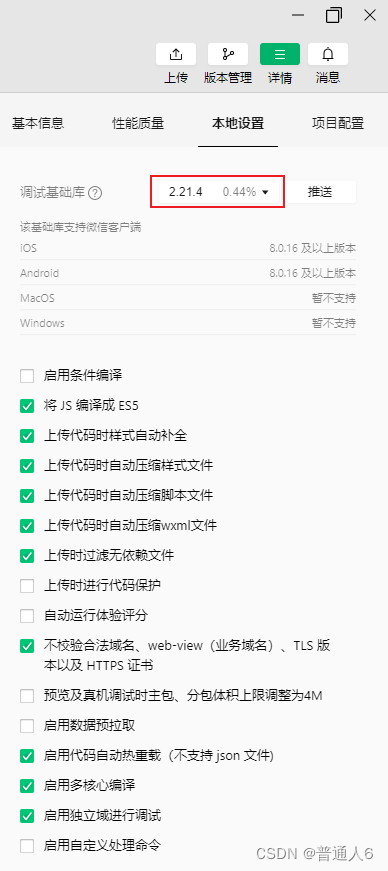
如果调试这个接口时报错或者点着没反应,需要在开发工具中把基础库版本调至2.21.2或以上,我这边没有2.21.2选了2.21.4
获取昵称的输入框在开发环境中是没有效果的
wxml
html
<form bindsubmit="subs">
  <view class="bodyer">
    <button class="cha" open-type="chooseAvatar" bindchooseavatar="to_cha">
      <image src="{{avatar_url?avatar_url:'/imgs/avatar.png'}}" mode="widthFix" />
      <input type="text" name="avatar" value="{{avatar_path}}" style="display: none;" />
    </button>
    <view class="boxs tit">申请以下获得权限</view>
    <view class="boxs tips">获取你的公开信息</view>
    <input type="nickname" placeholder="请输入昵称" name="nick" />
    <button class="sub" form-type="submit">授权登录</button>
  </view>
</form>
wxss
css
page {
  text-align: center;
}

.cha {
  width: 128rpx;
  margin-top: 160rpx;
  display: flex;
  align-items: center;
  justify-content: center;
  background: none !important;
}

.cha image {
  width: 128rpx;
  border-radius: 300rpx;
  overflow: hidden;
}

.boxs {
  margin: 30rpx;
}

.tit {
  font-weight: bold;
  margin-top: 60rpx;
}

.tips {
  color: #999999;
}

input {
  width: 350rpx;
  height: 88rpx;
  line-height: 88rpx;
  margin: 30rpx auto;
  border: 1rpx solid #dedede;
  border-radius: 10rpx;
  overflow: hidden;
}

.sub {
  width: 570rpx !important;
  height: 88rpx !important;
  line-height: 88rpx !important;
  margin-top: 80rpx !important;
  margin-bottom: 80rpx !important;
  padding: 0 !important;
  border-radius: 100rpx !important;
  overflow: hidden !important;
  color: #ffffff !important;
  background: linear-gradient(to right, #db011a 0%, #ff604a 100%) !important;
}
js
javascript
var app = getApp();
var that;

Page({
	data: {
		avatar_path: "",
		avatar_url: "",
	},

	onLoad(options) {
		that = this;

	},

	onShareAppMessage() {

	},

	onShareTimeline() {

	},

	// 上传头像
	to_cha: function (e) {
		app.f_up(e.detail.avatarUrl, {}, function (params) {
			that.setData({
				avatar_path: params.path,
				avatar_url: params.url,
			});
		});
	},

	// 提交
	subs: function (e) {
		var data = e.detail.value;
		app.request_api("/index/my/m_up", data, function (params) {
			if (params.code == 0) {
				wx.showToast({
					title: "登录成功",
				});
				setTimeout(() => {
					wx.redirectTo({
						url: "/pages/cert_sel/cert_sel",
					});
				}, 1500);
			} else {
				wx.showToast({
					title: params.msg,
					icon: "none",
				});
			}
		});
	},
});
部分app.js
javascript
var app;
var that;

App({
  // 文件上传
  f_up: function (file_path, data = {}, callback = false) {
    wx.showLoading({
      title: "上传中...",
      mask: true,
    });
    var usf = wx.uploadFile({
      url: app.globalData.api_url + "/index/base/upload",
      filePath: file_path,
      name: "file",
      formData: data,
      header: {
        "Content-Type": "application/x-www-form-urlencoded",
        "Cookie": "session_id",
        "X-Requested-With": "XMLHttpRequest",
      },
      success: function (params) {
        var params1 = JSON.parse(params.data);
        if (params1.code == 0) {
          if (callback != false) {
            callback(params1);
          }
        } else {
          wx.showModal({
            title: "上传失败",
            content: params1.msg,
            showCancel: false,
          });
        }

        setTimeout(() => {
          wx.hideLoading();
        }, 100);
      },
    });
    usf.onProgressUpdate(function (params) {
      wx.showLoading({
        title: "上传中..." + params.progress + "%",
        mask: true,
      });
    });
  },

  // 图片选择
  m_sel: function (types, len = 1, callback = false) {
    wx.chooseMedia({
      count: len, //可选择最大文件数 (最多100)
      type: types, //文件类型,all是全部文件类型
      success: function (params) {
        wx.showLoading({
          title: "上传中...",
          mask: true,
        });
        var isup = 0;
        var res = [];
        params.tempFiles.forEach(function (vo, key) {
          app.f_up(vo.tempFilePath, {}, function (params1) {
            res.push(params1);
            setTimeout(() => {
              isup++;
              if (isup == params.tempFiles.length) {
                wx.hideLoading();
                callback(res);
              }
            }, 100);
          });
        });
      },
    });
  },

  globalData: {
    api_url: "http://test.cc",
    openid: "",
    wid: 0,
  },
});
上传接口
php
// 上传
function upload()
{
	set_time_limit(0);
	ini_set("max_execution_time", 0);
	ini_set("memory_limit", -1);

	$name = trim(input("name")); //获取文件名
	$file = request()->file("file"); //获取上传的文件
	if (!$file) {
		$res["msg"] = "文件大小超限";
		$res["code"] = 1;
		return json($res);
	}

	$path_ul = "./Uploads/file/"; //移动到框架应用根目录/public/Uploads/目录下
	$infos = $file->move($path_ul);
	if (!$infos) {
		$res["msg"] = $file->getError();
		$res["code"] = 1;
		return json($res);
	}

	if (!$name) {
		$name = $infos->getInfo("name"); //获取原始文件名
	}

	$path = $infos->getSaveName();
	$path = str_replace("\\", "/", $path); //\(反斜杠)替换为/(斜杠)
	$path = ltrim($path_ul, ".") . ltrim($path, "/");
	$urls = request()->domain() . $path;

	$res = [];
	$res["name"] = $name;
	$res["path"] = $path;
	$res["url"] = $urls;
	$res["field"] = $path . "|" . $name;
	$res["code"] = 0;
	return json($res);
}