基本信息
OSPF(开放最短路径优先)是一个链路状态路由协议(链路就是路由器连接网络的接口)
OSPF通过路由器之间通告网络接口的状态来建立链路状态数据库,每个路由器生成以自己为根的最短路径树,然后根据最短路径树构造路由表
OSPF的管理距离为110,无跳数限制,适合中大型网络,而且可以支持负载均衡等功能
- 如何运行的
运行了OSPF的路由器相互之间发送Hello数据包,发现彼此,维持邻居关系
形成邻居关系后,OSPF将链路状态数据LSA通过组播地址224.0.0.5(所有SPF路由器的组播地址224.0.0.5,DR的组播地址224.0.0.6)传送给某一区域内的所有路由器
其他路由器收到后运行Dijkstra SPF算法来了解到到达目的地的最短路径,然后创建SPF树(最短路径树),再根据SPF树的信息创建路由表
命令格式
bash
router ospf [进程号]
#启用OSPF,进程号用于本地表示OSPF,只具有本地意义,不同路由器的进程号可以不相同
router-id X.X.X.X
#为了方便管理通常手动指定id,如果不指定,routerid的选择顺序为
#路由器的最大的环回接口的ip作为id
#如果没有环回接口,则使用活动接口的最大ip作为id
network [网络号] [反掩码] area [区域号]
#ospf是无类路由协议,通告的网络号后需加掩码或反掩码
#区域号可以采用A.B.C.D的方式也可以采用0-4294967295的十进制数表示,区域0是骨干区域- 实例
第一步,分好设备与链路
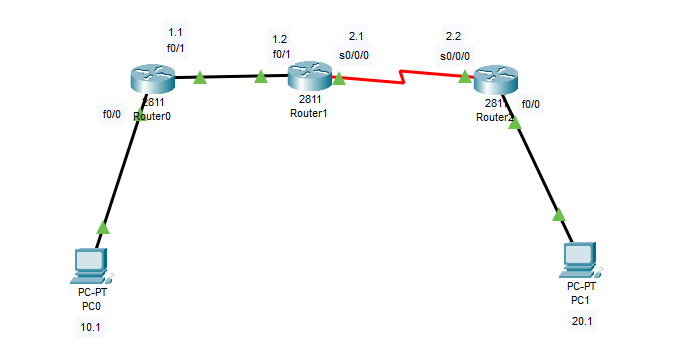
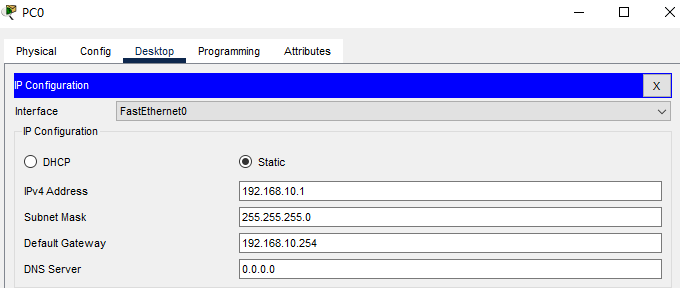
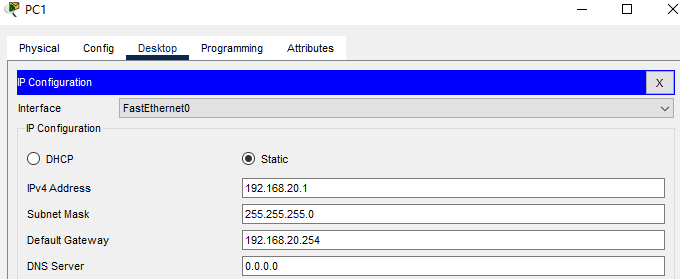
第二步,配置PC,路由器的网关和ip
| 设备 | ip | 掩码 | 网关 |
|---|---|---|---|
| PC0 | 192.168.10.1 | 255.255.255.0 | 192.168.10.254 |
| PC1 | 192.168.20.1 | 255.255.255.0 | 192.168.20.254 |
R0
Router(config)#interface f0/0
Router(config-if)#no shutdown
Router(config-if)#ip address 192.168.10.254 255.255.255.0
Router(config-if)#ex
Router(config)#interface f0/1
Router(config-if)#no shutdown
Router(config-if)#ip address 192.168.1.1 255.255.255.0
Router(config-if)#ex
R1
Router(config)#interface f0/1
Router(config-if)#no shutdown
Router(config-if)#ip address 192.168.1.2 255.255.255.0
Router(config-if)#ex
Router(config)#interface s0/0/0
Router(config-if)#no shutdown
Router(config-if)#ip address 192.168.2.1 255.255.255.0
Router(config-if)#clock rate 128000
Router(config-if)#ex
R2
Router(config)#interface f0/0
Router(config-if)#no shutdown
Router(config-if)#ip address 192.168.20.254 255.255.255.0
Router(config-if)#ex
Router(config)#interface s0/0/0
Router(config-if)#no shutdown
Router(config-if)#ip address 192.168.2.2 255.255.255.0
Router(config-if)#ex
第三步,配置OSPF协议(主要)
R0
Router(config)#router ospf 1
Router(config-router)#router-id 1.1.1.1
Router(config-router)#network 192.168.10.0 0.0.0.255 area 0
Router(config-router)#network 192.168.1.0 0.0.0.255 area 0
Router(config-router)#
R1
Router(config)#
Router(config)#router ospf 1
Router(config-router)#router-id 2.2.2.2
Router(config-router)#network 192.168.1.0 0.0.0.255 area 0
Router(config-router)#network 192.168.2.0 0.0.0.255 area 0
Router(config-router)#
R2
Router(config)#
Router(config)#router ospf 1
Router(config-router)#router-id 3.3.3.3
Router(config-router)#network 192.168.2.0 0.0.0.255 area 0
Router(config-router)#network 192.168.20.0 0.0.0.255 area 0
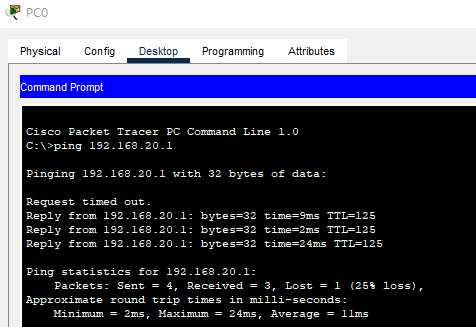
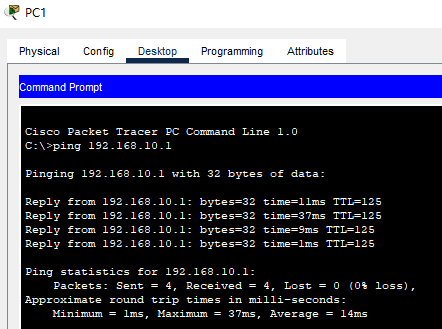
第四步,验证
总结
单区域OSPF在配置时逻辑较为简单,我们只需要把进程和id配好再宣告直连网段即可
进程号通常只用1就行
一个设备上的router-id在区域里必须是唯一的,自己配的时候从1开始就行了
network后面也是输直连网段
区域号在多区域中会有用处