欢迎加入开源鸿蒙跨平台社区:https://openharmonycrossplatform.csdn.net
本文基于flutter3.27.5开发
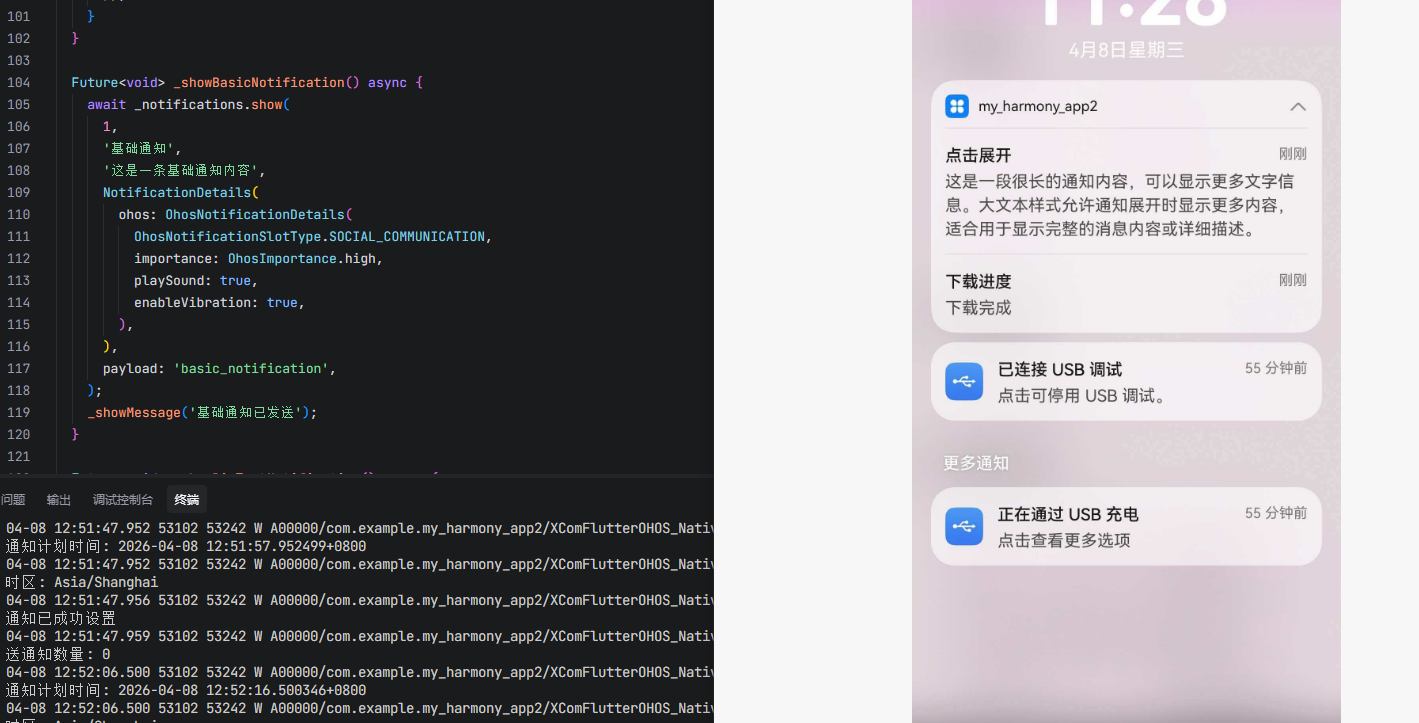
一、flutter_local_notifications 库概述
本地通知是移动应用与用户交互的重要方式,用于提醒用户、推送消息、定时提醒等场景。在 Flutter for OpenHarmony 应用开发中,flutter_local_notifications 是一个功能丰富的本地通知插件,提供了完整的跨平台通知能力。
flutter_local_notifications 库特点
flutter_local_notifications 库基于 Flutter 平台接口实现,提供了以下核心特性:
即时通知:支持立即显示本地通知,可自定义标题、内容、图标等。
定时通知:支持基于时间、日期的定时通知,以及周期性重复通知。
通知样式:支持多种通知样式,包括大文本、大图片、收件箱样式等。
通知渠道:支持通知渠道管理,可设置重要性、声音、振动等属性。
通知操作:支持通知点击回调、通知操作按钮等交互功能。
通知管理:支持取消通知、获取活动通知、获取待发送通知等功能。
功能支持对比
| 功能 | Android | iOS | OpenHarmony |
|---|---|---|---|
| 即时通知 | ✅ | ✅ | ✅ |
| 定时通知 | ✅ | ✅ | ✅ |
| 周期性通知 | ✅ | ✅ | ✅ |
| 通知样式 | ✅ | ✅ | ✅ |
| 通知渠道 | ✅ | ❌ | ✅ |
| 通知操作 | ✅ | ✅ | ✅ |
| 点击回调 | ✅ | ✅ | ✅ |
| 取消通知 | ✅ | ✅ | ✅ |
使用场景:消息提醒、定时闹钟、任务提醒、下载完成通知、日历提醒等。
二、安装与配置
2.1 添加依赖
在项目的 pubspec.yaml 文件中添加 flutter_local_notifications 依赖:
yaml
dependencies:
  flutter_local_notifications:
    git:
      url: https://atomgit.com/openharmony-sig/fluttertpc_flutter_local_notifications.git
      path: flutter_local_notifications
然后执行以下命令获取依赖:
bash
flutter pub get2.2 权限配置
flutter_local_notifications 在 OpenHarmony 平台上需要配置不同的权限:
- 即时通知:需要在运行时请求通知权限
- 定时通知 :需要在
module.json5中配置ohos.permission.PUBLISH_AGENT_REMINDER权限
重要:OpenHarmony 的通知权限需要在应用运行时动态请求,用户授权后才能发送通知。如果不请求权限,通知将无法正常显示。
2.2.1 权限请求方法
在初始化通知插件后,需要调用 requestNotificationsPermission() 方法请求权限:
dart
// 获取 OpenHarmony 平台特定的通知插件实例
final OhosFlutterLocalNotificationsPlugin? ohosImplementation =
    flutterLocalNotificationsPlugin.resolvePlatformSpecificImplementation<
        OhosFlutterLocalNotificationsPlugin>();

// 请求通知权限
final bool? granted = await ohosImplementation?.requestNotificationsPermission();
if (granted ?? false) {
  print('通知权限已授权');
} else {
  print('通知权限被拒绝');
}
2.2.2 检查权限状态
可以使用 areNotificationsEnabled() 方法检查通知权限是否已启用:
dart
final bool enabled = await flutterLocalNotificationsPlugin
    .resolvePlatformSpecificImplementation<
        OhosFlutterLocalNotificationsPlugin>()
    ?.areNotificationsEnabled() ?? false;

if (enabled) {
  print('通知权限已启用');
} else {
  print('通知权限未启用,需要请求权限');
}
2.2.3 定时通知权限配置
重要 :定时通知(zonedSchedule 和 periodicallyShow)需要额外的权限配置。
步骤 1:在 module.json5 中添加权限
在 ohos/entry/src/main/module.json5 文件的 requestPermissions 数组中添加:
json
{
  "name": "ohos.permission.PUBLISH_AGENT_REMINDER",
  "reason": "$string:reminder_reason",
  "usedScene": {
    "abilities": ["EntryAbility"],
    "when": "always"
  }
}
步骤 2:添加权限说明字符串
在 ohos/entry/src/main/resources/base/element/string.json 中添加:
json
{
  "name": "reminder_reason",
  "value": "需要发送定时提醒通知"
}
步骤 3:真机代理提醒权限申请(重要!)
警告:OpenHarmony 真机对代理提醒功能有管控机制。未通过管控的应用无法使用后台代理提醒能力,即使配置了权限,定时通知也无法正常工作。
真机定时通知不工作的原因:
- OpenHarmony 为防止滥用后台代理提醒能力(如发送广告、营销类提醒),增加了管控机制
- 未通过管控的应用无法使用代理提醒功能
- 症状:定时通知设置成功,但
pendingNotificationRequests()返回空列表,通知不会触发
注意事项:
- 当前仅对纯工具类应用开放申请
- 申请审批后才能正常使用代理提醒功能
- 模拟器上可能不受此限制
注意 :如果不配置
ohos.permission.PUBLISH_AGENT_REMINDER权限,定时通知将无法正常工作,pendingNotificationRequests()方法也会返回空列表。
三、核心 API 详解
3.1 FlutterLocalNotificationsPlugin 类
FlutterLocalNotificationsPlugin 是核心类,提供所有通知操作方法。
dart
class FlutterLocalNotificationsPlugin {
  factory FlutterLocalNotificationsPlugin();

  Future<bool?> initialize(InitializationSettings initializationSettings, {...});
  Future<void> show(int id, String? title, String? body, NotificationDetails? notificationDetails, {...});
  Future<void> zonedSchedule(int id, String? title, String? body, TZDateTime scheduledDate, NotificationDetails notificationDetails, {...});
  Future<void> periodicallyShow(int id, String? title, String? body, RepeatInterval repeatInterval, NotificationDetails notificationDetails, {...});
  Future<void> cancel(int id, {String? tag});
  Future<void> cancelAll();
  // ...
}
3.2 initialize 方法
initialize 方法用于初始化通知插件,必须在应用启动时调用。
dart
Future<bool?> initialize(
  InitializationSettings initializationSettings, {
  DidReceiveNotificationResponseCallback? onDidReceiveNotificationResponse,
  DidReceiveBackgroundNotificationResponseCallback? onDidReceiveBackgroundNotificationResponse,
})参数说明:
initializationSettings 参数是初始化设置,包含各平台的配置。
onDidReceiveNotificationResponse 参数是通知点击回调。
使用示例:
dart
final FlutterLocalNotificationsPlugin notifications = FlutterLocalNotificationsPlugin();

// 初始化时区数据库
tz.initializeTimeZones();

// 初始化通知插件
await notifications.initialize(
  InitializationSettings(
    ohos: OhosInitializationSettings('app_icon'),
  ),
  onDidReceiveNotificationResponse: (NotificationResponse response) {
    print('通知被点击: ${response.payload}');
  },
);

// 设置本地时区(定时通知必需)
final String? timeZoneName = await notifications.getLocalTimezone();
if (timeZoneName != null) {
  tz.setLocalLocation(tz.getLocation(timeZoneName));
  print('本地时区: $timeZoneName');
}

// 请求通知权限(重要!)
final bool? granted = await notifications
    .resolvePlatformSpecificImplementation<OhosFlutterLocalNotificationsPlugin>()
    ?.requestNotificationsPermission();

if (granted ?? false) {
  print('通知权限已授权,可以发送通知');
} else {
  print('通知权限被拒绝,通知将无法正常显示');
}重要提示:
- 在 OpenHarmony 平台上,必须在初始化后请求通知权限,否则通知将无法正常显示
- 定时通知必须设置本地时区,否则定时通知无法正常工作
- 建议在应用启动时检查并请求权限
3.3 show 方法
show 方法用于立即显示通知。
dart
Future<void> show(
  int id,
  String? title,
  String? body,
  NotificationDetails? notificationDetails, {
  String? payload,
})参数说明:
id 参数是通知唯一标识,用于后续取消或更新通知。
title 参数是通知标题。
body 参数是通知内容。
notificationDetails 参数是通知详情配置。
payload 参数是自定义数据,点击通知时传递给回调。
使用示例:
dart
await notifications.show(
  1,
  '通知标题',
  '这是通知内容',
  NotificationDetails(
    ohos: OhosNotificationDetails(
      OhosNotificationSlotType.SOCIAL_COMMUNICATION,
      importance: OhosImportance.high,
    ),
  ),
  payload: 'custom_data',
);
3.4 zonedSchedule 方法
zonedSchedule 方法用于定时发送通知。
dart
Future<void> zonedSchedule(
  int id,
  String? title,
  String? body,
  TZDateTime scheduledDate,
  NotificationDetails notificationDetails, {
  String? payload,
  DateTimeComponents? matchDateTimeComponents,
})参数说明:
scheduledDate 参数是通知发送时间,使用 TZDateTime 类型。
matchDateTimeComponents 参数用于设置重复周期,如每天、每周等。
使用示例:
dart
await notifications.zonedSchedule(
  2,
  '定时通知',
  '这是定时通知内容',
  TZDateTime.now(local).add(Duration(seconds: 10)),
  NotificationDetails(
    ohos: OhosNotificationDetails(
      OhosNotificationSlotType.SOCIAL_COMMUNICATION,
    ),
  ),
  uiLocalNotificationDateInterpretation: UILocalNotificationDateInterpretation.absoluteTime,
  payload: 'scheduled_notification',
);
3.5 periodicallyShow 方法
periodicallyShow 方法用于周期性发送通知。
dart
Future<void> periodicallyShow(
  int id,
  String? title,
  String? body,
  RepeatInterval repeatInterval,
  NotificationDetails notificationDetails, {
  String? payload,
})参数说明:
repeatInterval 参数是重复间隔,支持每分钟、每小时、每天、每周等。
使用示例:
dart
await notifications.periodicallyShow(
  3,
  '周期通知',
  '这是周期性通知',
  RepeatInterval.hourly,
  NotificationDetails(
    ohos: OhosNotificationDetails(
      OhosNotificationSlotType.SOCIAL_COMMUNICATION,
    ),
  ),
);
3.6 cancel 方法
cancel 方法用于取消指定通知。
dart
Future<void> cancel(int id, {String? tag})参数说明:
id 参数是要取消的通知 ID。
tag 参数是通知标签(可选)。
使用示例:
dart
await notifications.cancel(1);3.7 cancelAll 方法
cancelAll 方法用于取消所有通知。
dart
Future<void> cancelAll()使用示例:
dart
await notifications.cancelAll();3.8 getNotificationAppLaunchDetails 方法
getNotificationAppLaunchDetails 方法用于获取应用是否通过通知启动。
dart
Future<NotificationAppLaunchDetails?> getNotificationAppLaunchDetails()返回值 :返回 NotificationAppLaunchDetails 对象,包含启动信息。
使用示例:
dart
final details = await notifications.getNotificationAppLaunchDetails();
if (details?.didNotificationLaunchApp ?? false) {
  print('应用通过通知启动');
}
3.9 pendingNotificationRequests 方法
pendingNotificationRequests 方法用于获取待发送的通知列表。
dart
Future<List<PendingNotificationRequest>> pendingNotificationRequests()返回值:返回待发送通知列表。
使用示例:
dart
final pending = await notifications.pendingNotificationRequests();
for (var request in pending) {
  print('待发送通知: ${request.id}, ${request.title}, ${request.body}');
}
注意 :OpenHarmony API 12 版本暂不支持读取
payload字段,返回的PendingNotificationRequest对象中payload字段将为空。
四、数据模型详解
4.1 InitializationSettings 类
InitializationSettings 类包含各平台的初始化设置。
dart
class InitializationSettings {
  const InitializationSettings({
    this.android,
    this.iOS,
    this.macOS,
    this.linux,
    this.ohos
  });

  final AndroidInitializationSettings? android;
  final DarwinInitializationSettings? iOS;
  final DarwinInitializationSettings? macOS;
  final LinuxInitializationSettings? linux;
  final OhosInitializationSettings? ohos;
}
4.2 OhosInitializationSettings 类
OhosInitializationSettings 类是 OpenHarmony 平台的初始化设置。
dart
class OhosInitializationSettings {
  const OhosInitializationSettings(this.defaultIcon);

  final String defaultIcon;  // 默认通知图标
}
4.3 NotificationDetails 类
NotificationDetails 类包含各平台的通知详情。
dart
class NotificationDetails {
  const NotificationDetails({
    this.android,
    this.iOS,
    this.macOS,
    this.linux,
    this.ohos
  });

  final AndroidNotificationDetails? android;
  final DarwinNotificationDetails? iOS;
  final DarwinNotificationDetails? macOS;
  final LinuxNotificationDetails? linux;
  final OhosNotificationDetails? ohos;
}
4.4 OhosNotificationDetails 类
OhosNotificationDetails 类是 OpenHarmony 平台的通知详情。
dart
class OhosNotificationDetails {
  const OhosNotificationDetails(
    this.slotType, {
    this.icon,
    this.importance = OhosImportance.defaultImportance,
    this.styleInformation,
    this.playSound = true,
    this.enableVibration = true,
    this.groupKey,
    this.autoCancel = true,
    this.ongoing = false,
    this.silent = false,
    this.color,
    this.largeIcon,
    this.showProgress = false,
    this.maxProgress = 0,
    this.progress = 0,
    // ...
  });

  final String? icon;                        // 通知图标
  final OhosNotificationSlotType slotType;   // 通知渠道类型
  final OhosImportance importance;           // 重要性级别
  final OhosStyleInformation? styleInformation; // 通知样式
  final bool playSound;                      // 是否播放声音
  final bool enableVibration;                // 是否振动
  final String? groupKey;                    // 分组键
  final bool autoCancel;                     // 点击后自动取消
  final bool ongoing;                        // 是否持续显示
  final bool showProgress;                   // 显示进度条
  final int maxProgress;                     // 最大进度
  final int progress;                        // 当前进度
}
4.5 OhosNotificationSlotType 枚举
OhosNotificationSlotType 枚举定义了通知渠道类型。
dart
enum OhosNotificationSlotType {
  UNKNOWN_TYPE,          // 未知类型
  SOCIAL_COMMUNICATION,  // 社交通信
  SERVICE_INFORMATION,   // 服务信息
  CONTENT_INFORMATION,   // 内容信息
  LIVE_VIEW,            // 直播
  CUSTOMER_SERVICE,     // 客户服务
}
4.6 OhosImportance 枚举
OhosImportance 枚举定义了通知重要性级别。
dart
enum OhosImportance {
  none,              // 不显示
  min,               // 最低
  low,               // 低
  defaultImportance, // 默认
  high,              // 高
}
4.7 RepeatInterval 枚举
RepeatInterval 枚举定义了重复间隔。
dart
enum RepeatInterval {
  everyMinute,    // 每分钟
  hourly,         // 每小时
  daily,          // 每天
  weekly,         // 每周
}
五、OpenHarmony 平台实现原理
5.1 原生 API 映射
flutter_local_notifications 在 OpenHarmony 平台上使用 @kit.NotificationKit 和 @kit.BackgroundTasksKit 模块实现:
| Flutter API | OpenHarmony API |
|---|---|
| show | notificationManager.publish |
| zonedSchedule | reminderAgentManager.publishReminder |
| periodicallyShow | reminderAgentManager.publishReminder |
| cancel | notificationManager.cancel |
| cancelAll | notificationManager.cancelAll |
5.2 通知渠道实现
OpenHarmony 使用 NotificationSlot 实现通知渠道管理:
typescript
let notificationSlot: notificationManager.NotificationSlot = {
  id: slotId,
  type: slotType,
  level: importance,
  badgeFlag: showBadge,
  sound: sound,
  vibrationEnabled: enableVibration,
};
await notificationManager.addSlot(notificationSlot);
5.3 定时通知实现
OpenHarmony 使用 reminderAgentManager 实现定时通知:
typescript
let reminderRequest: reminderAgentManager.ReminderRequestTimer = {
  reminderType: reminderAgentManager.ReminderType.REMINDER_TYPE_TIMER,
  triggerTimeInSeconds: triggerTime,
  notificationId: notificationId,
  title: title,
  content: body,
};
await reminderAgentManager.publishReminder(reminderRequest);
六、通知样式详解
6.1 默认样式
dart
OhosNotificationDetails(
  OhosNotificationSlotType.SOCIAL_COMMUNICATION,
  styleInformation: OhosDefaultStyleInformation(),
);
6.2 大文本样式
dart
OhosNotificationDetails(
  OhosNotificationSlotType.SOCIAL_COMMUNICATION,
  styleInformation: OhosBigTextStyleInformation(
    '这是一段很长的通知内容,可以显示更多文字信息...',
    contentTitle: '大文本标题',
    summaryText: '摘要',
  ),
);
6.3 大图片样式
dart
OhosNotificationDetails(
  OhosNotificationSlotType.SOCIAL_COMMUNICATION,
  styleInformation: OhosBigPictureStyleInformation(
    OhosFilePath('path/to/image.png'),
    contentTitle: '大图片标题',
    summaryText: '摘要',
  ),
);
6.4 收件箱样式
dart
OhosNotificationDetails(
  OhosNotificationSlotType.SOCIAL_COMMUNICATION,
  styleInformation: OhosInboxStyleInformation(
    ['消息1', '消息2', '消息3'],
    contentTitle: '收件箱',
    summaryText: '3条新消息',
  ),
);
七、实战案例
7.1 基础通知
dart
Future<void> showBasicNotification() async {
  final notifications = FlutterLocalNotificationsPlugin();

  await notifications.show(
    1,
    '基础通知',
    '这是一条基础通知',
    NotificationDetails(
      ohos: OhosNotificationDetails(
        OhosNotificationSlotType.SOCIAL_COMMUNICATION,
        importance: OhosImportance.high,
      ),
    ),
  );
}
7.2 带进度条的通知
dart
Future<void> showProgressNotification(int progress) async {
  final notifications = FlutterLocalNotificationsPlugin();

  await notifications.show(
    2,
    '下载中',
    '正在下载文件...',
    NotificationDetails(
      ohos: OhosNotificationDetails(
        OhosNotificationSlotType.SERVICE_INFORMATION,
        showProgress: true,
        maxProgress: 100,
        progress: progress,
        ongoing: true,
      ),
    ),
  );
}
7.3 定时通知
dart
Future<void> scheduleNotification() async {
  final notifications = FlutterLocalNotificationsPlugin();

  final scheduledDate = TZDateTime.now(local).add(Duration(minutes: 5));

  await notifications.zonedSchedule(
    3,
    '定时提醒',
    '这是5分钟后的提醒',
    scheduledDate,
    NotificationDetails(
      ohos: OhosNotificationDetails(
        OhosNotificationSlotType.SOCIAL_COMMUNICATION,
      ),
    ),
    uiLocalNotificationDateInterpretation: UILocalNotificationDateInterpretation.absoluteTime,
    payload: 'scheduled_5min',
  );
}
7.4 每日重复通知
dart
Future<void> scheduleDailyNotification() async {
  final notifications = FlutterLocalNotificationsPlugin();

  final scheduledDate = TZDateTime(
    local,
    DateTime.now().year,
    DateTime.now().month,
    DateTime.now().day,
    9, 0, 0,  // 每天上午9点
  );

  await notifications.zonedSchedule(
    4,
    '每日提醒',
    '早上好!新的一天开始了',
    scheduledDate,
    NotificationDetails(
      ohos: OhosNotificationDetails(
        OhosNotificationSlotType.SOCIAL_COMMUNICATION,
      ),
    ),
    uiLocalNotificationDateInterpretation: UILocalNotificationDateInterpretation.absoluteTime,
    matchDateTimeComponents: DateTimeComponents.time,
  );
}
7.5 处理通知点击
dart
Future<void> initNotifications() async {
  final notifications = FlutterLocalNotificationsPlugin();

  await notifications.initialize(
    InitializationSettings(
      ohos: OhosInitializationSettings('app_icon'),
    ),
    onDidReceiveNotificationResponse: (NotificationResponse response) {
      final payload = response.payload;
      final notificationId = response.id;

      if (payload != null) {
        print('通知被点击,payload: $payload');
        // 根据payload跳转到对应页面
      }
    },
  );
}
7.6 检查应用启动来源
dart
Future<void> checkLaunchSource() async {
  final notifications = FlutterLocalNotificationsPlugin();

  final details = await notifications.getNotificationAppLaunchDetails();

  if (details?.didNotificationLaunchApp ?? false) {
    final response = details?.notificationResponse;
    print('应用通过通知启动');
    print('通知ID: ${response?.id}');
    print('Payload: ${response?.payload}');
  }
}
八、最佳实践
8.1 初始化时机
在应用启动时尽早初始化通知插件:
dart
void main() async {
  WidgetsFlutterBinding.ensureInitialized();

  final notifications = FlutterLocalNotificationsPlugin();
  await notifications.initialize(
    InitializationSettings(
      ohos: OhosInitializationSettings('@mipmap/ic_launcher'),
    ),
    onDidReceiveNotificationResponse: handleNotificationResponse,
  );

  runApp(MyApp());
}
8.2 通知 ID 管理
使用常量或枚举管理通知 ID:
dart
class NotificationIds {
  static const int downloadComplete = 1;
  static const int dailyReminder = 2;
  static const int messageNotification = 3;
}
8.3 通知渠道管理
根据通知类型使用不同的渠道:
dart
OhosNotificationDetails getNotificationDetails(String type) {
  switch (type) {
    case 'message':
      return OhosNotificationDetails(
        OhosNotificationSlotType.SOCIAL_COMMUNICATION,
        importance: OhosImportance.high,
        playSound: true,
      );
    case 'download':
      return OhosNotificationDetails(
        OhosNotificationSlotType.SERVICE_INFORMATION,
        importance: OhosImportance.low,
        playSound: false,
      );
    default:
      return OhosNotificationDetails(
        OhosNotificationSlotType.CONTENT_INFORMATION,
      );
  }
}
8.4 及时取消通知
不再需要的通知应及时取消:
dart
Future<void> cleanupNotifications() async {
  final notifications = FlutterLocalNotificationsPlugin();

  // 取消特定通知
  await notifications.cancel(NotificationIds.downloadComplete);

  // 或取消所有通知
  await notifications.cancelAll();
}
8.5 错误处理
dart
Future<void> safeShowNotification() async {
  try {
    await notifications.show(
      1,
      '标题',
      '内容',
      NotificationDetails(
        ohos: OhosNotificationDetails(
          OhosNotificationSlotType.SOCIAL_COMMUNICATION,
        ),
      ),
    );
  } catch (e) {
    print('显示通知失败: $e');
  }
}
九、常见问题
Q1:通知不显示怎么办?
检查以下几点:
-
确保已请求通知权限(OpenHarmony 必需)
dartfinal granted = await notifications .resolvePlatformSpecificImplementation<OhosFlutterLocalNotificationsPlugin>() ?.requestNotificationsPermission(); if (!(granted ?? false)) { print('通知权限未授权'); return; } -
确保已正确初始化插件
-
确认通知渠道类型和重要性设置正确
-
检查通知图标资源是否存在
重要:OpenHarmony 平台必须在发送通知前请求权限,否则通知将无法显示。
Q2:定时通知不工作或待发送列表为空?
检查以下几点:
-
确保已配置定时通知权限(最常见原因)
json// 在 module.json5 中添加 { "name": "ohos.permission.PUBLISH_AGENT_REMINDER", "reason": "$string:reminder_reason", "usedScene": { "abilities": ["EntryAbility"], "when": "always" } } -
确保已添加权限说明字符串
json// 在 string.json 中添加 { "name": "reminder_reason", "value": "需要发送定时提醒通知" } -
重新安装应用:权限配置修改后需要重新安装应用才能生效
-
确保已设置本地时区(定时通知必需)
dart// 初始化时区数据库 tz.initializeTimeZones(); // 获取并设置本地时区 final String? timeZoneName = await notifications.getLocalTimezone(); if (timeZoneName != null) { tz.setLocalLocation(tz.getLocation(timeZoneName)); } -
OpenHarmony 系统可能会优化后台任务,导致定时通知有延迟
Q3:如何自定义通知声音?
将音频文件放入 raw 资源目录,然后在通知详情中指定:
dart
OhosNotificationDetails(
  OhosNotificationSlotType.SOCIAL_COMMUNICATION,
  playSound: true,
  sound: OhosNotificationSound(
    OhosNotificationSoundSource.rawResource,
    'custom_sound',
  ),
);
Q4:通知点击后如何跳转页面?
在通知回调中处理导航:
dart
onDidReceiveNotificationResponse: (response) {
  if (response.payload == 'open_detail') {
    Navigator.pushNamed(context, '/detail');
  }
},
Q5:如何获取当前显示的通知?
dart
final activeNotifications = await notifications.getActiveNotifications();
for (var notification in activeNotifications) {
  print('活动通知: ${notification.id}, ${notification.title}');
}
注意 :OpenHarmony API 12 版本暂不支持读取
payload字段,返回的ActiveNotification对象中payload字段将为空。
十、总结
flutter_local_notifications 库为 Flutter for OpenHarmony 开发提供了完整的本地通知能力。通过丰富的 API,开发者可以实现即时通知、定时通知、周期性通知等功能,并支持多种通知样式和交互操作。该库在鸿蒙平台上已经完成了完整的适配,支持所有核心功能,开发者可以放心使用。
重要提示:
- 即时通知 :需要在运行时请求通知权限(
requestNotificationsPermission()) - 定时通知 :
- 需要在
module.json5中配置ohos.permission.PUBLISH_AGENT_REMINDER权限 - 需要设置本地时区(
getLocalTimezone()+setLocalLocation()) - 真机上必须向华为申请代理提醒权限,否则无法使用
- 需要在
- payload 字段:OpenHarmony API 12 暂不支持从系统读取,需自行存储管理
真机定时通知限制:
- OpenHarmony 真机对代理提醒功能有管控机制
- 未通过华为审批的应用无法使用后台代理提醒能力
- 需要通过邮件向华为申请代理提醒权限
十一、完整代码示例
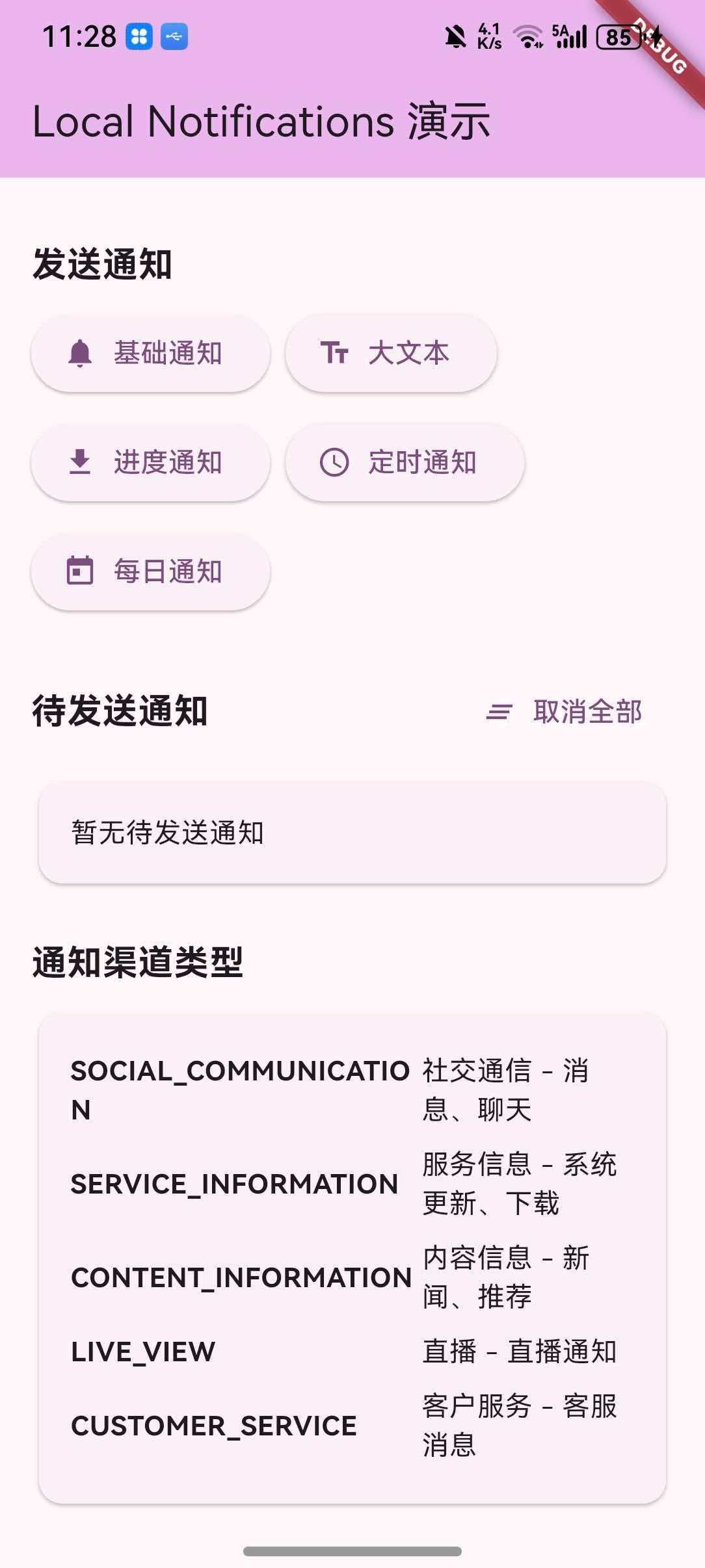
以下是一个完整的可运行示例,展示了 flutter_local_notifications 库的核心功能:
main.dart
dart
import 'dart:async';

import 'package:flutter/material.dart';
import 'package:flutter_local_notifications/flutter_local_notifications.dart';
import 'package:timezone/timezone.dart' as tz;
import 'package:timezone/data/latest.dart' as tz;

void main() async {
  WidgetsFlutterBinding.ensureInitialized();

  // 初始化时区数据库
  tz.initializeTimeZones();

  final notifications = FlutterLocalNotificationsPlugin();
  await notifications.initialize(
    InitializationSettings(
      ohos: OhosInitializationSettings('@mipmap/ic_launcher'),
    ),
    onDidReceiveNotificationResponse: (NotificationResponse response) {
      debugPrint('通知被点击: ${response.payload}');
    },
  );

  // 设置本地时区(OpenHarmony 定时通知必需)
  final String? timeZoneName = await notifications.getLocalTimezone();
  if (timeZoneName != null) {
    tz.setLocalLocation(tz.getLocation(timeZoneName));
    debugPrint('本地时区: $timeZoneName');
  }

  // 请求通知权限(OpenHarmony 必需)
  final bool? granted = await notifications
      .resolvePlatformSpecificImplementation<OhosFlutterLocalNotificationsPlugin>()
      ?.requestNotificationsPermission();

  if (granted ?? false) {
    debugPrint('通知权限已授权');
  } else {
    debugPrint('通知权限被拒绝');
  }

  runApp(const MyApp());
}

class MyApp extends StatelessWidget {
  const MyApp({super.key});

  @override
  Widget build(BuildContext context) {
    return MaterialApp(
      title: 'Local Notifications Demo',
      theme: ThemeData(
        colorScheme: ColorScheme.fromSeed(seedColor: Colors.purple),
        useMaterial3: true,
      ),
      home: const HomePage(),
    );
  }
}

class HomePage extends StatefulWidget {
  const HomePage({super.key});

  @override
  State<HomePage> createState() => _HomePageState();
}

class _HomePageState extends State<HomePage> {
  final FlutterLocalNotificationsPlugin _notifications = FlutterLocalNotificationsPlugin();
  List<PendingNotificationRequest> _pendingNotifications = [];
  String _statusMessage = '';

  @override
  void initState() {
    super.initState();
    _loadPendingNotifications();
    _checkLaunchSource();
  }

  Future<void> _loadPendingNotifications() async {
    final pending = await _notifications.pendingNotificationRequests();
    setState(() {
      _pendingNotifications = pending;
    });
  }

  Future<void> _checkLaunchSource() async {
    final details = await _notifications.getNotificationAppLaunchDetails();
    if (details?.didNotificationLaunchApp ?? false) {
      setState(() {
        _statusMessage = '应用通过通知启动\nPayload: ${details?.notificationResponse?.payload}';
      });
    }
  }

  Future<void> _showBasicNotification() async {
    await _notifications.show(
      1,
      '基础通知',
      '这是一条基础通知内容',
      NotificationDetails(
        ohos: OhosNotificationDetails(
          OhosNotificationSlotType.SOCIAL_COMMUNICATION,
          importance: OhosImportance.high,
          playSound: true,
          enableVibration: true,
        ),
      ),
      payload: 'basic_notification',
    );
    _showMessage('基础通知已发送');
  }

  Future<void> _showBigTextNotification() async {
    await _notifications.show(
      2,
      '大文本通知',
      '展开查看更多内容',
      NotificationDetails(
        ohos: OhosNotificationDetails(
          OhosNotificationSlotType.SOCIAL_COMMUNICATION,
          styleInformation: OhosBigTextStyleInformation(
            '这是一段很长的通知内容,可以显示更多文字信息。'
            '大文本样式允许通知展开时显示更多内容,'
            '适合用于显示完整的消息内容或详细描述。',
            contentTitle: '大文本标题',
            summaryText: '点击展开',
          ),
        ),
      ),
      payload: 'big_text_notification',
    );
    _showMessage('大文本通知已发送');
  }

  Future<void> _showProgressNotification() async {
    for (int i = 0; i <= 100; i += 10) {
      await _notifications.show(
        3,
        '下载进度',
        i == 100 ? '下载完成' : '正在下载... $i%',
        NotificationDetails(
          ohos: OhosNotificationDetails(
            OhosNotificationSlotType.SERVICE_INFORMATION,
            showProgress: true,
            maxProgress: 100,
            progress: i,
            ongoing: i < 100,
            autoCancel: i == 100,
          ),
        ),
      );
      await Future.delayed(const Duration(milliseconds: 500));
    }
    _showMessage('下载完成');
  }

  Future<void> _scheduleNotification() async {
    final scheduledDate = tz.TZDateTime.now(tz.local).add(const Duration(seconds: 10));

    await _notifications.zonedSchedule(
      4,
      '定时通知',
      '这是10秒后的定时通知',
      scheduledDate,
      NotificationDetails(
        ohos: OhosNotificationDetails(
          OhosNotificationSlotType.SOCIAL_COMMUNICATION,
        ),
      ),
      uiLocalNotificationDateInterpretation: UILocalNotificationDateInterpretation.absoluteTime,
      payload: 'scheduled_notification',
    );

    _showMessage('定时通知已设置,10秒后发送');
    _loadPendingNotifications();
  }

  Future<void> _scheduleDailyNotification() async {
    final now = DateTime.now();
    final scheduledDate = tz.TZDateTime(
      tz.local,
      now.year,
      now.month,
      now.day,
      now.hour,
      now.minute + 1,
    );

    await _notifications.zonedSchedule(
      5,
      '每日提醒',
      '这是每分钟重复的提醒',
      scheduledDate,
      NotificationDetails(
        ohos: OhosNotificationDetails(
          OhosNotificationSlotType.SOCIAL_COMMUNICATION,
        ),
      ),
      uiLocalNotificationDateInterpretation: UILocalNotificationDateInterpretation.absoluteTime,
      matchDateTimeComponents: DateTimeComponents.time,
    );

    _showMessage('每日通知已设置');
    _loadPendingNotifications();
  }

  Future<void> _cancelNotification(int id) async {
    await _notifications.cancel(id);
    _showMessage('通知已取消');
    _loadPendingNotifications();
  }

  Future<void> _cancelAllNotifications() async {
    await _notifications.cancelAll();
    _showMessage('所有通知已取消');
    _loadPendingNotifications();
  }

  void _showMessage(String message) {
    ScaffoldMessenger.of(context).showSnackBar(
      SnackBar(content: Text(message)),
    );
  }

  @override
  Widget build(BuildContext context) {
    return Scaffold(
      appBar: AppBar(
        title: const Text('Local Notifications 演示'),
        backgroundColor: Theme.of(context).colorScheme.inversePrimary,
      ),
      body: SingleChildScrollView(
        padding: const EdgeInsets.all(16),
        child: Column(
          crossAxisAlignment: CrossAxisAlignment.stretch,
          children: [
            if (_statusMessage.isNotEmpty)
              Card(
                color: Colors.blue.shade100,
                child: Padding(
                  padding: const EdgeInsets.all(16),
                  child: Text(_statusMessage),
                ),
              ),
            const SizedBox(height: 16),

            const Text(
              '发送通知',
              style: TextStyle(fontSize: 18, fontWeight: FontWeight.bold),
            ),
            const SizedBox(height: 8),

            Wrap(
              spacing: 8,
              runSpacing: 8,
              children: [
                ElevatedButton.icon(
                  onPressed: _showBasicNotification,
                  icon: const Icon(Icons.notifications),
                  label: const Text('基础通知'),
                ),
                ElevatedButton.icon(
                  onPressed: _showBigTextNotification,
                  icon: const Icon(Icons.text_fields),
                  label: const Text('大文本'),
                ),
                ElevatedButton.icon(
                  onPressed: _showProgressNotification,
                  icon: const Icon(Icons.download),
                  label: const Text('进度通知'),
                ),
                ElevatedButton.icon(
                  onPressed: _scheduleNotification,
                  icon: const Icon(Icons.schedule),
                  label: const Text('定时通知'),
                ),
                ElevatedButton.icon(
                  onPressed: _scheduleDailyNotification,
                  icon: const Icon(Icons.today),
                  label: const Text('每日通知'),
                ),
              ],
            ),
            const SizedBox(height: 24),

            Row(
              mainAxisAlignment: MainAxisAlignment.spaceBetween,
              children: [
                const Text(
                  '待发送通知',
                  style: TextStyle(fontSize: 18, fontWeight: FontWeight.bold),
                ),
                TextButton.icon(
                  onPressed: _cancelAllNotifications,
                  icon: const Icon(Icons.clear_all),
                  label: const Text('取消全部'),
                ),
              ],
            ),
            const SizedBox(height: 8),

            if (_pendingNotifications.isEmpty)
              const Card(
                child: Padding(
                  padding: EdgeInsets.all(16),
                  child: Text('暂无待发送通知'),
                ),
              )
            else
              ListView.builder(
                shrinkWrap: true,
                physics: const NeverScrollableScrollPhysics(),
                itemCount: _pendingNotifications.length,
                itemBuilder: (context, index) {
                  final notification = _pendingNotifications[index];
                  return Card(
                    child: ListTile(
                      leading: CircleAvatar(
                        child: Text('${notification.id}'),
                      ),
                      title: Text(notification.title ?? '无标题'),
                      subtitle: Text(notification.body ?? '无内容'),
                      trailing: IconButton(
                        icon: const Icon(Icons.close),
                        onPressed: () => _cancelNotification(notification.id),
                      ),
                    ),
                  );
                },
              ),
            const SizedBox(height: 24),

            const Text(
              '通知渠道类型',
              style: TextStyle(fontSize: 18, fontWeight: FontWeight.bold),
            ),
            const SizedBox(height: 8),

            Card(
              child: Padding(
                padding: const EdgeInsets.all(16),
                child: Column(
                  crossAxisAlignment: CrossAxisAlignment.start,
                  children: [
                    _buildSlotInfo('SOCIAL_COMMUNICATION', '社交通信', '消息、聊天'),
                    _buildSlotInfo('SERVICE_INFORMATION', '服务信息', '系统更新、下载'),
                    _buildSlotInfo('CONTENT_INFORMATION', '内容信息', '新闻、推荐'),
                    _buildSlotInfo('LIVE_VIEW', '直播', '直播通知'),
                    _buildSlotInfo('CUSTOMER_SERVICE', '客户服务', '客服消息'),
                  ],
                ),
              ),
            ),
          ],
        ),
      ),
    );
  }

  static Widget _buildSlotInfo(String type, String name, String usage) {
    return Padding(
      padding: const EdgeInsets.symmetric(vertical: 4),
      child: Row(
        children: [
          SizedBox(
            width: 180,
            child: Text(type, style: const TextStyle(fontWeight: FontWeight.bold)),
          ),
          Expanded(
            child: Text('$name - $usage'),
          ),
        ],
      ),
    );
  }
}
运行此示例后,您将看到一个完整的本地通知演示界面,包含基础通知、大文本通知、进度通知、定时通知、每日通知等功能,以及待发送通知列表管理。点击通知按钮即可发送对应类型的通知。