摘自黑马程序员Springboot+Vue3
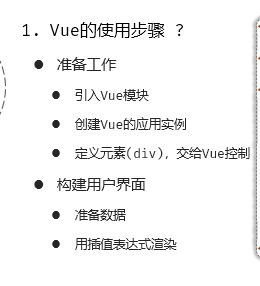
**Vue会完全接管挂载的元素,并对其进行动态渲染。**不要对Vue接管的元素进行更改
我可以把createApp想像成一个摸具,挂载后称为一个实例对象,methods是这个对象的方法,data是对象的属性,因此我们可以直接用this调用方法和属性
step1:挂载元素
step2:设置插值表达式
step3:调用data函数返回数据
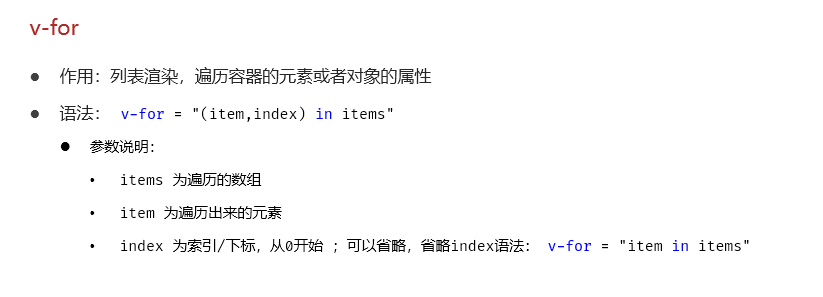
列表渲染
html
<body>

    <div id="app">
        <table border="1 solid" colspa="0" cellspacing="0">
            <tr>
                <th>文章标题</th>
                <th>分类</th>
                <th>发表时间</th>
                <th>状态</th>
                <th>操作</th>
            </tr>
            <tr v-for="(article,index) in articleList">
                <td>{{article.title}}</td>
                <td>{{article.category}}</td>
                <td>{{article.time}}</td>
                <td>{{article.state}}</td>
                <td>
                    <button>编辑</button>
                    <button>删除</button>
                </td>
            </tr>
            <!-- <tr>
                <td>标题2</td>
                <td>分类2</td>
                <td>2000-01-01</td>
                <td>已发布</td>
                <td>
                    <button>编辑</button>
                    <button>删除</button>
                </td>
            </tr>
            <tr>
                <td>标题3</td>
                <td>分类3</td>
                <td>2000-01-01</td>
                <td>已发布</td>
                <td>
                    <button>编辑</button>
                    <button>删除</button>
                </td>
            </tr> -->
        </table>
    </div>

    <script type="module">
        //导入vue模块
        import { createApp } from
            'https://unpkg.com/vue@3/dist/vue.esm-browser.js'
        //创建应用实例
        createApp({
            data() {
                return {
                    articleList: [
                        {
                            title: "医疗反腐绝非砍医护收入",
                            category: "时事",
                            time: "2023-09-5",
                            state: "已发布"
                        },
                        {
                            title: "中国男篮缘何一败涂地?",
                            category: "篮球",
                            time: "2023-09-5",
                            state: "草稿"
                        },
                        {
                            title: "华山景区已受大风影响阵风达7-8级,未来24小时将持续",
                            category: "旅游",
                            time: "2023-09-5",
                            state: "已发布"
                        }

                    ]
                }
            }
        }).mount("#app")//控制页面元素
    </script>
</body>
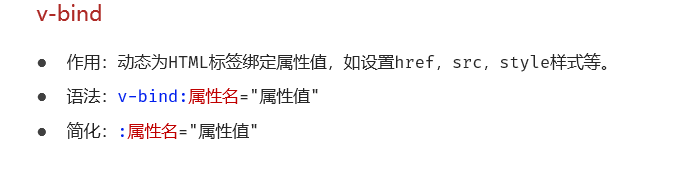
动态绑定元素
html
<!DOCTYPE html>
<html lang="en">

<head>
    <meta charset="UTF-8">
    <meta name="viewport" content="width=device-width, initial-scale=1.0">
    <title>Document</title>
</head>

<body>
    <div id="app">
        <a v-bind:href="url">黑马官网</a>
    </div>

    <script type="module">
        //引入vue模块
        import { createApp} from
                'https://unpkg.com/vue@3/dist/vue.esm-browser.js'
        //创建vue应用实例
        createApp({
            data() {
                return {
                    url: "https://www.baidu.com"
                }
            }
        }).mount("#app")//控制html元素
    </script>
</body>

</html>
条件渲染
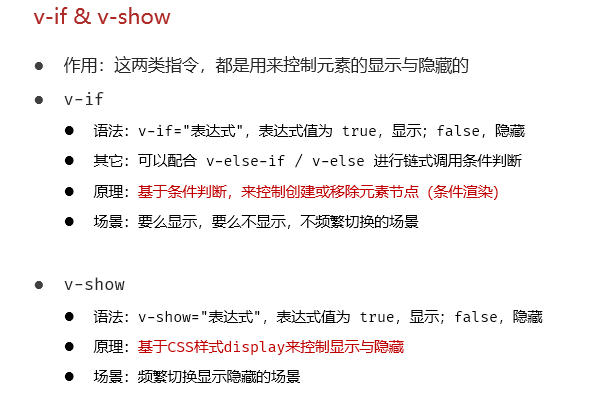
v-if是决定是否创建,v-show全都创建但选择显示
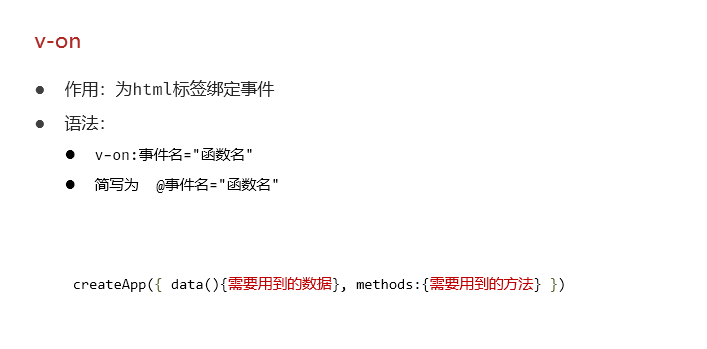
事件绑定
html
<!DOCTYPE html>
<html lang="en">
<head>
<meta charset="UTF-8">
<meta name="viewport" content="width=device-width, initial-scale=1.0">
<title>Document</title>
</head>
<body>
<div id="app">
<button v-on:click="money">点我有惊喜</button>
<button @click="love">再点更惊喜</button>
</div>
<script type="module">
//导入vue模块
import { createApp} from 'https://unpkg.com/vue@3/dist/vue.esm-browser.js'
//创建vue应用实例
createApp({
data() {
return {
//定义数据
}
},
methods: {
money(){
alert("送你钱100")
},
love(){
alert("爱你一万年")
}
},
}).mount("#app");//控制html元素
</script>
</body>
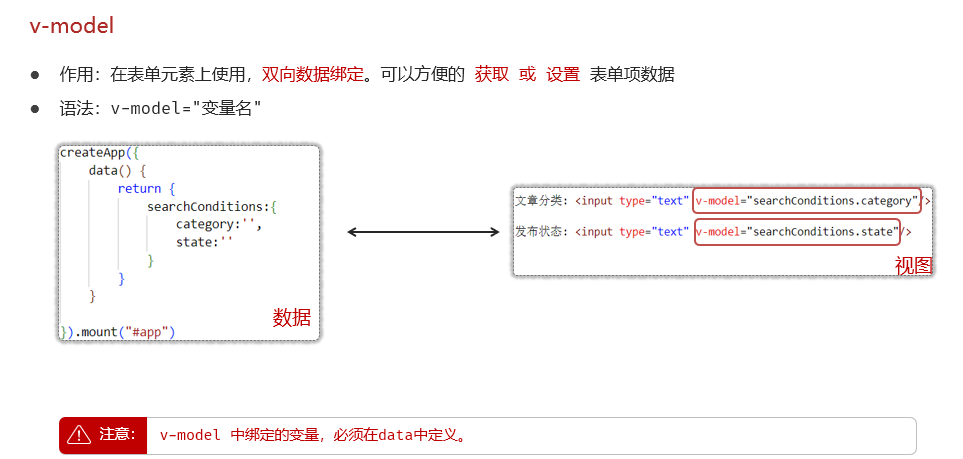
</html>双向绑定
html
<!DOCTYPE html>
<html lang="en">

<head>
    <meta charset="UTF-8">
    <meta name="viewport" content="width=device-width, initial-scale=1.0">
    <title>Document</title>
</head>

<body>
    <div id="app">

        文章分类: <input type="text" v-model="searchConditions.category"/> <span>{{searchConditions.category}}</span>

        发布状态: <input type="text" v-model="searchConditions.state"/> <span>{{searchConditions.state}}</span>

        <button>搜索</button>
        <button @:click="clear">清空</button>

        <br />
        <br />
        <table border="1 solid" colspa="0" cellspacing="0">
            <tr>
                <th>文章标题</th>
                <th>分类</th>
                <th>发表时间</th>
                <th>状态</th>
                <th>操作</th>
            </tr>
            <tr v-for="(article,index) in articleList">
                <td>{{article.title}}</td>
                <td>{{article.category}}</td>
                <td>{{article.time}}</td>
                <td>{{article.state}}</td>
                <td>
                    <button>编辑</button>
                    <button>删除</button>
                </td>
            </tr>
        </table>
    </div>
    <script type="module">
        //导入vue模块
        import { createApp } from 'https://unpkg.com/vue@3/dist/vue.esm-browser.js'
        //创建vue应用实例
        createApp({
            data() {
                return {
                    //定义数据
                    articleList: [{
                        title: "医疗反腐绝非砍医护收入",
                        category: "时事",
                        time: "2023-09-5",
                        state: "已发布"
                    },
                    {
                        title: "中国男篮缘何一败涂地?",
                        category: "篮球",
                        time: "2023-09-5",
                        state: "草稿"
                    },
                    {
                        title: "华山景区已受大风影响阵风达7-8级,未来24小时将持续",
                        category: "旅游",
                        time: "2023-09-5",
                        state: "已发布"
                    }],
                    searchConditions: {
                        category: '',
                        state: ''
                    }

                }
            },
            methods: {
                clear(){
                    this.searchConditions.category='';
                    this.searchConditions.state='';
                }
            },
        }).mount("#app")
    </script>
</body>

</html>
Vue声明周期
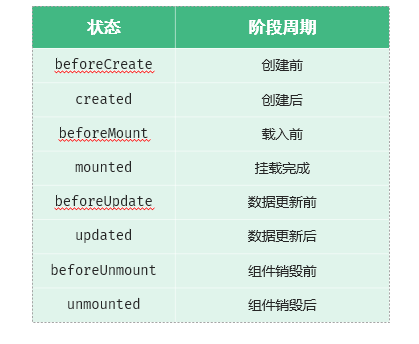
总的来说就是:创建 挂载 更新 销毁(通常只用挂载)
我们想要在指定生命周期进行操作就调用生命周期的函数就行
javascript
        createApp({
            beforeCreate() {
                console.log("hello")
            },
            mounted() {
                console.log("mounted")
            },
        }).mount("#app")