AR城市历史穿越应用
欢迎加入开源鸿蒙跨平台社区:
https://openharmonycrossplatform.csdn.net
一、项目概述
运行效果图
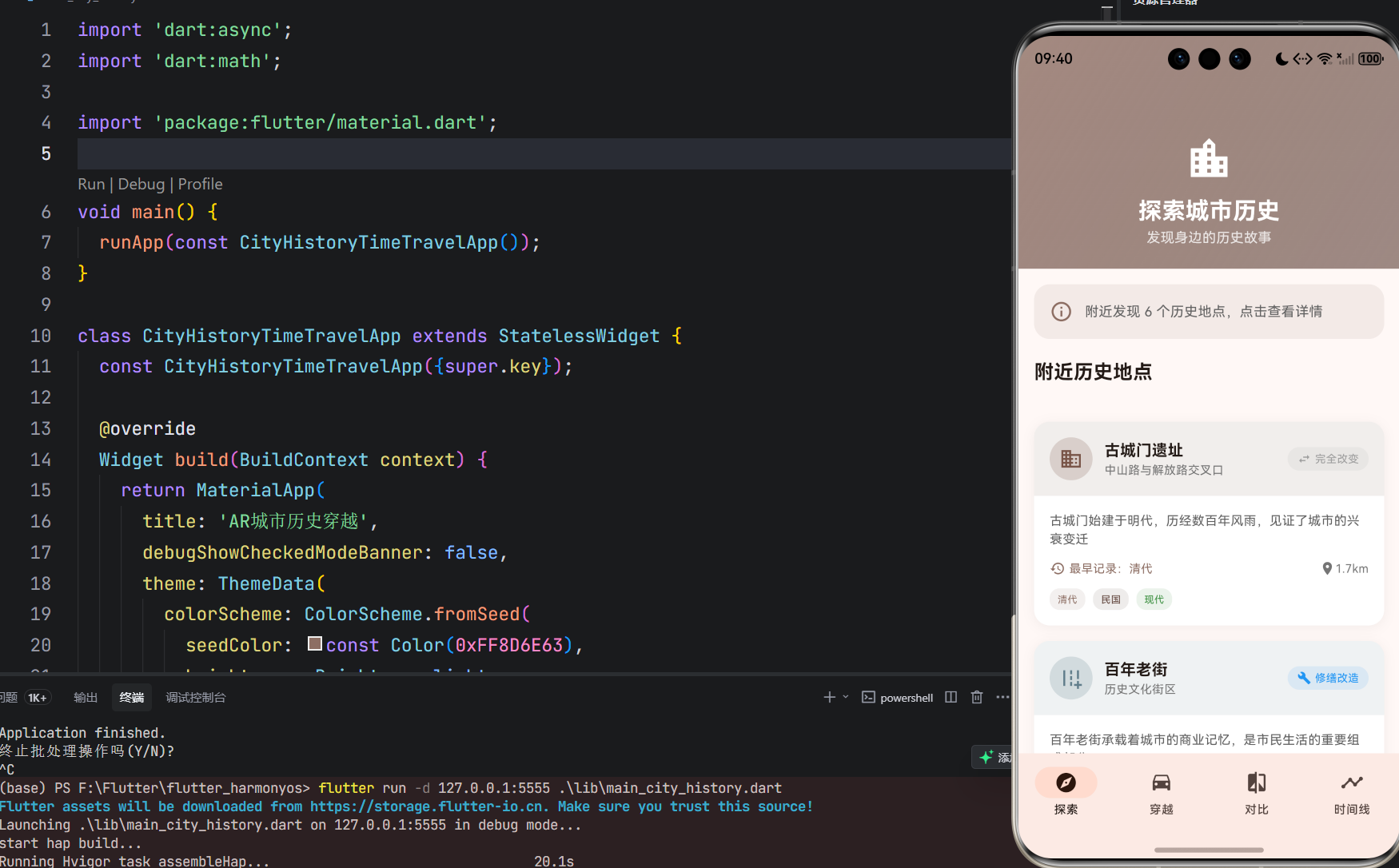
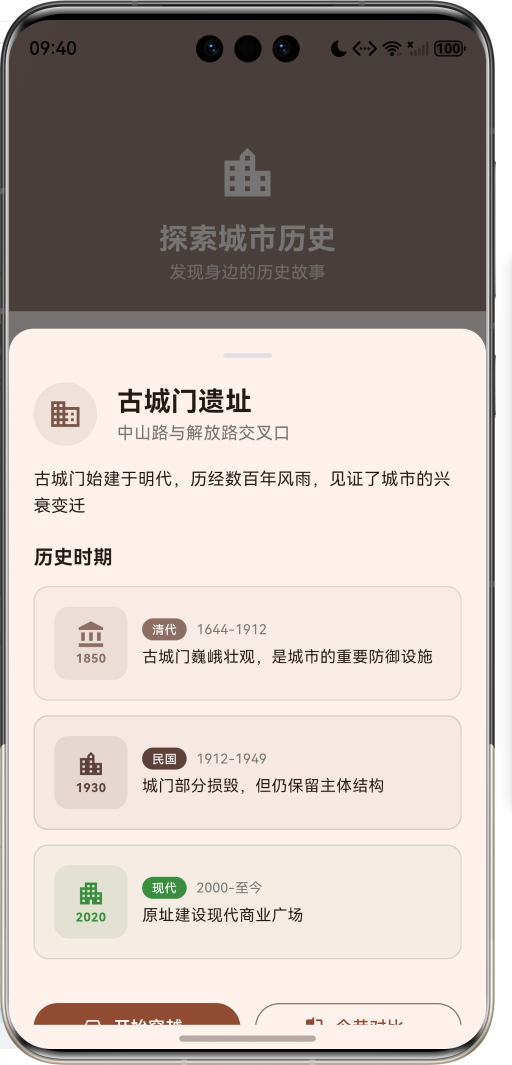
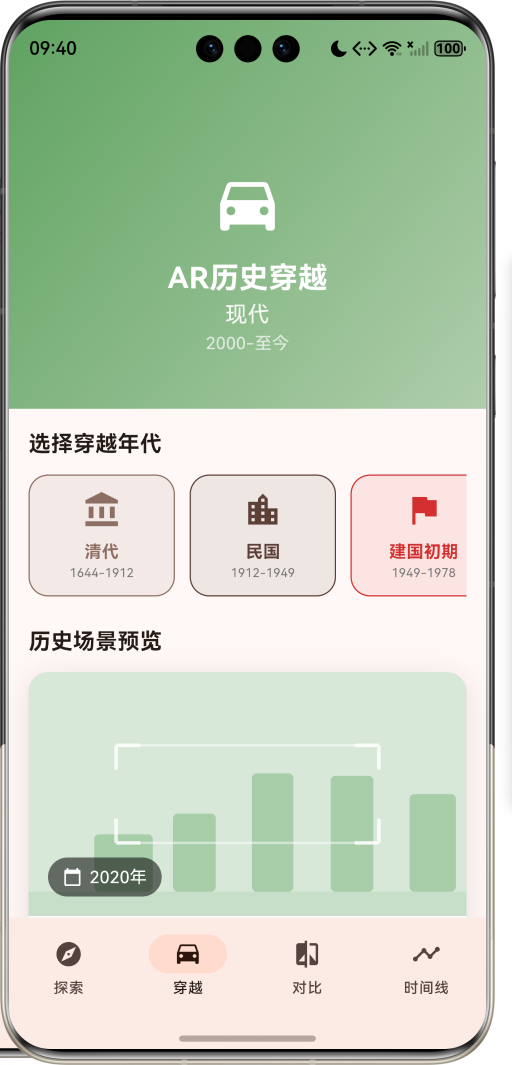
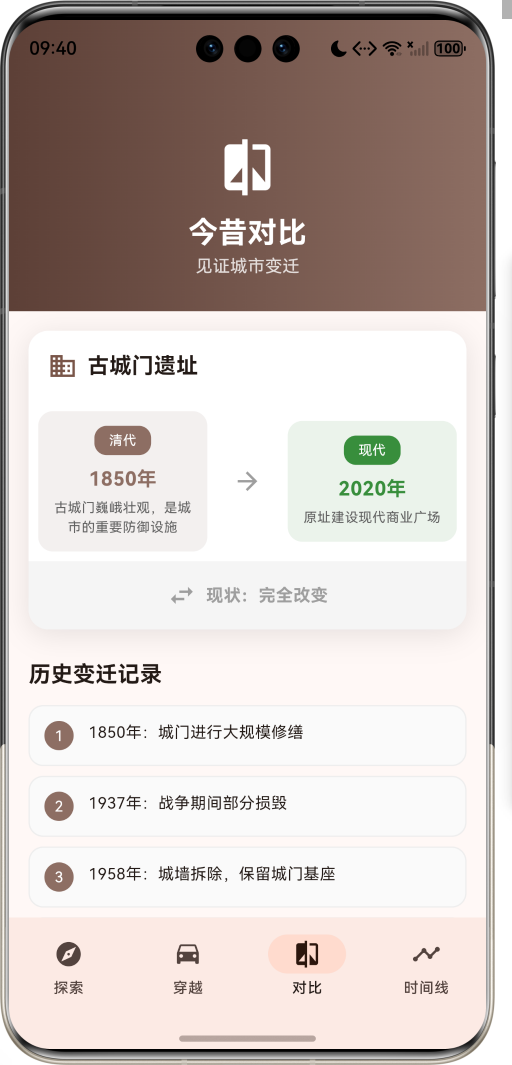

1.1 应用简介
AR城市历史穿越是一款科技探索类应用,为用户提供沉浸式的历史体验服务。应用以棕色为主色调,象征历史与传承。界面设计采用复古现代结合的风格,让用户能够穿越时空,见证城市变迁。
应用通过AR技术模拟展示城市某个地点几十年前的样子,支持今昔对比,让用户了解城市历史发展脉络。站在城市某个地点,就能看到这个地方百年前的模样,感受时光流转的魅力。
1.2 核心功能
| 功能模块 | 功能描述 | 实现方式 |
|---|---|---|
| 历史探索 | 发现附近历史地点 | 位置服务 |
| AR穿越 | 模拟历史场景展示 | CustomPaint绘制 |
| 今昔对比 | 历史与现代对比 | 双视图展示 |
| 时间线 | 城市发展脉络 | 时间轴组件 |
| 历史事件 | 重要历史事件记录 | 数据模型存储 |
| 场景特征 | 历史场景特征展示 | 标签列表 |
1.3 历史年代定义
| 序号 | 年代名称 | 时间跨度 | 颜色 | 描述 |
|---|---|---|---|---|
| 1 | 清代 | 1644-1912 | 棕色 | 封建王朝末期 |
| 2 | 民国 | 1912-1949 | 深棕 | 风云变幻年代 |
| 3 | 建国初期 | 1949-1978 | 红色 | 新中国建设 |
| 4 | 改革开放 | 1978-2000 | 蓝色 | 经济腾飞时期 |
| 5 | 现代 | 2000-至今 | 绿色 | 现代化都市 |
1.4 地点类型定义
| 序号 | 类型名称 | Emoji | 颜色 |
|---|---|---|---|
| 1 | 建筑 | 🏛️ | 棕色 |
| 2 | 街道 | 🛣️ | 蓝灰 |
| 3 | 公园 | 🌳 | 绿色 |
| 4 | 桥梁 | 🌉 | 蓝色 |
| 5 | 车站 | 🚂 | 橙色 |
| 6 | 市场 | 🏪 | 粉红 |
| 7 | 寺庙 | 🛕 | 紫色 |
| 8 | 学校 | 🏫 | 靛蓝 |
1.5 变化类型定义
| 序号 | 类型名称 | Emoji | 颜色 | 说明 |
|---|---|---|---|---|
| 1 | 保存完好 | ✅ | 绿色 | 历史风貌保留 |
| 2 | 修缮改造 | 🔧 | 蓝色 | 部分改造更新 |
| 3 | 原址重建 | 🏗️ | 橙色 | 原址新建建筑 |
| 4 | 完全改变 | ↔️ | 灰色 | 面貌完全不同 |
| 5 | 已拆除 | ❌ | 红色 | 原建筑已不存在 |
1.6 技术栈
| 技术领域 | 技术选型 | 版本要求 |
|---|---|---|
| 开发框架 | Flutter | >= 3.0.0 |
| 编程语言 | Dart | >= 2.17.0 |
| 设计规范 | Material Design 3 | - |
| 自定义绘制 | CustomPainter | - |
| 动画系统 | AnimationController | - |
| 目标平台 | 鸿蒙OS / Web | API 21+ |
1.7 项目结构
lib/
└── main_city_history.dart
    ├── CityHistoryTimeTravelApp       # 应用入口
    ├── HistoricalEra                  # 历史年代枚举
    ├── LocationType                   # 地点类型枚举
    ├── ChangeType                     # 变化类型枚举
    ├── HistoricalLocation             # 历史地点模型
    ├── HistoricalPeriod               # 历史时期模型
    ├── HistoricalEvent                # 历史事件模型
    ├── TimeLineItem                   # 时间线项目模型
    ├── CityHistoryHomePage            # 主页面(底部导航)
    ├── _buildExplorePage              # 探索页面
    ├── _buildTimeTravelPage           # 穿越页面
    ├── _buildComparePage              # 对比页面
    ├── _buildTimelinePage             # 时间线页面
    └── ARScenePainter                 # AR场景绘制器
二、系统架构
2.1 整体架构图
Data Layer
Business Layer
Presentation Layer
主页面
CityHistoryHomePage
探索页
穿越页
对比页
时间线页
地点列表
地点详情
距离显示
年代选择
AR场景
场景特征
今昔对比
变迁记录
现状展示
时间轴
历史节点
事件详情
位置服务
LocationService
AR引擎
AREngine
历史数据管理
HistoryManager
HistoricalLocation
历史地点
HistoricalPeriod
历史时期
HistoricalEvent
历史事件
TimeLineItem
时间线
2.2 类图设计
has
has
contains
belongs to
belongs to
belongs to
contains
CityHistoryTimeTravelApp
+Widget build()
<<enumeration>>
HistoricalEra
+String label
+String period
+Color color
+IconData icon
+String description
+qing()
+republic()
+earlyPrc()
+reform()
+modern()
<<enumeration>>
LocationType
+String label
+IconData icon
+Color color
+architecture()
+street()
+park()
+bridge()
+station()
+market()
+temple()
+school()
<<enumeration>>
ChangeType
+String label
+IconData icon
+Color color
+preserved()
+renovated()
+rebuilt()
+replaced()
+demolished()
HistoricalLocation
+String id
+String name
+String currentAddress
+LocationType type
+double latitude
+double longitude
+List<HistoricalPeriod> periods
+String description
+List<String> historicalFacts
+ChangeType changeType
+double distance
+HistoricalEra earliestEra
HistoricalPeriod
+HistoricalEra era
+String description
+String imagePath
+int year
+List<String> features
HistoricalEvent
+String id
+String title
+String description
+HistoricalEra era
+int year
+String location
+String significance
TimeLineItem
+int year
+String title
+String description
+HistoricalEra era
+List<HistoricalEvent> events
2.3 页面导航流程
探索
穿越
对比
时间线
应用启动
探索页
底部导航
浏览历史地点
选择地点
查看详情
开始穿越
选择年代
查看AR场景
浏览场景特征
今昔对比
查看变迁记录
浏览时间轴
查看历史节点
2.4 AR穿越流程
历史数据 AR引擎 穿越页 用户 历史数据 AR引擎 穿越页 用户 选择历史地点 获取历史时期 返回时期列表 选择穿越年代 启动AR模拟 绘制历史场景 渲染完成 展示历史场景 查看场景特征 显示详细信息
三、核心模块设计
3.1 数据模型设计
3.1.1 历史年代枚举 (HistoricalEra)
dart
enum HistoricalEra {
  qing('清代', '1644-1912', Color(0xFF8D6E63), Icons.account_balance, '封建王朝末期'),
  republic('民国', '1912-1949', Color(0xFF5D4037), Icons.location_city, '风云变幻年代'),
  earlyPrc('建国初期', '1949-1978', Color(0xFFD32F2F), Icons.flag, '新中国建设'),
  reform('改革开放', '1978-2000', Color(0xFF1976D2), Icons.trending_up, '经济腾飞时期'),
  modern('现代', '2000-至今', Color(0xFF388E3C), Icons.apartment, '现代化都市');

  final String label;
  final String period;
  final Color color;
  final IconData icon;
  final String description;
}
3.1.2 地点类型枚举 (LocationType)
dart
enum LocationType {
  architecture('建筑', Icons.domain, Color(0xFF795548)),
  street('街道', Icons.add_road, Color(0xFF607D8B)),
  park('公园', Icons.park, Color(0xFF4CAF50)),
  bridge('桥梁', Icons.water, Color(0xFF2196F3)),
  station('车站', Icons.train, Color(0xFFFF9800)),
  market('市场', Icons.store, Color(0xFFE91E63)),
  temple('寺庙', Icons.temple_buddhist, Color(0xFF9C27B0)),
  school('学校', Icons.school, Color(0xFF3F51B5));

  final String label;
  final IconData icon;
  final Color color;
}
3.1.3 历史地点模型 (HistoricalLocation)
dart
class HistoricalLocation {
  final String id;                        // 地点ID
  final String name;                      // 地点名称
  final String currentAddress;            // 当前地址
  final LocationType type;                // 地点类型
  final double latitude;                  // 纬度
  final double longitude;                 // 经度
  final List<HistoricalPeriod> periods;   // 历史时期列表
  final String description;               // 描述
  final List<String> historicalFacts;     // 历史事实
  final ChangeType changeType;            // 变化类型
  final double distance;                  // 距离

  HistoricalEra get earliestEra;          // 最早年代
}
3.1.4 历史时期模型 (HistoricalPeriod)
dart
class HistoricalPeriod {
  final HistoricalEra era;        // 所属年代
  final String description;       // 描述
  final String imagePath;         // 图片路径
  final int year;                 // 年份
  final List<String> features;    // 场景特征
}
3.1.5 历史年代分布
30% 25% 20% 15% 10% 历史地点年代分布 清代 民国 建国初期 改革开放 现代
3.2 页面结构设计
3.2.1 主页面布局
CityHistoryHomePage
IndexedStack
探索页
穿越页
对比页
时间线页
NavigationBar
探索 Tab
穿越 Tab
对比 Tab
时间线 Tab
3.2.2 探索页结构
探索页
SliverAppBar
提示卡片
地点列表
标题展示
渐变背景
地点卡片
类型图标
变化状态
年代标签
3.2.3 穿越页结构
穿越页
SliverAppBar
年代选择
场景预览
年代卡片
选中状态
AR场景
年份标签
场景特征
3.2.4 时间线页结构
时间线页
SliverAppBar
时间轴
时间节点
年代圆点
连接线
信息卡片
3.3 年代选择逻辑
是
否
用户点击年代
更新选中状态
启动穿越动画
显示加载状态
获取历史数据
匹配历史时期
时期存在?
渲染AR场景
显示默认场景
展示场景特征
3.4 今昔对比逻辑
选择地点
获取历史时期
排序时期列表
取最早时期
取最晚时期
左侧展示历史
右侧展示现代
对比卡片
显示变化类型
展示变迁记录
3.5 AR场景绘制逻辑
是
否
开始绘制
获取年代颜色
绘制建筑轮廓
绘制地面
绘制扫描线
绘制角标
是否动画中?
添加加载遮罩
完成绘制
四、UI设计规范
4.1 配色方案
应用以棕色为主色调,象征历史与传承:
| 颜色类型 | 色值 | 用途 |
|---|---|---|
| 主色 | #8D6E63 | 导航、主题元素 |
| 辅助色 | #5D4037 | 渐变、背景 |
| 清代色 | #8D6E63 | 清代相关 |
| 民国色 | #5D4037 | 民国相关 |
| 建国色 | #D32F2F | 建国初期相关 |
| 改革色 | #1976D2 | 改革开放相关 |
| 现代色 | #388E3C | 现代相关 |
4.2 年代颜色
| 历史年代 | 色值 | 视觉效果 |
|---|---|---|
| 清代 | #8D6E63 | 古朴棕色 |
| 民国 | #5D4037 | 深沉棕褐 |
| 建国初期 | #D32F2F | 革命红色 |
| 改革开放 | #1976D2 | 发展蓝色 |
| 现代 | #388E3C | 现代绿色 |
4.3 字体规范
| 元素 | 字号 | 字重 | 颜色 |
|---|---|---|---|
| 页面标题 | 24px | Bold | 白色 |
| 地点名称 | 16px | SemiBold | #000000 |
| 年代标签 | 11px | Regular | 年代颜色 |
| 描述文字 | 13px | Regular | #666666 |
| 年份显示 | 16px | Bold | 年代颜色 |
4.4 组件规范
4.4.1 探索页界面
┌─────────────────────────────────────┐
│ [🏛️] 探索城市历史                    │
│      发现身边的历史故事               │
├─────────────────────────────────────┤
│  ℹ️ 附近发现 6 个历史地点             │
├─────────────────────────────────────┤
│  [🏛️] 古城门遗址        [完全改变]   │
│       中山路与解放路交叉口            │
│       📅 最早记录:清代  📍 0.8km     │
│       [清代] [民国] [现代]            │
└─────────────────────────────────────┘
4.4.2 年代选择卡片
┌─────────────────────────────────────┐
│ [🏛️]                                │
│  清代                               │
│  1644-1912                          │
└─────────────────────────────────────┘
4.4.3 AR场景预览
┌─────────────────────────────────────┐
│ ┌───┐           ┌───┐               │
│ │   │           │   │               │
│ └───┘           └───┘               │
│                                     │
│     [建筑轮廓]  [建筑轮廓]           │
│                                     │
│ ┌───┐           ┌───┐               │
│ │   │           │   │               │
│ └───┘           └───┘               │
│                                     │
│ [📅 1850年]                         │
└─────────────────────────────────────┘
4.4.4 时间线节点
┌─────────────────────────────────────┐
│  (●)────────                        │
│  │  [清代] 1850年                    │
│  │  清代鼎盛                         │
│  │  城市商业繁荣,人口增长            │
│  ↓                                  │
│  (●)────────                        │
│     [民国] 1912年                    │
└─────────────────────────────────────┘
五、核心功能实现
5.1 年代选择实现
dart
void _startTimeTravel(HistoricalEra era) {
  setState(() {
    _selectedEra = era;
    _isTimeTraveling = true;
  });

  Future.delayed(const Duration(seconds: 2), () {
    if (mounted) {
      setState(() {
        _isTimeTraveling = false;
      });
    }
  });
}
5.2 最早年代获取
dart
HistoricalEra get earliestEra {
  if (periods.isEmpty) return HistoricalEra.modern;
  return periods.map((p) => p.era).reduce((a, b) => a.index < b.index ? a : b);
}
5.3 地点选择实现
dart
void _selectLocation(HistoricalLocation location) {
  setState(() {
    _selectedLocation = location;
  });
}

void _showLocationDetail(HistoricalLocation location) {
  setState(() {
    _selectedLocation = location;
  });
  showModalBottomSheet(
    context: context,
    isScrollControlled: true,
    builder: (context) => DraggableScrollableSheet(
      initialChildSize: 0.7,
      builder: (context, scrollController) => SingleChildScrollView(
        controller: scrollController,
        child: Column(
          children: [
            // 地点详情内容
          ],
        ),
      ),
    ),
  );
}
5.4 历史时期匹配
dart
final period = _selectedLocation!.periods.firstWhere(
  (p) => p.era == _selectedEra,
  orElse: () => _selectedLocation!.periods.first,
);
5.5 AR场景绘制实现
dart
class ARScenePainter extends CustomPainter {
  final Color eraColor;
  final bool isAnimating;

  ARScenePainter(this.eraColor, this.isAnimating);

  @override
  void paint(Canvas canvas, Size size) {
    // 绘制建筑轮廓
    for (int i = 0; i < 5; i++) {
      final x = size.width * 0.15 + i * size.width * 0.18;
      final height = 40 + random.nextInt(60);
      final rect = RRect.fromRectAndRadius(
        Rect.fromLTWH(x, size.height - height - 20, width, height),
        const Radius.circular(4),
      );
      canvas.drawRRect(rect, buildingPaint);
    }

    // 绘制扫描框角标
    final cornerPaint = Paint()
      ..color = Colors.white.withOpacity(0.8)
      ..style = PaintingStyle.stroke
      ..strokeWidth = 3;
    // ... 角标绘制代码
  }
}
5.6 时间线绘制
dart
Widget _buildTimelineItem(TimeLineItem item) {
  final isLast = item == _timeline.last;

  return Row(
    crossAxisAlignment: CrossAxisAlignment.start,
    children: [
      Column(
        children: [
          Container(
            width: 40,
            height: 40,
            decoration: BoxDecoration(
              color: item.era.color,
              shape: BoxShape.circle,
            ),
            child: Center(
              child: Text(
                item.year.toString().substring(2),
                style: const TextStyle(color: Colors.white),
              ),
            ),
          ),
          if (!isLast)
            Container(
              width: 2,
              height: 80,
              color: item.era.color.withOpacity(0.3),
            ),
        ],
      ),
      // 信息卡片
    ],
  );
}
六、交互设计
6.1 探索流程
穿越页 地点详情 探索页 用户 穿越页 地点详情 探索页 用户 打开探索页 加载附近地点 展示地点列表 点击地点 显示详情弹窗 展示历史时期 点击穿越 跳转穿越页 展示AR场景
6.2 穿越流程
否
是
打开穿越页
已选择地点?
显示提示
显示年代选择
选择年代
启动穿越动画
渲染AR场景
展示场景特征
引导选择地点
6.3 对比流程
点击记录
返回
选择地点
获取时期
排序数据
展示对比
查看变迁
七、扩展功能规划
7.1 后续版本规划
2024-01-07 2024-01-14 2024-01-21 2024-01-28 2024-02-04 2024-02-11 2024-02-18 2024-02-25 2024-03-03 2024-03-10 2024-03-17 2024-03-24 2024-03-31 基础UI框架 历史地点展示 AR场景模拟 真实AR功能 历史图片叠加 语音讲解 社区贡献 历史路线规划 云端数据同步 V1.0 基础版本 V1.1 增强版本 V1.2 进阶版本 AR城市历史穿越开发计划
7.2 功能扩展建议
7.2.1 真实AR功能
AR功能:
- 摄像头实时画面
- 历史图片叠加
- 3D建筑模型
- 位置定位对齐
7.2.2 语音讲解系统
讲解功能:
- 专业历史讲解
- 多语言支持
- 离线语音包
- 智能推荐路线
7.2.3 社区贡献
社区功能:
- 用户上传历史照片
- 历史故事分享
- 地点纠错
- 互动评论
八、注意事项
8.1 开发注意事项
-
年代排序:历史时期按年代顺序排列
-
场景匹配:选择年代时匹配对应历史时期
-
动画管理:穿越动画需要正确管理AnimationController
-
状态同步:选择地点后需同步更新各页面
-
数据完整性:确保历史数据的准确性
8.2 常见问题
| 问题 | 原因 | 解决方案 |
|---|---|---|
| AR场景为空 | 未选择地点 | 先选择历史地点 |
| 年代不匹配 | 无对应时期 | 显示默认时期 |
| 时间线错乱 | 数据未排序 | 检查数据顺序 |
| 动画卡顿 | 控制器未释放 | 检查dispose |
8.3 使用技巧
🏛️ 历史探索技巧 🏛️
探索建议
- 关注身边的历史地点
- 了解城市变迁脉络
- 对比今昔变化
- 记录个人感受
穿越体验
- 选择感兴趣的年代
- 注意场景特征变化
- 结合历史事件理解
- 分享给朋友
时间线学习
- 按时间顺序浏览
- 关注重要节点
- 理解历史因果
- 建立时间观念
九、运行说明
9.1 环境要求
| 环境 | 版本要求 |
|---|---|
| Flutter SDK | >= 3.0.0 |
| Dart SDK | >= 2.17.0 |
| 鸿蒙OS | API 21+ |
| Web浏览器 | Chrome 90+ |
9.2 运行命令
bash
# 查看可用设备
flutter devices

# 运行到Web服务器
flutter run -d web-server -t lib/main_city_history.dart --web-port 8143

# 运行到鸿蒙设备
flutter run -d 127.0.0.1:5555 lib/main_city_history.dart

# 代码分析
flutter analyze lib/main_city_history.dart
十、总结
AR城市历史穿越应用通过历史探索、AR穿越、今昔对比、时间线四大模块,为用户提供了一个沉浸式的历史体验平台。应用支持5个历史年代、8种地点类型、5种变化状态,让用户能够穿越时空,见证城市变迁。
核心功能涵盖历史地点探索、AR场景模拟、今昔对比展示、城市发展时间线四大模块。历史年代包括清代、民国、建国初期、改革开放、现代五个时期,覆盖中国近现代主要历史阶段;地点类型涵盖建筑、街道、公园、桥梁、车站、市场、寺庙、学校等,全面展示城市面貌;变化状态分为保存完好、修缮改造、原址重建、完全改变、已拆除五种,直观呈现历史变迁。
应用采用 Material Design 3 设计规范,以棕色为主色调,象征历史与传承。通过本应用,希望能够帮助用户了解城市历史,感受时光流转的魅力,增强对城市文化的认同感。
AR城市历史穿越------穿越时空,见证城市变迁