欢迎加入开源鸿蒙跨平台社区:
https://openharmonycrossplatform.csdn.net
1. 项目介绍
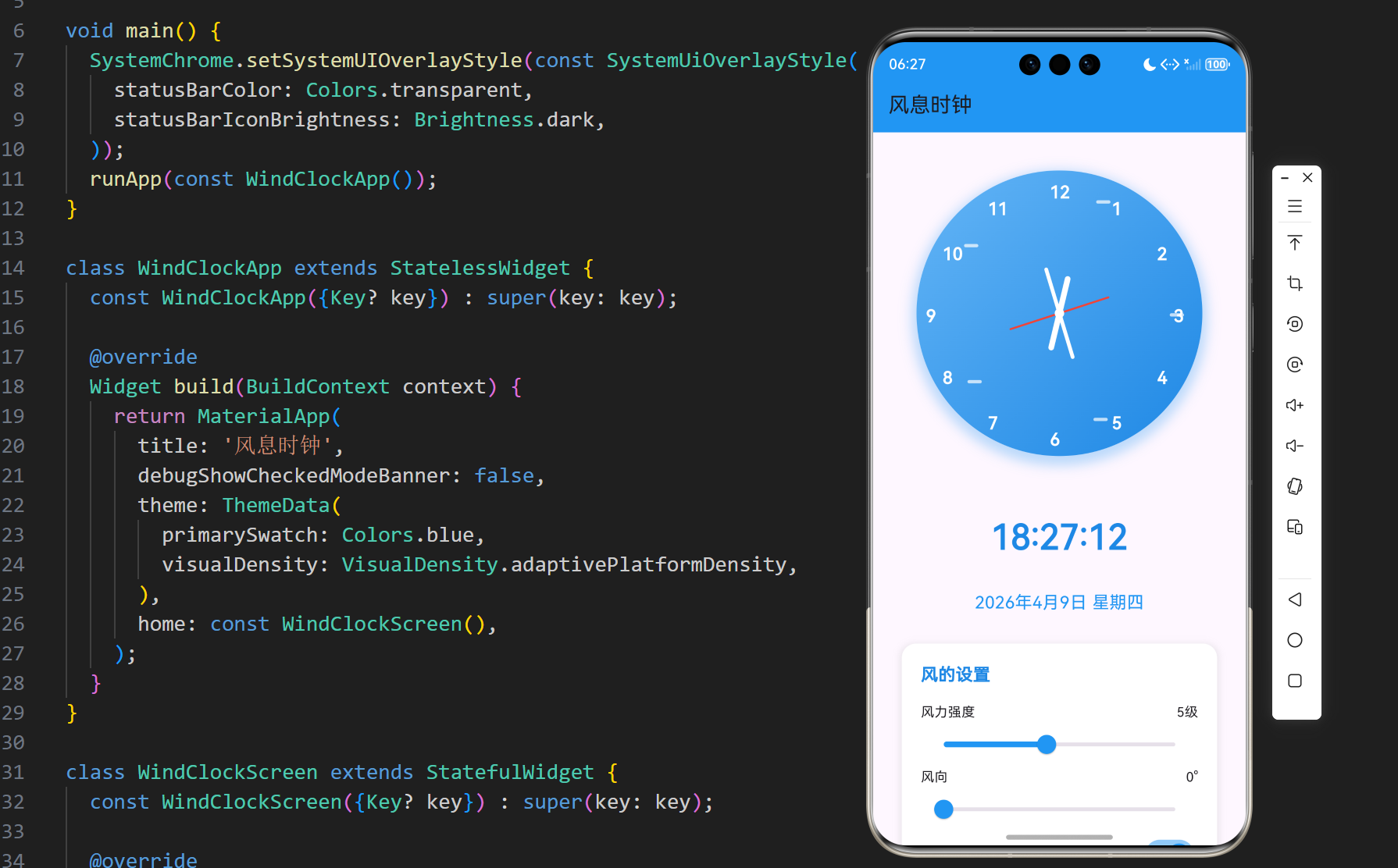
在快节奏的现代生活中,我们常常需要一个能够带来宁静感的时钟应用。风息时钟是一个融合了自然元素的时钟应用,通过模拟风的视觉效果,为用户带来一种宁静、自然的感觉。本文将详细介绍如何使用 Flutter 实现这个具有自然风格的时钟应用,包括模拟时钟显示、风的视觉效果、天气信息展示等功能。
1.1 项目目标
- 实现一个具有自然风格的时钟应用
- 显示模拟时钟和数字时间
- 实现风的视觉效果,增强自然感
- 提供风的强度和方向调节功能
- 显示日期和天气信息
- 确保在不同平台上的一致性表现
1.2 技术栈
- Flutter:跨平台 UI 框架
- Dart:编程语言
- Timer:用于实现时钟的实时更新
- Stack:用于时钟的布局
- Transform:用于时钟指针的旋转
- Animation:用于实现风的效果
- Slider:用于调节风的强度和方向
- Switch:用于开关风效果
2. 核心功能设计
2.1 时钟功能
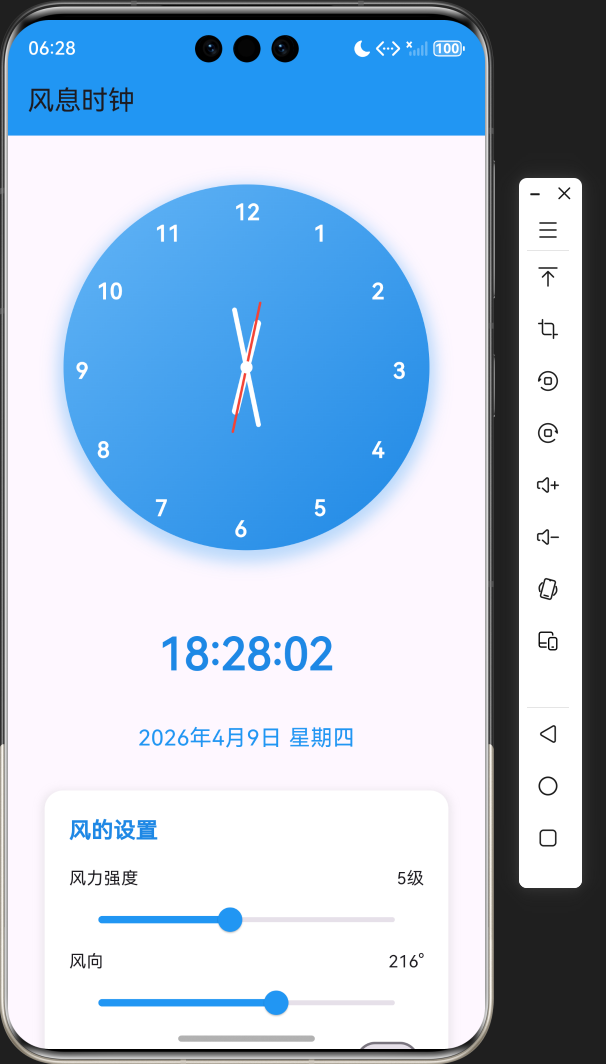
- 模拟时钟:显示当前时间,包括时针、分针和秒针
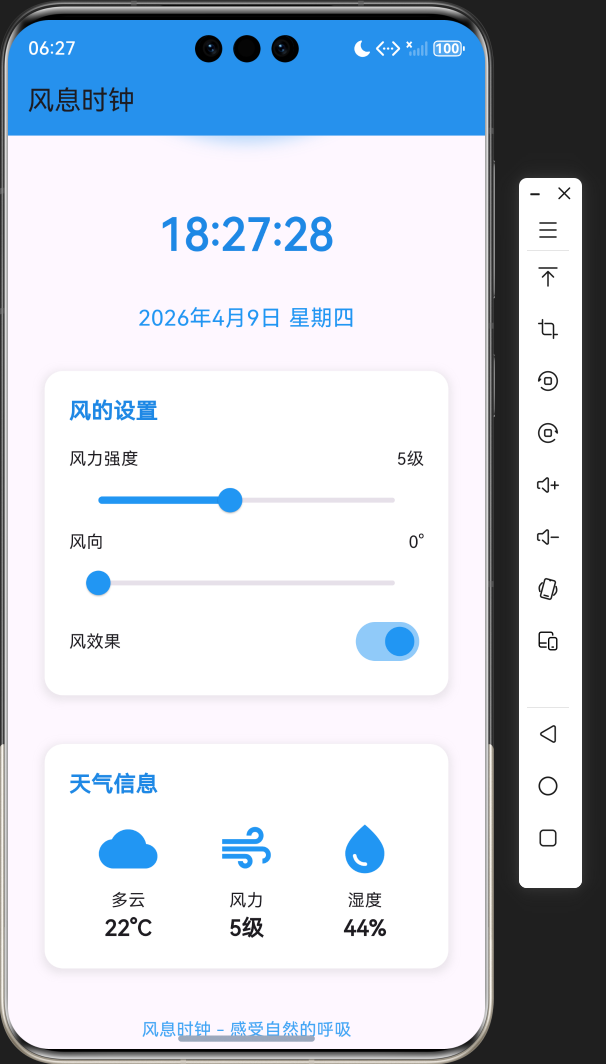
- 数字时间:显示当前时间的数字格式(HH:MM:SS)
- 日期显示:显示当前日期和星期
2.2 风的效果
- 视觉效果:围绕时钟的动态风效果
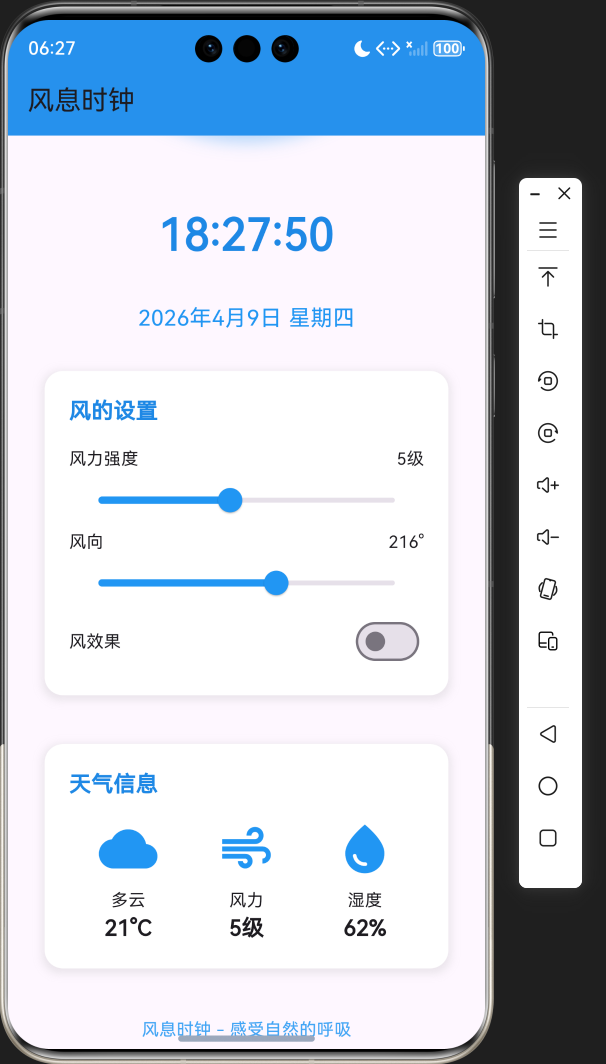
- 强度调节:可调节风力强度(1-10级)
- 方向调节:可调节风向(0-360度)
- 开关控制:可开关风效果
2.3 天气信息
- 温度显示:显示模拟的当前温度
- 风力显示:显示当前风力等级
- 湿度显示:显示模拟的当前湿度
3. 技术架构
3.1 项目结构
lib/
└── main.dart          # 主应用文件,包含所有代码
3.2 组件结构
WindClockApp
└── WindClockScreen
    ├── State management (currentTime, windStrength, isWindActive, etc.)
    ├── Timer functionality (startTimer, update time)
    ├── Wind animation (startWindAnimation, animate wind effect)
    ├── UI components
    │   ├── Analog clock display
    │   ├── Digital time display
    │   ├── Date display
    │   ├── Wind settings section
    │   └── Weather information section
    └── Utility functions (_getWeekday)
4. 关键代码解析
4.1 状态管理
dart
class _WindClockScreenState extends State<WindClockScreen> {
  DateTime _currentTime = DateTime.now();
  Timer? _timer;
  double _windStrength = 0.5;
  bool _isWindActive = true;
  int _windDirection = 0; // 0-360度
  double _animationValue = 0.0;
  // ...
}代码解析:
_currentTime:当前时间_timer:计时器实例,用于实时更新时间_windStrength:风力强度(0.1-1.0)_isWindActive:风效果是否激活_windDirection:风向(0-360度)_animationValue:风动画的动画值
4.2 时钟功能
dart
void _startTimer() {
  _timer = Timer.periodic(const Duration(seconds: 1), (timer) {
    setState(() {
      _currentTime = DateTime.now();
    });
  });
}代码解析:
_startTimer方法:启动计时器,每秒更新一次当前时间Timer.periodic:创建一个周期性计时器setState:更新状态,触发 UI 重建
4.3 风的动画
dart
void _startWindAnimation() {
  Timer.periodic(const Duration(milliseconds: 50), (timer) {
    if (_isWindActive) {
      setState(() {
        _animationValue = (_animationValue + 0.01 * _windStrength) % 1.0;
      });
    }
  });
}代码解析:
_startWindAnimation方法:启动风的动画- 每50毫秒更新一次动画值
_animationValue随时间和风力强度变化- 当
_isWindActive为 false 时,停止动画
4.4 风的视觉效果
dart
// 风的效果
if (_isWindActive)
  ...List.generate(5, (index) {
    double angle = (index * 72) * pi / 180;
    double radius = 120 + sin(_animationValue * 2 * pi + index) * 10 * _windStrength;
    double x = radius * cos(angle);
    double y = radius * sin(angle);
    return Positioned(
      left: 150 + x,
      top: 150 + y,
      child: Container(
        width: 10 + _windStrength * 10,
        height: 2 + _windStrength * 3,
        decoration: BoxDecoration(
          color: Colors.white.withOpacity(0.7),
          borderRadius: BorderRadius.circular(5),
        ),
      ),
    );
});代码解析:
- 使用
List.generate创建5个风的元素 - 每个元素的位置和大小随
_animationValue和_windStrength变化 - 使用
sin函数创建波浪效果 - 风力越强,风的元素越大,动画速度越快
4.5 时钟指针
dart
// 时针
Transform.rotate(
  angle: (_currentTime.hour % 12) * 30 * pi / 180 + _currentTime.minute * 0.5 * pi / 180,
  child: Container(
    width: 6,
    height: 80,
    decoration: BoxDecoration(
      color: Colors.white,
      borderRadius: BorderRadius.circular(3),
    ),
  ),
),

// 分针
Transform.rotate(
  angle: _currentTime.minute * 6 * pi / 180 + _currentTime.second * 0.1 * pi / 180,
  child: Container(
    width: 4,
    height: 100,
    decoration: BoxDecoration(
      color: Colors.white,
      borderRadius: BorderRadius.circular(2),
    ),
  ),
),

// 秒针
Transform.rotate(
  angle: _currentTime.second * 6 * pi / 180,
  child: Container(
    width: 2,
    height: 110,
    decoration: BoxDecoration(
      color: Colors.red,
      borderRadius: BorderRadius.circular(1),
    ),
  ),
),代码解析:
- 使用
Transform.rotate实现指针的旋转 - 时针:每小时旋转30度,每分钟旋转0.5度
- 分针:每分钟旋转6度,每秒钟旋转0.1度
- 秒针:每秒钟旋转6度
- 指针长度和宽度不同,增强视觉层次感
5. 技术亮点与创新
5.1 风的效果实现
- 动态风效果:通过动画值和三角函数实现风的动态效果
- 风力强度调节:风力强度影响风的大小和动画速度
- 风向调节:虽然当前版本中风向尚未直接影响风的方向,但为后续功能扩展预留了接口
- 视觉效果:风的元素使用半透明白色,模拟风的轻盈感
5.2 时钟设计
- 渐变背景:使用线性渐变作为时钟背景,增强视觉效果
- 阴影效果:为时钟添加阴影,提升层次感
- 指针设计:不同长度和宽度的指针,增强视觉对比
- 红色秒针:使用红色秒针,增强时间流逝的视觉感受
5.3 用户交互
- 风力调节:使用滑块调节风力强度,直观易用
- 风向调节:使用滑块调节风向,为后续功能扩展做准备
- 风效果开关:使用开关控制风效果的开启和关闭
- 实时反馈:调整风力和风向时,风的效果实时变化
5.4 天气信息
- 模拟天气数据:显示模拟的温度、风力和湿度信息
- 图标使用:使用 Flutter 内置图标,增强视觉效果
- 与风的设置联动:风力信息与风的设置联动,保持数据一致性
6. 应用场景与扩展
6.1 应用场景
- 桌面装饰:作为桌面装饰应用,为用户带来自然的感觉
- 冥想辅助:风的效果可以作为冥想时的视觉辅助
- 放松心情:自然风格的设计有助于放松心情
- 时间管理:作为日常时钟使用,同时提供天气信息
6.2 扩展方向
- 风声音效:添加风的音效,增强沉浸感
- 真实天气数据:集成天气 API,获取真实的天气数据
- 主题切换:支持不同主题风格,如晴天、雨天、夜晚等
- 自定义风效果:允许用户自定义风的颜色、形状等
- 多语言支持:添加多语言支持,扩大应用的适用范围
- 数据持久化:保存用户的设置,下次启动时恢复
7. 代码优化建议
7.1 性能优化
- 动画优化 :使用
AnimationController替代Timer.periodic,获得更好的动画性能 - 状态管理 :对于更复杂的应用,可以使用
Provider、Riverpod等状态管理库 - UI 优化 :使用
RepaintBoundary包裹时钟部分,减少不必要的重绘
7.2 代码结构优化
- 组件化:将时钟、风效果、设置等拆分为独立组件
- 逻辑分离:将业务逻辑与 UI 逻辑分离,提高代码的可维护性
- 参数化:将风力、风向等参数提取为可配置的常量
7.3 用户体验优化
- 触觉反馈:在支持的设备上,添加触觉反馈,增强交互体验
- 动画效果:添加更多的动画效果,如页面切换动画
- 错误处理:添加适当的错误处理,提高应用的稳定性
- 用户引导:添加首次使用引导,帮助用户了解应用的使用方法
8. 测试与调试
8.1 测试策略
- 功能测试:测试时钟、风效果、设置等核心功能
- 性能测试:测试应用在不同设备上的性能表现
- 兼容性测试:测试在不同平台、不同屏幕尺寸上的表现
- 用户体验测试:测试应用的易用性和用户体验
8.2 调试技巧
- 使用 Flutter DevTools:利用 Flutter DevTools 分析性能瓶颈和调试问题
- 添加日志:在关键位置添加日志,便于调试
- 使用模拟器:在不同尺寸的模拟器上测试,确保适配性
- 用户测试:邀请用户测试,收集反馈,不断改进
9. 总结与展望
9.1 项目总结
本项目成功实现了一个具有自然风格的风息时钟应用,主要功能包括:
- 模拟时钟显示:显示当前时间,包括时针、分针和秒针
- 数字时间显示:显示当前时间的数字格式
- 日期显示:显示当前日期和星期
- 风的视觉效果:围绕时钟的动态风效果
- 风的设置:可调节风力强度、风向和开关风效果
- 天气信息:显示模拟的天气信息,包括温度、风力和湿度
9.2 技术价值
- 学习价值:展示了如何使用 Flutter 实现一个具有动画效果的时钟应用
- 实用价值:提供了一个可直接使用的自然风格时钟应用
- 参考价值:为类似功能的开发提供了参考方案
9.3 未来展望
- 风声音效:添加风的音效,增强沉浸感
- 真实天气数据:集成天气 API,获取真实的天气数据
- 主题切换:支持不同主题风格,如晴天、雨天、夜晚等
- 自定义风效果:允许用户自定义风的颜色、形状等
- 多语言支持:添加多语言支持,扩大应用的适用范围
- 数据持久化:保存用户的设置,下次启动时恢复
10. 附录
10.1 完整代码
dart
import 'package:flutter/material.dart';
import 'dart:math';
import 'dart:async';
import 'package:flutter/services.dart';
void main() {
SystemChrome.setSystemUIOverlayStyle(const SystemUiOverlayStyle(
statusBarColor: Colors.transparent,
statusBarIconBrightness: Brightness.dark,
));
runApp(const WindClockApp());
}
class WindClockApp extends StatelessWidget {
const WindClockApp({Key? key}) : super(key: key);
@override
Widget build(BuildContext context) {
return MaterialApp(
title: '风息时钟',
debugShowCheckedModeBanner: false,
theme: ThemeData(
primarySwatch: Colors.blue,
visualDensity: VisualDensity.adaptivePlatformDensity,
),
home: const WindClockScreen(),
);
}
}
class WindClockScreen extends StatefulWidget {
const WindClockScreen({Key? key}) : super(key: key);
@override
State<WindClockScreen> createState() => _WindClockScreenState();
}
class _WindClockScreenState extends State<WindClockScreen> {
DateTime _currentTime = DateTime.now();
Timer? _timer;
double _windStrength = 0.5;
bool _isWindActive = true;
int _windDirection = 0; // 0-360度
double _animationValue = 0.0;
@override
void initState() {
super.initState();
_startTimer();
_startWindAnimation();
}
void _startTimer() {
_timer = Timer.periodic(const Duration(seconds: 1), (timer) {
setState(() {
_currentTime = DateTime.now();
});
});
}
void _startWindAnimation() {
Timer.periodic(const Duration(milliseconds: 50), (timer) {
if (_isWindActive) {
setState(() {
_animationValue = (_animationValue + 0.01 * _windStrength) % 1.0;
});
}
});
}
@override
void dispose() {
_timer?.cancel();
super.dispose();
}
@override
Widget build(BuildContext context) {
return Scaffold(
appBar: AppBar(
title: const Text('风息时钟'),
backgroundColor: Colors.blue.shade500,
),
body: SingleChildScrollView(
child: Column(
children: [
// 时钟部分
Container(
margin: const EdgeInsets.symmetric(vertical: 40),
child: Stack(
alignment: Alignment.center,
children: [
// 时钟背景
Container(
width: 300,
height: 300,
decoration: BoxDecoration(
shape: BoxShape.circle,
gradient: LinearGradient(
begin: Alignment.topLeft,
end: Alignment.bottomRight,
colors: [
Colors.blue.shade300,
Colors.blue.shade600,
],
),
boxShadow: [
BoxShadow(
color: Colors.blue.withOpacity(0.3),
spreadRadius: 5,
blurRadius: 10,
offset: const Offset(0, 5),
),
],
),
),
// 风的效果
if (_isWindActive)
...List.generate(5, (index) {
double angle = (index * 72) * pi / 180;
double radius = 120 + sin(_animationValue * 2 * pi + index) * 10 * _windStrength;
double x = radius * cos(angle);
double y = radius * sin(angle);
return Positioned(
left: 150 + x,
top: 150 + y,
child: Container(
width: 10 + _windStrength * 10,
height: 2 + _windStrength * 3,
decoration: BoxDecoration(
color: Colors.white.withOpacity(0.7),
borderRadius: BorderRadius.circular(5),
),
),
);
}),
// 时钟刻度
...List.generate(12, (index) {
double angle = (index * 30) * pi / 180;
double radius = 130;
double x = radius * cos(angle - pi / 2);
double y = radius * sin(angle - pi / 2);
return Positioned(
left: 150 + x - 10,
top: 150 + y - 10,
child: Text(
'${index == 0 ? 12 : index}',
style: const TextStyle(
fontSize: 18,
fontWeight: FontWeight.bold,
color: Colors.white,
),
),
);
}),
// 时针
Transform.rotate(
angle: (_currentTime.hour % 12) * 30 * pi / 180 + _currentTime.minute * 0.5 * pi / 180,
child: Container(
width: 6,
height: 80,
decoration: BoxDecoration(
color: Colors.white,
borderRadius: BorderRadius.circular(3),
),
),
),
// 分针
Transform.rotate(
angle: _currentTime.minute * 6 * pi / 180 + _currentTime.second * 0.1 * pi / 180,
child: Container(
width: 4,
height: 100,
decoration: BoxDecoration(
color: Colors.white,
borderRadius: BorderRadius.circular(2),
),
),
),
// 秒针
Transform.rotate(
angle: _currentTime.second * 6 * pi / 180,
child: Container(
width: 2,
height: 110,
decoration: BoxDecoration(
color: Colors.red,
borderRadius: BorderRadius.circular(1),
),
),
),
// 中心点
Container(
width: 10,
height: 10,
decoration: const BoxDecoration(
shape: BoxShape.circle,
color: Colors.white,
),
),
],
),
),
// 数字时间显示
Container(
margin: const EdgeInsets.symmetric(vertical: 20),
child: Text(
_currentTime.toString().substring(11, 19),
style: TextStyle(
fontSize: 36,
fontWeight: FontWeight.bold,
color: Colors.blue.shade600,
),
),
),
// 日期显示
Container(
margin: const EdgeInsets.symmetric(vertical: 10),
child: Text(
'${_currentTime.year}年${_currentTime.month}月${_currentTime.day}日 ${_getWeekday(_currentTime.weekday)}',
style: TextStyle(
fontSize: 18,
color: Colors.blue.shade500,
),
),
),
// 风的设置
Container(
margin: const EdgeInsets.symmetric(vertical: 20, horizontal: 30),
padding: const EdgeInsets.all(20),
decoration: BoxDecoration(
color: Colors.white,
borderRadius: BorderRadius.circular(15),
boxShadow: [
BoxShadow(
color: Colors.grey.withOpacity(0.2),
spreadRadius: 2,
blurRadius: 5,
offset: const Offset(0, 2),
),
],
),
child: Column(
crossAxisAlignment: CrossAxisAlignment.start,
children: [
Text(
'风的设置',
style: TextStyle(
fontSize: 18,
fontWeight: FontWeight.bold,
color: Colors.blue.shade600,
),
),
const SizedBox(height: 16),
// 风力强度
Row(
mainAxisAlignment: MainAxisAlignment.spaceBetween,
children: [
const Text('风力强度'),
Text('${(_windStrength * 10).toStringAsFixed(0)}级'),
],
),
Slider(
value: _windStrength,
min: 0.1,
max: 1.0,
onChanged: (value) {
setState(() {
_windStrength = value;
});
},
activeColor: Colors.blue.shade500,
),
// 风向
Row(
mainAxisAlignment: MainAxisAlignment.spaceBetween,
children: [
const Text('风向'),
Text('${_windDirection}°'),
],
),
Slider(
value: _windDirection.toDouble(),
min: 0,
max: 360,
onChanged: (value) {
setState(() {
_windDirection = value.toInt();
});
},
activeColor: Colors.blue.shade500,
),
// 风的开关
Row(
mainAxisAlignment: MainAxisAlignment.spaceBetween,
children: [
const Text('风效果'),
Switch(
value: _isWindActive,
onChanged: (value) {
setState(() {
_isWindActive = value;
});
},
activeColor: Colors.blue.shade500,
),
],
),
],
),
),
// 天气信息
Container(
margin: const EdgeInsets.symmetric(vertical: 20, horizontal: 30),
padding: const EdgeInsets.all(20),
decoration: BoxDecoration(
color: Colors.white,
borderRadius: BorderRadius.circular(15),
boxShadow: [
BoxShadow(
color: Colors.grey.withOpacity(0.2),
spreadRadius: 2,
blurRadius: 5,
offset: const Offset(0, 2),
),
],
),
child: Column(
crossAxisAlignment: CrossAxisAlignment.start,
children: [
Text(
'天气信息',
style: TextStyle(
fontSize: 18,
fontWeight: FontWeight.bold,
color: Colors.blue.shade600,
),
),
const SizedBox(height: 16),
Row(
mainAxisAlignment: MainAxisAlignment.spaceAround,
children: [
Column(
children: [
const Icon(
Icons.wb_cloudy,
size: 48,
color: Colors.blue,
),
const SizedBox(height: 8),
const Text('多云'),
Text(
'${20 + Random().nextInt(5)}°C',
style: const TextStyle(
fontSize: 18,
fontWeight: FontWeight.bold,
),
),
],
),
Column(
children: [
const Icon(
Icons.air,
size: 48,
color: Colors.blue,
),
const SizedBox(height: 8),
const Text('风力'),
Text(
'${(_windStrength * 10).toStringAsFixed(0)}级',
style: const TextStyle(
fontSize: 18,
fontWeight: FontWeight.bold,
),
),
],
),
Column(
children: [
const Icon(
Icons.water_drop,
size: 48,
color: Colors.blue,
),
const SizedBox(height: 8),
const Text('湿度'),
Text(
'${40 + Random().nextInt(30)}%',
style: const TextStyle(
fontSize: 18,
fontWeight: FontWeight.bold,
),
),
],
),
],
),
],
),
),
// 底部信息
Container(
margin: const EdgeInsets.symmetric(vertical: 20),
child: Text(
'风息时钟 - 感受自然的呼吸',
style: TextStyle(
color: Colors.blue.shade400,
fontSize: 14,
),
),
),
],
),
),
);
}
String _getWeekday(int weekday) {
switch (weekday) {
case 1: return '星期一';
case 2: return '星期二';
case 3: return '星期三';
case 4: return '星期四';
case 5: return '星期五';
case 6: return '星期六';
case 7: return '星期日';
default: return '';
}
}
}10.2 依赖项
- flutter:Flutter 框架
- dart:math:提供数学函数,用于风的动画效果
- dart:async:提供 Timer 类,用于实现时钟的实时更新
- flutter/services.dart:提供 SystemChrome 类,用于设置系统 UI 样式
10.3 运行环境
- Flutter SDK:3.0.0 或更高版本
- Dart SDK:2.17.0 或更高版本
- 支持的平台:Android、iOS、Web、Windows、macOS、Linux