Q:在使用"pip install llama-cpp-python"安装llama-cpp-python出现错误,最后几句错误是这样的:
Building wheel for llama-cpp-python (pyproject.toml) ... error
ERROR: Failed building wheel for llama-cpp-python
Failed to build llama-cpp-python
ERROR: Could not build wheels for llama-cpp-python, which is required to install pyproject.toml-based projects
从日志看来,是编译llama.cpp的时候报的错。
A:自己手动编译llama.cpp,然后在llama-cpp-python使用自己编译的llama.cpp,至于生成的是CPU版的llama.cpp,还是GPU版的llama.cpp,需要在手动编译llama.cpp时配置。
步骤:
一、下载llama.cpp源码,并编译
bash
git clone https://github.com/ggml-org/llama.cpp.git
cd /d llama.cpp

#以cuda版本为例,其他编译参考:https://github.com/ggml-org/llama.cpp/blob/master/docs/build.md
cmake -B build -DGGML_CUDA=ON
cmake --build build --config Release
生成完成后,在build\bin\Release下会生成对应的二进制文件。
二、安装llama-cpp-python
打开powershell
bash
#!PowerShell

#设置PowerShell权限(全局有效)
Set-ExecutionPolicy RemoteSigned
#【或】设置PowerShell权限(当前回话有效)
Set-ExecutionPolicy -ExecutionPolicy RemoteSigned -Scope Process

#创建虚拟环境
Set-Location D:\llama_rag  #D:\llama_rag为你想部署rag的目录
python -m venv env_rag  #创建虚拟环境,名字为:env_rag
.\env_rag\Scripts\activate  #激活虚拟环境

#安装llama-cpp-python
$env:CMAKE_ARGS="-DLLAMA_BUILD=OFF"  #设置在安装llama-cpp-python的过程中不自动安装llama.cpp以使用自己编译的llama.cpp
pip install llama-cpp-python  #安装llama-cpp-python
三、关联手动编译的llama.cpp和llama-cpp-python
1.找到llama-cpp-python中的dll加载路径
bash
#!PowerShell

#进入python环境
python
#输入代码:from llama_cpp import Llama
会有如下报错:
>>> from llama_cpp import Llama
Traceback (most recent call last):
File "<stdin>", line 1, in <module>
File "D:\llama_rag\env_rag\Lib\site-packages\llama_cpp\init.py", line 1, in <module>
from .llama_cpp import *
File "D:\llama_rag\env_rag\Lib\site-packages\llama_cpp\llama_cpp.py", line 43, in <module>
_lib = load_shared_library(_lib_base_name, _base_path)
^^^^^^^^^^^^^^^^^^^^^^^^^^^^^^^^^^^^^^^^^^^^^^^
File "D:\llama_rag\env_rag\Lib\site-packages\llama_cpp\_ctypes_extensions.py", line 50, in load_shared_library
os.add_dll_directory(str(base_path))
File "<frozen os>", line 1119, in add_dll_directory
FileNotFoundError: WinError 2 系统找不到指定的文件。: 'D:\\llama_rag\\env_rag\\Lib\\site-packages\\llama_cpp\\lib'
注意到提示加载dll时找不到指定文件,路径为:D:\llama_rag\env_rag\Lib\site-packages\llama_cpp\lib
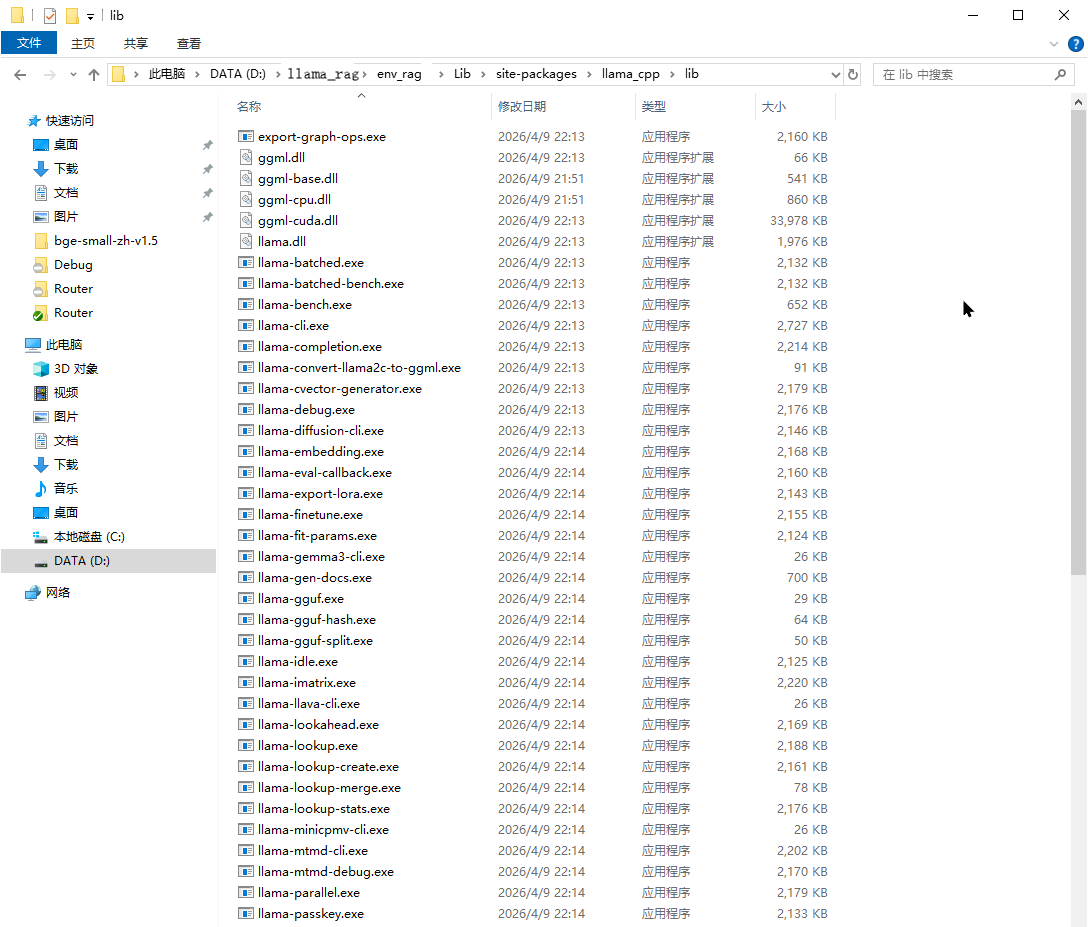
2.到"D:\llama_rag\env_rag\Lib\site-packages\llama_cpp"目录下找到lib文件夹,如果没有lib文件夹则新建一个lib文件夹
3.把步骤一中生成的build\bin\Release下会生成对应的二进制文件拷贝到lib目录下
4.重新执行代码:from llama_cpp import Llama后,没有报错即表示已经应用的自己编译的llama.cpp
>>> from llama_cpp import Llama
>>>
至此,完毕