文章目录
- 一、表格滚动效果
- 二、效果演示
- 三、系统分析
-
- 1.页面结构
-
- [1.1 容器区域](#1.1 容器区域)
- [1.2 表头区域](#1.2 表头区域)
- [1.3 滚动表格区域](#1.3 滚动表格区域)
- [2 核心功能实现](#2 核心功能实现)
-
- [2.1 数据初始化与渲染](#2.1 数据初始化与渲染)
- [2.2 动态内容渲染](#2.2 动态内容渲染)
- [2.3 滚动动画控制](#2.3 滚动动画控制)
- [2.4 播放暂停控制](#2.4 播放暂停控制)
- 四、扩展建议
- 五、完整代码
一、表格滚动效果
数据可视化中的动态展示能够有效吸引用户注意力,特别是在监控大屏或排行榜场景中。当数据量较大而显示区域有限时,滚动展示成为一种高效的解决方案。通过平滑的滚动动画,可以让用户在不中断观看的情况下浏览全部数据,提升信息获取效率。本文将介绍如何使用 HTML、CSS 和 JavaScript 实现表格滚动效果。
二、效果演示
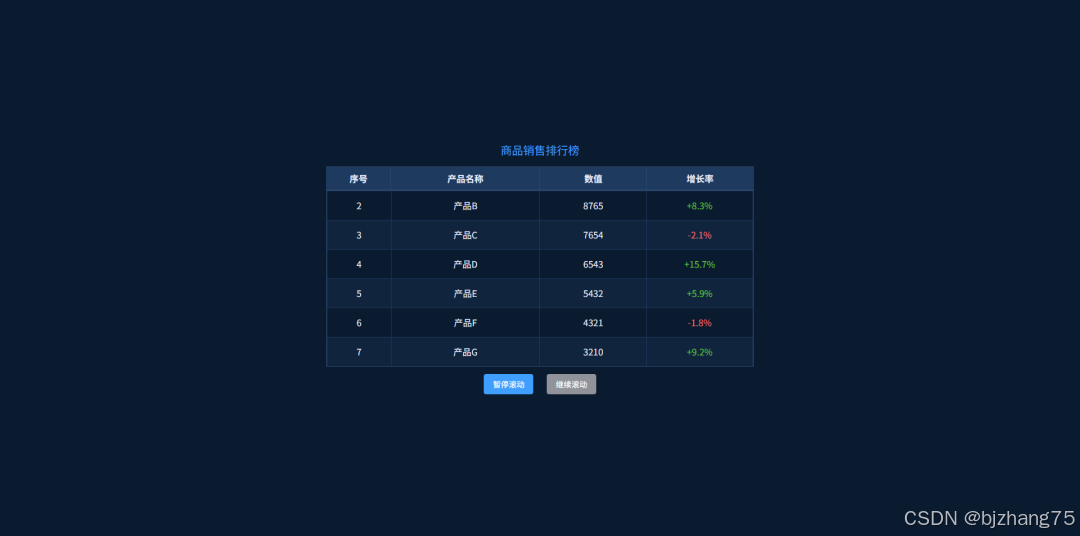
这个表格滚动效果模拟了一个商品销售排行榜的展示界面。页面顶部显示表格标题,下方是带有表头的滚动表格区域。数据行会从底部向上滚动,当一行完全滚出视窗后,其后续行继续滚动。整个滚动过程平滑连续,当所有数据都滚动完成后,会立即回到初始状态。
三、系统分析
1.页面结构
页面主要包括以下几个区域:
1.1 容器区域
包含整个表格组件的外层容器,设置了深色背景和合适的尺寸。
html
<div class="screen-container">
  <div class="table-title">商品销售排行榜</div>
  <div class="table-wrapper">
    <!-- 表格内容 -->
  </div>
  <div class="control-btn">
    <button id="pauseBtn">暂停滚动</button>
    <button id="playBtn" disabled>继续滚动</button>
  </div>
</div>
1.2 表头区域
固定不动的表格头部,包含列标题,不会随数据滚动。
html
<div class="table-header">
  <table class="header-table">
    <tr>
      <th>序号</th>
      <th>产品名称</th>
      <th>数值</th>
      <th>增长率</th>
    </tr>
  </table>
</div>
1.3 滚动表格区域
包含实际数据内容,是滚动效果的主要部分。
html
<div class="scroll-table" id="scrollTable">
  <div class="table-content" id="tableContent"></div>
</div>
2 核心功能实现
2.1 数据初始化与渲染
首先准备表格数据,并根据容器高度计算最大可见行数。initTable 函数负责初始化表格内容,它复制原始数据以创建循环效果,并计算可显示的最大行数。当数据量少于最大可见行数时,自动禁用滚动功能。
javascript
function initTable() {
  renderDataTable([...tableData, ...tableData]);

  const availableHeight = scrollTable.clientHeight;
  maxVisibleRows = Math.floor(availableHeight / rowHeight);

  if (tableData.length <= maxVisibleRows) {
    pauseBtn.disabled = true;
    playBtn.disabled = true;
    pauseBtn.textContent = '数据不足';
    return false;
  }

  return true;
}
2.2 动态内容渲染
renderDataTable 函数根据传入的数据动态生成表格 HTML 内容。该函数不仅渲染基本的表格结构,还根据增长率的正负值设置不同的颜色样式,使数据展示更加直观。
javascript
function renderDataTable(data) {
  const tableHtml = `<table class="data-table">
      ${data.map(item => `<tr>
          <td>${item.id}</td>
          <td>${item.name}</td>
          <td>${item.value}</td>
          <td style="color: ${item.rate.includes('-') ? '#f56c6c' : '#67c23a'}">${item.rate}</td>
        </tr>`).join('')}
    </table>`;
  tableContent.innerHTML = tableHtml;
}
2.3 滚动动画控制
animateScroll 函数是滚动效果的核心,通过 requestAnimationFrame 实现平滑动画,并在每行到达顶部时设置暂停状态。
javascript
function animateScroll() {
  if (!isScrolling) return;

  if (scrollState === 'scrolling') {
    const distance = targetTop - topValue;

    if (Math.abs(distance) <= scrollSpeed) {
      topValue = targetTop;
      tableContent.style.top = `${topValue}px`;

      if (currentRowIndex >= tableData.length) {
        topValue = 0;
        tableContent.style.top = `${topValue}px`;
        currentRowIndex = 0;
        renderDataTable([...tableData, ...tableData]);
        targetTop = 0;
      }

      scrollState = 'paused';

      pauseTimeoutId = setTimeout(() => {
        currentRowIndex++;
        targetTop = -currentRowIndex * rowHeight;
        scrollState = 'scrolling';
        scrollAnimationId = requestAnimationFrame(animateScroll);
      }, pauseDuration);
    } else {
      topValue += distance > 0 ? scrollSpeed : -scrollSpeed;
      tableContent.style.top = `${topValue}px`;
      scrollAnimationId = requestAnimationFrame(animateScroll);
    }
  }
}
2.4 播放暂停控制
startScroll 和 pauseScroll 函数分别负责启动和暂停滚动,同时处理动画帧和定时器的清理工作,防止内存泄漏。
javascript
function startScroll() {
  if (scrollAnimationId) cancelAnimationFrame(scrollAnimationId);
  if (pauseTimeoutId) clearTimeout(pauseTimeoutId);

  if (tableData.length > maxVisibleRows) {
    scrollState = 'scrolling';
    scrollAnimationId = requestAnimationFrame(animateScroll);
  }
}
javascript
function pauseScroll() {
  if (scrollAnimationId) {
    cancelAnimationFrame(scrollAnimationId);
    scrollAnimationId = null;
  }
  if (pauseTimeoutId) {
    clearTimeout(pauseTimeoutId);
    pauseTimeoutId = null;
  }
}
四、扩展建议
- 支持不同滚动速度配置,满足多样化展示需求
- 增加鼠标悬停暂停功能,提升用户体验
- 实现数据动态更新机制,支持实时数据展示
五、完整代码
git地址:https://gitee.com/ironpro/hjdemo/blob/master/table-moveup/index.html
html
<!DOCTYPE html>
<html lang="zh-CN">
<head>
  <meta charset="utf-8">
  <meta name="viewport" content="width=device-width, initial-scale=1.0">
  <title>表格滚动效果</title>
  <style>
    body { margin: 0; padding: 0; background-color: #0a1a2f; display: flex; justify-content: center; align-items: center; min-height: 100vh; }
    .screen-container { width: 800px; height: 490px; background-color: #0a1a2f; padding: 20px; border-radius: 8px; box-sizing: border-box; overflow: hidden; display: flex; flex-direction: column; }
    .table-title { color: #409eff; font-size: 20px; margin-bottom: 15px; text-align: center; flex-shrink: 0; }
    .table-wrapper { width: 100%; flex: 1; margin-bottom: 10px; display: flex; flex-direction: column; min-height: 0; }
    .table-header { flex-shrink: 0; width: 100%; height: 42px; }
    .header-table, .data-table { width: 100%; border-collapse: collapse; color: #e5eaf5; font-size: 16px; table-layout: fixed; }
    .header-table th, .data-table td { padding: 0 10px; text-align: center; box-sizing: border-box; white-space: nowrap; overflow: hidden; text-overflow: ellipsis; }
    .header-table th:nth-child(1), .data-table td:nth-child(1) { width: 15%; }
    .header-table th:nth-child(2), .data-table td:nth-child(2) { width: 35%; }
    .header-table th:nth-child(3), .data-table td:nth-child(3) { width: 25%; }
    .header-table th:nth-child(4), .data-table td:nth-child(4) { width: 25%; }
    .header-table th { background-color: #1e3a5f; height: 40px; line-height: 40px; border: 1px solid #2d496e; box-sizing: border-box; }
    .scroll-table { width: 100%; flex: 1; overflow: hidden; position: relative; border: 1px solid #2d496e; box-sizing: border-box; min-height: 0; }
    .table-content { position: absolute; top: 0; left: 0; width: 100%; }
    .data-table tr { height: 52px; line-height: 50px; box-sizing: border-box; }
    .data-table td { border: 1px solid #1e3a5f; box-sizing: border-box; height: 50px; vertical-align: middle; }
    .data-table tr:nth-child(odd) { background-color: rgba(30, 58, 95, 0.3); }
    .data-table tr:hover { background-color: rgba(64, 158, 255, 0.2); }
    .control-btn { text-align: center; height: 40px; line-height: 40px; }
    button { padding: 8px 16px; margin: 0 10px; background-color: #409eff; color: white; border: none; border-radius: 4px; cursor: pointer; font-size: 14px; }
    button:hover { background-color: #66b1ff; }
    button:disabled { background-color: #909399; cursor: not-allowed; }
  </style>
</head>
<body>
<div class="screen-container">
  <div class="table-title">商品销售排行榜</div>
  <div class="table-wrapper">
    <div class="table-header">
      <table class="header-table">
        <tr>
          <th>序号</th>
          <th>产品名称</th>
          <th>数值</th>
          <th>增长率</th>
        </tr>
      </table>
    </div>
    <div class="scroll-table" id="scrollTable">
      <div class="table-content" id="tableContent"></div>
    </div>
  </div>
  <div class="control-btn">
    <button id="pauseBtn">暂停滚动</button>
    <button id="playBtn" disabled>继续滚动</button>
  </div>
</div>

<script>
  const tableData = [
    { id: 1, name: '产品A', value: '9876', rate: '+12.5%' },
    { id: 2, name: '产品B', value: '8765', rate: '+8.3%' },
    { id: 3, name: '产品C', value: '7654', rate: '-2.1%' },
    { id: 4, name: '产品D', value: '6543', rate: '+15.7%' },
    { id: 5, name: '产品E', value: '5432', rate: '+5.9%' },
    { id: 6, name: '产品F', value: '4321', rate: '-1.8%' },
    { id: 7, name: '产品G', value: '3210', rate: '+9.2%' },
    { id: 8, name: '产品H', value: '2109', rate: '+7.4%' }
  ];

  const tableContent = document.getElementById('tableContent');
  const scrollTable = document.getElementById('scrollTable');
  const pauseBtn = document.getElementById('pauseBtn');
  const playBtn = document.getElementById('playBtn');

  let scrollAnimationId = null;
  let pauseTimeoutId = null;
  let isScrolling = true;
  const rowHeight = 52;
  let topValue = 0;
  let targetTop = 0;
  let currentRowIndex = 0;
  let scrollSpeed = 2;
  let pauseDuration = 1500;
  let maxVisibleRows = 0;
  let scrollState = 'scrolling';

  function initTable() {
    renderDataTable([...tableData, ...tableData]);

    const availableHeight = scrollTable.clientHeight;
    maxVisibleRows = Math.floor(availableHeight / rowHeight);

    if (tableData.length <= maxVisibleRows) {
      pauseBtn.disabled = true;
      playBtn.disabled = true;
      pauseBtn.textContent = '数据不足';
      return false;
    }

    return true;
  }

  function renderDataTable(data) {
    const tableHtml = `<table class="data-table">
        ${data.map(item => `<tr> <td>${item.id}</td> <td>${item.name}</td> <td>${item.value}</td> <td style="color: ${item.rate.includes('-') ? '#f56c6c' : '#67c23a'}">${item.rate}</td> </tr>`).join('')}
      </table>`;
    tableContent.innerHTML = tableHtml;
  }

  function animateScroll() {
    if (!isScrolling) return;

    if (scrollState === 'scrolling') {
      const distance = targetTop - topValue;

      if (Math.abs(distance) <= scrollSpeed) {
        topValue = targetTop;
        tableContent.style.top = `${topValue}px`;

        if (currentRowIndex >= tableData.length) {
          topValue = 0;
          tableContent.style.top = `${topValue}px`;
          currentRowIndex = 0;
          renderDataTable([...tableData, ...tableData]);
          targetTop = 0;
        }

        scrollState = 'paused';

        pauseTimeoutId = setTimeout(() => {
          currentRowIndex++;
          targetTop = -currentRowIndex * rowHeight;
          scrollState = 'scrolling';
          scrollAnimationId = requestAnimationFrame(animateScroll);
        }, pauseDuration);
      } else {
        topValue += distance > 0 ? scrollSpeed : -scrollSpeed;
        tableContent.style.top = `${topValue}px`;
        scrollAnimationId = requestAnimationFrame(animateScroll);
      }
    }
  }

  function startScroll() {
    if (scrollAnimationId) cancelAnimationFrame(scrollAnimationId);
    if (pauseTimeoutId) clearTimeout(pauseTimeoutId);

    if (tableData.length > maxVisibleRows) {
      scrollState = 'scrolling';
      scrollAnimationId = requestAnimationFrame(animateScroll);
    }
  }

  function pauseScroll() {
    if (scrollAnimationId) {
      cancelAnimationFrame(scrollAnimationId);
      scrollAnimationId = null;
    }
    if (pauseTimeoutId) {
      clearTimeout(pauseTimeoutId);
      pauseTimeoutId = null;
    }
  }

  pauseBtn.addEventListener('click', () => {
    if (isScrolling) {
      pauseScroll();
      isScrolling = false;
      pauseBtn.disabled = true;
      playBtn.disabled = false;
      pauseBtn.textContent = '已暂停';
    }
  });

  playBtn.addEventListener('click', () => {
    if (!isScrolling && tableData.length > maxVisibleRows) {
      isScrolling = true;
      startScroll();
      pauseBtn.disabled = false;
      playBtn.disabled = true;
      pauseBtn.textContent = '暂停滚动';
    }
  });

  const isInitable = initTable();
  if (isInitable) {
    startScroll();
  }

  window.addEventListener('beforeunload', () => {
    if (scrollAnimationId) {
      cancelAnimationFrame(scrollAnimationId);
    }
    if (pauseTimeoutId) {
      clearTimeout(pauseTimeoutId);
    }
  });
</script>
</body>
</html>