实时天气查询应用
欢迎加入开源鸿蒙跨平台社区:
https://openharmonycrossplatform.csdn.net
适配的第三方库地址:
一、项目概述
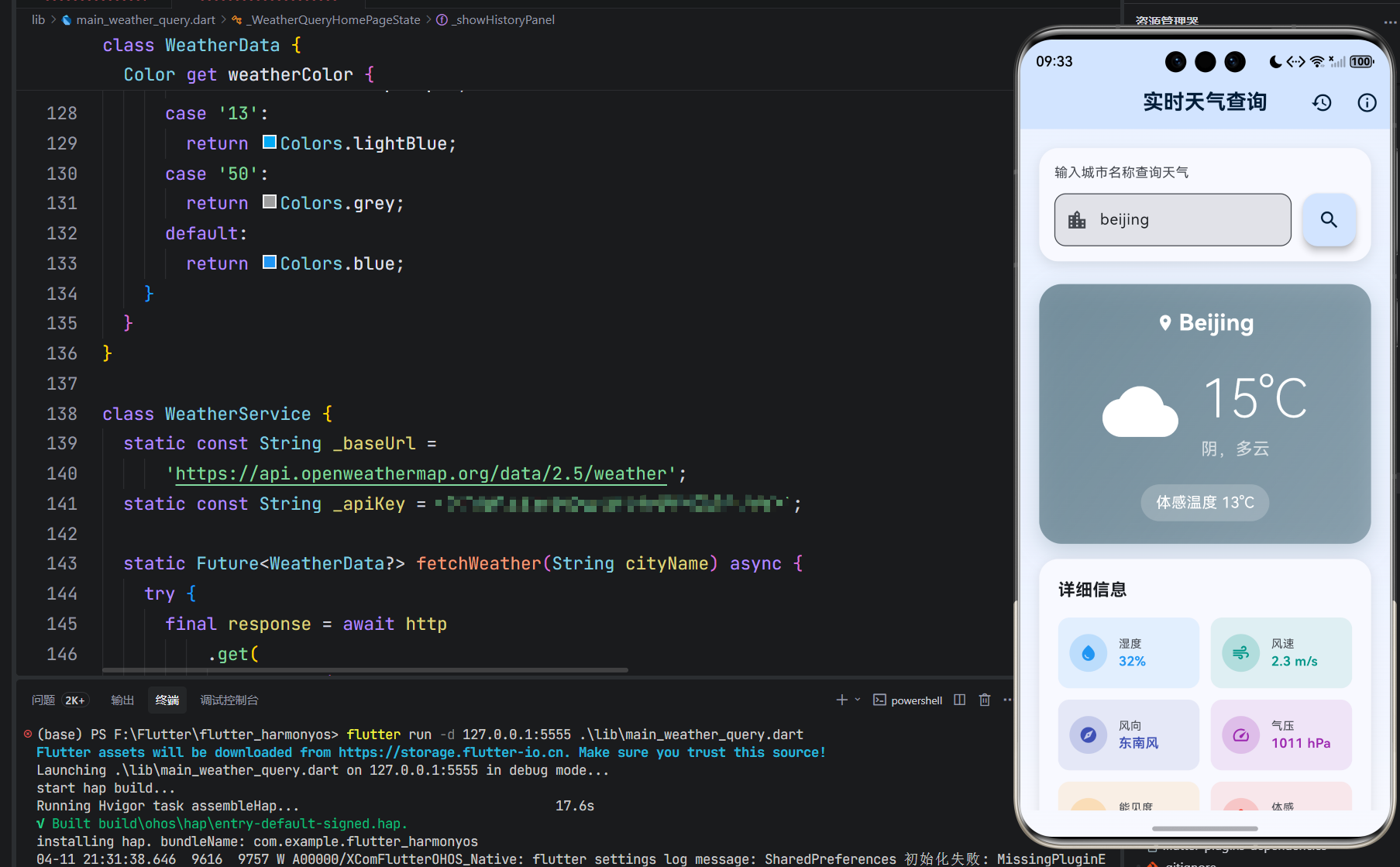
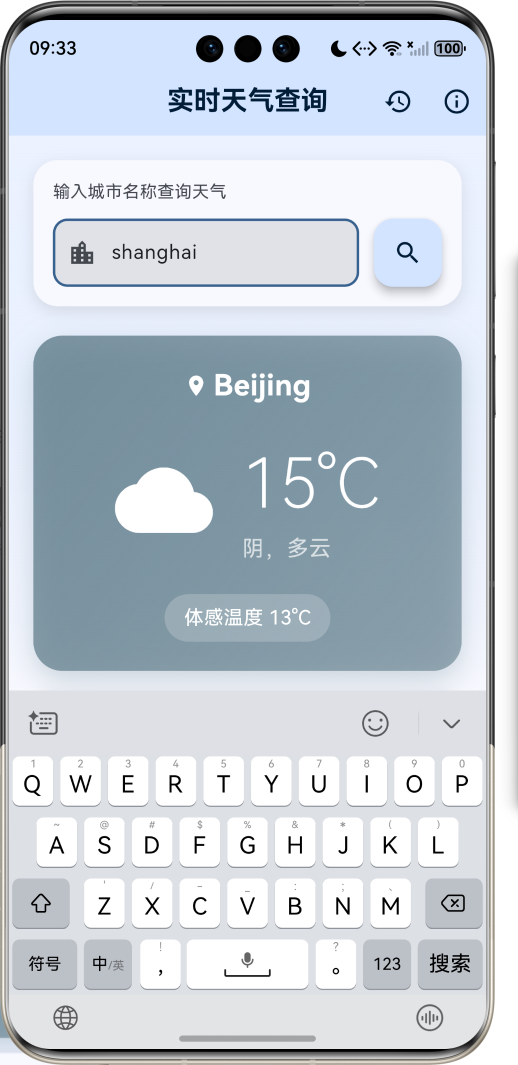
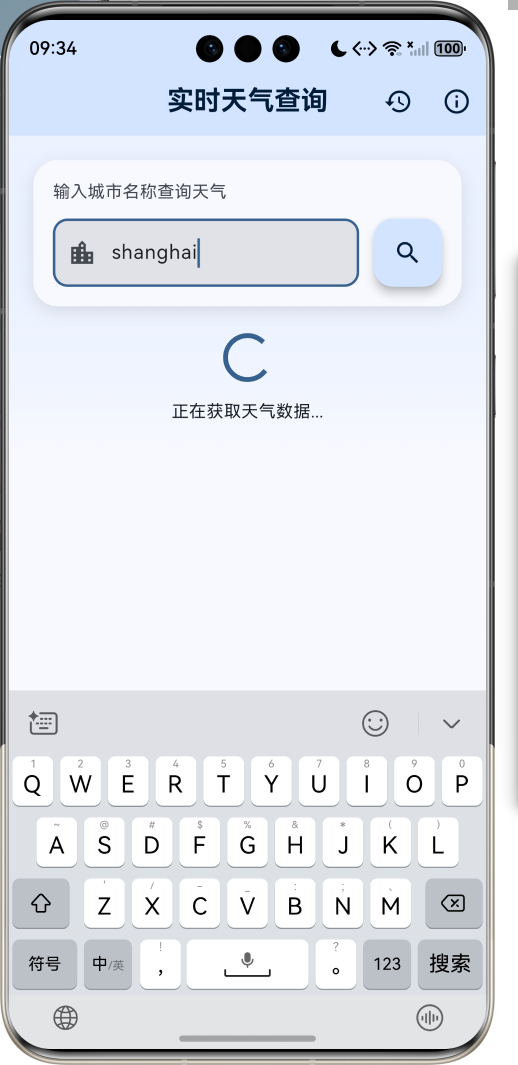
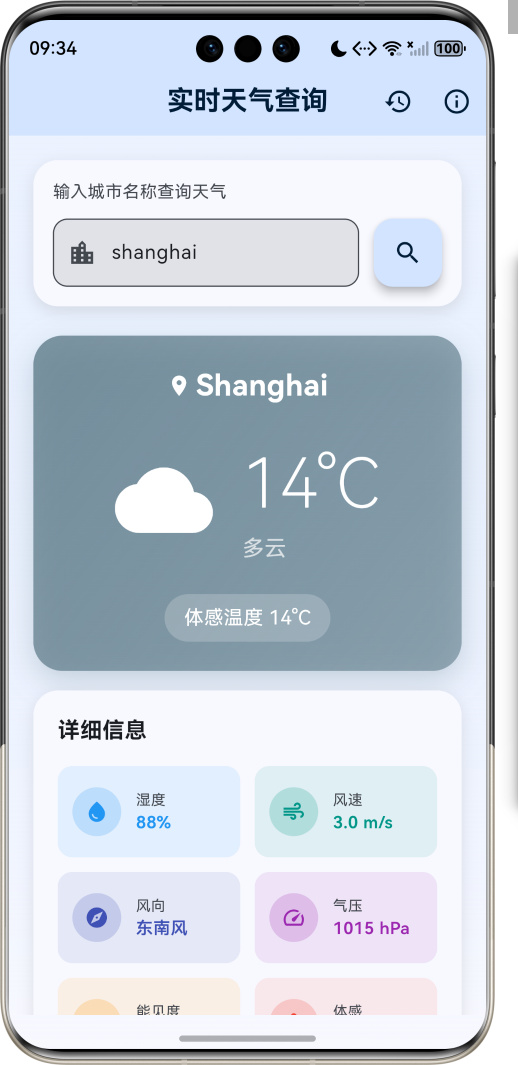
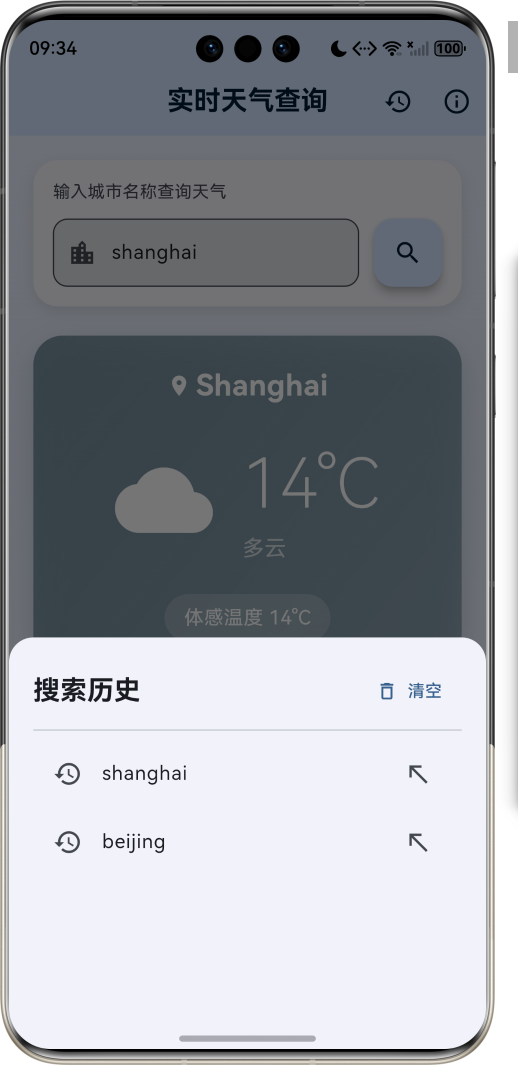
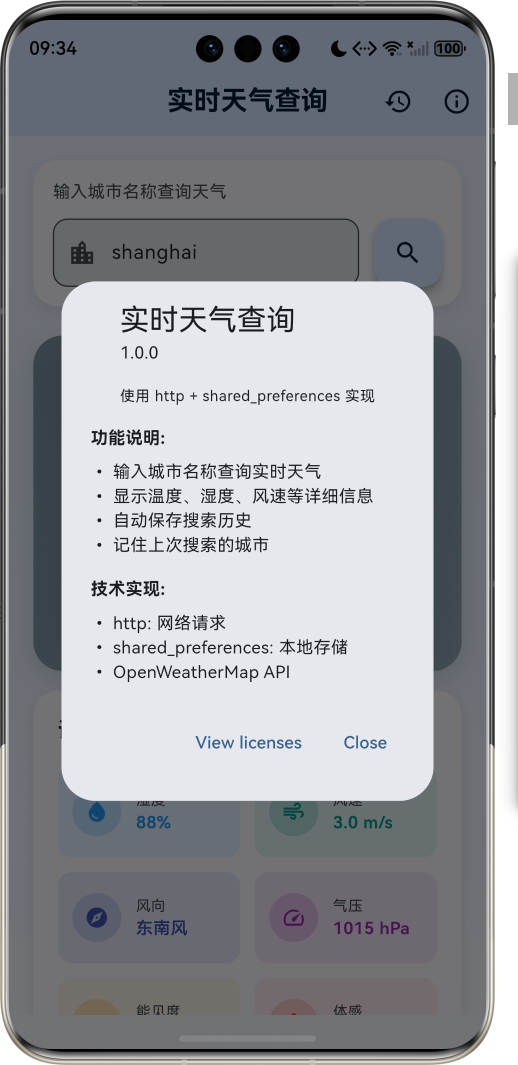
运行效果图
1.1 应用简介
实时天气查询是一款简洁实用的天气信息获取应用,用户只需输入城市名称,即可快速获取该城市的实时天气数据。应用采用清新的蓝色调设计,界面简洁直观,操作便捷流畅。支持全球主要城市的天气查询,数据来源可靠,更新及时准确。
应用以天空蓝为主色调,象征晴朗与清新。涵盖城市搜索、天气展示、搜索历史三大核心模块。用户可以快速查询任意城市的温度、湿度、风速、气压等详细信息,同时应用会自动保存搜索记录,方便下次快速访问。无论是出行规划还是日常关注天气变化,这款应用都能为用户提供及时准确的天气信息。
1.2 核心功能
| 功能模块 |
功能描述 |
实现方式 |
优先级 |
| 城市搜索 |
输入城市名称查询天气 |
http网络请求 |
高 |
| 实时天气 |
显示当前温度、天气状况 |
OpenWeatherMap API |
高 |
| 详细信息 |
湿度、风速、气压、能见度等 |
数据解析展示 |
高 |
| 搜索历史 |
保存最近搜索的城市列表 |
SharedPreferences |
中 |
| 自动记忆 |
记住上次搜索的城市 |
本地持久化存储 |
中 |
| 错误处理 |
网络异常、城市不存在提示 |
异常捕获机制 |
高 |
| 历史管理 |
清空搜索历史记录 |
SharedPreferences |
低 |
1.3 天气类型定义
| 序号 |
天气类型 |
Emoji |
图标 |
Icon Code |
描述 |
| 1 |
晴天 |
☀️ |
wb_sunny |
01d/01n |
天空晴朗无云 |
| 2 |
少云 |
🌤️ |
cloud |
02d/02n |
云量较少 |
| 3 |
多云 |
⛅ |
cloud |
03d/03n |
云层较多 |
| 4 |
阴天 |
☁️ |
cloud |
04d/04n |
云层密布 |
| 5 |
小雨 |
🌧️ |
grain |
09d/09n |
细雨绵绵 |
| 6 |
中雨 |
🌧️ |
grain |
10d/10n |
雨势适中 |
| 7 |
雷阵雨 |
⛈️ |
flash_on |
11d/11n |
雷电交加 |
| 8 |
雪 |
🌨️ |
ac_unit |
13d/13n |
银装素裹 |
| 9 |
雾 |
🌫️ |
blur_on |
50d/50n |
雾气弥漫 |
1.4 风向角度对照表
| 角度范围 |
风向 |
角度范围 |
风向 |
| 337.5° - 22.5° |
北风 |
157.5° - 202.5° |
南风 |
| 22.5° - 67.5° |
东北风 |
202.5° - 247.5° |
西南风 |
| 67.5° - 112.5° |
东风 |
247.5° - 292.5° |
西风 |
| 112.5° - 157.5° |
东南风 |
292.5° - 337.5° |
西北风 |
1.5 技术栈
| 技术领域 |
技术选型 |
版本要求 |
用途说明 |
| 开发框架 |
Flutter |
>= 3.0.0 |
跨平台UI框架 |
| 编程语言 |
Dart |
>= 2.17.0 |
应用开发语言 |
| 设计规范 |
Material Design 3 |
- |
UI设计规范 |
| 网络请求 |
http |
>= 1.2.2 |
HTTP客户端库 |
| 本地存储 |
SharedPreferences |
>= 2.5.3 |
轻量级键值存储 |
| 天气API |
OpenWeatherMap |
- |
天气数据源 |
| 目标平台 |
鸿蒙OS / Web / Android / iOS |
API 21+ |
多平台支持 |
1.6 项目结构
lib/
└── main_weather_query.dart
    ├── WeatherQueryApp              # 应用入口 Widget
    ├── WeatherData                  # 天气数据模型
    │   ├── cityName                 # 城市名称
    │   ├── temperature              # 当前温度
    │   ├── feelsLike                # 体感温度
    │   ├── humidity                 # 湿度
    │   ├── windSpeed                # 风速
    │   ├── windDirection            # 风向
    │   ├── description              # 天气描述
    │   ├── iconCode                 # 图标代码
    │   ├── pressure                 # 气压
    │   ├── visibility               # 能见度
    │   └── updateTime               # 更新时间
    ├── WeatherService               # 天气服务类
    │   ├── fetchWeather()           # 按城市名获取天气
    │   └── fetchWeatherByLocation() # 按坐标获取天气
    └── WeatherQueryHomePage         # 主页面
        ├── _searchController        # 搜索输入控制器
        ├── _weatherData             # 当前天气数据
        ├── _isLoading               # 加载状态
        ├── _errorMessage            # 错误信息
        ├── _prefs                   # SharedPreferences实例
        ├── _searchHistory           # 搜索历史列表
        ├── _buildSearchSection()    # 构建搜索区域
        ├── _buildMainWeatherCard()  # 构建主天气卡片
        ├── _buildWeatherDetails()   # 构建详细信息
        ├── _buildEmptyState()       # 构建空状态
        ├── _buildErrorWidget()      # 构建错误提示
        ├── _showHistoryPanel()      # 显示历史面板
        ├── _searchWeather()         # 执行搜索
        ├── _saveSearchHistory()     # 保存搜索历史
        └── _clearSearchHistory()    # 清空搜索历史
二、系统架构
2.1 整体架构图
Data Layer
Business Layer
Presentation Layer
主页面
WeatherQueryHomePage
搜索区域
天气卡片
详细信息
历史面板
输入框
搜索按钮
城市名称
温度显示
天气图标
天气描述
湿度
风速
风向
气压
能见度
历史列表
清空按钮
天气服务
WeatherService
数据解析
WeatherData.fromJson
HTTP请求
http.get
本地存储
SharedPreferences
OpenWeatherMap API
2.2 类图设计
creates
uses
calls
creates
WeatherQueryApp
+Widget build()
WeatherData
+String cityName
+double temperature
+double feelsLike
+int humidity
+double windSpeed
+String windDirection
+String description
+String iconCode
+int pressure
+int visibility
+DateTime updateTime
+fromJSON() : WeatherData
+get weatherIcon() : IconData
+get weatherColor() : Color
-_getWindDirection() : String
-_capitalizeFirst() : String
WeatherService
-String _baseUrl
-String _apiKey
+fetchWeather() : Future<WeatherData?>
+fetchWeatherByLocation() : Future<WeatherData?>
WeatherQueryHomePage
-TextEditingController _searchController
-WeatherData? _weatherData
-bool _isLoading
-String? _errorMessage
-SharedPreferences? _prefs
-List<String> _searchHistory
-int _maxHistoryCount
+initState()
+dispose()
+build() : Widget
-_initPrefs()
-_loadSearchHistory()
-_loadLastSearchedCity()
-_saveSearchHistory()
-_clearSearchHistory()
-_searchWeather()
-_showHistoryPanel()
-_buildSearchSection() : Widget
-_buildMainWeatherCard() : Widget
-_buildWeatherDetails() : Widget
-_buildEmptyState() : Widget
-_buildErrorWidget() : Widget
2.3 页面导航流程
是
否
是
否
成功
失败
重试
修改城市
搜索新城市
查看历史
刷新
点击城市
清空历史
应用启动
初始化SharedPreferences
初始化成功?
有上次搜索记录?
显示空状态
自动加载上次城市天气
显示天气数据
等待用户输入
用户输入城市名称
点击搜索/回车
显示加载状态
发送HTTP请求
请求结果
解析天气数据
显示错误信息
更新UI显示
保存搜索历史
保存为上次搜索城市
用户操作
用户操作
显示历史面板
重新请求当前城市
选择历史城市
清空搜索历史
2.4 网络请求时序图
SharedPreferences OpenWeatherMap API HTTP客户端 天气服务 主页面 用户 SharedPreferences OpenWeatherMap API HTTP客户端 天气服务 主页面 用户 alt 请求成功 请求失败 网络超时 输入城市名称 点击搜索按钮 设置加载状态 fetchWeather(cityName) http.get(url) GET /weather?q=city&appid=key 200 OK + JSON数据 Response对象 解析JSON为WeatherData WeatherData对象 保存搜索历史 保存成功 更新UI显示天气 显示天气信息 404/其他错误 错误响应 null 设置错误信息 显示错误提示 TimeoutException null 显示超时提示
三、核心模块设计
3.1 数据模型设计
3.1.1 天气数据模型 (WeatherData)
class WeatherData {
  final String cityName;
  final double temperature;
  final double feelsLike;
  final int humidity;
  final double windSpeed;
  final String windDirection;
  final String description;
  final String iconCode;
  final int pressure;
  final int visibility;
  final DateTime updateTime;

  WeatherData({
    required this.cityName,
    required this.temperature,
    required this.feelsLike,
    required this.humidity,
    required this.windSpeed,
    required this.windDirection,
    required this.description,
    required this.iconCode,
    required this.pressure,
    required this.visibility,
    required this.updateTime,
  });

  factory WeatherData.fromJson(Map<String, dynamic> json) {
    return WeatherData(
      cityName: json['name'] ?? '未知城市',
      temperature: (json['main']['temp'] as num?)?.toDouble() ?? 0.0,
      feelsLike: (json['main']['feels_like'] as num?)?.toDouble() ?? 0.0,
      humidity: json['main']['humidity'] ?? 0,
      windSpeed: (json['wind']['speed'] as num?)?.toDouble() ?? 0.0,
      windDirection: _getWindDirection(json['wind']['deg']),
      description: _capitalizeFirst(json['weather'][0]['description'] ?? '未知'),
      iconCode: json['weather'][0]['icon'] ?? '01d',
      pressure: json['main']['pressure'] ?? 1013,
      visibility: (json['visibility'] as int?) ?? 10000,
      updateTime: DateTime.now(),
    );
  }

  static String _getWindDirection(int? deg) {
    if (deg == null) return '未知';
    const directions = ['北', '东北', '东', '东南', '南', '西南', '西', '西北'];
    final index = ((deg + 22.5) ~/ 45) % 8;
    return '${directions[index]}风';
  }

  static String _capitalizeFirst(String text) {
    if (text.isEmpty) return text;
    return text[0].toUpperCase() + text.substring(1);
  }

  IconData get weatherIcon {
    switch (iconCode.substring(0, 2)) {
      case '01': return Icons.wb_sunny;
      case '02': case '03': case '04': return Icons.cloud;
      case '09': case '10': return Icons.grain;
      case '11': return Icons.flash_on;
      case '13': return Icons.ac_unit;
      case '50': return Icons.blur_on;
      default: return Icons.wb_cloudy;
    }
  }

  Color get weatherColor {
    switch (iconCode.substring(0, 2)) {
      case '01': return Colors.orange;
      case '02': case '03': case '04': return Colors.blueGrey;
      case '09': case '10': return Colors.indigo;
      case '11': return Colors.deepPurple;
      case '13': return Colors.lightBlue;
      case '50': return Colors.grey;
      default: return Colors.blue;
    }
  }
}
3.1.2 字段说明表
| 字段名 |
类型 |
来源 |
说明 |
| cityName |
String |
json'name' |
城市名称 |
| temperature |
double |
json'main''temp' |
当前温度(摄氏度) |
| feelsLike |
double |
json'main''feels_like' |
体感温度 |
| humidity |
int |
json'main''humidity' |
相对湿度(%) |
| windSpeed |
double |
json'wind''speed' |
风速(m/s) |
| windDirection |
String |
json'wind''deg' |
风向(计算得出) |
| description |
String |
json'weather'0'description' |
天气描述 |
| iconCode |
String |
json'weather'0'icon' |
天气图标代码 |
| pressure |
int |
json'main''pressure' |
大气压强(hPa) |
| visibility |
int |
json'visibility' |
能见度(米) |
| updateTime |
DateTime |
DateTime.now() |
数据更新时间 |
3.2 天气服务类设计
3.2.1 WeatherService 完整实现
class WeatherService {
  static const String _baseUrl = 'https://api.openweathermap.org/data/2.5/weather';
  static const String _apiKey = 'YOUR_API_KEY';

  static Future<WeatherData?> fetchWeather(String cityName) async {
    if (cityName.trim().isEmpty) {
      debugPrint('城市名称不能为空');
      return null;
    }

    try {
      final uri = Uri.parse(
        '$_baseUrl?q=${Uri.encodeComponent(cityName)}&appid=$_apiKey&units=metric&lang=zh_cn'
      );

      debugPrint('请求URL: $uri');

      final response = await http.get(uri).timeout(
        const Duration(seconds: 10),
        onTimeout: () {
          throw TimeoutException('请求超时,请检查网络连接');
        },
      );

      debugPrint('响应状态码: ${response.statusCode}');
      debugPrint('响应内容: ${response.body}');

      if (response.statusCode == 200) {
        final jsonData = json.decode(response.body);
        return WeatherData.fromJson(jsonData);
      } else if (response.statusCode == 404) {
        debugPrint('未找到城市: $cityName');
        return null;
      } else if (response.statusCode == 401) {
        debugPrint('API密钥无效');
        return null;
      } else {
        debugPrint('API错误: ${response.statusCode}');
        return null;
      }
    } on http.ClientException catch (e) {
      debugPrint('网络请求异常: $e');
      return null;
    } on TimeoutException catch (e) {
      debugPrint('请求超时: $e');
      return null;
    } on FormatException catch (e) {
      debugPrint('JSON解析错误: $e');
      return null;
    } catch (e) {
      debugPrint('未知错误: $e');
      return null;
    }
  }

  static Future<WeatherData?> fetchWeatherByLocation(double lat, double lon) async {
    try {
      final uri = Uri.parse(
        '$_baseUrl?lat=$lat&lon=$lon&appid=$_apiKey&units=metric&lang=zh_cn'
      );

      final response = await http.get(uri).timeout(
        const Duration(seconds: 10),
      );

      if (response.statusCode == 200) {
        return WeatherData.fromJson(json.decode(response.body));
      }
      return null;
    } catch (e) {
      debugPrint('按位置获取天气失败: $e');
      return null;
    }
  }
}
3.2.2 错误处理策略
| 异常类型 |
处理方式 |
用户提示 |
| ClientException |
返回null |
"网络连接失败,请检查网络" |
| TimeoutException |
返回null |
"请求超时,请稍后重试" |
| FormatException |
返回null |
"数据解析错误" |
| HTTP 404 |
返回null |
"未找到该城市" |
| HTTP 401 |
返回null |
"API密钥无效" |
| HTTP 5xx |
返回null |
"服务器错误,请稍后重试" |
3.3 本地存储设计
3.3.1 SharedPreferences 完整实现
class _WeatherQueryHomePageState extends State<WeatherQueryHomePage> {
  SharedPreferences? _prefs;
  List<String> _searchHistory = [];
  static const int _maxHistoryCount = 10;
  static const String _historyKey = 'search_history';
  static const String _lastCityKey = 'last_city';

  Future<void> _initPrefs() async {
    try {
      _prefs = await SharedPreferences.getInstance().timeout(
        const Duration(seconds: 3),
        onTimeout: () => throw TimeoutException('SharedPreferences 初始化超时'),
      );
      _loadSearchHistory();
      _loadLastSearchedCity();
    } on TimeoutException catch (e) {
      debugPrint('SharedPreferences 初始化超时: $e');
    } catch (e) {
      debugPrint('SharedPreferences 初始化失败: $e');
    }
  }

  void _loadSearchHistory() {
    _searchHistory = _prefs?.getStringList(_historyKey) ?? [];
    setState(() {});
  }

  void _loadLastSearchedCity() {
    final lastCity = _prefs?.getString(_lastCityKey);
    if (lastCity != null && lastCity.isNotEmpty) {
      _searchController.text = lastCity;
      _searchWeather(lastCity);
    }
  }

  Future<void> _saveSearchHistory(String city) async {
    if (city.trim().isEmpty) return;

    _searchHistory.remove(city);
    _searchHistory.insert(0, city);

    if (_searchHistory.length > _maxHistoryCount) {
      _searchHistory = _searchHistory.sublist(0, _maxHistoryCount);
    }

    await _prefs?.setStringList(_historyKey, _searchHistory);
    await _prefs?.setString(_lastCityKey, city);

    setState(() {});
  }

  Future<void> _clearSearchHistory() async {
    await _prefs?.remove(_historyKey);
    setState(() {
      _searchHistory = [];
    });
  }
}
3.3.2 存储键值定义
| 键名常量 |
值 |
类型 |
说明 |
| _historyKey |
'search_history' |
String |
搜索历史列表的键 |
| _lastCityKey |
'last_city' |
String |
上次搜索城市的键 |
| _maxHistoryCount |
10 |
int |
最大历史记录数量 |
四、API 接口详解
4.1 OpenWeatherMap API
4.1.1 接口基础信息
4.1.2 请求参数详解
| 参数名 |
类型 |
必填 |
默认值 |
说明 |
| q |
String |
二选一 |
- |
城市名称,支持中文和英文 |
| lat |
double |
二选一 |
- |
纬度,与lon配合使用 |
| lon |
double |
二选一 |
- |
经度,与lat配合使用 |
| appid |
String |
是 |
- |
API密钥 |
| units |
String |
否 |
standard |
温度单位:metric(摄氏度)、imperial(华氏度) |
| lang |
String |
否 |
en |
语言:zh_cn(中文)、en(英文)等 |
| mode |
String |
否 |
json |
返回格式:json、xml |
4.1.3 完整响应示例
{
  "coord": {
    "lon": 116.3972,
    "lat": 39.9075
  },
  "weather": [
    {
      "id": 800,
      "main": "Clear",
      "description": "晴",
      "icon": "01d"
    }
  ],
  "base": "stations",
  "main": {
    "temp": 25.5,
    "feels_like": 26.2,
    "temp_min": 23.0,
    "temp_max": 28.0,
    "pressure": 1013,
    "humidity": 65,
    "sea_level": 1013,
    "grnd_level": 1008
  },
  "visibility": 10000,
  "wind": {
    "speed": 3.5,
    "deg": 180,
    "gust": 5.2
  },
  "clouds": {
    "all": 0
  },
  "dt": 1705312800,
  "sys": {
    "type": 2,
    "id": 2036468,
    "country": "CN",
    "sunrise": 1705286400,
    "sunset": 1705321200
  },
  "timezone": 28800,
  "id": 1816670,
  "name": "Beijing",
  "cod": 200
}
4.1.4 响应字段说明
| 字段路径 |
类型 |
说明 |
| name |
String |
城市名称 |
| coord.lon |
double |
经度 |
| coord.lat |
double |
纬度 |
| weather0.id |
int |
天气状况ID |
| weather0.main |
String |
天气主分类 |
| weather0.description |
String |
天气详细描述 |
| weather0.icon |
String |
天气图标代码 |
| main.temp |
double |
当前温度 |
| main.feels_like |
double |
体感温度 |
| main.temp_min |
double |
最低温度 |
| main.temp_max |
double |
最高温度 |
| main.pressure |
int |
大气压强(hPa) |
| main.humidity |
int |
相对湿度(%) |
| visibility |
int |
能见度(米) |
| wind.speed |
double |
风速(m/s) |
| wind.deg |
int |
风向角度 |
| wind.gust |
double |
阵风速度 |
| clouds.all |
int |
云量(%) |
| sys.country |
String |
国家代码 |
| sys.sunrise |
int |
日出时间戳 |
| sys.sunset |
int |
日落时间戳 |
| timezone |
int |
时区偏移(秒) |
| dt |
int |
数据计算时间戳 |
4.2 获取API密钥
4.2.1 注册步骤
访问 OpenWeatherMap 官网
点击 Sign Up 注册
填写注册信息
验证邮箱
登录账号
进入 API Keys 页面
复制默认密钥或创建新密钥
替换代码中的 YOUR_API_KEY
4.2.2 免费套餐限制
| 项目 |
限制 |
| 每日请求次数 |
1000次 |
| 每分钟请求次数 |
60次 |
| 支持的API |
Current Weather, 5 Day Forecast等 |
| 数据更新频率 |
每10分钟 |
五、UI 组件设计
5.1 搜索区域组件
Widget _buildSearchSection(ColorScheme colorScheme) {
  return Container(
    padding: const EdgeInsets.all(16),
    decoration: BoxDecoration(
      color: colorScheme.surface,
      borderRadius: BorderRadius.circular(20),
      boxShadow: [
        BoxShadow(
          color: colorScheme.shadow.withValues(alpha: 0.1),
          blurRadius: 10,
          offset: const Offset(0, 4),
        ),
      ],
    ),
    child: Column(
      crossAxisAlignment: CrossAxisAlignment.stretch,
      children: [
        Text(
          '输入城市名称查询天气',
          style: TextStyle(
            fontSize: 14,
            color: colorScheme.onSurfaceVariant,
          ),
        ),
        const SizedBox(height: 12),
        Row(
          children: [
            Expanded(
              child: TextField(
                controller: _searchController,
                decoration: InputDecoration(
                  hintText: '例如:北京、上海、广州',
                  prefixIcon: const Icon(Icons.location_city),
                  border: OutlineInputBorder(
                    borderRadius: BorderRadius.circular(12),
                  ),
                  filled: true,
                  fillColor: colorScheme.surfaceContainerHighest,
                ),
                onSubmitted: _searchWeather,
                textInputAction: TextInputAction.search,
              ),
            ),
            const SizedBox(width: 12),
            FloatingActionButton(
              onPressed: () => _searchWeather(_searchController.text),
              child: const Icon(Icons.search),
            ),
          ],
        ),
      ],
    ),
  );
}
5.2 主天气卡片组件
Widget _buildMainWeatherCard(ColorScheme colorScheme) {
  return Container(
    padding: const EdgeInsets.all(24),
    decoration: BoxDecoration(
      gradient: LinearGradient(
        begin: Alignment.topLeft,
        end: Alignment.bottomRight,
        colors: [
          _weatherData!.weatherColor.withValues(alpha: 0.8),
          _weatherData!.weatherColor.withValues(alpha: 0.6),
        ],
      ),
      borderRadius: BorderRadius.circular(24),
      boxShadow: [
        BoxShadow(
          color: _weatherData!.weatherColor.withValues(alpha: 0.3),
          blurRadius: 20,
          offset: const Offset(0, 8),
        ),
      ],
    ),
    child: Column(
      children: [
        Row(
          mainAxisAlignment: MainAxisAlignment.center,
          children: [
            const Icon(Icons.location_on, color: Colors.white, size: 20),
            const SizedBox(width: 4),
            Text(
              _weatherData!.cityName,
              style: const TextStyle(
                fontSize: 24,
                fontWeight: FontWeight.bold,
                color: Colors.white,
              ),
            ),
          ],
        ),
        const SizedBox(height: 24),
        Row(
          mainAxisAlignment: MainAxisAlignment.center,
          children: [
            Icon(_weatherData!.weatherIcon, size: 80, color: Colors.white),
            const SizedBox(width: 24),
            Column(
              crossAxisAlignment: CrossAxisAlignment.start,
              children: [
                Text(
                  '${_weatherData!.temperature.round()}°C',
                  style: const TextStyle(
                    fontSize: 56,
                    fontWeight: FontWeight.w200,
                    color: Colors.white,
                  ),
                ),
                Text(
                  _weatherData!.description,
                  style: const TextStyle(fontSize: 18, color: Colors.white70),
                ),
              ],
            ),
          ],
        ),
        const SizedBox(height: 24),
        Container(
          padding: const EdgeInsets.symmetric(horizontal: 16, vertical: 8),
          decoration: BoxDecoration(
            color: Colors.white.withValues(alpha: 0.2),
            borderRadius: BorderRadius.circular(20),
          ),
          child: Text(
            '体感温度 ${_weatherData!.feelsLike.round()}°C',
            style: const TextStyle(fontSize: 16, color: Colors.white),
          ),
        ),
      ],
    ),
  );
}
5.3 详细信息网格组件
Widget _buildWeatherDetails(ColorScheme colorScheme) {
  return Container(
    padding: const EdgeInsets.all(20),
    decoration: BoxDecoration(
      color: colorScheme.surface,
      borderRadius: BorderRadius.circular(20),
      boxShadow: [
        BoxShadow(
          color: colorScheme.shadow.withValues(alpha: 0.1),
          blurRadius: 10,
          offset: const Offset(0, 4),
        ),
      ],
    ),
    child: Column(
      crossAxisAlignment: CrossAxisAlignment.start,
      children: [
        Text(
          '详细信息',
          style: TextStyle(
            fontSize: 18,
            fontWeight: FontWeight.bold,
            color: colorScheme.onSurface,
          ),
        ),
        const SizedBox(height: 16),
        GridView.count(
          shrinkWrap: true,
          physics: const NeverScrollableScrollPhysics(),
          crossAxisCount: 2,
          childAspectRatio: 2.0,
          crossAxisSpacing: 12,
          mainAxisSpacing: 12,
          children: [
            _buildDetailItem(Icons.water_drop, '湿度', '${_weatherData!.humidity}%', Colors.blue),
            _buildDetailItem(Icons.air, '风速', '${_weatherData!.windSpeed.toStringAsFixed(1)} m/s', Colors.teal),
            _buildDetailItem(Icons.explore, '风向', _weatherData!.windDirection, Colors.indigo),
            _buildDetailItem(Icons.speed, '气压', '${_weatherData!.pressure} hPa', Colors.purple),
            _buildDetailItem(Icons.visibility, '能见度', '${(_weatherData!.visibility / 1000).toStringAsFixed(1)} km', Colors.orange),
            _buildDetailItem(Icons.thermostat, '体感', '${_weatherData!.feelsLike.round()}°C', Colors.red),
          ],
        ),
      ],
    ),
  );
}
5.4 历史面板组件
void _showHistoryPanel() {
  showModalBottomSheet(
    context: context,
    isScrollControlled: true,
    shape: const RoundedRectangleBorder(
      borderRadius: BorderRadius.vertical(top: Radius.circular(20)),
    ),
    builder: (context) => DraggableScrollableSheet(
      initialChildSize: 0.4,
      minChildSize: 0.2,
      maxChildSize: 0.6,
      expand: false,
      builder: (context, scrollController) => Container(
        padding: const EdgeInsets.all(20),
        child: Column(
          crossAxisAlignment: CrossAxisAlignment.start,
          children: [
            Row(
              mainAxisAlignment: MainAxisAlignment.spaceBetween,
              children: [
                Text('搜索历史', style: Theme.of(context).textTheme.titleLarge),
                if (_searchHistory.isNotEmpty)
                  TextButton.icon(
                    onPressed: () {
                      Navigator.pop(context);
                      _clearSearchHistory();
                    },
                    icon: const Icon(Icons.delete_outline, size: 18),
                    label: const Text('清空'),
                  ),
              ],
            ),
            const Divider(),
            Expanded(
              child: _searchHistory.isEmpty
                  ? _buildEmptyHistory()
                  : _buildHistoryList(scrollController),
            ),
          ],
        ),
      ),
    ),
  );
}
5.5 颜色方案
| 元素 |
颜色值 |
用途 |
| 主色 |
#4A90D9 |
应用主色调 |
| 晴天 |
Orange (#FF9800) |
晴天天气卡片背景 |
| 多云 |
BlueGrey (#607D8B) |
多云天气卡片背景 |
| 雨天 |
Indigo (#3F51B5) |
雨天天气卡片背景 |
| 雷暴 |
DeepPurple (#673AB7) |
雷暴天气卡片背景 |
| 雪天 |
LightBlue (#03A9F4) |
雪天天气卡片背景 |
| 雾天 |
Grey (#9E9E9E) |
雾天天气卡片背景 |
六、状态管理
6.1 状态变量定义
| 变量名 |
类型 |
初始值 |
说明 |
| _searchController |
TextEditingController |
new |
搜索输入控制器 |
| _weatherData |
WeatherData? |
null |
当前天气数据 |
| _isLoading |
bool |
false |
是否正在加载 |
| _errorMessage |
String? |
null |
错误信息 |
| _prefs |
SharedPreferences? |
null |
本地存储实例 |
| _searchHistory |
List |
\[\] |
搜索历史列表 |
6.2 状态流转图
应用启动(无历史)
应用启动(有历史)
用户搜索
请求成功
请求失败
用户搜索新城市
刷新当前城市
清空历史
用户重试
用户清空
Empty
Loading
Success
Error
显示空状态提示
显示加载动画
显示天气数据
显示错误信息
七、性能优化
7.1 网络请求优化
| 优化项 |
实现方式 |
效果 |
| 请求超时 |
设置10秒超时 |
避免长时间等待 |
| URL编码 |
Uri.encodeComponent |
支持中文城市名 |
| 异常捕获 |
try-catch多层级 |
防止应用崩溃 |
| 调试日志 |
debugPrint |
便于问题排查 |
7.2 UI 渲染优化
| 优化项 |
实现方式 |
效果 |
| 条件渲染 |
if-else判断 |
避免不必要的Widget构建 |
| const构造 |
const Widget |
减少重复创建 |
| GridView收缩 |
shrinkWrap: true |
避免嵌套滚动冲突 |
| 物理滚动 |
BouncingScrollPhysics |
提升滚动体验 |
7.3 内存优化
| 优化项 |
实现方式 |
效果 |
| 控制器释放 |
dispose()中释放 |
防止内存泄漏 |
| 历史限制 |
最多10条 |
控制存储大小 |
| 图片缓存 |
使用IconData |
避免图片加载 |
八、错误处理
8.1 错误类型及处理
try {
  final response = await http.get(uri).timeout(const Duration(seconds: 10));

  if (response.statusCode == 200) {
    return WeatherData.fromJson(json.decode(response.body));
  } else if (response.statusCode == 404) {
    _errorMessage = '未找到该城市,请检查城市名称';
  } else if (response.statusCode == 401) {
    _errorMessage = 'API密钥无效,请检查配置';
  } else {
    _errorMessage = '服务器错误 (${response.statusCode})';
  }
} on http.ClientException {
  _errorMessage = '网络连接失败,请检查网络设置';
} on TimeoutException {
  _errorMessage = '请求超时,请稍后重试';
} on FormatException {
  _errorMessage = '数据解析错误,请稍后重试';
} catch (e) {
  _errorMessage = '未知错误: $e';
}
8.2 错误提示设计
| 错误类型 |
图标 |
颜色 |
提示文案 |
| 网络错误 |
error_outline |
error |
网络连接失败,请检查网络设置 |
| 超时错误 |
hourglass_empty |
error |
请求超时,请稍后重试 |
| 城市不存在 |
location_off |
error |
未找到该城市,请检查城市名称 |
| API错误 |
key_off |
error |
API密钥无效,请检查配置 |
| 解析错误 |
data_object |
error |
数据解析错误,请稍后重试 |
九、运行指南
9.1 环境准备
| 项目 |
要求 |
| Flutter SDK |
>= 3.0.0 |
| Dart SDK |
>= 2.17.0 |
| 开发工具 |
VS Code / Android Studio |
| 目标平台 |
Web / Android / iOS / 鸿蒙OS |
9.2 安装步骤
# 1. 进入项目目录
cd flutter_harmonyos

# 2. 安装依赖
flutter pub get

# 3. 运行应用(Web)
flutter run -d web-server -t lib/main_weather_query.dart --web-port=8080

# 4. 运行应用(Android)
flutter run -d android -t lib/main_weather_query.dart

# 5. 运行应用(鸿蒙OS)
flutter run -d ohos -t lib/main_weather_query.dart
9.3 配置API密钥
在 lib/main_weather_query.dart 文件中找到以下代码:
static const String _apiKey = 'YOUR_API_KEY';
替换为你的OpenWeatherMap API密钥:
static const String _apiKey = '你的实际API密钥';
十、测试用例
10.1 功能测试
| 测试项 |
测试步骤 |
预期结果 |
| 搜索北京 |
输入"北京",点击搜索 |
显示北京天气数据 |
| 搜索上海 |
输入"上海",点击搜索 |
显示上海天气数据 |
| 搜索英文城市 |
输入"Tokyo",点击搜索 |
显示东京天气数据 |
| 空输入 |
清空输入框,点击搜索 |
提示"请输入城市名称" |
| 不存在的城市 |
输入"不存在的城市名",点击搜索 |
提示"未找到该城市" |
| 查看历史 |
点击历史按钮 |
显示搜索历史列表 |
| 清空历史 |
点击清空按钮 |
历史记录被清空 |
| 重启应用 |
关闭应用后重新打开 |
自动加载上次搜索的城市 |
10.2 异常测试
| 测试项 |
测试步骤 |
预期结果 |
| 断网测试 |
断开网络,搜索城市 |
提示"网络连接失败" |
| 超时测试 |
设置短超时,搜索城市 |
提示"请求超时" |
| 无效API密钥 |
使用错误密钥 |
提示"API密钥无效" |
十一、扩展功能建议
| 功能 |
描述 |
技术方案 |
优先级 |
| 多日预报 |
显示未来3-7天天气预报 |
OpenWeatherMap Forecast API |
高 |
| 定位功能 |
自动获取当前位置天气 |
geolocator插件 |
高 |
| 天气预警 |
极端天气提醒通知 |
flutter_local_notifications |
中 |
| 城市收藏 |
收藏常用城市快速切换 |
SharedPreferences |
中 |
| 主题切换 |
支持多种主题颜色 |
ThemeProvider |
低 |
| 小组件 |
桌面天气小组件 |
home_widget插件 |
低 |
| 空气质量 |
显示空气质量指数 |
OpenWeatherMap Air Pollution API |
中 |