前言
本文基于真实工业温湿度变送器 ,从零讲解 Modbus RTU(串口 / RS485) 和 Modbus TCP(以太网) 两种通信方式的区别、报文结构、CRC 校验、数据解析,并提供可直接运行的 .NET4.8 WPF 完整源码,适合工控采集、上位机开发新手快速落地。
不管是 RTU 还是 TCP ,温湿度、寄存器、数据解析 全都要做 高低字节反转!
这是 Modbus 协议死规定,不换就读出来全是错数!
一、设备协议说明(核心)
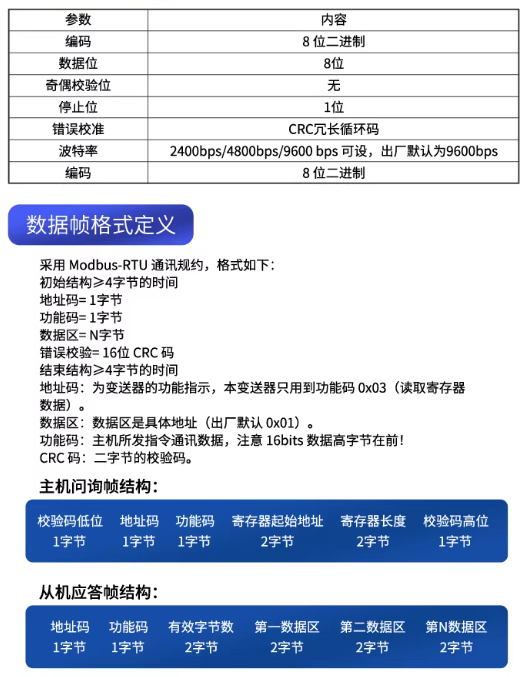
本案例使用标准 Modbus-RTU 温湿度变送器,协议固定:
- 功能码:
03(读取保持寄存器) - 寄存器:
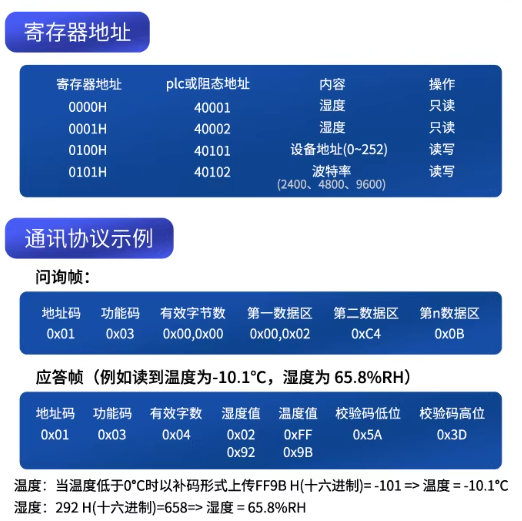
- 温度:
0000H(2 字节,有符号,÷10,单位℃) - 湿度:
0001H(2 字节,无符号,÷10,单位 % RH)
- 温度:
- 串口参数:
9600 8N1 - TCP 端口:默认
502
二、Modbus RTU 与 TCP 终极区别(秒懂版)
1. 一句话总结
- RTU :串口线 / 485 → 开头地址 + 指令 + CRC2 字节
- TCP :网线 / WiFi → MBAP7 字节头 + 指令 + 无 CRC
2. 报文对比(读温湿度)
✅ RTU 报文
plaintext
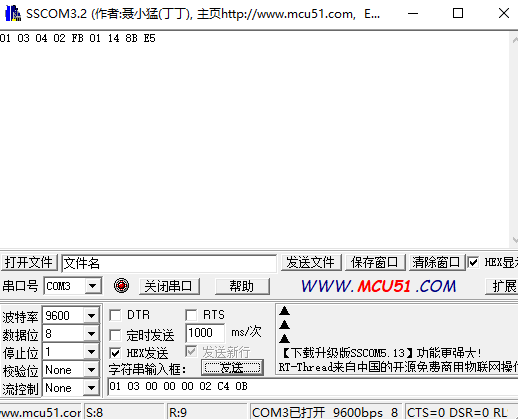
01 03 00 00 00 02 C4 0B
地址 功能 起始 长度  CRC
✅ TCP 报文
plaintext
00 01 00 00 00 06 01 03 00 00 00 02
MBAP7字节头    地址 功能 起始 长度
3. 关键结论(必看)
- RTU 必须 CRC 校验 ,TCP 完全不需要 CRC
- TCP 多 7 字节 MBAP 头,仅为格式要求,无业务意义
- 温度 / 湿度解析代码 100% 通用
- RTU 靠
01地址识别设备,TCP 靠IP 识别,01仅占位
三、Modbus RTU .NET4.8 WPF 完整源码
1. MainWindow.xaml(界面)
xml
<Window x:Class="ModbusDemo.MainWindow"
        xmlns="http://schemas.microsoft.com/winfx/2006/xaml/presentation"
        xmlns:x="http://schemas.microsoft.com/winfx/2006/xaml"
        Title="Modbus RTU 温湿度采集" Height="420" Width="520" WindowStartupLocation="CenterScreen">
    <Grid Margin="20">
        <Grid.RowDefinitions>
            <RowDefinition Height="Auto"/>
            <RowDefinition Height="Auto"/>
            <RowDefinition Height="Auto"/>
            <RowDefinition Height="Auto"/>
            <RowDefinition Height="*"/>
            <RowDefinition Height="Auto"/>
        </Grid.RowDefinitions>

        <TextBlock Grid.Row="0" Text="串口配置" FontSize="16" FontWeight="Bold" Margin="0 0 0 10"/>
        <StackPanel Grid.Row="1" Orientation="Horizontal" Margin="0 0 0 10">
            <TextBlock Text="串口号:" VerticalAlignment="Center"/>
            <ComboBox x:Name="CmbComPort" Width="100" Margin="5 0"/>
            <TextBlock Text="波特率:" VerticalAlignment="Center" Margin="10 0 0 0"/>
            <ComboBox x:Name="CmbBaudRate" Width="100" Margin="5 0">
                <ComboBoxItem>9600</ComboBoxItem>
            </ComboBox>
            <Button x:Name="BtnOpen" Content="打开串口" Width="85" Margin="10 0 0 0" Click="BtnOpen_Click"/>
            <Button x:Name="BtnClose" Content="关闭串口" Width="85" Margin="5 0 0 0" Click="BtnClose_Click" IsEnabled="False"/>
        </StackPanel>

        <StackPanel Grid.Row="2" Orientation="Horizontal" Margin="0 0 0 10">
            <TextBlock Text="设备地址:" VerticalAlignment="Center"/>
            <TextBox x:Name="TxtDeviceAddr" Text="1" Width="60" Margin="5 0"/>
            <Button x:Name="BtnRead" Content="读取数据" Width="85" Margin="10 0 0 0" Click="BtnRead_Click" IsEnabled="False"/>
            <Button x:Name="BtnAutoRead" Content="自动读取" Width="85" Margin="5 0 0 0" Click="BtnAutoRead_Click"/>
        </StackPanel>

        <Grid Grid.Row="3" Margin="0 10 15 10">
            <Grid.ColumnDefinitions>
                <ColumnDefinition/>
                <ColumnDefinition/>
            </Grid.ColumnDefinitions>
            <Border BorderBrush="LightGray" BorderThickness="1" Margin="5" Padding="10">
                <StackPanel>
                    <TextBlock Text="温度" HorizontalAlignment="Center"/>
                    <TextBlock x:Name="TxtTemperature" Text="-- ℃" FontSize="24" FontWeight="Bold" Foreground="Red" HorizontalAlignment="Center"/>
                </StackPanel>
            </Border>
            <Border Grid.Column="1" BorderBrush="LightGray" BorderThickness="1" Margin="5" Padding="10">
                <StackPanel>
                    <TextBlock Text="湿度" HorizontalAlignment="Center"/>
                    <TextBlock x:Name="TxtHumidity" Text="-- %RH" FontSize="24" FontWeight="Bold" Foreground="Blue" HorizontalAlignment="Center"/>
                </StackPanel>
            </Border>
        </Grid>

        <GroupBox Grid.Row="4" Header="运行日志">
            <TextBox x:Name="TxtLog" IsReadOnly="True" VerticalScrollBarVisibility="Auto" TextWrapping="Wrap" FontFamily="Consolas"/>
        </GroupBox>

        <StatusBar Grid.Row="5" Margin="0 10 0 0">
            <TextBlock x:Name="TxtStatus" Text="就绪"/>
        </StatusBar>
    </Grid>
</Window>
2. MainWindow.xaml.cs(业务逻辑 + CRC 校验)
csharp
运行
using System;
using System.IO.Ports;
using System.Linq;
using System.Windows;
using System.Windows.Threading;

namespace ModbusDemo
{
    public partial class MainWindow : Window
    {
        private SerialPort _serialPort;
        private DispatcherTimer _timer;

        public MainWindow()
        {
            InitializeComponent();
            InitSerial();
            InitTimer();
            LoadPorts();
        }

        private void InitSerial()
        {
            _serialPort = new SerialPort { DataBits = 8, StopBits = StopBits.One, Parity = Parity.None };
        }

        private void InitTimer()
        {
            _timer = new DispatcherTimer { Interval = TimeSpan.FromSeconds(1) };
            _timer.Tick += (s, e) => Read();
        }

        private void LoadPorts()
        {
            CmbComPort.Items.Clear();
            foreach (var p in SerialPort.GetPortNames()) CmbComPort.Items.Add(p);
            if (CmbComPort.Items.Count > 0) CmbComPort.SelectedIndex = 0;
            CmbBaudRate.SelectedIndex = 0;
        }

        private void BtnOpen_Click(object sender, RoutedEventArgs e)
        {
            try
            {
                _serialPort.PortName = CmbComPort.Text;
                _serialPort.BaudRate = int.Parse(CmbBaudRate.Text);
                _serialPort.Open();
                BtnOpen.IsEnabled = false; BtnClose.IsEnabled = true; BtnRead.IsEnabled = true;
                AddLog("串口打开成功");
            }
            catch (Exception ex) { MessageBox.Show(ex.Message); }
        }

        private void BtnClose_Click(object sender, RoutedEventArgs e)
        {
            _timer.IsEnabled = false; BtnAutoRead.Content = "自动读取";
            _serialPort.Close();
            BtnOpen.IsEnabled = true; BtnClose.IsEnabled = false; BtnRead.IsEnabled = false;
            AddLog("串口已关闭");
        }

        private void BtnRead_Click(object sender, RoutedEventArgs e) => Read();

        private void BtnAutoRead_Click(object sender, RoutedEventArgs e)
        {
            if (!_serialPort.IsOpen) { MessageBox.Show("请先打开串口"); return; }
            _timer.IsEnabled = !_timer.IsEnabled;
            BtnAutoRead.Content = _timer.IsEnabled ? "停止" : "自动读取";
        }

        private void Read()
        {
            try
            {
                byte addr = byte.Parse(TxtDeviceAddr.Text);
                byte[] cmd = { addr, 0x03, 0x00, 0x00, 0x00, 0x02 };
                ushort crc = Crc16Modbus.Compute(cmd);
                byte[] frame = cmd.Concat(new[] { (byte)(crc & 0xFF), (byte)(crc >> 8) }).ToArray();

                _serialPort.DiscardInBuffer();
                _serialPort.Write(frame, 0, frame.Length);
                System.Threading.Thread.Sleep(100);

                int len = _serialPort.BytesToRead;
                if (len == 0) { AddLog("未收到数据"); return; }

                byte[] buf = new byte[len];
                _serialPort.Read(buf, 0, len);

                if (!Crc16Modbus.CheckValid(buf)) { AddLog("CRC校验失败"); return; }

                short tRaw = BitConverter.ToInt16(new[] { buf[4], buf[3] }, 0);
                ushort hRaw = BitConverter.ToUInt16(new[] { buf[6], buf[5] }, 0);

                Dispatcher.Invoke(() =>
                {
                    TxtTemperature.Text = $"{tRaw / 10f:F1} ℃";
                    TxtHumidity.Text = $"{hRaw / 10f:F1} %RH";
                });
                AddLog($"采集成功 → 温度:{tRaw / 10f:F1} ℃ 湿度:{hRaw / 10f:F1} %RH");
            }
            catch (Exception ex) { AddLog($"异常:{ex.Message}"); }
        }

        private void AddLog(string msg)
        {
            Dispatcher.Invoke(() =>
            {
                TxtLog.AppendText($"{DateTime.Now:HH:mm:ss} - {msg}\r\n");
                TxtLog.ScrollToEnd();
            });
        }

        protected override void OnClosed(EventArgs e)
        {
            if (_serialPort.IsOpen) _serialPort.Close();
            base.OnClosed(e);
        }
    }

    public static class Crc16Modbus
    {
        public static ushort Compute(byte[] data)
        {
            ushort crc = 0xFFFF;
            for (int i = 0; i < data.Length; i++)
            {
                crc ^= data[i];
                for (int j = 0; j < 8; j++)
                {
                    if ((crc & 1) != 0) { crc >>= 1; crc ^= 0xA001; }
                    else crc >>= 1;
                }
            }
            return crc;
        }

        public static bool CheckValid(byte[] frame)
        {
            if (frame.Length < 3) return false;
            var data = frame.Take(frame.Length - 2).ToArray();
            ushort calc = Compute(data);
            ushort recv = (ushort)((frame[frame.Length - 1] << 8) | frame[frame.Length - 2]);
            return calc == recv;
        }
    }
}
四、Modbus TCP 简化版报文(直接套用)
plaintext
00 01 00 00 00 06 01 03 00 00 00 02- 前 7 字节:MBAP 固定头
- 无 CRC,直接发送即可
- 数据解析与 RTU完全一致
五、常见问题
- 串口黄色感叹号:安装 CH340/PL2303 驱动
- CRC 校验失败:干扰、波特率错误、接线松动
- TCP 无返回:IP 错误、端口 502 未开放、防火墙拦截
- 数据异常:字节序(大端)、÷10 比例未处理
六、总结
- RTU = 串口 + CRC + 地址
- TCP = 网线 + MBAP 头 + 无 CRC
- 温湿度解析完全通用
- 源码可直接用于工业采集、上位机开发
补充: