
个人主页:小则又沐风
个人专栏:<数据结构>
<竞赛专栏>
座右铭
路虽远,行则将至;事虽难,做则必成
目录
[一 auto和范围for](#一 auto和范围for)
[二 string类的常用的接口](#二 string类的常用的接口)
[1 string类对象的常见构造](#1 string类对象的常见构造)
[4. string类对象的修改操作](#4. string类对象的修改操作)
前言:
为什么要学string库,在我们的C语言中我们可以用数组来存储字符串,那么我们为什么要学一个string类呢??
那是因为我们在C语言中的用起来特别的麻烦但是在我们的string中我们会感到无与伦比的畅快.下面我们直接来看一下我们的string库中的给我们的接口和函数
在讲解的之前我们先来认识一下 auto和范围for
一 auto和范围for
1.auto
auto也算的上一种万能的牌,他会根据我们的代码推断出我们的变量的类型.
cpp
#include<iostream>
#include<string>
#include <typeinfo>
using namespace std;
int main()
{
	auto i = 4;
	cout << typeid(i).name() << endl;
	return 0;
}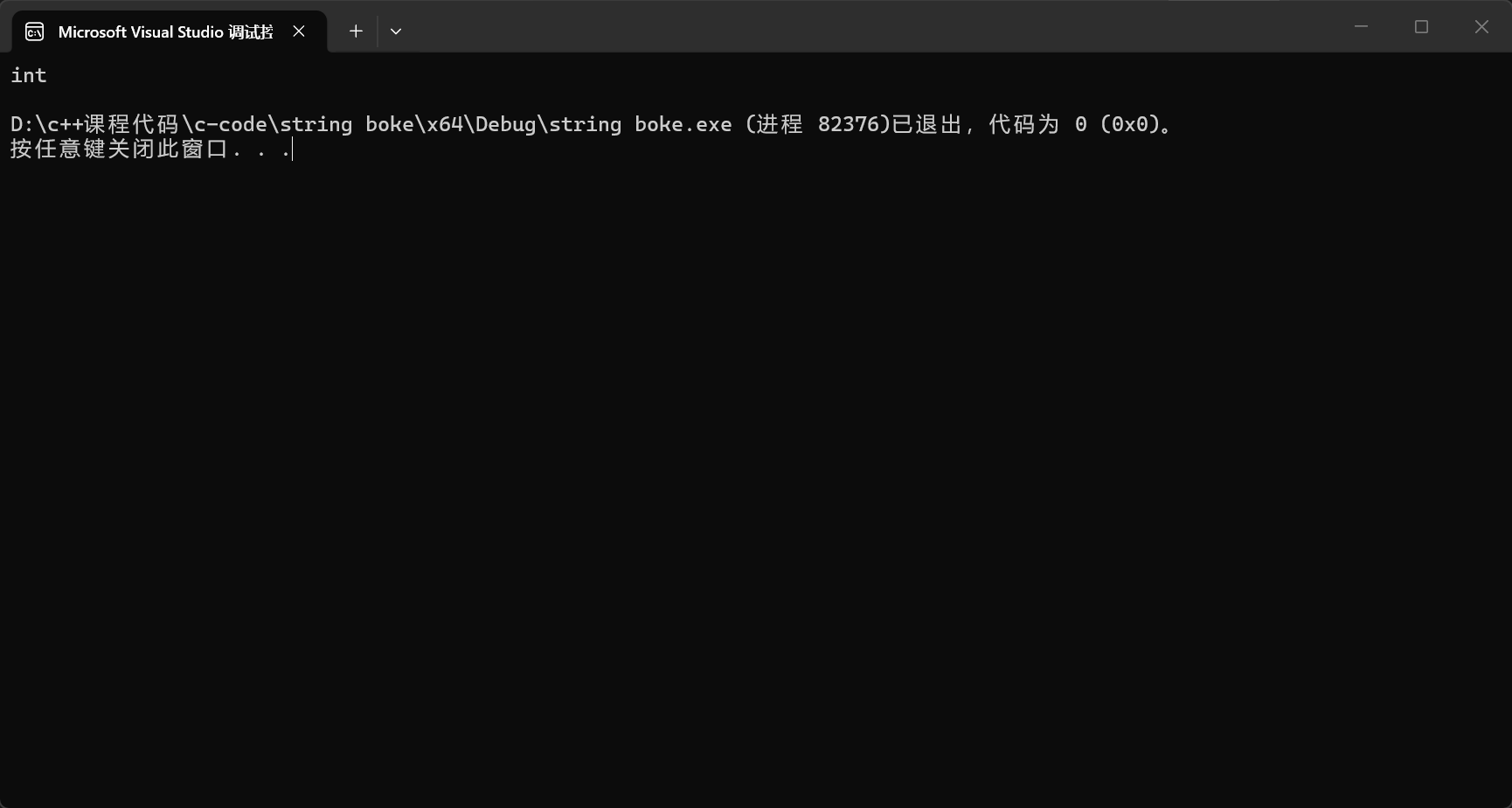
这就是auto的基本的用法,但是这个关键字有几点的需要注意的地方:
- 用auto声明指针类型时,用auto和auto*没有任何区别,但用auto声明引用类型时则必须加&
- 当在同一行声明多个变量时,这些变量必须是相同的类型,否则编译器将会报错,因为编译器实际 只对第一个类型进行推导,然后用推导出来的类型定义其他变量。
cpp
#include<iostream>
#include<string>
#include <typeinfo>
using namespace std;
int main()
{
	auto i = 20, d = 2.2;
	return 0;
}
- auto不能作为函数的参数,可以做返回值,但是建议谨慎使用
cpp
#include<iostream>
#include<string>
#include <typeinfo>
using namespace std;
auto func()
{
		cout << "func()" << endl;
}
int main()
{
	/*auto i = 20, d = 2.2;*/
	func();
	return 0;
}
但是如果我们想作为函数的参数的话就会发生错误;
cpp
#include<iostream>
#include<string>
#include <typeinfo>
using namespace std;
auto func()
{
		cout << "func()" << endl;
}
int fun1(auto a)
{
	cout << "fun1()" << endl;
}
int main()
{
	/*auto i = 20, d = 2.2;*/
	func();
	return 0;
}
- auto不能直接用来声明数组
cpp
#include<iostream>
#include<string>
#include <typeinfo>
using namespace std;
auto func()
{
		cout << "func()" << endl;
}
//int fun1(auto a)
//{
//	cout << "fun1()" << endl;
//}
int main()
{
	/*auto i = 20, d = 2.2;*/
	func();
	auto arr[] = { 1,2,3,4 };
	return 0;
}
这样看起来这个auto好像有一点鸡肋啊,并非鸡肋我们来看下面的代码
cpp
#include<iostream>
#include<map>
int main()
{
	std::map<std::string, std::string>p1 = { {"apple","苹果"},{"banana","香蕉"},{"orange","橙子"} };
	std::map<std::string, std::string>::iterator it = p1.begin();
	while (it != p1.end())
	{
		std::cout << (*it).first << " " << (*it).second << std::endl;
		it++;
	}
	return 0;
}
我去,怎么有这么长的代码,这看的人头都大了,只不过我们需要这个map的迭代器,我们居然需要这么长代码.那么这时候我们使用一个auto不就解决了吗?
cpp
#include<iostream>
#include<map>
int main()
{
	std::map<std::string, std::string>p1 = { {"apple","苹果"},{"banana","香蕉"},{"orange","橙子"} };
	/*std::map<std::string, std::string>::iterator it = p1.begin();*/
	auto it = p1.begin();
	while (it != p1.end())
	{
		std::cout << (*it).first << " " << (*it).second << std::endl;
		it++;
	}
	return 0;
}
是不是觉得这个auto爽多了;
2.范围for
什么是范围for我们开看一下官方的解释:
对于一个有范围的集合而言,由程序员来说明循环的范围是多余的,有时候还会容易犯错误。因此 C++11中引入了基于范围的for循环。for循环后的括号由冒号" :"分为两部分:第一部分是范围 内用于迭代的变量,第二部分则表示被迭代的范围,自动迭代,自动取数据,自动判断结束。
所以在这里看起来范围for是简化版本的for循环啊
cpp
#include<iostream>
using namespace std;
int main()
{
	int array[] = { 1, 2, 3, 4, 5 };
	for (int i = 0; i < sizeof(array) / sizeof(array[0]); i++)
	{
		cout << array[i] << " ";
	}
	cout << endl;
	return 0;
}
这是我们之前经常使用的for循环来遍历我们的数组.
现在我们来尝试一下使用范围for
cpp
#include<iostream>
using namespace std;
int main()
{
	int array[] = { 1, 2, 3, 4, 5 };
	for (int i = 0; i < sizeof(array) / sizeof(array[0]); i++)
	{
		cout << array[i] << " ";
	}
	cout << endl;
	for (int v : array)
	{
		cout << v << ' ';
	}
	cout << endl;
	return 0;
}
这样的设计大大减少了我们的代码量.
- 范围for可以作用到数组和容器对象上进行遍历
- 范围for的底层很简单,容器遍历实际就是替换为迭代器,这个从汇编层也可以看到
类似我们就可以用它我们的容器来进行遍历.(配合上我们的auto用起来更爽)
cpp
#include<iostream>
#include<map>
using namespace std;
int main()
{
	int array[] = { 1, 2, 3, 4, 5 };
	for (int i = 0; i < sizeof(array) / sizeof(array[0]); i++)
	{
		cout << array[i] << " ";
	}
	cout << endl;
	for (int v : array)
	{
		cout << v << ' ';
	}
	cout << endl;
	std::map<std::string, std::string>p1 = { {"apple","苹果"},{"banana","香蕉"},{"orange","橙子"} };
	for (auto v : p1)
	{
		cout << v.first << ' ' << v.second << endl;
	}
	return 0;
}
二 string类的常用的接口
1 string类对象的常见构造
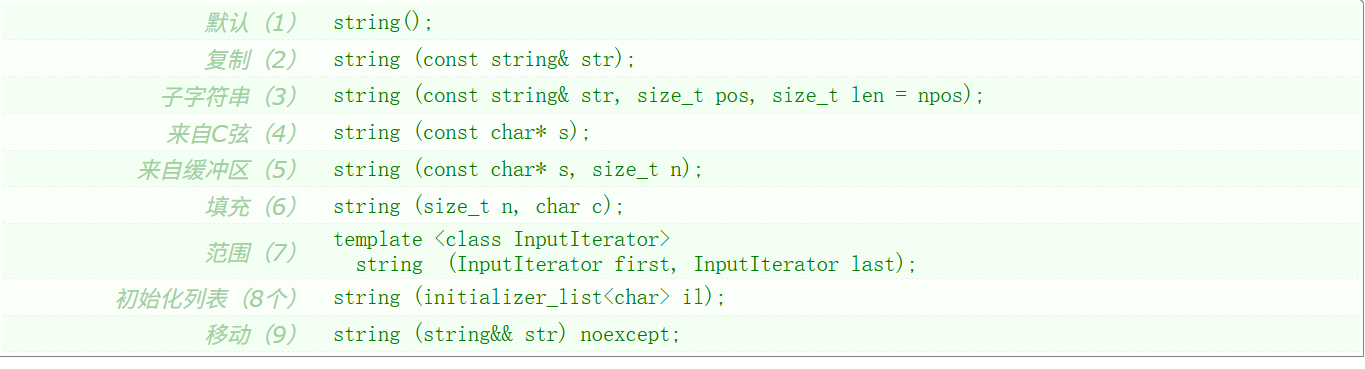
这是string提供的构造函数,我们可以看到居然有这么多的构造函数
下面来注意讲解一下每个构造函数的用法:
我们先来看一下string的默认构造:
cpp
#include<iostream>
#include<string>
using namespace std;
int main()
{
	string s;
	cout << s;
	return 0;
}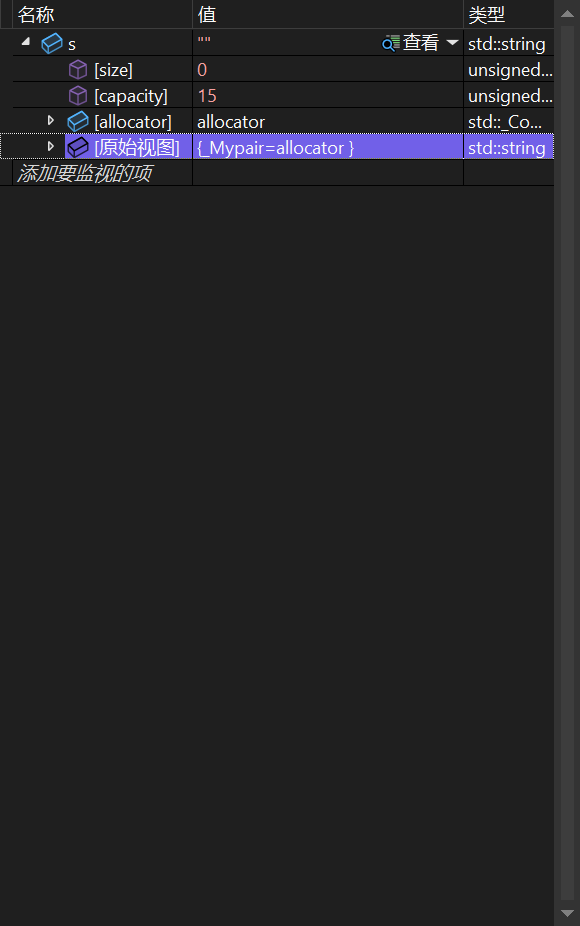
我们运行后可以看到默认构造的字符串是一个空字符串;
下面我们来看第二个构造函数:

cpp
#include<iostream>
#include<string>
using namespace std;
int main()
{
	string s;
	cout << s << endl;
	string s1("apple");
	cout << s1 << endl;
	return 0;
}
就是用一个常量的字符串来赋值;

cpp
#include<iostream>
#include<string>
using namespace std;
int main()
{
	string s;
	cout << s << endl;
	string s1("apple");
	cout << s1 << endl;
	string s2(5, 'j');
	cout << s2 << endl;
	return 0;
}
就是用n个字符来填充字符串
下面我们来看string的拷贝构造

cpp
#include<iostream>
#include<string>
using namespace std;
int main()
{
	string s;
	cout << s << endl;
	string s1("apple");
	cout << s1 << endl;
	string s2(5, 'j');
	cout << s2 << endl;
	string s3(s2);
	cout << s3 << endl;
	return 0;
}
以上的四种的构造函数时最常用的构造函数
2.string类对象的容量操作
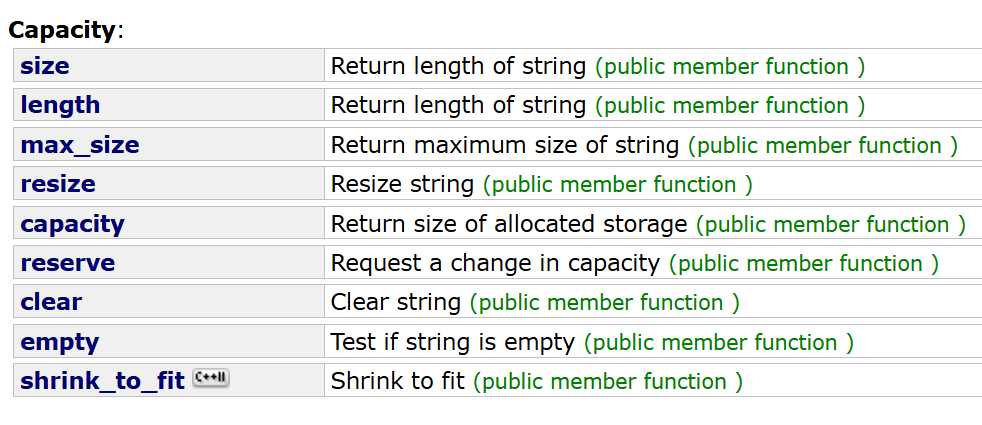
(1)size
我们先来看这个size的用法
我们很容易的想到这个size的作用就是求出string的有效的字符个数
cpp
#include<iostream>
#include<string>
using namespace std;
int main()
{
	string s("hello world");
	cout << s.size() << endl;
	return 0;
}
length的作用是和这个size是一样的,所以这里不做演示,为什么会有两个相同作用的接口呢?
是因为多写一个size是为了和之后的容器的操作保持一致.
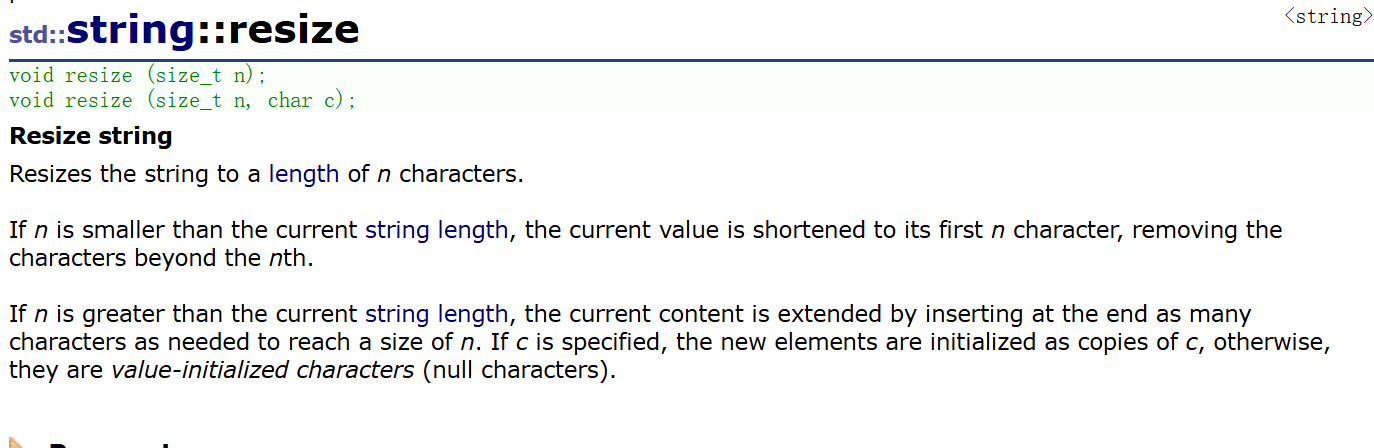
(2)resize
resize就是扩展我们的有效的字符个数,至于是用什么字符来扩展
我们来看一下
cpp
#include<iostream>
#include<string>
using namespace std;
int main()
{
	string s("hello world");
	cout << s.size() << endl;
	s.resize(15);
	cout << s << endl;
	return 0;
}
调试一下
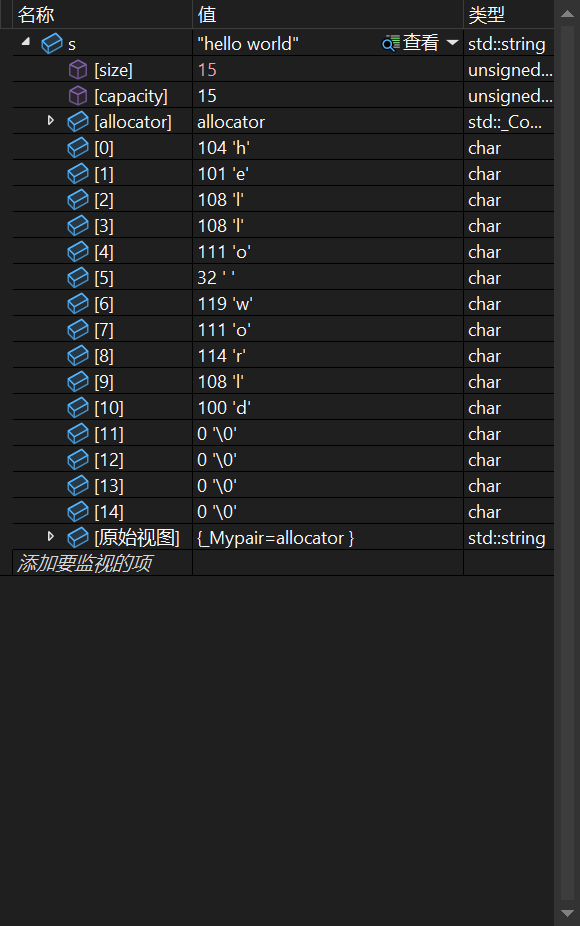
我们可以看到填充的字符的缺省值是0;
当然我们可以用我们想要的字符来填充
cpp
#include<iostream>
#include<string>
using namespace std;
int main()
{
	string s("hello world");
	cout << s.size() << endl;
	/*s.resize(15);*/
	s.resize(15, '0');
	cout << s << endl;
	return 0;
}
我们可以看到我们在初始建立出的s的capacity是15,如果我们的resize超过了这个值会怎么样?
cpp
#include<iostream>
#include<string>
using namespace std;
int main()
{
	string s("hello world");
	cout << s.size() << endl;
	/*s.resize(15);*/
	s.resize(20, '0');
	cout << s << endl;
	return 0;
}
调试一下
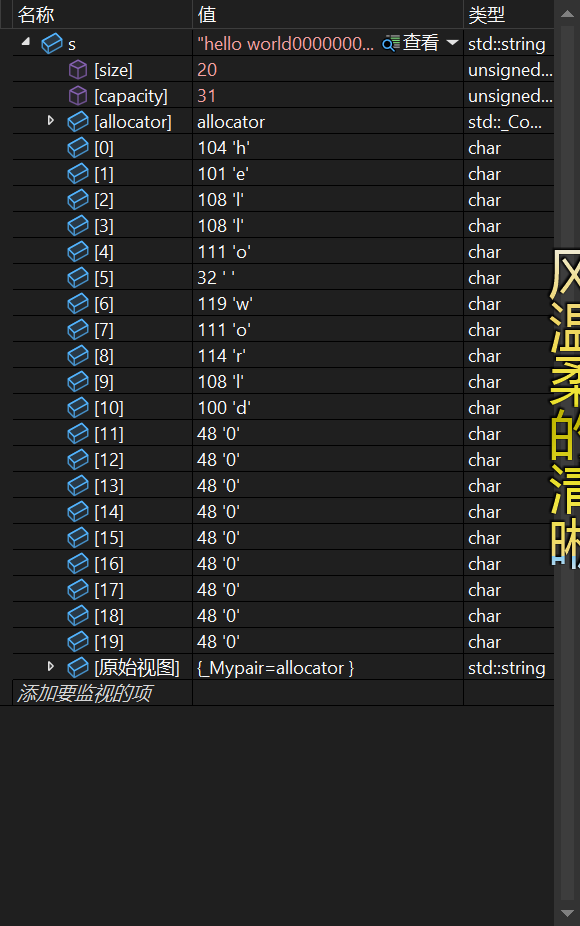
可以看到会发生扩容
但是我们如果resize的大小小于我们本来的size呢?
来试试
cpp
#include<iostream>
#include<string>
using namespace std;
int main()
{
	string s("hello world");
	cout << s.size() << endl;
	/*s.resize(15);*/
	s.resize(5, '0');
	cout << s << endl;
	return 0;
}
调试一下
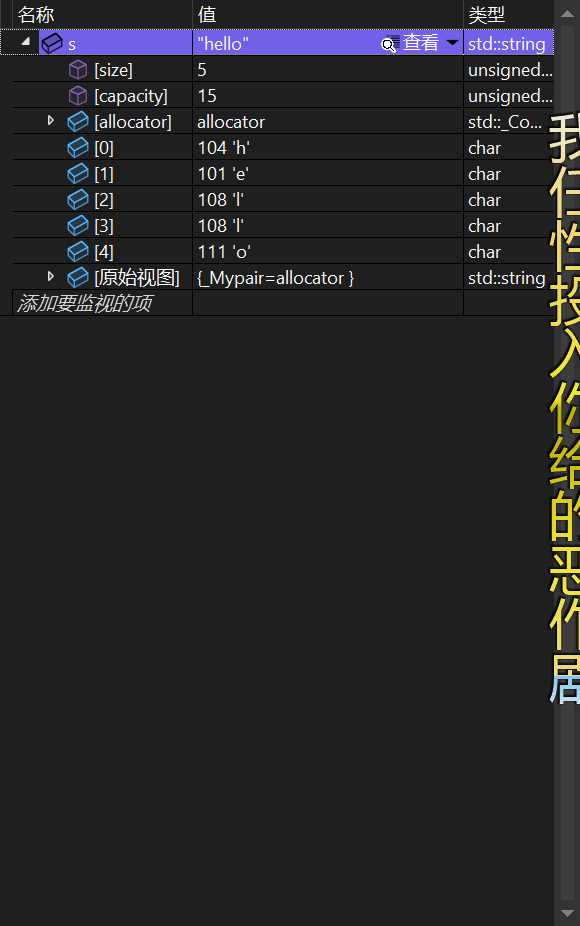
可以看到我们的resize会引起扩容但是他并不会引起缩容
(3)claer
这个接口就是把string中的有效字符的清理了.
cpp
#include<iostream>
#include<string>
using namespace std;
int main()
{
	string s("hello world");
	cout << s.size() << endl;
	/*s.resize(15);*/
	s.resize(5, '0');
	cout << s << endl;
	s.clear();
	return 0;
}
我们来看经过这个clear的处理这个字符串会发生什么.
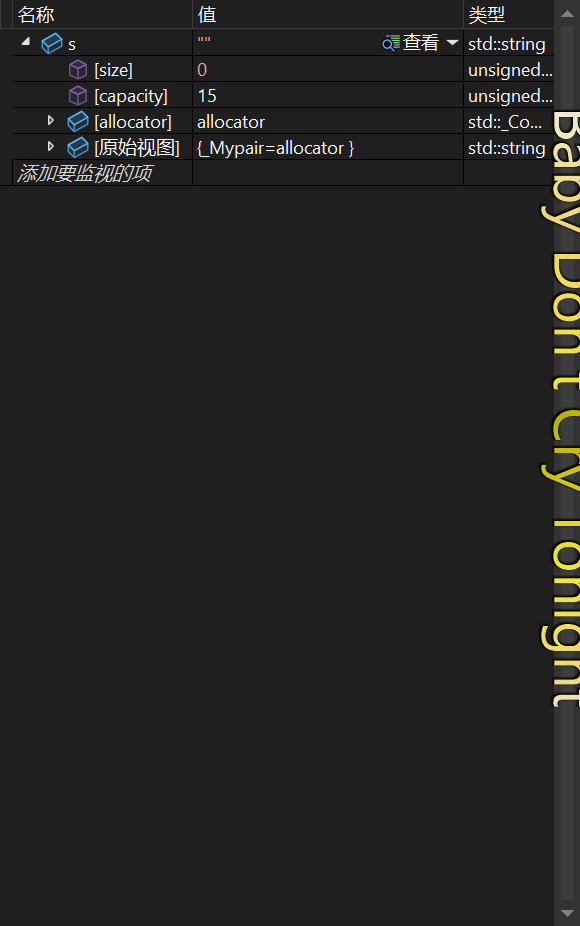
我们可以看到这个接口只把有效的字符给清理了,但是对我们的capacity没有做处理
(4)empty

这个接口就是判断string是否是一个空字符串
cpp
#include<iostream>
#include<string>
using namespace std;
int main()
{
	string s("hello world");
	cout << s.size() << endl;
	/*s.resize(15);*/
	s.resize(5, '0');
	cout << s << endl;
	if (!s.empty())
	{
		cout << "非空" << endl;
	}
	s.clear();
	if (s.empty())
	{
		cout << "空" << endl;
	}
	return 0;
}
(5)reserve
这个接口就是来对capacity进行处理的接口,用来为字符串预先开辟空间
cpp
#include<iostream>
#include<string>
using namespace std;
int main()
{
	string s("hello world");
	s.reserve(20);
	cout << s.size() << endl;
	/*s.resize(15);*/
	s.resize(5, '0');
	cout << s << endl;
	if (!s.empty())
	{
		cout << "非空" << endl;
	}
	s.clear();
	if (s.empty())
	{
		cout << "空" << endl;
	}
	return 0;
}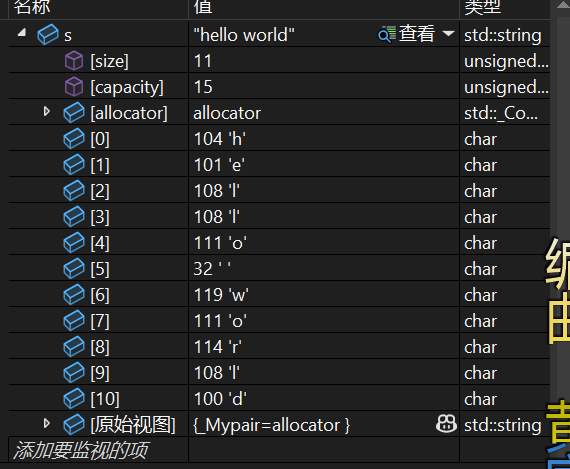
可以看到在执行这个reserve的代码的之前我们的capacity的值是15
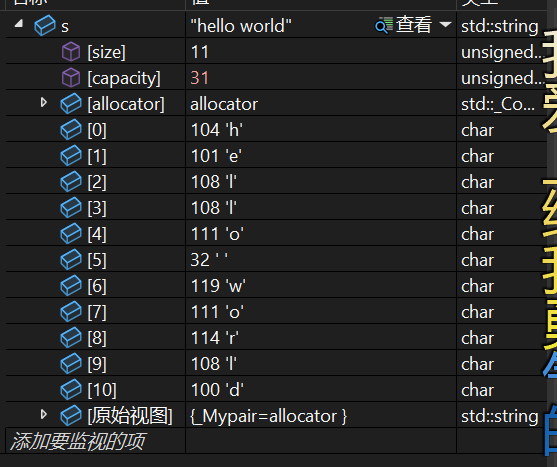
在执行结束后这个capacacity的值到达了31
这是因为capacacity在底层的扩容操作是二倍扩容的
如果我们的reserve的值是小于size的话发生什么事情会
cpp
#include<iostream>
#include<string>
using namespace std;
int main()
{
	//string s("hello world");
	//s.reserve(20);
	//cout << s.size() << endl;
	///*s.resize(15);*/
	//s.resize(5, '0');
	//cout << s << endl;
	//if (!s.empty())
	//{
	//	cout << "非空" << endl;
	//}
	//s.clear();
	//if (s.empty())
	//{
	//	cout << "空" << endl;
	//}
	string s(16, 'j');
	s.reserve(5);
	cout << s << endl;

	return 0;
}
调试一下
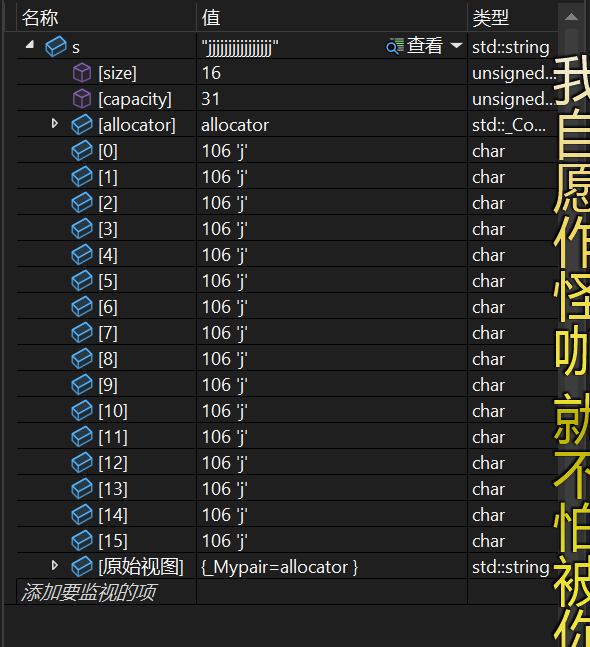
会发现什么都没有发生
那么如果是处于大于size小于capacity的区间呢?
cpp
#include<iostream>
#include<string>
using namespace std;
int main()
{
	//string s("hello world");
	//s.reserve(20);
	//cout << s.size() << endl;
	///*s.resize(15);*/
	//s.resize(5, '0');
	//cout << s << endl;
	//if (!s.empty())
	//{
	//	cout << "非空" << endl;
	//}
	//s.clear();
	//if (s.empty())
	//{
	//	cout << "空" << endl;
	//}
	string s(16, 'j');
	//s.reserve(5);
	s.reserve(20);
	cout << s << endl;

	return 0;
}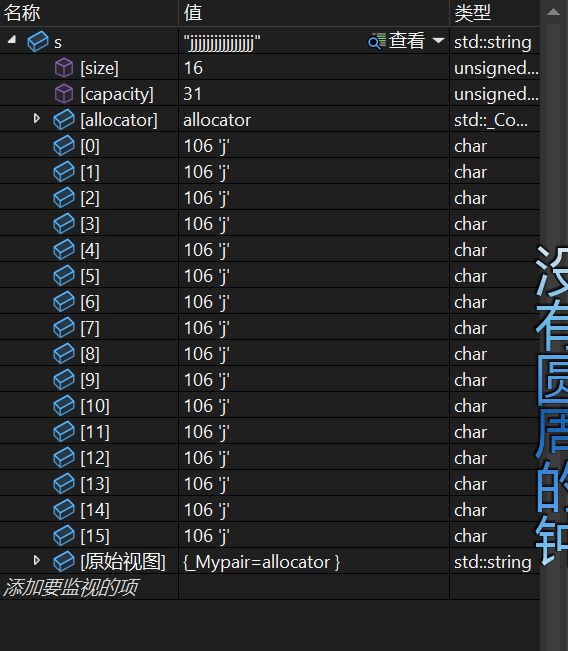
会发现也是什么都不会发生,所以我们这个reserve的作用只会在预先扩容这个capacity
下面我们来总结一下
size是返回string的有效字符的个数
resize是用我们提供的参数来填充string如果需要扩容会自动扩容,填充的字符的缺省值是0
claer是清理string的有效的字符,不会改变capacity
reserve是为string提前开辟空间,只会扩容在vs上不会缩容但是在其他的平台上的操作不明确
3.string类的访问和遍历

先来介绍这个最常用的访问的方式,在string的类中对这个\[\]进行了重载,实现了让我们访问string的时候就像数组一样.
cpp
#include<iostream>
#include<string>
using namespace std;
int main()
{
	string s("hello world");
	for (int i = 0; i < s.size(); i++)
	{
		s[i] += 1;
		cout << s[i];
	}
	cout << endl;
	return 0;
}
在这个支持下想要访问哪一个字符我们只需要知道他的下标就可以了

string还提供了迭代器我们也可以依靠这个来访问和遍历string
cpp
#include<iostream>
#include<string>
using namespace std;
int main()
{
	string s("hello world");
	/*for (int i = 0; i < s.size(); i++)
	{
		s[i] += 1;
		cout << s[i];
	}
	cout << endl;*/
	string::iterator it = s.begin();
	while (it != s.end())
	{
		(*it)++;
		cout << *it;
		it++;
	}
	cout << endl;
	return 0;
}
我们还可以发现还提供了这两个迭代器,我们来看看这是怎么个事
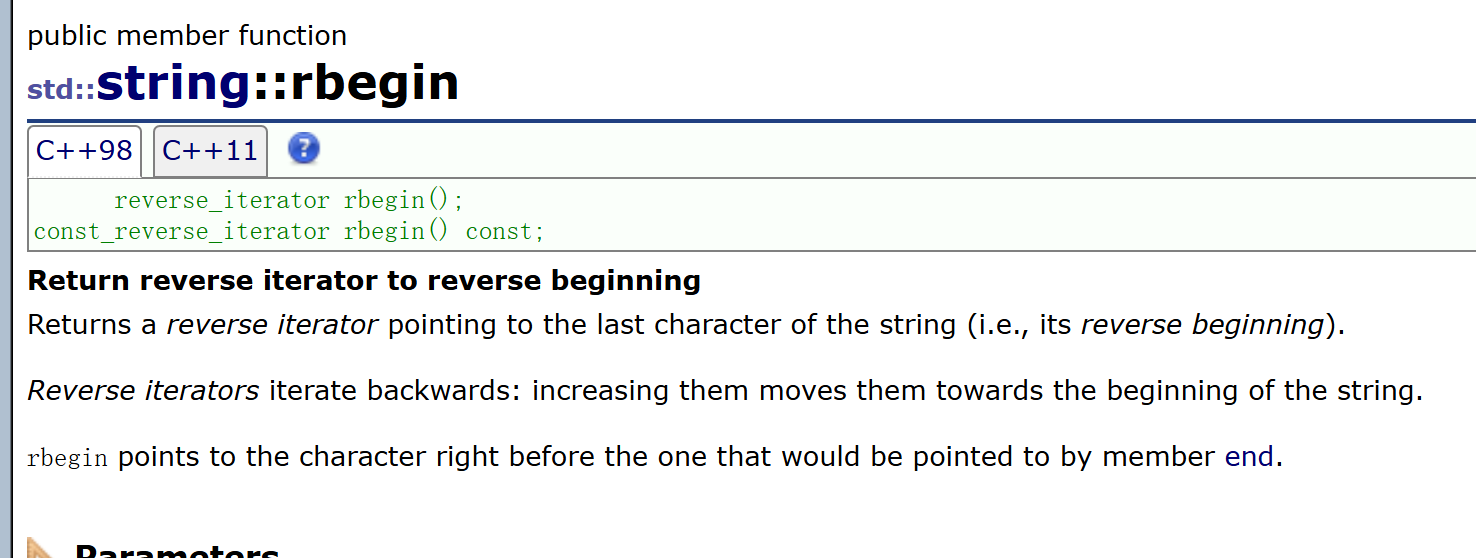
似乎是倒着遍历的迭代器
cpp
#include<iostream>
#include<string>
using namespace std;
int main()
{
	string s("hello world");
	/*for (int i = 0; i < s.size(); i++)
	{
		s[i] += 1;
		cout << s[i];
	}
	cout << endl;*/
	string::iterator it1 = s.begin();
	while (it1 != s.end())
	{
		/*(*it1)++;*/
		cout << *it1;
		it1++;
	}
	cout << endl;
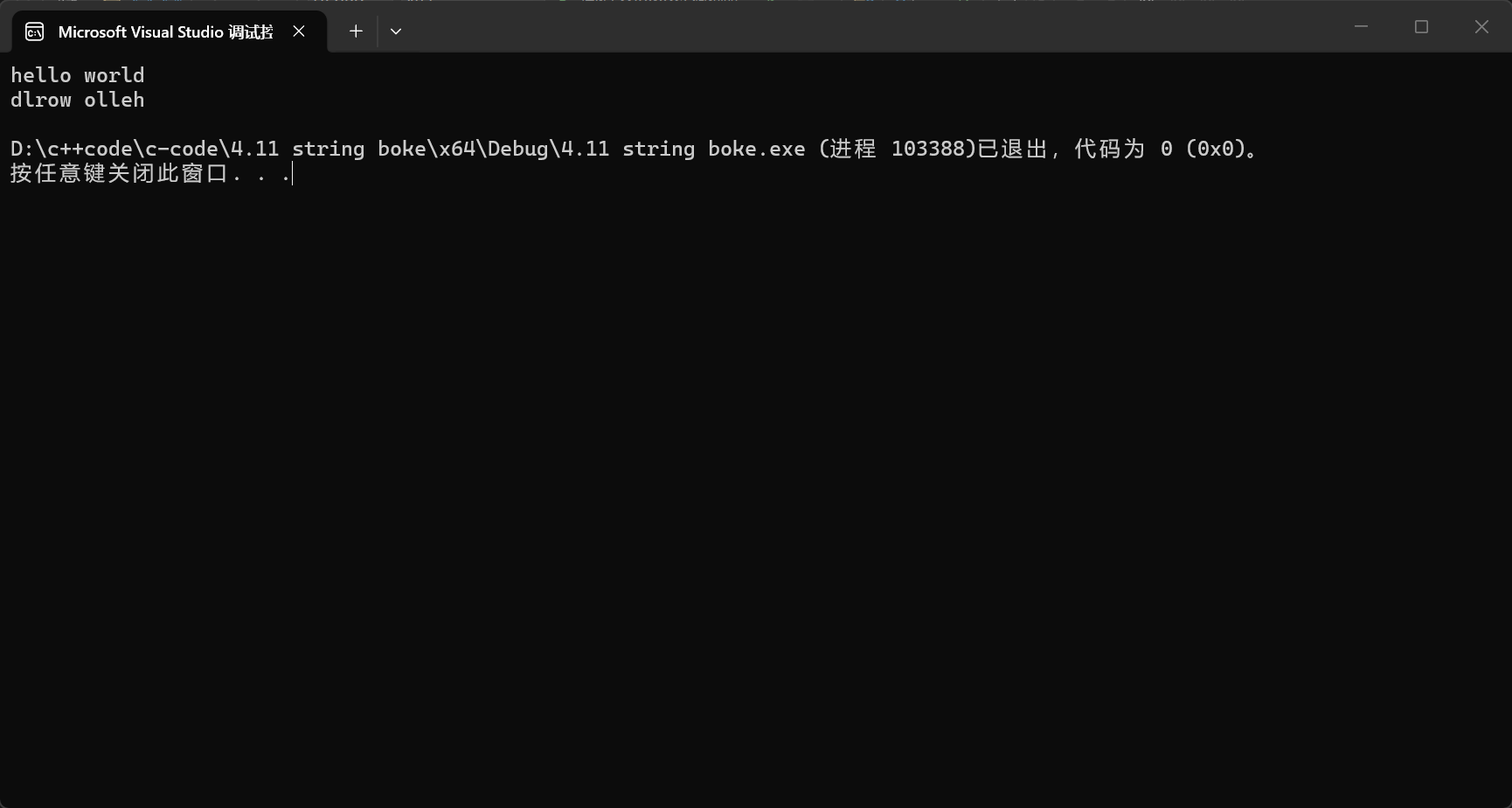
	string::reverse_iterator it2 = s.rbegin();
	while (it2 != s.rend())
	{
		cout << *it2;
		it2++;
	}
	cout << endl;
	return 0;
}
4. string类对象的修改操作
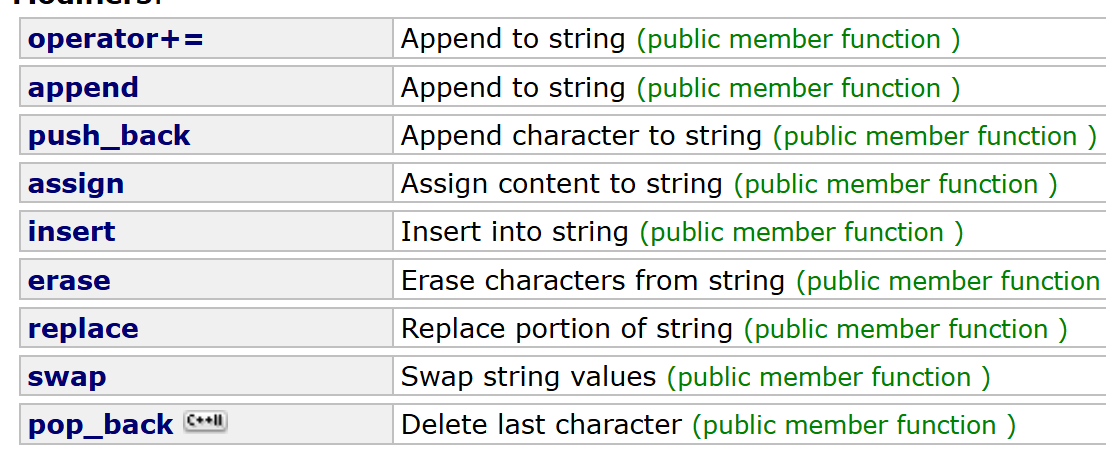
(1)operator+=
这个操作就是实现了在原字符串上的末尾加上字符或者是字符串
cpp
#include<iostream>
#include<string>
using namespace std;
int main()
{
	string s("hello");
	s += ' ';
	cout << s << endl;
	s += "world";
	cout << s << endl;

	return 0;
}
(2)append

我们可以看到这个append有很多的用法
我来讲解一下比较常用的几个

这个就是在string的末尾加上提供的字符串
cpp
#include<iostream>
#include<string>
using namespace std;
int main()
{
	string s("hello");
	s += ' ';
	cout << s << endl;
	s += "world";
	cout << s << endl;
	s.append(" ni hao");
	cout << s << endl;
	return 0;
}
这个呢就是从我们提供的字符串的第pos的位置提取len个字符加到字符串的后面
cpp
#include<iostream>
#include<string>
using namespace std;
int main()
{
	string s("hello");
	s += ' ';
	cout << s << endl;
	s += "world";
	cout << s << endl;
	s.append(" ni hao");
	cout << s << endl;
	s.append("I Love C++",1, 5);
	cout << s << endl;
	return 0;
}
这个就是提取我们给出的字符串的前n个字符,追加到末尾
cpp
#include<iostream>
#include<string>
using namespace std;
int main()
{
	string s("hello");
	s += ' ';
	cout << s << endl;
	s += "world";
	cout << s << endl;
	s.append(" ni hao");
	cout << s << endl;
	s.append("I Love C++",1, 5);
	cout << s << endl;
	s.append(" you are so cute", 4);
	cout << s << endl;
	return 0;
}
这个就是用n个字符c来加到末尾
cpp
#include<iostream>
#include<string>
using namespace std;
int main()
{
	string s("hello");
	s += ' ';
	cout << s << endl;
	s += "world";
	cout << s << endl;
	s.append(" ni hao");
	cout << s << endl;
	s.append("I Love C++",1, 5);
	cout << s << endl;
	s.append(" you are so cute", 4);
	cout << s << endl;
	s.append(2, '^');
	cout << s << endl;
	return 0;
}
(3)push_back
这个就是实现在字符串的末尾加上单个字符
cpp
#include<iostream>
#include<string>
using namespace std;
int main()
{
	string s("hello");
	s += ' ';
	cout << s << endl;
	s += "world";
	cout << s << endl;
	s.append(" ni hao");
	cout << s << endl;
	s.append("I Love C++",1, 5);
	cout << s << endl;
	s.append(" you are so cute", 4);
	cout << s << endl;
	s.append(2, '^');
	cout << s << endl;
	s.push_back('s');
	cout << s << endl;
	return 0;
}
(4)find

这个就可以实现在字符串中的查找的操作,其中pos是开始查找的位置,缺省值是从头开始
cpp
#include<iostream>
#include<string>
using namespace std;
int main()
{
	string s("hello");
	s += ' ';
	cout << s << endl;
	s += "world";
	cout << s << endl;
	s.append(" ni hao");
	cout << s << endl;
	s.append("I Love C++",1, 5);
	cout << s << endl;
	s.append(" you are so cute", 4);
	cout << s << endl;
	s.append(2, '^');
	cout << s << endl;
	s.push_back('s');
	cout << s << endl;
	int pos = s.find("Love");
	for (int i = pos; i < s.size(); i++)
	{
		cout << s[i];
	}
	cout << endl;
	return 0;
}
(5)find_first_of

这个的用法和find十分相似,只不过他是找到我们提供的字符串中的任意的一个就会返回
我们来看下面的代码
cpp
#include<iostream>
using namespace std;
int main()
{
	string s("I Love you but I can not get your love");
	int pos = s.find_first_of("aeiou");
	while (pos != string::npos)
	{
		s[pos] = '*';
		pos=s.find_first_of("aeiou",pos);
	}
	cout << s;
	return 0;
}
这个代码通过使用这个操作把这串字符串的元音字母变成了*;
(6)find_last_of
和find_first_of一样的逻辑但是不同的是这个是从末尾开始查找的
(7)substr
这个是截取出一段来构造出新的字符串
如果我们只传一个参数那么这个行为就是从这个位置一直截取到了结尾
cpp
#include<iostream>
#include<string>
using namespace std;
int main()
{
	string s("hhh,that is fun");
	string str;
	str = s.substr(4);
	cout << str << endl;
	return 0;
}
如果我们传入了第二个参数就是从这个pos开始截取n个字符
cpp
#include<iostream>
#include<string>
using namespace std;
int main()
{
	string s("hhh,that is fun");
	string str;
	str = s.substr(4);
	cout << str << endl;
	str = s.substr(4,3);
	cout << str << endl;
	return 0;
}
(8)operator+
这个呢就是可以实现string之间的加
cpp
#include<iostream>
#include<string>
using namespace std;
int main()
{
    string s("hhh,that is fun");
    string str;
    str = s.substr(4);
    cout << str << endl;
    str = s.substr(4,3);
    cout << str << endl;
    string s1 = s + 'o';

    return 0;
}
(9)getline
这个就是可以解决了我们无法输入包含空格的字符串的问题
我们平常的输入是这样的情况
cpp
#include<iostream>
#include<string>
using namespace std;
int main()
{
	string s;
	cin >> s;
	cout << s;
	return 0;
}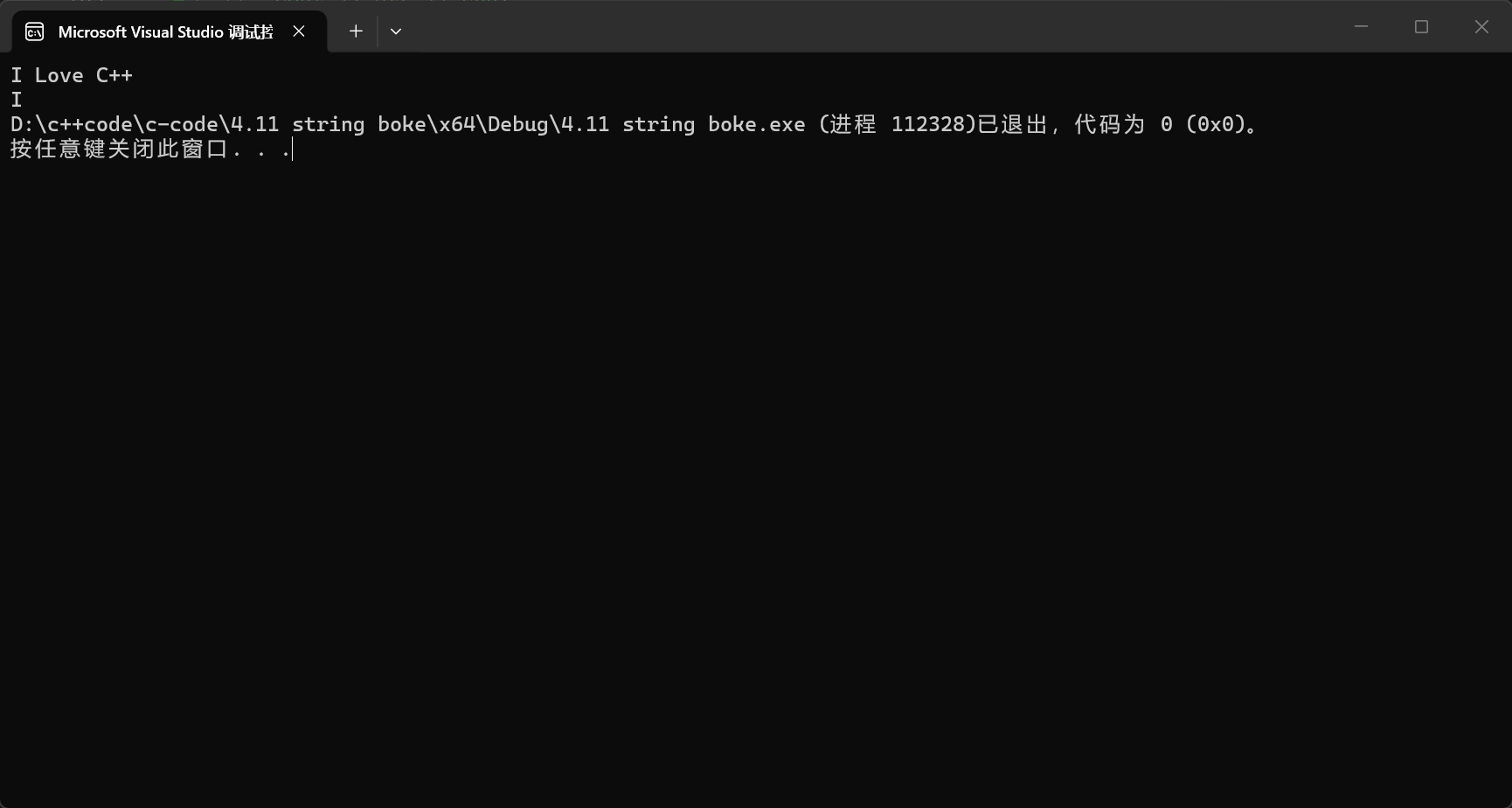
但是这个getline就解决了这个问题
cpp
#include<iostream>
#include<string>
using namespace std;
int main()
{
	string s;
    getline(cin,s);
	cout << s;
	return 0;
}
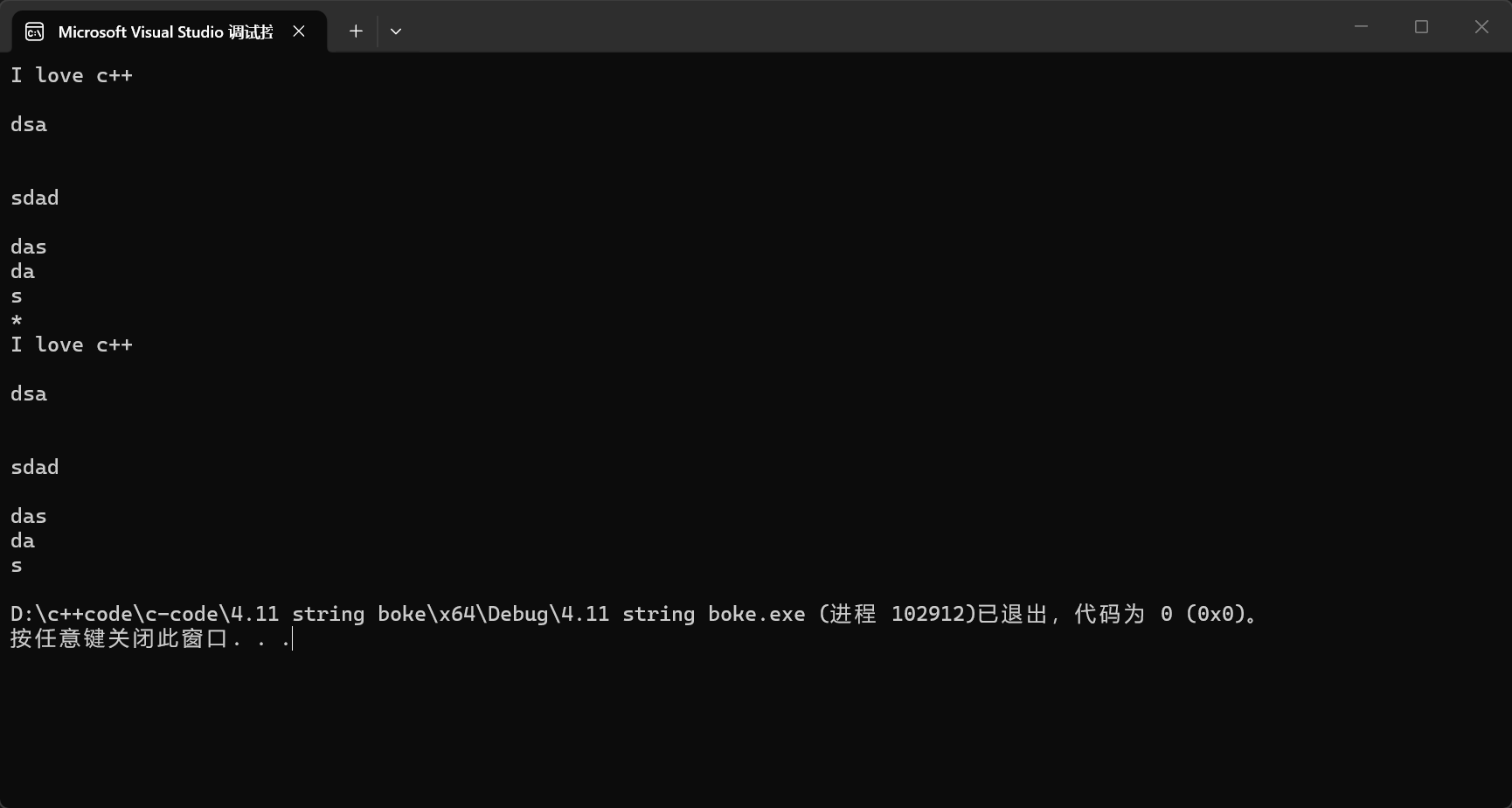
其实这个参数还有第三个就是我们终止读入的符号,缺省值是换行符
cpp
#include<iostream>
#include<string>
using namespace std;
int main()
{
	string s;
 /*   getline(cin,s);*/
	getline(cin, s, '*');
	cout << s;
	return 0;
}
总结
内容围绕 C++
string类核心接口展开,先铺垫auto与范围for两大 C++11 语法糖,再系统梳理string的常用操作:涵盖构造、容量管理(size/resize/clear/empty/reserve)、访问遍历、修改操作四大模块。修改操作是重点,包含尾部追加(
operator+=/append/push_back)、查找(find/find_first_of/find_last_of)、截取(substr)、拼接(operator+)及整行读取(getline),覆盖string开发的高频场景,是 C++ 字符串编程的核心基础。
之后将会模拟实现string这个类,今天的内容就结束了,谢谢大家的观看!!!