从源码深入理解HashMap和HashTree
- HashMap和TreeMap的整体架构
- HashMap源码解读
-
- [HashMap的成员变量:数组 + 链表 + 红黑树⭐](#HashMap的成员变量:数组 + 链表 + 红黑树⭐)
- HashMap的常用方法
-
- [插入键值对:put(K key, V value)](#插入键值对:put(K key, V value))
-
- Step1:哈希函数:扰动函数⭐
- Step2:定位数组索引
- [Step3:putVal 核心逻辑](#Step3:putVal 核心逻辑)
- 扩容机制:resize()
- [根据key获取value: get (key)](#根据key获取value: get (key))
- TreeMap源码解读
-
- TreeMap的成员变量:纯粹的红黑树⭐
- TreeMap的常用方法
-
- [插入键值对: put(K key, V value)](#插入键值对: put(K key, V value))
- 根据key获取value:get (key)
- [TreeMap 的导航方法](#TreeMap 的导航方法)
- [TreeMap 的范围视图](#TreeMap 的范围视图)
- [TreeMap 的自定义排序](#TreeMap 的自定义排序)
- 完整测试⭐
- 性能分析与选型建议
- [面试笔试题 ⭐](#面试笔试题 ⭐)
-
- [HashMap 和 TreeMap 有什么区别?⭐](#HashMap 和 TreeMap 有什么区别?⭐)
- [如何决定使用 HashMap 还是 TreeMap?](#如何决定使用 HashMap 还是 TreeMap?)
- [HashMap 和 TreeMap 在性能上有什么区别?什么场景下 TreeMap 更合适?](#HashMap 和 TreeMap 在性能上有什么区别?什么场景下 TreeMap 更合适?)
- [HashMap 的 put 方法流程是怎样的?⭐](#HashMap 的 put 方法流程是怎样的?⭐)
- [HashMap 是如何解决哈希冲突的?⭐](#HashMap 是如何解决哈希冲突的?⭐)
- [HashMap的扩容(Resize)/ 树化阶段 (Treeify) / 退化阶段 (Untreeify) 过程 ⭐](#HashMap的扩容(Resize)/ 树化阶段 (Treeify) / 退化阶段 (Untreeify) 过程 ⭐)
- [为什么 HashMap 的容量必须是 2 的幂?](#为什么 HashMap 的容量必须是 2 的幂?)
- [HashMap中为什么链表转红黑树的阈值是 8?退化阈值是 6?](#HashMap中为什么链表转红黑树的阈值是 8?退化阈值是 6?)
- [HashMap 为什么线程不安全?](#HashMap 为什么线程不安全?)
- [什么是红黑树?为什么 TreeMap 用它而不用 AVL 树?](#什么是红黑树?为什么 TreeMap 用它而不用 AVL 树?)
- [TreeMap 支持 null 键吗?](#TreeMap 支持 null 键吗?)
- [重写 equals 为什么必须重写 hashCode?⭐](#重写 equals 为什么必须重写 hashCode?⭐)
在 Java 集合框架中,Map 接口是最常用的数据结构之一。而 HashMap 和 TreeMap 作为 Map 的两个核心实现类,经常让开发者陷入选择的困惑:什么时候用 HashMap?什么时候用 TreeMap?它们的底层究竟有什么不同?
HashMap和TreeMap的整体架构
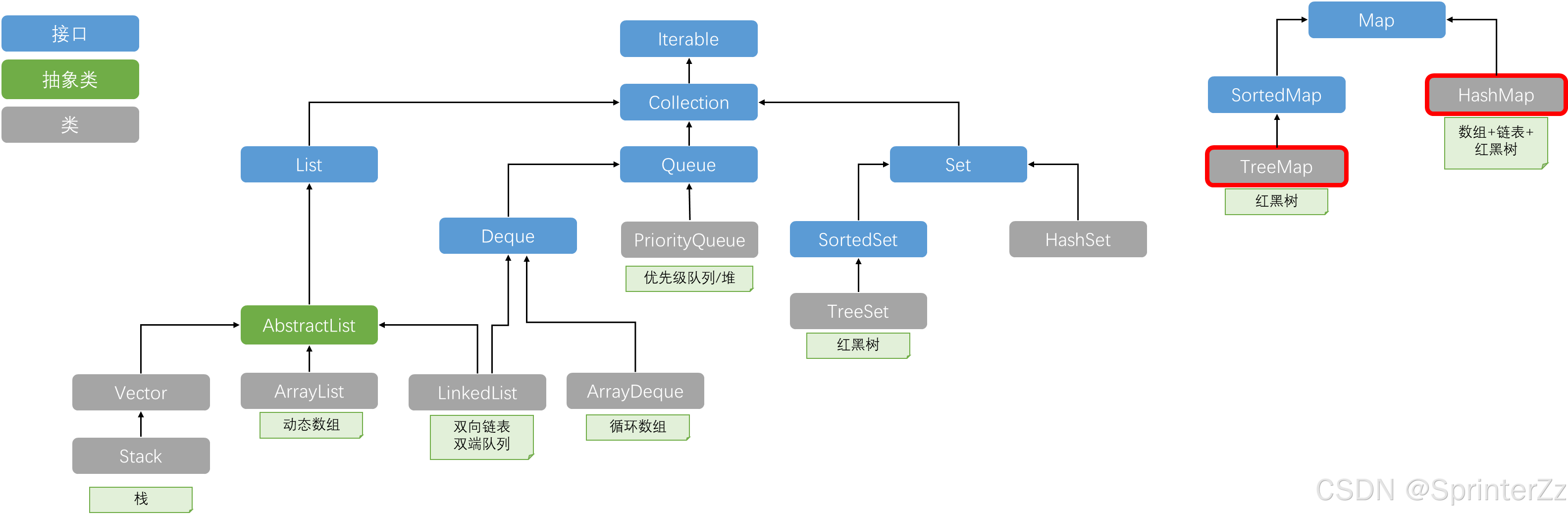
| 维度 | HashMap | TreeMap |
|---|---|---|
| 底层数据结构 | 数组 + 链表 + 红黑树 | 红黑树 |
| 元素顺序 | 无序,不保证顺序恒久不变 | 有序,按键的自然顺序或自定义比较器排序 |
| 时间复杂度 | O(1) ~ O(log n) | O(log n) |
| 键的要求 | 正确实现 hashCode() 和 equals() | 实现 Comparable 或传入 Comparator |
| 空键支持 | 允许 null 键和 null 值 | 不允许 null 键,允许 null 值 |
| 线程安全 | 否 | 否 |
| 继承关系 | extends AbstractMap | extends AbstractMap, implements NavigableMap |
| 适用场景 | 高频增删查,不关心顺序 | 需要有序遍历、范围查询 |
HashMap源码解读
HashMap的成员变量:数组 + 链表 + 红黑树⭐
HashMap 采用经典的哈希表 设计,核心是一个 Node<K,V>[] table 数组 。
java
// HashMap 核心字段
transient Node<K,V>[] table;          // 哈希表数组
transient int size;                   // 键值对数量
int threshold;                        // 扩容阈值 = capacity * loadFactor
final float loadFactor;               // 负载因子,默认 0.75

// 链表节点结构
static class Node<K,V> {
    final int hash;
    final K key;
    V value;
    Node<K,V> next;    // 指向下一个节点,形成链表
}


// 红黑树节点结构(继承自 LinkedHashMap.Entry,后者继承自 Node)
static final class TreeNode<K,V> extends LinkedHashMap.Entry<K,V> {
    TreeNode<K,V> parent;
    TreeNode<K,V> left;
    TreeNode<K,V> right;
    TreeNode<K,V> prev;
    boolean red;
}
HashMap的常用方法
插入键值对:put(K key, V value)
put 是 HashMap 最核心的方法,它的实现展示了哈希表的所有设计精髓 。
Step1:哈希函数:扰动函数⭐
java
static final int hash(Object key) {
    int h;
    return (key == null) ? 0 : (h = key.hashCode()) ^ (h >>> 16);
}
为什么要 h ^ (h >>> 16)? (高 16 位与低 16 位进行异或运算)
因为计算数组索引时使用 (n-1) & hash,如果 n 较小(如 16),只用到低 4 位,高位信息被浪费。异或运算让高位也参与索引计算,减少哈希冲突 。
Step2:定位数组索引
java
// 数组长度必须是2的幂,这样 (n-1) & hash 等价于 hash % n,但更高效
int index = (n - 1) & hash;
Step3:putVal 核心逻辑
java
final V putVal(int hash, K key, V value, boolean onlyIfAbsent, boolean evict) {
    Node<K,V>[] tab; Node<K,V> p; int n, i;
    // 1. 数组为空时,调用 resize() 初始化
    if ((tab = table) == null || (n = tab.length) == 0)
        n = (tab = resize()).length;

    // 2. 桶为空,直接新建节点放入
    if ((p = tab[i = (n - 1) & hash]) == null)
        tab[i] = newNode(hash, key, value, null);
    else {
        // 3. 桶不为空,处理冲突
        Node<K,V> e; K k;
        // 3.1 检查第一个节点是否就是要找的key
        if (p.hash == hash && ((k = p.key) == key || (key != null && key.equals(k))))
            e = p;
        // 3.2 如果是红黑树节点,走树化的插入逻辑
        else if (p instanceof TreeNode)
            e = ((TreeNode<K,V>)p).putTreeVal(this, tab, hash, key, value);
        else {
            // 3.3 遍历链表
            for (int binCount = 0; ; ++binCount) {
                if ((e = p.next) == null) {
                    p.next = newNode(hash, key, value, null); // 尾插法
                    // 链表长度达到阈值8,转为红黑树
                    if (binCount >= TREEIFY_THRESHOLD - 1)
                        treeifyBin(tab, hash);
                    break;
                }
                // 找到相同key,跳出
                if (e.hash == hash && ((k = e.key) == key || (key != null && key.equals(k))))
                    break;
                p = e;
            }
        }
        // 4. 存在相同key,更新value
        if (e != null) {
            V oldValue = e.value;
            if (!onlyIfAbsent || oldValue == null)
                e.value = value;
            return oldValue;
        }
    }
    ++modCount;
    // 5. 超过阈值,扩容
    if (++size > threshold)
        resize();
    return null;
}流程图总结:
- 计算 key 的 hash 值 → 定位到数组索引
- 该位置为空 → 直接插入
- 该位置有节点:
- 判断是否为红黑树节点 → 执行红黑树插入
- 否则遍历链表 → 找到相同 key 则更新,否则尾插
- 链表长度 ≥ 8 →
treeifyBin()转换红黑树
- 检查元素数量是否超过阈值 → 执行扩容
扩容机制:resize()
扩容是 HashMap 性能优化的关键,JDK 8 对此做了重大改进 。
java
final Node<K,V>[] resize() {
    Node<K,V>[] oldTab = table;
    int oldCap = (oldTab == null) ? 0 : oldTab.length;
    int oldThr = threshold;
    int newCap, newThr = 0;

    if (oldCap > 0) {
        // 扩容:容量和阈值都翻倍
        newCap = oldCap << 1;
        newThr = oldThr << 1;
    } else {
        // 初始化:容量=16,阈值=12
        newCap = DEFAULT_INITIAL_CAPACITY;
        newThr = (int)(DEFAULT_LOAD_FACTOR * DEFAULT_INITIAL_CAPACITY);
    }

    // 创建新数组
    Node<K,V>[] newTab = (Node<K,V>[])new Node[newCap];
    table = newTab;

    if (oldTab != null) {
        // 迁移数据
        for (int j = 0; j < oldCap; ++j) {
            Node<K,V> e = oldTab[j];
            if (e != null) {
                oldTab[j] = null;
                if (e.next == null) {
                    // 单节点,直接重新计算位置
                    newTab[e.hash & (newCap - 1)] = e;
                } else if (e instanceof TreeNode) {
                    // 红黑树节点的拆分
                    ((TreeNode<K,V>)e).split(this, newTab, j, oldCap);
                } else {
                    // 链表拆分:根据 hash & oldCap 分成高低两条链
                    Node<K,V> loHead = null, loTail = null;  // 低位链(原位置)
                    Node<K,V> hiHead = null, hiTail = null;  // 高位链(原位置+oldCap)
                    Node<K,V> next;
                    do {
                        next = e.next;
                        if ((e.hash & oldCap) == 0) {
                            // 保留在原位置
                            if (loTail == null) loHead = e;
                            else loTail.next = e;
                            loTail = e;
                        } else {
                            // 移动到 原索引+oldCap 位置
                            if (hiTail == null) hiHead = e;
                            else hiTail.next = e;
                            hiTail = e;
                        }
                    } while ((e = next) != null);
                    // 将高低链放入新数组
                    if (loTail != null) {
                        loTail.next = null;
                        newTab[j] = loHead;
                    }
                    if (hiTail != null) {
                        hiTail.next = null;
                        newTab[j + oldCap] = hiHead;
                    }
                }
            }
        }
    }
    return newTab;
}
JDK 8 扩容优化亮点 :不再对每个元素重新计算 hash,而是利用 (e.hash & oldCap) == 0 判断元素是留在原位置还是移动到 原位置+oldCap。因为容量翻倍后,索引只取决于新增的那 1 位是 0 还是 1 。
根据key获取value: get (key)
java
public V get(Object key) {
    Node<K,V> e;
    return (e = getNode(hash(key), key)) == null ? null : e.value;
}

final Node<K,V> getNode(int hash, Object key) {
    Node<K,V>[] tab; Node<K,V> first, e; int n; K k;
    if ((tab = table) != null && (n = tab.length) > 0 &&
        (first = tab[(n - 1) & hash]) != null) {
        // 1. 检查第一个节点
        if (first.hash == hash && ((k = first.key) == key || (key != null && key.equals(k))))
            return first;
        if ((e = first.next) != null) {
            // 2. 红黑树查找
            if (first instanceof TreeNode)
                return ((TreeNode<K,V>)first).getTreeNode(hash, key);
            // 3. 链表遍历
            do {
                if (e.hash == hash && ((k = e.key) == key || (key != null && key.equals(k))))
                    return e;
            } while ((e = e.next) != null);
        }
    }
    return null;
}
判断 key 相等的条件 :hash 值相同 且 equals() 返回 true。这就是重写 equals 必须重写 hashCode 的根本原因 。
TreeMap源码解读
TreeMap的成员变量:纯粹的红黑树⭐
TreeMap 没有任何数组结构,直接使用红黑树 组织所有元素 。红黑树是一种自平衡的二叉查找树,通过颜色约束(根黑、无连续红、黑高相等)保证树的高度不超过 2 l o g ( n ) 2log(n) 2log(n),从而确保 O ( l o g n ) O(log n) O(logn) 的操作复杂度。
节点结构:Entry
java
static final class Entry<K,V> implements Map.Entry<K,V> {
    K key;
    V value;
    Entry<K,V> left;    // 左子节点
    Entry<K,V> right;   // 右子节点
    Entry<K,V> parent;  // 父节点
    boolean color = BLACK;  // 节点颜色

    Entry(K key, V value, Entry<K,V> parent) {
        this.key = key;
        this.value = value;
        this.parent = parent;
    }
}
每个树节点包含:键值对、左右子节点引用、父节点引用、以及红黑树的颜色标记 。
核心成员属性
java
public class TreeMap<K,V> extends AbstractMap<K,V>
    implements NavigableMap<K,V>, Cloneable, java.io.Serializable {

    private final Comparator<? super K> comparator;  // 比较器
    private transient Entry<K,V> root;               // 根节点
    private transient int size = 0;                  // 元素个数
    private transient int modCount = 0;              // 结构性修改次数
}
comparator 决定了排序方式:为 null 时使用 Key 的自然顺序(Key 必须实现 Comparable),否则使用指定的比较器 。
TreeMap的常用方法
插入键值对: put(K key, V value)
TreeMap 的插入本质上是红黑树的插入操作 。
java
public V put(K key, V value) {
    Entry<K,V> t = root;
    // 1. 空树,新节点直接作为根
    if (t == null) {
        compare(key, key); // 类型检查
        root = new Entry<>(key, value, null);
        size = 1;
        modCount++;
        return null;
    }

    int cmp;
    Entry<K,V> parent;
    Comparator<? super K> cpr = comparator;
    // 2. 查找插入位置(二叉搜索树查找)
    if (cpr != null) {
        // 使用自定义比较器
        do {
            parent = t;
            cmp = cpr.compare(key, t.key);
            if (cmp < 0)
                t = t.left;
            else if (cmp > 0)
                t = t.right;
            else
                return t.setValue(value);  // key已存在,更新value
        } while (t != null);
    } else {
        // 使用自然顺序
        if (key == null)
            throw new NullPointerException();  // TreeMap 不允许 null 键
        Comparable<? super K> k = (Comparable<? super K>) key;
        do {
            parent = t;
            cmp = k.compareTo(t.key);
            if (cmp < 0)
                t = t.left;
            else if (cmp > 0)
                t = t.right;
            else
                return t.setValue(value);
        } while (t != null);
    }

    // 3. 创建新节点并插入
    Entry<K,V> e = new Entry<>(key, value, parent);
    if (cmp < 0)
        parent.left = e;
    else
        parent.right = e;

    // 4. 修复红黑树平衡(关键!)
    fixAfterInsertion(e);
    size++;
    modCount++;
    return null;
}- 二分查找定位:从根节点开始,根据比较结果向左或向右递归查找
- Key 存在则覆盖:找到相同 Key 时,只更新 Value,不新增节点
- 红黑树再平衡 :
fixAfterInsertion(e)负责在插入后恢复红黑树的平衡性质,包括左旋、右旋、变色三种操作
根据key获取value:get (key)
java
public V get(Object key) {
    Entry<K,V> p = getEntry(key);
    return (p == null ? null : p.value);
}

final Entry<K,V> getEntry(Object key) {
    // 使用比较器或自然顺序进行二叉搜索
    if (comparator != null)
        return getEntryUsingComparator(key);
    if (key == null)
        throw new NullPointerException();
    Comparable<? super K> k = (Comparable<? super K>) key;
    Entry<K,V> p = root;
    while (p != null) {
        int cmp = k.compareTo(p.key);
        if (cmp < 0)
            p = p.left;
        else if (cmp > 0)
            p = p.right;
        else
            return p;
    }
    return null;
}查找逻辑就是标准的二叉搜索树查找:比当前节点小则走左边,大则走右边,相等则返回 。
TreeMap 的导航方法
TreeMap 实现了 NavigableMap 接口,提供了一套强大的导航查询方法 :
java
// 获取最小的键值对
Map.Entry<K,V> firstEntry();

// 获取最大的键值对
Map.Entry<K,V> lastEntry();

// 返回严格小于给定key的最大键值对
Map.Entry<K,V> lowerEntry(K key);

// 返回小于等于给定key的最大键值对
Map.Entry<K,V> floorEntry(K key);

// 返回大于等于给定key的最小键值对
Map.Entry<K,V> ceilingEntry(K key);

// 返回严格大于给定key的最小键值对
Map.Entry<K,V> higherEntry(K key);实战示例:
java
TreeMap<Integer, String> map = new TreeMap<>();
map.put(1, "A");
map.put(3, "C");
map.put(5, "E");

System.out.println(map.ceilingEntry(2));  // 3=C
System.out.println(map.floorEntry(4));    // 3=C
System.out.println(map.higherKey(3));     // 5
TreeMap 的范围视图
java
// 返回 [fromKey, toKey) 范围内的子 Map
SortedMap<K,V> subMap(K fromKey, K toKey);

// 返回小于 toKey 的部分
SortedMap<K,V> headMap(K toKey);

// 返回大于等于 fromKey 的部分
SortedMap<K,V> tailMap(K fromKey);
TreeMap 的自定义排序
java
// 降序排列
TreeMap<String, Integer> map = new TreeMap<>((a, b) -> b.compareTo(a));
map.put("Tom", 85);
map.put("Jack", 92);
map.put("Lily", 76);
// 遍历结果将按降序输出
或者实现 Comparable 接口:
java
class Person implements Comparable<Person> {
    String name;
    int age;

    @Override
    public int compareTo(Person o) {
        return Integer.compare(this.age, o.age);  // 按年龄排序
    }
}
完整测试⭐
java
public class MapTest {
    public static void main(String[] args) {
        // 分别测试 HashMap 和 TreeMap
        System.out.println("====== HashMap 测试 (无序) ======");
        testMapApi(new HashMap<>());

        System.out.println("\n====== TreeMap 测试 (按 Key 升序) ======");
        testMapApi(new TreeMap<>());
    }

    public static void testMapApi(Map<String, Integer> map) {
        // 1. put(K key, V value): 设置映射关系
        map.put("Apple", 10);
        map.put("Banana", 20);
        map.put("Orange", 30);
        // 重复 put 会覆盖旧值,并返回旧值
        Integer oldVal = map.put("Apple", 15);
        System.out.println("Apple 原来的值是: " + oldVal + ", 现在是: " + map.get("Apple"));

        // 2. get(Object key): 获取 value
        System.out.println("Banana 的数量: " + map.get("Banana"));
        System.out.println("Pear 的数量 (不存在): " + map.get("Pear")); // 返回 null

        // 3. getOrDefault(Object key, V defaultValue): 不存在则返回默认值
        System.out.println("Pear 的默认值: " + map.getOrDefault("Pear", 0));

        // 4. containsKey & containsValue: 判断是否存在
        System.out.println("是否包含 Key 'Orange': " + map.containsKey("Orange"));
        System.out.println("是否包含 Value 50: " + map.containsValue(50));

        // 5. keySet(): 返回所有 key 的不重复集合
        Set<String> keys = map.keySet();
        System.out.println("所有的 Key: " + keys);

        // 6. values(): 返回所有 value 的可重复集合
        Collection<Integer> values = map.values();
        System.out.println("所有的 Value: " + values);

        // 7. entrySet(): 返回所有的 key-value 映射关系(最推荐的遍历方式)
        System.out.println("遍历所有 Entry:");
        for (Map.Entry<String, Integer> entry : map.entrySet()) {
            System.out.println("  - 商品: " + entry.getKey() + ", 价格: " + entry.getValue());
        }

        // 8. remove(Object key): 删除并返回被删除的 value
        Integer removedVal = map.remove("Orange");
        System.out.println("被删除的 Orange 价格是: " + removedVal);
        System.out.println("删除后的 Map: " + map);
    }
}
java
TreeMap<Integer, String> treeMap = new TreeMap<>();
treeMap.put(10, "Value10");
treeMap.put(30, "Value30");
treeMap.put(50, "Value50");
treeMap.put(20, "Value20");

// 1. 获取边界
System.out.println("最小 Key: " + treeMap.firstKey()); // 10
System.out.println("最大 Key: " + treeMap.lastKey());  // 50

// 2. 查找邻居
System.out.println("比 30 大的下一个: " + treeMap.higherKey(30)); // 50
System.out.println("大于等于 25 的最小 Key: " + treeMap.ceilingKey(25)); // 30

// 3. 范围截取 (左闭右开)
System.out.println("10到35之间的子集: " + treeMap.subMap(10, 35)); // {10=..., 20=..., 30=...}

// 4. 倒序
System.out.println("倒序遍历: " + treeMap.descendingMap());
性能分析与选型建议
时间复杂度对比
| 操作 | HashMap | TreeMap |
|---|---|---|
| get | O(1) 平均,O(log n) 最差(红黑树) | O(log n) |
| put | O(1) 平均,O(log n) 最差 | O(log n) |
| remove | O(1) 平均,O(log n) 最差 | O(log n) |
| 遍历 | O(n),无序 | O(n),有序 |
| 范围查询 | 不支持 | O(log n + m) |
空间占用
- HashMap :需要维护数组、链表节点、红黑树节点。在未满负载时会有空间浪费(数组空槽位)
- TreeMap :每个节点都需要存储 left、right、parent 指针和 color 属性,单节点内存开销更大,但空间利用率稳定
选型决策树
需要 Map 实现?
    │
    ├── 需要键有序?── 是 ──→ TreeMap
    │                        (注意:键不能为 null)
    │
    ├── 需要范围查询?── 是 ──→ TreeMap
    │
    ├── 追求极致性能?── 是 ──→ HashMap
    │                        (O(1) vs O(log n))
    │
    └── 其他情况 ────────────→ HashMap
(默认选择)| 场景 | 推荐 | 理由 |
|---|---|---|
| 本地缓存 | HashMap | O(1) 查询,性能最优 |
| 需要排序输出 | TreeMap | 天生有序,无需额外排序 |
| 分页查询 | TreeMap | subMap 天然支持范围截取 |
| 海量数据存储 | HashMap | 扩容后可保持 O(1) 性能 |
| 统计排名 | TreeMap | 按键排序后取前 N 名很方便 |
| 配置项存储 | HashMap | 无序,读取频繁,性能优先 |
面试笔试题 ⭐
HashMap 和 TreeMap 有什么区别?⭐
| 维度 | HashMap | TreeMap |
|---|---|---|
| 底层数据结构 | 数组 + 链表 + 红黑树 | 红黑树 |
| 元素顺序 | 无序,不保证顺序恒久不变 | 有序,按键的自然顺序或自定义比较器排序 |
| 时间复杂度 | O(1) ~ O(log n) | O(log n) |
| 键的要求 | 正确实现 hashCode() 和 equals() | 实现 Comparable 或传入 Comparator |
| 空键支持 | 允许 null 键和 null 值 | 不允许 null 键,允许 null 值 |
| 线程安全 | 否 | 否 |
| 继承关系 | extends AbstractMap | extends AbstractMap, implements NavigableMap |
| 适用场景 | 高频增删查,不关心顺序 | 需要有序遍历、范围查询 |
如何决定使用 HashMap 还是 TreeMap?
参考答案:
- 对于插入、删除、定位元素这类操作,HashMap 是最佳选择
- 如果需要有序遍历 key 集合,或需要范围查询 (如 subMap)、邻近查找 (如 ceilingKey),选择 TreeMap
- 一句话总结:要速度用 HashMap,要顺序用 TreeMap
HashMap 和 TreeMap 在性能上有什么区别?什么场景下 TreeMap 更合适?
参考答案:
- HashMap :O(1) 常数级查找,适合高频随机访问
- TreeMap :O(log n) 查找,适合有序遍历、范围查询、最值查找
- TreeMap 典型场景:价格区间筛选、时间范围查询、按成绩排名、版本路由等
HashMap 的 put 方法流程是怎样的?⭐
参考答案:
- 计算 key 的 hashCode,通过扰动函数(高 16 位异或低 16 位)得到 hash 值
- 判断数组是否初始化,若未初始化则调用 resize 初始化
- 通过
(n-1) & hash计算索引位置- 若该位置为空,直接插入
- 若不为空:
- 判断首节点是否相同(hash 相等且 key 相等),相同则覆盖
- 判断是否为红黑树节点,是则走树插入逻辑
- 否则遍历链表,找到相同 key 则覆盖,找不到则尾插法插入
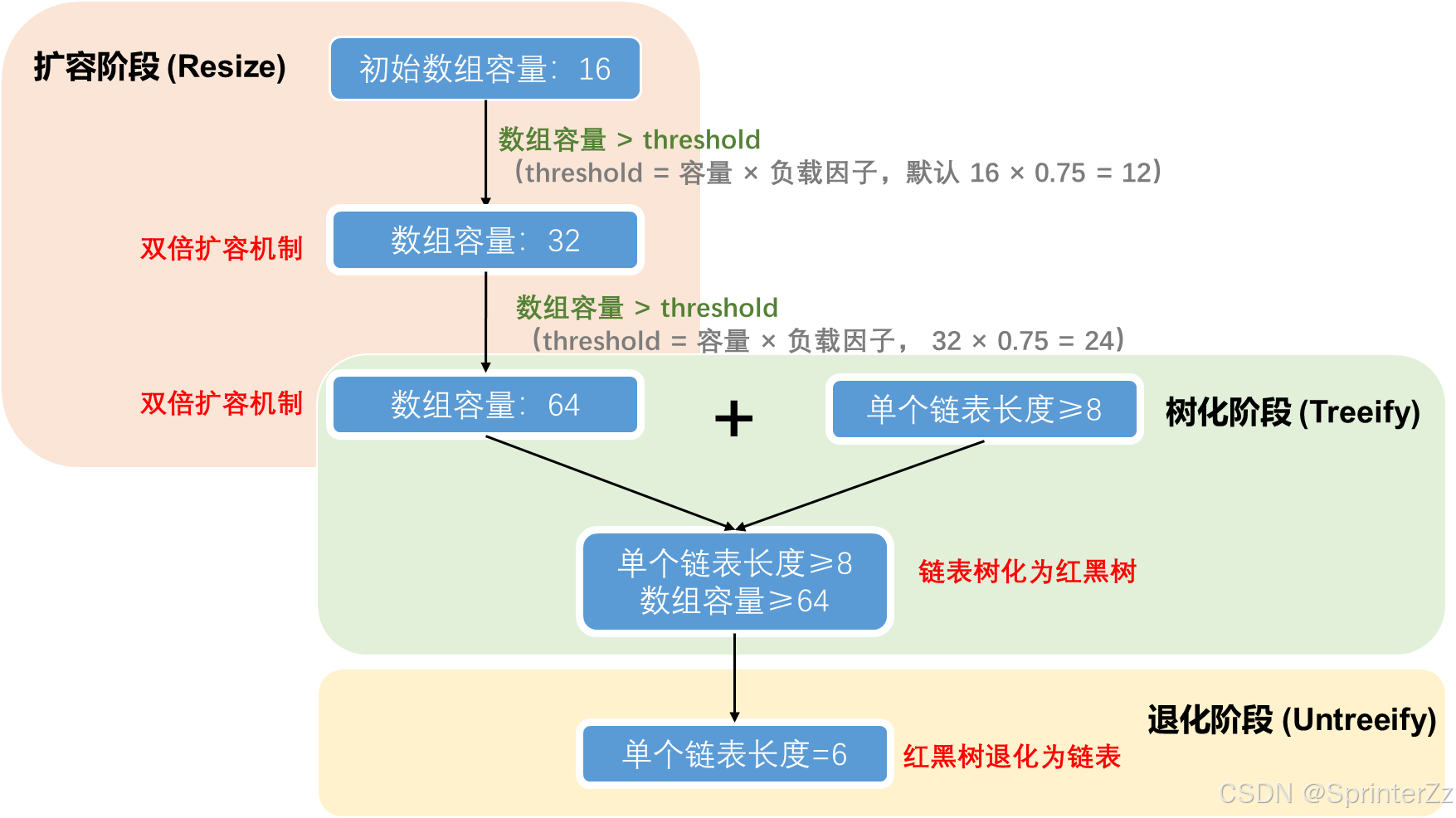
- 链表长度 ≥ 8 且数组长度 ≥ 64 时,转为红黑树
- 判断 size 是否超过阈值,超过则扩容
HashMap 是如何解决哈希冲突的?⭐
参考答案:
- 拉链法:冲突元素以链表形式存储在同一桶中
- 红黑树优化:链表长度 ≥ 8 且数组长度 ≥ 64 时,转为红黑树,将查找复杂度从 O(n) 降为 O(log n)
- 扰动函数 :
(h = key.hashCode()) ^ (h >>> 16)让高位参与索引计算,减少冲突
HashMap的扩容(Resize)/ 树化阶段 (Treeify) / 退化阶段 (Untreeify) 过程 ⭐
为什么 HashMap 的容量必须是 2 的幂?
参考答案:
- 位运算效率高 :
(n-1) & hash等价于hash % n,但位运算更快- 均匀分布:2 的幂保证低位掩码(n-1 全为 1),使 hash 分布更均匀,减少冲突
- 扩容时便于迁移:扩容后只需判断新增位的值即可确定新位置
HashMap中为什么链表转红黑树的阈值是 8?退化阈值是 6?
参考答案:
- 泊松分布:负载因子 0.75 下,链表长度达到 8 的概率极低(约 0.00000006)
- 性能考量:链表长度 8 时查询性能已明显退化,需要树化优化
- 退化阈值是 6:留出 7 作为缓冲区间,避免频繁转换
HashMap 为什么线程不安全?
参考答案:
- 数据覆盖:多线程 put 时,若 hash 相同且同时判断到槽位为空,后执行的会覆盖先执行的数据
- size 不准确 :
++size非原子操作,多线程下可能导致实际 size 偏小- JDK 7 死循环:扩容时头插法可能导致链表成环(JDK 8 已改为尾插法)
- 解决方案 :使用
ConcurrentHashMap或Collections.synchronizedMap()
什么是红黑树?为什么 TreeMap 用它而不用 AVL 树?
| 对比项 | 红黑树 | AVL 树 |
|---|---|---|
| 平衡标准 | 黑高平衡(宽松) | 严格高度平衡(高度差 ≤ 1) |
| 插入/删除旋转次数 | 最多 3 次 | 可能 O(log n) 次 |
| 查询效率 | O(log n),常数稍大 | 略快(更严格平衡) |
| 适用场景 | 频繁增删 | 高频查询 |
- TreeMap 选择红黑树是因为它在增删和查询之间取得了更好平衡
TreeMap 支持 null 键吗?
参考答案:
- 自然排序时 :不支持,会抛
NullPointerException- 自定义 Comparator 时:可以在比较器中处理 null,从而支持 null 键
- 允许 null 值
重写 equals 为什么必须重写 hashCode?⭐
参考答案:
- HashMap 判断 key 相等需要同时满足:
hashCode 相等且equals 返回 true- 若只重写 equals 不重写 hashCode:
- 两个 equals 相等的对象,hashCode 可能不同
- 放入 HashMap 后,用另一个对象去 get,会因为 hash 不同定位到不同桶而取不出来
- 违反 Java 规约,导致集合行为不确定