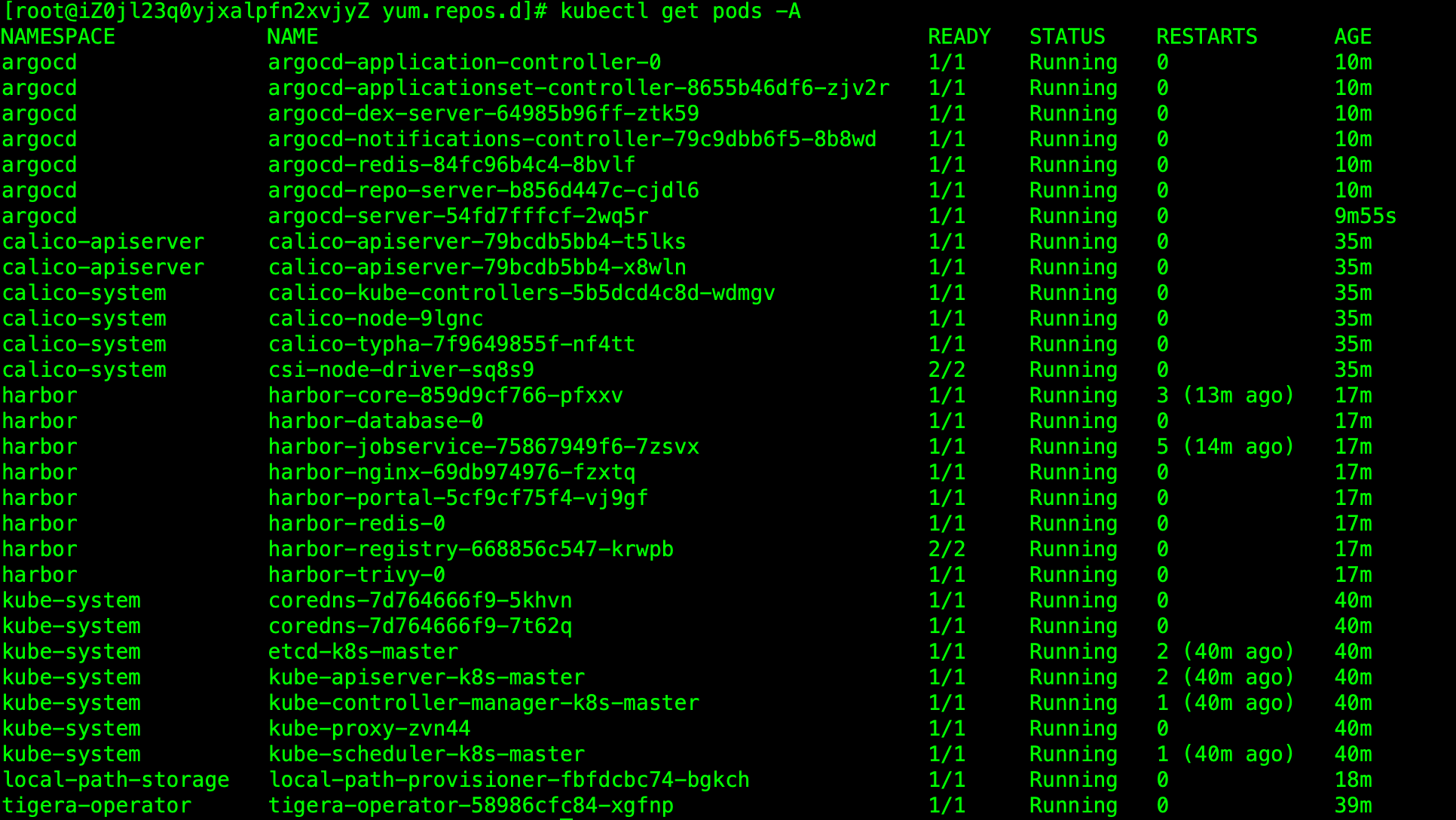
环境信息
| 项目 | 详情 |
|---|---|
| 主机 IP | 8.147.67.244(内网 172.16.78.0) |
| 操作系统 | Rocky Linux 9.7 (Blue Onyx) |
| 内核 | 5.14.0-611.36.1.el9_7.x86_64 |
| Kubernetes | v1.35.0 |
| 容器运行时 | containerd 2.2.2 |
| CNI | Calico v3.29.1 |
| 内存 | 14Gi |
| 磁盘 | 50G (已用 ~6.5G) |
| 节点 | 单节点 (k8s-master, control-plane) |
安装总览
| 组件 | 版本 | 暴露方式 | 端口 | 状态 |
|---|---|---|---|---|
| Helm | v3.17.0 | CLI | - | ✅ 已安装 |
| local-path-provisioner | v0.0.30 | - | - | ✅ 默认 StorageClass |
| Harbor | v2.12.3 (Chart 1.16.3) | NodePort | HTTP 30002 / HTTPS 30003 | ✅ 已部署 |
| ArgoCD | v2.13.5 | NodePort | HTTP 30080 / HTTPS 30443 | ✅ 已部署 |
目录结构
k8s-tools-install/
├── install-all.sh            # 一键安装总脚本
├── 00-prerequisites.sh       # 前置依赖安装(Helm + StorageClass + 镜像加速)
├── 01-install-harbor.sh      # Harbor 安装脚本
├── 02-install-argocd.sh      # ArgoCD 安装脚本
└── README.md                 # 本文档
快速安装
# 方式一:一键安装
bash install-all.sh

# 方式二:分步安装
bash 00-prerequisites.sh   # 1. 安装前置依赖
bash 01-install-harbor.sh   # 2. 安装 Harbor
bash 02-install-argocd.sh   # 3. 安装 ArgoCD
一、前置依赖安装
1.1 安装 Helm 3
从华为云镜像下载 Helm v3.17.0:
HELM_VERSION="v3.17.0"
curl -fsSL https://mirrors.huaweicloud.com/helm/${HELM_VERSION}/helm-${HELM_VERSION}-linux-amd64.tar.gz -o /tmp/helm.tar.gz
tar -zxf /tmp/helm.tar.gz -C /tmp/
mv /tmp/linux-amd64/helm /usr/local/bin/helm
chmod +x /usr/local/bin/helm
1.2 配置 containerd 国内镜像加速
创建 /etc/containerd/conf.d/mirrors.toml:
[plugins."io.containerd.grpc.v1.cri".registry.mirrors]
  [plugins."io.containerd.grpc.v1.cri".registry.mirrors."docker.io"]
    endpoint = ["https://docker.m.daocloud.io"]
  [plugins."io.containerd.grpc.v1.cri".registry.mirrors."registry.k8s.io"]
    endpoint = ["https://k8s.m.daocloud.io"]
  [plugins."io.containerd.grpc.v1.cri".registry.mirrors."gcr.io"]
    endpoint = ["https://gcr.m.daocloud.io"]
  [plugins."io.containerd.grpc.v1.cri".registry.mirrors."ghcr.io"]
    endpoint = ["https://ghcr.m.daocloud.io"]
  [plugins."io.containerd.grpc.v1.cri".registry.mirrors."quay.io"]
    endpoint = ["https://quay.m.daocloud.io"]

systemctl restart containerd
1.3 安装 local-path-provisioner
使用 kubectl 直接安装(Helm 方式在国内网络不稳定):
kubectl apply -f https://raw.githubusercontent.com/rancher/local-path-provisioner/v0.0.30/deploy/local-path-storage.yaml
kubectl patch storageclass local-path -p '{"metadata": {"annotations":{"storageclass.kubernetes.io/is-default-class":"true"}}}'
1.4 移除 master 节点 taint(单节点必需)
kubectl taint nodes k8s-master node-role.kubernetes.io/control-plane:NoSchedule-⚠️ 踩坑记录
- local-path-provisioner 的
WaitForFirstConsumer模式 :单节点集群中,使用Immediate绑定模式会导致 "no node was specified" 错误,必须保持WaitForFirstConsumer - busybox 镜像 :local-path-provisioner 的 helper pod 需要 busybox 镜像,国内网络必须预拉取:
crictl pull busybox:latest - GitHub 被墙:ArgoCD 的 Helm 仓库和 YAML 清单需要通过代理下载
二、Harbor 安装
2.1 安装方式
使用 Helm 安装 Harbor 2.12.3:
bash
helm repo add harbor https://helm.goharbor.io
helm repo update
kubectl create namespace harbor

helm install harbor harbor/harbor \
    --namespace harbor \
    --version 1.16.3 \
    --set expose.type=nodePort \
    --set expose.nodePort.ports.http.nodePort=30002 \
    --set expose.nodePort.ports.https.nodePort=30003 \
    --set externalURL=https://8.147.67.244:30003 \
    --set expose.tls.auto.commonName=8.147.67.244 \
    --set persistence.persistentVolumeClaim.registry.size=20Gi \
    --set persistence.persistentVolumeClaim.database.size=10Gi \
    --set persistence.persistentVolumeClaim.redis.size=5Gi \
    --set persistence.persistentVolumeClaim.trivy.size=5Gi \
    --set harborAdminPassword=Harbor12345 \
    --set chartmuseum.enabled=false \
    --set trivy.enabled=true \
    --set portal.replicas=1 \
    --set core.replicas=1 \
    --set registry.replicas=1 \
    --set jobservice.replicas=1
2.2 访问信息
| 项目 | 值 |
|---|---|
| HTTP 地址 | http://8.147.67.244:30002 |
| HTTPS 地址 | https://8.147.67.244:30003 |
| 用户名 | admin |
| 密码 | Harbor12345 |
浏览器访问 HTTPS 会提示证书不安全(自签名证书),点击"高级"→"继续访问"即可。
2.3 Docker Login 配置
# 方式一:HTTP(推荐,无证书问题)
echo 'Harbor12345' | docker login 8.147.67.244:30002 -u admin --password-stdin

# 方式二:HTTPS(需配置 insecure-registries)
# 编辑 /etc/docker/daemon.json 添加:
# "insecure-registries": ["8.147.67.244:30003"]
2.4 验证安装
kubectl get pods -n harbor
kubectl get svc -n harbor
2.5 存储分配
| 组件 | 存储大小 | 存储类 |
|---|---|---|
| Registry | 20Gi | local-path |
| Database (PostgreSQL) | 10Gi | local-path |
| Redis | 5Gi | local-path |
| Trivy | 5Gi | local-path |
存储位置:/opt/local-path-provisioner/
2.6 常用操作
# 查看 Harbor 日志
kubectl logs -f deployment/harbor-core -n harbor

# 修改 admin 密码
helm upgrade harbor harbor/harbor -n harbor --set harborAdminPassword=NewPassword123

# 卸载 Harbor
helm uninstall harbor -n harbor
kubectl delete pvc --all -n harbor
三、ArgoCD 安装
3.1 安装方式
由于国内网络无法访问 ArgoCD Helm 仓库,使用 kubectl + patch 方式安装:
kubectl create namespace argocd

# 使用 GitHub 代理下载安装清单
curl -sL https://ghfast.top/https://raw.githubusercontent.com/argoproj/argo-cd/v2.13.5/manifests/install.yaml \
    -o /tmp/argocd-install.yaml

# 应用清单(必须指定 -n argocd)
kubectl apply -f /tmp/argocd-install.yaml -n argocd

# 修改 Service 为 NodePort
kubectl patch svc argocd-server -n argocd \
    --type merge \
    -p '{"spec":{"type":"NodePort","ports":[{"name":"http","port":80,"protocol":"TCP","targetPort":8080,"nodePort":30080},{"name":"https","port":443,"protocol":"TCP","targetPort":8080,"nodePort":30443}]}}'

# 设置 insecure 模式(跳过 TLS 验证)
kubectl set env deployment/argocd-server -n argocd ARGOCD_SERVER_INSECURE=true
3.2 访问信息
| 项目 | 值 |
|---|---|
| Web UI | https://8.147.67.244:30443 |
| API | https://8.147.67.244:30443/api/v1 |
| 用户名 | admin |
| 密码 | 见下方命令获取 |
3.3 获取初始密码
kubectl -n argocd get secret argocd-initial-admin-secret -o jsonpath="{.data.password}" | base64 -d3.4 安装 ArgoCD CLI
curl -sL https://ghfast.top/https://github.com/argoproj/argo-cd/releases/download/v2.13.5/argocd-linux-amd64 \
    -o /usr/local/bin/argocd
chmod +x /usr/local/bin/argocd
argocd version
3.5 CLI 登录
argocd login 8.147.67.244:30443 --insecure --username admin3.6 修改默认密码
# 方式一:通过 CLI
argocd account update-password

# 方式二:通过 kubectl
kubectl -n argocd exec -it deployment/argocd-server -- argocd account update-password
3.7 常用操作
# 查看 ArgoCD 状态
kubectl get pods -n argocd

# 查看 ArGoCD Server 日志
kubectl logs -f deployment/argocd-server -n argocd

# 卸载 ArgoCD
kubectl delete -f /tmp/argocd-install.yaml -n argocd
kubectl delete namespace argocd
四、端口汇总
| 服务 | 协议 | 端口 | 用途 |
|---|---|---|---|
| Harbor | HTTP | 30002 | Harbor Web UI (HTTP) / Docker Registry |
| Harbor | HTTPS | 30003 | Harbor Web UI (HTTPS) / Docker Registry |
| ArgoCD | HTTP | 30080 | ArgoCD Web UI (HTTP) / API |
| ArgoCD | HTTPS | 30443 | ArgoCD Web UI (HTTPS) / API |
五、防火墙配置
如需从外网访问,需在云安全组中开放以下端口:
| 端口 | 协议 | 说明 |
|---|---|---|
| 30002 | TCP | Harbor HTTP |
| 30003 | TCP | Harbor HTTPS |
| 30080 | TCP | ArgoCD HTTP |
| 30443 | TCP | ArgoCD HTTPS |
六、快速验证命令
# 检查所有 Pod
echo "=== Harbor ==="
kubectl get pods -n harbor
echo "=== ArgoCD ==="
kubectl get pods -n argocd

# 检查 Service
echo "=== Harbor Service ==="
kubectl get svc -n harbor harbor
echo "=== ArgoCD Service ==="
kubectl get svc -n argocd argocd-server

# 检查存储
echo "=== PVC ==="
kubectl get pvc -n harbor
kubectl get pvc -n argocd