1、新建两个交换器(其实就是普通交换器)
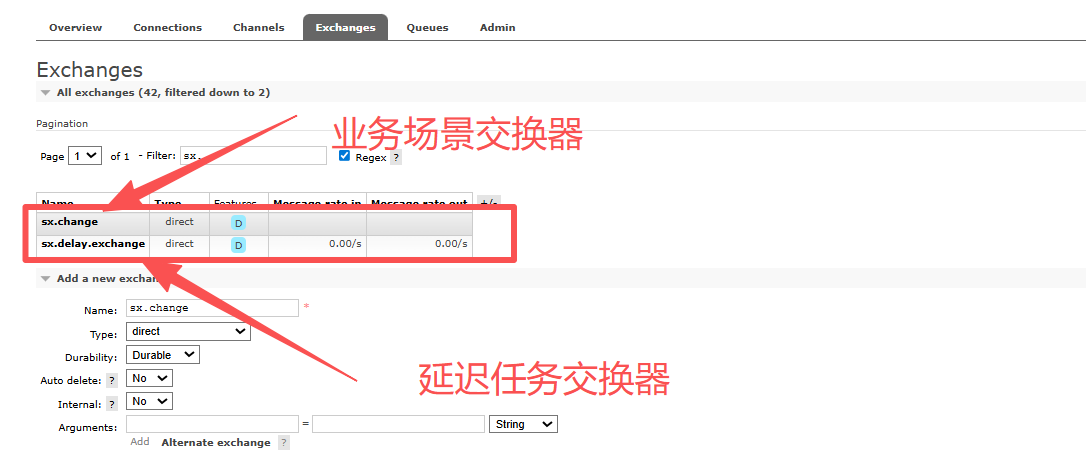
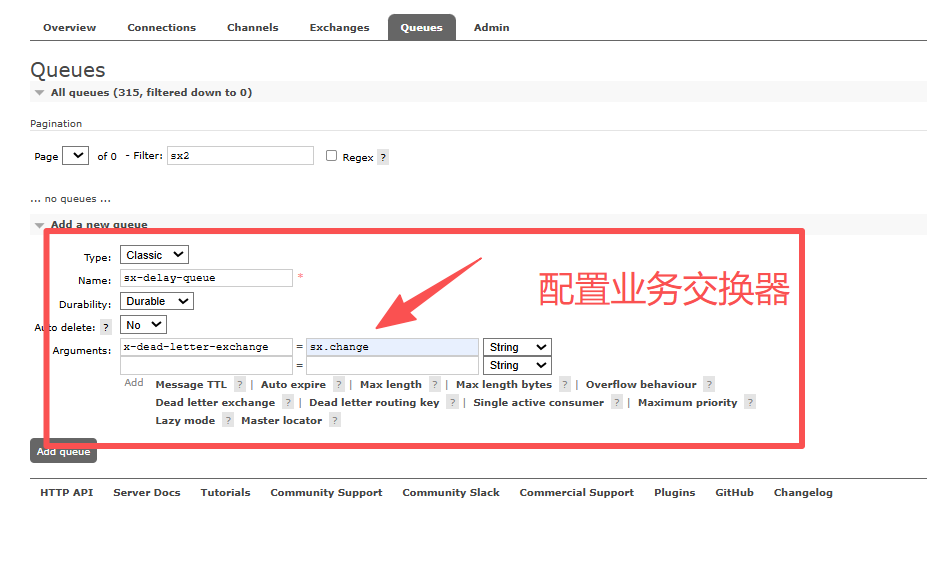
2、新建延迟队列
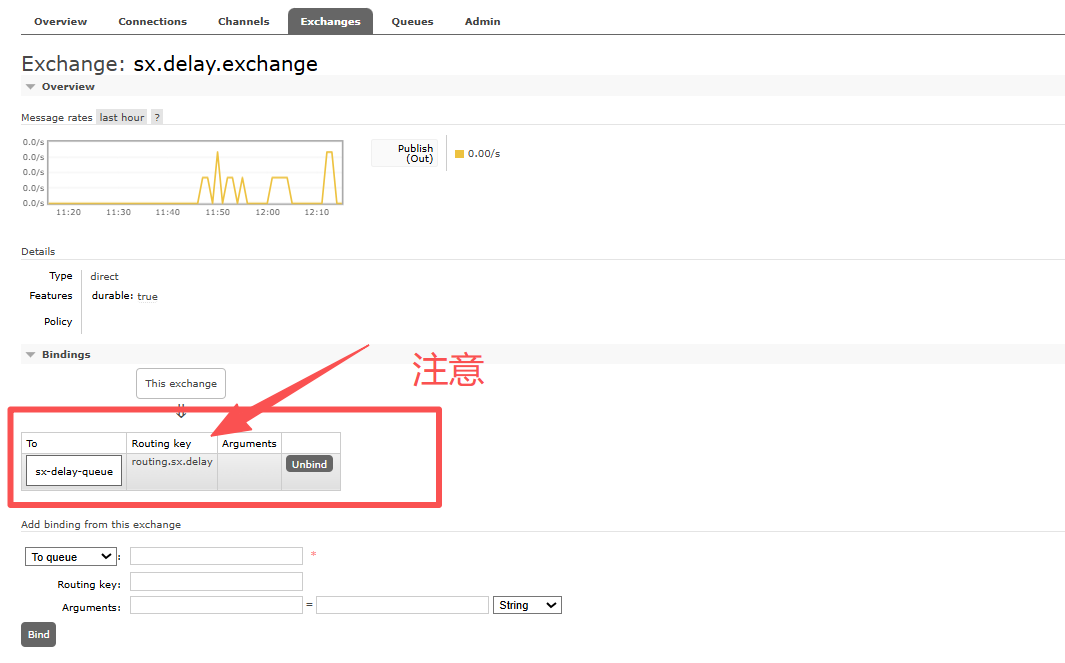
3、将延迟任务交换器和延迟队列绑定
注意指定的路由,要和业务队列与业务交换器绑定路由相同
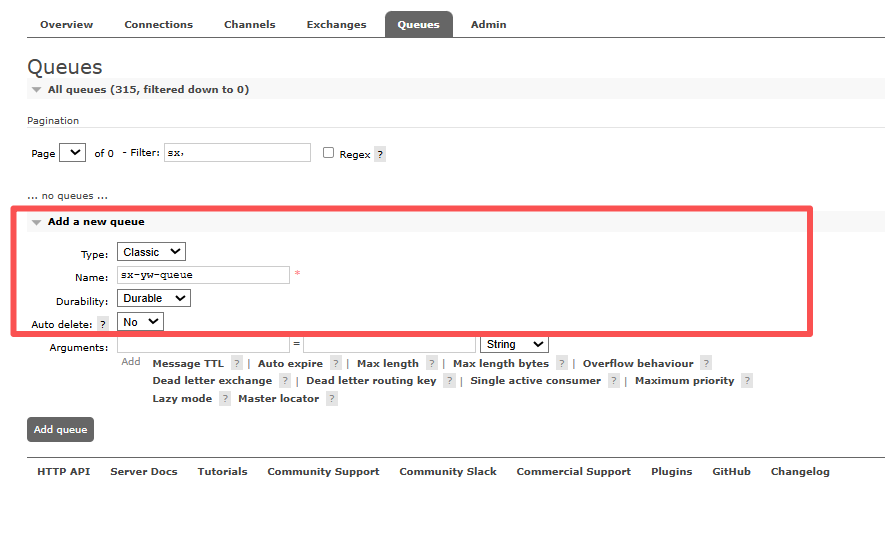
4、新建业务队列
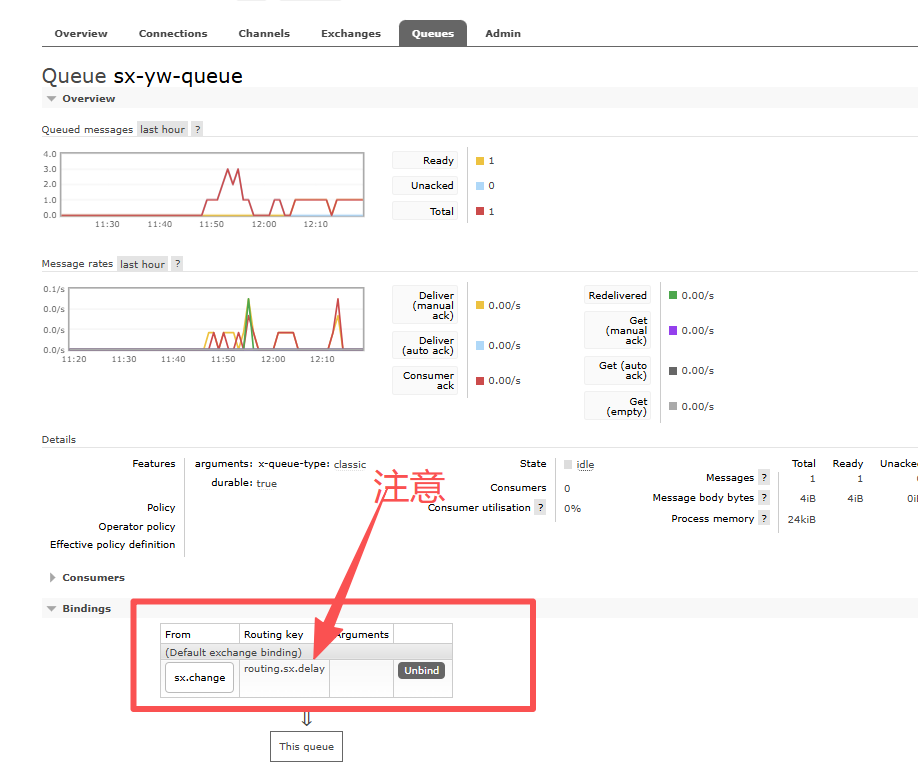
5、将业务交换器和业务队列绑定
注意指定的路由,要和上面延迟队列与延迟任务交换器绑定路由相同
场景使用
yaml
//sx.delay.exchange 延迟任务交换器
rabbitTemplate.send("sx.delay.exchange", "routing.sx.delay", message);- 生产者发消息:发送到 sx.delay.exchange 交换机,路由键 routing.sx.delay
- 进入延迟队列:交换机根据绑定,把消息路由到sx-delay-queue 队列
- 等待过期:消息在sx-delay-queue 队列里躺到 TTL 时间到,变成死信
- 死信转发:RabbitMQ 读取队列的 x-dead-letter-exchange 配置,把消息自动发给 sx.change 交换机,同时用 routing.sx.delay作为路由键
- 进入业务队列:sx.change 交换机收到消息后,根据路由键 routing.sx.delay,把消息路由到真正的业务队列 pdt-billing-wb
- 消费者消费:你只需要监听 sx-yw-queue,就能拿到延迟后的消息
测试代码
controller层
yaml
@GetMapping("/delay")
@ResponseBody
 public R delay() {
     delayQueueProducer.delayRetry("test");
     return R.ok();
 }
DelayQueueProducer类
yaml
import lombok.Data;
import lombok.experimental.Accessors;
import lombok.extern.slf4j.Slf4j;
import org.springframework.amqp.core.Message;
import org.springframework.amqp.core.MessageProperties;
import org.springframework.amqp.rabbit.core.RabbitTemplate;
import org.springframework.beans.factory.annotation.Autowired;
import org.springframework.scheduling.support.CronSequenceGenerator;
import org.springframework.stereotype.Component;

import java.text.ParseException;
import java.util.Date;
import java.util.HashMap;
import java.util.Map;

@Slf4j
@Component
public class DelayQueueProducer {
    @Autowired
    private RabbitTemplate rabbitTemplate;
    //第一次进入延迟队列
    public void delayRetry(String msg) {
        DelayMQMessage delayMQMessage = new DelayMQMessage()
                .setDelay(10000) // 延迟时间毫秒
                .setContent(msg.getBytes());
        HashMap<String, Object> props = new HashMap<>();
        //这里可以设置一些需要判断消息的业务属性,比如请求次数,超时时间。
        props.put("PROP_TIMES", 0L);
        //设置超时时间
        props.put("PROP_ABORT", getAbort());
        delayMQMessage.setProps(props);
        send(delayMQMessage);
    }

	//再次进入延迟队列
    public String delayRetry(Message message, String content) {
        DelayMQMessage delayMQMessage = buildMessage(content);

        //判断次数是否超限
        long times = Long.valueOf(StringUtils.defaultString(getProp(message, "PROP_TIMES"), "0"));
        long limit = 3;
        if ((++times > limit)) {
            System.out.println("取消重试,重试次数超限");
            return "OVER_LIMIT";
        }

        //判断时间是否超限
        long abort = Long.valueOf(StringUtils.defaultString(getProp(message, "PROP_ABORT"), getAbort().toString()));
        if (System.currentTimeMillis() >= abort) {
            log.info("取消重试,重试时间截止!");
            return "OVER_TIMES";
        }

        HashMap<String, Object> props = new HashMap<>();
        props.put("PROP_TIMES", times);
        props.put("PROP_ABORT", abort);
        delayMQMessage.setProps(props);
        send(delayMQMessage);
        log.info("延迟重试,成功写入队列。");
        return StringUtils.EMPTY;
    }

    //发送队列消息
    public void send(DelayMQMessage delayMQMessage) {
        String expiration = getExpiration(delayMQMessage);
        MessageProperties properties = new MessageProperties();
        properties.setExpiration(expiration);
        if(!NumberUtils.isNullOrZero(delayMQMessage.getDelay())){
            properties.setDelay(delayMQMessage.getDelay());
        }
        for (Map.Entry<String, Object> prop : delayMQMessage.getProps().entrySet()) {
            properties.setHeader(prop.getKey(), prop.getValue());
        }
        Message message = new Message(delayMQMessage.getContent(), properties);
        log.info("发送延迟消息:{}", message);
        rabbitTemplate.send("sx.delay.exchange", "routing.sx.delay", message);
    }

	//获取过期时间
    private Long getAbort() {
        Date abort;
        try {
            abort = org.apache.commons.lang3.time.DateUtils.addDays(org.apache.commons.lang3.time.DateUtils.parseDate(org.apache.commons.lang3.time.DateFormatUtils.format(new Date(), "yyyy-MM-dd"), "yyyy-MM-dd"), 1);
        } catch (ParseException pe) {
            abort = org.apache.commons.lang3.time.DateUtils.addDays(new Date(), 1);
        }
        return abort.getTime();
    }

    private String getExpiration(DelayMQMessage delayMQMessage) {
        // 延迟时间
        int delay = delayMQMessage.getDelay();
        if (ObjectUtils.isNotEmpty(delay)) {
            return String.valueOf(delay);
        }

        final CronSequenceGenerator generator = new CronSequenceGenerator(delayMQMessage.getCron());
        return String.valueOf(generator.next(new Date()).getTime() - System.currentTimeMillis());
    }

    /**
     * 获取扩展属性值
     *
     * @param message 消息
     * @param prop    属性名
     * @return 属性值
     */
    public String getProp(Message message, String prop) {
        return message.getMessageProperties().getHeader(prop).toString();
    }

    @Data
    @Accessors(chain = true)
    class DelayMQMessage{
        /**
         * 延迟循环策略
         */
        private String cron;
        /*延迟等待时长(毫秒)*/
        private int delay;
        /**
         * 消息主体内容
         */
        private byte[] content;
        /**
         * 业务路由名称(用于转到指定的消费队列)
         */
        private String routing;

        private Map<String, Object> props;
    }

    private DelayMQMessage buildMessage(String msg) {
        return new DelayMQMessage()
                .setRouting("routing.sx.business")
                .setDelay(10000) // 默认1分钟
                .setContent(msg.getBytes());
    }
}
DelayQueueConsumer消费者
yaml
@Slf4j
@Component
public class DelayQueueConsumer {
    @Autowired
    private DelayQueueProducer delayQueueProducer;

    @RabbitListener(queues = {"sx-yw-queue"}, ackMode = "MANUAL")
    public void consum2(String contentString, Channel channel, Message message) {
        long deliveryTag = message.getMessageProperties().getDeliveryTag();
        //处理业务
        log.info("延迟队列监听,{}",contentString);
		// 处理业务
        boolean result = false;
        if(result){
            //业务成功
            this.doAck(channel, deliveryTag, contentString);
            return;
        }else{
            //处理失败, 再次放入延迟队列
            delayQueueProducer.delayRetry(message, contentString);
        }
        this.doAck(channel, deliveryTag, contentString);
    }

    private void doAck(Channel channel, long deliveryTag, String contentString) {
        try {
            channel.basicAck(deliveryTag, false);
        } catch (IOException e) {
            log.error("ACK确认失败!内容: {}", contentString, e);
        }
    }
}