1 背景
未来我们需要:当用户提出一个复杂问题时,系统能不能快速、准确、实时地返回最合适的结果,并且把这些结果进一步组织成适合下游模型和 Agent 消费的形式
- 关键词检索的精确匹配,
- 向量检索的语义召回,
- 结构化过滤的业务约束,
- 多阶段排序和 rerank 的结果优化,
- 实时更新后的在线 serving 能力
2 混合检索(Hybird retrieval)
2.1 什么是混合检索
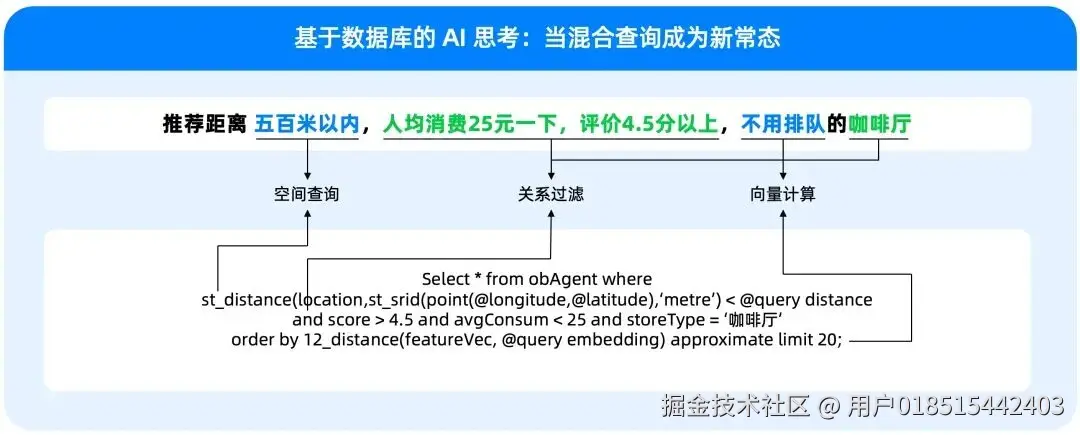 在上图的这个提问中: 距离五百米以内,是基于空间位置(GIS)的查询。 人均消费 25 元,评价 4.5 分以上,是基于传统标量的查询。 不用排队,是基于用户对店铺的评价,基于向量的语意检索。 mp.weixin.qq.com/s/raBPlHxsV...
2.2 为什么需要混合检索
2.2.1 真实查询同时包含多种信号
例如一个典型需求:找近五年、申请人是华为、涉及 5G 通信方案、技术路线类似某篇专利 的专利。
这里其实同时包含了几种不同类型的信息:
- 关键词匹配(5G通信)
- 语义相似(技术路线类似)
- 结构化过滤(申请人、时间)
- 业务规则(法律状态、分类号等)
单一检索方式很难同时满足这些条件,因此需要把:关键词检索 + 向量检索 + 结构化过滤组合在一起,这正是混合检索的核心思想。
2.2.2 关键词检索无法覆盖语义相似
在很多场景中,同一个概念可能有不同表达但是语义相同,例如:
- tumor therapy
- cancer treatment
- anti-tumor drug
如果只依赖关键词匹配,很多相关文档可能被遗漏,向量检索可以通过 embedding 捕获语义相似性。
因此需要:关键词召回 + 向量召回,共同保证召回覆盖率。
2.2.3 纯向量检索缺乏业务可控性
虽然向量检索可以很好地表达语义相似性,但它也有明显问题:
- 很难表达复杂 业务规则
- 不擅长处理 精确条件
- 可解释性较弱
例如:用户希望:
- 申请人是 某公司
- 法律状态是 有效
- 时间在 近五年
这些条件更适合通过结构化过滤实现,因此实际系统通常采用:语义召回 + 结构化过滤的组合方式。
2.2.4 AI 应用对召回质量要求更高
2.2.4.1 大模型幻觉
所谓幻觉,简单来说,就是模型生成了看起来合理、但实际上不准确,甚至完全错误的内容。
LLM的幻觉是怎么产生的?
- 是用参数里的泛化知识去填空:模型会根据自己训练中学到的统计规律,生成一个"听起来像那么回事"的答案,但它未必对应你当前业务里的真实事实。
- 是从不够相关的上下文里做过度推断:表面上模型引用了检索结果,但这些结果其实并不是最贴近问题的证据,于是模型在归纳时会出现偏差。
- 是把局部正确的信息拼成整体错误的结论:这在专利和生物医药场景里尤其常见:术语看起来都对,逻辑结构也很完整,但最终结论未必真的成立。
上面几种情况都是因为给模型提供的上下文信息不够,这也是为什么在 RAG 和 Agent 场景里,大家越来越强调"先把 retrieval 做好"。
那其实就会有个问题:是不是我把信息提供全了模型的表现就好了,例如:我想从专利里面提取信息,把一篇几万字的专利文本一股脑给模型了,效果好不好?这个就要提到下面的问题了
2.2.4.2 模型上下文腐烂问题
上下文窗口变大,只是给了模型"容纳更多内容"的能力,长上下文不等于高质量上下文,即使模型拿到了上下文,如果上下文中混入了太多不够相关、不够精确、噪声过高的内容,模型对真正关键信息的利用效率也会明显下降。
- 关键信息被稀释:真正重要的证据只占上下文中的一小部分,模型未必会优先抓住它。
- 模型注意力被噪声分散:模型会花资源去处理那些其实并不重要的段落,导致核心信息权重下降。
- 答案变得模糊或保守:因为上下文里同时存在多种弱相关信号,模型可能会输出一个看起来全面、但其实不够精准的答案。
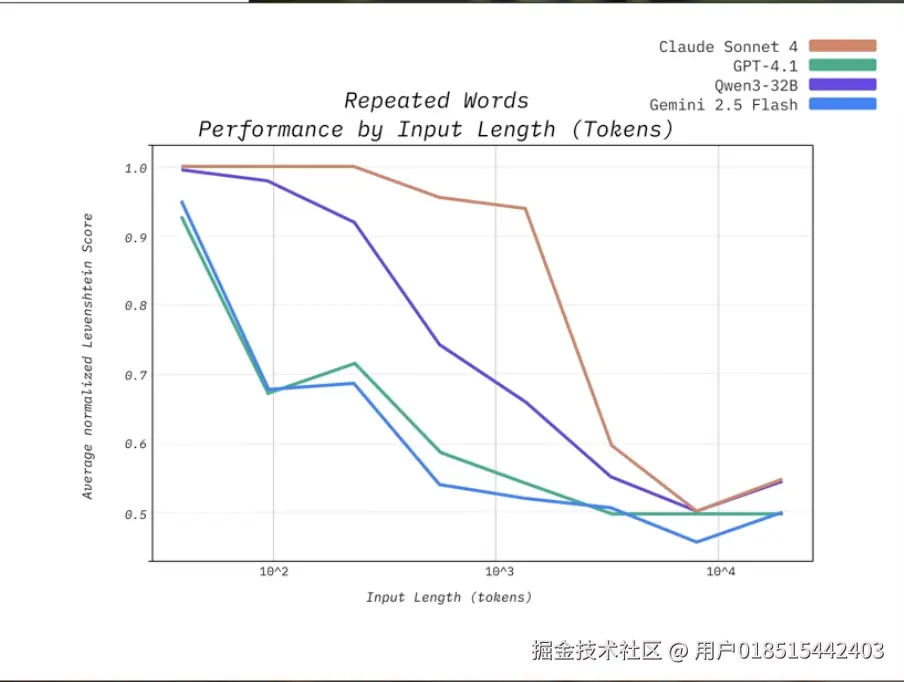 上下文长度是如何影响模型输出的,www.youtube.com/watch?v=TUj...
3 Vespa 是什么
3.1 官方定义(主要是从用途侧定义的):
Vespa.ai is an AI Search Platform for developing and operating large-scale applications that combine big data, vector search, machine-learned ranking, and real-time inference. With native tensor support for complex ranking and decisioning, Vespa enables real-time AI applications like RAG, recommendation, and intelligent search---at enterprise scale.
3.2 技术侧给Vespa的定义
一个面向大规模在线应用的检索、排序与推理一体化 serving platform。
3.2.1 一体化
因为 Vespa 不是只做全文检索,也不是只做向量检索,它更希望把结构化过滤、关键词检索、向量召回、多阶段排序,甚至模型推理,尽量放到同一个平台里完成。
3.2.1 serving
Vespa 关注的不只是"把数据建好索引、存进去",而是当一个真实的用户请求到来时,系统如何在很短时间内,从海量数据中筛选候选、完成排序,并返回最合适的结果。
最终通过对数据进行多阶段排序得到高质量召回,在给模型尽可能全面信息的同时最大程度避免噪音来避免模型上下文腐烂问题。
4 Vespa 和 主流检索技术对比
4.1 Vespa VS Elasticsearch/Solr
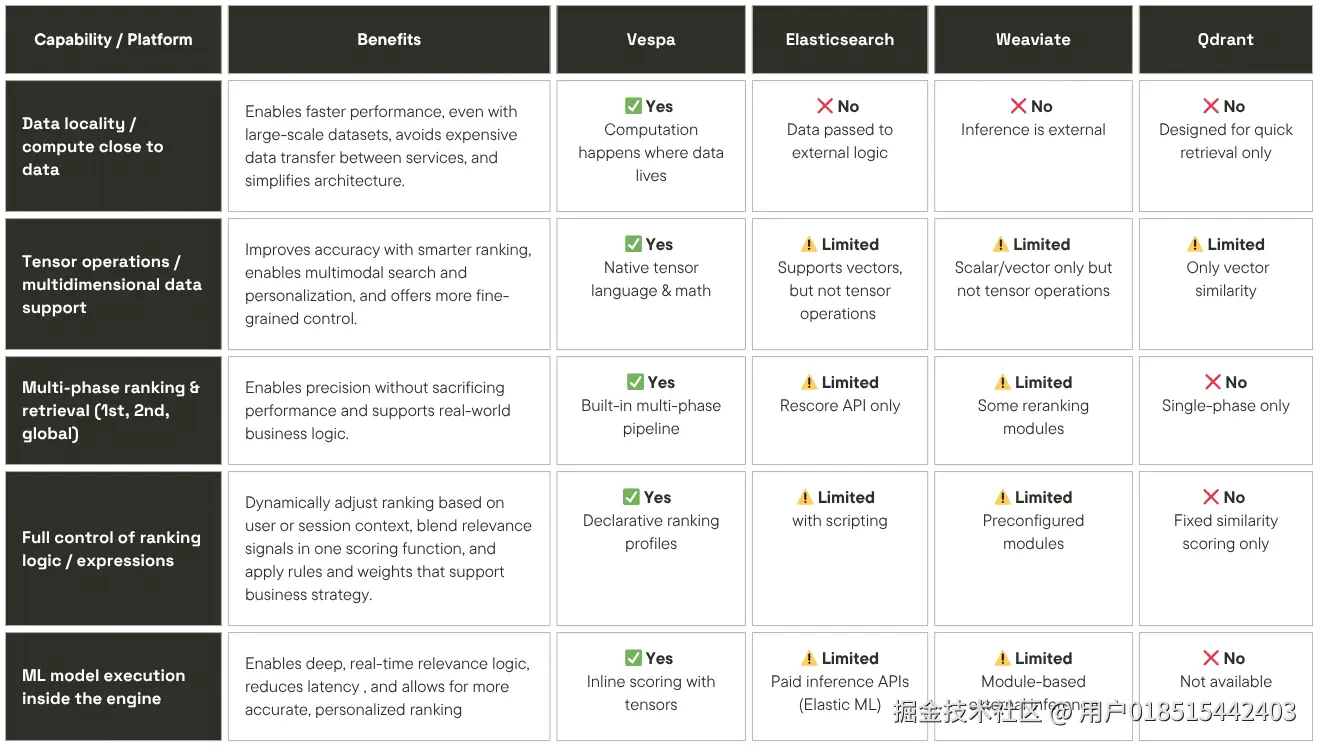
4.2 Vector database feature comparison
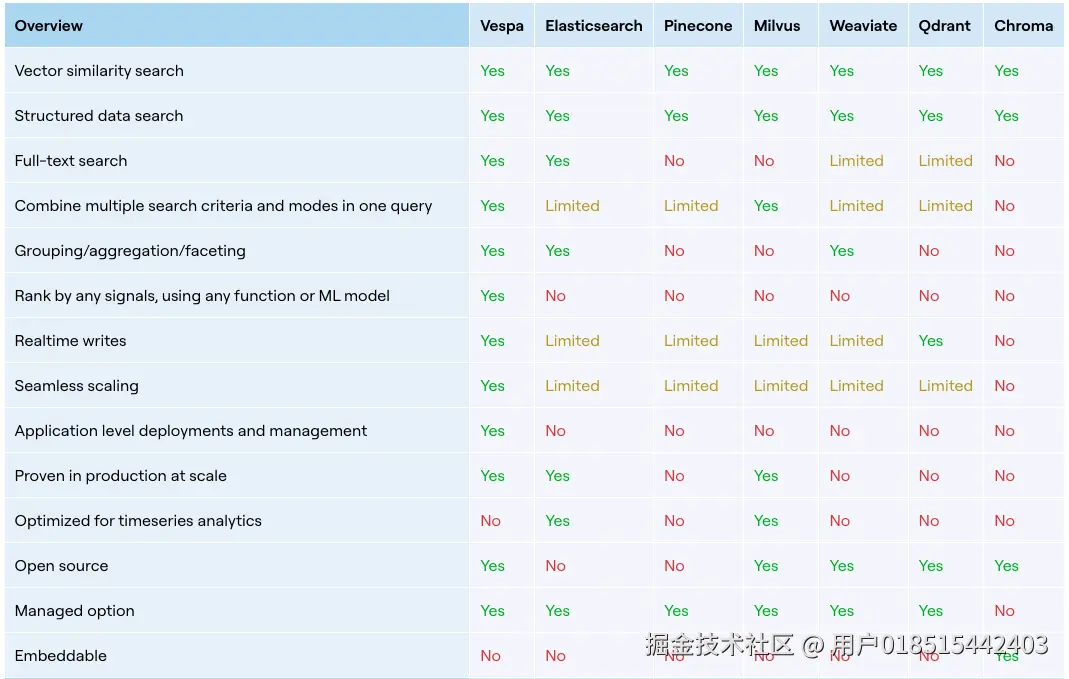
5 Vespa 能力
5.1 统一检索
Vespa 的一个核心设计,是把关键词检索、结构化过滤、向量检索统一到同一个查询执行框架里。官方文档明确说明,nearest neighbor search 可以与其他过滤条件、查询条件组合使用。
业务真正需要的是 hybrid retrieval,就像我们前面在混合搜索那部分提到的场景。Vespa 的价值就在于,它把这几类能力放进了一条查询链路中,而不是让工程团队自己拼多套系统。
这项能力特别适合我们当前的 RAG
因为这些场景往往都要求"语义相关 + 条件过滤 + 排序控制"同时成立。
5.2 分阶段排序
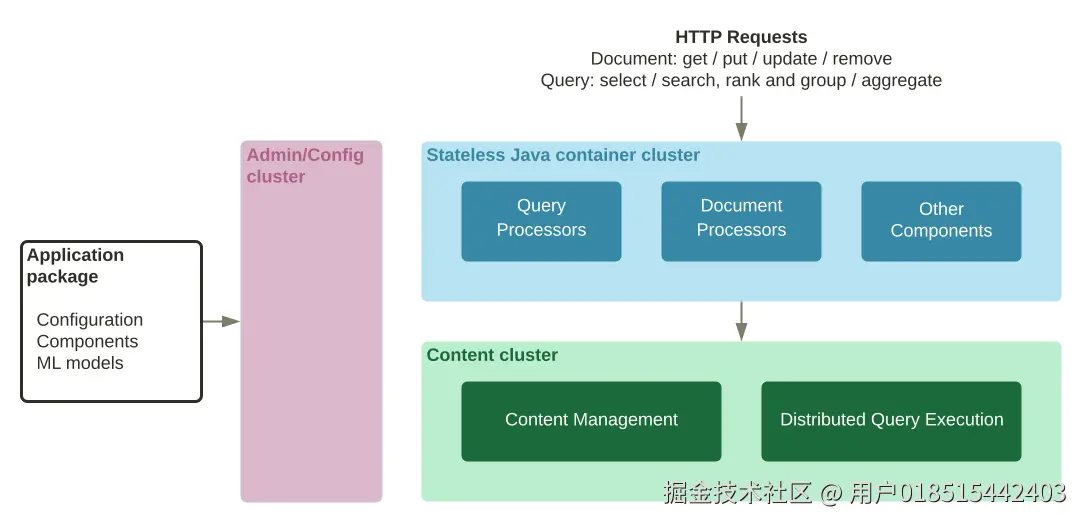
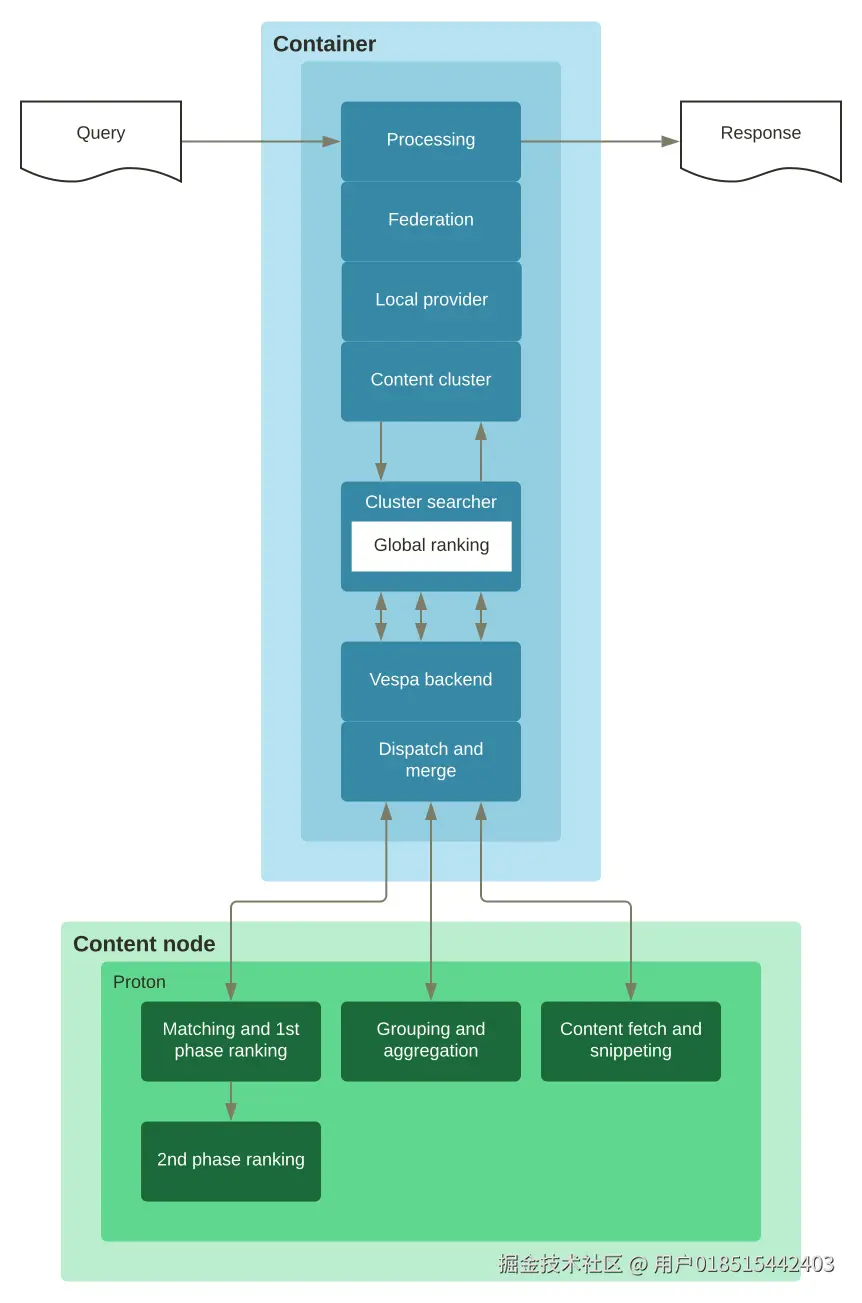
Vespa 官方提供了比较完整的 phased ranking 机制,支持 first-phase、second-phase 和 global-phase。官方文档说明,检索阶段可以使用 weakAnd、nearest neighbor 等高效算子先做候选选择;随后 second-phase 在 content node 上做更精细的重排;global-phase 则在合并结果后于 stateless container 上执行,适合做更昂贵但质量更高的最终 reranking。
Vespa 的特点,是把这件事做成了平台原生能力,而不是外部补丁。官方文档也明确提到 global-phase 很适合用于高质量但计算开销大的模型重排场景。
5.3. 实时更新
Vespa 在官方文档里强调 real-time indexing and search。官方 llms.txt 明确写到:Vespa 提供低延迟 CRUD,数据在写入后可以在毫秒级变得可搜索。
5.4. 在线推理与张量能力
这是 Vespa 和很多传统检索系统在产品心智上差异很大的一点。官方文档强调 tensor API、machine-learned ranking,以及 ONNX 模型可直接用于 ranking。
检索与模型可以协同工作。
6 Vespa 架构
6.1 整体架构
6.2 Query 执行过程
7 Vespa 检索 Demo
7.1 Vespa 文本检索
7.1.1 创建 Application
安装CLI、clone 项目、准备数据
bash
# 安装 cli
brew install vespa-cli

# 官方样例项目
vespa clone text-search text-search && cd text-search

# 获得输入数据
./scripts/convert-msmarco.sh
数据格式
json
{
  "put": "id:msmarco:msmarco::D1555982",
  "fields": {
    "id": "D1555982",
    "url": "https://answers.yahoo.com/question/index?qid=20071007114826AAwCFvR",
    "title": "The hot glowing surfaces of stars emit energy in the form of electromagnetic radiation",
    "body": "Science   Mathematics Physics The hot glowing surfaces of stars emit energy in the form of electromagnetic radiation ... "
  }
}
定义 schema
json
schema msmarco {
    document msmarco {
        field language type string {
            indexing: "en" | set_language
        }
        field id type string {
            indexing: attribute | summary
            match: word
        }
        field title type string {
            indexing: index | summary
            match: text
            index: enable-bm25
        }
        field body type string {
            indexing: index | summary
            match: text
            index: enable-bm25
        }
        field url type string {
            indexing: index | summary
            index: enable-bm25
        }
    }
    fieldset default {
        fields: title, body, url
    }
    document-summary minimal {
        summary id {  }
    }
    document-summary debug-tokens {
        summary url {}
        summary url-tokens {
            source: url
            tokens
        }
        from-disk
    }
    rank-profile default {
        first-phase {
            expression: nativeRank(title, body, url)
        }
    }
    rank-profile bm25 inherits default {
        first-phase {
            expression: bm25(title) + bm25(body) + bm25(url)
        }
    }
}
service.xml
xml
<?xml version="1.0" encoding="UTF-8"?>
<services version="1.0">
    <container id="text_search" version="1.0">
        <search />
        <document-processing />
        <document-api />
    </container>
    <content id="msmarco" version="1.0">
        <min-redundancy>1</min-redundancy>
        <documents>
            <document type="msmarco" mode="index" />
            <document-processing cluster="text_search" />
        </documents>
        <nodes>
            <node distribution-key="0" hostalias="node1" />
        </nodes>
    </content>
</services>
docker 启动、set local、发布应用、feed data
bash
podman run --detach --name vespa-msmarco --hostname vespa-msmarco \
  --publish 8080:8080 --publish 19071:19071 \
  vespaengine/vespa

vespa config set target local
vespa status deploy --wait 300
vespa deploy --wait 300 app

vespa feed -t http://localhost:8080 dataset/documents.jsonl
7.1.2 查询
7.1.2.1 简单查询
bash
vespa query \
  'yql=select * from msmarco where default contains text(@user-query)' \
  'user-query=what is dad bod' \
  'hits=3' \
  'language=en'
这里用的是 default fieldset、default rank-profile
7.1.2.2 检索结果
json
{
  "root": {
    "id": "toplevel",
    "relevance": 1,
    "fields": {
      "totalCount": 562
    },
    "children": [
      {
        "id": "id:msmarco:msmarco::D2977840",
        "relevance": 0.20676669550322158,
        "source": "msmarco",
        "fields": {
          "sddocname": "msmarco",
          "body": "<sep />After The Cut released a piece explaining <hi>what</hi> the  <hi>dad</hi> <hi>bod</hi>  <hi>is</hi> last week  the internet pretty much exploded into debate over the trend  <sep />",
          "documentid": "id:msmarco:msmarco::D2977840",
          "id": "D2977840",
          "title": "What Is A  Dad Bod   An Insight Into The Latest Male Body Craze To Sweep The Internet",
          "url": "http://www.huffingtonpost.co.uk/2015/05/05/what-is-a-dadbod-male-body_n_7212072.html"
        }
      }
    ]
  }
}
7.1.2.3 查询参数
7.1.2.3.1 targetHits
这个参数用来调节满足低延迟、高吞吐的需求
bash
vespa query \
  'yql=select * from msmarco where title contains ({targetHits:100}text(@user-query))' \
  'user-query=what is dad bod' \
  'hits=3' \
  'language=en'
这个参数是WAND的候选规模,这个参数不写,默认100
WAND 的核心思想:match term 数量越多、score 越高
| 文档 | 匹配词 |
|---|---|
| A | dad bod |
| B | what dad bod |
| C | bod |
| D | what |
B > A > C > D
所谓WAND是加速 Top-K 检索的算法
text
倒排索引
   │
   ▼
term posting lists
   │
   ▼
WAND pruning
(只保留 top ~100 candidate)
   │
   ▼
ranking
BM25 / nativeRank
   │
   ▼
返回 hits
7.1.2.3.2 gramma:"all"
gramma:"all" 加之前几个关键词之间的关系是 OR,加之后这几个关键词都要在字段中存在
bash
vespa query \
  'yql=select * from msmarco where title contains ({grammar:"all"}text(@user-query))' \
  'user-query=what is dad bod' \
  'hits=3' \
  'language=en'
7.1.2.3.3 多字段查询
bash
vespa query \
  'yql=select * from msmarco where title contains ({grammar:"all"}text(@user-query)) or url contains ({grammar:"all"}text(@user-query))' \
  'user-query=what is dad bod' \
  'hits=3' \
  'language=en'
7.1.2.3.4 rank 函数
bash
vespa query \
  'yql=select * from msmarco where rank(default contains text(@user-query), url contains ({weight:1000, significance:1.0}"www.answers.com"))' \
  'user-query=what is dad bod' \
  'hits=3' \
  'language=en'
weight 表示boost的强度,boost的意思是在排序时人为提高某些文档的分数 relevance score
significance ≈ IDF 用于表示查询词在相关性计算中的"重要程度",类似于 IDF 权重,它会影响该词匹配对最终 ranking score 的贡献,这个参数在Vespa不太需要手动写
TF表示文档中词出现的频率
IDF表示词的稀有程度,例如一些冠词 a the,这些不太稀有,重要性就降低了
Vespa 的 nativeRank 可以理解为 TF × IDF × Boost 的一种实现,rank(A, B) 查询操作符允许我们 用 A 进行文档召回,用 B 作为 ranking 特征进行 boosting,从而在不改变召回集合的情况下调整排序结果
significance 和 weight 改变 rank features 的输入参数,而 rank-profile 使用这些 features 计算分数。
7.1.2.3.5 filter
bash
vespa query \
  'yql=select * from msmarco where default contains text(@user-query) and url contains ({filter:true,ranked:false}"huffingtonpost.co.uk")' \
  'user-query=what is dad bod' \
  'hits=3' \
  'language=en'
7.1.2.3.6 userInput 函数
bash
vespa query \
  'yql=select * from msmarco where userInput(@user-query)' \
  'user-query=title:"dad bod"' \
  'hits=3' \
  'language=en'
userInput和text不同点在于:把 user-query 当成查询语言解析,而不是普通文本
以下情形可以使用:
- LLM 生成 structured query
- 用户指定字段
- 用户写 phrase 查询
- dad bod
- "dad bod"
- title:"dad bod"
- (title:"machine learning" OR title:"deep learning") AND body:protein
7.1.2.4 查询调试
7.1.2.4.1 trace.level
bash
vespa query \
  'yql=select * from msmarco where default contains ({targetHits:100}text(@user-query)) and url contains ({filter:true,ranked:false}"huffingtonpost.co.uk")' \
  'user-query=what is dad bod' \
  'trace.level=3' \
  'language=en'

# query=[AND (WEAKAND(100) default:what default:is default:dad default:bod) |url:'huffingtonpost co uk']
0不输出调试,1,2 是输出简单的调试
上面的例子中我们可以看到 url 匹配被执行了 phrase 计算,这是由于 schema 当中我们对这个字段进行 bm25 index,其实这个字段我们更加需要单 token 匹配,短语匹配比单 token 过滤更贵,可以再加一个字段 match: word
7.1.2.4.2 summary=debug-tokens
bash
vespa query \
  'yql=select * from msmarco where url contains ({filter:true,ranked:false}"huffingtonpost.co.uk")' \
  'trace.level=0' \
  'language=en' \
  'summary=debug-tokens'
json
{
    "root": {
        "id": "toplevel",
        "relevance": 1,
        "fields": {
            "totalCount": 562
        },
        "children": [
            {
                "id": "index:msmarco/0/59444ddd06537a24953b73e6",
                "relevance": 0.0,
                "source": "msmarco",
                "fields": {
                    "sddocname": "msmarco",
                    "url": "http://www.huffingtonpost.co.uk/2015/05/05/what-is-a-dadbod-male-body_n_7212072.html",
                    "url-tokens": [
                        "http",
                        "www",
                        "huffingtonpost",
                        "co",
                        "uk",
                        "2015",
                        "05",
                        "05",
                        "what",
                        "is",
                        "a",
                        "dadbod",
                        "male",
                        "body",
                        "n",
                        "7212072",
                        "html"
                    ]
                }
            }
        ]

    }
}
bash
vespa query \
  'yql=select * from msmarco where url contains ({filter:true,ranked:false,stem:false}"https")' \
  'summary=debug-tokens' \
  'language=en'


vespa query \
  'yql=select * from msmarco where url contains ({filter:true,ranked:false}"https")' \
  'summary=debug-tokens' \
  'language=de'
stem 参数的作用:控制查询词是否进行词干化处理,从而允许或禁止不同词形之间的匹配;stem:true(默认):支持词形变化匹配;stem:false:只匹配完全相同的 token
language 决定查询词使用哪套语言学处理规则(linguistic pipeline),而其中的 stemming 会改变查询 token。
7.1.2.5 ranking
7.1.2.5.1 指定 rank-profile
bash
vespa query \
  'yql=select * from msmarco where default contains text(@user-query)' \
  'user-query=what is dad bod' \
  'hits=3' \
  'language=en' \
  'ranking=bm25'
ranking=xxx
7.1.2.5.2 修改 schema 中的 rank-profile
json
schema msmarco {
    document msmarco {
        field language type string {
            indexing: "en" | set_language
        }
        field id type string {
            indexing: attribute | summary
            match: word
        }
        field title type string {
            indexing: index | summary
            match: text
            index: enable-bm25
        }
        field body type string {
            indexing: index | summary
            match: text
            index: enable-bm25
        }
        field url type string {
            indexing: index | summary
            index: enable-bm25
        }
    }
    fieldset default {
        fields: title, body, url
    }
    document-summary minimal {
        summary id {  }
    }
    document-summary debug-tokens {
        summary url {}
        summary url-tokens {
            source: url
            tokens
        }
        from-disk
    }
    rank-profile default {
        first-phase {
            expression: nativeRank(title, body, url)
        }
    }
    rank-profile bm25 inherits default {
        first-phase {
            expression: bm25(title) + bm25(body) + bm25(url)
        }
    }

    rank-profile combined inherits default {
        first-phase {
            expression: bm25(title) + bm25(body) + bm25(url) + nativeRank(title) + nativeRank(body) + nativeRank(url)
        }
        match-features {
          bm25(title)
          bm25(body)
          bm25(url)
          nativeRank(title)
          nativeRank(body)
          nativeRank(url)
        }
    }
}
bash
# 重新发布
vespa deploy --wait 300 app


vespa query \
  'yql=select * from msmarco where default contains text(@user-query)' \
  'user-query=what is dad bod' \
  'hits=3' \
  'language=en' \
  'ranking=combined'
7.1.2.5.3 rank-profile 中的 match-features
json
{
    "root": {
        "id": "toplevel",
        "relevance": 1,
        "fields": {
            "totalCount": 562
        },
        "children": [
          {
                "id": "id:msmarco:msmarco::D2977840",
                "relevance": 25.482783473796484,
                "source": "msmarco",
                "fields": {
                    "matchfeatures": {
                        "bm25(body)": 19.51565699523739,
                        "bm25(title)": 4.978933753876959,
                        "bm25(url)": 0.3678926381724701,
                        "nativeRank(body)": 0.3010929113058281,
                        "nativeRank(title)": 0.24814575272673867,
                        "nativeRank(url)": 0.07106142247709807
                    },
                    "sddocname": "msmarco",
                    "documentid": "id:msmarco:msmarco::D2977840",
                    "id": "D2977840",
                    "title": "What Is A  Dad Bod   An Insight Into The Latest Male Body Craze To Sweep The Internet",
                    "url": "http://www.huffingtonpost.co.uk/2015/05/05/what-is-a-dadbod-male-body_n_7212072.html"
                }
            }
        ]

    }
}
用处:
- 调试 ranking
- 训练 Learning-to-Rank 模型
- ranking explain / 分析
7.2 Vespa 混合检索
7.2.1 创建 Application
bash
# 启动容器服务
podman run --detach --name vespa --hostname vespa-container \
  --publish 127.0.0.1:8080:8080 --publish 127.0.0.1:19071:19071 \
  vespaengine/vespa

# 查看服务状态
vespa status deploy --wait 300

# clone 项目
vespa clone msmarco-ranking msmarco-ranking && cd msmarco-ranking

# 下载 onnx 模型
mkdir -p models
curl -L https://huggingface.co/Xenova/ms-marco-MiniLM-L-6-v2/resolve/main/onnx/model.onnx -o models/model.onnx
curl -L https://huggingface.co/Xenova/ms-marco-MiniLM-L-6-v2/raw/main/tokenizer.json -o models/tokenizer.json

# 发布应用
vespa deploy --wait 300

# feed data
vespa feed ext/docs.jsonl
7.2.2 查询
7.2.2.1 向量检索 VS 混合检索
bash
# 普通检索
vespa query 'query=what was the manhattan project' \
 'yql=select * from passage where {targetHits: 100}nearestNeighbor(e5_embedding, q)'\
 'input.query(q)=embed(e5_embedding_model, @query)' \
 'input.query(qt)=embed(colbert_embedding_model, @query)' \
 'ranking=e5-colbert'  'hits=30' > query_result/1.json

# 混合检索
vespa query 'query=what was the manhattan project' \
 'yql=select * from passage where userQuery() or ({targetHits: 100}nearestNeighbor(e5_embedding, q))'\
 'input.query(q)=embed(e5_embedding_model, @query)' \
 'input.query(qt)=embed(colbert_embedding_model, @query)' \
 'ranking=e5-colbert' 'hits=30' > query_result/2.json
7.2.2.2 修改检索词并且放大
bash
# 普通检索
vespa query 'query=which secret wartime program built the first atomic bomb who led the us effort to develop nuclear weapons in world war ii what project created the first nuclear weapon' \
 'yql=select * from passage where {targetHits: 100}nearestNeighbor(e5_embedding, q)'\
 'input.query(q)=embed(e5_embedding_model, @query)' \
 'input.query(qt)=embed(colbert_embedding_model, @query)' \
 'ranking=e5-colbert' 'hits=100'> query_result/3.json


# 混合检索
vespa query 'query=which secret wartime program built the first atomic bomb who led the us effort to develop nuclear weapons in world war ii what project created the first nuclear weapon' \
 'yql=select * from passage where userQuery() or ({targetHits: 100}nearestNeighbor(e5_embedding, q))'\
 'input.query(q)=embed(e5_embedding_model, @query)' \
 'input.query(qt)=embed(colbert_embedding_model, @query)' \
 'ranking=e5-colbert' 'hits=100' > query_result/4.json
7.2.2.3 向量排序 VS cross-encoder 排序
bash
# 向量排序
vespa query 'query=what was the manhattan project' \
 'yql=select * from passage where userQuery() or ({targetHits: 100}nearestNeighbor(e5_embedding, q))'\
 'input.query(q)=embed(e5_embedding_model, @query)' \
 'input.query(qt)=embed(colbert_embedding_model, @query)' \
 'ranking=e5-colbert' 'hits=30' > query_result/5.json

# 带 cross-encoder 的混合检索
vespa query 'query=what was the manhattan project' \
 'yql=select * from passage where userQuery() or ({targetHits: 100}nearestNeighbor(e5_embedding, q))'\
 'input.query(q)=embed(e5_embedding_model, @query)' \
 'input.query(qt)=embed(colbert_embedding_model, @query)' \
 'input.query(query_token_ids)=embed(tokenizer, @query)' \
 'ranking=e5-colbert-cross-encoder-rrf' 'hits=30' > query_result/6.json
7.2.2.4 只比较加不加 gloabal-phase
便于比较我们修改一下 schema 里的 rank-profile
json
schema passage {

  document passage {

    field id type string {
      indexing: summary | attribute
    }
    field text type string {
      indexing: summary | index
      index: enable-bm25
    }
  }
  fieldset default {
    fields: text
  }

  field text_token_ids type tensor<float>(d0[64])  {
    # hf tokenizer - token ids used by cross-encoder
    indexing: input text | embed tokenizer | attribute
    attribute: paged
  }

  field e5_embedding type tensor<bfloat16>(x[384]) {
    # Using the e5 embedding model defined in services.xml
    indexing: input text | embed e5_embedding_model | attribute | index
    attribute {
      distance-metric: angular
    }
    index { # override default hnsw settings
      hnsw {
        max-links-per-node: 32
        neighbors-to-explore-at-insert: 400
      }
    }
  }

  field colbert_embeddings type tensor<int8>(dt{}, x[16]) {
    # No index - used for ranking, not retrieval
    indexing: input text | embed colbert_embedding_model | attribute
    attribute: paged
  }

  onnx-model ranker {
    file: models/model.onnx
    input input_ids: input_ids
    input attention_mask: attention_mask
    input token_type_ids: token_type_ids
    gpu-device: 0
  }

  rank-profile bm25 {
    first-phase {
      expression: bm25(text)
    }
  }

  rank-profile e5-similarity {
    inputs {
      query(q) tensor<float>(x[384])
    }
    first-phase {
      expression: closeness(field, e5_embedding)
    }
  }

  rank-profile e5-colbert inherits e5-similarity {
    inputs {
      query(qt) tensor<float>(qt{},x[128])
      query(q) tensor<float>(x[384])
    }
    function cos_sim() {
      expression: cos(distance(field, e5_embedding))
    }
    function max_sim() {
      expression {
        sum(
          reduce(
            sum(
              query(qt) * unpack_bits(attribute(colbert_embeddings)), x
            ),
            max, dt
          ),
          qt
        )
       }
    }

    second-phase {
      rerank-count: 100
      expression: max_sim()
    }
    match-features: max_sim() cos_sim()
  }

  rank-profile bm25-colbert inherits e5-colbert {
    # Overrides the first-phase expression fo e5-colbert rank-profile
    first-phase {
      expression: bm25(text)
    }
  }

  rank-profile e5-colbert-rrf inherits e5-colbert {
    global-phase {
      rerank-count: 200
      expression: reciprocal_rank(cos_sim) + reciprocal_rank(max_sim)
    }
    match-features: max_sim() cos_sim()
  }

  rank-profile e5-colbert-cross-encoder-rrf {
    inputs {
      query(q) tensor<float>(x[384])
      query(qt) tensor<float>(qt{},x[128])
      query(query_token_ids) tensor<float>(d0[32])
    }
    function input_ids() {
        expression: tokenInputIds(96, query(query_token_ids), attribute(text_token_ids))
    }
    function token_type_ids() {
      expression: tokenTypeIds(96, query(query_token_ids), attribute(text_token_ids))
    }
    function attention_mask() {
      expression: tokenAttentionMask(96, query(query_token_ids), attribute(text_token_ids))
    }
    function colbert_max_sim() {
      expression {
        sum(
          reduce(
            sum(
              query(qt) * unpack_bits(attribute(colbert_embeddings)), x
            ),
            max, dt
          ),
          qt
        )
       }
    }
    function e5_cos_sim() {
      expression: cos(distance(field, e5_embedding))
    }
    function cross_encoder() {
      expression: onnx(ranker){d0:0,d1:0}
    }
    first-phase {
        expression: e5_cos_sim
    }
    second-phase {
      rerank-count: 1000
      expression: colbert_max_sim()
    }
    global-phase {
      rerank-count: 12
      expression {
        reciprocal_rank(e5_cos_sim) +
        reciprocal_rank(colbert_max_sim) +
        reciprocal_rank(cross_encoder)
      }
    }
    match-features: colbert_max_sim e5_cos_sim
  }

  rank-profile e5-colbert-fair {
    inputs {
      query(q) tensor<float>(x[384])
      query(qt) tensor<float>(qt{},x[128])
    }

    function e5_first_score() {
      expression: closeness(field, e5_embedding)
    }

    function colbert_max_sim() {
      expression {
        sum(
          reduce(
            sum(
              query(qt) * unpack_bits(attribute(colbert_embeddings)), x
            ),
            max, dt
          ),
          qt
        )
      }
    }

    first-phase {
      expression: e5_first_score
    }

    second-phase {
      total-rerank-count: 100
      expression: colbert_max_sim()
    }

    match-features: e5_first_score colbert_max_sim
  }

  rank-profile e5-colbert-cross-encoder-fair inherits e5-colbert-fair {
    inputs {
      query(query_token_ids) tensor<float>(d0[32])
    }

    function input_ids() {
      expression: tokenInputIds(96, query(query_token_ids), attribute(text_token_ids))
    }

    function token_type_ids() {
      expression: tokenTypeIds(96, query(query_token_ids), attribute(text_token_ids))
    }

    function attention_mask() {
      expression: tokenAttentionMask(96, query(query_token_ids), attribute(text_token_ids))
    }

    function cross_encoder() {
      expression: onnx(ranker){d0:0,d1:0}
    }

    global-phase {
      rerank-count: 12
      expression: cross_encoder()
    }

    match-features: e5_first_score colbert_max_sim
  }
}
重新发布应用
bash
vespa deploy --wait 300检索比较
bash
# 不加 cross-encoder
vespa query 'query=what was the manhattan project' \
 'yql=select * from passage where userQuery() or ({targetHits: 100, approximate:false}nearestNeighbor(e5_embedding, q))' \
 'input.query(q)=embed(e5_embedding_model, @query)' \
 'input.query(qt)=embed(colbert_embedding_model, @query)' \
 'ranking=e5-colbert-fair' \
 'hits=30' \
 'trace.level=3' \
 > query_result/7.json

# 加 cross-encoder
vespa query 'query=what was the manhattan project' \
 'yql=select * from passage where userQuery() or ({targetHits: 100, approximate:false}nearestNeighbor(e5_embedding, q))' \
 'input.query(q)=embed(e5_embedding_model, @query)' \
 'input.query(qt)=embed(colbert_embedding_model, @query)' \
 'input.query(query_token_ids)=embed(tokenizer, @query)' \
 'ranking=e5-colbert-cross-encoder-fair' \
 'hits=30' \
 'trace.level=3' \
 > query_result/8.json