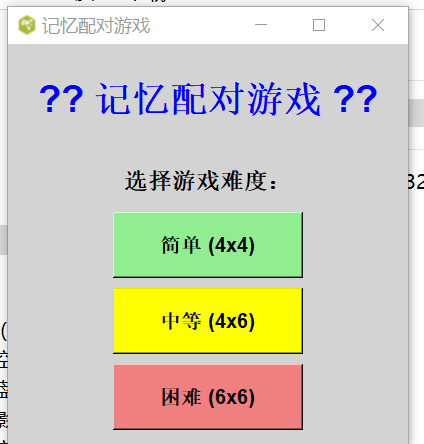
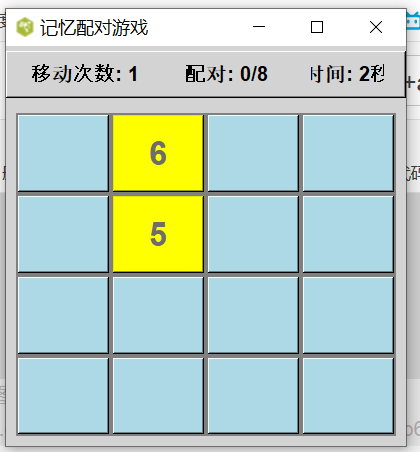
这个记忆配对游戏的玩法很简单,让我为您详细说明:
🎮 游戏规则
-
游戏目标:找出所有配对的数字卡片
-
基本玩法:
- 游戏开始时,所有卡片都是背面朝上(蓝色)
- 点击卡片会翻转显示数字
- 每次点击两张卡片,比较数字是否相同
- 如果数字相同:配对成功,卡片保持翻开状态
- 如果数字不同:配对失败,卡片会自动翻回背面
-
胜利条件:将所有卡片都成功配对
🎯 游戏特点
-
三种难度选择:
- 简单:4×4 网格(8对卡片)
- 中等:4×6 网格(12对卡片)
- 困难:6×6 网格(18对卡片)
-
统计信息:
- 移动次数:记录您翻转卡片的次数
- 配对数量:显示已成功配对的数量
- 计时器:记录完成游戏所用的时间
💡 游戏技巧
-
记忆策略:
- 记住已翻转卡片的位置和数字
- 尝试在脑中建立"数字→位置"的映射
- 优先配对已知位置的相同数字
-
系统方法:
- 按顺序逐行翻转卡片
- 先找出所有数字的位置
- 再集中进行配对
-
提高效率:
- 观察已配对卡片的分布
- 利用排除法缩小搜索范围
- 保持专注,避免重复翻转同一张卡片
🎮 操作说明
- 点击卡片:翻转查看数字
- 新游戏按钮:重新开始当前难度的游戏
- 主菜单按钮:返回难度选择界面
- 退出游戏:关闭程序
📊 游戏界面说明
┌─────────────────────────────────┐
│ 移动次数: 0    配对: 0/8    时间: 0秒 │ ← 统计栏
├─────────────────────────────────┤
│  [1] [2] [3] [4]               │
│  [5] [6] [7] [8]               │ ← 游戏板
│  [1] [3] [5] [7]               │
│  [2] [4] [6] [8]               │
├─────────────────────────────────┤
│      [新游戏] [主菜单]           │ ← 控制按钮
└─────────────────────────────────┘
🎯 游戏示例
假设您看到:
- 第1行第1列显示数字"5"
- 第3行第2列也显示数字"5"
那么这两张卡片就是一对,配对成功!
⭐ 小贴士
- 不要着急,游戏没有时间限制(只有计时记录)
- 配对失败时,卡片会停留1秒后翻回,利用这段时间记忆位置
- 越难的关卡越考验记忆力,可以先从简单模式开始练习
这个游戏主要锻炼短期记忆能力 和注意力集中,通过不断练习可以显著提升记忆力!祝您游戏愉快!🎉
测试环境
opensees=3.7.1
activateTcl=8.6.11
源码:
c
#!/usr/bin/env wish

package require Tk

# 全局变量
set GAME(rows) 4
set GAME(cols) 4
set GAME(totalPairs) 0
set GAME(firstRow) -1
set GAME(firstCol) -1
set GAME(secondRow) -1
set GAME(secondCol) -1
set GAME(canFlip) 1
set GAME(moves) 0
set GAME(matches) 0
set GAME(timeElapsed) 0
set GAME(timerId) ""
set GAME(gameActive) 0

# 初始化游戏
proc initGame {rows cols} {
    global GAME

    set GAME(rows) $rows
    set GAME(cols) $cols
    set GAME(totalPairs) [expr {$rows * $cols / 2}]
    set GAME(firstRow) -1
    set GAME(firstCol) -1
    set GAME(secondRow) -1
    set GAME(secondCol) -1
    set GAME(canFlip) 1
    set GAME(moves) 0
    set GAME(matches) 0
    set GAME(timeElapsed) 0
    set GAME(gameActive) 1

    # 停止旧计时器
    if {$GAME(timerId) != ""} {
        after cancel $GAME(timerId)
        set GAME(timerId) ""
    }

    # 创建卡片内容
    set symbols {}
    for {set i 1} {$i <= $GAME(totalPairs)} {incr i} {
        lappend symbols $i $i
    }

    # 随机打乱
    for {set i 0} {$i < [llength $symbols]} {incr i} {
        set j [expr {int(rand() * [llength $symbols])}]
        set temp [lindex $symbols $i]
        set symbols [lreplace $symbols $i $i [lindex $symbols $j]]
        set symbols [lreplace $symbols $j $j $temp]
    }

    # 存储卡片值
    for {set i 0} {$i < $rows} {incr i} {
        for {set j 0} {$j < $cols} {incr j} {
            set index [expr {$i * $cols + $j}]
            set GAME(card_${i}_${j}) [lindex $symbols $index]
            set GAME(flipped_${i}_${j}) 0
            set GAME(matched_${i}_${j}) 0
        }
    }

    # 清除主窗口内容,转换为游戏界面
    clearMainWindow
    drawGameBoard
}

# 清除主窗口内容
proc clearMainWindow {} {
    # 删除所有子控件
    foreach child [winfo children .] {
        destroy $child
    }
    # 重置窗口标题和协议
    wm title . "记忆配对游戏"
    wm protocol . WM_DELETE_WINDOW {exitGame}
    # 设置背景色
    . configure -bg lightgray
}

# 开始计时
proc startTimer {} {
    global GAME

    if {$GAME(gameActive)} {
        incr GAME(timeElapsed)
        if {[winfo exists .stats.time]} {
            .stats.time configure -text "时间: $GAME(timeElapsed)秒"
        }
        set GAME(timerId) [after 1000 startTimer]
    }
}

# 绘制游戏板
proc drawGameBoard {} {
    global GAME

    # 状态栏
    frame .stats -relief raised -bd 2 -bg lightgray
    pack .stats -fill x -pady 5

    label .stats.moves -text "移动次数: 0" -font {Arial 12 bold} -bg lightgray
    pack .stats.moves -side left -padx 20 -pady 5

    label .stats.pairs -text "配对: 0/$GAME(totalPairs)" -font {Arial 12 bold} -bg lightgray
    pack .stats.pairs -side left -padx 20 -pady 5

    label .stats.time -text "时间: 0秒" -font {Arial 12 bold} -bg lightgray
    pack .stats.time -side left -padx 20 -pady 5

    button .stats.reset -text "新游戏" -command resetGame -font {Arial 10 bold} -bg lightblue
    pack .stats.reset -side right -padx 20 -pady 5

    button .stats.menu -text "主菜单" -command returnToMenu -font {Arial 10 bold} -bg lightgreen
    pack .stats.menu -side right -padx 5 -pady 5

    # 游戏板
    frame .board -bg gray
    pack .board -expand 1 -fill both -padx 10 -pady 10

    # 创建卡片
    for {set i 0} {$i < $GAME(rows)} {incr i} {
        for {set j 0} {$j < $GAME(cols)} {incr j} {
            button .board.btn_${i}_${j} -text "" -width 8 -height 4 \
                -font {Arial 20 bold} -bg lightblue -activebackground skyblue \
                -command [list flipCard $i $j]
            grid .board.btn_${i}_${j} -row $i -column $j -padx 2 -pady 2 -sticky nsew
        }
    }

    # 配置网格
    for {set i 0} {$i < $GAME(rows)} {incr i} {
        grid rowconfigure .board $i -weight 1
    }
    for {set j 0} {$j < $GAME(cols)} {incr j} {
        grid columnconfigure .board $j -weight 1
    }

    # 启动计时器
    startTimer
}

# 翻转卡片
proc flipCard {row col} {
    global GAME

    if {!$GAME(gameActive)} return
    if {!$GAME(canFlip)} return
    if {$GAME(flipped_${row}_${col})} return
    if {$GAME(matched_${row}_${col})} return

    # 显示卡片
    set btn .board.btn_${row}_${col}
    $btn configure -text $GAME(card_${row}_${col}) -bg yellow -state disabled
    set GAME(flipped_${row}_${col}) 1

    # 第一张卡片
    if {$GAME(firstRow) == -1} {
        set GAME(firstRow) $row
        set GAME(firstCol) $col
        return
    }

    # 第二张卡片
    if {$GAME(secondRow) == -1} {
        set GAME(secondRow) $row
        set GAME(secondCol) $col

        incr GAME(moves)
        updateStats

        # 检查匹配
        set firstVal $GAME(card_${GAME(firstRow)}_${GAME(firstCol)})
        set secondVal $GAME(card_${row}_${col})

        if {$firstVal == $secondVal} {
            # 匹配成功
            set GAME(matched_${GAME(firstRow)}_${GAME(firstCol)}) 1
            set GAME(matched_${row}_${col}) 1
            incr GAME(matches)
            updateStats

            set GAME(firstRow) -1
            set GAME(firstCol) -1
            set GAME(secondRow) -1
            set GAME(secondCol) -1

            # 检查胜利
            if {$GAME(matches) == $GAME(totalPairs)} {
                gameWin
            }
        } else {
            # 匹配失败
            set GAME(canFlip) 0
            after 1000 resetFlip
        }
    }
}

# 重置翻转(匹配失败时)
proc resetFlip {} {
    global GAME

    if {!$GAME(gameActive)} return

    # 翻回第一张
    if {$GAME(firstRow) != -1 && !$GAME(matched_${GAME(firstRow)}_${GAME(firstCol)})} {
        set btn1 .board.btn_${GAME(firstRow)}_${GAME(firstCol)}
        if {[winfo exists $btn1]} {
            $btn1 configure -text "" -bg lightblue -state normal
        }
        set GAME(flipped_${GAME(firstRow)}_${GAME(firstCol)}) 0
    }

    # 翻回第二张
    if {$GAME(secondRow) != -1 && !$GAME(matched_${GAME(secondRow)}_${GAME(secondCol)})} {
        set btn2 .board.btn_${GAME(secondRow)}_${GAME(secondCol)}
        if {[winfo exists $btn2]} {
            $btn2 configure -text "" -bg lightblue -state normal
        }
        set GAME(flipped_${GAME(secondRow)}_${GAME(secondCol)}) 0
    }

    set GAME(firstRow) -1
    set GAME(firstCol) -1
    set GAME(secondRow) -1
    set GAME(secondCol) -1
    set GAME(canFlip) 1
}

# 更新统计
proc updateStats {} {
    global GAME

    if {[winfo exists .stats.moves]} {
        .stats.moves configure -text "移动次数: $GAME(moves)"
        .stats.pairs configure -text "配对: $GAME(matches)/$GAME(totalPairs)"
    }
}

# 游戏胜利
proc gameWin {} {
    global GAME

    set GAME(gameActive) 0

    if {$GAME(timerId) != ""} {
        after cancel $GAME(timerId)
        set GAME(timerId) ""
    }

    tk_messageBox -title "恭喜胜利!" \
        -message "🎉 恭喜你赢了! 🎉\n\n移动次数: $GAME(moves)\n用时: $GAME(timeElapsed)秒" \
        -type ok -icon info

    set playAgain [tk_messageBox -title "新游戏" -message "是否开始新游戏?" -type yesno]
    if {$playAgain == "yes"} {
        resetGame
    } else {
        returnToMenu
    }
}

# 重置游戏
proc resetGame {} {
    global GAME

    if {$GAME(timerId) != ""} {
        after cancel $GAME(timerId)
        set GAME(timerId) ""
    }

    initGame $GAME(rows) $GAME(cols)
}

# 返回主菜单
proc returnToMenu {} {
    global GAME

    # 停止计时器
    if {$GAME(timerId) != ""} {
        after cancel $GAME(timerId)
        set GAME(timerId) ""
    }

    # 清除游戏界面,显示主菜单
    clearMainWindow
    showMenu
}

# 退出游戏
proc exitGame {} {
    global GAME

    if {$GAME(timerId) != ""} {
        after cancel $GAME(timerId)
    }

    # 询问是否退出
    set confirm [tk_messageBox -title "退出" -message "确定要退出游戏吗?" -type yesno -icon question]
    if {$confirm == "yes"} {
        exit
    }
}

# 显示主菜单
proc showMenu {} {
    # 初始化随机数
    expr {srand([clock seconds])}

    # 设置主窗口
    wm title . "记忆配对游戏"
    wm geometry . "400x400"
    wm protocol . WM_DELETE_WINDOW {exitGame}
    . configure -bg lightgray

    label .title -text "🧠 记忆配对游戏 🎮" -font {Arial 22 bold} \
        -fg blue -bg lightgray
    pack .title -pady 30

    label .info -text "选择游戏难度:" -font {Arial 14 bold} -bg lightgray
    pack .info -pady 10

    button .easy -text "简单 (4x4)" -font {Arial 12 bold} -bg lightgreen \
        -command {initGame 4 4} -width 15 -height 2
    pack .easy -pady 5

    button .medium -text "中等 (4x6)" -font {Arial 12 bold} -bg yellow \
        -command {initGame 4 6} -width 15 -height 2
    pack .medium -pady 5

    button .hard -text "困难 (6x6)" -font {Arial 12 bold} -bg lightcoral \
        -command {initGame 6 6} -width 15 -height 2
    pack .hard -pady 5

    label .rules -text "🎯 规则:点击卡片,找出所有相同的数字对" \
        -font {Arial 10} -fg gray -bg lightgray
    pack .rules -pady 15

    button .exit -text "退出游戏" -font {Arial 11 bold} -bg lightgray \
        -command exitGame -width 12 -height 1
    pack .exit -pady 10
}

# 启动游戏 - 直接显示主菜单
showMenu
运行效果
将上面代码保存为test.tcl注意需要是ANSI格式,然后双击运行