1. 又来了一个分割线的标签,哦豁,又得加代码啦。
1.1 上一篇代码中的select中最后加上hr
Elements elements = doc.select("title, p, img, h1, h2, h3, h4, h5, h6, br, table, ul, li, hr");
1.2 判断加上
else if (tagName.equals("hr")) {
   drawHr(document, element);
}
1.3 然后在加上下边的常量语枚举和样式类
    private static final Pattern PX_PATTERN = Pattern.compile("(\\d+)px?");
    private static final Pattern PERCENT_PATTERN = Pattern.compile("(\\d+)%?");
    // ==================== 数据类和常量 ====================

    public enum LineStyle {
        SOLID, DASHED, DOTTED, DOUBLE, NONE
    }

    public static class HrStyle {

        public int widthPercent = 100;
        public int thickness = 2;
        public Color color = Color.BLACK;
        public LineStyle lineStyle = LineStyle.SOLID;
        public ParagraphAlignment alignment = ParagraphAlignment.CENTER;
        public int space = 1; // 间距

        @Override
        public String toString() {
            return String.format("HrStyle{width=%d%%, thickness=%dpx, color=%s, style=%s, align=%s}",
                    widthPercent, thickness, rgbToHex(color), lineStyle, alignment);
        }
    }

    private static final java.util.Map<String, Color> COLOR_MAP = new java.util.HashMap<>();

    static {
        COLOR_MAP.put("black", Color.BLACK);
        COLOR_MAP.put("white", Color.WHITE);
        COLOR_MAP.put("red", Color.RED);
        COLOR_MAP.put("green", Color.GREEN);
        COLOR_MAP.put("blue", Color.BLUE);
        COLOR_MAP.put("yellow", Color.YELLOW);
        COLOR_MAP.put("cyan", Color.CYAN);
        COLOR_MAP.put("magenta", Color.MAGENTA);
        COLOR_MAP.put("gray", Color.GRAY);
        COLOR_MAP.put("grey", Color.GRAY);
        COLOR_MAP.put("darkgray", Color.DARK_GRAY);
        COLOR_MAP.put("lightgray", Color.LIGHT_GRAY);
        COLOR_MAP.put("orange", Color.ORANGE);
        COLOR_MAP.put("pink", Color.PINK);
    }
1.4 核心转换代码
 /**
     * 主入口:从 Jsoup Element 绘制分割线
     * @param hrElement Jsoup 解析的 hr 元素
     */
    public static void drawHr(XWPFDocument document, Element hrElement) {
        HrStyle style = parseHrElement(hrElement);
        applyStyleToParagraph(document, style);
    }

    /**
     * 解析 JSoup Element 提取样式
     */
    public static HrStyle parseHrElement(Element element) {
        HrStyle style = new HrStyle();

        // 1. 解析 style 属性
        String styleAttr = element.attr("style");
        if (!styleAttr.isEmpty()) {
            parseStyleAttribute(styleAttr, style);
        }

        // 2. 解析直接属性(HTML4 遗留属性)
        // width 属性 (如 width="80%" 或 width="80")
        String widthAttr = element.attr("width");
        if (!widthAttr.isEmpty()) {
            style.widthPercent = parsePercent(widthAttr);
        }

        // size 属性 (线条高度/粗细)
        String sizeAttr = element.attr("size");
        if (!sizeAttr.isEmpty()) {
            style.thickness = parseInt(sizeAttr);
        }

        // color 属性
        String colorAttr = element.attr("color");
        if (!colorAttr.isEmpty()) {
            style.color = parseColor(colorAttr);
        }

        // noshade 属性(无阴影,实线)
        if (element.hasAttr("noshade")) {
            style.lineStyle = LineStyle.SOLID;
        }

        // align 属性(对齐方式)
        String alignAttr = element.attr("align");
        if (!alignAttr.isEmpty()) {
            style.alignment = parseAlignment(alignAttr);
        }

        // 3. 解析 class 属性(支持预设样式类)
        String classAttr = element.attr("class");
        if (!classAttr.isEmpty()) {
            applyCssClass(classAttr, style);
        }

        return style;
    }

    // ==================== 样式解析工具方法 ====================

    /**
     * 解析 style 属性中的 CSS 样式
     */
    private static void parseStyleAttribute(String styleAttr, HrStyle style) {
        // 分割多个 CSS 属性
        String[] declarations = styleAttr.split(";");

        for (String declaration : declarations) {
            declaration = declaration.trim();
            if (declaration.isEmpty()) continue;

            String[] parts = declaration.split(":", 2);
            if (parts.length != 2) continue;

            String property = parts[0].trim().toLowerCase();
            String value = parts[1].trim().toLowerCase();

            switch (property) {
                case "width":
                    style.widthPercent = parsePercent(value);
                    break;
                case "height":
                case "border-top-width":
                case "border-width":
                    style.thickness = parsePx(value);
                    break;
                case "color":
                case "border-color":
                case "border-top-color":
                    style.color = parseColor(value);
                    break;
                case "border-style":
                case "border-top-style":
                    style.lineStyle = parseLineStyle(value);
                    break;
                case "border":
                    // 简写属性:border: 2px solid red
                    parseBorderShorthand(value, style);
                    break;
                case "margin":
                case "margin-top":
                case "margin-bottom":
                    // 边距会影响间距
                    style.space = parsePx(value);
                    break;
                case "text-align":
                    style.alignment = parseAlignment(value);
                    break;
            }
        }
    }

    /**
     * 解析 border 简写属性
     */
    private static void parseBorderShorthand(String value, HrStyle style) {
        String[] parts = value.split("\\s+");
        for (String part : parts) {
            if (part.matches("\\d+px?")) {
                style.thickness = parsePx(part);
            } else if (isColor(part)) {
                style.color = parseColor(part);
            } else {
                style.lineStyle = parseLineStyle(part);
            }
        }
    }

    // ==================== 数据类型转换 ====================

    private static int parsePercent(String value) {
        Matcher m = PERCENT_PATTERN.matcher(value);
        return m.find() ? Integer.parseInt(m.group(1)) : 100;
    }

    private static int parsePx(String value) {
        Matcher m = PX_PATTERN.matcher(value);
        return m.find() ? Integer.parseInt(m.group(1)) : 2;
    }

    private static int parseInt(String value) {
        try {
            return Integer.parseInt(value.replaceAll("[^0-9]", ""));
        } catch (NumberFormatException e) {
            return 2;
        }
    }

    private static Color parseColor(String colorStr) {
        colorStr = colorStr.trim().toLowerCase();

        // 十六进制 #RRGGBB 或 #RGB
        if (colorStr.startsWith("#")) {
            return Color.decode(colorStr.length() == 4
                    ? "#" + colorStr.charAt(1) + colorStr.charAt(1)
                      + colorStr.charAt(2) + colorStr.charAt(2)
                      + colorStr.charAt(3) + colorStr.charAt(3)
                    : colorStr);
        }

        // rgb(r, g, b)
        if (colorStr.startsWith("rgb")) {
            return parseRgb(colorStr);
        }

        // 颜色名称映射
        return COLOR_MAP.getOrDefault(colorStr, Color.BLACK);
    }

    private static Color parseRgb(String rgb) {
        Pattern p = Pattern.compile("rgb\\s*\\(\\s*(\\d+)\\s*,\\s*(\\d+)\\s*,\\s*(\\d+)\\s*\\)");
        Matcher m = p.matcher(rgb);
        if (m.find()) {
            return new Color(
                    Integer.parseInt(m.group(1)),
                    Integer.parseInt(m.group(2)),
                    Integer.parseInt(m.group(3))
            );
        }
        return Color.BLACK;
    }

    private static LineStyle parseLineStyle(String value) {
        return switch (value) {
            case "dashed" -> LineStyle.DASHED;
            case "dotted" -> LineStyle.DOTTED;
            case "double" -> LineStyle.DOUBLE;
            case "none", "hidden" -> LineStyle.NONE;
            default -> LineStyle.SOLID;
        };
    }

    private static ParagraphAlignment parseAlignment(String value) {
        return switch (value.toLowerCase()) {
            case "left" -> ParagraphAlignment.LEFT;
            case "right" -> ParagraphAlignment.RIGHT;
            default -> ParagraphAlignment.CENTER;
        };
    }

    private static boolean isColor(String str) {
        return str.startsWith("#") || str.startsWith("rgb") || COLOR_MAP.containsKey(str);
    }

    // ==================== CSS 类预设 ====================

    private static void applyCssClass(String classNames, HrStyle style) {
        String[] classes = classNames.split("\\s+");
        for (String cls : classes) {
            switch (cls) {
                case "dashed":
                    style.lineStyle = LineStyle.DASHED;
                    break;
                case "dotted":
                    style.lineStyle = LineStyle.DOTTED;
                    break;
                case "double":
                    style.lineStyle = LineStyle.DOUBLE;
                    break;
                case "solid":
                    style.lineStyle = LineStyle.SOLID;
                    break;
                case "red":
                    style.color = Color.RED;
                    break;
                case "blue":
                    style.color = Color.BLUE;
                    break;
                case "gray":
                case "grey":
                    style.color = Color.GRAY;
                    break;
                case "thick":
                    style.thickness = 4;
                    break;
                case "thin":
                    style.thickness = 1;
                    break;
            }
        }
    }

    // ==================== 绘制实现 ====================

    /**
     * 应用样式到段落(创建分割线)
     */
    private static void applyStyleToParagraph(XWPFDocument document, HrStyle style) {
        if (style.lineStyle == LineStyle.NONE) return;

        XWPFParagraph paragraph = document.createParagraph();

        // 设置对齐
        paragraph.setAlignment(style.alignment);

        // 获取/创建段落属性
        CTP ctp = paragraph.getCTP();
        CTPPr pPr = ctp.isSetPPr() ? ctp.getPPr() : ctp.addNewPPr();

        // 设置段落底边边框作为分割线
        CTPBdr border = pPr.isSetPBdr() ? pPr.getPBdr() : pPr.addNewPBdr();

        CTBorder bottomBorder = CTBorder.Factory.newInstance();

        // 设置边框样式
        setBorderStyle(bottomBorder, style.lineStyle);

        // 设置颜色
        bottomBorder.setColor(rgbToHex(style.color));

        // 设置粗细 (以1/8磅为单位)
        int size = Math.max(2, style.thickness * 4);
        bottomBorder.setSz(BigInteger.valueOf(size));

        // 设置间距
        bottomBorder.setSpace(BigInteger.valueOf(style.space > 0 ? style.space : 1));

        border.setBottom(bottomBorder);

        // 设置宽度(通过缩进)
        if (style.widthPercent < 100) {
            setParagraphWidth(paragraph, style.widthPercent);
        }

        // 添加空运行保持段落
        XWPFRun run = paragraph.createRun();
        run.setText(" ");
        run.setFontSize(2);

        // 设置段落间距
        paragraph.setSpacingBefore(style.space * 50);
        paragraph.setSpacingAfter(style.space * 50);
    }

    private static void setBorderStyle(CTBorder border, LineStyle style) {
        switch (style) {
            case DASHED:
                border.setVal(STBorder.DASHED);
                break;
            case DOTTED:
                border.setVal(STBorder.DOTTED);
                break;
            case DOUBLE:
                border.setVal(STBorder.DOUBLE);
                break;
            case SOLID:
            default:
                border.setVal(STBorder.SINGLE);
                break;
        }
    }

    private static void setParagraphWidth(XWPFParagraph paragraph, int widthPercent) {
        CTPPr pPr = paragraph.getCTP().isSetPPr()
                ? paragraph.getCTP().getPPr()
                : paragraph.getCTP().addNewPPr();

        CTInd ind = pPr.isSetInd() ? pPr.getInd() : pPr.addNewInd();

        // 标准页面可写区域约 6.5 英寸 = 9360 twips
        int totalWidth = 9360;
        int indent = (totalWidth * (100 - widthPercent)) / 200;

        ind.setLeft(BigInteger.valueOf(indent));
        ind.setRight(BigInteger.valueOf(indent));
    }

    private static String rgbToHex(Color color) {
        return String.format("%02X%02X%02X",
                color.getRed(), color.getGreen(), color.getBlue());
    }
1.5 废话不多说,结束,展示一下样式
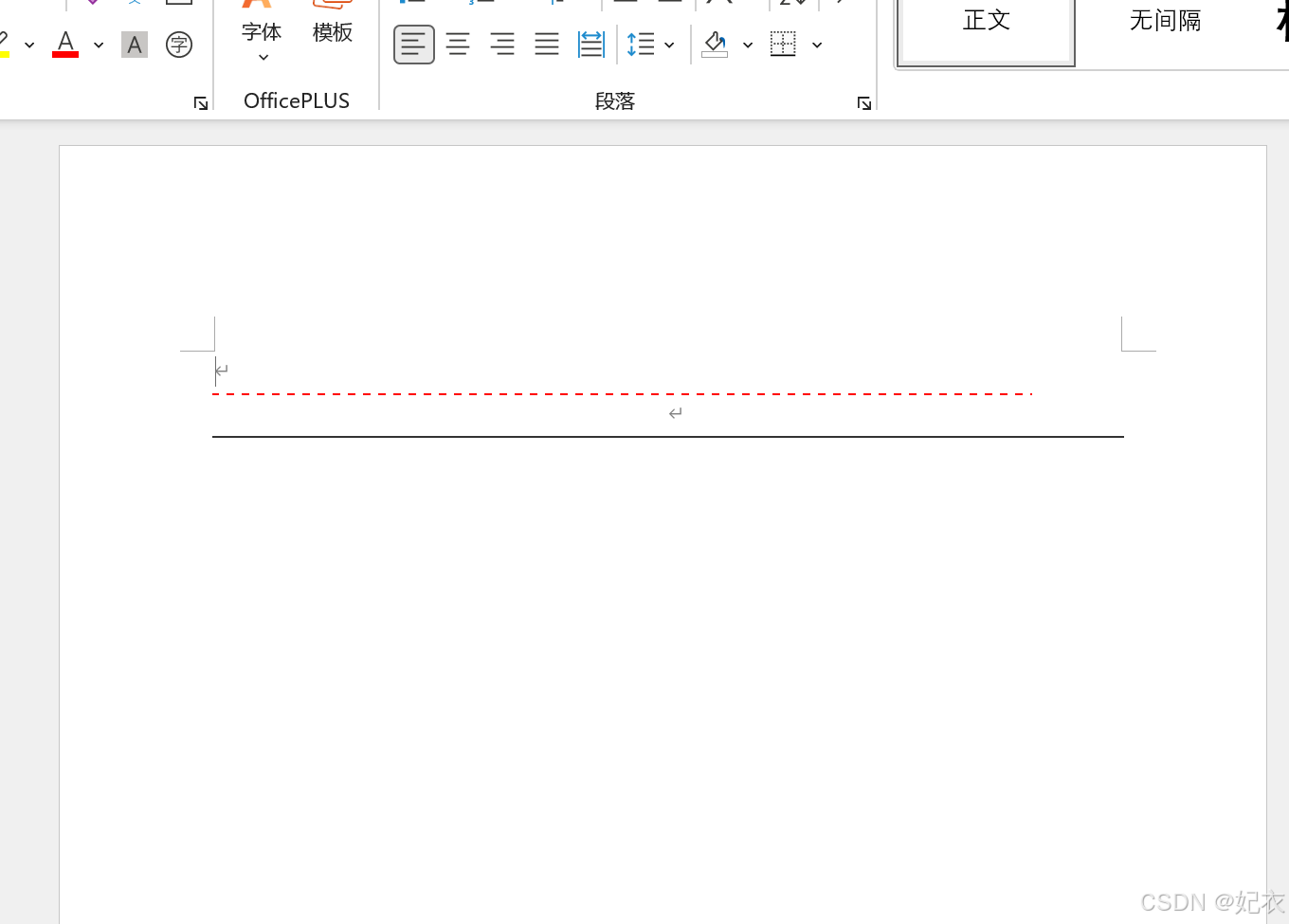
1.5.1 示例数据:
<hr style=\"width:80%;height:2px;color:red;border-style:dashed;\">
<hr style=\"width:100%;color:#333;border-style:solid;\">
1.5.2 导出样式: