背景
大家好,我是 uni-app 的核心开发 笨笨狗吞噬者,欢迎关注我的微信公众号 前端笨笨狗,或者加我的微信 wxid_olsjlzuh4ivf22 沟通交流!
微信小程序支持分包异步化 跨分包自定义组件引用,但是,很多业务项目往往都比较复杂,组件使用情况也不容易看清,开发中很容易遇到这些问题:
- 无法快速获悉某个组件到底被哪些页面使用
- 不清楚一个组件在项目里出现了多少次
- 做分包优化时,不知道组件放在主包还是分包更合适
于是,我写了一个插件 vite-plugin-component-insight 来简化这一过程。
特性
- 开箱即用,配置简单
- 统计组件的使用次数和调用情况
- 结合主包和分包关系输出组件划分建议
- 支持生成 markdown 报告,方便查看更加详细的信息
- 支持 hx 项目和 cli 项目
- 支持 uni-app 和 uni-app-x (vue3)
使用指南
安装
bash
npm install @uni_toolkit/vite-plugin-component-insight -D
# 或
pnpm add @uni_toolkit/vite-plugin-component-insight -D
# 或
yarn add @uni_toolkit/vite-plugin-component-insight -D
配置插件
在 vite.config.js 中使用:
ts
import { defineConfig } from 'vite';
import uni from '@dcloudio/vite-plugin-uni';
import componentInsight from '@uni_toolkit/vite-plugin-component-insight';

export default defineConfig({
  plugins: [
    uni(),
    componentInsight(), // 在 uni 之后调用
  ],
});
Tips
插件默认不会生成文件,而是在控制台直接输出分析结果。
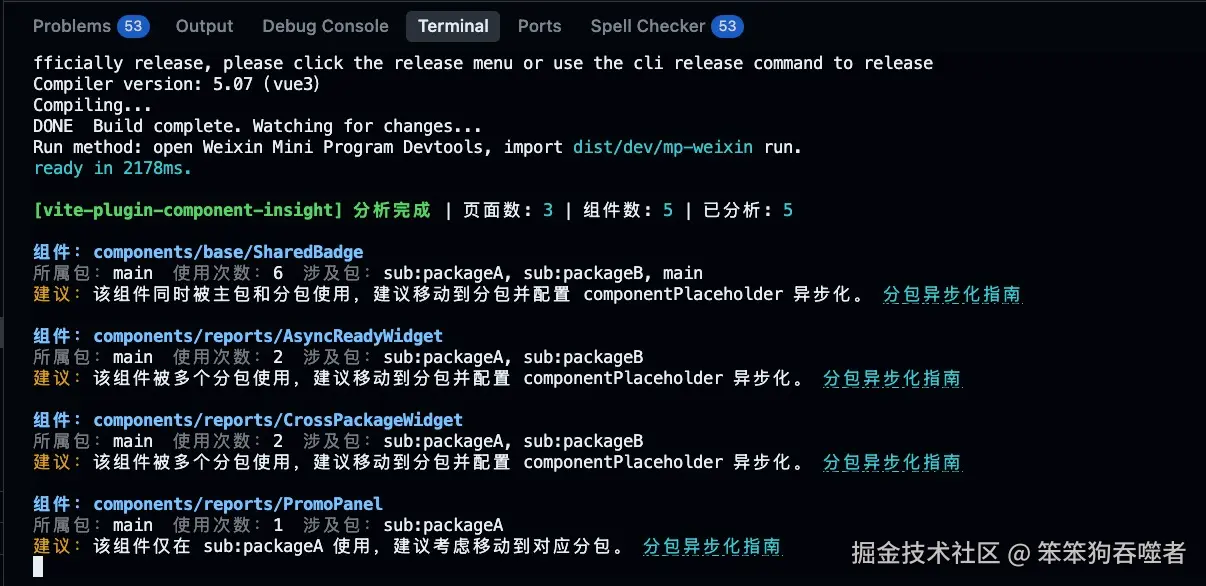
如果需要生成 markdown 报告,可以这样配置:
ts
componentInsight({
  reportMarkdownPath: 'logs/component-insight-report.md',
})
如果只想生成 markdown,不输出控制台日志,可以这样配置:
ts
componentInsight({
  logToConsole: false,
  reportMarkdownPath: 'logs/component-insight-report.md',
})
完整配置项
ts
interface VitePluginComponentInsightOptions {
  reportMarkdownPath?: string;
  logToConsole?: boolean;
  exclude?: ReadonlyArray<string | RegExp> | string | RegExp | null;
  include?: ReadonlyArray<string | RegExp> | string | RegExp | null;
}| 选项 | 说明 |
|---|---|
| reportMarkdownPath | 自定义 Markdown 报告输出路径,不传则不生成 Markdown |
| logToConsole | 是否输出控制台日志,默认开启 |
| exclude | 指定过滤的文件,默认过滤 node_modules 和 uni_modules |
| include | 指定包含的文件,默认为空 |